1
Getting Started With
Stac® Replica™ Backup
for HP SureStore Tape
September 1999
Notice
The information contained in this document is subject to change without notice.
Hewlett-Packard makes no warranty of any kind with regard to this
material, including, but not limited to, the implied warranties of
merchantability and fitness for a particular purpose. Hewlett-Packard shall
not be liable for errors contained herein or for incidental or consequential
damages in connection with the furnishing, performance, or use of this material.
Hewlett-Packard assumes no responsibility for the use or reliability of its software
on equipment that is not furnished by Hewlett-Packard.
This document contains proprietary information that is protected by copyright.
All rights are reserved. No part of this document may be photocopied,
reproduced, or translated to another language without the prior written consent of
Hewlett-Packard Company.
Novell NetWare® is a registered trademark of Novell, Inc. Microsoft® Windows
NT and NTAS® are registered trademarks of Microsoft Corporation. Windows®
and Windows 95® are registered trademarks of Microsoft in the U.S. and other
countries. Stac® is a registered trademark of Stac Corporation. Replica™ is a
trademark of the Stac Corporation.
Hewlett-Packard Company
Technical Communications/MS 45SLE
Network Server Division
10955 Tantau Avenue
Cupertino, CA 95014 USA
© Copyright 1999, Hewlett-Packard Company.
ii
Contents
1 Quick View ................................................................................................... 1
2 Introduction ................................................................................................. 3
The Replica Solution for Server Backup ........................................................ 3
What Version of Software Do I Have? ....................................................... 3
For More Information About Replica .......................................................... 4
Online Help ............................................................................................... 4
3 Installing Replica......................................................................................... 5
Installing Replica for Windows NT ................................................................. 5
What You Need......................................................................................... 5
Creating a Drivers Diskette........................................................................ 6
Installing the Replica Drivers and Software................................................ 6
Installing Replica for NetWare ....................................................................... 9
What You Need......................................................................................... 9
Determining the Version of Replica to Install ........................................... 10
Installing Replica for Novell NetWare 4.2 ................................................ 11
Finishing the Installation .......................................................................... 12
Verifying the Replica Installation.................................................................. 12
Installing TapeAssure for HP T20 Tape Drive Verification and Diagnostics.. 13
4 Backing Up Your Data............................................................................... 15
Using Replica Shortcuts .............................................................................. 15
Creating a Backup Configuration (Windows NT) .......................................... 16
Creating a Backup Configuration (NetWare)................................................ 22
Performing an Immediate Backup ............................................................... 27
Disaster Recovery Feature on the Single Server Edition.............................. 28
5 Restoring Files and Folders ..................................................................... 29
Restoring Files (Windows NT) ..................................................................... 30
Restoring Files (NetWare) ........................................................................... 33
Dismounting the Tape Volume..................................................................... 37
Optimizing Replica File Protection............................................................... 38
Disaster Recovery Feature on the Single Server Edition.............................. 38
Recovering a System Volume When You Don’t Have Disaster Recovery .... 38
Manually Recovering a Windows NT System Volume ............................. 38
iii
Contents
Manually Recovering a NetWare System Volume ................................... 39
6 Caring For Your Tape Drive ...................................................................... 41
Care of the Tape Drive ................................................................................ 41
Choosing Tapes for Your Tape Drive........................................................... 41
Erasing Tapes ......................................................................................... 42
Inserting and Removing Tape Cartridges..................................................... 42
Write-Protecting a Tape Cartridge ............................................................... 44
Caring for Your Tape Cartridges.................................................................. 45
Operating Conditions............................................................................... 45
Storing Tape Cartridges........................................................................... 45
Ordering Information ................................................................................... 46
A Tape Drive Specifications ......................................................................... 47
Interface.................................................................................................. 47
Backup Speed ......................................................................................... 47
Tape Format ........................................................................................... 47
Reliability Specifications.......................................................................... 47
Power Requirements ............................................................................... 48
Physical Specifications............................................................................ 48
B Software License, Warranty, and Support ............................................... 49
HP Software License Agreement ................................................................. 49
Warranty ................................................................................................. 50
Technical Support ................................................................................... 50
Index............................................................................................................... 51
iv
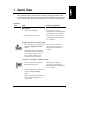
1 Quick View
This chapter provides a summary table for quickly finding procedures in this
Getting Started guide. If you are an experienced network administrator, you can
also use the table as a quick reference guide to the procedures in the document.
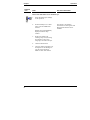
Shortcut
icon
Task
For more information
Install Replica
1.
Prepare to install Replica.
See Chapter 3 for a list of
requirements for installing Replica
under Windows NT or NetWare.
2.
Install the Replica software.
See Chapter 3 for instructions on
installing Replica under Windows
NT or NetWare.
Configure Replica for automatic backups
1.
From the desktop icon or Start menu,
open the Configuration Wizard
shortcut.
The Wizard walks you through the
configuration procedure, prompting
you to select a tape drive, choose
drive volumes for backup, and
schedule a time for the backup.
See Chapter 4 for detailed
instructions on configuring a
backup under Windows NT or
NetWare.
Perform an "off-schedule," immediate backup
1.
Insert a blank tape cartridge in the
HP NetServer tape drive.
2.
From the desktop icon or Start menu,
open the immediate backup
shortcut.
See Chapter 4 for detailed
instructions on performing an
immediate backup under Windows
NT or NetWare.
Replica immediately begins backing
up the volumes designated in the
configuration.
1
Chapter 1
Shortcut
icon
Quick View
Task
For more information
Restore files and folders from a mounted tape
1.
Insert the backup tape cartridge
in the tape drive.
2.
From the desktop icon or Start
menu, open the restore files
shortcut.
Replica starts and immediately
displays the Mount Tape
window.
2
3.
Prepare for mounting by
selecting a tape drive, choosing
the volume to restore, and
assigning a drive ID to the tape.
4.
Click the Mount button.
5.
Once the volume is mounted, use
the Explorer or File Manager to
copy the recovered files or
folders to other disk volumes.
See Chapter 5 for detailed
instructions on restoring files and
backup under Windows NT or
NetWare.
2 Introduction
This guide helps you protect the valuable data stored on your HP NetServer using
your Stac Replica backup software.
The guide tells you how to install, set up, and use the software. It also provides
instructions for caring for your HP SureStore tape drive and tells you where to
find information on performing tape diagnostics.
The Replica Solution for Server Backup
With Stac Replica for HP SureStore Tape, you get a powerful backup program
that makes file backup as easy as pressing a button.
Designed for ease-of-use, Replica provides desktop shortcuts that allow you to
quickly configure automatic daily backups, perform immediate backups, and
restore files and folders from your backup tape--without special training or
expertise.
The HP SureStore Tape edition of Replica includes a Configuration Wizard that
walks you through the process of setting up a default configuration that
automatically backs up designated volumes at the same time, every day. All you
have to do is make sure that a tape cartridge is inserted in the server’s HP
SureStore tape drive.
Replica also provides a desktop shortcut for performing one-step, unscheduled
backups any time you wish. Opening the shortcut starts an immediate backup of
the same volumes you designated for backup with the Configuration Wizard.
Once the server data is backed up, it is just as easy to restore lost or damaged
files by mounting the appropriate backup tape as a volume that your server
recognizes as a removable drive. After the tape is mounted, you can use the
familiar Windows Explorer, or File Manager to copy the files to the desired
location.
What Version of Software Do I Have?
Stac Replica for HP SureStore Tape contains device drivers for both the T20 and
T4 tape devices. It is available in two editions:
• The CD-ROM for product number C4396A is titled "HP SureStore Tape,
Backup & Disaster Recovery, Replica Single Server for HP SureStore
Tape." This edition provides a complete disaster recovery feature.
3
Chapter 2
Introduction
• The CD-ROM for product number C4394A is titled "HP SureStore Tape
Server/PC Workstation Backup, Replica Backup for HP SureStore Tape,
HP Colorado Backup II." This version of Replica does not have the
disaster recovery feature.
If you have product C4394A, and want to upgrade to the version of Replica that
contains the disaster recovery feature, contact your HP representative and order
HP product number C4396A.
For More Information About Replica
This document describes the basic features of your Stac Replica backup software.
Electronic versions (in Adobe Acrobat PDF format) of the Replica for SureStore
Tape User’s Guide are stored on your HP SureStore Tape CD-ROM. Available
for both Windows NT and NetWare versions of the product, the document
provides a comprehensive guide to Replica, including more advanced backup and
restore options.
Each guide is available in four languages: English, French, German, and
Spanish.
The PDF versions of the Replica for SureStore Tape User’s Guide, Windows NT
Edition are stored on the HP SureStore Tape CD-ROM under the following
pathnames:
English
French
German
Spanish
\stac\eng_nt\manual.pdf
\stac\fre_nt\manual.pdf
\stac\ger_nt\manual.pdf
\stac\spa_nt\manual.pdf
The PDF versions of the Replica for SureStore Tape User’s Guide, NetWare
Edition are stored on the HP SureStore Tape CD-ROM under the following
pathnames:
English
French
German
Spanish
\stac\eng_nw\manual.pdf
\stac\fre_nw\manual.pdf
\stac\ger_nw\manual.pdf
\stac\spa_nw\manual.pdf
Online Help
Replica provides extensive online help. The online documentation provides
information on screens and dialog boxes, as well as procedural instructions for
Replica operations.
4
3 Installing Replica
This chapter provides instructions for installing Stac Replica drivers and software
under Windows NT or NetWare. Review the section that applies to the operating
system running on your HP NetServer before starting the Replica installation.
Installing Replica for Windows NT
This section provides instructions for installing Replica and its related files on an
HP NetServer running Windows NT. If you are installing Replica on an HP
NetServer running NetWare, skip to the "Installing Replica for NetWare" section
later in this chapter.
NOTE
For best results, always close any applications running on the
HP NetServer before starting the Replica installation.
What You Need
Before you can install Replica and begin backing up server files, you need the
following:
• An HP NetServer running Windows NT Server 3.51, Windows NT
Server 4.0, or Microsoft Small Business Server
• At least 32 MB RAM
• At least 8 MB free disk space on the boot drive, or on the drive that
contains the system folder
• At least one configured HP SureStore T20 tape drive and a blank tape
cartridge (provided with your server)
• A system console connected to the network and running the TCP/IP or
IPX/SPX communications protocol, which allows the Replica service to
communicate with the Windows application
• Administrator privileges for server access
5
Chapter 3
Installing Replica
Creating a Drivers Diskette
If you don’t have an HP NetServer Windows NT drivers diskette, you may need to
create one before you can install the T20.
NOTE
You do not need to create a drivers diskette if you installed
NT 4.0 using HP Installation Assistant. Installation Assistant
automatically copied the T20 device drivers to
C:\HP\DRIVERS\T20. It automatically copied the files
necessary to install the Stac Replica backup software to
C:\I386\$OEM$\STAC.
You can create your drivers diskette using an HP NetServer or a Windows-based
PC.
To create the drivers diskette from an HP NetServer:
1. Boot the HP NetServer from the HP NetServer Navigator CD-ROM.
2. Click the NetServer Utilities button; then click Diskette Library.
3. Select your NOS version and follow the on-screen instructions for placing
the drivers on a diskette.
To create the drivers diskette from a Windows-based PC:
1. Boot the PC if you have not already done so.
2. Insert the HP NetServer Navigator CD-ROM. The Diskette Library screen
appears.
3. Select your NOS version and follow the on-screen instructions for placing
the drivers on a diskette.
Installing the Replica Drivers and Software
The installation instructions are slightly different for Windows NT 4.0 and
Windows NT 3.51. Please follow the appropriate instructions.
If your HP NetServer is running Windows NT 4.0 or Microsoft BackOffice
Small Business Server:
To add the T20 device driver and install Replica:
1. Log in to the HP NetServer as Administrator.
2. Open the Tape Devices icon in the Control Panel group.
6
Chapter 3
Installing Replica
The system starts scanning for any connected tape drives. If it locates an
HP SureStore T20 tape drive, a message appears identifying it as an HP
T20 device.
3. Click the OK button to start installation of the device driver.
4. You need to install the driver from the drivers diskette you created in the
previous section or from the C: drive if you installed NT 4.0 from using
HP Installation Assistant.
◊
If you are installing the drivers from a drivers diskette, insert the
diskette and click OK.
◊
If you are installing the drivers from the C: drive, identify this
pathname: C:\HP\DRIVERS\T20.
When the driver is successfully loaded, the Tape Devices panel displays a
"driver loaded" message.
5. Close the Control Panel.
6. Install the Stac Replica backup software using the SETUP.EXE file. You
will find this file in one of two places:
◊
If you installed NT 4.0 using HP Installation Assistant, the files
necessary to install Stac Replica were copied to your C: drive. Execute
the Setup utility from the following subdirectory:
C:\I386\$OEM$\STAC\SETUP.EXE
◊
If you did not install NT 4.0 using HP Installation Assistant, insert the
HP SureStore Tape CD-ROM in the HP NetServer’s CD-ROM drive.
Execute the SETUP.EXE file for the language you want to use:
∗ For the English version, execute SETUP.EXE from the
\STAC\ENG_NT subdirectory.
∗ For the French version, execute SETUP.EXE from the
\STAC\FRE_NT subdirectory.
∗ For the German version, execute SETUP.EXE from the
\STAC\GER_NT subdirectory.
∗ For the Spanish version, execute SETUP.EXE from the
\STAC\SPA_NT subdirectory.
7. Once the Setup utility is running, follow the onscreen instructions for
completing the installation.
7
Chapter 3
Installing Replica
If your HP NetServer is running Windows NT 3.51:
To install Replica on an HP NetServer running Windows NT 3.51, you must first
install the T20 device driver.
Adding a T20 Device Driver
To add the T20 device driver:
1. Reboot the HP NetServer from the installed operating system.
2. Open the Main folder and double-click the Windows NT Setup icon.
3. Choose Add/Remove Tape Devices from the Options pull-down menu.
4. Click the Add button.
The Select Tape Device Options screen displays a list of available devices.
5. Choose Other from the list and press Enter.
The Insert Disk window appears, prompting you for the disk containing
the required driver.
6. Insert the appropriate drivers disk into drive A, then enter the pathname
A:\T20\NT351 in the entry field, and click OK.
The Select OEM Option screen appears, listing the driver(s) provided on
the disk.
7. From the list, choose the HP Colorado T20 driver, and click OK.
8. Click the Install button to begin the driver installation.
A dialog box appears, asking you to confirm the source directory of
the driver.
9. Click the Continue button.
10. When the installation is complete, click Close to exit Tape Device Setup,
then close the Setup utility.
11. Shut down Windows NT and reboot the HP NetServer.
Installing Replica on Windows NT 3.51
After you have installed the T20 driver on your Windows NT 3.51 system, you
can install Replica.
To install the Replica software:
1. Insert the HP SureStore Tape CD-ROM in the HP NetServer CD-ROM
drive.
8
Chapter 3
Installing Replica
2. Execute the SETUP.EXE file for the language you want to use:
◊
For the English version, execute SETUP.EXE from the \stac\eng_nt
directory.
◊
For the French version, execute SETUP.EXE from the \stac\fre_nt
directory.
◊
For the German version, execute SETUP.EXE from the \stac\ger_nt
directory.
◊
For the Spanish version, execute SETUP.EXE from the \stac\spa_nt
directory.
3. Once the Setup utility is running, follow the on-screen instructions for
completing the installation.
When the HP NetServer restarts, Replica is ready for use with the HP
SureStore tape drive.
Installing Replica for NetWare
This section provides instructions for installing Replica and its related files on an
HP NetServer running NetWare 4.2.
NOTE
For best results, always close any applications running on the
HP NetServer before starting the Replica installation.
What You Need
Before you can install Replica and begin backing up server files, you need the
following:
For the host server:
• An HP NetServer running Novell NetWare 4.2
• At least 16 MB RAM
• At least 5 MB free disk space in the SYS volume
• At least one supported HP SureStore T20 tape drive and a blank tape
cartridge
9
Chapter 3
Installing Replica
For the administration PC:
• Windows 95 or Windows 98
• At least 8 MB RAM
• At least 4 MB free disk space
• A 1.44 MB floppy disk drive
• A network connection to the servers protected by Replica
• Administrator privileges for server access
NOTE
For successful installation of Replica on the NetWare server,
Windows 95 or Windows 98 must be running on the
administration PC. Installing from any other operating system
will result in an incorrect installation.
Determining the Version of Replica to Install
Your HP SureStore CD contains two versions of Stac Replica for NetWare 4.2.
One version should be used on systems that are NWPA-based and the other
version should be used on systems that are DDFS-based. Before you attempt to
install Stac Replica on your NetWare 4.2 system you must determine which
version of Stac Replica you should install. If you install the wrong version,
Replica will not be able to detect the tape device and you will have to de-install
the installed version and then install the correct version.
You can determine whether your system is NWPA-based or DDFS-based by
examining the file extension for your system’s disk device driver file. To do this,
view NetWare’s STARTUP.NCF file and examine the LOAD statements that are
used to load the disk device driver. If the extension for the disk device driver file
is ".DSK" your system is a DDFS-based system. If the extension for the disk
device driver file is ".HAM", your system is a NWPA-based system.
To view the STARTUP.NCF file, from the NetWare console screen enter LOAD
INSTALL. The system will display the "Installation Options" screen. At the
"Installation Options" screen, highlight the "NCF file options" line and press
ENTER. At the "Available NCF Files Options" screen, highlight the "Edit
STARTUP.NCF file" line and press ENTER. Accept the default path displayed in
the "Specify a server boot path …" window. The contents of the STARTUP.NCF
file should now be displayed.
10
Chapter 3
Installing Replica
If you used the Installation Assistant feature of the HP NetServer Navigator CD
to install NetWare 4.2, your STARTUP.NCF file will probably contain a load
statement that reads "LOAD AIC78XX.DSK …" which means that your system
is DDFS-based, or "LOAD AHA2940.HAM …" which means that your system is
NWPA-based. If you don't see one of these LOAD statements, look for a LOAD
statement where the file name extension for the file is .DSK or .HAM.
Press ESC to close the STARTUP.NCF file window.
Installing Replica for Novell NetWare 4.2
There are two options for installing Replica for Novell NetWare 4.2.
• Install using the HP SureStore CD's graphical interface.
• Install using the Replica SETUP.EXE program.
To install Replica on an HP NetServer running Novell NetWare 4.2 using the
HP SureStore CD’s graphical user interface:
1. From an administration PC running Windows 95 or Windows 98, log in
to the server as supervisor (or as a user with equivalent privileges).
2. Map a drive letter to the HP NetServer's SYS volume.
3. Insert the HP SureStore Tape CD-ROM in the administration PC's CDROM drive.
4. If you have the autorun feature enabled on your PC, the HP SureStore
Tape CD installer will start up. Select the language, select "Install
Software", and then follow the on-screen prompts to complete the
installation.
To install Replica on an HP NetServer running Novell NetWare 4.2 using the
SETUP.EXE program:
If you do not wish to use the graphical user interface, you can install Stac Replica
by running the appropriate SETUP.EXE file from the \stac directory on the HP
SureStore Tape CD-ROM. Once the Setup utility is running, follow the on-screen
instructions for completing the installation.
• To install the NWPA version:
◊
For the English version, execute SETUP.EXE from the
\stac\eng_nwpa directory.
◊
For the French version, execute SETUP.EXE from the \stac\fre_nwpa
directory.
11
Chapter 3
Installing Replica
◊
For the German version, execute SETUP.EXE from the
\stac\ger_nwpa directory.
◊
For the Spanish version, execute SETUP.EXE from the
\stac\spa_nwpa directory.
• To install the DDFS version:
◊
For the English version, execute SETUP.EXE from the \stac\eng_nw
directory.
◊
For the French version, execute SETUP.EXE from the \stac\fre_nw
directory.
◊
For the German version, execute SETUP.EXE from the \stac\ger_nw
directory.
◊
For the Spanish version, execute SETUP.EXE from the \stac\spa_nw
directory.
Finishing the Installation
When the installation of Replica is complete, perform the following:
1. Update STARTUP.NCF through NetWare’s INSTALL utility. Make sure
it contains the line:
SET RESERVED BUFFERS BELOW 16 MEG=200
2. Enable support for HP OpenView or HP TopTools. Add the following line
to AUTOEXEC.NCF just ahead of "LOAD REPLICA":
LOAD STACSDI –snmp
3. When the installation is complete, restart the server to load Replica.
When the HP NetServer restarts, Replica is ready for use.
Verifying the Replica Installation
If Replica is successfully installed on your HP NetServer, three program shortcuts
appear as icons on your desktop and the Replica application is available through
the Start menu, under the Replica Program Group. For more information on the
Replica shortcut icons, see the section, "Using Replica Shortcuts," in Chapter 4
of this guide.
12
Chapter 3
Installing Replica
Installing TapeAssure for HP T20 Tape Drive
Verification and Diagnostics
HP provides an easy-to-use software utility, TapeAssure, that lets you confirm
that the HP SureStore T20 tape drive is properly installed and set up for
operation. You can also use the utility to perform diagnostics on your tape drive.
In addition, TapeAssure provides tips for resolving any tape drive problems.
TapeAssure is available on your HP SureStore Tape CD-ROM.
The pathnames for the utility are:
English
French
German
Spanish
\tpassure\eng\setup.exe
\tpassure\fre\setup.exe
\tpassure\ger\setup.exe
\tpassure\spa\setup.exe
13
4 Backing Up Your Data
This chapter provides instructions on the following topics:
• How to use Replica’s Configuration Wizard to quickly set up the
automatic backup of server volumes on a regular schedule.
• How to perform an immediate, "off-schedule" backup of the server
volumes you designated for automatic backup with the Wizard.
• Where to find information on creating the disaster recovery disks
necessary for using the disaster recovery feature.
Using Replica Shortcuts
Replica’s major functions are available as desktop shortcuts. Using these "onebutton" shortcuts, you can quickly configure an automatic backup or restore lost
files without having to navigate complex arrays of menus and windows. (You
also have the option of opening the Replica application through the Program
Manager.)
A Configuration Wizard shortcut starts a Wizard that walks you
through a complete configuration in just a few minutes.
An immediate backup shortcut starts Replica and performs a backup of
the volumes you designated for backup with the configuration Wizard.
(When you click this shortcut, no confirmation screen appears, and the
backup starts immediately.)
A restore files shortcut starts the Replica application and displays the
Mount window where you prepare for file restoration by mounting the
backup tape as a server volume.
15
Chapter 4
Backing Up Your Data
Creating a Backup Configuration (Windows NT)
NOTE
Instructions for creating a backup configuration are provided
separately for Windows NT and Novell NetWare systems. This
section applies only to HP NetServers running Windows NT.
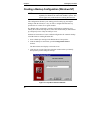
The Configuration Wizard is your starting point for setting up your Replica
backups. With the Wizard, it is easy to create a configuration that backs up
specified server volumes on a regular schedule.
The Wizard walks you through a complete configuration--prompting you to
identify the location of the tape drive, choose the volumes that you want backed
up, and specify a time of day for backup to occur.
Follow these instructions to create a default configuration for automatic backup
of an HP NetServer running Windows NT.
1. Insert a blank tape cartridge in the HP SureStore T20 tape drive.
2. From the desktop or Start menu, open the Configuration Wizard
shortcut.
The Wizard starts and displays a welcome screen.
3. Click Next to go to the Tape Drive Selection window where you identify
the tape drive you’ll be using for backups.
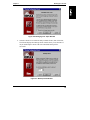
Figure 4-1. Tape Drive Selection Window
16
Chapter 4
Backing Up Your Data
4. Choose a tape drive from the menu of available tape drives, then click
Next.
NOTE
If the tape in the selected drive contains data from a previous
Replica backup, the Wizard asks you to confirm the
overwriting of the data based upon the new configuration.
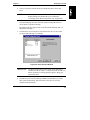
The Wizard displays the Drive Selection window listing HP NetServer
drives that are available for backup.
By default, each drive appears with a red check mark indicating that it is
designated for backup.
5. Click the drive icons in the drive list to deselect the drive or drives that
you don’t want backed up. For example:
Figure 4-2. Drive Selection Window
IMPORTANT
The Wizard won’t permit you to choose more data than it
estimates will fit on a tape in a compressed form (20 GB). If it
detects a problem, a warning message appears, asking you
reselect the drives.
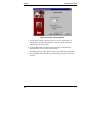
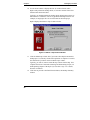
6. Click Next to proceed to the Backup Schedule window where you set the
time of day for the backup, and select either a five-day or seven-day
schedule for daily backups.
17
Chapter 4
Backing Up Your Data
Figure 4-3. Backup Schedule Window
7. Use the arrow buttons to specify the time (in 24-hour format) that you
want Replica to perform the backup, or select the contents of the Time
field and enter the desired time.
8. Click the button that corresponds to the schedule you want (Monday
through Friday, or Every day), then click Next.
The Managing Your Tapes window appears, providing tips for optimizing
your backups by using alternate tapes and storing your tapes at an off-site
location.
18
Chapter 4
Backing Up Your Data
Figure 4-4. Managing Your Tapes Window
9. Select the check box to enable the daily reminder feature, then click Next.
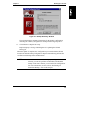
The Wizard displays the Backup Check window where you set the time of
day at which Replica checks if the next scheduled backup will be
successful.
Figure 4-5. Backup Check Window
19
Chapter 4
Backing Up Your Data
10. Use the arrow buttons to display the time (in 24-hour format) when
Replica will perform the backup check, or select the contents of the Time
field and enter the desired time.
Typically, you should schedule the backup check during business hours so
that someone is available to correct any problems that Replica detects--for
example, an empty tape drive or too much data for the backup tape.
Replica displays the Mount a Tape Volume window.
Figure 4-6. Mount a Tape Volume Window
11. Click the Mount tape volume box if you want to have Replica mount this
backup tape as a read-only volume after replication is complete. Leave this
box unchecked if you don’t want to mount the tape volume.
Typically, you will not want to mount the tape volume after backup. For a
complete discussion of automatic mounting and dismounting of tapes, see
the Replicating chapter of the Replica for SureStore Tape User’s Guide,
Windows NT Edition.
12. Click Next to proceed to the final Wizard window, the Backup Summary
window.
20
Chapter 4
Backing Up Your Data
Figure 4-7. Backup Summary Window
The window displays summary information for the backup configuration,
including the volume(s) designated for backup and the target tape drive.
13. Click Finish to complete the setup.
Replica displays a message indicating that it is updating the Wizard
backup job.
When the update is complete, the configuration you created with the Wizard
becomes the default backup configuration--Replica automatically performs the
verification and backup at the scheduled time.
NOTE
In addition to the automatic backup you configured with the
Wizard, you can also perform an immediate, unscheduled
backup of the same volumes you selected in the configuration.
For more information, see the section, "Performing an
Immediate Backup," later in this chapter.
21
Chapter 4
Backing Up Your Data
Creating a Backup Configuration (NetWare)
NOTE
Instructions for creating a backup configuration are provided
separately for Windows NT and Novell NetWare systems. This
section applies only to HP NetServers running Novell
NetWare.
The configuration Wizard is your starting point for setting up your Replica
backups. With the Wizard, it is easy to create a configuration that backs up
specified server volumes on a regular schedule.
The Wizard walks you through a complete configuration--prompting you to
identify the location of the tape drive, choose the volumes that you want backed
up, and specify a time of day for the backup to occur.
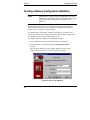
To configure a default configuration for automatic backup:
1. Insert a blank tape cartridge in the HP SureStore T20 tape drive.
2. From the desktop or Start menu, open the Configuration Wizard
shortcut.
After an initial startup screen, the Wizard displays the Server Login
window where you choose a server for backup. For example:
Figure 4-8. Server Login Window
22
Chapter 4
Backing Up Your Data
3. Choose a server from the Host Replica Server menu, enter the user name
and password that provide access to the selected server, then click Next.
Upon validating the log-in information, Replica opens the connection to
the server and displays the Tape Drive Selection window in which you
identify the tape drive you’ll be using for backups.
Figure 4-9. Tape Drive Selection Window
4. Choose a tape drive from the menu of available tape drives, then
click Next.
NOTE
If the tape in the selected drive contains data from a previous
Replica backup, the Wizard asks you to confirm the
overwriting of the data based upon the new configuration.
The Wizard displays the Volume Selection window listing HP NetServer
volumes that are available for backup.
23
Chapter 4
Backing Up Your Data
5. Click volumes in the list to mark the ones you want backed up with a red
check. For example:
Figure 4-10. Volume Selection Window
IMPORTANT
24
The Wizard won’t permit you to choose more data than it
estimates will fit on a tape in a compressed form (20 GB). If it
detects a problem, a warning message appears, asking you to
reselect the drives.
Chapter 4
Backing Up Your Data
6. Click Next to proceed to the Backup Schedule window where you set the
time of day for the backup, and select either a five-day or seven-day
schedule for daily backups.
Figure 4-11. Backup Schedule Window
7. Use the arrow buttons to specify the time (in 12-hour format) that you
want Replica to perform the backup, or select the contents of the fields
and enter the desired time.
8. Click the button that corresponds to the schedule you want (Monday
through Friday or Every day), then click Next.
The Managing Your Tapes window appears, providing tips for optimizing
your backups by using alternate tapes and storing your tapes at an off-site
location.
25
Chapter 4
Backing Up Your Data
Figure 4-12. Managing Your Tapes Window
9. Click Next to proceed to the final Wizard window, the Backup Summary
window.
Figure 4-13. Backup Summary Window
The window displays summary information for the backup configuration,
including the volume(s) designated for backup and the target tape drive.
10. Click Finish to complete the setup.
Replica displays a message indicating that it is updating the Wizard
backup job.
26
Chapter 4
Backing Up Your Data
When the update is complete, the configuration you created with the Wizard
becomes the default backup configuration--Replica automatically performs the
verification and backup at the scheduled time.
NOTE
In addition to the automatic backup you configured with the
Wizard, you can also perform an immediate, unscheduled
backup of the same volumes you selected for the configuration.
For more information, see the following section, "Performing
an Immediate Backup."
Performing an Immediate Backup
In addition to the automatic backup you configured with the Wizard, you can use
the immediate backup shortcut to perform an "off-schedule" backup of the same
volumes you designated for regular backup--at any time.
Immediate backup is entirely automatic; when you open the shortcut, Replica
starts, verifies the job, and begins backing up the designated volumes to the tape
currently mounted in the target tape drive.
NOTE
When you select immediate backup, there is no verification
screen. Backup begins immediately.
To perform an immediate backup:
1. Insert a blank tape cartridge in the HP SureStore tape drive.
2. From the desktop or Start menu under the Replica Program Group, open
the immediate backup shortcut.
Replica immediately begins backing up the volumes designated in the
configuration.
During the backup, the Replica Status window provides information about
the current backup operation (and any scheduled backups). Check the
lower left corner of the window for messages about the window and
Replica operations.
3. Click the Progress button in the Status window to track the progress of
the backup.
27
Chapter 4
Backing Up Your Data
For more information on Status window features, see the Status chapter
in the Replica for SureStore Tape User’s Guide stored in PDF format on
your HP SureStore Tape CD-ROM.
When the backup is complete, you can click the History tab in the Status window
to display any status messages generated during the backup. These messages
confirm a successful backup, or tell you why the backup failed.
Disaster Recovery Feature on the Single Server
Edition
The Single Server Edition of HP Stac Replica includes complete disaster recovery
facilities. Before you can use the disaster recovery feature, you must create the
Disaster Recovery disks. For complete instructions on creating these disks,
review the chapter on Disaster Recovery in the Replica for SureStore Tape User’s
Guide stored on the HP SureStore Tape CD-ROM.
28
5 Restoring Files and Folders
In case of hardware failure or accidental erasure of files, you can use Stac
Replica’s restore files shortcut to mount the appropriate backup tape as a
removable drive, then restore the lost or damaged files by simply copying the
originals to the desired location.
Restoration is a three-step process: mounting the backup tape as a drive, copying
the files to the desired location, then dismounting the tape volume.
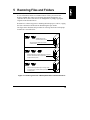
The figure below illustrates the procedure for restoring files from a backup tape
mounted as a removable drive.
Mounting a Backup Tape as a Volume
c
e
Installed hard drives are
mounted as Drives C and E.
Tape is unmounted; visible only to Replica
as backup media.
c
e
f
Replica mounts tape as a system volume that is recognized
as Drive F; while mounted, it’s no longer visible
to Replica as backup media.
c
e
Dismount tape through Replica; tape is no longer visible
as a system volume, instead is visible only to Replica
as backup media.
Figure 5-1. Restoring Files from a Backup Mounted as a Removable Drive
29
Chapter 5
Restoring Files and Folders
Restoring Files (Windows NT)
By mounting the appropriate backup tape as a volume on your HP NetServer, you
can quickly restore individual files and folders--without having to perform
tedious partitioning and formatting of a disk to receive the restored data.
Follow these instructions to restore files from a mounted tape volume to an HP
NetServer running Windows NT. For an HP NetServer running NetWare, skip to
the "Restoring Files (NetWare)" section later in this chapter.
1. Insert the tape cartridge containing the backed up files in the tape drive.
2. From the desktop or Start menu under the Replica Program Group, open
the restore files shortcut.
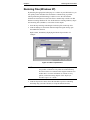
Replica starts, immediately displaying the Mount Tape window. For
example:
Figure 5-2. Mount Tape Window
NOTE
In addition to restoring files from a mounted tape, you can
also perform a volume recovery where all of the backed up
files from a drive are returned to their original locations or to
another drive. For more information on volume recovery
options, see the Recovering chapter of the Replica for
SureStore Tape User’s Guide.
3. From the Tape device menu, choose the SureStore tape drive containing
the backup tape you want to mount (or accept the default selection).
30
Chapter 5
Restoring Files and Folders
4. Click the name of the drive that was the origin of the folders/files that you
want to restore.
Replica marks the selected drive with a red check. For example:
Figure 5-3. Replica Marks the Selected Drive with a Red Check
5. From the Tape library list, select the backup tape containing the files you
want to restore.
6. In the Shared name field, type a volume name for the mounted tape, or
choose an available drive letter drive ID menu (or accept the default
selection).
7. Click Mount Tape.
Replica begins mounting the drive you selected from the server list.
During mounting, the Status window appears, displaying messages about
the operation’s progress.
31
Chapter 5
Restoring Files and Folders
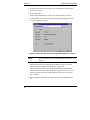
Figure 5-4. Status Window Displays Messages About Replica’s Progress
NOTE
The mounting of a tape as a removable drive can take several
minutes.
When the tape volume is mounted and available for access, the text in the
Mount status field changes from Mounting... to Mounted.
8. After the tape is mounted as a volume, use the Windows Explorer or File
Manager to copy the restored files to the proper location.
NOTE
Do not close the Mount Tape window if you plan to
immediately dismount the tape volume--it must be open with
the tape volume selected for Replica to dismount the tape. If
you close the window, you must restart Replica, click Status to
open the Status window, then click the Device Status tab to
display the mounted jobs.
When you’ve finished copying the files to the desired locations, you must
now dismount the tape before continuing with any other operations. For
instructions, see the section, "Dismounting a Tape Volume," later in this
chapter.
32
Chapter 5
Restoring Files and Folders
Restoring Files (NetWare)
By mounting the appropriate backup tape as a volume on your HP NetServer, you
can quickly restore individual files and folders--without having to first prepare a
disk to receive the restored data.
To restore files from a mounted tape volume:
1. Insert the tape cartridge containing the backed up files in the tape drive.
2. From the desktop or Start menu under the Replica Program Group, open
the restore files shortcut.
Replica starts, immediately displaying the Replica Server Login window
in which you choose the server on which to restore the files and provide
the user name and password that provide access to the server. For
example:
Figure 5-5. Replica Server Login
3. Choose a server from the Host Replica Server menu, enter the user name
and password that provide access to the selected server, then click OK.
Replica displays the Mount Tape window where you specify a tape drive
for mounting the backup tape and choose the volume that was the original
source of the files you want to restore. For example:
33
Chapter 5
Restoring Files and Folders
Figure 5-6. Mount Tape Window
NOTE
In addition to restoring files from a mounted tape, you can
also perform a volume recovery where all of the backed up
files from a drive are returned to their original locations or to
another drive. For more information on volume recovery
options, see Recovering chapter of the Replica for SureStore
Tape User’s Guide.
4. Click the plus (+) symbol next to the name of the server containing the
source volume of the files/folders that you want to restore.
The names of backed up volumes appear beneath the server icon.
For example:
34
Chapter 5
Restoring Files and Folders
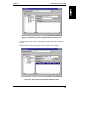
Figure 5-7. Backed-up Volumes Appear Below the Server Icon
5. Click the name of the volume containing the folders/files that you want to
restore.
Replica marks the selected volume with a red check. For example:
Figure 5-8. Tape Library List Displays Backed-up Files
35
Chapter 5
Restoring Files and Folders
6. From the Tape Library list, select the tape containing the backed up files
you want to restore.
7. Click Mount Tape.
Replica begins mounting the volume you selected from the server list.
8. Click the Status tab to bring forward the Status page displaying messages
about the operation’s progress.
Figure 5-9. Status Window Displays Messages About Replica’s Progress
NOTE
The mounting of a tape as a removable drive can take several
minutes.
When the tape volume is mounted and available for access, text in the
Mount status field changes from Mounting... to Mounted.
The newly mounted drive is now visible in the Network Neighborhood
window. However, because the tape mount takes place on the server, you
must connect the drive to the administration PC before you can restore
files or folders.
9. Use the NetWare setup utility to connect the drive to the administration
PC.
36
Chapter 5
Restoring Files and Folders
10. After the tape is mounted as a volume and connected to the administration
PC, use the Windows Explorer or File Manager to copy the restored files
to the proper location.
NOTE
Do not close the Mount Tape window if you plan to
immediately dismount the tape volume--it must be open with
the tape volume selected for Replica to dismount the tape. If
you close the window, you must restart Replica, click the
Status button to open the Status window, then click the Device
Status tab to display the mounted jobs.
When you’ve finished copying the files to the desired locations, you must
now dismount the tape before continuing with any other operations. For
instructions, see the following section, "Dismounting the Tape Volume."
Dismounting the Tape Volume
When you have finished copying the replacement files, you must dismount the
tape, thereby removing it from the list of available volumes. After dismount, the
tape is no longer recognized by the HP NetServer as a removable volume.
To dismount the tape volume:
1. Verify that none of the files on the mounted tape volume are open or in
use.
2. If you are dismounting from a server running NetWare, close any
Explorer or File Manager windows open on the client computer’s desktop.
3. Start the Replica application from the Program Manager.
4. When the main window appears, click Status to display the Status
window.
5. Move the Device Status tab to the front of the window, then select the
Mounted job representing the tape volume.
6. Click the Dismount button.
37
Chapter 5
Restoring Files and Folders
Optimizing Replica File Protection
Although Stac Replica for HP SureStore Tape Edition is optimized for backing
up and restoring data files, there are steps you can take to optimize Replica’s file
protection capabilities.
Separate your data files from system files by storing the data files on volumes
other than the drive on which the operating system is installed (typically drive
C). When you separate your files in this way, the tape mount procedure described
earlier in this chapter to restore lost or damaged data files is practically 100%
effective.
Disaster Recovery Feature on the Single Server
Edition
The Single Server Edition of HP Stac Replica includes complete disaster recovery
facilities. If you created the Disaster Recovery disks and replicated the server
entirely, Replica can do a full disaster recovery that returns your server to its state
at the time of the last server backup. For complete instructions on recovering
from a disaster, review the chapter on Disaster Recovery in the Replica for
SureStore Tape User’s Guide stored on the HP SureStore Tape CD-ROM.
Recovering a System Volume When You Don’t
Have Disaster Recovery
If you have a version of Replica that does not have the disaster recovery feature,
you can still recover your system files by reinstalling the network operating
system. Use the following instructions to manually recover a system volume
when you don’t have the disaster recovery feature. The procedures for recovering
Windows NT and NetWare system volumes are discussed separately.
Manually Recovering a Windows NT System Volume
If your Windows NT system volume is lost through disk failure or user error, you
can rebuild the base operating system manually by following the procedure
below.
To manually recover a Windows NT system volume:
1. Boot the HP NetServer from a DOS disk that can recognize the HP
NetServer’s CD-ROM drive.
38
Chapter 5
Restoring Files and Folders
2. Install the Windows NT operating system from the NOS installation
CD-ROM.
3. Use the Installer utility to restore the original partitions and format disk
volumes.
4. Reconstruct the original server configurations, including hardware setups,
passwords, and profiles.
5. Re-install your applications on the HP NetServer.
6. Re-install Replica software according to the instructions in Chapter 3.
7. Restart the HP NetServer and restore lost or damaged data files by using
the Restore feature described earlier in this chapter.
Manually Recovering a NetWare System Volume
If your NetWare system volume is lost through disk failure or user error, you can
restore the SYS volume if you’ve backed it up to tape.
To manually recover a NetWare system volume:
1. From the NetWare console, enter:
UNLOAD REPLICA
to unload the Replica NLM.
2. Enter:
LOAD REPLICA -NOCLIENTS
to load Replica in a safe mode.
By loading Replica in this mode, you won’t be able to use Replica, and
network users will be unable to log in to the server until the recovery is
complete.
3. Insert the tape containing the SYS you want to restore, then enter:
REPLICA RECOVER SYS
Replica locates the first SYS volume on the tape and asks for confirmation
before starting the recovery.
4. Enter YES to begin the recovery.
5. When the volume is recovered, shut down server and reboot.
39
6 Caring For Your Tape Drive
This chapter provides information about caring for your HP SureStore T20 tape
drive and its cartridge tapes.
Care of the Tape Drive
The HP SureStore T20 tape drive is simple to care for. No routine cleaning or
maintenance is required.
CAUTION
Do not clean the tape drive’s read-write head. Do not degauss
or demagnetize the tape drive’s read-write head. This will
damage the tape drive.
Choosing Tapes for Your Tape Drive
Your HP SureStore T20 tape drive is compatible with several types of tape
cartridges:
• High-capacity Travan 5 (TR-5) 20 GB mini-cartridge (QIC-3220 format),
one of which is supplied with the tape drive. This is the normal tape
cartridge you should use for your backup data.
• HP Colorado 5 GB mini-cartridges, which have a lower capacity than
TR-5 cartridges.
• TR-4 mini-cartridges. This is an older tape format that allows your T20 to
maintain compatibility with previously written tapes.
Various brands of tape cartridges will work with your tape drive. To ensure the
highest level of performance, HP brand tapes, which have been tested for
compatibility with your drive, are recommended. See the HP NetServer Support
web site for updates to this list.
41
Chapter 6
Caring For Your Tape Drive
Erasing Tapes
The Erase or Format utility provided by most backup applications is the safest
and quickest method of removing data from your tapes.
NOTE
Do not erase tapes with bulk erasers. Magnetic bulk erasing
removes the tracking reference points that are placed on the
tape at the factory. Without these points, the tapes cannot be
read by your tape drive.
Inserting and Removing Tape Cartridges
This section provides some basic guidelines for inserting and removing tape
cartridges.
To insert a tape cartridge into your drive:
1. Hold the tape cartridge with the metal base plate down and the tape
window facing the drive.
2. Align the tape cartridge with the tape drive’s opening and push it firmly
into the drive.
After the cartridge is inserted, you will hear the sound of the tape being
wound back and forth. This sound indicates that the tape drive is finding
the beginning of the tape, determining the tape’s length and format, and
positioning the drive’s read-write head.
42
Chapter 6
Caring For Your Tape Drive
The back of the cartridge
will be flush with the
recessed bezel.
Figure 6-1. Inserting the Tape Cartridge
CAUTION
Interfering with a tape cartridge during operations can cause
data loss and may make the tape temporarily unrecordable.
During read-write operations (while the operation light on the
front panel is flashing), do not:
Pull the tape cartridge out of the drive
Bump the tape cartridge
Turn off the power to the computer
If this does happen, you may not be able to read the data
currently written to the tape. In addition, the tape may not be
recordable until it is erased with an Erase utility.
43
Chapter 6
Caring For Your Tape Drive
To remove a tape cartridge from the drive:
1. Wait until the operation light on the front of your tape drive stops
blinking and your backup software indicates that it is all right to remove
the tape cartridge. Do not remove a tape cartridge during an operation.
See the Caution above.
2. Grasp the tape cartridge firmly and pull it straight out of the drive.
Write-Protecting a Tape Cartridge
If you write-protect a tape cartridge, the tape drive can only read data from the
tape, not write to it. Use this setting to protect data on the tape cartridge from
being erased or overwritten, for example, when you are restoring files from tape.
• To write-protect a cartridge, slide the write-protect tab on the cartridge to
the right.
• To remove write-protection from a cartridge, slide the write-protect tab to
the left.
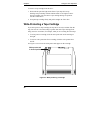
See Figure 6-2 to see how the write-protect tabs appear on the cartridge.
Write-protect tab
in locked position
Figure 6-2. Write-protecting a Cartridge
44
Chapter 6
Caring For Your Tape Drive
Caring for Your Tape Cartridges
Your data is valuable. Treat cartridges with respect so that they provide you with
the security you need. Follow these guidelines for handling tape cartridges:
• Do not open the tape door unnecessarily. This may expose the tape to
contamination or damage.
• Do not touch the tape or leader. Dust and natural skin oils can affect tape
performance.
Operating Conditions
Tape cartridges should be used in an environment within the same operational
ranges as an HP NetServer:
Temperature:
Operating
5º C to 45º C
Non-operating
-40º C to 65º C
Humidity
Operating
Relative humidity of 20% to 80% (non-condensing)
Non-operating
Relative humidity of 5% to 95% (non-condensing)
NOTE
If a cartridge has been exposed to conditions outside its
operating range, you should acclimatize the cartridge by
leaving it in the operating environment for 8 hours before
using it.
Storing Tape Cartridges
Tape cartridges should be stored safely to ensure that they perform their desired
role: protecting your data.
• Do not place tape cartridges near sources of electromagnetic interference,
such as under a telephone, or near computer monitors, motors, video, or
X-ray equipment.
• Keep cartridges out of direct sunlight and away from heaters.
45
Chapter 6
Caring For Your Tape Drive
• Store cartridges in their plastic cases in an environment that is free
from dust.
Ordering Information
HP products are recommended for use with the HP SureStore T20 tape drive. For
information on ordering tape cartridges and SCSI cables, see the HP NetServer
Support web site.
46
A Tape Drive Specifications
This chapter provides the technical specifications for the HP SureStore T20 tape
drive and lists part numbers for compatible tape cartridges, SCSI cables, and
accessories.
Interface
SCSI-2
Backup Speed
Data transfer rate
Sustained: 1,042 KB/second at 100 ips
Burst: 3 MB/second
Tape speed
Read-write: 50, 75, 100 ips
Search/rewind: 90, 120 ips
Load time
30 seconds
Retension time
740-foot tape, 150 seconds
400-foot tape, 81 seconds
Tape Format
Format
QIC-3220
Media
HP 20GB/Travan TR-5 (QIC-3220)
Number of tracks
108
Bit density
106,400 bpi
Encoding method
RLL1,7
Error Correction
Level-10 Reed-Solomon
Reliability Specifications
Hard error rate: <1 in 1015 bits read with Reed-Solomon ECC
Predicted mean time between failures (20% duty cycle):
Internal:
250,000 hours
External:
200,000 hours
47
Appendix A
Tape Drive Specifications
Power Requirements
External:
Tape Drive:
+16 VDC @ 1.3 A
Power Supply:
100-240 VAC, 50/60 Hz, 1.0A
Internal:
5V ±5%, 0.9A peak, 0.8A max steady state
12V ±10%, 2.5A peak, 1.3A max steady state
Physical Specifications
Internal:
Dimensions:
43 mm H x 149 mm W x 206 mm D (1.69 in x 5.86 in x 8.1 in)
(1.69 in x 5.86 in x 7.87 in)
Weight:
0.8 kg (1 lb, 12 oz)
External:
48
Dimensions:
55.9 mm H x 147 mm W x 208 mm D (2.2 in x 5.8 in x 8.2 in)
(2.5 in x 7.14 in x 11.1 in)
Weight:
0.83 kg (1.82 lbs)
B Software License, Warranty, and
Support
HP Software License Agreement
ATTENTION: USE OF THE SOFTWARE IS SUBJECT TO THE HP
SOFTWARE LICENSE TERMS SET FORTH BELOW. USING THE
SOFTWARE INDICATES YOUR ACCEPTANCE OF THESE LICENSE
TERMS. IF YOU DO NOT ACCEPT THESE LICENSE TERMS, YOU MAY
RETURN THE SOFTWARE FOR A FULL REFUND. IF THE SOFTWARE IS
BUNDLED WITH ANOTHER PRODUCT, YOU MAY RETURN THE ENTIRE
UNUSED PRODUCT FOR A FULL REFUND.
HP Software License Terms
The following License Terms govern your use of the accompanying Software
unless you have a separate signed agreement with HP.
License Grant. HP grants you a license to Use one copy of the Software. "Use"
means storing, loading, installing, executing or displaying the Software. You
may not modify the Software or disable any licensing or control features of the
Software. If the Software is licensed for "concurrent use", you may not allow
more than the maximum number of authorized users to Use the Software
concurrently.
Ownership. The Software is owned and copyrighted by HP or its third party
suppliers. Your license confers no title to, or ownership in, the Software and is
not a sale of any rights in the Software. HP’s third party suppliers may protect
their rights in the event of any violation of these License Terms.
Copies and Adaptations. You may only make copies or adaptations of the
Software for archival purposes or when copying or adaptation is an essential step
in the authorized Use of the Software. You must reproduce all copyright notices
in the original Software on all copies or adaptations. You may not copy the
Software onto any public network.
No Disassembly or Decryption. You may not disassemble or decompile the
Software unless HP’s prior written consent is obtained. In some jurisdictions,
HP’s consent may not be required for limited disassembly or decompilation. Upon
request, you will provide HP with reasonably detailed information regarding any
disassembly or decompilation. You may not decrypt the Software unless
decryption is a necessary part of the operation of the Software.
49
Appendix B
Software License, Warranty, and Support
Transfer. Your license will automatically terminate upon any transfer of the
Software. Upon transfer, you must deliver the Software, including any copies and
related documentation, to the transferee. The transferee must accept these
License Terms as a condition to the transfer.
Termination. HP may terminate your license upon notice for failure to comply
with any of these License Terms. Upon termination, you must immediately
destroy the Software, together with all copies, adaptations and merged portions in
any form.
Export Requirements. You may not export or re-export the Software or any
copy or adaptation in violation of any applicable laws or regulations.
U.S. Government Restricted Rights. The Software and any accompanying
documentation have been developed entirely at private expense. They are
delivered and licensed as "commercial computer software" as defined in DFARS
252.227-7013 (Oct 1988), DFARS 252.211-7015 (May 1991) or DFARS
252.227-7014 (Jun 1995), as a "commercial item" as defined in FAR 2.101(a), or
as "Restricted computer software" as defined in FAR 52.227-19 (Jun 1987) (or
any equivalent agency regulation or contract clause), whichever is applicable.
You have only those rights provided for such Software and any accompanying
documentation by the applicable FAR or DFARS clause or the HP standard
software agreement for the product involved.
Warranty
HP warrants for a period of NINETY (90) DAYS from the date of the purchase
that the Software will execute its programming instructions when all files are
properly installed. HP does not warrant that the software will be uninterrupted or
error free.
Refer to your system Warranty and Service/Support Booklet for more
information.
Technical Support
Refer to your system User Guide for information on obtaining technical support.
50
Index
5
5 GB mini-cartridges, 41
A
accessories, 46
acclimatizing tapes, 45
B
backup check
scheduling, 20
backup software:Erase utility, 42
blinking light, 44
bulk eraser, 42
C
care instructions, 41
caring for your tape drive, 41
cartridge. See tape cartridge
choosing tapes for your tape drive, 41
cleaning read-write head, 41
Colorado 5 GB mini-cartridges, 41
conditions for operation, 45
creating a backup configuration
(NetWare), 22
backup schedule window, 25
backup summary window, 26
managing your tapes window, 25
server login window, 22
tape drive selection window, 23
volume selection window, 23
creating a backup configuration
(Windows NT), 16
backup check window, 19
backup schedule window, 17
backup summary window, 20
drive selection window, 17
managing your tapes window, 18
tape drive selection window, 16
creating disaster recovery disks, 28
D
data security, 45
degaussing, 41
demagnetizing, 41
dimensions, 48
disaster recovery, 28, 38
creating disaster recovery disks, 28
feature, 3, 4
recovering from a disaster, 38
dismounting the tape volume, 37
E
ejecting tapes, 44
electromagnetic interference, 45
Erase utility, 42
erasing tapes, 42
error rate, 47
F
flashing light, 44
Format utility, 42
formatting tapes, 42
H
handling tape cartridges, 45
HP Colorado 5 GB mini-cartridges, 41
HP part numbers, 46
I
inserting tapes, 42
installing Replica, 5
installing Replica for NetWare, 9
for Novell NetWare 4.2, 11
requirements for, 9
installing Replica for Windows NT, 5
adding a T20 device driver, 8
creating a drivers diskette, 6
51
Index
for Microsoft Back Office Small
Business Server, 6
for Windows NT 3.51, 8
for Windows NT 4.0, 6
installing Replica, 8
requirementsfor, 5
interface specification, 47
L
light, blinking, 44
M
magnetic bulk erasure, 42
magnetic interference, 45
manually recovering a NetWare system
volume, 39
manually recovering a Windows NT
system volume, 38
mini-cartridge, 41
mounting a tape volume image after
backup, 20
O
online help, 4
operating conditions for tapes, 45
operation light, 43, 44
optimizing Replica file protection, 38
ording information, 46
P
part numbers, 46
performing an immediate backup, 27
immediate backup shortcut, 27
Replica status window, 27
power requirements, 48
product number C4394A, 4
product number C4396A, 3
purchasing supplies or accessories, 46
Q
QIC-3095 format, 41
52
R
read-write head, no cleaning required,
41
recovering a system volume
when you don’t have disaster
recovery, 38
when you have disaster recovery, 38
reformatting tapes, 42
reliability specifications, 47
removing tapes, 42, 44
Replica documentation, online user
guide, 4
Replica shortcuts, 15
configuration shortcut, 15
immediate backup shortcut, 15
restore files shortcut, 15
restoring files (NetWare), 33
mount tape window, 33
restore shortcut, 33
restoring files (Windows NT), 30
mount tape window. See
restore files shortcut, 30
restoring files and folders, 29
S
SCSI-2, 47
security of data, 45
Software license, 49
software:Erase utility, 42
specifications
physical, 48
power, 48
reliability, 47
storing tapes, 45
supplies and accessories, 46
Support information, 49
T
tape cartridge
acclimatizing, 45
brands, 41
capacity, 41
Index
caring for, 45
compatible with drive, 41
electromagnetic interference, 45
erasing, 42
inserting, 43
inserting and removing, 42
no bulk erasers, 42
operating conditions, 45
reference points, 42
removing, 44
storing, 45
temperature and humidity ranges, 45
write protecting, 44
tape door, 45
tape drive
care of, 41
dimensions, 48
weight, 48
tape drive specifications, 47
backup speed, 47
interface, 47
reliability specifications, 47
tape format, 47
tape. See tape cartridge, 45
TapeAssure
HP T20 tape drive, 13
installation, 13
Technical support, 50
temperature, conditioning cartridges,
45
TR-4, 41
TR-5 tape cartridge, 41
tracking reference points, 42
Travan cartridge. See TR-5 cartridge,
41
V
verifying Replica installation, 12
W
Warranty information, 49
weight, 48
write-protection, 44
53