Transcript
LASERJET PRO 200
COLOR MFP M276
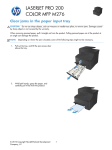
Clear jams from the output bin
CAUTION: Do not use sharp objects, such as tweezers or needle-nose pliers, to remove jams. Damage caused
by sharp objects will not be covered by the warranty.
1.
With both hands, grasp the paper, and
carefully pull it free from the product.
© 2012 Copyright Hewlett-Packard Development
Company, L.P.
1