1
Quick Start Guide
Filename: ma2usqs.doc
Title: HP-Print2k.dot
Template: HP-Print2K.dot
Author: jiml
Last Saved By: WASSER, Inc.
Revision #: 85
Page: 1 of 114
Printed: 04/12/02 08:01 AM
The information in this document is subject to change
without notice.
Hewlett-Packard® Company makes no warranty of any kind with
regard to this material, including, but not limited to, the implied
warranties of merchantability and fitness for a particular purpose.
HP shall not be liable for errors contained herein or for incidental
or consequential damages in connection with the furnishing,
performance, or use of this material.
HP assumes no responsibility for the use or reliability of its software
on equipment that is not furnished by HP.
This document contains proprietary information that is protected by
copyright. All rights are reserved. No part of this document may be
photocopied, reproduced, or translated to another language
without the prior written consent of HP.
Hewlett-Packard Company
Home Products Division
P.O. Box 4010
Cupertino, CA 95015-4010
USA
© Hewlett-Packard Company, 2002. All rights reserved.
Hewlett-Packard is a registered trademark of Hewlett-Packard
Company in the United States of America and other
countries/regions.
This product incorporates copyright protection technology that
is protected by method claims of certain U.S. patents and other
intellectual property rights owned by Macrovision Corporation and
other rights owners. Use of this copyright protection technology
must be authorized by Macrovision Corporation, and is intended
for home and other limited viewing uses only unless otherwise
authorized by Macrovision Corporation. Reverse engineering
or disassembly is prohibited. Apparatus Claims of U.S. Patent
Nos. 4,631,603, 4,577,216, 4,819,098, and 4,907,093
licensed for limited viewing uses only.
Other brand or product names are trademarks of their respective
holders.
Filename: ma2usqs.doc
Title: HP-Print2k.dot
Template: HP-Print2K.dot
Author: jiml
Last Saved By: WASSER, Inc.
Revision #: 85
Page: 2 of 114
Printed: 04/12/02 08:01 AM
Start Here
Start Here
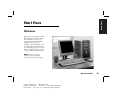
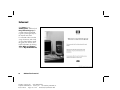
Welcome
Thank you for becoming a member
of the HP Pavilion home PC family.
This “Start Here” section is an
overview of some of the added
software features and tools
available on your HP Pavilion. The
rest of this Quick Start Guide gives
you information on how to use your
computer. With this guide, you can
use your computer with confidence.
Note: The screens on your
computer may not match the
screens pictured on these pages.
Quick Start Guide
Filename: ma2usqs.doc
Title: HP-Print2k.dot
Template: HP-Print2K.dot
Author: jiml
Last Saved By: WASSER, Inc.
Revision #: 85
Page: 3 of 114
Printed: 04/12/02 08:01 AM
iii
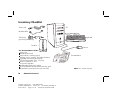
Inventory Checklist
PC
Power cord
Modem cable
Keyboard
Transformer
(powered speakers only)
Speakers
The documentation includes:
Setup poster
This Quick Start Guide
Support Guide, containing support,
warranty, license, regulatory, and safety information
Upgrading and Servicing the PC guide
(select models installed on PC, or in print)
Read first, addenda, or other
documents if applicable
HP DVD Writer guide (select models)
Microsoft Windows XP Home Edition Start Here guide
My HP Pavilion home PC brochure (select models)
iv
HP Pavilion home PC
Filename: ma2usqs.doc
Title: HP-Print2k.dot
Template: HP-Print2K.dot
Author: jiml
Last Saved By: WASSER, Inc.
Revision #: 85
Page: 4 of 114
Printed: 04/12/02 08:01 AM
Mouse
Documentation
Note: Your contents may vary.
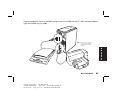
Connect your keyboard, mouse,
monitor, and modem as described
in the setup poster. Turn on the
computer for the first time and finish
the registration process. Then, add a
printer or other device, or install any
software programs that came on
CDs or DVDs included in the
computer box (select models only).
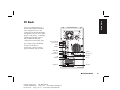
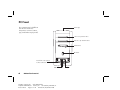
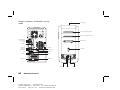
PS/2 keyboard
PS/2 mouse
Serial
SERIAL
Your computer may look different
from the one shown here.
Component, connector location,
type, and number vary by model.
Start Here
PC Back
Parallel
Telephone
OUT
Joystick
IN
ETHERNET
USB
Monitor
SERIAL
Audio Out
Audio In
Microphone
Speaker out
Ethernet
TV out
Modem
Quick Start Guide
Filename: ma2usqs.doc
Title: HP-Print2k.dot
Template: HP-Print2K.dot
Author: jiml
Last Saved By: WASSER, Inc.
Revision #: 85
Page: 5 of 114
Printed: 04/12/02 08:01 AM
v
PC Front
Your computer may look different
from the one shown here.
Component, connector location,
type, and number vary by model.
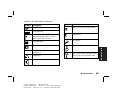
CD storage
cd-rom or hp cd-writer drive
dvd-rom or hp dvd writer drive
Diskette drive
On button
SERIAL
Lower front cover opened
to show connectors
IEEE 1394 USB
vi
HP Pavilion home PC
Filename: ma2usqs.doc
Title: HP-Print2k.dot
Template: HP-Print2K.dot
Author: jiml
Last Saved By: WASSER, Inc.
Revision #: 85
Page: 6 of 114
Printed: 04/12/02 08:01 AM
Serial
Start Here
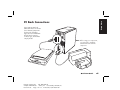
PC Back Connections
Your computer may look
different from the one shown
here. External components
shown in the following
figure are not included with
the PC. Back connector
location, type, and number
vary by model.
Note: Before using your components,
you may need to install the
software that came with the
component.
Quick Start Guide
Filename: ma2usqs.doc
Title: HP-Print2k.dot
Template: HP-Print2K.dot
Author: jiml
Last Saved By: WASSER, Inc.
Revision #: 85
Page: 7 of 114
Printed: 04/12/02 08:01 AM
vii
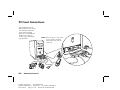
PC Front Connections
Your computer may look
different from the one shown
here. External components
shown in the following
figure are not included with
the PC. Front connector
location, type, and number
vary by model.
Note: Before using your components,
you may need to install the
software that came with the
component.
l
Seria
Serial
viii
HP Pavilion home PC
Filename: ma2usqs.doc
Title: HP-Print2k.dot
Template: HP-Print2K.dot
Author: jiml
Last Saved By: WASSER, Inc.
Revision #: 85
Page: 8 of 114
Printed: 04/12/02 08:01 AM
Start Here
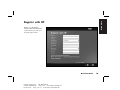
Register with HP
Register your HP Pavilion
home PC with Hewlett-Packard
so HP can assist you with your
technical support needs.
Quick Start Guide
Filename: ma2usqs.doc
Title: HP-Print2k.dot
Template: HP-Print2K.dot
Author: jiml
Last Saved By: WASSER, Inc.
Revision #: 85
Page: 9 of 114
Printed: 04/12/02 08:01 AM
ix
Internet
Click Start, choose
All Programs, and then click
Easy Internet Sign-up for
a simple step-by-step wizard
to guide you through setup for
the Internet and e-mail.
For information about modem
setup, the Internet, and e-mail,
see the related chapters inside
this guide. You can also find
helpful information by clicking
Start, Help and Support,
and then My HP Pavilion PC.
x
HP Pavilion home PC
Filename: ma2usqs.doc
Title: HP-Print2k.dot
Template: HP-Print2K.dot
Author: jiml
Last Saved By: WASSER, Inc.
Revision #: 85
Page: 10 of 114
Printed: 04/12/02 08:01 AM
Help and Support
Easy Internet Sign-up
Start Here
HP Desktop
HP Tour Guide
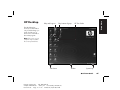
The HP desktop has
shortcut icons that make it
easy to find the things you
need. Click the icon to
find out more information
about that program.
Note: The screen on your
computer may not match
the screen pictured here.
Start button
Taskbar
System tray
Quick Start Guide
Filename: ma2usqs.doc
Title: HP-Print2k.dot
Template: HP-Print2K.dot
Author: jiml
Last Saved By: WASSER, Inc.
Revision #: 85
Page: 11 of 114
Printed: 04/12/02 08:01 AM
xi
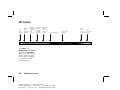
HP Center
Manage
your
See
personal
more
buttons finances
Find the
latest music
software
and
services
Get great
offers
from HP
and HP
partners
Find help
and
support
when you
need it
Customize ticker
Click Start, choose
All Programs, hp center,
and then click hp center
again. Get the latest support
updates and receive great
Internet deals on shopping,
personal finance, music,
and entertainment.
xii
HP Pavilion home PC
Filename: ma2usqs.doc
Title: HP-Print2k.dot
Template: HP-Print2K.dot
Author: jiml
Last Saved By: WASSER, Inc.
Revision #: 85
Page: 12 of 114
Printed: 04/12/02 08:01 AM
View ticker
display
Alerts
you
Get
hp center
to new
messages help
Start Here
Start Menu
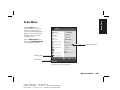
Click the Start button to
view the Start menu, the entry
point to everything on your
computer. Look at the following
pages to learn about important
software programs and tools
available to you.
Choose All Programs and
then choose Hewlett-Packard
to find HP-specific software.
Help and Support
All Programs
Start button
Note: The screen on your computer may
not match the screen pictured here.
Quick Start Guide
Filename: ma2usqs.doc
Title: HP-Print2k.dot
Template: HP-Print2K.dot
Author: jiml
Last Saved By: WASSER, Inc.
Revision #: 85
Page: 13 of 114
Printed: 04/12/02 08:01 AM
xiii
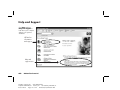
Help and Support
Click Start and then
Help and Support to
learn about your computer
and get your questions
answered.
HP Pavilion
information
and support
Help and
support news
xiv
HP Pavilion home PC
Filename: ma2usqs.doc
Title: HP-Print2k.dot
Template: HP-Print2K.dot
Author: jiml
Last Saved By: WASSER, Inc.
Revision #: 85
Page: 14 of 114
Printed: 04/12/02 08:01 AM
Start Here
My HP Pavilion PC
Learn how
to use your
HP Pavilion
home PC
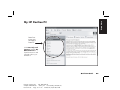
Click Start, Help and
Support, and then My
HP Pavilion PC for
detailed instructions and
information about your
HP Pavilion.
Quick Start Guide
Filename: ma2usqs.doc
Title: HP-Print2k.dot
Template: HP-Print2K.dot
Author: jiml
Last Saved By: WASSER, Inc.
Revision #: 85
Page: 15 of 114
Printed: 04/12/02 08:01 AM
xv
HP Instant Support
Send a help request
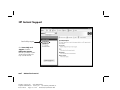
Click Start, Help and
Support, and then
HP Instant Support.
Run tests yourself, or contact
an HP Support analyst for
help over the Internet.
Note: HP Instant Support is not available in all models.
xvi
HP Pavilion home PC
Filename: ma2usqs.doc
Title: HP-Print2k.dot
Template: HP-Print2K.dot
Author: jiml
Last Saved By: WASSER, Inc.
Revision #: 85
Page: 16 of 114
Printed: 04/12/02 08:01 AM
Start Here
All Programs
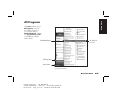
Click Start and then choose
All Programs to find all
the software programs on
your computer. Choose
Hewlett-Packard, and then
click hp pavilion pc tools
to find HP drivers and the
HP Tour Guide.
hp pavilion
pc tools
Hewlett-Packard
All Programs
Start button
Note: The screen on your computer may not match the
screen pictured here.
Quick Start Guide
Filename: ma2usqs.doc
Title: HP-Print2k.dot
Template: HP-Print2K.dot
Author: jiml
Last Saved By: WASSER, Inc.
Revision #: 85
Page: 17 of 114
Printed: 04/12/02 08:01 AM
xvii
HP Tour Guide
Click Start, choose
All Programs,
Hewlett-Packard, click
hp pavilion pc tools, and
then click hp tour guide.
Or
Click the icon on the desktop
(select models).
Let the HP Tour Guide show
you the desktop and the basics
of the Internet and e-mail.
xviii
HP Pavilion home PC
Filename: ma2usqs.doc
Title: HP-Print2k.dot
Template: HP-Print2K.dot
Author: jiml
Last Saved By: WASSER, Inc.
Revision #: 85
Page: 18 of 114
Printed: 04/12/02 08:01 AM
Start Here
Your HP Pavilion home PC Support Guide
You can get help over the
telephone from HP.
See the Support Guide
included with the computer
documentation for the terms
of your HP Pavilion warranty
coverage, for license
information, and for support
telephone numbers and
addresses.
The Support Guide contains
operating specifications for the
PC along with regulatory and
safety information.
hp pavilion home pc
support guide
üwhere to get help
üwarranty and license information
üdeclaration of conformity
üoperating specifications
üregulatory and safety information
Note: Your document contents may vary.
Quick Start Guide
Filename: ma2usqs.doc
Title: HP-Print2k.dot
Template: HP-Print2K.dot
Author: jiml
Last Saved By: WASSER, Inc.
Revision #: 85
Page: 19 of 114
Printed: 04/12/02 08:01 AM
xix
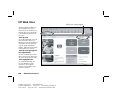
HP Web Sites
Type these Web site addresses
into the Address box of your
Internet browser, and then press
the Enter key on your keyboard
to find helpful information from
HP online.
www.hp.com
Go to HP’s main Web site for the
latest information about your
HP Pavilion home PC and all your
HP products. Receive technical
support, download software
updates, and find out about HP’s
home and business services.
www.hp.com/cposupport/
loc/regional.html
Use this worldwide direct link to
HP’s Customer Care Web site for
all your technical support needs.
www.myhpclub.com
Go to My HP Club Web site
for new HP Pavilion owner
information, tips and tricks,
activities, special deals, sneak
previews, and more.
xx
HP Pavilion home PC
Filename: ma2usqs.doc
Title: HP-Print2k.dot
Template: HP-Print2K.dot
Author: jiml
Last Saved By: WASSER, Inc.
Revision #: 85
Page: 20 of 114
Printed: 04/12/02 08:01 AM
Select your country/region
®
Start Here
Microsoft Windows XP Operating System
®
For questions about the Microsoft Windows XP operating
system, try these sources of information:
Help and Support, for onscreen help and
troubleshooting — click Start and then
Help and Support.
Microsoft Windows XP Home Edition Start Here guide,
included with the computer documentation packet.
Quick Start Guide
Filename: ma2usqs.doc
Title: HP-Print2k.dot
Template: HP-Print2K.dot
Author: jiml
Last Saved By: WASSER, Inc.
Revision #: 85
Page: 21 of 114
Printed: 04/12/02 08:01 AM
xxi
Recovery System and Hard Drive Space
HP Pavilion home PCs with Windows XP feature a
“recovery” partition included on the hard drive, thus
eliminating the need for recovery CDs that may get lost or
damaged. The recovery process from the hard drive (either
application or operating system) offers the following
advantages:
Selective: Ensures that the recovery data is matched to
the particular HP Pavilion home PC model. You can easily
recover only the application or system software you need.
Non-destructive: By recovering only the software you
need, you preserve user data and files.
Fast: Recovering only the necessary software
components, the recovery process is shorter and faster
from the hard drive.
xxii
HP Pavilion home PC
Filename: ma2usqs.doc
Title: HP-Print2k.dot
Template: HP-Print2K.dot
Author: jiml
Last Saved By: WASSER, Inc.
Revision #: 85
Page: 22 of 114
Printed: 04/12/02 08:01 AM
Instructions for using system recovery and application
recovery are in your Quick Start Guide; refer to the
section “Using Application Recovery and System
Recovery.” For information on viewing the space used by
the recovery partition on the hard drive, as well as steps
for deleting undesired software titles, refer to the section
“Freeing Up Space on Your Hard Disk Drive.”
In the event of a warranty hard drive failure, standard
warranty terms apply: a new “imaged” hard drive or
replacement PC that includes the Windows XP operating
system and the recovery partition, as well as all
pre-loaded software programs.
Consumers who wish to have recovery CDs may purchase
those CDs for a minimal shipping and handling charge.
Based on HP’s contractual agreements with its software
partners, there are three approved scenarios in which
customers may wish to order Recovery CDs from HP:
The original hard drive has failed and the customer
does not want an imaged hard drive from HP (for
example, out-of-warranty).
Important: This recovery CD set is a complete image of
the original HP Pavilion home PC hard drive contents and is
matched to your model number. When using the recovery
CDs to recover the hard drive, any files or software that you
created, saved, or installed on the computer will be
overwritten. Therefore, please remember to back up your
files prior to using your recovery CDs.
To order recovery CDs, contact the
HP Customer Care Center at 208-323-2551.
The original hard drive has been replaced by a larger
capacity hard drive.
The original hard drive has been reformatted or
re-partitioned.
Quick Start Guide
Filename: ma2usqs.doc
Title: HP-Print2k.dot
Template: HP-Print2K.dot
Author: jiml
Last Saved By: WASSER, Inc.
Revision #: 85
Page: 23 of 114
Printed: 04/12/02 08:01 AM
xxiii
Start Here
Recovery CDs
xxiv
HP Pavilion home PC
Filename: ma2usqs.doc
Title: HP-Print2k.dot
Template: HP-Print2K.dot
Author: jiml
Last Saved By: WASSER, Inc.
Revision #: 85
Page: 24 of 114
Printed: 04/12/02 08:01 AM
Start Here ........................................... iii
Introducing the Quick Start Guide......... 1
Safety Information................................................. 1
Using the Quick Start Guide .................................. 3
Finding Additional Information ............................... 4
Setting Up the Computer ...................... 5
Turning On the Computer for the First Time .............. 5
Registering with HP ............................................... 6
Getting Help ........................................................ 7
Protecting the PC .................................................. 7
Working in Comfort .............................................. 8
Using the Computer ............................. 9
Introducing the Basics ........................................... 9
Windows Operating System .............................. 9
Start Menu ....................................................... 9
HP Center ...................................................... 10
Help and Support ........................................... 11
Using the Mouse ................................................ 12
The Scroll Feature ........................................... 13
The Autoscroll Feature ..................................... 14
The Panning Feature ....................................... 14
Using the Keyboard ............................................ 15
Introduction.................................................... 15
Features ........................................................ 18
Buttons .......................................................... 19
Button Configuration ....................................... 22
Adjusting Speaker Volume ................................... 23
Using a Microphone ........................................... 24
Adjusting Microphone Volume.......................... 25
Turning Off the Computer .................................... 26
Putting the Computer into Standby and
Hibernation Mode .............................................. 27
Standby Mode ............................................... 27
Hibernation Mode .......................................... 28
Automatic Standby or Hibernation Mode .......... 29
Quick Start Guide
Filename: ma2usqs.doc
Title: HP-Print2k.dot
Template: HP-Print2K.dot
Author: jiml
Last Saved By: WASSER, Inc.
Revision #: 85
Page: 25 of 114
Printed: 04/12/02 08:01 AM
xxv
Contents
Contents
Setting Up and Using the Internet .......31
Doing Common Tasks ......................... 47
Introducing the Internet........................................ 31
What Is the Internet? ....................................... 31
What Is an ISP?.............................................. 32
What Is the World Wide Web? ........................ 32
What Is a URL? .............................................. 32
What Is an E-Mail Address?............................. 33
How Do I Search the Internet?.......................... 33
Setting Up the Modem ........................................ 34
Setting Up the Network Interface Adapter ............. 36
Setting Up Your Internet Account .......................... 39
Signing Up with an ISP Using
Easy Internet Sign-up....................................... 39
Connecting to the Internet.................................... 40
Using ISP-Provided Browser ............................. 40
Using Any Browser ......................................... 41
Visiting the Hewlett-Packard Web Site ................... 41
Viewing Online Manuals ................................. 43
Sending and Receiving E-Mail ............................. 44
If the ISP Provides the Browser.......................... 44
If Using Outlook Express.................................. 45
Inserting a CD or DVD .........................................47
Removing a CD or DVD .......................................48
Handling CDs .....................................................49
Playing Music CDs ..............................................49
Using MusicMatch Jukebox ..............................49
Using Windows Media Player ..........................51
Using the hp cd-writer Drive .................................52
Playing DVD Movies............................................53
Playing a DVD ................................................53
Viewing Help Information.................................54
Understanding DVD Terminology.......................55
Using the WinDVD Control Panel ......................55
Using Country/Region Codes ...........................56
Using the Combo Drive........................................57
Using the hp dvd writer Drive ...............................58
Playing VCD.......................................................58
Connecting External Components to
Your Computer....................................................59
Using HP Pavilion PC Tools ...................................64
xxvi
HP Pavilion home PC
Filename: ma2usqs.doc
Title: HP-Print2k.dot
Template: HP-Print2K.dot
Author: jiml
Last Saved By: WASSER, Inc.
Revision #: 85
Page: 26 of 114
Printed: 04/12/02 08:01 AM
Getting HP Updates for the PC............ 65
Informing You of Changes.................................... 65
Using HP Center for Updates from HP Messages .... 65
Starting HP Center .......................................... 66
Turning Off the HP Center Service .................... 67
Re-enabling the HP Center Service.................... 68
Contents
Resolving Problems............................ 69
Troubleshooting .................................................. 69
Using Application Recovery and
System Recovery................................................. 75
System Restore ............................................... 75
Application Recovery ...................................... 75
System Recovery............................................. 76
Freeing Up Space on Your Hard Disk Drive............ 78
Displaying Hard Disk Space ............................ 79
Increasing Available Hard Disk Space............... 79
Reinstalling Programs ...................................... 80
Index................................................. 81
Quick Start Guide
Filename: ma2usqs.doc
Title: HP-Print2k.dot
Template: HP-Print2K.dot
Author: jiml
Last Saved By: WASSER, Inc.
Revision #: 85
Page: 27 of 114
Printed: 04/12/02 08:01 AM
xxvii
xxviii
HP Pavilion home PC
Filename: ma2usqs.doc
Title: HP-Print2k.dot
Template: HP-Print2K.dot
Author: jiml
Last Saved By: WASSER, Inc.
Revision #: 86
Page: 28 of 114
Printed: 04/12/02 11:23 AM
Introducing the Quick Start Guide
This product has not been evaluated for connection to an
“IT” power system (an AC distribution system with no direct
connection to earth, according to IEC 60950).
AC Power Safety Warning
Warning: Install the computer near
an AC outlet. The AC power cord is your
HP Pavilion PC’s main AC disconnecting
device and must be easily accessible at
all times. For your safety, the power
cord provided with your system has a
grounded plug. Always use the power
cord with a properly grounded wall
outlet to avoid the risk of electrical shock.
Warning: To reduce the possibility
of an electric shock from the telephone
network, plug your computer into the
AC outlet before connecting it to the
telephone line. Also, disconnect the
telephone line before unplugging your
computer from the AC power outlet.
Warning: Your system is provided with
a voltage select switch for use in a 115
or 230 VAC power system. The voltage
select switch has been pre-set to the
correct voltage setting for use in the
particular country/region where it was
initially sold. Changing the voltage select
switch to the incorrect position can
damage your PC and void any implied
warranty.
Quick Start Guide
Filename: ma2usqs.doc
Title: HP-Print2k.dot
Template: HP-Print2K.dot
Author: jiml
Last Saved By: WASSER, Inc.
Revision #: 85
Page: 1 of 114
Printed: 04/12/02 08:01 AM
1
Introduction
Safety Information
Warning: Always disconnect the
modem cord from the telephone system
before installing or removing your
computer cover.
Warning: Do not operate the computer
with the cover removed.
Warning: The power supply is not
user-serviceable. To prevent damage
to the power supply, have a qualified
person repair or replace it. All other
components are user-serviceable.
Warning: Electrostatic discharge (ESD)
can damage disk drives, add-in cards,
and other components. If an ESD station
is not available, wear a wrist strap
attached to a metal part of the computer.
Place cards on a conductive foam pad or
inside the card wrapper, if possible, but
never on the card wrapper.
2
HP Pavilion home PC
Filename: ma2usqs.doc
Title: HP-Print2k.dot
Template: HP-Print2K.dot
Author: jiml
Last Saved By: WASSER, Inc.
Revision #: 85
Page: 2 of 114
Printed: 04/12/02 08:01 AM
Thank you for purchasing the HP Pavilion
home PC. We’ve made it easy for you to start
using the PC right away. The setup poster shows
you how to connect your computer, and this
Quick Start Guide will help you continue
from there.
Note: Be sure you set up the computer near a telephone
This Quick Start Guide will help you learn
how to:
3
Turn the computer on and off correctly.
3
Set up an Internet account and connect to the
Internet.
3
Adjust the speaker volume.
3
Insert and remove a CD disc.
3
Use the CD-ROM, DVD-ROM, hp cd-writer, or
hp dvd writer drive to play music, watch
movies, or record information.
3
Use HP Pavilion PC Tools.
3
Save power with standby and
hibernation modes.
3
Solve common problems.
line so that you can easily connect the modem for
Internet access.
Quick Start Guide
Filename: ma2usqs.doc
Title: HP-Print2k.dot
Template: HP-Print2K.dot
Author: jiml
Last Saved By: WASSER, Inc.
Revision #: 85
Page: 3 of 114
Printed: 04/12/02 08:01 AM
Introduction
Using the Quick Start Guide
3
Finding Additional
Information
Look in the computer box for printed information
that describes important details or updates
regarding your model PC.
You can find additional information about the PC
in the onscreen Help and Support Center, which
is on the computer. Just click Start, and then
click Help and Support.
You can find information about accessing
internal parts of the computer chassis in the
Upgrading and Servicing the PC guide included
with your PC (select models installed on your
system, others printed). To view guides installed
on your PC, refer to “Using HP Pavilion PC
Tools” on page 64.
Note: The procedures in the Upgrading and Servicing
the PC guide require you to turn off the PC and
disconnect it from any Internet and network
connections, and from power. If the guide is
installed on your computer, be sure to print it
for future reference.
4
HP Pavilion home PC
Filename: ma2usqs.doc
Title: HP-Print2k.dot
Template: HP-Print2K.dot
Author: jiml
Last Saved By: WASSER, Inc.
Revision #: 85
Page: 4 of 114
Printed: 04/12/02 08:01 AM
You can find online guides and information for
your PC at the HP Customer Care Web site. To
find online manuals for your PC:
1 Type
http://www.hp.com/cposupport/eschome.html
into your browser address box, and press the
Enter key on your keyboard.
2 In the QuickFind box, type your product name
or number (Pavilion 712a, for example). The
product number is on the lower front of the
PC chassis.
3 Click product support for your language
when the Results window appears.
4 Click manuals to see a list of manuals for
your PC.
Setting Up the Computer
After registering, install any software programs
that came on CDs or DVDs included in the
computer box (select models only).
Note: Some programs come preinstalled on the PC.
Before installing a program, check to see if it
already installed on your system.
When you have completed these steps, you
may add any printer, scanner, camera, or other
peripheral equipment you have for your system.
Refer to “Connecting External Components
to Your Computer” on page 59 for connector
information.
Turning On the Computer
for the First Time
After you’ve completed connecting the
components of the HP Pavilion by using the steps
illustrated on the setup poster, you’re ready to
turn on the computer.
First, press the Power button on the monitor.
Then, to turn on the computer, press the On
button on the front of the PC.
Note: The power supply is pre-set for the country/region
in which you purchased the HP Pavilion. If you
move to another country/region, please make
sure you check its voltage requirements before
plugging your PC into an AC power outlet.
Setup
Follow the steps shown on the setup poster to set
up the computer in your work area. Then read
the topics in this section that describe how to
turn on the computer for the first time, and finish
the registration process.
Quick Start Guide
Filename: ma2usqs.doc
Title: HP-Print2k.dot
Template: HP-Print2K.dot
Author: jiml
Last Saved By: WASSER, Inc.
Revision #: 85
Page: 5 of 114
Printed: 04/12/02 08:01 AM
5
Your computer may look different from the ones
shown here.
Registering with HP
As part of the initial setup in some
countries/regions, you will be prompted to
register the computer with HP. It’s important to
register so that you can be notified of changes
and updates to the HP Pavilion. This information
also assists HP Customer Care if you ever need
to call for support.
We recommend that you register the HP Pavilion
at this time. You can register any of these ways:
3
When you first start up your computer, follow
the onscreen instructions and register as soon
as you have a modem connection.
3
Double-click the registration icon on your
desktop, and follow the onscreen instructions.
3
Go to the HP Web site, and register online at
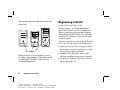
On button
When you first turn on the computer, a series
of startup screens appears. To proceed with the
®
®
initial Microsoft Windows setup, you must
answer a few questions.
6
HP Pavilion home PC
Filename: ma2usqs.doc
Title: HP-Print2k.dot
Template: HP-Print2K.dot
Author: jiml
Last Saved By: WASSER, Inc.
Revision #: 85
Page: 6 of 114
Printed: 04/12/02 08:01 AM
http://register.hp.com
You can get help over the telephone from HP.
See the Support Guide included with the
computer documentation for the terms of your
HP Pavilion warranty coverage and for support
telephone numbers.
Protecting the PC
HP provides a virus-scanning software program
to help protect your PC (select models only). The
program runs automatically when you start the
computer.
The virus-scanning program manufacturer
provides free virus scan updates through your
Internet connection for 90 days after your
HP Pavilion home PC purchase. You can
purchase a subscription service for updates
after your initial free period expires.
New types of viruses are invented all the
time. Be sure to get regular updates of your
virus-scanning software from the program
manufacturer.
If a software program or the operating system
gets damaged, you can reinstall the software.
Refer to “Using Application Recovery and
System Recovery” on page 75 for details.
When your PC has software problems, it’s
possible that a voltage spike, power outage, or
brownout has occurred. Symptoms of voltage
spikes include a flickering video display,
unexpected computer startups, and the computer
not responding to your commands. A voltage
spike can occasionally corrupt or destroy files,
so it is a good idea to consistently make backup
copies of your data files. Prevent voltage spikes
by installing a surge suppressor made for use
with computers between the power outlet and
the computer power cord.
Quick Start Guide
Filename: ma2usqs.doc
Title: HP-Print2k.dot
Template: HP-Print2K.dot
Author: jiml
Last Saved By: WASSER, Inc.
Revision #: 85
Page: 7 of 114
Printed: 04/12/02 08:01 AM
7
Setup
Getting Help
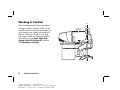
Working in Comfort
After assembling the HP Pavilion, but before
you begin using the computer, make sure the
computer and your work area are properly set
up to maintain your comfort and productivity.
Refer to “Working in Comfort” in the Help
and Support Center for important ergonomic
information. Just click Start, Help and
Support, My HP Pavilion PC, and then
click Working in Comfort.
8
HP Pavilion home PC
Filename: ma2usqs.doc
Title: HP-Print2k.dot
Template: HP-Print2K.dot
Author: jiml
Last Saved By: WASSER, Inc.
Revision #: 85
Page: 8 of 114
Printed: 04/12/02 08:01 AM
0–15˚
50–70 cm
(20–28 inches)
0–15˚
Basics
Using the Computer
Introducing the Basics
Start Menu
Windows Operating System
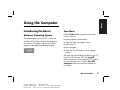
Click the Start button to open the Start menu.
Use this menu to:
The operating system for your PC is Microsoft
Windows XP. Windows displays the desktop on
the monitor. The taskbar with the Start button
appears at the edge of the desktop display.
3
Select programs or documents.
3
Open the Help and Support Center.
3
Start a search.
3
Run a program.
3
Open the Control Panel to view or change
settings.
The Start menu also displays the buttons Log Off
and Turn Off Computer. Click the Log Off
button to end your current computer session and
to switch between users. Click the Turn Off
Computer button to turn off the computer or
to restart it.
Quick Start Guide
Filename: ma2usqs.doc
Title: HP-Print2k.dot
Template: HP-Print2K.dot
Author: jiml
Last Saved By: WASSER, Inc.
Revision #: 85
Page: 9 of 114
Printed: 04/12/02 08:01 AM
9
HP Center
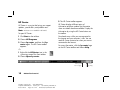
3 The HP Center toolbar appears.
HP Center is a service that brings you support
updates, special offers, and product news.
HP Center displays different topics of
information and then updates the information
when new details become available. Display the
information by using the HP Center buttons on
the toolbar.
Note: HP Center is not available in all models.
To open HP Center:
1 Click Start on the taskbar.
2 Choose All Programs.
3 Choose hp center, and then click hp
center again. The HP Center toolbar
appears.
Or
Downloads occur while you are connected to
the Internet and your computer is idle. You can
read HP Center content even when you are not
connected to the Internet.
For more information, click the hp center logo
on the HP Center toolbar and choose Help.
1 Right-click the HP Center icon in the
system tray area of the Start taskbar.
2 Choose Open hp center.
Alerts you to
new messages
10
HP Pavilion home PC
Filename: ma2usqs.doc
Title: HP-Print2k.dot
Template: HP-Print2K.dot
Author: jiml
Last Saved By: WASSER, Inc.
Revision #: 85
Page: 10 of 114
Printed: 04/12/02 08:01 AM
hp center
logo (Help)
1 When the alert exclamation point button
on the toolbar turns red, click it to view
new information.
2 Click a button on the HP Center toolbar, such
as Finance or Music. The toolbar shows up to
six buttons, based on your monitor resolution
and desktop settings.
Help and Support
To open the Help and Support Center, press
the Help button on your keyboard, or click Start
on the taskbar and select Help and Support.
Help has information, tours, and tutorials. Help
also has troubleshooting tools to assist you,
including HP Instant Support.
Note: HP Instant Support is not available in all models.
3 Click the down arrow on the left end of
the toolbar to select other buttons from a
drop-down menu.
4 Click the down arrow on the left end of the
toolbar, and then click Customize to add,
remove, or change the order of the buttons.
5 Click the hp center logo on
the toolbar, and choose Help
for detailed instructions.
Quick Start Guide
Filename: ma2usqs.doc
Title: HP-Print2k.dot
Template: HP-Print2K.dot
Author: jiml
Last Saved By: WASSER, Inc.
Revision #: 85
Page: 11 of 114
Printed: 04/12/02 08:01 AM
11
Basics
To view HP Center content, open HP Center and
do any of the following:
HP Instant Support
Note: HP Instant Support is not available in all models.
When you need assistance to solve a computerrelated problem, start HP Instant Support:
1 Click Start on the taskbar, and click Help
and Support.
2 Click HP Instant Support.
3 Click Request Help.
4 Follow the onscreen instructions to run a test
or submit a problem to HP Instant Support.
When you submit a problem to HP Instant
Support, you communicate over the Internet with
an HP Support analyst. The analyst will work
with you until the problem is solved.
12
HP Pavilion home PC
Filename: ma2usqs.doc
Title: HP-Print2k.dot
Template: HP-Print2K.dot
Author: jiml
Last Saved By: WASSER, Inc.
Revision #: 85
Page: 12 of 114
Printed: 04/12/02 08:01 AM
Using the Mouse
Your PC includes a mouse. When you move
the mouse, its roller ball moves and causes the
cursor on the screen to move. Use the mouse
on a flat surface.
You may have an optical mouse that uses a
light, instead of a roller ball, to sense movement.
Use the optical mouse on an opaque surface.
Note: The optical mouse cannot work on a glass,
translucent, or reflective surface.
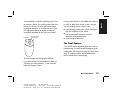
Use the wheel button in the middle of the mouse
to scroll or select items on the screen. You can
use the scrolling mouse in these ways:
3
Scroll through a document without having to
click the scroll bar on the screen.
3
Use the autoscroll feature to have the
document scroll automatically.
3
Skim through a document.
Scroll wheel button
Left button
Right button
The Scroll Feature
Click the left mouse button to place the cursor in
the document. To scroll toward the beginning of
a document, roll the mouse wheel up (away from
you). To scroll toward the end of a document,
roll the wheel down (toward you).
You can change the configuration of these
two mouse buttons for left-handed use. Refer to
“Reverse your mouse buttons” in the onscreen
Help and Support Center.
Quick Start Guide
Filename: ma2usqs.doc
Title: HP-Print2k.dot
Template: HP-Print2K.dot
Author: jiml
Last Saved By: WASSER, Inc.
Revision #: 85
Page: 13 of 114
Printed: 04/12/02 08:01 AM
13
Basics
Some computers include a scrolling mouse. Like
an ordinary mouse, the scrolling mouse has two
buttons on the top. Click the left mouse button
to position the cursor or to select an item. Click
the right mouse button to display a menu of
commands available for the item you clicked.
The Autoscroll Feature
The Panning Feature
The autoscroll feature allows you to read
through a document while the document scrolls
automatically.
Use the panning feature when you want to skim
through a document.
1 To use autoscroll, place the cursor next to the
text where you want to begin scrolling and
press the wheel button once. An autoscroll
icon appears.
2 To begin scrolling, move the mouse in the
direction you want to scroll. The farther you
move the pointer from the starting point, the
faster the document scrolls.
3 To stop autoscroll, press the wheel button
again.
14
HP Pavilion home PC
Filename: ma2usqs.doc
Title: HP-Print2k.dot
Template: HP-Print2K.dot
Author: jiml
Last Saved By: WASSER, Inc.
Revision #: 85
Page: 14 of 114
Printed: 04/12/02 08:01 AM
1 To use panning, press and hold down the
wheel button.
2 Slowly move the mouse in the direction you
want to scroll. The farther you move the
pointer from the starting point, the faster the
document pans.
3 To stop the panning feature, release the wheel
button.
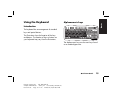
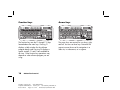
Alphanumeric keys
Basics
Using the Keyboard
Introduction
The keyboard has an arrangement of standard
keys and special buttons.
The illustrations show the location of the keys
and buttons. The location of keys or buttons on
your keyboard may vary from the illustrations.
The alphanumeric keys are the main keys found
on a standard typewriter.
Quick Start Guide
Filename: ma2usqs.doc
Title: HP-Print2k.dot
Template: HP-Print2K.dot
Author: jiml
Last Saved By: WASSER, Inc.
Revision #: 85
Page: 15 of 114
Printed: 04/12/02 08:01 AM
15
Function keys
Arrow keys
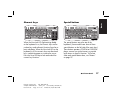
The function keys are the F1 through F12 keys
located above the main keys. Pressing F1
displays a Help window for the software
program being used. Pressing F3 displays a
search window. F1 and F3 are available at
all times. Other function key operations may
depend on what software program you are
using.
The arrow keys are controls for up, down, right,
and left. You can use these keys instead of the
mouse to move the cursor for navigation in a
Web site, in a document, or in a game.
16
HP Pavilion home PC
Filename: ma2usqs.doc
Title: HP-Print2k.dot
Template: HP-Print2K.dot
Author: jiml
Last Saved By: WASSER, Inc.
Revision #: 85
Page: 16 of 114
Printed: 04/12/02 08:01 AM
Special buttons
When the Num Lock LED (light-emitting diode)
on the keyboard is on, the numeric keys are the
number keys and arithmetic functions found on a
basic calculator. When the Num Lock LED on the
keyboard is off, the numeric keys are directional
keys used during games or to move the cursor.
Press the Num Lock key to lock and unlock the
numeric key functions.
The special buttons are at the top of the
keyboard. (Some models have some of these
special buttons on the left side of the main keys.)
These buttons operate a CD-ROM or DVD-ROM
player, connect you to the Internet, or provide
quick access to specific functions. To find out
what each special button does, see “Buttons”
on page 19.
Basics
Numeric keys
Quick Start Guide
Filename: ma2usqs.doc
Title: HP-Print2k.dot
Template: HP-Print2K.dot
Author: jiml
Last Saved By: WASSER, Inc.
Revision #: 85
Page: 17 of 114
Printed: 04/12/02 08:01 AM
17
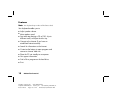
Features
Note: Your keyboard may not have all the features listed.
Your keyboard enables you to:
3
Adjust speaker volume.
3
Mute speaker sound.
3
Start and stop playing a CD or DVD, skip to
different tracks, and eject the disc tray.
3
Connect to the Internet (if you have an
established Internet account).
3
Search for information on the Internet.
3
Customize the buttons to open programs and
connect to Internet Web sites.
3
Place the PC into standby to save power.
3
Get support information.
3
Find a file or program on the hard drive.
3
Print.
18
HP Pavilion home PC
Filename: ma2usqs.doc
Title: HP-Print2k.dot
Template: HP-Print2K.dot
Author: jiml
Last Saved By: WASSER, Inc.
Revision #: 85
Page: 18 of 114
Printed: 04/12/02 08:01 AM
Basics
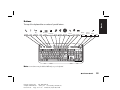
Buttons
The top of the keyboard has a number of special buttons.
hp
Standby
Help
My
HP Club
Print
HP Picture
Toolkit Shopping Sports
Finance Connect
Search
Chat E-Mail
Media
Controls
Volume
Control
Music
Mute
Note: Some buttons may be labeled differently on your keyboard.
Quick Start Guide
Filename: ma2usqs.doc
Title: HP-Print2k.dot
Template: HP-Print2K.dot
Author: jiml
Last Saved By: WASSER, Inc.
Revision #: 85
Page: 19 of 114
Printed: 04/12/02 08:01 AM
19
Icon
hp
Feature
Description
Standby
Puts PC into power-saving mode (screen is blank but PC is still on). To make screen
reappear, press any key on keyboard, or press Standby again. May take 10–30
seconds before screen reappears.
Help
Opens the Help and Support Center.
HP
Links to HP Web site.
Print
Prints documents from most programs.
HP Picture Toolkit
Opens HP Picture Toolkit view. Can be reconfigured.
Shopping
Sports
Finance
Connect
Goes to popular Web sites. Can be reconfigured to open any site or application.
Search
Chat
E-Mail
20
HP Pavilion home PC
Filename: ma2usqs.doc
Title: HP-Print2k.dot
Template: HP-Print2K.dot
Author: jiml
Last Saved By: WASSER, Inc.
Revision #: 85
Page: 20 of 114
Printed: 04/12/02 08:01 AM
Feature
Description
Media Controls
(cd/dvd/mp3)
Operates CD or DVD player: open and close top disc tray, skip tracks, pause,
and stop.
Volume control
(Volume knob or
Volume Up and
Volume Down
buttons)
Volume knob: Increases speaker volume when turned clockwise and decreases
volume when turned counterclockwise. Can be turned indefinitely, even after
maximum sound has been reached.
Volume Up and Down buttons: Press the Volume Up
button to increase
button to decrease volume.
volume and the Volume Down
Music
Starts MusicMatch Jukebox or Windows Media Player. Can be reconfigured.
Mute
Turns speaker sound on and off.
Basics
Icon
The Internet buttons will work only if you have established an Internet connection and have signed up
with an Internet Service Provider (ISP).
Quick Start Guide
Filename: ma2usqs.doc
Title: HP-Print2k.dot
Template: HP-Print2K.dot
Author: jiml
Last Saved By: WASSER, Inc.
Revision #: 85
Page: 21 of 114
Printed: 04/12/02 08:01 AM
21
Button Configuration
You can reconfigure the special buttons on the
keyboard to open different programs or files, or
to connect to favorite Web sites.
1 Click Start on the taskbar.
2 Choose Control Panel.
3 Click Printers and Other Hardware,
if present.
4 Double-click Keyboard.
5 In the Keyboard Properties window that
appears, click the Buttons tab.
22
HP Pavilion home PC
Filename: ma2usqs.doc
Title: HP-Print2k.dot
Template: HP-Print2K.dot
Author: jiml
Last Saved By: WASSER, Inc.
Revision #: 85
Page: 22 of 114
Printed: 04/12/02 08:01 AM
6 Double-click the button you want to change.
The button configuration window opens.
7 Choose the button capability from the dropdown list. Enter the Display Label and the
Address. (For a Web site, enter the complete
Web site URL in the Address box.)
8 Click OK.
9 On the Buttons tab, click Apply.
10 Repeat steps 6 through 9 for each button you
want to reconfigure.
11 Click OK when you are finished reconfiguring
the keyboard.
The HP Pavilion includes a set of stereo speakers
that you can either attach to the monitor (select
models only) or place on the desk. For details on
connecting the speakers to the PC, see the setup
poster.
You can adjust speaker volume by:
3
Using the volume knob or buttons on the
keyboard.
3
Using the volume knob on the speakers (select
models only).
3
Using the Volume icon on the taskbar.
If you do not see this Volume icon, click Start,
Control Panel, Sounds, Speech, and
Audio Devices, if present, and then doubleclick Sounds and Audio Devices to open the
Sounds and Audio Devices Properties window.
Select the Place volume icon in the
taskbar check box. Click Apply, and then
click OK. The Volume icon appears in the
taskbar.
Note: Some applications may result in low volume, even
when the volume knob is turned to its maximum
position. If this is the case, double-click the Volume
icon on the taskbar and increase the Volume
settings in the Volume settings window.
Quick Start Guide
Filename: ma2usqs.doc
Title: HP-Print2k.dot
Template: HP-Print2K.dot
Author: jiml
Last Saved By: WASSER, Inc.
Revision #: 85
Page: 23 of 114
Printed: 04/12/02 08:01 AM
23
Basics
Adjusting Speaker Volume
The two ways to use the Volume icon are:
1 Click the Volume icon on the taskbar.
2 Drag the Volume slider up to increase
the volume or down to decrease the
volume.
3 When you are satisfied with the sound level,
click outside the Volume window to close this
window.
Or
1 Double-click the Volume icon on the
taskbar. The Volume Control settings
window opens.
2 Drag the Volume slider up to increase the
volume or down to decrease the volume of a
specific sound control.
3 When you are satisfied with the sound level,
click the Close box (the X in the corner) to
close this window.
24
HP Pavilion home PC
Filename: ma2usqs.doc
Title: HP-Print2k.dot
Template: HP-Print2K.dot
Author: jiml
Last Saved By: WASSER, Inc.
Revision #: 85
Page: 24 of 114
Printed: 04/12/02 08:01 AM
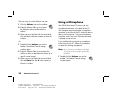
Using a Microphone
Your HP Pavilion home PC comes with one
microphone connector in the back of the PC.
Your computer may have another microphone
connector in the front of the PC under the access
door or on the monitor. Only one microphone
connector works at a time. The back connector
is already set up to work.
If you would prefer to connect a microphone
to the front of your PC, follow this procedure
to select the working microphone:
Note: If you connect your microphone to the back
of your PC, you do not need to perform this
procedure.
1 Double-click the Volume icon on the
taskbar. The Volume Control settings
window opens.
Control Panel, Sounds, Speech, and
Audio Devices, if present, then double-click
Sounds and Audio Devices to open the
Sounds and Audio Devices Properties window.
Select the Place volume icon in the
taskbar check box. Click Apply, and then
click OK. The Volume icon appears in the
taskbar.
2 In the Volume Control window, select
Options and click Properties.
3 In Adjust volume for, click Recording.
4 In Show the following volume controls, select
the Microphone check box.
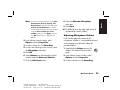
8 Select the Alternate Microphone
check box.
9 Click Close.
10 Click X (Close) on the upper-right corner of
the Recording Control window.
Adjusting Microphone Volume
If you need to adjust the volume of the
microphone, whether it is connected to the front
of the computer or to the back, follow the
procedure below:
5 Click OK.
1 Double-click the Volume icon on the
taskbar. The Volume Control window
opens.
6 Select Options from the Recording Control
window, and click Advanced Controls.
2 In the Volume Control window, select
Options and click Properties.
7 Click the Advanced button.
3 In Adjust volume for, click Recording.
Quick Start Guide
Filename: ma2usqs.doc
Title: HP-Print2k.dot
Template: HP-Print2K.dot
Author: jiml
Last Saved By: WASSER, Inc.
Revision #: 85
Page: 25 of 114
Printed: 04/12/02 08:01 AM
Basics
Note: If you do not see this Volume icon, click Start,
25
4 In Show the following volume controls, select
the Microphone check box.
5 Click OK.
6 Adjust the volume of Microphone Balance by
dragging the volume control slider.
Note: If the volume is now acceptable, proceed directly
to step 10.
7 To make finer adjustments to the sound, click
the Advanced button, and then select the
Boost check box.
8 Click Close.
9 Repeat step 6, if needed.
10 Click X (Close) on the upper-right corner of
the Volume Control window.
26
HP Pavilion home PC
Filename: ma2usqs.doc
Title: HP-Print2k.dot
Template: HP-Print2K.dot
Author: jiml
Last Saved By: WASSER, Inc.
Revision #: 85
Page: 26 of 114
Printed: 04/12/02 08:01 AM
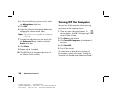
Turning Off the Computer
You can turn off the computer without pressing
any buttons on the computer chassis.
1 Close any open software programs. To
close programs, click X in the upper-right
corner of each window.
2 Click Start on the taskbar.
3 Click Turn Off Computer, at the bottom of
the menu.
4 Click Turn Off.
5 Turn off the monitor.
For information on alternatives to turning off
the computer, see the next section “Putting the
Computer into Standby and Hibernation Mode.”
As an alternative to shutting down the computer,
you can put the PC in standby mode. To
conserve power, you can automatically put the
computer into standby and then hibernation by
setting the power management timers.
Standby Mode
When the computer is in standby mode, it
goes into a low-power state and the monitor is
blank as if it’s turned off. The next time you
use the computer, any programs, folders, and
documents that were open before you put the
computer in standby will be available. With
standby mode, you can save electricity without
having to wait for the PC to go through the
normal startup routine when you turn it on.
Standby mode also allows faxes to come
through to the computer, and it enables the PC
to automatically retrieve e-mail messages and
download information from the Internet, if you
have programmed the computer to do so.
To manually put the computer in standby:
1 Press the Standby button on the keyboard.
The screen goes dark, and the computer goes
into standby mode.
2 When you want to use the computer again,
press a key on the keyboard, or press the
Standby button. The screen display reappears
just as you left it.
Another way to manually put the computer into
standby is to:
1 Click Start on the taskbar.
2 Click Turn Off Computer.
3 Click Stand By.
Quick Start Guide
Filename: ma2usqs.doc
Title: HP-Print2k.dot
Template: HP-Print2K.dot
Author: jiml
Last Saved By: WASSER, Inc.
Revision #: 85
Page: 27 of 114
Printed: 04/12/02 08:01 AM
27
Basics
Putting the Computer into
Standby and
Hibernation Mode
If the computer does not work properly when
you wake it from standby, reset the computer:
press and hold the On button on the front of the
PC for approximately 5 seconds until the system
turns off. Then turn the computer back on.
Note: Using the On button to reset the system is not
recommended and should be used only as a last
resort.
Hibernation Mode
When the computer is in hibernation mode, it
saves everything that is in computer memory to
the hard disk, turns off the monitor and the hard
disk, and then turns itself off. When you turn on
the computer, everything (programs, folders, and
documents) is restored to the screen.
To manually put the computer into hibernation:
1 Click Start on the taskbar.
2 Click Turn Off Computer.
3 Press the Shift key on the keyboard and click
Hibernate.
28
HP Pavilion home PC
Filename: ma2usqs.doc
Title: HP-Print2k.dot
Template: HP-Print2K.dot
Author: jiml
Last Saved By: WASSER, Inc.
Revision #: 85
Page: 28 of 114
Printed: 04/12/02 08:01 AM
Note: If Hibernate is not present, you first need to
set up your computer for hibernation; refer to
steps 1 through 6 of “Automatic Standby or
Hibernation Mode” on page 29.
4 When you want to use the computer again
after hibernation, press the On button on the
front of the PC.
If the computer does not work properly when
you wake it from hibernation, restart the
computer:
1 Click Start on the taskbar.
2 Click Turn Off Computer.
3 Click Restart.
To automatically put the computer into standby
or hibernation mode, modify the power
management settings:
7 Click the Power Schemes tab to set the
timers for standby and/or hibernation. In the
Power Schemes box, select a power scheme
from the drop-down list. Choose the timers:
3
To turn on auto-standby for the computer,
click a time (such as After 30 mins) in the
System standby list.
3
3 Click Performance and Maintenance,
if present.
To set the timer for auto-hibernation, click
the time to elapse before hibernation in the
System hibernates list.
4 Double-click Power Options.
Note: If both standby and hibernation timers are
1 Click Start on the taskbar.
2 Click Control Panel.
5 Check if the auto-hibernation feature is
enabled by clicking the Hibernate tab,
and seeing if a check mark is in the Enable
hibernation check box. If necessary, enable
the feature by clicking the check box so that
a check appears in it.
set, the system hibernation timer must be set
for a longer time than the system standby
timer.
8 Click OK.
6 If you changed the Enable hibernation check
box, click Apply.
Quick Start Guide
Filename: ma2usqs.doc
Title: HP-Print2k.dot
Template: HP-Print2K.dot
Author: jiml
Last Saved By: WASSER, Inc.
Revision #: 85
Page: 29 of 114
Printed: 04/12/02 08:01 AM
29
Basics
Automatic Standby or
Hibernation Mode
30
HP Pavilion home PC
Filename: ma2usqs.doc
Title: HP-Print2k.dot
Template: HP-Print2K.dot
Author: jiml
Last Saved By: WASSER, Inc.
Revision #: 85
Page: 30 of 114
Printed: 04/12/02 08:01 AM
Setting Up and Using the Internet
3
Access to the ISPs in your area. Some ISPs
offer a traditional dial-up service, and others
offer faster technologies such as Digital
Subscriber Line (DSL) and cable. (DSL, ADSL,
and cable ISPs are not available in all
countries/regions.)
3
Internet Explorer Web browser.
3
Outlook Express e-mail software program.
3
V.90 modem and modem software (not
available in all models).
3
LAN (local area network) card (select
models only).
3
Special keyboard buttons to access the
Internet.
Introducing the Internet
What Is the Internet?
The Internet is a group of computers that
communicate with each other through telephone
lines, digital service, or cable lines. Each Internet
computer is independent, and its operators
choose which files to make available to users of
the Internet. To connect your PC to the Internet
and use the information and services available
there, you need an ISP.
Quick Start Guide
Filename: ma2usqs.doc
Title: HP-Print2k.dot
Template: HP-Print2K.dot
Author: jiml
Last Saved By: WASSER, Inc.
Revision #: 85
Page: 31 of 114
Printed: 04/12/02 08:01 AM
31
Internet
Your HP Pavilion comes with:
What Is an ISP?
What Is the World Wide Web?
Internet Service Providers (ISPs) are businesses
that give you access to the Internet, and most of
them provide an electronic mail service (e-mail).
There is usually a monthly fee for this service.
The World Wide Web (WWW), also called
the Web, is a public part of the Internet used
by individuals, companies, governments, and
organizations. These individuals and groups
have created millions of Web site pages in
support of their activities.
The types of connection vary and may be a
telephone dial-up modem, a LAN (local area
network), cable modem, or DSL (Digital
Subscriber Line).
When your computer connects to the Internet, it
is actually communicating with the ISP’s Internet
computer. The ISP verifies your account and then
provides you access to the Internet. You use a
Web browser program to search, find, and
display Web site information. Some ISPs allow
you to use the browser program of your choice.
Some ISPs provide their own browser.
32
HP Pavilion home PC
Filename: ma2usqs.doc
Title: HP-Print2k.dot
Template: HP-Print2K.dot
Author: jiml
Last Saved By: WASSER, Inc.
Revision #: 85
Page: 32 of 114
Printed: 04/12/02 08:01 AM
A Web page is a file or group of files that a
user can access by entering the Web page’s file
location, or URL.
What Is a URL?
The URL (Uniform Resource Locator) identifies a
file location, typically in the form
http://www.name.extension
What Is an E-Mail Address?
When you use e-mail, your e-mail address
identifies the electronic post office box where
people can send you electronic mail. E-mail
addresses have the form
name@domain_name
The domain name is usually the name of the
ISP or organization, and includes an extension
identifying the kind of organization the ISP is.
For example, if your name is Jane Jones and
XYZ is your ISP, your e-mail address might be
[email protected]
with the extension .com indicating that XYZ is
a business. For information on using e-mail, see
“Sending and Receiving E-Mail” on page 44.
How Do I Search the Internet?
The browser program you use includes a Search
feature. You may need to click a button or select
the feature from a menu to display it, depending
on the type of browser program it is.
The Search feature provides a box where you
enter a question or a word that describes the
information you want to find. If you enter one or
a few general words, you may get many general
results. If you enter several precise words, you
usually get fewer but more specific results.
Quick Start Guide
Filename: ma2usqs.doc
Title: HP-Print2k.dot
Template: HP-Print2K.dot
Author: jiml
Last Saved By: WASSER, Inc.
Revision #: 85
Page: 33 of 114
Printed: 04/12/02 08:01 AM
33
Internet
The URL contains the protocol and the pathway
to a site and may include the path to a specific
file within that site. Each period, or dot, in the
URL separates elements within the address. For
example, you will see the URL extension .com
used by companies. When you enter the URL
into your browser Address box and press the
Enter key on your keyboard, the browser
contacts that location and displays the Web
page for you.
The Windows Search feature includes direct
access to the Internet Explorer Search. (If the
ISP provides the browser, you may not be able
to use Internet Explorer to search the Internet.)
To begin a search:
1 Click Start on the taskbar.
2 Click Search.
3 Click Search the Internet. (You may have
to scroll down in the list to see this option.)
4 Type a word or question into the Search box.
Setting Up the Modem
The modem is used for connecting to an ISP that
provides telephone dial-up connection to the
Internet. There are other ways to connect to the
ISP that do not use the telephone modem, such
as a LAN (local area network) or DSL (Digital
Subscriber Line). See ”Setting Up the Network
Interface Adapter” on page 36 if you are
connecting through a LAN. Check with your
ISP for specifics on your connection.
5 Click Search.
Note: Your computer may not come with a modem.
The computer connects to the Internet (if
needed), performs the search, and displays the
results. Click a link in the results list to display
the Web page.
Before you can connect to the Internet and send
or receive e-mail and faxes using telephone
dial-up, you must connect the telephone line to
the modem, which is in the computer.
There are also Web sites specifically created for
searching the Internet. These are called search
engines. Search engines use a number of ways
to find information.
The setup poster shows you how to plug in a
modem/telephone cable to the computer modem
connector and to your telephone line wall jack
connector.
34
HP Pavilion home PC
Filename: ma2usqs.doc
Title: HP-Print2k.dot
Template: HP-Print2K.dot
Author: jiml
Last Saved By: WASSER, Inc.
Revision #: 85
Page: 34 of 114
Printed: 04/12/02 08:01 AM
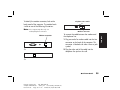
To identify the modem connector, look at the
back panel of the computer. The modem looks
similar to one of the following illustrations.
Telephone Line switch
2
1
Note: Your computer may have only one
Modem connector
Modem connector
To connect the cable between the modem and
the telephone line:
1 Plug one end of a modem cable into the Line
connector on the back of the computer. This
connector is labeled with either Line or a jack
symbol.
Or
2 Plug the other end of the cable into the
telephone line jack on the wall.
Or
Quick Start Guide
Filename: ma2usqs.doc
Title: HP-Print2k.dot
Template: HP-Print2K.dot
Author: jiml
Last Saved By: WASSER, Inc.
Revision #: 85
Page: 35 of 114
Printed: 04/12/02 08:01 AM
35
Internet
modem/telephone connection.
3 On modems with a Telephone Line switch,
make sure the switch is in position 1.
Back of PC
2
1
Telephone
(optional)
Telephone cable
(optional)
Line
Modem cable
Wall jack
Telephone
(optional)
36
HP Pavilion home PC
Filename: ma2usqs.doc
Title: HP-Print2k.dot
Template: HP-Print2K.dot
Author: jiml
Last Saved By: WASSER, Inc.
Revision #: 85
Page: 36 of 114
Printed: 04/12/02 08:01 AM
You can also connect a telephone to the
other connector on the modem (optional). By
connecting a telephone to the modem, you can
make regular (voice) telephone calls when you
are not using the modem — even if the computer
is turned off.
Setting Up the
Network Interface Adapter
The network interface adapter (also called a
network interface card, or NIC ) provides a
high-performance connection to an Ethernet
(10BaseT) or Fast Ethernet (100BaseT) network.
After this adapter is connected to a LAN (local
area network), you will be able to get a highspeed connection to the Internet through the
LAN. For information about high-speed
providers, click the easy Internet sign-up
icon found on the desktop or in the Start menu
under All Programs.
Note: Your computer may not come with a network
interface adapter.
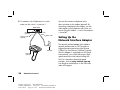
Locate the RJ-45 port on the back of the
computer. (Refer to the illustration that matches
your system.)
RJ-45 port
To connect the network interface adapter to the
network:
1 Plug the network cable into the RJ-45 port on
the network adapter. The port is located on
the back of the computer.
Note: Do not connect a telephone cable (RJ-11
connector) to the network adapter port (RJ-45).
2 Plug the other end of the network cable into
a 10BaseT or a 100BaseT port on the
network hub.
Note: The hub is a device to which all computers on
the network are connected.
Warning: DO NOT plug the network
cable into a telephone jack. Although the
plug on the network cable looks similar
to the plug on a telephone cable, they are
not the same.
Quick Start Guide
Filename: ma2usqs.doc
Title: HP-Print2k.dot
Template: HP-Print2K.dot
Author: jiml
Last Saved By: WASSER, Inc.
Revision #: 85
Page: 37 of 114
Printed: 04/12/02 08:01 AM
37
Internet
This network connection also allows you to
share printers, data, and other devices among
your PCs.
3 With the computer turned on, check the LEDs
(light-emitting diodes) on the network adapter.
The LEDs on each type of network adapter are
described below. (Refer to the illustration that
matches your system.)
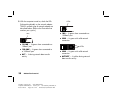
LEDs
3
10 LNK — Lit green when connected to a
10BaseT port
3
100 LNK — Lit green when connected to
a 100BaseT port
3
38
ACT — Lit during network data transfer
activity
HP Pavilion home PC
Filename: ma2usqs.doc
Title: HP-Print2k.dot
Template: HP-Print2K.dot
Author: jiml
Last Saved By: WASSER, Inc.
Revision #: 85
Page: 38 of 114
Printed: 04/12/02 08:01 AM
LEDs
3
100 — Lit green when connected to a
100BaseT port
3
LINK — Lit green with valid network
connection
LEDs
3
LINK — Lit green with valid network
connection
3
ACTIVITY — Lit yellow during network
data transfer activity
Before you can connect to the Internet, you need
to sign up with an Internet Service Provider (ISP).
HP has made arrangements with leading ISPs
in your area to help you sign up for Internet
service. Use Easy Internet Sign-up to sign up with
an ISP. The software programs for available ISPs
are part of your system.
The Windows desktop may have a folder
called Online Services, which includes icons for
accessing various online services. These icons
are part of the Windows operating system, but
they are not functional in all countries/regions.
Signing Up with an ISP Using
Easy Internet Sign-up
Easy Internet Sign-up helps you sign up for a
new Internet account, set up an existing account,
or configure Internet access using a LAN (local
area network), cable modem, or DSL (Digital
Subscriber Line).
1 Connect the telephone line to your modem.
Refer to the setup poster and to “Setting Up
the Modem” on page 34.
Note: If you decide to use a DSL or a cable Internet
connection, contact your ISP for any specific
software and hardware you may need.
2 Open Easy Internet Sign-up:
3
Double-click the easy Internet
sign-up icon.
Or
3
Click Start on the taskbar. Choose All
Programs. Click easy Internet
sign-up.
Quick Start Guide
Filename: ma2usqs.doc
Title: HP-Print2k.dot
Template: HP-Print2K.dot
Author: jiml
Last Saved By: WASSER, Inc.
Revision #: 85
Page: 39 of 114
Printed: 04/12/02 08:01 AM
39
Internet
Setting Up Your
Internet Account
The Easy Internet Sign-up screen appears.
3 Follow the onscreen instructions.
Connecting to the Internet
A Web browser program searches for, finds,
and displays Web site information. How you
access and explore the Internet depends on
whether you are using an ISP that provides the
browser or an ISP that allows you to use any
browser.
40
HP Pavilion home PC
Filename: ma2usqs.doc
Title: HP-Print2k.dot
Template: HP-Print2K.dot
Author: jiml
Last Saved By: WASSER, Inc.
Revision #: 85
Page: 40 of 114
Printed: 04/12/02 08:01 AM
Using ISP-Provided Browser
If you have signed up for an ISP that provides
the browser, you can open the browser program
and connect to the Internet by using either of the
following methods:
3
Double-click the ISP-provided icon on the
desktop.
Or
3
Press the Connect (or Internet) button
on the keyboard.
If you signed up for Internet access with an ISP
that allows any browser, use Internet Explorer
or another Web browser to explore the Internet.
To connect to the Internet, use either of the
following methods:
3
Click Start on the taskbar, choose
All Programs, and click Internet
Explorer.
Or
3
Press the Connect (or Internet) button
on the keyboard.
Once you are connected to the Internet,
your browser displays your designated home
Web page.
You can go to a particular Web site by entering
the address (such as http://www.hp.com) in the
Address box in the Web browser and pressing
Enter on your keyboard. Or, you can use the
browser Search tool to search for references to
a specific word or phrase on the Web.
Visiting the
Hewlett-Packard Web Site
The Hewlett-Packard Web site is dedicated to
HP Pavilion home PC owners and to the entire
HP product line. There you will find the latest
news and information about all of your HP
products. You can receive technical support,
download software and driver updates, and find
out about HP’s home and business services.
Quick Start Guide
Filename: ma2usqs.doc
Title: HP-Print2k.dot
Template: HP-Print2K.dot
Author: jiml
Last Saved By: WASSER, Inc.
Revision #: 85
Page: 41 of 114
Printed: 04/12/02 08:01 AM
41
Internet
Using Any Browser
To go to the HP Web site:
3
Support: Receive technical support
and detailed product information such as
hardware warranties, specifications, and
instruction manuals. To go directly to the
support Web page for your PC model and
find online manuals for it, see “Viewing
Online Manuals” on page 43.
3
HP Store: Buy products, supplies, and
accessories online for your home, home
office, or business. At this site you can
find special offers on HP products, locate
replacement parts, and get addresses of store
and service locations that sell and repair HP
products.
3
Solutions: Find technology tips, educational
materials, and ideas you can use at home or
at work. You can also register your other HP
products.
1 Establish a connection to the Internet.
2 Type http://www.hp.com into your Web
browser Address box, and press the Enter key
on your keyboard.
3 Select your country/region from the dropdown list at the top of the page, and then
click the blue arrow to the right of the list.
From this Web page you can select the following
links:
Note: These links may not be available in all
countries/regions.
3
Products and Services: Find detailed
information about all HP products and the
various business and personal computing
services HP offers.
3
Drivers: Download software and driver
updates.
42
HP Pavilion home PC
Filename: ma2usqs.doc
Title: HP-Print2k.dot
Template: HP-Print2K.dot
Author: jiml
Last Saved By: WASSER, Inc.
Revision #: 85
Page: 42 of 114
Printed: 04/12/02 08:01 AM
Note: For more information, refer to the HP Web site
information located in the Support Guide
included with your HP Pavilion home PC.
Note: Online manuals are associated with specific
HP Pavilion home PC model numbers. Not all
models have online manuals.
View online manuals for your PC by going to the
HP Web site:
1 Establish a connection to the Internet.
2 Type http://www.hp.com into your Web
browser Address box, and press the Enter key
on your keyboard.
3 Select your country/region from the dropdown list at the top of the page, and then
click the blue arrow to the right of the list.
4 Click Support, and then select your model.
To go directly to the English language support
Web page for your HP Pavilion model and find
online manuals for it, use the following steps:
1 Establish a connection to the Internet.
2 Type
http://www.hp.com/cposupport/eschome.html
into your Web browser Address box, and
press the Enter key on your keyboard.
3 In the Quick Find box, type your product
name and number, and then press the
Enter key on your keyboard. For example,
Pavilion xt865 or Pavilion 7970. The product
number is on the lower front of the PC chassis.
4 When the results window appears, click
product support for your PC model
(language).
5 Click manuals in the Ask a question box.
Note: If manuals does not appear, there are no online
manuals associated with your model.
6 Click a manual title to view it.
Quick Start Guide
Filename: ma2usqs.doc
Title: HP-Print2k.dot
Template: HP-Print2K.dot
Author: jiml
Last Saved By: WASSER, Inc.
Revision #: 85
Page: 43 of 114
Printed: 04/12/02 08:01 AM
43
Internet
Viewing Online Manuals
Sending and Receiving
E-Mail
Your HP Pavilion home PC comes with an
electronic mail (e-mail) software program from
Microsoft called Outlook Express. Some ISPs use
Outlook Express. Other ISPs provide their own
e-mail program and Web browser, and they
may not let you use Outlook Express or your
preinstalled browser.
Note: Some models have Microsoft Outlook instead of
Outlook Express. For details on using Microsoft
Outlook, open the Outlook program and
access Help.
Before you can send and receive e-mail,
you need:
3
An account with an Internet Service
Provider (ISP).
44
HP Pavilion home PC
Filename: ma2usqs.doc
Title: HP-Print2k.dot
Template: HP-Print2K.dot
Author: jiml
Last Saved By: WASSER, Inc.
Revision #: 85
Page: 44 of 114
Printed: 04/12/02 08:01 AM
3
Microsoft Internet Explorer (included with
your HP Pavilion) or other browser program
(usually provided by an ISP).
3
A dial-up modem/telephone connection, or a
network adapter connection from your PC to
the ISP.
Note: If you decide to use a DSL or a cable Internet
connection, contact your ISP for any specific
software and hardware you may need.
If the ISP Provides the Browser
Follow the ISP’s instructions to download its Web
browser and e-mail program and to set up and
use your e-mail account. You will then be able to
send and receive e-mail each time you connect
to your ISP.
If Using Outlook Express
Sending e-mail messages
After you sign up with an ISP and connect your
modem, you can run Outlook Express from the
Start menu.
Open the Outlook Express program:
Note: You can also press the E-Mail button on the
keyboard to open Outlook Express (select
models only).
2 Click the Create Mail button on the toolbar.
3 Type in, or select from an address book, the
address of each recipient.
4 Type the message title in the Subject box.
5 Type your message in the New Message
window.
Quick Start Guide
Filename: ma2usqs.doc
Title: HP-Print2k.dot
Template: HP-Print2K.dot
Author: jiml
Last Saved By: WASSER, Inc.
Revision #: 85
Page: 45 of 114
Printed: 04/12/02 08:01 AM
45
Internet
The first time you start Outlook Express, the
Internet Connection Wizard window opens if
you are not already connected to the Internet.
You will need to provide connection information
such as an account name and password and the
names of an incoming and an outgoing mail
server to use Outlook Express. If you are unsure
how to answer any of the questions, contact
your ISP.
1 Click Start on the taskbar, and select
the Outlook Express icon.
Receiving e-mail messages
6 Click the Send button on the toolbar when
you’re finished.
1 Start Outlook Express. See instructions above.
7 If necessary, click the Send/Recv tool on the
toolbar to send any messages stored in the
Outbox.
2 If necessary, click the Send/Recv tool on the
toolbar to have Outlook Express deliver new
messages from all listed e-mail accounts.
Note: When you compose a message without being
connected to the Internet, the message is stored
in the Outbox until the next time you log on to
the Internet and connect to your ISP.
3 Click the Inbox folder to view the list of
incoming messages. Messages not yet read
appear in bold on the screen.
Note: The messages stay in your Inbox until you
delete them or move them to another folder.
4 Click a message once to view it, or doubleclick the message to expand it and read it in
its own window.
For more information about using Outlook
Express, go to the Help menu within the
program.
46
HP Pavilion home PC
Filename: ma2usqs.doc
Title: HP-Print2k.dot
Template: HP-Print2K.dot
Author: jiml
Last Saved By: WASSER, Inc.
Revision #: 85
Page: 46 of 114
Printed: 04/12/02 08:01 AM
Doing Common Tasks
Inserting a CD or DVD
1 Make sure the computer is on.
There are three basic types of compact disc (CD)
drives: CD-ROM drives, which can read audio
and data CD discs, CD-RW drives, which can
read and record audio and data CD discs, and
DVD-ROM drives, which can read DVD discs.
Select models have a DVD+R/RW drive, which
can read and write CD and DVD discs. Some
computers have a combo drive, which combines
the functions of a CD-RW and DVD or a CD-RW
and DVD+R/RW into one drive. On some PCs
the CD-RW drive is labeled hp cd-writer and the
DVD-RW drive is labeled hp dvd writer.
2 Press the Eject button near the drive to eject
the disc tray.
Note: On some PCs, the media drive is located
behind a door on the front of the computer.
Common Tasks
Your computer may look different from the
ones shown here.
Eject button
Note: There are two types of DVD discs:
DVD+R/RW and DVD-R/RW. DVD-R and DVD-RW
discs do not work in the DVD+R/RW drive.
Drive door
Quick Start Guide
Filename: ma2usqs.doc
Title: HP-Print2k.dot
Template: HP-Print2K.dot
Author: jiml
Last Saved By: WASSER, Inc.
Revision #: 85
Page: 47 of 114
Printed: 04/12/02 08:01 AM
47
3 Remove the CD/DVD from its case, holding
on to the disc edges only.
4 Gently place the disc in the tray with the label
facing up.
You can also close the tray by clicking the
close/open button on the control panel for
the program (such as MusicMatch Jukebox
or Windows Media Player) that controls the
drive.
Note: For the top drive in the PC, you can close the
tray by pressing the media control open/close
button on the keyboard.
Removing a CD or DVD
Note: You cannot remove a CD or DVD after you have
turned off the computer, so make sure you do so
before shutting down the computer.
1 Open the disc tray by pressing the Eject
button.
5 Close the disc tray by gently pushing the tray
into the computer.
48
HP Pavilion home PC
Filename: ma2usqs.doc
Title: HP-Print2k.dot
Template: HP-Print2K.dot
Author: jiml
Last Saved By: WASSER, Inc.
Revision #: 85
Page: 48 of 114
Printed: 04/12/02 08:01 AM
2 Holding on to the disc edges only, lift the CD
or DVD out of the tray.
3 Place the disc in its case.
4 Close the disc tray by gently pushing the tray
into the computer.
Handling CDs
Playing Music CDs
To avoid damaging a CD, follow these
guidelines:
The HP Pavilion includes MusicMatch Jukebox
(select models) or Windows Media Player. This
software lets you play music CDs.
Return the CD to the case when you are
finished using it.
3
Handle the disc by its outside edges or center
hole only.
3
Do not touch the unlabeled side of a CD or
place the unlabeled side down on your desk.
Doing so could scratch the surface of the CD.
3
Store CDs at room temperature.
Using MusicMatch Jukebox
This software lets you play music CDs, as well as
record digital music files, create music CDs on
your hp cd-writer drive, organize your digital
music into libraries, and listen to music over the
Internet.
If you are connected to the Internet when playing
a music CD, MusicMatch Jukebox searches a
CD database on the Internet, displays the song
titles in the Playlist area, and then begins
playing the CD. The next time you play this CD,
you don’t need to be connected to the Internet —
MusicMatch Jukebox keeps the song titles.
Quick Start Guide
Filename: ma2usqs.doc
Title: HP-Print2k.dot
Template: HP-Print2K.dot
Author: jiml
Last Saved By: WASSER, Inc.
Revision #: 85
Page: 49 of 114
Printed: 04/12/02 08:01 AM
49
Common Tasks
3
To play a music CD:
1 Insert the music CD into the drive. The
MusicMatch Jukebox window opens.
Or
If the MusicMatch window does not
automatically open, click Start on the
taskbar, choose All Programs, and then
select MusicMatch Jukebox.
3 To control the CD currently in the drive,
click the buttons in the MusicMatch Jukebox
window. To play a particular song, doubleclick its song title (or track number) in the
Playlist. You can also control the CD using
the media control buttons if your keyboard
has them.
For more information on this software, refer to
the online Help within the MusicMatch Jukebox
program. To view the Help menu:
1 Insert a CD in the drive. The MusicMatch
Jukebox window opens.
Or
2 If you are not currently connected to the
Internet, the CDDB Internet Connectivity
dialog box appears. If you want to search the
Internet for the name of the artist and the song
titles on the CD, you will need to connect to
the Internet and then click Continue
lookup. If you don’t want to connect to
the Internet, click Quit.
50
HP Pavilion home PC
Filename: ma2usqs.doc
Title: HP-Print2k.dot
Template: HP-Print2K.dot
Author: jiml
Last Saved By: WASSER, Inc.
Revision #: 85
Page: 50 of 114
Printed: 04/12/02 08:01 AM
If the MusicMatch window does not
automatically open, click Start on the
taskbar, select All Programs, and then
select MusicMatch Jukebox.
2 Click the Help menu in the MusicMatch
Jukebox menu bar.
Using Windows Media Player
This software lets you play music CDs, as well as
play DVDs when you have a DVD-ROM drive.
You can use it to record digital music files, create
music CDs on your hp cd-writer drive, organize
your digital music into libraries, and listen to
music or view a music video over the Internet.
To play a music CD:
Or
If the Windows Media Player window does
not automatically open, click Start on the
taskbar, choose All Programs, and then
select Windows Media Player.
2 To control the CD currently in the drive, click
the buttons in the Windows Media Player
window. To play a particular song, doubleclick its song title (or track number) in the
Playlist. You can also control the CD using
the media control buttons if your keyboard
has them.
Quick Start Guide
Filename: ma2usqs.doc
Title: HP-Print2k.dot
Template: HP-Print2K.dot
Author: jiml
Last Saved By: WASSER, Inc.
Revision #: 85
Page: 51 of 114
Printed: 04/12/02 08:01 AM
51
Common Tasks
1 Insert the music CD into the drive. The
Windows Media Player window opens.
When you click the Media Guide or the Radio
Tuner features, Windows Media Player connects
to the Internet and obtains information about the
CD selections or streaming radio stations.
For more information on this software, refer to
the online Help within the Windows Media
Player program. To view the Help menu:
1 Insert a CD in the drive. The Windows Media
Player window opens.
Or
If the Windows Media Player window does
not automatically open, click Start on the
taskbar, select All Programs, and then
select Windows Media Player.
2 Click the Help menu in the Windows Media
Player menu bar.
52
HP Pavilion home PC
Filename: ma2usqs.doc
Title: HP-Print2k.dot
Template: HP-Print2K.dot
Author: jiml
Last Saved By: WASSER, Inc.
Revision #: 85
Page: 52 of 114
Printed: 04/12/02 08:01 AM
Using the hp cd-writer Drive
Using the hp cd-writer drive, you can play a
CD, or record onto a recordable disc (CD-R or
CD-RW).
Note: The hp cd-writer drive is available on select
models only.
1 Press the Eject button on the door of your
hp cd-writer drive, and place a CD in the
center of the CD-RW disc tray.
2 Close the disc tray by gently pushing the tray
into the computer.
3 Click Start on the taskbar.
4 Click My Computer.
5 Double-click the CD Drive icon.
From there, you can copy audio or data files
to a CD using the HP RecordNow software
program.
To open HP RecordNow program:
1 Click Start on the taskbar.
2 Choose All Programs.
3 Choose HP RecordNow.
4 Click RecordNow.
Note: For information about recording onto CDs,
refer to the Help menu in the HP RecordNow
program.
Playing DVD Movies
The DVD-ROM drive (select models only) can run
software on CD-ROMs, play music CDs, and
play DVD movies and software.
Playing a DVD
DVDs automatically play after you insert
the disc.
countries/regions. For information about this, see
“Using Country/Region Codes” on page 56.
1 Insert the disc into the DVD-ROM drive.
Note: On a double-sided DVD, read the text
around the inner hole of the disc to determine
which side (A versus B or Standard versus
Widescreen) to play. Place the disc in the tray
with the label face up for the side you want
to play.
Quick Start Guide
Filename: ma2usqs.doc
Title: HP-Print2k.dot
Template: HP-Print2K.dot
Author: jiml
Last Saved By: WASSER, Inc.
Revision #: 85
Page: 53 of 114
Printed: 04/12/02 08:01 AM
53
Common Tasks
Note: DVD movies are often localized to geographical
2 Close the disc tray by gently pushing the tray
into the computer. The movie plays in its own
resizable window, and the WinDVD control
panel appears.
Video window
You may want to start WinDVD and adjust the
settings before inserting the disc and starting the
movie.
To start WinDVD without a disc in the drive:
1 Click Start on the taskbar.
2 Choose All Programs.
3 Choose InterVideo WinDVD.
4 Click InterVideo WinDVD. The WinDVD
video window and control panel open.
Viewing Help Information
TM
For information on the WinDVD software, refer
to the online Help within the program. To view
the Help menu:
1 Insert a DVD disc in the drive. The WinDVD
window opens.
Or
Control panel
54
HP Pavilion home PC
Filename: ma2usqs.doc
Title: HP-Print2k.dot
Template: HP-Print2K.dot
Author: jiml
Last Saved By: WASSER, Inc.
Revision #: 85
Page: 54 of 114
Printed: 04/12/02 08:01 AM
Using the WinDVD Control Panel
The WinDVD control panel automatically
appears when you insert a DVD.
2 Click the ? in the WinDVD menu bar.
If you are playing a movie full screen and the
panel is hidden, you can redisplay it as follows:
Understanding DVD Terminology
1 Right-click anywhere in the video window.
To understand the DVD controls, you should be
familiar with DVD terminology. Each DVD can
hold one or more titles. Most full-length movies
have only one title on the DVD, but some DVDs
include several short movies, with each movie
being a separate title.
2 Select View.
Each title is divided into multiple chapters.
A chapter is a particular segment or scene in
the movie. When watching a DVD movie, you
have the ability to jump to the next chapter, the
previous chapter, or to a specific chapter.
A single image in a movie is called a frame.
3 Click Player. The control panel appears.
3
To see what a button does on the control
panel, place the mouse pointer on the
button; the button title appears onscreen.
3
To move the WinDVD control panel, place
the mouse pointer on the panel (but not on
a button), and drag it to the desired
location on the screen.
Quick Start Guide
Filename: ma2usqs.doc
Title: HP-Print2k.dot
Template: HP-Print2K.dot
Author: jiml
Last Saved By: WASSER, Inc.
Revision #: 85
Page: 55 of 114
Printed: 04/12/02 08:01 AM
55
Common Tasks
If the program does not automatically open,
click Start on the taskbar, choose All
Programs, InterVideo WinDVD, and
then click InterVideo WinDVD again.
3
To resize the video window when it is not
full screen, place the mouse pointer on a
window corner and drag the border.
The country/region number is usually placed
over a world globe printed on the DVD
packaging and disc.
Or
DVDs without country/region codes will play on
any player or drive in any country/region.
Click the Full Screen button in the
upper-right corner of the WinDVD
control panel.
Using Country/Region Codes
DVDs sometimes come with country/region
codes imprinted as part of the disc data. These
codes prevent DVD movies from being played
in countries/regions of the world that are
different from where they were sold. You can
play DVDs from other countries/regions only five
times before the country/region code locks and
becomes permanent. Once the code locks, you
can only play DVDs from that country/region.
When the country/region code locks, if you
need help, contact HP Support.
56
HP Pavilion home PC
Filename: ma2usqs.doc
Title: HP-Print2k.dot
Template: HP-Print2K.dot
Author: jiml
Last Saved By: WASSER, Inc.
Revision #: 85
Page: 56 of 114
Printed: 04/12/02 08:01 AM
The six major DVD countries/regions are:
3
Country/Region 1: North America
3
Country/Region 2: Japan, Europe,
Middle East, South Africa
3
Country/Region 3: Southeast Asia
3
Country/Region 4: Australia, New
Zealand, Mexico, Central and South America
3
Country/Region 5: Northwest Asia,
North Africa
3
Country/Region 6: China
WinDVD is not pre-set to a particular
country/region — the country/region code of
the first DVD movie you play determines your
DVD country/region.
Using the Combo Drive
The combo drive is available on select
models only.
When you insert a disc in the combo drive, the
computer automatically detects the type of disc:
Warning: You can change the
3
country/region code only five times
before the setting becomes permanent.
When the country/region code locks, if
you need help, contact HP Support.
If you insert a software program CD, it is
available for use.
3
If you insert a music CD, a window opens for
the program that plays CDs. See “Playing
Music CDs” on page 49.
3
If you insert a DVD movie, the Video window
and WinDVD control panel open. See
“Playing DVD Movies” on page 53.
If you insert a blank CD-R or CD-RW, use
HP RecordNow to copy audio or data files.
Quick Start Guide
Filename: ma2usqs.doc
Title: HP-Print2k.dot
Template: HP-Print2K.dot
Author: jiml
Last Saved By: WASSER, Inc.
Revision #: 86
Page: 57 of 114
Printed: 04/12/02 11:15 AM
57
Common Tasks
For example, if you play a DVD with a
country/region 1 code, WinDVD sets the current
country/region of your DVD-ROM player to 1. If
you later play a DVD that is coded for a different
country/region, WinDVD asks if you want to set
this as the current country/region.
Using the
hp dvd writer Drive
The hp dvd writer is a DVD+R/RW drive
available on select models only.
The hp dvd writer drive plays movie DVDs
and music CDs, reads data CDs and DVDs, and
records files to DVD+RW, DVD+R, CD-R, and
CD-RW discs.
Note: There are two types of DVD discs:
DVD+R/RW and DVD-R/RW. DVD-R and DVD-RW
discs do not work in the DVD+R/RW drive.
The guide for this drive is printed and included
in the computer box (select models).
58
HP Pavilion home PC
Filename: ma2usqs.doc
Title: HP-Print2k.dot
Template: HP-Print2K.dot
Author: jiml
Last Saved By: WASSER, Inc.
Revision #: 85
Page: 58 of 114
Printed: 04/12/02 08:01 AM
Playing VCD
Note: The VCD program is available in select
models only.
With the VCD (Video CD) program, you can
play MPEG (Motion Picture Experts Group)
videos. These MPEG-1 files have a .dat or .mpg
extension.
To play a VCD:
1 Insert the VCD into a CD-ROM or DVD-ROM
drive.
2 Click Start, choose All Programs, select
Mediamatics VCDExpress, and then
click Mediamatics VCD Player. The
VCD Player control panel opens.
Or
If you want to play a file, click the open
folder button on the panel. Choose the drive
and folder containing the MPEG-1 file, and
double-click the file you want to play.
4 Use the control buttons in the VCD panel to
control the playback. The multimedia buttons
on the keyboard may not work with the VCD
program.
Note: To identify the function of the control buttons in
Connecting
External Components
to Your Computer
You can connect external components to
your PC.
Connectors (or ports) connect hardware to your
PC. Depending on your model, connectors are
on the back or front of the PC. On some PCs,
flip open the cover on the lower front to see
connectors.
Common Tasks
3 Click the play button on the panel.
the VCD panel, move the mouse slowly over
each button.
Quick Start Guide
Filename: ma2usqs.doc
Title: HP-Print2k.dot
Template: HP-Print2K.dot
Author: jiml
Last Saved By: WASSER, Inc.
Revision #: 85
Page: 59 of 114
Printed: 04/12/02 08:01 AM
59
Your computer may look different from the ones shown here. External components shown in the following
figure are not included with the PC. Front connector location, type, and number vary by model.
Note: Before using your components,
you may need to install the
software that came with the
component.
Serial
Serial
60
HP Pavilion home PC
Filename: ma2usqs.doc
Title: HP-Print2k.dot
Template: HP-Print2K.dot
Author: jiml
Last Saved By: WASSER, Inc.
Revision #: 85
Page: 60 of 114
Printed: 04/12/02 08:01 AM
External components shown in the following figure are not included with the PC. Back connector location,
type, and number vary by model.
Note: Before using your components,
Quick Start Guide
Filename: ma2usqs.doc
Title: HP-Print2k.dot
Template: HP-Print2K.dot
Author: jiml
Last Saved By: WASSER, Inc.
Revision #: 85
Page: 61 of 114
Printed: 04/12/02 08:01 AM
Common Tasks
you may need to install the
software that came with the
component.
61
Features, connectors, and locations vary by
model.
CD storage
cd-rom or hp cd-writer drive
dvd-rom or hp dvd writer drive
Diskette drive
SERIAL
PS/2 keyboard
PS/2 mouse
Serial
Parallel
OUT
Joystick
On button
IN
ETHERNET
USB
Monitor
SERIAL
Audio Out
Audio In
Microphone
Speaker out
Ethernet
TV out
SERIAL
Telephone
Modem
IEEE 1394
62
HP Pavilion home PC
Filename: ma2usqs.doc
Title: HP-Print2k.dot
Template: HP-Print2K.dot
Author: jiml
Last Saved By: WASSER, Inc.
Revision #: 85
Page: 62 of 114
Printed: 04/12/02 08:01 AM
USB
Serial
Symbols in this table identify connectors.
Description
Symbol
Audio Line Out (powered speakers)
Mouse (PS/2)
Keyboard (PS/2)
Universal Serial Bus (USB) for mouse,
keyboard, digital camera, or other
device with a USB connector
Printer (parallel)
Monitor
serial
Serial port for digital camera or other
serial device
Headphones
Description
OUT
Audio Line In
IN
Microphone
Joystick/MIDI
IEEE 1394 for video cameras or other
devices with very fast transfer rates
Speaker
Quick Start Guide
Filename: ma2usqs.doc
Title: HP-Print2k.dot
Template: HP-Print2K.dot
Author: jiml
Last Saved By: WASSER, Inc.
Revision #: 85
Page: 63 of 114
Printed: 04/12/02 08:01 AM
63
Common Tasks
Symbol
Using HP Pavilion PC Tools
The HP Pavilion PC Tools folder in the All
Programs/Hewlett-Packard menu contains
special utilities for HP Pavilion owners. For
example, you’ll find a utility for displaying
system information. This folder also contains
the HP Tour Guide and any onscreen guides
included with your PC.
To see the items in the HP Pavilion PC Tools
folder:
1 Click Start on the taskbar.
2 Choose All Programs.
3 Choose Hewlett-Packard.
4 Click hp pavilion pc tools.
5 Click an item to view or use it.
Note: If there are no guide titles listed in HP Pavilion PC
Tools, your PC has no onscreen guides.
64
HP Pavilion home PC
Filename: ma2usqs.doc
Title: HP-Print2k.dot
Template: HP-Print2K.dot
Author: jiml
Last Saved By: WASSER, Inc.
Revision #: 85
Page: 64 of 114
Printed: 04/12/02 08:01 AM
Informing You of Changes
Note: HP Center is not available in all models.
HP provides an Internet-based service that
includes informing you when updates are
available for your PC.
HP Center also delivers Updates from
HP Messages. These messages inform you
of important information about your PC:
The updates from HP messages are also
available to you through the HP Web site under
the driver update and support information for
your model PC. To go to the Web site, see
“Visiting the Hewlett-Packard Web Site” on
page 41.
Using HP Center for
Updates from HP Messages
3
Product notices
3
System updates
3
Tips
The update message downloads when your PC
is idle, like other HP Center information, and
may display an alert or a notice that flashes on
your desktop. View messages as they arrive or
read them later. A message always asks for your
permission before installing a system update on
the PC.
HP Center is a service provided by HP to bring
you information, documents, digital media,
time-based notifications, and special offers.
Quick Start Guide
Filename: ma2usqs.doc
Title: HP-Print2k.dot
Template: HP-Print2K.dot
Author: jiml
Last Saved By: WASSER, Inc.
Revision #: 85
Page: 65 of 114
Printed: 04/12/02 08:01 AM
65
HP Updates
Getting HP Updates for the PC
Starting HP Center
3
Right-click the hp center icon in the
system tray area of the taskbar, and
select Open hp center.
Or
3
Click Start on the taskbar, choose All
Programs, choose hp center, and then
click hp center again.
The HP Center toolbar appears.
For detailed Help information, click the hp
center logo on the HP Center toolbar and
choose Help. For a description of a button or
area of the toolbar, place the cursor over the
toolbar.
Alerts you to
new messages
66
HP Pavilion home PC
Filename: ma2usqs.doc
Title: HP-Print2k.dot
Template: HP-Print2K.dot
Author: jiml
Last Saved By: WASSER, Inc.
Revision #: 85
Page: 66 of 114
Printed: 04/12/02 08:01 AM
hp center
logo (Help)
Turning Off the HP Center Service
To permanently turn off the HP Center Service:
You can turn off the HP Center Service
temporarily (during the current PC session) or
permanently (for all future PC sessions).
Note: If you change your mind later, you can turn on the
To temporarily turn off the HP Center Service:
1 Click Start on the taskbar.
1 Right-click the hp center icon in the
system tray area of the taskbar.
2 Choose All Programs.
2 Select Shut down hp center service.
4 Click Disable hp center.
The service is turned off until you restart the PC.
The service is turned off until you re-enable it.
service. See “Re-enabling the HP Center Service”
in the following section.
HP Updates
3 Choose hp center.
Quick Start Guide
Filename: ma2usqs.doc
Title: HP-Print2k.dot
Template: HP-Print2K.dot
Author: jiml
Last Saved By: WASSER, Inc.
Revision #: 85
Page: 67 of 114
Printed: 04/12/02 08:01 AM
67
Re-enabling the HP Center Service
The service comes enabled with the PC. You
can turn off the service and re-enable it later,
using the steps below. When you re-enable the
HP Center Service, the service runs whenever
you are connected to the Internet, and you
receive messages as they become available.
To turn on the service:
1 Click Start on the taskbar.
2 Choose All Programs.
3 Choose hp center.
4 Click Re-enable hp center.
68
HP Pavilion home PC
Filename: ma2usqs.doc
Title: HP-Print2k.dot
Template: HP-Print2K.dot
Author: jiml
Last Saved By: WASSER, Inc.
Revision #: 85
Page: 68 of 114
Printed: 04/12/02 08:01 AM
Help
Resolving Problems
Troubleshooting
For help on general and miscellaneous problems you may be experiencing with the PC, refer to the
following pages for possible solutions. Look up the description of the problem, and try the solution listed.
For more detailed information, press the Help button on your keyboard, or click Start on the taskbar and
select Help and Support.
Problem
Solution
My computer won’t
turn on at all.
3
When you press the On button on the front of the computer, the following events
should happen:
1 The keyboard indicator lights flash.
2 The light next to the diskette drive flashes.
3 The hard disk spins or the diskette drive makes a noise.
4 The computer makes one beep indicating it is operating properly.
Warning: Your system is provided with a voltage select switch for use in a
115 or 230 VAC power system. The voltage select switch has been pre-set
to the correct voltage setting for use in the particular country/region
where it was initially sold. Changing the voltage select switch to the
incorrect position can damage your PC and void any implied warranty.
Quick Start Guide
Filename: ma2usqs.doc
Title: HP-Print2k.dot
Template: HP-Print2K.dot
Author: jiml
Last Saved By: WASSER, Inc.
Revision #: 85
Page: 69 of 114
Printed: 04/12/02 08:01 AM
69
Problem
Solution
My computer won’t
turn on at all.
3
If the computer doesn’t go through the above procedure, check the following:
3 The power cord and all cables are securely plugged into the computer.
3 The power cord is plugged into a grounded outlet. Check to see whether the outlet
works by plugging another item into it.
3 The monitor is connected to the computer, plugged in, and turned on.
I installed a new
printer or other
device, and it won’t
work.
3
Be sure that you installed the device drivers that came with the new device.
You may need an updated driver for Windows XP. For non-HP peripherals, contact the
vendor directly. For HP peripherals, visit the HP Web site. Refer to your Support Guide
for details.
The computer doesn’t
make any sound.
3
3
Note: Some systems include an adapter cable for the speakers. The left and right speaker
cables plug into the adapter cable. The adapter cable plugs into the speaker port on
the back of the computer.
3
3
3
3
3
70
Check the speaker connection.
If your speakers have a power button, check whether it is turned on and the power
supply is turned on (select models only).
Remove the headphone connection.
Use the keyboard controls to increase the volume.
Press the Mute button on the keyboard to see if the mute feature is turned on.
Click the Volume icon on the taskbar. Increase the volume, and make sure the Mute
box is not selected.
HP Pavilion home PC
Filename: ma2usqs.doc
Title: HP-Print2k.dot
Template: HP-Print2K.dot
Author: jiml
Last Saved By: WASSER, Inc.
Revision #: 85
Page: 70 of 114
Printed: 04/12/02 08:01 AM
Solution
The computer (or part
of it) doesn’t seem to
be working.
3
3
Try restarting the computer as follows:
1 Click Start on the taskbar.
2 Click Turn Off Computer.
3 Click Restart.
If the computer shows no response to mouse or keyboard actions, reset the computer:
1 Press and hold the On button until the system turns off.
2 Wait a few seconds, and turn the computer back on.
Note: Using the On button to reset the system is not recommended and should be used
only as a last resort.
The monitor doesn’t
work, even though the
computer appears to.
3
It’s possible that a voltage spike, power outage, or brownout has occurred.
Symptoms of voltage spikes include a flickering video display, unexpected computer
startups, and the computer not responding to your commands. A voltage spike can
occasionally corrupt or destroy files, so it is a good idea to consistently make backup
copies of your data files. Prevent voltage spikes by installing a surge suppressor made
for use with computers between the power outlet and the computer power cord.
3
Check the connection of the power cord into the monitor.
Make sure the monitor is turned on — it has its own power button.
Make sure the monitor power cord is plugged into a grounded outlet. Check to see
whether the outlet works by plugging another item into it. (If the light on the front of
the monitor is lit, the monitor is getting power.)
Check the cable connection between the monitor and the computer. The cable
connectors must be pushed in all the way.
Adjust the brightness and contrast controls on the monitor.
3
3
3
3
Quick Start Guide
Filename: ma2usqs.doc
Title: HP-Print2k.dot
Template: HP-Print2K.dot
Author: jiml
Last Saved By: WASSER, Inc.
Revision #: 85
Page: 71 of 114
Printed: 04/12/02 08:01 AM
71
Help
Problem
Problem
Solution
When I push one
of the special or
multimedia buttons on
the keyboard, nothing
happens.
3
The keyboard Print
button doesn’t work.
I cannot remove a CD
or DVD disc.
72
Check the button configuration. To reconfigure the button:
1 Click Start on the taskbar.
2 Click Control Panel.
3 Click Printers and Other Hardware, if present.
4 Double-click Keyboard.
5 In the Keyboard Properties window that appears, click the Buttons tab.
6 Double-click the button you want to change. The button configuration window
displays.
7 Choose the button capability from the drop-down list. Enter the Display Label and
the Address. (For a Web site, enter the complete Web site URL in the Address box.)
8 Click OK.
9 On the Buttons tab, click Apply.
10 Repeat steps 6 through 9 for each button you want to reconfigure.
11 Click OK when you are finished reconfiguring the keyboard.
3 Some programs do not recognize the Print button.
3
You cannot remove a CD or DVD disc after you have turned off the computer. Turn on
the computer and press the Eject button to extend the tray.
HP Pavilion home PC
Filename: ma2usqs.doc
Title: HP-Print2k.dot
Template: HP-Print2K.dot
Author: jiml
Last Saved By: WASSER, Inc.
Revision #: 85
Page: 72 of 114
Printed: 04/12/02 08:01 AM
Solution
My keyboard doesn’t
work, even though the
computer and monitor
seem to work.
3
3
The AOL program
comes up even though
I’m not using it.
3
If the PC beeps repeatedly or if nothing happens when you press keys, it’s possible
that the keyboard is connected improperly.
PS/2 keyboards only: Check that the cable connector pins are straight. Make
sure the keyboard is connected to the keyboard port, not to the mouse port. If you
need to reconnect these two cables, turn the computer off, reconnect the cables, and
then turn the computer back on.
Try restarting the computer (click Start, select Turn Off Computer, and click
Restart). If that doesn’t work, press and hold the computer On button until the
computer turns off (approximately five seconds). Then turn the computer back on.
If AOL opens when you are using another Internet Service Provider (ISP), the PC is still
trying to use AOL for Internet access and you may want to remove the AOL program.
To uninstall AOL:
1
2
3
4
Click Start on the taskbar.
Click Control Panel.
Double-click Add or Remove Programs.
Select America Online, click Change/Remove, and then click Yes when the
confirmation window opens.
Note: Removing the AOL program will not cancel your account with AOL.
Quick Start Guide
Filename: ma2usqs.doc
Title: HP-Print2k.dot
Template: HP-Print2K.dot
Author: jiml
Last Saved By: WASSER, Inc.
Revision #: 85
Page: 73 of 114
Printed: 04/12/02 08:01 AM
73
Help
Problem
Problem
Solution
The mouse doesn’t
work, even though
everything else does.
3
3
3
If nothing happens when you move the mouse, it’s possible that the mouse is
connected improperly.
PS/2 mouse only: Check that the cable connector pins are straight. Make sure the
mouse is connected to the mouse port, not to the keyboard port. To reconnect these
two cables, turn the computer off, reconnect the cables, and then turn the computer
back on.
If the pointer doesn’t move on the screen when you move the mouse, clean the mouse.
For an optical mouse, wipe the light sensor lens on the bottom of the mouse with a
lint-free cloth. For a roller ball mouse:
1 Remove the mouse ball by unscrewing the bottom of the mouse.
2 Clean the mouse ball with a damp cloth (not paper).
3 Use your finger to move the rollers in the mouse ball housing, and remove lint
and dust.
4 Replace the mouse ball, and screw on the cover.
The computer might have stopped. Reset the computer by pressing and holding the
computer On button until the computer turns off (approximately five seconds). Then
turn the computer back on.
Non system disk error
3
The PC is trying to start the operating system from the diskette drive. Press the Eject
button, and remove the diskette from the drive.
Invalid Media error
3
The PC is trying to start the operating system from the hp cd-writer drive. Press the
Eject button immediately after turning on the PC and remove the CD from the drive.
74
HP Pavilion home PC
Filename: ma2usqs.doc
Title: HP-Print2k.dot
Template: HP-Print2K.dot
Author: jiml
Last Saved By: WASSER, Inc.
Revision #: 85
Page: 74 of 114
Printed: 04/12/02 08:01 AM
Before using the HP Pavilion System Recovery
or Application Recovery program, use
System Restore.
System Restore
Warning: Try System Restore before
using the HP Pavilion System Recovery
program.
If software on your hard drive accidentally gets
erased or damaged, first use the Microsoft
System Restore feature in Windows XP to restore
the computer system and program settings.
System Restore returns the computer settings
to a selected restore point without affecting
user programs or document files. For more
information, type System Restore into the Search
box in Help and Support.
Application Recovery
Note: Not all models include the Application
Recovery program. Perform steps 1 through 5 of
“To start Application Recovery.” If hp application
recovery appears in the hp pavilion pc tools
folder, then your PC includes the HP Pavilion
Application Recovery program.
If an individual application or driver accidentally
gets erased or damaged, you can reinstall the
software using the HP Pavilion Application
Recovery program.
Note: Do not use Application Recovery to reinstall
software programs that came on CDs or DVDs
included in the computer box. Reinstall these
programs directly from the CDs or DVDs.
To start Application Recovery:
1 Close all applications and folders.
2 Click Start on the taskbar.
3 Choose All Programs.
4 Choose Hewlett-Packard.
Quick Start Guide
Filename: ma2usqs.doc
Title: HP-Print2k.dot
Template: HP-Print2K.dot
Author: jiml
Last Saved By: WASSER, Inc.
Revision #: 85
Page: 75 of 114
Printed: 04/12/02 08:01 AM
75
Help
Using Application Recovery
and System Recovery
5 Choose hp pavilion pc tools.
System Recovery
6 Click hp application recovery. The
recovery box appears.
When other methods of repairing your system
software (like System Restore or Application
Recovery) fail, you may want to use the
HP Pavilion System Recovery program as a
last resort to reinstall the software.
7 Click Application Installation or Driver
Installation, and then click Next.
8 Select the driver or application program to
install, and then click Install.
9 Follow the onscreen instructions.
10 Repeat steps 7 through 9 to install other
drivers or applications.
11 When you have finished recovering
applications or drivers, close the Application
Recovery program. Then click Start, click
Turn Off Computer, and click Restart to
restart the PC.
Warning: Do not skip this last step!
You must restart the computer when you
are finished recovering applications or
drivers.
76
HP Pavilion home PC
Filename: ma2usqs.doc
Title: HP-Print2k.dot
Template: HP-Print2K.dot
Author: jiml
Last Saved By: WASSER, Inc.
Revision #: 85
Page: 76 of 114
Printed: 04/12/02 08:01 AM
When needed, you can reinstall the operating
system and the application software that was
originally installed on the computer at the factory
by using the System Recovery program.
Warning: The HP Pavilion System
Recovery program will delete any data
or programs that you installed after
purchase. Be sure to back up any
data that you want to keep onto a
removable disc.
3
Note: The system recovery image is in a partition area
Or
of the hard drive; this disk space is not available
for your use.
In the unlikely event that you replace the hard
drive, or somehow damage the data in the
special recovery partition on the hard drive,
you must contact HP Support for help.
To contact HP Support, see the Support Guide,
included in the computer documentation, for
the HP Customer Care telephone number.
To start System Recovery:
1 Disconnect all peripheral devices from the
PC except the monitor, the keyboard, and the
mouse.
2 Do one of the following:
3
If the computer does not respond, press
and hold the On button until the computer
turns off. Continue with step 3.
3 Wait a few seconds and then press the
On button to turn the computer on.
4 During the startup, do the following to enter
the System Recovery program:
When the blue screen with the HP Invent logo
appears, press the F10 key on the keyboard.
(You have only a few seconds to press the
F10 key before the normal startup process
continues.)
5 Wait until the System Recovery box appears
asking Do you really want to start HP PC
System Recovery?
Quick Start Guide
Filename: ma2usqs.doc
Title: HP-Print2k.dot
Template: HP-Print2K.dot
Author: jiml
Last Saved By: WASSER, Inc.
Revision #: 85
Page: 77 of 114
Printed: 04/12/02 08:01 AM
77
Help
If the computer responds: click Start on the
taskbar, choose All Programs, choose
Hewlett-Packard, choose hp pavilion
pc tools, and click hp pc system
recovery. Continue with step 5.
The System Recovery program uses a special
recovery partition on the hard disk that stores
an image of the original software. This makes
recovery convenient, without the need to have
or use a System Recovery CD.
6 Click Yes to continue with the recovery
process.
The partition:
3
Houses a backup version of the operating
system and the programs included with
the PC.
3
Takes up about 5 GB of hard disk space,
reducing the total amount of space available
for your use.
3
Replaces the need for system and application
recovery CDs.
7 Follow the onscreen instructions.
8 Complete the computer startup, and finish the
registration process. Then reconnect all
peripheral devices.
Freeing Up Space on
Your Hard Disk Drive
The PC comes with a hard disk drive.
Depending on your model, the hard disk drive
has 20 gigabytes (GB) to more than 160 GB of
total disk space. The PC comes with preloaded
software programs and a partition within the
hard disk drive that takes up a certain amount
of space on the hard disk drive.
Note: The system recovery image is in a partition area
of the hard drive; this disk space is not available
for your use.
78
HP Pavilion home PC
Filename: ma2usqs.doc
Title: HP-Print2k.dot
Template: HP-Print2K.dot
Author: jiml
Last Saved By: WASSER, Inc.
Revision #: 85
Page: 78 of 114
Printed: 04/12/02 08:01 AM
Use the following procedures to:
3
View the amount of used and free disk space
by using the System Tools Disk Management.
3
Uninstall unneeded programs.
3
Use the Disk Cleanup utility.
3
Reinstall programs that came with the PC.
To view the amount of space on the hard disk:
1 Click Start on the taskbar.
2 Click Control Panel.
Increasing Available
Hard Disk Space
You can free up space on the hard disk
by uninstalling programs or by using the
Disk Cleanup utility to remove unneeded files.
3 Click Performance and Maintenance, if
present.
To uninstall programs:
4 Double-click Administrative Tools.
1 Click Start.
5 Double-click Computer Management. The
Computer Management window opens.
2 Click Control Panel.
6 Double-click Storage.
7 Double-click Disk Management (Local).
Information displays for each drive on your PC.
You may need to scroll the window to the right to
see the capacity and the free space sizes.
3 Double-click the Add or Remove
Programs, if present.
4 Click the program, and then click the
Change/Remove button.
5 Click OK when the confirmation window
opens.
6 Repeat steps 4 and 5 for each program you
want to remove.
7 Click Close.
Quick Start Guide
Filename: ma2usqs.doc
Title: HP-Print2k.dot
Template: HP-Print2K.dot
Author: jiml
Last Saved By: WASSER, Inc.
Revision #: 85
Page: 79 of 114
Printed: 04/12/02 08:01 AM
79
Help
Displaying Hard Disk Space
To use the Disk Cleanup utility:
Reinstalling Programs
1 Click Start.
You can reinstall most programs that came with
your PC except the try-and-buy HP Learning
Adventure programs.
2 Choose All Programs.
3 Choose Accessories.
4 Choose System Tools.
5 Click Disk Cleanup. Wait for the calculations
to complete.
6 Select the files you want to delete, and click
OK, and then click Yes.
Note: HP Learning Adventure programs are not included
in all models.
For programs that came on CDs or DVDs, just
reinsert the disc and follow the onscreen
instructions.
For preinstalled programs, follow the steps in
“Application Recovery“ on page 75.
80
HP Pavilion home PC
Filename: ma2usqs.doc
Title: HP-Print2k.dot
Template: HP-Print2K.dot
Author: jiml
Last Saved By: WASSER, Inc.
Revision #: 85
Page: 80 of 114
Printed: 04/12/02 08:01 AM
mouse, 13
mouse scroll wheel, 13
Mute, 21
Off. See shutting down
computer
On, 5
Power, 5
Print, 20
Search, 20
special keys, 17
Standby, 20
Start, 9
A
adjusting microphone volume, 25
adjusting speaker volume, 23, 70
All Programs, xvii
America Online, troubleshooting, 73
Application Recovery, 75
Application Recovery warning, 76
autoscrolling, mouse, 14
available hard disk space
checking, 78
increasing, 79
B
back connectors, 61
box contents, iv
browsing the Internet, 33
buttons
Eject, 47
E-Mail, 20
Help, 20
HP, 20
C
carpal tunnel syndrome, 8
CD/DVD
country/region codes for
DVD, 56
handling, 49
inserting, 47
keyboard button, 21
opening drive, 47
playing music, 49
removing, 48, 72
terminology for DVD, 55
using correct DVD disc, 58
cd-writer drive
playing, 52
recording, 52
writing to, 53
chassis, symbols, 63
combo drive, 57
components, 5
computer
Application Recovery, 75
damage warning, 69
hibernation mode,
automatic, 29
hibernation mode, manual, 28
no sound, 70
not working, 71
problem turning on, 69
Quick Start Guide
Filename: ma2usqs.doc
Title: HP-Print2k.dot
Template: HP-Print2K.dot
Author: jiml
Last Saved By: WASSER, Inc.
Revision #: 87
Page: 81 of 114
Printed: 04/12/02 11:24 AM
81
Index
Index
replacement parts, 42
service locations, 42
setting it up, 5, 8
settings, 9
sleep mode. See hibernation
mode
standby mode, about, 27
standby mode, automatic, 29
standby mode, manual, 27
System Recovery, 75
System Restore, 75
troubleshooting, 69
turning off, 26
turning on, 5
upgrading internal parts, 4
Connect button, 40
connecting
Ethernet adapter, 36
external components, 59
phone line, 39
to a Web site, 41
to the Internet, 40
connectors
PC back, vii, 61
PC front, viii, 60
symbols on chassis, 63
82
Control Panel, opening, 9
corrupted software, 75
country/region code warning, 57
country/region codes for DVD, 56
D
desktop, xi
desktop tour, xviii
device not working, 70
Disk Cleanup utility, 79
domain name, 33
drivers
finding, xvii
updating, 41
DVD
country/region code
warning, 57
country/region codes, 56
discs, 58
Help, 54
inserting, 47
keyboard button, 21
opening drive, 47
playing, 53
HP Pavilion home PC
Filename: ma2usqs.doc
Title: HP-Print2k.dot
Template: HP-Print2K.dot
Author: jiml
Last Saved By: WASSER, Inc.
Revision #: 85
Page: 82 of 114
Printed: 04/12/02 08:01 AM
removing, 48
terminology, 55
E
Easy Internet Sign-up, x, 39
Eject button, 47
e-mail
address, 33
keyboard button, 20
receiving, 44
sending, 44
tour, xviii
using Outlook Express, 45
erased software, 75
error
disk, 74
invalid media, 74
Ethernet adapter, connecting, 36
external components,
connecting, 59
F
faxes, standby mode, 27
freeing up hard disk space, 78
front connectors, 60
hard disk cleanup, 79
hard disk drive, freeing up
space, 78
hard disk space
available, 79
increasing, 79
Help
MusicMatch Jukebox, 50
on the Web, 42
over the telephone, 7
Windows Media Player, 52
Help and Support, xiv
opening, 11
Help button, 20
hibernation mode, 27, 28
automatic, 29
manual, 28
high-speed Internet connection, 36
home Web page, 41
HP button, 19
hp cd-writer drive
playing, 52
recording, 52
writing to, 53
HP Center, xii, 10, 65
re-enabling, 68
toolbar, 66
turning off service, 67
Updates from HP Messages, 65
HP drivers
finding, xvii, 41
updating, 41
hp dvd writer, 58
hp dvd writer drive, 58
using correct disc, 58
HP Instant Support, 11, 12
HP Pavilion
learning to use, xv, 9
HP Pavilion PC Tools, xvii, 64
HP Picture Toolkit button, 20
HP RecordNow program, 53
HP Tour Guide, xviii, 64
HP Web site, 41
finding service locations, 42
getting replacement parts, 42
Windows XP Help, xx, 4
I
Instant Support, 11, 12
Internet
about, 31
browser programs, 40
browsing the Web, 33
connecting to, 34, 40
Easy Internet Sign-up, x, 39
finding an ISP, 39
high-speed connection, 36
ISP-provided browser, 40
keyboard button, 20
searching the, 33
signing up with an ISP, 39
Internet Service Provider (ISP),
defined, 32
Internet tour, xviii
introduction, 3
invalid media error, 74
inventory checklist, iv
K
keyboard
features, 18
reconfiguring buttons, 22
troubleshooting, 72, 73
types of buttons, 19
Quick Start Guide
Filename: ma2usqs.doc
Title: HP-Print2k.dot
Template: HP-Print2K.dot
Author: jiml
Last Saved By: WASSER, Inc.
Revision #: 87
Page: 83 of 114
Printed: 04/12/02 11:24 AM
Index
H
83
keyboard keys
alphanumeric, 15
arrow, 16
function, 16
numeric, 17
L
logging off, 9
M
manuals
online, 4, 42, 43
messages from HP, turning off, 67
microphone, 24
adjusting volume, 25
Microsoft XP Help, xxi, 4
modem, setting up, 34
monitor, 5
monitor, troubleshooting, 71
mouse
autoscroll feature, 14
buttons, 13
left-handed, 13
optical, 12
panning feature, 14
84
roller ball, 12
scroll wheel button, 13
scrolling, 13
troubleshooting, 74
using, 12
MPEG video, playing, 58
music
Help in MusicMatch
Jukebox, 50
Help in Windows Media
Player, 52
keyboard button, 21
MusicMatch Jukebox, 21, 49
playing, 49, 51
Windows Media Player, 51
Mute button, 21
N
Net. See Internet, about
network cable warning, 37
network interface adapter
about, 36
connecting, 36
network interface card, 36
NIC, 36
HP Pavilion home PC
Filename: ma2usqs.doc
Title: HP-Print2k.dot
Template: HP-Print2K.dot
Author: jiml
Last Saved By: WASSER, Inc.
Revision #: 85
Page: 84 of 114
Printed: 04/12/02 08:01 AM
no sound, 70
non system disk error, 74
O
Off button. See shutting down
computer
On button, 5
online manuals, 4, 42, 43
onscreen guides, 64
operating system, 9
operating system help, xxi, 4
Outlook Express
receiving e-mail, 46
sending e-mail, 45
P
panning, scrolling mouse, 14
peripherals, 5
playing DVD movies, 53
disc types, 58
Power button, 5
power management settings,
modifying, 29
Print button, 20
not working, 72
R
receiving e-mails, 44
reconfiguring keyboard buttons, 22
recovering system, 75
region code, 56
registering with HP, ix, 6
reinstalling software, 75, 76, 80
removing unneeded software, 79
repetitive strain injury (RSI), 8
replacement parts, 42
restoring system, 75
RJ-45 port, 37
S
safety warnings, 1
saving electricity, 27
scrolling mouse, 13
Search button, 19
searching for files or folders, 9
searching the Internet, 33
selecting programs or documents, 9
sending an e-mail, 44
service locations, 42
setting up computer, 5, 8
settings
viewing or changing, 9
Volume Control, 24
shortcut icons, xi
shutting down computer, 26
sleep mode. See hibernation mode
software
corrupted, 75
erased, 75
finding, xvii
reinstalling, 75, 76, 80
uninstalling, 79
updating, 41
solving common problems, 69
sound, troubleshooting, 70
speaker volume, adjusting, 23
Standby button, 20
standby mode
about, 27
automatic, 29
manual, 27
Start button, 9
Start Here, iii
Start menu contents, xiii, 9
starting HP Center, 66
starting WinDVD, 54
Support telephone
numbers, xix, 4, 7
support updates, xii, 4
surface, using mouse on, 12
symbols on chassis, 63
System Recovery, 75, 77
System Recovery warning, 76
Quick Start Guide
Filename: ma2usqs.doc
Title: HP-Print2k.dot
Template: HP-Print2K.dot
Author: jiml
Last Saved By: WASSER, Inc.
Revision #: 87
Page: 85 of 114
Printed: 04/12/02 11:25 AM
Index
printer, troubleshooting, 70
problem
computer not working, 71
DVD-R disc not working, 58
DVD-RW disc not working, 58
error message, 74
keyboard, 72, 73
monitor, 71
mouse, 74
no sound, 70
printer, 70
troubleshooting, 69
turning on computer, 69
problem resolution
HP Instant Support, 12
troubleshooting, xv, 69
product notices, 65
85
System Restore, 75
system updates, 65
T
taskbar, Windows, 9
technical specifications, 41
technical support, 41
terminology for DVD, 55
tips, 65
tour
desktop, xviii
e-mail, xviii
Internet, xviii
software, xviii
Tour Guide, xviii, 64
tours in Help and Support, 11
troubleshooting, xv, 69
turning off, computer, 26
turning on computer
first time, 5
troubleshooting, 69
tutorials in Help, 11
U
uninstalling software, 79
86
updates from HP, xii, 65
updating
drivers, 41
software, 41
system, 65
Upgrading and Servicing the PC
guide, 4
URL
defined, 32
using, 41
using a microphone, 24
using the computer, 9
V
VCD program, 58
viewing onscreen guides, 64
virus protection, 7
voltage requirements, 1
voltage warning, 69
volume
adjusting, 23, 70
adjusting microphone, 25
controls, 21
show volume icon on
taskbar, 23
HP Pavilion home PC
Filename: ma2usqs.doc
Title: HP-Print2k.dot
Template: HP-Print2K.dot
Author: jiml
Last Saved By: WASSER, Inc.
Revision #: 85
Page: 86 of 114
Printed: 04/12/02 08:01 AM
Volume Control settings window, 24
W
warranties, 42
warranty, xix, 7
warranty warning, 69
Web. (See also Internet)
browser programs, 40
defined, 32
page, 32
searching the, 33
site, 41
Windows, 9
Windows Media Player, 51
Help, 52
Windows XP
device drivers, 41, 70
Help, xxi, 4
WinDVD
control panel, 55
starting, 54
working in comfort, 8
World Wide Web (WWW),
defined, 32