1
HP 3PAR StoreServ File Controller
Administrator Guide
Abstract
This document describes how to install, configure, and maintain the HP 3PAR StoreServ File Controller and is intended for
system administrators. For the latest version of this guide, go to http://www.hp.com/support/manuals. Under storage, select
NAS Systems and then select HP 3PAR StoreServ File Controller.
HP Part Number: C8S69-96009
Published: June 2013
Edition: 1
© Copyright 2012, 2013 Hewlett-Packard Development Company, L.P.
Confidential computer software. Valid license from HP required for possession, use or copying. Consistent with FAR 12.211 and 12.212, Commercial
Computer Software, Computer Software Documentation, and Technical Data for Commercial Items are licensed to the U.S. Government under
vendor's standard commercial license.
The information contained herein is subject to change without notice. The only warranties for HP products and services are set forth in the express
warranty statements accompanying such products and services. Nothing herein should be construed as constituting an additional warranty. HP shall
not be liable for technical or editorial errors or omissions contained herein.
Acknowledgments
Microsoft® and Windows® are U.S. registered trademarks of Microsoft Corporation.
Java™ is a US trademark of Sun Microsystems, Inc.
UNIX® is a registered trademark of The Open Group.
Warranty
WARRANTY STATEMENT: To obtain a copy of the warranty for this product, see the warranty information website:
http://www.hp.com/go/storagewarranty
Contents
1 HP 3PAR StoreServ File Controller ................................................................8
Features..................................................................................................................................8
Hardware components..............................................................................................................8
HP 3PAR StoreServ File Controller hardware components..........................................................8
Drive LED definitions...........................................................................................................11
Systems Insight Display LEDs................................................................................................11
Systems Insight Display LED combinations.............................................................................12
Software components..............................................................................................................13
2 Installing and configuring the storage system................................................15
Setup overview.......................................................................................................................15
Verify the kit contents..........................................................................................................15
Locate the serial number, Certificate of Authenticity, and End User License Agreement......................15
Install the storage system hardware...........................................................................................15
Connect to the storage system..................................................................................................16
Power on the server and log on................................................................................................16
Configure the storage system....................................................................................................17
Provisioning cluster shared storage............................................................................................17
Provisioning standalone storage................................................................................................18
Complete system configuration.................................................................................................18
Integrating the 3PAR StoreServ system with the HP 3PAR StoreServ File Controller............................19
Registering the 3PAR StoreServ SMI-S provider.......................................................................19
Updating the storage provider cache....................................................................................20
Using Server Core..................................................................................................................20
Configuring failover properties for multi-site environments.............................................................21
Additional access methods......................................................................................................21
Using the Remote Desktop method.......................................................................................21
Using the Telnet method......................................................................................................21
3 Administration tools..................................................................................22
Microsoft Windows Storage Server 2012 administration tools.......................................................22
Remote Administration........................................................................................................22
File and Storage Services....................................................................................................22
Data Deduplication............................................................................................................23
Print Management..............................................................................................................24
Network File System (NFS) User Mapping.............................................................................24
4 Storage management overview..................................................................25
Storage management elements.................................................................................................25
Storage management example............................................................................................25
Physical storage elements....................................................................................................26
Arrays.........................................................................................................................27
Fault tolerance..............................................................................................................27
Online spares...............................................................................................................28
Logical storage elements.....................................................................................................28
Logical drives (LUNs).....................................................................................................28
Partitions......................................................................................................................29
Volumes.......................................................................................................................29
File system elements...........................................................................................................30
File sharing elements..........................................................................................................30
Volume Shadow Copy Service overview................................................................................30
Using storage elements.......................................................................................................30
Clustered server elements....................................................................................................30
Contents
3
Network adapter teaming........................................................................................................31
Management tools..................................................................................................................31
HP Systems Insight Manager...............................................................................................31
Management Agents..........................................................................................................31
5 File server management............................................................................32
File services management........................................................................................................32
Storage management utilities...............................................................................................32
Array management utilities.............................................................................................32
Array Configuration Utility..............................................................................................32
Disk Management utility.................................................................................................33
Guidelines for managing disks and volumes..........................................................................33
Scheduling defragmentation................................................................................................33
Disk quotas.......................................................................................................................34
Adding storage.................................................................................................................34
Expanding storage........................................................................................................35
Extending storage using Windows Storage Utilities............................................................35
Extend volumes using Disk Management.....................................................................35
Expanding storage for EVA arrays using HP P6000 Command View....................................35
Expanding storage using the Array Configuration Utility.....................................................36
Expand logical drive.................................................................................................36
Volume shadow copies............................................................................................................36
Shadow copy planning......................................................................................................37
Identifying the volume....................................................................................................37
Allocating disk space....................................................................................................37
Identifying the storage area............................................................................................38
Determining creation frequency.......................................................................................38
Shadow copies and drive defragmentation............................................................................38
Mounted drives..................................................................................................................38
Managing shadow copies..................................................................................................39
The shadow copy cache file...........................................................................................39
Enabling and creating shadow copies.............................................................................41
Viewing a list of shadow copies......................................................................................41
Set schedules................................................................................................................41
Viewing shadow copy properties.....................................................................................41
Redirecting shadow copies to an alternate volume.............................................................41
Disabling shadow copies...............................................................................................42
Managing shadow copies from the storage system desktop.....................................................42
Shadow Copies for Shared Folders......................................................................................43
SMB shadow copies......................................................................................................44
NFS shadow copies......................................................................................................45
Recovery of files or folders..............................................................................................45
Recovering a deleted file or folder...................................................................................45
Recovering an overwritten or corrupted file.......................................................................46
Recovering a folder.......................................................................................................46
Backup and shadow copies............................................................................................46
Shadow Copy Transport.....................................................................................................46
Folder and share management.................................................................................................47
Folder management...........................................................................................................47
Share management............................................................................................................53
Share considerations.....................................................................................................53
Defining Access Control Lists...........................................................................................53
Integrating local file system security into Windows domain environments..............................53
Comparing administrative (hidden) and standard shares....................................................54
Managing shares..........................................................................................................54
4
Contents
File Server Resource Manager..................................................................................................54
Quota management...........................................................................................................55
File screening management.................................................................................................55
Storage reports..................................................................................................................55
6 Cluster administration...............................................................................56
Cluster overview.....................................................................................................................56
Cluster terms and components..................................................................................................56
Nodes..............................................................................................................................56
Resources.........................................................................................................................57
Cluster groups...................................................................................................................57
Virtual servers....................................................................................................................57
Failover and failback..........................................................................................................57
Quorum disk.....................................................................................................................58
Cluster concepts.....................................................................................................................58
Sequence of events for cluster resources................................................................................59
Hierarchy of cluster resource components..............................................................................59
Cluster planning.....................................................................................................................60
Storage planning...............................................................................................................60
Network planning..............................................................................................................61
Protocol planning...............................................................................................................61
Preparing for cluster installation................................................................................................62
Before beginning installation...............................................................................................62
Using multipath data paths for high availability.....................................................................62
Checklists for cluster server installation..................................................................................62
Network requirements....................................................................................................62
Shared disk requirements...............................................................................................63
Cluster installation..................................................................................................................63
Setting up networks............................................................................................................64
Configuring the private network adapter..........................................................................64
Configuring the public network adapter...........................................................................64
Renaming the local area connection icons........................................................................64
Verifying connectivity and name resolution.......................................................................64
Verifying domain membership........................................................................................64
Setting up a cluster account............................................................................................64
About the Quorum disk..................................................................................................64
Configuring shared disks................................................................................................65
Verifying disk access and functionality.............................................................................65
Configuring cluster service software..........................................................................................65
Using Failover Cluster Management.....................................................................................65
Creating a cluster..............................................................................................................65
Adding nodes to a cluster...................................................................................................65
Geographically dispersed clusters........................................................................................65
Cluster groups and resources, including file shares......................................................................66
Cluster group overview.......................................................................................................66
Node-based cluster groups.............................................................................................66
Load balancing.............................................................................................................66
File share resource planning issues.......................................................................................67
Resource planning.........................................................................................................67
Permissions and access rights on share resources...............................................................67
NFS cluster-specific issues...............................................................................................67
Non cluster aware file sharing protocols...............................................................................68
Adding new storage to a cluster..........................................................................................68
Creating physical disk resources......................................................................................68
Creating file share resources...........................................................................................69
Contents
5
Creating NFS share resources.........................................................................................69
Shadow copies in a cluster..................................................................................................69
Extend a LUN in a cluster....................................................................................................69
MSNFS administration on a server cluster..............................................................................70
Best practices for running Server for NFS in a server cluster................................................70
Print services in a cluster..........................................................................................................70
Creating a cluster printer spooler.........................................................................................70
Advanced cluster administration procedures...............................................................................71
Failing over and failing back...............................................................................................71
Restarting one cluster node..................................................................................................71
Shutting down one cluster node...........................................................................................72
Powering down the cluster...................................................................................................72
Powering up the cluster.......................................................................................................72
7 Troubleshooting, servicing, and maintenance...............................................73
Accessing Event Notifier Configuration Wizard...........................................................................73
Maintaining your storage system...............................................................................................73
Determining the current storage system software version...............................................................74
HP System Management Homepage.........................................................................................74
Starting the System Management Homepage application........................................................74
System Management Homepage main page.........................................................................75
Certificate of Authenticity.........................................................................................................77
Known issues.........................................................................................................................77
Error codes............................................................................................................................79
HP Insight Management CSP WBEM Providers for Windows error codes...................................79
HP Support websites...............................................................................................................80
Autonomy LiveVault.................................................................................................................81
Microsoft Systems Center Operations Manager...........................................................................81
Removing and replacing hardware components..........................................................................82
8 Storage system recovery............................................................................83
System Recovery DVD.............................................................................................................83
Drive letters are not assigned after a restore..........................................................................83
Restoring the factory image with a DVD or USB flash device.........................................................84
Using a USB flash drive for storage system recovery....................................................................84
Recovering both servers...........................................................................................................85
Recovering a single server.......................................................................................................85
9 Support and other resources......................................................................88
Contacting HP........................................................................................................................88
HP technical support..........................................................................................................88
Subscription service............................................................................................................88
Related information.................................................................................................................88
HP websites......................................................................................................................88
Rack stability..........................................................................................................................89
Customer self repair................................................................................................................89
10 Documentation feedback.........................................................................90
A Operating system logical drives..................................................................91
B Regulatory information..............................................................................92
Belarus Kazakhstan Russia marking...........................................................................................92
Turkey RoHS material content declaration...................................................................................92
Ukraine RoHS material content declaration................................................................................92
6
Contents
Warranty information..............................................................................................................92
Glossary....................................................................................................93
Index.........................................................................................................95
Contents
7
1 HP 3PAR StoreServ File Controller
The HP 3PAR StoreServ File Controller enables simplified file and application storage. This reduces
your cost of ownership by simplifying management, increasing resource utilization, centralizing
growth, and protecting data.
Features
The HP 3PAR StoreServ File Controller provides the following advantages:
•
Efficiently maximizing resources through file and data management without increasing costs.
•
HP and Microsoft management integration, including Microsoft Server Manager and System
Center and HP Systems Insight Manager and Integrated Lights Out (iLO).
•
Each system ships from the factory with preintegrated hardware and preloaded software, to
significantly reduce the time and complexity of installation.
For more information about HP 3PAR StoreServ File Controller features, go to:
http://www.hp.com/go/3PARStoreServ
Hardware components
This section provides illustrations of the storage system hardware components.
HP 3PAR StoreServ File Controller hardware components
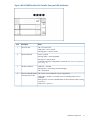
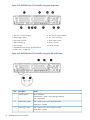
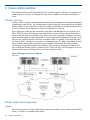
The following figures show components and LEDs located on the front and rear panels of the HP
3PAR StoreServ File Controller.
Figure 1 HP 3PAR StoreServ File Controller front panel components
1. Video connector
2. SATA optical drive bay
3. Drive bays
4. Systems Insight Display
5. USB connectors (2)
8
HP 3PAR StoreServ File Controller
Figure 2 HP HP 3PAR StoreServ File Controller front panel LEDs and buttons
Item
1
Description
Status
NIC status LED
Off = No network link
Solid green = Link to network
Flashing green = Network activity
2
System health LED
Green = Normal
Flashing amber = System degraded
Flashing red = System critical
To identify components in degraded or critical state, see “Systems Insight Display
LEDs” (page 11).
3
UID LED and button
Solid blue = Activated
Flashing blue = System being remotely managed
Off = Deactivated
4
Power On/Standby button
and system power LED
Off = Power cord not attached or power supply failure
Solid Amber = System is in standby; Power On/Standby Button service is
initialized.
Flashing Green = Power On/Standby Button has been pressed; system is waiting
to power on.
Solid Green = System on
Hardware components
9
Figure 3 HP 3PAR StoreServ File Controller rear panel components
1. PCIe slots 1–3 (top to bottom)
2. PCIe slots 4–6 (top to bottom)
3. Power supply 1 (PS1)
4. PS1 power connector
5. PS2 power connector
6. Power supply 2 (PS2)
7. USB connectors (4)
8. Video connector
9. iLO connector
10. Serial connector
11. FlexibleLOM ports (Shown: 4x1Gb/Optional:
2x10Gb); port 1 on right side
Figure 4 HP 3PAR StoreServ File Controller rear panel LEDs and buttons
Item
1
Description
Status
UID LED/button
Blue = Activated.
Flashing blue = System is being managed remotely.
Off = Deactivated.
2
Power supply 2 LED
Off = System is off or power supply has failed.
Solid green = Normal
3
Power supply 1LED
Off = System is off or power supply has failed.
Solid green = Normal
10
HP 3PAR StoreServ File Controller
Item
4
Description
Status
NIC activity LED
Green = Activity exists
Flashing green = Activity exists
Off = No activity exists
5
NIC link LED
Green = Link exists
Off = No link exists
Drive LED definitions
The following figure shows the drive LEDs. These LEDs are located on all HP ProLiant hot plug hard
drives.
Figure 5 Drive LEDs
Item
1
2
3
4
LED
Status
Definition
Locate
Solid blue
The drive is being identified by a host application.
Flashing blue
The drive carrier firmware is being updated or requires an
update.
Rotating green
Drive activity
Off
No drive activity
Solid white
Do not remove the drive. Removing the drive causes one or
more of the logical drives to fail.
Off
Removing the drive does not cause a logical drive to fail.
Solid green
The drive is a member of one or more logical drives.
Flashing green
The drive is rebuilding or performing a RAID migration,
stripe size migration, capacity expansion, or logical drive
extension, or is erasing.
Activity ring
Do not remove
Drive status
Flashing amber/green The drive is a member of one or more logical drives and
predicts the drive will fail.
Flashing amber
The drive is not configured and predicts the drive will fail.
Solid amber
The drive has failed.
Off
The drive is not configured by a RAID controller.
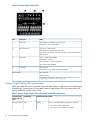
Systems Insight Display LEDs
The HP Systems Insight Display LEDs represent the system board layout. The display enables
diagnosis with the access panel installed.
Hardware components
11
Figure 6 Systems Insight Display LEDs
Item
Description
Status
1
Power cap
Off = System is in standby, or no cap is set.
Solid green = Power cap applied
2
NIC link/activity
Solid green = Network link
Flashing green = Network link and activity
Off = No link to network. If the power is off, view the rear panel RJ-45
LEDs for status.
3
AMP status
Green = AMP mode enabled
Solid amber = Failover
Flashing amber = invalid configuration
Off = AMP modes disabled
4
Over temp
Off = Normal
Solid amber = High system temperature detected
All other LEDs
Off = Normal
Amber =Failure
For detailed information on the activation of these LEDs, see “Systems
Insight Display LED combinations” (page 12).
Systems Insight Display LED combinations
When the health LED on the front panel illuminates either amber or red, the server is experiencing
a health event. Combinations of illuminated Systems Insight Display LEDs, the system power LED,
and the health LED indicate system status.
Table 1 Systems Insight Display LEDs and internal health LED combinations
Systems Insight
Display LED and
color
Health LED
System power LED Status
Processor (amber)
Red
Amber
One or more of the following conditions may exist:
• Processor in socket X has failed.
• Processor X is not installed in the socket.
12
HP 3PAR StoreServ File Controller
Table 1 Systems Insight Display LEDs and internal health LED combinations (continued)
Systems Insight
Display LED and
color
Health LED
System power LED Status
• Processor X is unsupported.
• ROM detects a failed processor during POST.
Amber
Green
Processor in socket X is in a pre-failure condition.
Red
Green
One or more DIMMs have failed.
Amber
Green
DIMM in slot X is in a pre-failure condition.
Over temp (amber) Amber
Green
The Health Driver has detected a cautionary temperature
level.
Red
Amber
The server has detected a hardware critical temperature
level.
PCI riser (amber)
Red
Green
The PCI riser cage is not seated properly.
Fan (amber)
Amber
Green
One fan has failed or is removed.
Red
Green
Two or more fans have failed or are removed.
Red
Amber
One or more of the following conditions may exist:
DIMM (amber)
Power supply
(amber)
• Only one power supply is installed and that power
supply is in standby.
• Power supply fault
• System board fault
Amber
Green
One or more of the following conditions may exist:
• Redundant power supply is installed and only one
power supply is functional.
• AC power cord is not plugged into redundant power
supply.
• Redundant power supply fault
• Power supply mismatch at POST or power supply
mismatch through hot-plug addition
Power cap (off)
—
Power cap (green) —
—
Amber
Standby
Flashing green
Waiting for power
Green
Power is available.
Software components
Windows Storage Server 2012 Standard Edition comes preinstalled and activated on the HP 3PAR
StoreServ File Controller. The storage system configuration also includes the HP Initial Configuration
Tasks window, Windows Server Manager, and HP StoreEasy tools, which are used to set up and
manage your storage system.
Software components
13
NOTE: Windows Storage Server 2012 Standard Edition is installed in Server with a GUI mode
by default. You can switch to Server Core Installation mode; however, Server Core Installation
mode is only supported on an HP 3PAR StoreServ File Controller when the operating environment
does not require user interaction (such as in a data center). Any activity that requires the use of a
GUI must be done in Server with a GUI mode. For more information about installation options,
see the “Windows Server Installation Options” article on Microsoft TechNet at:
http://technet.microsoft.com/library/hh831786.aspx
To switch to Server Core mode, see “Using Server Core” (page 20) for more information.
The Initial Configuration Tasks window assists during the initial out of box setup by configuring
items such as time zone, networking, domain join, and provisioning storage. Select Windows
Server Manager→File and Storage Services to create virtual disks and place volumes on the virtual
disks. Also, the Windows Server Manager→Tools→HP StoreEasy menu provides a collection of
HP and Microsoft utilities that are useful for managing the storage system. These menu items are
also accessible from the HP StoreEasy folder on the desktop.
14
HP 3PAR StoreServ File Controller
2 Installing and configuring the storage system
Setup overview
The HP 3PAR StoreServ File Controller comes preinstalled with the Microsoft Windows Storage
Server 2012 Standard Edition operating system with Microsoft iSCSI Software Target and a
Microsoft Cluster Service (MSCS) license included.
Verify the kit contents
Remove the contents, ensuring that you have all of the following components. If components are
missing, contact HP technical support.
Hardware
•
HP 3PAR StoreServ File Controller system (with operating system preloaded)
•
Power cords
•
Rail kit
Media and documentation
•
HP 3PAR StoreServ File Controller Quick Start Guide
•
Safety and Disposal Documentation CD
•
HP System Recovery DVD
•
End User License Agreement
•
Certificate of Authenticity Card
•
HP ProLiant Essentials Integrated Lights-Out Advanced Pack
Locate the serial number, Certificate of Authenticity, and End User License
Agreement
For technical support purposes, locate the storage system's serial number, Certificate of Authenticity
(COA), and End User License Agreement (EULA). Record the serial number and COA product key
and make a print copy of the EULA as needed.
The storage system's serial number is located in several places:
•
Top of the storage system or blade
•
Back of the storage system
•
Inside the storage system shipping box
•
Outside of the storage system shipping box
The storage system's Certificate of Authenticity (COA) card is located inside the storage system
shipping box. There is also a COA sticker with product key affixed to the top of the storage system
or blade.
There is an electronic copy of the EULA installed with the storage system at C:\Windows\
System32\license.rtf.
Install the storage system hardware
If your storage system is fully racked and cabled, go to “Connect to the storage system” (page 16).
For HP 3PAR StoreServ File Controller systems, install the rail kit and insert and secure the storage
system into the rack by following the HP Rack Rail Kit Installation Instructions.
Setup overview
15
Connect to the storage system
Use either the direct attach or remote management method to connect to the storage system.
IMPORTANT: Only the direct attach and remote management access methods can be used to
install the storage system. After the storage system installation process is complete and the server’s
IP addresses have been assigned, you can then additionally use the remote desktop method to
access the storage system.
•
Direct attach —This access method is mandatory if your network does not have a Dynamic
Host Configuration Protocol (DHCP) server. Connect the following cables to the back panel
of the storage system in the following sequence: keyboard, mouse, network cables, monitor
cable, and power cable.
NOTE:
•
The keyboard, mouse, and monitor are not provided with the storage system.
Remote management—Access the storage system using the Integrated Lights-Out (iLO) remote
management method:
1. Connect the desired network cables to network adapter ports on the back of the storage
system.
2. Connect a network cable to the iLO port located on the back of the storage system.
3. Connect a power cable to the storage system.
4. Locate the iLO Network Settings tag attached to the storage system and record the default
user name, password, and DNS name.
5. From a remote computer, open a standard Web browser and enter the iLO management
hostname of the storage system.
NOTE: By default, iLO obtains the management IP address and subnet mask from your
network’s DHCP server. The hostname found on the iLO tag is automatically registered
with your network’s DNS server.
6.
Using the default user information provided on the iLO Network Settings tag, log on to
iLO, and then launch a remote console to the storage system.
For detailed instructions on using iLO remote management software, see the HP iLO 4
User Guide.
Power on the server and log on
1.
Power on the system by pushing the power button on the front panel. If using iLO, click
Momentary Press under the Power Switch menu of the remote console.
IMPORTANT:
If you are deploying a cluster, only interact with one of the servers. After
powering on both servers, the Setup Windows Wizard and the Initial Configuration Tasks
must be run from only one server.
The storage system starts and displays the Setup Windows wizard, in which you select language
and regional settings and accept the license agreement. After completing the wizard, you are
asked if you want to configure a standalone system or a two-node cluster. Click Yes to configure
your system as a cluster or click No to configure your system as a standalone server. The
storage system installation process takes approximately 10–15 minutes.
2.
16
After installation completes and the server (or servers if deploying a cluster) reboots, you are
automatically logged on as the local administrator. If you are deploying a cluster, continue
to work only with the server on which you used the Setup Windows Wizard.
Installing and configuring the storage system
Configure the storage system
The HP Initial Configuration Tasks (ICT) window launches automatically at logon. Use the ICT to
perform setup tasks such as setting the time zone, network configuration, changing the computer
name, joining a domain, creating a virtual disk, and provisioning storage. For more information
on any of these tasks, click the help icon for the appropriate task group in the ICT window.
NOTE:
Microsoft Storage Spaces are not supported on HP 3PAR StoreServ File Controller.
Provisioning cluster shared storage
HP 3PAR StoreServ File Controller products are NAS gateway products that provide file services
for SAN or array block storage. By presenting LUNs from the SAN or array to the HP 3PAR
StoreServ File Controller, you can offer SMB and NFS file shares to clients. This also enables other
Windows based features such as snapshots (volume shadow copies), data deduplication, directory
quotas and much more.
All storage provisioning for HP 3PAR StoreServ File Controller is done on the particular array used
for storage. Consult the documentation for your particular array to perform the necessary tasks
involved in presenting LUNs to the HP 3PAR StoreServ File Controller. In general, you should follow
the array’s guidelines for providing storage to Windows Storage Server 2012. This will also likely
involve such tasks as cabling, configuring ports, zoning, and configuring MPIO.
NOTE: For instructions on how to connect the HP 3PAR StoreServ File Controller to an HP 3PAR
StoreServ system, see the HP 3PAR Windows Server 2012 and Windows Server 2008
Implementation Guide, which is available at:
http://www.hp.com/support/manuals
Under storage, select Storage Software, and then select HP 3PAR Operating System Software
under Storage 3PAR Device Management Software. The Implementation Guide is listed in the
Setup and install – general section.
Deploying two or more HP 3PAR StoreServ File Controller systems as a Windows Failover Cluster
enables highly available services such as file shares, iSCSI targets, and more. The Initial
Configuration Tasks (ICT) window assists in creating a two node cluster. If you plan on having
more than two nodes in the cluster, it is recommended that you use ICT to create a two node cluster
first, and then add additional nodes using Windows Failover Cluster Manager or equivalent
PowerShell cmdlets. For more information, see ???.
A Windows failover cluster requires shared storage from the array or SAN. Following are the
requirements for shared storage that will enable creation of the cluster.
•
•
Create a LUN that will be used as a witness disk or quorum disk.
◦
Create a LUN of at least 544 MB. This will allow for a volume size of the required 512
MB after NTFS formatting.
◦
Present the LUN to all hosts that will be part of the cluster.
Optionally, create an additional LUN or LUNs that will be assigned to the first file server.
When the Validate and Create the Cluster ICT task is run, the wizard will look for additional
LUNs. If any are found, the wizard will provide an option to create a file server in addition
Configure the storage system
17
to creating the cluster. The Validate and Create the Cluster wizard uses the following logic to
assign LUNs:
•
◦
The smallest LUN that is larger than 500 MB will be used as the quorum disk in the cluster.
◦
Any additional LUNs will be assigned to the file server that will be created.
◦
If you want to create a file server when the cluster is created, provision an additional
LUN.
After the LUNs are provisioned and presented to all hosts, use the Create Volumes task in the
ICT to create NTFS volumes on the LUN.
◦
It is not necessary to provide a drive letter for the quorum disk, although you may if you
like.
Provisioning standalone storage
HP 3PAR StoreServ File Controller products are NAS gateway products that provide file services
for SAN or array block storage. By presenting LUNs from the SAN or array to the HP 3PAR
StoreServ File Controller, you can offer SMB and NFS file shares to clients. This also enables other
Windows based features such as snapshots (volume shadow copies), data deduplication, directory
quotas and much more.
NOTE:
Microsoft Storage Spaces are not supported with StoreEasy products.
All storage provisioning for HP 3PAR StoreServ File Controller is done on the particular array used
for storage. Consult the documentation for your particular array to perform the necessary tasks
involved in presenting LUNs to the HP 3PAR StoreServ File Controller. In general, you should follow
the array’s guidelines for providing storage to Windows Storage Server 2012. This will also likely
involve such tasks as cabling, configuring ports, zoning, and configuring MPIO.
NOTE: For instructions on how to connect the HP 3PAR StoreServ File Controller to an HP 3PAR
StoreServ system, see the HP 3PAR Windows Server 2012 and Windows Server 2008
Implementation Guide, which is available at:
http://www.hp.com/support/manuals
Under storage, select Storage Software, and then select HP 3PAR Operating System Software
under Storage 3PAR Device Management Software. The Implementation Guide is listed in the
Setup and install – general section.
Complete system configuration
IMPORTANT: HP strongly recommends that you validate your configuration when using clusters.
Whether you create a cluster through the ICT or the Failover Cluster Manager, one of the first steps
is validating your configuration using the Microsoft cluster validation tool. If you choose to skip
the validation step, you can still validate the cluster after it is created.
After the storage system is physically set up and you have completed all of the required tasks in
the Initial Configuration Tasks window, you may want to complete additional setup tasks. Depending
on the deployment scenario of the storage system, these steps can vary. These additional steps
can include:
18
•
Running Microsoft Windows Update—HP highly recommends that you run Microsoft Windows
updates to identify, review, and install the latest, applicable, critical security updates on the
storage system.
•
Creating and managing users and groups—User and group information and permissions
determine whether a user can access files. If the storage system is deployed into a workgroup
environment, this user and group information is stored locally on the device. By contrast, if
Installing and configuring the storage system
the storage system is deployed into a domain environment, user and group information is
stored on the domain.
•
Configuring event notification.
•
Using Ethernet NIC teaming (optional)—Use Windows Server Manager to configure and
monitor Ethernet network interface controller (NIC) teams in a Windows-based operating
system. These teams provide options for increasing fault tolerance and throughput. For more
information, see the Windows Server 2012 NIC Teaming (LBFO) Deployment and Management
Guide, available at:
http://www.microsoft.com/en-us/download/details.aspx?id=30160
•
Adjusting logging for system, application, and security events.
•
Installing third-party software applications—For example, these might include an antivirus
application that you install.
•
Registering the server — To register the server, refer to the HP Registration website (http://
register.hp.com).
Integrating the 3PAR StoreServ system with the HP 3PAR StoreServ File
Controller
Three steps are required to complete the integration of the 3PAR StoreServ system with the HP
3PAR StoreServ File Controller. These steps must be taken on each HP 3PAR StoreServ File Controller
system that is attached to the 3PAR StoreServ system.
Registering the 3PAR StoreServ SMI-S provider
Complete the following steps to register the SMI-S provider with the HP 3PAR StoreServ File
Controller:
1. Open an elevated PowerShell command prompt. To do so, right-click the PowerShell icon in
the desktop task bar and select Run as Administrator.
2. Register the provider:
a. Enter the following command:
Register-SmisProvider –ConectionUri http://<3PAR StoreServ system
ip address>:<port>
The default port number is 5988. However, your 3PAR StoreServ configuration may be
different.
b.
When prompted, enter the credentials for the 3PAR StoreServ system. The default user
name is 3paradm and the default password is 3pardata.
NOTE: If you are using virtual domains on the StoreServ system, use the credentials for
the domain that will be managed by the HP 3PAR StoreServ File Controller to register the
SMI-S provider. For more information about virtual domains, see the HP 3PAR StoreServ
Storage Concepts Guide.
c.
3.
When the registration completes, the PowerShell command prompt will return with no
errors. If errors are reported, see the error description for assistance.
Confirm the provider has been registered by entering the command Get-StorageProvider. The
resulting output should list the SMI-S provider registered with the supplied IP address. The
Manufacturer should be listed as HP 3PAR.
Integrating the 3PAR StoreServ system with the HP 3PAR StoreServ File Controller
19
Updating the storage provider cache
The storage provider cache is used by the HP 3PAR StoreServ File Controller to improve the
efficiency of storage provisioning operations. After the initial SMI-S provider registration, the cache
must be refreshed. Execute the following command in an elevated PowerShell command window:
Update-StorageProviderCache –DiscoveryLevel full.
NOTE: If you use the Inform Management Console to change the StoreServ storage (for example,
add new virtual volumes or change volume names), the storage provider cache must be updated
manually so changes are correctly reflected in the HP 3PAR StoreServ File Controller user interface.
Using Server Core
The Server Core interface is a command prompt with PowerShell support. In Windows Server
2012, you can transition between Server with a GUI mode and Server Core mode without
reinstalling the operating system.
Transition to Server Core mode
1.
Open PowerShell and execute the following command:
PS C:\Users\Administrator> Remove-WindowsFeature Server-Gui-Shell,
Server-Gui-Mgmt-Infra
2.
When prompted, restart the server by executing the following command:
PS C:\Users\Administrator> shutdown –r –t 0
After the server restart, only the command prompt will be available, indicating the server is
now in Server Core mode.
NOTE: If you close all command prompts, there will be no way to manage the server in Server
Core mode. To resolve this issue, complete the following steps:
1. Press CTRL+ALT+DELETE.
2. Select Start Task Manager.
3. Select File→Start New Task, which opens a command prompt.
4. Enter cmd.exe.
Alternatively, you can log off and log back on again. For more information, see the Microsoft
TechNet article “Configure a Server Core Server” at:
http://technet.microsoft.com/en-us/library/jj592692.aspx
Transition to Server with a GUI mode
1.
Open PowerShell and execute the following command:
PS C:\Users\Administrator> Add-WindowsFeature Server-Gui-Shell,
Server-Gui-Mgmt-Infra
2.
Reboot the server manually by entering one of the following commands:
PS C:\Users\Administrator> shutdown –r –t 0
or
PS C:\Users\Administrator> Install-WindowsFeature
Server-Gui-Mgmt-Infra,Server-Gui-Shell –Restart
20
Installing and configuring the storage system
NOTE: Transitioning to Server Core mode disables the OEM-Appliance-OOBE feature. After
transitioning back to Server with a GUI mode, you must manually enable this feature by executing
the following command:
PS C:\Users\Administrator>dism /online /enable-feature
/featurename:OEM-Appliance-OOBE
Then, install HP ICT from C:\hpnas\Components\ManagementTools.
Configuring failover properties for multi-site environments
You can configure failover properties for multi-site environments using DFS Management, which
is available from the Tools menu in Windows Server Manager (Tools→DFS Management).
For detailed instructions, see the Microsoft TechNet article, DFS Step-by-Step Guide for Windows
Server 2008, which is available at:
http://technet.microsoft.com/en-us/library/cc732863(v=ws.10).aspx
NOTE:
•
The information in the article applies to Windows Server 2012 as well.
•
The article provides instructions to configure both DFS Namespace and DFS Replication.
•
The prerequisites listed in the article are already installed with the StoreEasy software.
•
You can start at the section entitled, “Overivew of the DFS Management Snap-in”.
Additional access methods
After the storage system installation process is complete and the system's IP address has been
assigned, you can then additionally use the Remote Desktop and Telnet methods to access the
storage system.
Using the Remote Desktop method
Remote Desktop provides the ability for you to log on to and remotely administer your server, giving
you a method of managing it from any client. Installed for remote administration, Remote Desktop
allows only two concurrent sessions. Leaving a session running takes up one license and can affect
other users. If two sessions are running, additional users will be denied access.
To connect the storage system to a network using the Remote Desktop method:
1. On the PC client, select Start→Windows PowerShell. Type mstsc and click Enter.
2. Enter the IP address of the storage system in the Computer box and click Connect.
3. Log on to the storage system with the administrator user name and password.
Using the Telnet method
Telnet is a utility that lets users connect to machines, log on, and obtain a command prompt
remotely. By default, Telnet server is not installed.
Configuring failover properties for multi-site environments
21
3 Administration tools
HP 3PAR StoreServ File Controller systems include several administration tools to simplify storage
system management tasks.
Microsoft Windows Storage Server 2012 administration tools
Microsoft Windows Storage Server 2012 operating systems provide a user interface for initial
server configuration, unified storage system management, simplified setup and management of
storage and shared folders, and iSCSI targets. It is specially tuned to provide optimal performance
for network-attached storage. Windows Storage Server 2012 provides significant enhancements
in share and storage management scenarios, as well as integration of storage system management
components and functionality.
Remote Administration
The following tools are available for remote management of the system:
•
Remote Desktop
•
Server Manager on a Windows 8 client via RSAT tools
•
Remote PowerShell
After initial setup of the system is completed using the Initial Configuration Tasks window, Windows
Server Manager is used to manage the system.
Windows Server Manager can be launched from the storage system desktop by clicking the icon
on the left end of the task bar. The local HP 3PAR StoreServ File Controller system as well as other
Windows servers may be managed, as described in the Manage Multiple, Remote Servers with
Server Manager article on Microsoft TechNet.
Windows Server Manager can also be used for remote management of the storage system by
installing it on a Windows 8 client as part of Remote Server Administration tools. To download
the tools, go to the following Microsft website:
Download Center
NOTE: The Tools menu of Windows Server Manager applies to local tools only, not a remote
system under management.
Many storage related tasks are accomplished with the File and Storage Services content within
Windows Server Manager. There is also a Tools menu where many of the common utilities familiar
to Windows administrators can be launched. The Tools→HP StoreEasy menu groups the HP-specific
management tools as well as some of the more commonly used Windows tools related to managing
a StoreEasy system.
File and Storage Services
File and Storage Services includes technologies that help you set up and manage one or more file
servers, which are servers that provide central locations on your network where you can store files
and share them with users. If users need access to the same files and applications, or if centralized
backup and file management are important to your organization, you should set up one or more
servers as a file server by installing the File and Storage Services role and the appropriate role
services.
22
Administration tools
Administrators can use the File and Storage Services role to setup and manage multiple file servers
and their storage by using Server Manager or Windows PowerShell. Some of the specific
applications include the following:
•
Use Data Deduplication to reduce the disk space requirements of your files, saving money on
storage.
•
Use iSCSI Target Server to create centralized, software-based, and hardware-independent
iSCSI disk subsystems in storage area networks (SANs).
•
Use Server Manager to remotely manage multiple file servers from a single window.
•
Use Windows PowerShell to automate the management of the majority of administration tasks
for file servers.
For more information, see the Windows Storage Server 2012 Help.
Data Deduplication
Data deduplication involves finding and removing duplication within data without compromising
its fidelity or integrity. The goal is to store more data in less space by segmenting files into small
variable-sized chunks (32–128 KB), identifying duplicate chunks, and maintaining a single copy
of each chunk. Redundant copies of the chunk are replaced by a reference to the single copy. The
chunks are compressed and then organized into special container files in the System Volume
Information folder.
After a volume is enabled for deduplication and the data is optimized, the volume contains the
following:
•
Unoptimized files—For example, unoptimized files could include files that do not meet the
selected file-age policy setting, system state files, alternate data streams, encrypted files, files
with extended attributes, files smaller than 32 KB, other reparse point files, or files in use by
other applications.
•
Optimized files—Files that are stored as reparse points that contain pointers to a map of the
respective chunks in the chunk store that are needed to restore the file when it is requested.
•
Chunk store—Location for the optimized file data.
•
Additional free space—The optimized files and chunk store occupy much less space than they
did prior to optimization.
To enable Data deduplication on a volume:
1. Open Windows Server Manager.
2. Select File and Storage Services and select Volumes.
3. Right-click a data volume and select Configure Data Deduplication.
The Deduplication Settings window is displayed.
4.
Complete the following:
a. Select the Enable data deduplication checkbox.
b. Enter the number of days that should pass between file creation and when files are
deduplicated.
c. Identify any file type extensions that should not be deduplicated.
d. Click Add to browse to any folders containing files that should not be deduplicated.
5.
Click Apply to apply these settings, or click Set Deduplication Schedule to configure a
deduplication schedule.
For more information, see the Windows Storage Server 2012 Help.
Microsoft Windows Storage Server 2012 administration tools
23
Print Management
Use Print Management to view and manage printers and print servers in your organization. You
can use Print Management from any computer running Windows Storage Server 2012, and you
can manage all network printers on print servers running Windows 2000 Server, Windows Server
2003, Windows Storage Server 2003, Windows Storage Server 2003 R2, Windows Storage
Server 2008, Windows Storage Server 2008 R2, or Windows Storage Server 2012.
Print Management provides details such as the queue status, printer name, driver name, and server
name. You can also set custom views by using the Print Management filtering capability. For
example, you can create a view that displays only printers in a particular error state. You can also
configure Print Management to send e-mail notifications or run scripts when a printer or print server
needs attention. The filtering capability also allows you to bulk edit print jobs, such as canceling
all print jobs at once. You can also delete multiple printers at the same time.
Administrators can install printers remotely by using the automatic detection feature, which finds
and installs printers on the local subnet to the local print server. Administrators can log on remotely
to a server at a branch location, and then install printers remotely.
For more information, see the Windows Storage Server 2012 Help.
Network File System (NFS) User Mapping
Network File System (NFS) is a network file sharing protocol that allows remote access to files over
a network and is typically used in networks with computers running UNIX, Linux, or Mac OS
operating systems. NFS is supported on all HP 3PAR StoreServ File Controller systems.
All of the following types of NFS account mapping are supported: Active Directory® Domain
Services (AD DS) mapped user access, Active Directory® Lightweight Directory Services (AD LDS)
mapped user access, unmapped anonymous user access, and unmapped UNIX user access.
For more information about NFS, see the following Microsoft website:
The Storage Team at Microsoft – File Cabinet Blog
24
Administration tools
4 Storage management overview
This chapter provides an overview of some of the components that make up the storage structure
of the storage system.
Storage management elements
Storage is divided into four major divisions:
•
Physical storage elements
•
Logical storage elements
•
File system elements
•
File sharing elements
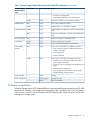
Each of these elements is composed of the previous level's elements.
Storage management example
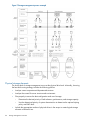
Figure 7 (page 26) depicts many of the storage elements that one would find on a storage device.
The following sections provide an overview of the storage elements.
Storage management elements
25
Figure 7 Storage management process example
Physical storage elements
The lowest level of storage management occurs at the physical drive level. Minimally, choosing
the best disk carving strategy includes the following policies:
•
Analyze current corporate and departmental structure.
•
Analyze the current file server structure and environment.
•
Plan properly to ensure the best configuration and use of storage.
•
26
◦
Determine the desired priority of fault tolerance, performance, and storage capacity.
◦
Use the determined priority of system characteristics to determine the optimal striping
policy and RAID level.
Include the appropriate number of physical drives in the arrays to create logical storage
elements of desired sizes.
Storage management overview
Arrays
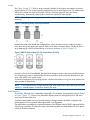
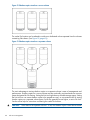
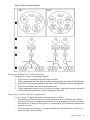
See Figure 8 (page 27). With an array controller installed in the system, the capacity of several
physical drives (P1–P3) can be logically combined into one or more logical units (L1) called arrays.
When this is done, the read/write heads of all the constituent physical drives are active
simultaneously, dramatically reducing the overall time required for data transfer.
NOTE: Depending on the storage system model, array configuration may not be possible or
necessary.
Figure 8 Configuring arrays from physical drives
Because the read/write heads are simultaneously active, the same amount of data is written to
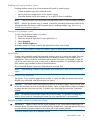
each drive during any given time interval. Each unit of data is termed a block. The blocks form a
set of data stripes over all the hard drives in an array, as shown in Figure 9 (page 27).
Figure 9 RAID 0 (data striping) (S1-S4) of data blocks (B1-B12)
For data in the array to be readable, the data block sequence within each stripe must be the same.
This sequencing process is performed by the array controller, which sends the data blocks to the
drive write heads in the correct order.
A natural consequence of the striping process is that each hard drive in a given array contains the
same number of data blocks.
NOTE: If one hard drive has a larger capacity than other hard drives in the same array, the extra
capacity is wasted because it cannot be used by the array.
Fault tolerance
Drive failure, although rare, is potentially catastrophic. For example, using simple striping as shown
in Figure 9 (page 27), failure of any hard drive leads to failure of all logical drives in the same
array, and hence to data loss.
To protect against data loss from hard drive failure, storage systems should be configured with
fault tolerance. HP recommends adhering to RAID 5 configurations.
The table below summarizes the important features of the different kinds of RAID supported by the
Smart Array controllers. The decision chart in the following table can help determine which option
is best for different situations.
Storage management elements
27
Table 2 Summary of RAID methods
RAID 0 Striping
(no fault
tolerance)
RAID 1+0
Mirroring
RAID 5
Distributed Data
Guarding
RAID 6 (ADG)
Maximum number of hard N/A
drives
N/A
14
Storage system dependent
Tolerant of single hard
drive failure?
No
Yes
Yes
Yes
Tolerant of multiple
simultaneous hard drive
failures?
No
If the failed
No
drives are not
mirrored to each
other
Yes (two drives can fail)
Online spares
Further protection against data loss can be achieved by assigning an online spare (or hot spare)
to any configuration except RAID 0. This hard drive contains no data and is contained within the
same storage subsystem as the other drives in the array. When a hard drive in the array fails, the
controller can then automatically rebuild information that was originally on the failed drive onto
the online spare. This quickly restores the system to full RAID level fault tolerance protection.
However, unless RAID Advanced Data Guarding (ADG) is being used, which can support two
drive failures in an array, in the unlikely event that a third drive in the array should fail while data
is being rewritten to the spare, the logical drive still fails.
Logical storage elements
Logical storage elements consist of those components that translate the physical storage elements
to file system elements. The storage system uses the Window Disk Management utility to manage
the various types of disks presented to the file system. There are two types of LUN presentation:
basic disk and dynamic disk. Each of these types of disk has special features that enable different
types of management.
Logical drives (LUNs)
While an array is a physical grouping of hard drives, a logical drive consists of components that
translate physical storage elements into file system elements. A LUN may also be referred to as a
virtual disk.
It is important to note that a LUN may span all physical drives within a storage controller subsystem,
but cannot span multiple storage controller subsystems.
Figure 10 Two arrays (A1, A2) and five logical drives (L1 through L5) spread over five physical
drives
NOTE: This type of configuration may not apply to all storage systems and serves only as an
example.
Through the use of basic disks, you can create primary partitions or extended partitions. Partitions
can only encompass one LUN. Through the use of dynamic disks, you can create volumes that
28
Storage management overview
span multiple LUNs. You can use the Windows Disk Management utility to convert disks to dynamic
and back to basic and to manage the volumes residing on dynamic disks. Other options include
the ability to delete, extend, mirror, and repair these elements.
Partitions
Partitions exist as either primary partitions or extended partitions. The master boot record (MBR)
disk partitioning style supports volumes up to 2 terabytes in size and up to 4 primary partitions
per disk (or three primary partitions, one extended partition, and unlimited logical drives). Extended
partitions allow the user to create multiple logical drives. These partitions or logical disks can be
assigned drive letters or be used as mount points on existing disks. If mount points are used, it
should be noted that Services for UNIX (SFU) does not support mount points at this time. The use
of mount points in conjunction with NFS shares is not supported.
The GUID partition table (GPT) disk partitioning style supports volumes up to 18 exabytes in size
and up to 128 partitions per disk. Unlike MBR partitioned disks, data critical to platform operation
is located in partitions instead of unpartitioned or hidden sectors. In addition, GPT partitioned disks
have redundant primary and backup partition tables for improved partition data structure integrity.
On the Volumes tab in the disk properties dialog box in Disk Management, disks with the GPT
partitioning style are displayed as GUID Partition Table (GPT) disks, and disks with the MBR
partitioning style are displayed as Master Boot Record (MBR) disks.
Volumes
When planning dynamic disks and volumes, there is a limit to the amount of growth a single volume
can undergo. Volumes are limited in size and can have no more than 32 separate LUNs, with
each LUN not exceeding 2 terabytes (TB), and volumes totaling no more than 64 TB of disk space.
The RAID level of the LUNs included in a volume must be considered. All of the units that make up
a volume should have the same high-availability characteristics. In other words, the units should
all be of the same RAID level. For example, it would not be a good practice to include both a RAID
1+0 and a RAID 5 array in the same volume set. By keeping all the units the same, the entire
volume retains the same performance and high-availability characteristics, making managing and
maintaining the volume much easier. If a dynamic disk goes offline, the entire volume dependent
on the one or more dynamic disks is unavailable. There could be a potential for data loss depending
on the nature of the failed LUN.
Volumes are created out of the dynamic disks, and can be expanded on the fly to extend over
multiple dynamic disks if they are spanned volumes. However, after a type of volume is selected,
it cannot be altered. For example, a spanning volume cannot be altered to a mirrored volume
without deleting and recreating the volume, unless it is a simple volume. Simple volumes can be
mirrored or converted to spanned volumes. Fault-tolerant disks cannot be extended. Therefore,
selection of the volume type is important. The same performance characteristics on numbers of
reads and writes apply when using fault-tolerant configurations, as is the case with controller-based
RAID. These volumes can also be assigned drive letters or be mounted as mount points off existing
drive letters.
The administrator should carefully consider how the volumes will be carved up and what groups
or applications will be using them. For example, putting several storage-intensive applications or
groups into the same dynamic disk set would not be efficient. These applications or groups would
be better served by being divided up into separate dynamic disks, which could then grow as their
space requirements increased, within the allowable growth limits.
NOTE: Dynamic disks cannot be used for clustering configurations because Microsoft Cluster
only supports basic disks.
Storage management elements
29
File system elements
File system elements are composed of the folders and subfolders that are created under each logical
storage element (partitions, logical disks, and volumes). Folders are used to further subdivide the
available file system, providing another level of granularity for management of the information
space. Each of these folders can contain separate permissions and share names that can be used
for network access. Folders can be created for individual users, groups, projects, and so on.
File sharing elements
The storage system supports several file sharing protocols, including Distributed File System (DFS),
Network File System (NFS), File Transfer Protocol (FTP), Hypertext Transfer Protocol (HTTP), and
Microsoft Server Message Block (SMB). On each folder or logical storage element, different file
sharing protocols can be enabled using specific network names for access across a network to a
variety of clients. Permissions can then be granted to those shares based on users or groups of
users in each of the file sharing protocols.
Volume Shadow Copy Service overview
The Volume Shadow Copy Service (VSS) provides an infrastructure for creating point-in-time
snapshots (shadow copies) of volumes. VSS supports 64 shadow copies per volume.
Shadow Copies of Shared Folders resides within this infrastructure, and helps alleviate data loss
by creating shadow copies of files or folders that are stored on network file shares at pre-determined
time intervals. In essence, a shadow copy is a previous version of the file or folder at a specific
point in time.
By using shadow copies, a storage system can maintain a set of previous versions of all files on
the selected volumes. End users access the file or folder by using a separate client add-on program,
which enables them to view the file in Windows Explorer.
Shadow copies should not replace the current backup, archive, or business recovery system, but
they can help to simplify restore procedures. For example, shadow copies cannot protect against
data loss due to media failures; however, recovering data from shadow copies can reduce the
number of times needed to restore data from tape.
Using storage elements
The last step in creating the element is determining its drive letter or mount point and formatting
the element. Each element created can exist as a drive letter, assuming one is available, and/or
as mount points on an existing folder or drive letter. Either method is supported. However, mount
points cannot be used for shares that will be shared using Microsoft Services for Unix. They can
be set up with both but the use of the mount point in conjunction with NFS shares causes instability
with the NFS shares.
Formats consist of NTFS, FAT32, and FAT. All three types can be used on the storage system.
However, VSS can only use volumes that are NTFS formatted. Also, quota management is possible
only on NTFS.
Clustered server elements
HP 3PAR StoreServ File Controller systems supports clustering. These storage systems support
several file sharing protocols including DFS, NFS, FTP, HTTP, and Microsoft SMB. Only NFS, FTP,
and Microsoft SMB are cluster-aware protocols. HTTP can be installed on each node but the
protocols cannot be set up through cluster administrator, and they will not fail over during a node
failure.
Network names and IP address resources for the clustered file share resource can also be established
for access across a network to a variety of clients. Permissions can then be granted to those shares
based on users or groups of users in each of the file sharing protocols.
30
Storage management overview
Network adapter teaming
Network adapter teaming is software-based technology used to increase a server's network
availability and performance. Teaming enables the logical grouping of physical adapters in the
same server (regardless of whether they are embedded devices or Peripheral Component
Interconnect (PCI) adapters) into a virtual adapter. This virtual adapter is seen by the network and
server-resident network-aware applications as a single network connection.
Management tools
HP Systems Insight Manager
HP SIM is a web-based application that allows system administrators to accomplish normal
administrative tasks from any remote location, using a web browser. HP SIM provides device
management capabilities that consolidate and integrate management data from HP and third-party
devices.
IMPORTANT: You must install and use HP SIM to benefit from the Pre-Failure Warranty for
processors, SAS and SCSI hard drives, and memory modules.
For additional information, refer to the Management CD in the HP ProLiant Essentials Foundation
Pack or the HP SIM website (http://www.hp.com/go/hpsim).
Management Agents
Management Agents provide the information to enable fault, performance, and configuration
management. The agents allow easy manageability of the server through HP SIM software, and
thirdparty SNMP management platforms. Management Agents are installed with every SmartStart
assisted installation or can be installed through the HP PSP. The Systems Management homepage
provides status and direct access to in-depth subsystem information by accessing data reported
through the Management Agents. For additional information, refer to the Management CD in the
HP ProLiant Essentials Foundation Pack or the HP website (http://www.hp.com/servers/manage).
Network adapter teaming
31
5 File server management
This chapter describes the tasks and utilities that play a role in file server management.
File services management
Information about the storage system in a SAN environment is provided in the SAN Design Reference
Guide, located on the HP web site at www.hp.com/go/SDGManuals.
Storage management utilities
The storage management utilities preinstalled on the storage system include the HP Array
Configuration Utility (ACU).
Array management utilities
Storage devices for RAID arrays and LUNs are created and managed using the array management
utilities mentioned previously. For HP Smart Arrays use the ACU.
NOTE: The ACU is used to configure and manage array-based storage. Software RAID-based
storage systems use Microsoft Disk Manager to manage storage. You need administrator or root
privileges to run the ACU.
Array Configuration Utility
The HP ACU supports the Smart Array controllers and hard drives installed on the storage system.
To open the ACU from the storage system desktop:
NOTE: If this is the first time that the ACU is being run, you will be prompted to select the Execution
Mode for ACU. Selecting Local Application Mode allows you to run the ACU from a Remote
Desktop, remote console, or storage system web access mode. Remote service mode allows you
to access the ACU from a remote browser.
1.
2.
Click Start and then right-click anywhere. Select All apps→HP System Tools→HP Array
Configuration Utility.
If the Execution Mode for ACU is set to Remote Mode, log on to the HP System Management
Homepage. The default user name is administrator and the password is the Windows
Storage Server 2012 administrator password that is set by the storage system administrator.
To open the ACU in browser mode:
NOTE:
1.
2.
3.
Confirm that the ACU Execution Mode is set to remote service.
Open a browser and enter the server name or IP address of the destination server. For example,
http://servername:2301 or http://192.0.0.1:2301.
Log on to the HP System Management Homepage. The default user name is administrator
and the default password is hpinvent.
Click Array Configuration Utility on the left side of the window. The ACU opens and identifies
the controllers that are connected to the system.
Some ACU guidelines to consider:
32
•
Do not modify the single logical drive of the storage system; it is configured for the storage
system operating system.
•
Spanning more than 14 disks with a RAID 5 volume is not recommended.
•
Designate spares for RAID sets to provide greater protection against failures.
•
RAID sets cannot span controllers.
File server management
•
A single array can contain multiple logical drives of varying RAID settings.
•
Extending and expanding arrays and logical drives is supported.
The HP Array Configuration Utility User Guide is available for download at http://www.hp.com/
support/manuals.
Disk Management utility
The Disk Management tool is a system utility for managing hard disks and the volumes, or partitions,
that they contain. Disk Management is used to initialize disks, create volumes, format volumes with
the FAT, FAT32, or NTFS file systems, and create fault-tolerant disk systems. Most disk-related tasks
can be performed in Disk Management without restarting the system or interrupting users. Most
configuration changes take effect immediately. A complete online help facility is provided with the
Disk Management utility for assistance in using the product.
NOTE:
•
When the Disk Management utility is accessed through a Remote Desktop connection, this
connection can only be used to manage disks and volumes on the server. Using the Remote
Desktop connection for other operations during an open session closes the session.
•
When closing Disk Management through a Remote Desktop connection, it may take a few
moments for the remote session to log off.
Guidelines for managing disks and volumes
•
The single logical drive is configured for the storage system operating system and should not
be altered in any manner. If this logical drive is altered, the system recovery process may not
function properly when using the System Recovery DVD. Do not tamper with the local C:
volume. This is a reserved volume and must be maintained as it exists.
•
HP does not recommend spanning array controllers with dynamic volumes. The use of software
RAID-based dynamic volumes is not recommended. Use the array controller instead; it is more
efficient.
•
Use meaningful volume labels with the intended drive letter embedded in the volume label, if
possible. (For example, volume e: might be named “Disk E:.”) Volume labels often serve as
the only means of identification.
•
Record all volume labels and drive letters in case the system needs to be restored.
•
When managing basic disks, only the last partition on the disk can be extended unless the
disk is changed to dynamic.
•
Basic disks can be converted to dynamic, but cannot be converted back to basic without
deleting all data on the disk.
•
Basic disks can contain up to four primary partitions (or three primary partitions and one
extended partition).
•
Format drives with a 16 K allocation size for best support of shadow copies, performance,
and defragmentation.
•
NTFS formatted drives are recommended because they provide the greatest level of support
for shadow copies, encryption, and compression.
•
Only basic disks can be formatted as FAT or FAT32.
•
Read the online Disk Management help found in the utility.
Scheduling defragmentation
Defragmentation is the process of analyzing local volumes and consolidating fragmented files and
folders so that each occupies a single, contiguous space on the volume. This improves file system
File services management
33
performance. Because defragmentation consolidates files and folders, it also consolidates the free
space on a volume. This reduces the likelihood that new files will be fragmented.
Defragmentation for a volume can be scheduled to occur automatically at convenient times.
Defragmentation can also be done once, or on a recurring basis.
NOTE: Scheduling defragmentation to run no later than a specific time prevents the
defragmentation process from running later than that time. If the defragmentation process is running
when the time is reached, the process is stopped. This setting is useful to ensure that the
defragmentation process ends before the demand for server access is likely to increase.
If defragmenting volumes on which shadow copies are enabled, use a cluster (or allocation unit)
size of 16 KB or larger during the format. Otherwise defragmentation registers as a change by
the Shadow Copy process. This increase in the number of changes forces Shadow Copy to delete
snapshots as the limit for the cache file is reached.
CAUTION: Allocation unit size cannot be altered without reformatting the drive. Data on a
reformatted drive cannot be recovered.
For more information about disk defragmentation, read the online help.
Disk quotas
Disk quotas track and control disk space use in volumes.
NOTE:
To limit the size of a folder or share, see “Quota management” (page 55).
Configure the volumes on the server to perform the following tasks:
•
Prevent further disk space use and log an event when a user exceeds a specified disk space
limit.
•
Log an event when a user exceeds a specified disk space warning level.
When enabling disk quotas, it is possible to set both the disk quota limit and the disk quota warning
level. The disk quota limit specifies the amount of disk space a user is allowed to use. The warning
level specifies the point at which a user is nearing his or her quota limit. For example, a user's disk
quota limit can be set to 50 megabytes (MB), and the disk quota warning level to 45 MB. In this
case, the user can store no more than 50 MB on the volume. If the user stores more than 45 MB
on the volume, the disk quota system logs a system event.
In addition, it is possible to specify that users can exceed their quota limit. Enabling quotas and
not limiting disk space use is useful to still allow users access to a volume, but track disk space use
on a per-user basis. It is also possible to specify whether or not to log an event when users exceed
either their quota warning level or their quota limit.
When enabling disk quotas for a volume, volume usage is automatically tracked from that point
forward, but existing volume users have no disk quotas applied to them. Apply disk quotas to
existing volume users by adding new quota entries on the Quota Entries page.
NOTE: When enabling disk quotas on a volume, any users with write access to the volume who
have not exceeded their quota limit can store data on the volume. The first time a user writes data
to a quota-enabled volume, default values for disk space limit and warning level are automatically
assigned by the quota system.
For more information about disk quotas, read the online help.
Adding storage
Expansion is the process of adding physical disks to an array that has already been configured.
Extension is the process of adding new storage space to an existing logical drive on the same
array, usually after the array has been expanded.
34
File server management
Storage growth may occur in three forms:
•
Extend unallocated space from the original logical disks or LUNs.
•
Alter LUNs to contain additional storage.
•
Add new LUNs to the system.
The additional space is then extended through a variety of means, depending on which type of
disk structure is in use.
Expanding storage
Expansion is the process of adding physical disks to an array that has already been configured.
The logical drives (or volumes) that exist in the array before the expansion takes place are
unchanged, because only the amount of free space in the array changes. The expansion process
is entirely independent of the operating system.
NOTE: See your storage array hardware user documentation for further details about expanding
storage on the array.
Extending storage using Windows Storage Utilities
Volume extension grows the storage space of a logical drive. During this process, the administrator
adds new storage space to an existing logical drive on the same array, usually after the array has
been expanded. An administrator may have gained this new storage space by either expansion
or by deleting another logical drive on the same array. Unlike drive expansion, the operating
system must be aware of changes to the logical drive size.
You extend a volume to:
•
Increase raw data storage
•
Improve performance by increasing the number of spindles in a logical drive volume
•
Change fault-tolerance (RAID) configurations
For more information about RAID levels, see the Smart Array Controller User Guide, or the document
titled Assessing RAID ADG vs. RAID 5 vs. RAID 1+0. Both are available at the Smart Array controller
web page or at http://h18000.www1.hp.com/products/servers/proliantstorage/arraycontrollers/
documentation.html.
Extend volumes using Disk Management
The Disk Management snap-in provides management of hard disks, volumes or partitions. It can
be used to extend a dynamic volume only.
NOTE:
Disk Management cannot be used to extend basic disk partitions.
Guidelines for extending a dynamic volume:
•
Use the Disk Management utility.
•
You can extend a volume only if it does not have a file system or if it is formatted NTFS.
•
You cannot extend volumes formatted using FAT or FAT32.
•
You cannot extend striped volumes, mirrored volumes, or RAID 5 volumes.
For more information, see the Disk Management online help.
Expanding storage for EVA arrays using HP P6000 Command View
Presenting a virtual disk offers its storage to a host. To make a virtual disk available to a host, you
must present it. You can present a virtual disk to a host during or after virtual disk creation. The
virtual disk must be completely created before the host presentation can occur. If you choose host
presentation during virtual disk creation, the management agent cannot complete any other task
File services management
35
until that virtual disk is created and presented. Therefore, HP recommends that you wait until a
virtual disk is created before presenting it to a host.
For more information, see the HP P6000 Command View Software Suite User Guide.
Expanding storage using the Array Configuration Utility
The Array Configuration Utility enables online capacity expansion of the array and logical drive
for specific MSA storage arrays, such as the P2000. For more information, use the ACU online
help, or the procedures to “Expand Array” in the HP Array Configuration Utility User Guide.
Expand logical drive
This option in the ACU increases the storage capacity of a logical drive by adding unused space
on an array to the logical drive on the same array. The unused space is obtained either by
expanding an array or by deleting another logical drive on the same array. For more information,
use the ACU online help, or the “Extend logical drive” procedure in the HP Array Configuration
Utility User Guide.
Volume shadow copies
NOTE: Select storage systems can be deployed in a clustered as well as a non-clustered
configuration. This chapter discusses using shadow copies in a non-clustered environment.
The Volume Shadow Copy Service provides an infrastructure for creating point-in-time snapshots
(shadow copies) of volumes. Shadow Copy supports 64 shadow copies per volume.
A shadow copy contains previous versions of the files or folders contained on a volume at a specific
point in time. While the shadow copy mechanism is managed at the server, previous versions of
files and folders are only available over the network from clients, and are seen on a per folder or
file level, and not as an entire volume.
The shadow copy feature uses data blocks. As changes are made to the file system, the Shadow
Copy Service copies the original blocks to a special cache file to maintain a consistent view of the
file at a particular point in time. Because the snapshot only contains a subset of the original blocks,
the cache file is typically smaller than the original volume. In the snapshot's original form, it takes
up no space because blocks are not moved until an update to the disk occurs.
By using shadow copies, a storage system can maintain a set of previous versions of all files on
the selected volumes. End users access the file or folder by using a separate client add-on program,
which enables them to view the file in Windows Explorer. Accessing previous versions of files, or
shadow copies, enables users to:
•
Recover files that were accidentally deleted. Previous versions can be opened and copied to
a safe location.
•
Recover from accidentally overwriting a file. A previous version of that file can be accessed.
•
Compare several versions of a file while working. Use previous versions to compare changes
between two versions of a file.
Shadow copies cannot replace the current backup, archive, or business recovery system, but they
can help to simplify restore procedures. Because a snapshot only contains a portion of the original
data blocks, shadow copies cannot protect against data loss due to media failures. However, the
strength of snapshots is the ability to instantly recover data from shadow copies, reducing the
number of times needed to restore data from tape.
36
File server management
Shadow copy planning
Before setup is initiated on the server and the client interface is made available to end users,
consider the following:
•
From what volume will shadow copies be taken?
•
How much disk space should be allocated for shadow copies?
•
Will separate disks be used to store shadow copies?
•
How frequently will shadow copies be made?
Identifying the volume
Shadow copies are taken for a complete volume, but not for a specific directory. Shadow copies
work best when the server stores user files, such as documents, spreadsheets, presentations,
graphics, or database files.
NOTE: Shadow copies should not be used to provide access to previous versions of application
or e-mail databases.
Shadow copies are designed for volumes that store user data such as home directories and My
Documents folders that are redirected by using Group Policy or other shared folders in which users
store data.
Shadow copies work with compressed or encrypted files and retain whatever permissions were
set on the files when the shadow copies were taken. For example, if a user is denied permission
to read a file, that user would not be able to restore a previous version of the file, or be able to
read the file after it has been restored.
Although shadow copies are taken for an entire volume, users must use shared folders to access
shadow copies. Administrators on the local server must also specify the \\servername\
sharename path to access shadow copies. If administrators or end users want to access a previous
version of a file that does not reside in a shared folder, the administrator must first share the folder.
NOTE:
Shadow copies are available only on NTFS, not FAT or FAT32 volumes.
Files or folders that are recorded by using Shadow Copy appear static, even though the original
data is changing.
Allocating disk space
When determining the amount of space to allocate for storing shadow copies, consider both the
number and size of files that are being copied, as well as the frequency of changes between
copies. For example, 100 files that only change monthly require less storage space than 10 files
that change daily. If the frequency of changes to each file is greater than the amount of space
allocated to storing shadow copies, no shadow copy is created.
Administrators should also consider user expectations of how many versions they will want to have
available. End users might expect only a single shadow copy to be available, or they might expect
three days or three weeks worth of shadow copies. The more shadow copies users expect, the
more storage space administrators must allocate for storing them.
Setting the limit too low also affects backup programs that use shadow copy technology because
these programs are also limited to using the amount of disk space specified by administrators.
NOTE: Regardless of the volume space that is allocated for shadow copies, there is a maximum
of 64 shadow copies for any volume. When the 65th shadow copy is taken, the oldest shadow
copy is purged.
The minimum amount of storage space that can be specified is 350 megabytes (MB). The default
storage size is 10 percent of the source volume (the volume being copied). If the shadow copies
are stored on a separate volume, change the default to reflect the space available on the storage
Volume shadow copies
37
volume instead of the source volume. Remember that when the storage limit is reached, older
versions of the shadow copies are deleted and cannot be restored.
CAUTION: To change the storage volume, shadow copies must be deleted. The existing file
change history that is kept on the original storage volume is lost. To avoid this problem, verify that
the storage volume that is initially selected is large enough.
Identifying the storage area
To store the shadow copies of another volume on the same file server, a volume can be dedicated
on separate disks. For example, if user files are stored on H:\, another volume such as S:\can
be used to store the shadow copies. Using a separate volume on separate disks provides better
performance and is recommended for heavily used storage systems.
If a separate volume will be used for the storage area (where shadow copies are stored), the
maximum size should be changed to No Limit to reflect the space available on the storage area
volume instead of the source volume (where the user files are stored).
Disk space for shadow copies can be allocated on either the same volume as the source files or
a different volume. There is a trade-off between ease of use and maintenance versus performance
and reliability that the system administrator must consider.
By keeping the shadow copy on the same volume, there is a potential gain in ease of setup and
maintenance; however, there may be a reduction in performance and reliability.
CAUTION: If shadow copies are stored on the same volume as the user files, note that a burst
of disk input/output (I/O) can cause all shadow copies to be deleted. If the sudden deletion of
shadow copies is unacceptable to administrators or end users, it is best to use a separate volume
on separate disks to store shadow copies.
Determining creation frequency
The more frequently shadow copies are created, the more likely that end users will get the version
that they want. However, with a maximum of 64 shadow copies per volume, there is a trade-off
between the frequency of making shadow copies and the amount of time that the earlier files will
be available.
By default, the storage system creates shadow copies at 0700 and 1200, Monday through Friday.
However, these settings are easily modified by the administrator so that the shadow copy schedule
can better accommodate end user needs.
Shadow copies and drive defragmentation
When running Disk Defragmenter on a volume with shadow copies activated, all or some of the
shadow copies may be lost, starting with the oldest shadow copies.
If defragmenting volumes on which shadow copies are enabled, use a cluster (or allocation unit)
size of 16 KB or larger. Using this allocation unit size reduces the number of copy outs occurring
on the snapshot. Otherwise, the number of changes caused by the defragmentation process can
cause shadow copies to be deleted faster than expected. Note, however, that NTFS compression
is supported only if the cluster size is 4 KB or smaller.
NOTE: To check the cluster size of a volume, use the fsutil fsinfo ntfsinfo command.
To change the cluster size on a volume that contains data, back up the data on the volume, reformat
it using the new cluster size, and then restore the data.
Mounted drives
A mounted drive is a local volume attached to an empty folder (called a mount point) on an NTFS
volume. When enabling shadow copies on a volume that contains mounted drives, the mounted
drives are not included when shadow copies are taken. In addition, if a mounted drive is shared
38
File server management
and shadow copies are enabled on it, users cannot access the shadow copies if they traverse from
the host volume (where the mount point is stored) to the mounted drive.
For example, assume there is a folder F:\data\users, and the Users folder is a mount point
for G:\. If shadow copies are enabled on both F:\ and G:\, F:\data is shared as
\\server1\data, and G:\data\users is shared as \\server1\users. In this example,
users can access previous versions of \\server1\data and \\server1\users but not
\\server1\data\users.
Managing shadow copies
The vssadmin tool provides a command line capability to create, list, resize, and delete volume
shadow copies.
The system administrator can make shadow copies available to end users through a feature called
“Shadow Copies for Shared Folders.” The administrator uses the Properties menu (see
Figure 11 (page 39)) to turn on the Shadow Copies feature, select the volumes to be copied, and
determine the frequency with which shadow copies are made.
Figure 11 System administrator view of Shadow Copies for Shared Folders
The shadow copy cache file
The default shadow copy settings allocate 10 percent of the source volume being copied (with a
minimum of 350 MB), and store the shadow copies on the same volume as the original volume.
(See Figure 12 (page 40)). The cache file is located in a hidden protected directory titled “System
Volume Information” off of the root of each volume for which shadow copy is enabled.
Volume shadow copies
39
Figure 12 Shadow copies stored on a source volume
The cache file location can be altered to reside on a dedicated volume separate from the volumes
containing files shares. (See Figure 13 (page 40)).
Figure 13 Shadow copies stored on a separate volume
The main advantage to storing shadow copies on a separate volume is ease of management and
performance. Shadow copies on a source volume must be continually monitored and can consume
space designated for file sharing. Setting the limit too high takes up valuable storage space. Setting
the limit too low can cause shadow copies to be purged too soon, or not created at all. By storing
shadow copies on a separate volume space, limits can generally be set higher, or set to No Limit.
See the online help for instructions on altering the cache file location.
CAUTION:
40
If the data on the separate volume L: is lost, the shadow copies cannot be recovered.
File server management
Enabling and creating shadow copies
Enabling shadow copies on a volume automatically results in several actions:
•
Creates a shadow copy of the selected volume.
•
Sets the maximum storage space for the shadow copies.
•
Schedules shadow copies to be made at 7 a.m. and 12 noon on weekdays.
NOTE:
Creating a shadow copy only makes one copy of the volume; it does not create a schedule.
NOTE: After the first shadow copy is created, it cannot be relocated. Relocate the cache file by
altering the cache file location under Properties prior to enabling shadow copy. See Viewing
shadow copy properties (page 41).
Viewing a list of shadow copies
To view a list of shadow copies on a volume:
1. Access Disk Management.
2. Select the volume or logical drive, then right-click on it.
3. Select Properties.
4. Select Shadow Copies tab.
All shadow copies are listed, sorted by the date and time they were created.
NOTE:
It is also possible to create new shadow copies or delete shadow copies from this page.
Set schedules
Shadow copy schedules control how frequently shadow copies of a volume are made. There are
a number of factors that can help determine the most effective shadow copy schedule for an
organization. These include the work habits and locations of the users. For example, if users do
not all live in the same time zone, or they work on different schedules, it is possible to adjust the
daily shadow copy schedule to allow for these differences.
Do not schedule shadow copies more frequently than once per hour.
NOTE: When deleting a shadow copy schedule, that action has no effect on existing shadow
copies.
Viewing shadow copy properties
The Shadow Copy Properties page lists the number of copies, the date and time the most recent
shadow copy was made, and the maximum size setting.
CAUTION: Use caution when reducing the size limit for all shadow copies. When the size is set
to less than the total size currently used for all shadow copies, enough shadow copies are deleted
to reduce the total size to the new limit. A shadow copy cannot be recovered after it has been
deleted.
NOTE: For volumes where shadow copies do not exist currently, it is possible to change the
location of the cache file. Managing the cache files on a separate disk is recommended.
Redirecting shadow copies to an alternate volume
IMPORTANT: Shadow copies must be initially disabled on the volume before redirecting to an
alternate volume. If shadow copies are enabled and you disable them, a message appears informing
you that all existing shadow copies on the volume will be permanently deleted.
To redirect shadow copies to an alternate volume:
Volume shadow copies
41
1.
2.
3.
4.
5.
6.
7.
Access Disk Management.
Select the volume or logical drive, then right-click on it.
Select Properties.
Select the Shadow Copies tab.
Select the volume that you want to redirect shadow copies from and ensure that shadow copies
are disabled on that volume; if enabled, click Disable.
Click Settings.
In the Located on this volume field, select an available alternate volume from the list.
NOTE:
8.
9.
To change the default shadow copy schedule settings, click Schedule.
Click OK.
On the Shadow Copies tab, ensure that the volume is selected, and then click Enable.
Shadow copies are now scheduled to be made on the alternate volume.
Disabling shadow copies
When shadow copies are disabled on a volume, all existing shadow copies on the volume are
deleted as well as the schedule for making new shadow copies.
CAUTION: When the Shadow Copies Service is disabled, all shadow copies on the selected
volumes are deleted. Once deleted, shadow copies cannot be restored.
Managing shadow copies from the storage system desktop
To access shadow copies from the storage system desktop:
The storage system desktop can be accessed by using Remote Desktop to manage shadow copies.
1. Select Start→Computer.
2. Right-click the volume name, and select Properties.
42
File server management
3.
Click the Shadow Copies tab. See Figure 14 (page 43).
Figure 14 Accessing shadow copies from My Computer
Shadow Copies for Shared Folders
Shadow copies are accessed over the network by supported clients and protocols. There are two
sets of supported protocols, SMB and NFS. All other protocols are not supported, including HTTP,
FTP, AppleTalk, and NetWare Shares. For SMB support, a client-side application denoted as
Shadow Copies for Shared Folders is required. The client-side application is available for Windows
XP, Windows 2000 SP3+, and later operating system versions.
No additional software is required to enable UNIX users to independently retrieve previous versions
of files stored on NFS shares.
NOTE: Shadow Copies for Shared Folders supports retrieval only of shadow copies of network
shares. It does not support retrieval of shadow copies of local folders.
NOTE: Shadow Copies for Shared Folders clients are not available for HTTP, FTP, AppleTalk,
or NetWare shares. Consequently, users of these protocols cannot use Shadow Copies for Shared
Folders to independently retrieve previous versions of their files. However, administrators can take
advantage of Shadow Copies for Shared Folders to restore files for these users.
Volume shadow copies
43
SMB shadow copies
Windows users can independently access previous versions of files stored on SMB shares by using
the Shadow Copies for Shared Folders client. After the Shadow Copies for Shared Folders client
is installed on the user's computer, the user can access shadow copies for a share by right-clicking
on the share to open its Properties window, clicking the Previous Versions tab, and then selecting
the desired shadow copy. Users can view, copy, and restore all available shadow copies.
Shadow Copies for Shared Folders preserves the permissions set in the access control list (ACL) of
the original folders and files. Consequently, users can only access shadow copies for shares to
which they have access. In other words, if a user does not have access to a share, he also does
not have access to the share's shadow copies.
The Shadow Copies for Shared Folders client pack installs a Previous Versions tab in the Properties
window of files and folders on network shares.
Users access shadow copies with Windows Explorer by selecting Open, Copy, or Restore from
the Previous Versions tab. (See Figure 15 (page 44)). Both individual files and folders can be
restored.
Figure 15 Client GUI
When users view a network folder hosted on the storage system for which shadow copies are
enabled, old versions (prior to the snapshot) of a file or directory are available. Viewing the
properties of the file or folder presents users with the folder or file history—a list of read-only,
44
File server management
point-in-time copies of the file or folder contents that users can then open and explore like any other
file or folder. Users can view files in the folder history, copy files from the folder history, and so
on.
NFS shadow copies
UNIX users can independently access previous versions of files stored on NFS shares via the NFS
client; no additional software is required. Server for NFS exposes each of a share's available
shadow copies as a pseudo-subdirectory of the share. Each of these pseudo-subdirectories is
displayed in exactly the same way as a regular subdirectory is displayed.
The name of each pseudo-subdirectory reflects the creation time of the shadow copy, using the
format [email protected]:MM:SS. To prevent common tools from needlessly enumerating
the pseudo-subdirectories, the name of each pseudo-subdirectory begins with the dot character,
thus rendering it hidden.
The following example shows an NFS share named “NFSShare” with three shadow copies, taken
on April 27, 28, and 29 of 2003 at 4 a.m.
NFSShare
[email protected]:00:00
[email protected]:00:00
[email protected]:00:00
Access to NFS shadow copy pseudo-subdirectories is governed by normal access-control mechanisms
using the permissions stored in the file system. Users can access only those shadow copies to which
they have read access at the time the shadow copy is taken. To prevent users from modifying
shadow copies, all pseudo-subdirectories are marked read-only, regardless of the user's ownership
or access rights, or the permissions set on the original files.
Server for NFS periodically polls the system for the arrival or removal of shadow copies and updates
the root directory view accordingly. Clients then capture the updated view the next time they issue
a directory read on the root of the share.
Recovery of files or folders
There are three common situations that may require recovery of files or folders:
•
Accidental file deletion, the most common situation
•
Accidental file replacement, which may occur if a user selects Save instead of Save As
•
File corruption
It is possible to recover from all of these scenarios by accessing shadow copies. There are separate
steps for accessing a file compared to accessing a folder.
Recovering a deleted file or folder
To recover a deleted file or folder within a folder:
1. Access to the folder where the deleted file was stored.
2. Position the cursor over a blank space in the folder. If the cursor hovers over a file, that file is
selected.
3. Right-click, select Properties from the bottom of the menu, and then click the Previous Versions
tab.
4. Select the version of the folder that contains the file before it was deleted, and then click Open.
5. View the folder and select the file or folder to recover. The view may be navigated multiple
folders deep.
6. Click Restore to restore the file or folder to its original location. Click Copy to allow the
placement of the file or folder to a new location.
Volume shadow copies
45
Recovering an overwritten or corrupted file
Recovering an overwritten or corrupted file is easier than recovering a deleted file because the file
itself can be right-clicked instead of the folder. To recover an overwritten or corrupted file:
1. Right-click the overwritten or corrupted file, and then click Properties.
2. Click Previous Versions.
3. To view the old version, click Open. To copy the old version to another location, click Copy
to replace the current version with the older version, click Restore.
Recovering a folder
To recover a folder:
1. Position the cursor so that it is over a blank space in the folder to be recovered. If the cursor
hovers over a file, that file is selected.
2. Right-click, select Properties from the bottom of the menu, and then click the Previous Versions
tab.
3. Click either Copy or Restore.
Clicking Restore enables the user to recover everything in that folder as well as all subfolders.
Clicking Restore does not delete any files.
Backup and shadow copies
Shadow copies are only available on the network via the client application, and only at a file or
folder level as opposed to the entire volume. Hence, the standard backup associated with a volume
backup will not work to back up the previous versions of the file system. To answer this particular
issue, shadow copies are available for backup in two situations. If the backup software in question
supports the use of shadow copies and can communicate with underlying block device, it is
supported, and the previous version of the file system will be listed in the backup application as
a complete file system snapshot. If the built-in backup application NTbackup is used, the backup
software forces a snapshot, and then uses the snapshot as the means for backup. The user is
unaware of this activity and it is not self-evident although it does address the issue of open files.
Shadow Copy Transport
Shadow Copy Transport provides the ability to transport data on a Storage Area Network (SAN).
With a storage array and a VSS-aware hardware provider, it is possible to create a shadow copy
on one server and import it on another server. This process, essentially “virtual” transport, is
accomplished in a matter of minutes, regardless of the size of the data.
A shadow copy transport can be used for a number of purposes, including:
•
Tape backups
An alternative to traditional backup to tape processes is transport of shadow copies from the
production server onto a backup server, where they can then be backed up to tape. Like the
other two alternatives, this option removes backup traffic from the production server. While
some backup applications might be designed with the hardware provider software that enables
transport, others are not. The administrator should determine whether or not this functionality
is included in the backup application.
•
Data mining
The data in use by a particular production server is often useful to different groups or
departments within an organization. Rather than add additional traffic to the production server,
a shadow copy of the data can be made available through transport to another server. The
shadow copy can then be processed for different purposes, without any performance impact
on the original server.
The transport process is accomplished through a series of DISKRAID command steps:
46
File server management
1.
2.
3.
4.
Create a shadow copy of the source data on the source server (read-only).
Mask off (hide) the shadow copy from the source server.
Unmask the shadow copy to a target server.
Optionally, clear the read-only flags on the shadow copy.
The data is now ready to use.
Folder and share management
The storage system supports several file-sharing protocols, including DFS, NFS, FTP, HTTP, and
Microsoft SMB. This section discusses overview information as well as procedures for the setup
and management of the file shares for the supported protocols. Security at the file level and at the
share level is also discussed.
NOTE: Select servers can be deployed in a clustered or non-clustered configuration. This section
discusses share setup for a non-clustered deployment.
Folder management
Volumes and folders on any system are used to organize data. Regardless of system size, systematic
structuring and naming conventions of volumes and folders eases the administrative burden. Moving
from volumes to folders to shares increases the level of granularity of the types of data stored in
the unit and the level of security access allowed.
Folders can be managed using Server Manager. Tasks include:
•
Accessing a specific volume or folder
•
Creating a new folder
•
Deleting a folder
•
Modifying folder properties
•
Creating a new share for a volume or folder
•
Managing shares for a volume or folder
Managing file-level permissions
Security at the file level is managed using Windows Explorer.
File level security includes settings for permissions, ownership, and auditing for individual files.
To enter file permissions:
1. Using Windows Explorer, access the folder or file that needs to be changed, and then right-click
the folder.
2. Click Properties, and then click the Security tab.
Folder and share management
47
Figure 16 Properties screen, Security tab
Several options are available on the Security tab:
3.
•
To add users and groups to the permissions list, click Add. Follow the dialog box
instructions.
•
To remove users and groups from the permissions list, highlight the desired user or group,
and then click Remove.
•
The center section of the Security tab lists permission levels. When new users or groups
are added to the permissions list, select the appropriate boxes to configure the common
file-access levels.
To modify ownership of files, or to modify individual file access level permissions, click
Advanced.
Figure 17 (page 49) illustrates the properties available on the Advanced Security Settings
screen.
48
File server management
Figure 17 Advanced Security settings screen, Permissions tab
Other functionality available in the Advanced Security Settings screen is illustrated in
Figure 17 (page 49) and includes:
4.
•
Add a new user or group—Click Add, and then follow the dialog box instructions.
•
Remove a user or group— Click Remove.
•
Replace permission entries on all child objects with entries shown here that apply to child
objects—This allows all child folders and files to inherit the current folder permissions by
default.
•
Modify specific permissions assigned to a particular user or group—Select the desired
user or group, and then click Edit.
Enable or disable permissions by selecting the Allow box to enable permission or the Deny
box to disable permission. If neither box is selected, permission is automatically disabled.
Figure 18 (page 50) illustrates the Edit screen and some of the permissions.
Folder and share management
49
Figure 18 User or group Permission Entry screen
Another area of the Advanced Security Settings is the Auditing tab. Auditing allows you to set
rules for the auditing of access, or attempted access, to files or folders. Users or groups can
be added, deleted, viewed, or modified through the Advanced Security Settings Auditing tab.
50
File server management
Figure 19 Advanced Security Settings screen, Auditing tab
5.
Click Add to display the Auditing Entry screen.
Figure 20 Auditing Entry for New Volume screen
6.
Click Select a principal to display the Select User or Group screen.
Folder and share management
51
Figure 21 Select User or Group screen
NOTE:
7.
8.
9.
10.
Click Advanced to search for users or groups.
Select the user or group.
Click OK.
Select the desired Successful and Failed audits for the user or group.
Click OK.
NOTE: Auditing must be enabled to configure this information. Use the local Computer Policy
Editor to configure the audit policy on the storage system.
The Owner tab allows taking ownership of files. Typically, administrators use this area to take
ownership of files when the file ACL is incomplete or corrupt. By taking ownership, you gain access
to the files, and then manually apply the appropriate security configurations.
Figure 22 Advanced Security Settings screen
The current owner of the file or folder is listed at the top of the screen. To take ownership:
1. Click the appropriate user or group in the Change owner to list.
52
File server management
2.
3.
If it is also necessary to take ownership of subfolders and files, enable the Replace owner on
subcontainers and objects box.
Click OK.
Share management
There are several ways to set up and manage shares. Methods include using Windows Explorer,
a command line interface, or Server Manger.
NOTE: Select servers can be deployed in a clustered as well as a non-clustered configuration.
This chapter discusses share setup for a non-clustered deployment.
As previously mentioned, the file-sharing security model of the storage system is based on the NTFS
file-level security model. Share security seamlessly integrates with file security. In addition to
discussing share management, this section discusses share security.
Share considerations
Planning the content, size, and distribution of shares on the storage system can improve
performance, manageability, and ease of use.
The content of shares should be carefully chosen to avoid two common pitfalls: either having too
many shares of a very specific nature, or of having very few shares of a generic nature. For
example, shares for general use are easier to set up in the beginning, but can cause problems
later. Frequently, a better approach is to create separate shares with a specific purpose or group
of users in mind. However, creating too many shares also has its drawbacks. For example, if it is
sufficient to create a single share for user home directories, create a “homes” share rather than
creating separate shares for each user.
By keeping the number of shares and other resources low, the performance of the storage system
is optimized. For example, instead of sharing out each individual user's home directory as its own
share, share out the top-level directory and let the users map personal drives to their own
subdirectory.
Defining Access Control Lists
The Access Control List (ACL) contains the information that dictates which users and groups have
access to a share, as well as the type of access that is permitted. Each share on an NTFS file system
has one ACL with multiple associated user permissions. For example, an ACL can define that User1
has read and write access to a share, User2 has read only access, and User3 has no access to
the share. The ACL also includes group access information that applies to every user in a configured
group. ACLs are also referred to as permissions.
Integrating local file system security into Windows domain environments
ACLs include properties specific to users and groups from a particular workgroup server or domain
environment. In a multidomain environment, user and group permissions from several domains can
apply to files stored on the same device. Users and groups local to the storage system can be
given access permissions to shares managed by the device. The domain name of the storage
system supplies the context in which the user or group is understood. Permission configuration
depends on the network and domain infrastructure where the server resides.
File-sharing protocols (except NFS) supply a user and group context for all connections over the
network. (NFS supplies a machine-based context.) When new files are created by those users or
machines, the appropriate ACLs are applied.
Configuration tools provide the ability to share permissions out to clients. These shared permissions
are propagated into a file system ACL, and when new files are created over the network, the user
creating the file becomes the file owner. In cases where a specific subdirectory of a share has
different permissions from the share itself, the NTFS permissions on the subdirectory apply instead.
Folder and share management
53
This method results in a hierarchical security model where the network protocol permissions and
the file permissions work together to provide appropriate security for shares on the device.
NOTE: Share permissions and file-level permissions are implemented separately. It is possible
for files on a file system to have different permissions from those applied to a share. When this
situation occurs, the file-level permissions override the share permissions.
Comparing administrative (hidden) and standard shares
SMB supports both administrative shares and standard shares.
•
Administrative shares are shares with a last character of $. Administrative shares are not
included in the list of shares when a client browses for available shares on a SMB server.
•
Standard shares are shares that do not end in a $ character. Standard shares are listed
whenever a SMB client browses for available shares on a SMB server.
The storage system supports both administrative and standard SMB shares. To create an
administrative share, end the share name with the $ character when setting up the share. Do not
type a $ character at the end of the share name when creating a standard share.
Managing shares
Shares can be managed using Server Manager. Tasks include:
•
Creating a new share
•
Deleting a share
•
Modifying share properties
•
Publishing in DFS
CAUTION: Before deleting a share, warn all users to exit that share and confirm that no one is
using that share.
NOTE: These functions can operate in a cluster on select servers, but should only be used for
non-cluster-aware shares. Use Cluster Administrator to manage shares for a cluster. The page will
display cluster share resources.
File Server Resource Manager
File Server Resource Manager (FSRM) is a suite of tools that allows administrators to understand,
control, and manage the quantity and type of data stored on their servers. Some of the tasks you
can perform are:
•
Quota management
•
File screening management
•
Storage reports
Server Manager provides access to FSRM tasks.
For procedures and methods beyond what are described below, see the online help.
54
File server management
Quota management
On the Quota Management node of the File Server Resource Manager snap-in, you can perform
the following tasks:
•
Create quotas to limit the space allowed for a volume or folder and generate notifications
when the quota limits are approached or exceeded.
•
Generate auto quotas that apply to all existing folders in a volume or folder, as well as to any
new subfolders created in the future.
•
Define quota templates that can be easily applied to new volumes or folders and that can be
used across an organization.
File screening management
On the File Screening Management node of the File Server Resource Manager snap-in, you can
perform the following tasks:
•
Create file screens to control the types of files that users can save and to send notifications
when users attempt to save blocked files.
•
Define file screening templates that can be easily applied to new volumes or folders and that
can be used across an organization.
•
Create file screening exceptions that extend the flexibility of the file screening rules.
Storage reports
On the Storage Reports node of the File Server Resource Manager snap-in, you can perform the
following tasks:
•
Schedule periodic storage reports that allow you to identify trends in disk usage.
•
Monitor attempts to save unauthorized files for all users or a selected group of users.
•
Generate storage reports instantly.
File Server Resource Manager
55
6 Cluster administration
One important feature of HP 3PAR StoreServ File Controller systems is that they can operate as a
single node or as a cluster. This chapter discusses cluster installation and cluster management
issues.
Cluster overview
A failover cluster is a group of independent computers that work together to increase the availability
of applications and services. The clustered servers (called nodes) are connected by physical cables
and by software. If one of the cluster nodes fails, another node begins to provide service (a process
known as failover). Users experience a minimum of disruptions in service.
Up to eight server nodes can be connected to each other and deployed as a no single point of
failure (NSPOF) cluster. Utilizing a private network allows communication amongst themselves in
order to track the state of each cluster node. Each node sends out periodic messages to the other
nodes; these messages are called heartbeats. If a node stops sending heartbeats, the cluster service
fails over any resources that the node owns to another node. For example, if the node that owns
the Quorum disk is shut down for any reason, its heartbeat stops. The other nodes detect the lack
of the heartbeat and another node takes over ownership of the Quorum disk and the cluster.
Clustering servers greatly enhances the availability of file serving by enabling file shares to fail
over to additional storage systems if problems arise. Clients see only a brief interruption of service
as the file share resource transitions from one server node to the other.
Figure 23 Storage system cluster diagram
Cluster terms and components
Nodes
The most basic parts of a cluster are the servers, referred to as nodes. A server node is any individual
server in a cluster, or a member of the cluster.
56
Cluster administration
Resources
Hardware and software components that are managed by the cluster service are called cluster
resources. Cluster resources have three defining characteristics:
•
They can be brought online and taken offline.
•
They can be managed in a cluster.
•
They can be owned by only one node at a time.
Examples of cluster resources are IP addresses, network names, physical disk resources, and file
shares. Resources represent individual system components. These resources are organized into
groups and managed as a group. Some resources are created automatically by the system and
other resources must be set up manually. Resource types include:
•
IP address resource
•
Cluster name resource
•
Cluster quorum disk resource
•
Physical disk resource
•
Virtual server name resources
•
SMB file share resources
•
NFS file share resources
•
FTP file share resources
•
iSCSI resources
Cluster groups
Cluster resources are placed together in cluster groups. Groups are the basic unit of failover
between nodes. Resources do not fail over individually; they fail over with the group in which they
are contained.
Virtual servers
A virtual server is a cluster group that consists of a static IP Address resource and a Network Name
resource. Several virtual servers can be created. By assigning ownership of the virtual servers to
the different server nodes, the processing load on the storage systems can be distributed between
the nodes of a cluster.
The creation of a virtual server allows resources dependent on the virtual server to fail over and
fail back between the cluster nodes. Cluster resources are assigned to the virtual server to ensure
non-disruptive service of the resources to the clients.
Failover and failback
Failover of cluster groups and resources happens:
•
When a node hosting the group becomes inactive.
•
When all of the resources within the group are dependent on one resource, and that resource
fails.
•
When an administrator forces a failover.
A resource and all of its dependencies must be located in the same group so that if a resource
fails over, all of its dependent resources fail over.
When a resource is failed over, the cluster service performs certain procedures. First, all of the
resources are taken offline in an order defined by the resource dependencies. Secondly, the cluster
Cluster terms and components
57
service attempts to transfer the group to the next node on the preferred owner's list. If the transfer
is successful, the resources are brought online in accordance with the resource dependency structure.
The system failover policy defines how the cluster detects and responds to the failure of individual
resources in the group. After a failover occurs and the cluster is brought back to its original state,
failback can occur automatically based on the policy. After a previously failed node comes online,
the cluster service can fail back the groups to the original host. The failback policy must be set
before the failover occurs so that failback works as intended.
Quorum disk
A Quorum disk is recommended for clusters with an even number of cluster nodes. The Quorum
disk is the shared storage used by the cluster nodes to coordinate the internal cluster state. This
physical disk in the common cluster disk array plays a critical role in cluster operations. The Quorum
disk offers a means of persistent storage. The disk must provide physical storage that can be
accessed by all nodes in the cluster. If a node has control of the quorum resource upon startup, it
can initiate the cluster. In addition, if the node can communicate with the node that owns the
quorum resource, it can join or remain in the cluster.
The Quorum disk maintains data integrity by:
•
Storing the most current version of the cluster database
•
Guaranteeing that only one set of active communicating nodes is allowed to operate as a
cluster
Cluster concepts
Figure 24 (page 59) illustrates a typical cluster configuration with the corresponding storage
elements. The diagram progresses from the physical disks to the file shares, showing the relationship
between both the cluster elements and the physical devices underlying them. While the diagram
only illustrates two nodes, the same concepts apply for multi-node deployments.
58
Cluster administration
Figure 24 Cluster concepts diagram
Sequence of events for cluster resources
The
1.
2.
3.
4.
5.
sequence of events in the diagram includes:
Physical disks are combined into RAID arrays and LUNs.
LUNS are designated as basic disks, formatted, and assigned a drive letter via Disk Manager.
Physical Disk resources are created for each basic disk inside Failover Cluster Management.
Directories and folders are created on assigned drives.
Cluster components (virtual servers, file shares) are created, organized in groups, and placed
within the folders using Failover Cluster Management exclusively.
Hierarchy of cluster resource components
Figure 24 (page 59) depicts the cluster resource hierarchy as follows:
•
Physical Disk resources are placed in a cluster group and relate to the basic disk. When a
Physical Disk resource is created through Failover Cluster Management, the resource should
be inserted into an existing cluster group or a corresponding group should be created for the
resource to reside in.
•
File share resources are placed in a group and relate to the actual directory on the drive on
which the share is being created.
Cluster concepts
59
•
An IP Address resource is formed in the group and relates to the IP address by which the
group's virtual server is identified on the network.
•
A Network Name resource is formed in the group and relates to the name published on the
network by which the group is identified.
•
The Group is owned by one of the nodes of the cluster, but may transition to the other nodes
during failover conditions.
The diagram illustrates a cluster containing two nodes. Each node has ownership of one group.
Contained within each group are file shares that are known on the network by the associated
Network Name and IP address. In the specific case of Node1, file share Eng1 relates to E:\Eng1.
This file share is known on the network as \\Fileserver1\Eng1 with an IP address of
172.18.1.99.
For cluster resources to function properly, two very important requirements should be adhered to:
•
Dependencies between resources of a group must be established. Dependencies determine
the order of startup when a group comes online. In the above case, the following order should
be maintained:
1. File Share—Dependent on Physical Disk Resource and Network Name
2. Network Name—Dependent on IP Address
Failure to indicate the dependencies of a resource properly may result in the file share
attempting to come online prior to the physical disk resource being available, resulting in a
failed file share.
•
Groups should have a Network Name resource and an IP Address resource. These resources
are used by the network to give each group a virtual name. Without this virtual reference to
the group, the only way to address a share that is created as a clustered resource is by node
name. Physical node names do not transition during a failover, whereas virtual names do.
For example, if a client maps a network share to \\Node1\Eng1 instead of
\\Fileserver1\Eng1, when Node1 fails and Node2 assumes ownership, the map will become
invalid because the reference in the map is to \\Node1. If the map were created to the virtual
name and Node1 were to fail, the map would still exist when the group associated with Eng1
failed over to Node2.
The previous diagram is an example and is not intended to imply limitations of a single group or
node. Groups can contain multiple physical disks resources and file shares and nodes can have
multiple groups, as shown by the group owned by Node2.
Cluster planning
Requirements for taking advantage of clustering include:
•
Storage planning
•
Network planning
•
Protocol planning
Storage planning
For clustering, a basic disk must be designated for the cluster and configured as the Quorum disk.
Additional basic disks are presented to each cluster node for data storage as physical disk resources.
The physical disk resources are required for the basic disks to successfully work in a cluster
environment, protecting it from simultaneous access from each node.
The basic disk must be added as a physical disk resource to an existing cluster group or a new
cluster group needs to be created for the resource. Cluster groups can contain more than one
physical disk resource depending on the site-specific requirements.
60
Cluster administration
NOTE: The LUN underlying the basic disk should be presented to only one node of the cluster
using selective storage presentation or SAN zoning, or having only one node online at all times
until the physical resource for the basic disk is established.
In preparing for the cluster installation:
•
All shared disks, including the Quorum disk, must be accessible from all nodes. When testing
connectivity between the nodes and the LUN, only one node should be given access to the
LUN at a time.
•
All shared disks must be configured as basic (not dynamic).
•
All partitions on the disks must be formatted as NTFS.
Network planning
Clusters require more sophisticated networking arrangements than a stand alone storage system.
A Windows NT domain or Active Directory domain must be in place to contain the cluster names,
virtual server names, and user and group information. A cluster cannot be deployed into a non
domain environment.
All cluster deployments have at least six network addresses and four network names:
•
The cluster name (Unique NETBIOS Name) and IP address
•
Node A's name and IP address
•
Node B's name and IP address
•
At least one virtual server name and IP address for virtual server A
•
Cluster Interconnect static IP addresses for Node A and Node B
In multi-node deployments, additional network addresses are required. For each additional node,
three static IP addresses are required.
Virtual names and addresses are the only identification used by clients on the network. Because
the names and addresses are virtual, their ownership can transition from one node to the other
during a failover, preserving access to the resources in the cluster group.
A cluster uses at least two network connections on each node:
•
The private cluster interconnect or “heartbeat” crossover cable connects to one of the network
ports on each cluster node. In more than two node deployments, a private VLAN on a switch
or hub is required for the cluster interconnect.
•
The public client network subnet connects to the remaining network ports on each cluster node.
The cluster node names and virtual server names have IP addresses residing on these subnets.
NOTE: If the share is to remain available during a failover, each cluster node must be connected
to the same network subnet. It is impossible for a cluster node to serve the data to a network to
which it is not connected.
Protocol planning
Not all file sharing protocols can take advantage of clustering. If a protocol does not support
clustering, it will not have a cluster resource and will not failover with any cluster group. In the
case of a failover, a client cannot use the virtual name or virtual IP address to access the share
since the protocol cannot failover with the cluster group. The client must wait until the initial node
is brought back online to access the share.
HP recommends placing cluster aware and non cluster aware protocols on different file shares.
Cluster planning
61
Table 3 Sharing protocol cluster support
Protocol
Client Variant
Cluster Aware (supports
failover)
Supported on cluster
nodes
SMB
Windows
Yes
Yes
NFS
UNIX
Yes
Yes
Linux
HTTP
Web
No
Yes
FTP
Many
Yes
Yes
NCP
Novell
No
Yes
AppleTalk
Apple
No
No
iSCSI
Standards-based iSCSI Yes
initiator
Yes
NOTE: AppleTalk is not supported on clustered disk resources. AppleTalk requires local memory
for volume indexing. On failover events, the memory map is lost and data corruption can occur.
Preparing for cluster installation
This section provides the steps necessary to cluster HP 3PAR StoreServ File Controller.
Before beginning installation
Confirm that the following specifications have been met before proceeding:
•
The Quorum disk has been created from shared storage and is at least 50 MB. (500 MB is
recommended.) Additional LUNs may also be presented for use as shared disk resources.
•
Cluster configurations should be deployed with dual data paths for high availability. Dual
data paths from each node enable a path failure to occur that does not force the failover of
the node. Clusters can be configured with single path, but if a failure in the path does occur,
all of the node resources will be failed to the non-affected node.
Using multipath data paths for high availability
HP recommends that cluster configurations be deployed with dual data paths for high availability.
Clusters can be configured with single path, but if a failure in the path occurs, all of the node
resources will be failed to the non-affected node. Pathing software is required in configurations
where multipathing to the storage is desired or required. Multipathing software allows for datapath
failure to occur without forcing a node failover.
Checklists for cluster server installation
These checklists assist in preparing for installation. Step-by-step instructions begin after the checklists.
Network requirements
•
A unique NetBIOS cluster name
•
For each node deployed in the cluster the following static IP addresses are required:
◦
One for the network adapters on the private network
◦
One for the network adapters on the public network
◦
One for the virtual server itself
A single static cluster IP address is required for the entire cluster.
62
Cluster administration
•
A domain user account for Cluster service (all nodes must be members of the same domain)
•
Each node should have at least two network adapters—one for connection to the public
network and the other for the node-to-node private cluster network. If only one network adapter
is used for both connections, the configuration is unsupported. A separate private network
adapter is required for HCL certification.
Shared disk requirements
NOTE: Do not allow more than one node access the shared storage devices at the same time
until Cluster service is installed on at least one node and that node is online. This can be
accomplished through selective storage presentation, SAN zoning, or having only one node online
at all times.
•
All shared disks, including the Quorum disk, must be accessible from all nodes. When testing
connectivity between the nodes and the LUN, only one node should be given access to the
LUN at a time.
•
All shared disks must be configured as basic (not dynamic).
•
All partitions on the disks must be formatted as NTFS.
Cluster installation
During the installation process, nodes are shut down and rebooted. These steps guarantee that the
data on disks that are attached to the shared storage bus is not lost or corrupted. This can happen
when multiple nodes try to simultaneously write to the same disk that is not yet protected by the
cluster software.
Use Table 4 (page 63) to determine which nodes and storage devices should be presented during
each step.
Table 4 Power sequencing for cluster installation
Step
Node 1
Additional
Nodes
Storage
Comments
Setting up
networks
On
On
Not Presented
Verify that all storage devices on the
shared bus are not presented; Power on
all nodes.
Setting up shared On
disks (including
the Qurom disk)
Off
Presented
Shut down all nodes. Present the shared
storage, then power on the first node.
Verifying disk
configuration
Off
On
Presented
Shut down first node, power on next
node. Repeat this process for all cluster
nodes.
Configuring the
first node
On
Off
Presented
Shut down all nodes; power on the first
node.
Configuring
On
additional nodes
On
Presented
Power on the next node after the first
node is successfully configured. Complete
this process for all cluster nodes.
Post-installation
On
Presented
At this point all cluster nodes should be
on.
On
To configure the Cluster service on the storage system, an account must have administrative
permissions on each node.
Cluster installation
63
Setting up networks
Verify that all network connections are correct, with private network adapters connected to other
private network adapters only, and public network adapters connected to the public network.
Configuring the private network adapter
The following procedures are best practices provided by Microsoft and should be configured on
the private network adapter.
•
On the General tab of the private network adapter, ensure that only TCP/IP is selected.
•
Ensure that the Register this connection's address in DNS is not selected in the DNS tab under
advanced settings for Internet Protocol (TCP/IP) Properties.
•
In all cases, set static IP addresses for the private network connector.
Configuring the public network adapter
While the public network adapter's IP address can be automatically obtained if a DHCP server is
available, this is not recommended for cluster nodes. HP strongly recommends setting static IP
addresses for all network adapters in the cluster, both private and public. If IP addresses are
obtained though DHCP, access to cluster nodes could become unavailable if the DHCP server goes
down. If DHCP must be used for the public network adapter, use long lease periods to assure that
the dynamically assigned lease address remains valid even if the DHCP service is temporarily lost.
Keep in mind that Cluster service recognizes only one network interface per subnet.
Renaming the local area connection icons
HP recommends changing the names of the network connections for clarity. The naming helps
identify a network and correctly assign its role. For example, “Cluster interconnect” for the private
network and “Public connection” for the public network.
Verifying connectivity and name resolution
To verify name resolution, ping each node from a client using the node's machine name instead
of its IP address.
Verifying domain membership
All nodes in the cluster must be members of the same domain and able to access a domain controller
and a DNS Server.
Setting up a cluster account
The Cluster service requires a domain user account under which the Cluster service can run. This
user account must be created before installing Cluster service, because setup requires a user name
and password. This user account should be a unique domain account created specifically to
administer this cluster. This user account will need to be granted administrator privileges.
About the Quorum disk
HP makes the following Quorum disk recommendations:
•
Dedicate a separate disk resource for a Quorum disk. Because the failure of the Quorum disk
would cause the entire cluster to fail, HP strongly recommends that the disk resource be a
RAID 1 configuration.
•
Create a partition with a minimum of 512 MB to be used as a Quorum disk.
HP recommends assigning the drive letter Q for the Quorum disk. It is also helpful to label the
volume Quorum.
64
Cluster administration
Configuring shared disks
Use the Windows Disk Management utility to configure additional shared disk resources. Verify
that all shared disks are formatted as NTFS and are designated as Basic.
Additional shared disk resources are automatically added into the cluster as physical disk resources
during the installation of cluster services.
Verifying disk access and functionality
Write a file to each shared disk resource to verify functionality.
At this time, shut down the first node, power on the next node and repeat the Verifying Disk Access
and Functionality step above for all cluster nodes. When it has been verified that all nodes can
read and write from the disks, turn off the cluster nodes and power on the first, and then continue
with this guide.
Configuring cluster service software
Failover Cluster Management provides the ability to manage, monitor, create and modify clusters
and cluster resources.
Using Failover Cluster Management
Failover Cluster Management shows information about the groups and resources on all of your
clusters and specific information about the clusters themselves.
Creating a cluster
During the creation of the cluster, Failover Cluster Management will analyze and verify the hardware
and software configuration and identify potential problems. A comprehensive and easy-to-read
report is created, listing any potential configuration issues before the cluster is created.
Some issues that can occur are:
•
No shared disk for the Quorum disk. A shared disk must be created with a NTFS partition at
least 512 MB in size.
•
Use of DHCP addresses for network connections. All Network adapters must be configured
with static IP addresses in a cluster configuration.
•
File Services for Macintosh and Service for NetWare are not supported in a cluster
configuration.
•
Dynamic Disks are not supported in a cluster configuration.
•
Errors appear on a network adapter that is not configured or does not have an active link. If
the network adapter is not going to be used it should be disabled.
Adding nodes to a cluster
Only the Quorum disk should be accessible by the new node while the new node is not a member
of the cluster. The new node should not have access to the other LUNs in the cluster until after it
has joined the cluster. After the node has joined the cluster, the LUNs may be presented to the new
node. Move the physical disk resources over to the new node to confirm functionality.
CAUTION:
Presenting other LUNs to the non-clustered system could lead to data corruption.
Geographically dispersed clusters
Cluster nodes can be geographically dispersed to provide an additional layer of fault tolerance.
Geographically dispersed clusters are also referred to as stretched clusters.
Configuring cluster service software
65
The following rules must be followed with geographically dispersed clusters:
•
A network connection with latency of 500 milliseconds or less ensures that cluster consistency
can be maintained. If the network latency is over 500 milliseconds, the cluster consistency
cannot be easily maintained.
•
All nodes must be on the same subnet.
Cluster groups and resources, including file shares
The Failover Cluster Management tool provides complete online help for all cluster administration
activities.
Cluster resources include administrative types of resources as well as file shares. The following
paragraphs include overview and planning issues for cluster groups, cluster resources, and clustered
file shares.
Creating and managing these resources and groups must be managed through Failover Cluster
Management.
Cluster group overview
A default cluster group is automatically created when the cluster is first created. This default cluster
group contains an Internet Protocol (IP) Address resource, a Network Name resource, and the
Quorum disk resource. When the new cluster is created, the (IP) address and the cluster name that
were specified during setup are set up as the IP address and network name of this default cluster
group.
CAUTION: Do not delete or rename the Cluster Group or IP Address. Doing so results in losing
the cluster and requires reinstallation of the cluster.
When creating groups, the administrator's first priority is to gain an understanding of how to
manage the groups and their resources. Administrators may choose to create a resource group
and a virtual server for each node that will contain all resources owned by that node, or the
administrator may choose to create a resource group and virtual server for each physical disk
resource. Additionally, the administrator should try to balance the load of the groups and their
resources on the cluster between the nodes.
Node-based cluster groups
Creating only one resource group and one virtual server for each node facilitates group and
resource administration. This setup allows administrators to include all file share resources under
one group. Clients access all of the resources owned by one node through a virtual server name.
In node-based cluster groups, each group has its own network name and IP address. The
administrator decides on which node to place each physical disk resource. This configuration
provides a very coarse level of granularity. All resources within a group must remain on the same
node. Only two IP addresses and network names are required. This configuration creates less
overhead for resource and network administration. A possible disadvantage of this approach is
that the resource groups can potentially grow large when many file shares are created.
Load balancing
The creation of separate cluster groups for each virtual server provides more flexibility in balancing
the processing load on the cluster between the two nodes. Each cluster group can be assigned to
a cluster node with the preferred owner parameter. For example, if there are two cluster groups,
the cluster could be set up to have the first cluster group owned by Node A and the second cluster
group owned by Node B. This allows the network load to be handled by both devices
simultaneously. If only one cluster group exists, it can only be owned by one node and the other
node would not serve any network traffic.
66
Cluster administration
File share resource planning issues
SMB and NFS are cluster-aware protocols that support the Active/Active cluster model, allowing
resources to be distributed and processed on both nodes at the same time. For example, some
NFS file share resources can be assigned to a group owned by a virtual server for Node A and
additional NFS file share resources can be assigned to a group owned by a virtual server for Node
B.
Configuring the file shares as cluster resources provides for high availability of file shares. Because
the resources are placed into groups, ownership of the files can easily move from one node to the
other, as circumstances require. If the cluster node owning the group of file shares should be shut
down or fail, the other node in the cluster will begin sharing the directories until the original owner
node is brought back on line. At that time, ownership of the group and its resources can be brought
back to the original owner node.
Resource planning
1.
Create a cluster group for each node in the cluster with an IP address resource and a network
name resource.
Cluster resource groups are used to balance the processing load on the servers. Distribute
ownership of the groups between the virtual servers.
2.
For NFS environments, configure the NFS server.
NFS specific procedures include entering audit and file lock information as well as setting up
client groups and user name mappings. These procedures are not unique to a clustered
deployment and are detailed in the Microsoft Services for NFS section within the “Other
network file and print services” chapter. Changes to NFS setup information are automatically
replicated to all nodes in a cluster.
3.
4.
Create the file share resources.
Assign ownership of the file share resources to the resource groups.
a. Divide ownership of the file share resource between the resource groups, which are in
turn distributed between the virtual servers, for effective load balancing.
b. Verify that the physical disk resource for this file share is also included in this group.
c. Verify that the resources are dependent on the virtual servers and physical disk resources
from which the file share was created.
Permissions and access rights on share resources
File Share and NFS Share permissions must be managed using the Failover Cluster Management
tool versus the individual shares on the file system themselves via Windows Explorer. Administering
them through the Failover Cluster Management tool allows the permissions to migrate from one
node to other. In addition, permissions established using Explorer are lost after the share is failed
or taken offline.
NFS cluster-specific issues
For convenience, all suggestions are listed below:
•
Back up user and group mappings.
To avoid loss of complex advanced mappings in the case of a system failure, back up the
mappings whenever the mappings have been edited or new mappings have been added.
•
Map consistently.
Groups that are mapped to each other should contain the same users and the members of the
groups should be properly mapped to each other to ensure proper file access.
Cluster groups and resources, including file shares
67
•
•
Map properly.
◦
Valid UNIX users should be mapped to valid Windows users.
◦
Valid UNIX groups should be mapped to valid Windows groups.
◦
Mapped Windows user must have the “Access this computer from the Network privilege”
or the mapping will be squashed.
◦
The mapped Windows user must have an active password, or the mapping will be
squashed.
In a clustered deployment, create user name mappings using domain user accounts.
Because the security identifiers of local accounts are recognized only by the local server, other
nodes in the cluster will not be able to resolve those accounts during a failover. Do not create
mappings using local user and group accounts.
•
In a clustered deployment, administer user name mapping on a computer that belongs to a
trusted domain.
If NFS administration tasks are performed on a computer that belongs to a domain that is not
trusted by the domain of the cluster, the changes are not properly replicated among the nodes
in the cluster.
•
In a clustered deployment, if PCNFS password and group files are being used to provide user
and group information, these files must be located on each node of the system.
Example: If the password and group files are located at c:\maps on node 1, then they must
also be at c:\maps on node 2. The contents of the password and group files must be the
same on both nodes as well.
These password and group files on each server node must be updated periodically to maintain
consistency and prevent users or groups from being inadvertently squashed.
Non cluster aware file sharing protocols
Services for Macintosh (SFM), File and Print Services for NetWare, HTTP file sharing protocols are
not cluster aware and will experience service interruption if installed on a clustered resource during
failover events of the resource. Service interruptions will be similar to those experienced during a
server outage. Data that has not been saved to disk prior to the outage will experience data loss.
In the case of SFM, it is not supported because SFM maintains state information in memory.
Specifically, the Macintosh volume index is located in paged pool memory. Using SFM in clustered
mode is not supported and may result in data loss similar in nature to a downed server should the
resource it is based on fails over to the opposing node.
Adding new storage to a cluster
Present the new storage to one node in the cluster. This can be accomplished through selective
storage presentation or through SAN zoning.
The tasks described below are used to add storage to a cluster. See the online help for clustering
for additional details.
Creating physical disk resources
A physical disk resource must reside within a cluster group. An existing cluster group can be used
or a new cluster group must be created. For information on creating disk resources, see the cluster
online help topic Physical Disk resource type.
68
Cluster administration
NOTE:
•
Physical disk resources usually do not have any dependencies set.
•
In multi-node clusters it is necessary to specify the node to move the group to. When a cluster
group is moved to another node, all resources in that group are moved.
•
When a physical disk resource is owned by a node, the disk appears as an unknown,
unreadable disk to all other cluster nodes. This is a normal condition. When the physical disk
resource moves to another node, the disk resource then becomes readable.
Creating file share resources
To create a file share resource, see two clustering online help topics:
•
Create a cluster-managed file share
•
Using a server cluster with large numbers of file shares
NOTE:
•
A file share resource must reside in the same cluster group as the physical disk resource it will
reside on.
•
The physical disk resource specified in this step must reside in the same cluster group as
specified in the beginning of this wizard.
Creating NFS share resources
To create an NFS share resource, see “MSNFS administration on a server cluster” (page 70).
Shadow copies in a cluster
It is recommended that the location of the cache file be placed on a separate disk from the original
data. In this case, a physical disk resource for the cache file disk should be created in the same
cluster group as the intended Shadow Copy resource and the volume for which snapshots will be
enabled. The resource should be created prior to the establishment of Shadow Copies. The Shadow
Copy resource should be dependent on both the original physical disk resource and the physical
disk resource that contains the cache file.
For more information, see the following topics in the clustering online help:
•
Using Shadow Copies of Shared Folders in a server cluster
•
Enable Shadow Copies for shared folders in a cluster
Extend a LUN in a cluster
To extend a LUN on a storage array in a cluster, review the requirements and procedures from
the storage array hardware provider for expanding or extending storage.
For additional information associated with extending a LUN in a cluster, see the following Microsoft
Knowledge Base articles:
•
How to extend the partition of a cluster shared disk
http://support.microsoft.com/default.aspx?scid=kb;en-us;304736
•
How to replace a disk that is in a cluster and use of the Cluster Recovery utility
http://support.microsoft.com/kb/305793
Cluster groups and resources, including file shares
69
MSNFS administration on a server cluster
The Microsoft Services for Network File System (NFS) online help provides server cluster information
for the following topics:
•
•
•
Configuring shared folders on a server cluster
◦
Configuring an NFS share as a cluster resource
◦
Modifying an NFS shared cluster resource
◦
Deleting an NFS shared cluster resource
Using Microsoft Services for NFS with server clusters
◦
Understanding how Server for NFS works with server clusters
◦
Using Server for NFS on a server cluster
Configuring User Name Mapping on a server cluster
For further details, see the online help for Microsoft Services for Network File System.
Best practices for running Server for NFS in a server cluster
•
Stop Server for NFS before stopping the server cluster.
•
Ensure share availability when a node fails.
•
Use the appropriate tool to manage Network File System (NFS) share cluster resources.
•
Avoid conflicting share names.
•
Ensure the availability of audit logs.
•
Move file shares or take them offline before stopping Server for NFS.
•
Take resources offline before modifying.
•
Administer Server for NFS only from computers in a trusted domain.
•
Restart the Server for NFS service after the cluster service restarts.
•
Choose the appropriate sharing mode.
•
Use the command line properly when creating or modifying NFS share cluster resources.
•
Use hard mounts.
•
Use the correct virtual server name.
Print services in a cluster
The Windows Storage Server 2012 Cluster service implementation increases availability of critical
print servers. A print spooler service on a clustered print server may be hosted on any of the nodes
in the cluster. As with all cluster resources, clients should access the print server by its virtual network
name or virtual IP address.
Creating a cluster printer spooler
Printer spoolers should be created in a separate group dedicated to this purpose for ease of
management. For each printer spooler, a physical resource is required to instantiate the print
spooler resource. In some cases, dedicated physical resources are not available and hence sharing
of the physical resource among other members of the group is acceptable, remembering that all
members of a group are managed as a unit. Hence, the group will failover and failback as a
group.
To create a printer spooler:
70
Cluster administration
1.
2.
3.
4.
Create
Create
Create
Create
a dedicated group (if desired).
a physical resource (disk) (if required, see note).
an IP address resource for the Virtual Server to be created (if required, see note).
a Virtual Server Resource (Network Name) (if required, see note).
NOTE: If the printer spool resource is added to an existing group with a physical resource,
IP address, and virtual server resource, steps 1-4 are not required.
5.
6.
Create a Print Spool resource.
To add a printer to the virtual server:
a. Double-click the printers and faxes icon.
b. Right-click the new screen, and then click add printer. A wizard starts.
c. Click create a new port, and then click Next.
d. Enter the IP address of the network printer.
e. Update the Port Name if desired, click Next, and then click Finish.
f. Select the appropriate driver, and then click Next.
g. If presented with a dialog to replace the driver present, click keep the driver, and then
click Next.
h. Name the printer, and then click Next.
i. Provide a share name for the printer for network access, and then click Next.
j. Provide location information and comments, and then click Next.
k. Click Yes to print a test page, click Next, and then click Finish.
l. A dialog box appears regarding the test page. Select the appropriate answer.
The Printer Spool is now a clustered resource.
Advanced cluster administration procedures
Failing over and failing back
As previously mentioned, when a node goes offline, all resources dependent on that node are
automatically failed over to another node. Processing continues, but in a reduced manner, because
all operations must be processed on the remaining node(s). In clusters containing more than two
nodes, additional fail over rules can be applied. For instance, groups can be configured to fail
over different nodes to balance the additional work load imposed by the failed node. Nodes can
be excluded from the possible owners list to prevent a resource from coming online on a particular
node. Lastly the preferred owners list can be ordered, to provide an ordered list of failover nodes.
Using these tools, the failover of resources can be controlled with in a multinode cluster to provide
a controlled balanced failover methodology that balances the increased work load.
Because operating environments differ, the administrator must indicate whether the system will
automatically fail the resources (organized by resource groups) back to their original node or will
leave the resources failed over, waiting for the resources to be moved back manually.
NOTE: If the storage system is not set to automatically fail back the resources to their designated
owner, the resources must be moved back manually each time a failover occurs.
Restarting one cluster node
CAUTION: Restarting a cluster node should be done only after confirming that the other node(s)
in the cluster are functioning normally. Adequate warning should be given to users connected to
resources of the node being restarted. Attached connections can be viewed through Server Manager
on the storage system Desktop using Terminal Services. From Failover Cluster Manager, select a
file server role and then view the shares for that role.
Advanced cluster administration procedures
71
The physical process of restarting one of the nodes of a cluster is the same as restarting a storage
system in single node environment. However, additional caution is needed.
Restarting a cluster node causes all cluster resources served by that node to fail over to the other
nodes in the cluster based on the failover policy in place. Until the failover process completes, any
currently executing read and write operations will fail. Other node(s) in the cluster will be placed
under a heavier load by the extra work until the restarted node comes up and the resources are
moved back.
Shutting down one cluster node
CAUTION: Shutting down a cluster node must be done only after confirming that the other node(s)
in the cluster are functioning normally. Adequate warning should be given to users connected to
resources of the node being shutdown.
Shutting down a cluster node causes all cluster resources served by that node to fail over to the
other node(s). This causes any currently executing client read and write operations to fail until the
cluster failover process completes. The other node(s) are placed under a heavier load by the extra
work until the second node is powered up and rejoins the cluster.
Powering down the cluster
The power down process for the storage system cluster is similar to the process for a single node,
but with the cluster, extra care must be taken with the storage subsystem and the sequence of the
shutdown.
The power down process is divided into two main steps:
1. Shutting down the cluster nodes
2. Removing power from the cluster nodes
The sequence of these steps is critical. The devices must be shut down before the storage subsystem.
Improperly shutting down the nodes and the storage subsystem causes corruption and loss of data.
CAUTION: Before powering down the cluster nodes, follow the proper shutdown procedure as
previously illustrated. See “Shutting down one cluster node” (page 72). Only one cluster node
should be shut down at a time.
Powering up the cluster
The power up process for the storage system cluster is more complex than it is for a single node
because extra care must be taken with the storage subsystem.
The sequence of the power up steps is critical. Improper power up procedures can cause corruption
and loss of data.
CAUTION: Do not power up the cluster nodes without first powering up the storage subsystem,
and verifying it is operating normally.
Nodes should be powered up separately allowing one node to form the cluster prior to powering
up the additional node(s). To power up the cluster nodes:
1. After the storage subsystem is confirmed to be operating normally, power up a single node.
Wait for the node to come completely up before powering up the subsequent node(s).
If more than one node is powered up at the same time, the first node that completes the
sequence gains ownership of the cluster quorum and controls the cluster database. Designate
a particular node as the usual cluster quorum owner by always powering up that node first
and letting it completely restart before powering up additional cluster node(s).
2.
72
Power up the additional cluster node(s). Each node should be allowed to start fully, prior to
starting a subsequent node.
Cluster administration
7 Troubleshooting, servicing, and maintenance
The storage system provides several monitoring and troubleshooting options. You can access the
following troubleshooting alerts and solutions to maintain the system health:
•
Notification alerts
•
System Management Homepage (SMH)
•
Hardware component LEDs
•
HP and Microsoft support websites
•
HP Insight Remote Support software
•
Microsoft Systems Center Operations Manager (SCOM) and Microsoft websites
•
HP SIM 6.3 or later, which is required for proper storage system/HP SIM integration.
NOTE: Integration with HP SIM is only supported using the WBEM/WMI interfaces. Do not
attempt to configure HP SIM to use the ProLiant SNMP agents, because the configuration is
untested and unsupported. The ProLiant SNMP agents are enabled on the storage system by
default and should not be disabled as they are used for internal management functions. If they
are enabled for external client consumption, HP SIM must be configured so it does not attempt
to communicate with these agents.
Accessing Event Notifier Configuration Wizard
Use the Event Notifier Configuration Wizard to configure the storage system to automatically send
email notifications about critical, warning, and information system statuses. You must configure
notification on each node.
You can launch the Event Notifier Configuration Wizard in the following ways:
•
From Windows Server Manager select Tools→HP StoreEasy→Configure Email Alerts.
•
From the HP StoreEasy desktop folder click Configure Email Alerts.
Maintaining your storage system
HP recommends the following maintenance guidelines for upgrading your system components
(operating system, software, firmware, and drivers), depending on your environment:
•
If your storage system is working properly, you are not required to install any updates.
•
If security updates are important for your operating environment, you can:
◦
Use Microsoft Windows Update to download updates.
◦
Use Windows Update Server to update the server blades in the storage system.
◦
Download and install specific security updates as needed from the Microsoft Security
TechCenter website:
http://technet.microsoft.com/security/default.aspx
•
If your maintenance policy is to only update servers to the most current and tested versions of
the system components, you can install the latest HP service release. To find the latest service
release, go to http://www.hp.com/go/support and search for your specific product. You
can also register your product on the HP support and drivers page to receive notification of
new service releases for your product.
•
If your maintenance policy allows you to update servers to the most current versions of the
system components for which HP has not completed testing and bundled as a service release,
Accessing Event Notifier Configuration Wizard
73
go to http://www.hp.com. Search for your specific product or the underlying server platform
(for example, ProLiant DL320 Gen8 server) to find specific updates.
•
HP recommends updating the operating system, software, firmware, and NIC drivers
simultaneously (in the same update window) to ensure proper operation of the storage system.
Determining the current storage system software version
You can find the current version using the registry.
From the registry:
1. Log in to the server blade.
2. Open a command window.
3. Enter the reg query command as shown in the following example:
C:\> reg query HKLM\Software\Wow6432Node\Hewlett-Packard\StorageWorks /s
The following information appears:
HKEY_LOCAL_MACHINE\Software\Wow6432Node\Hewlett-Packard\StorageWorks\QuickRestore
BASE
REG_SZ
3.00.0.11
QRVersion
REG_SZ
3.00.1a.118
The QRVersion field lists the version.
HP System Management Homepage
The HP System Management Homepage (SMH) is a web-based interface that consolidates and
simplifies single system management for HP servers. The SMH is the primary tool for identifying
and troubleshooting hardware issues in the storage system. You may choose this option to diagnose
a suspected hardware problem. Go to the SMH main page and open the Overall System Health
Status and the Component Status Summary sections to review the status of the storage system
hardware.
By aggregating the data from HP web-based agents and management utilities, the SMH provides
a common, easy-to-use interface for displaying the following information:
•
Hardware fault and status monitoring
•
System thresholds
•
Diagnostics
•
Software and firmware version control for an individual server
The SMH Help menu provides documentation for using, maintaining, and troubleshooting the
application. For more information about the SMH software, go to www.hp.com/support/manuals
and enter System Management Homepage in the Search box. Select HP System Management
Homepage Software. A list of documents and advisories is displayed. To view SMH user guides,
select User Guide.
Starting the System Management Homepage application
To start the application, double-click the HP System Management Homepage desktop shortcut or
enter https://hostname:2381/ in Internet Explorer. The hostname can be localhost or
the IP address of the server you want to monitor. To log into SMH, enter the same username and
password you use to log in to the server. Users who have administrative privileges on the server
have the same privileges in the SMH application.
To view the SMH of one server from another server, you must modify the Windows firewall settings
as follows:
1. Open the Control Panel and select System Security→Windows Firewall→Allowed Programs.
2. Select Allow another program and click Browse in the Add a Program dialog box.
74
Troubleshooting, servicing, and maintenance
3.
4.
5.
Navigate to C:\hp\hpsmh\bin and select hpsmhd. Click Open and then click Add. HP
System Management Homepage displays in the Allowed Programs and Features window.
Select Home/work (Private) and Public and click OK.
To access the SMH on another server, enter the following URL:
https://<server IP address>:2381
NOTE:
Port 2381 may need to be opened in the system’s firewall, if applicable.
System Management Homepage main page
Figure 25 (page 75) shows the SMH main page.
Figure 25 System Management Homepage main page
The page provides system, subsystem, and status views of the server and displays groupings of
systems and their status.
NOTE:
•
NICs will display with a failed status (red icon) if they are unplugged. To remove unused NICs
from the system status, you can disable them by selecting Control Panel→Hardware→Device
Manager, right-click on the specific NIC, and then select Disable.
•
When you remove a disk or disconnect a cable, the SMH interface might not display alerts
when you click the Refresh button. You can force a hard refresh by clicking the Home button
or by navigating to the problem area. The default refresh interval is two minutes. To change
the interval in the Settings menu, select Autorefresh, and then Configure Page refresh settings.
The minimum interval is five seconds and the maximum is 30 minutes.
HP System Management Homepage
75
Overall System Health Status
A webapp sets the value of the Overall System Health Status icon by using a predefined heuristic.
If no webapp can determine the status, the worst possible status is displayed in the Component
Status Summary section.
Component Status summary
The Component Status Summary section displays links to all subsystems that have a critical, major,
minor, or warning status. If there are no critical, major, minor or warning items, the Component
Status Summary section displays no items.
Enclosure
This section provides information about the enclosure cooling, IDs, power, Unit Identification LED,
PCIe devices, and I/O modules.
NOTE: A large number of disk errors may indicate that an I/O module has failed. Inspect the
I/O module LEDs on the storage system and any disk enclosures, and replace any failed component.
•
Because both a system and drive fan are required, the maximum and minimum number of
fans required is two. If either fan becomes degraded, the system could shut down quickly.
Because the fans are not mutually redundant, even if the status of a single fan has changed,
the new status is reported immediately in the Components Status Summary section on the SMH
main page.
•
When the Enclosure Manager IP address is set incorrectly, the enclosure status displayed is
Lost communication. Because the Enclosure Manager has lost communication with the external
network, none of the other items in the Enclosure Information section can be displayed.
Network
This section shows the status of the network connections.
Storage
This section displays information about the Smart Array and storage controllers within the storage
system. The Storage System page is organized as a left panel and a main page:
Figure 26 Storage system
76
Troubleshooting, servicing, and maintenance
The left panel provides links to information about the following items:
•
Controller
Select a storage controller to view its type, status, firmware version, and serial number.
•
Physical Drives
This section provides an overview of all disk drives attached to the controller. Drives are
identified and grouped as assigned, unassigned, and spare drives. Each physical drive is
listed as a separate entry in the Storage System submenu. Select any of the physical drives to
display more information about the drive.
NOTE: Spare drives are only used when a disk drive fails. Until a spare drive is used, it
remains offline and its LEDs will remain off.
•
Logical Drives
A list of logical drives associated with the controller appears in the left panel tree view. Select
one of the logical volume entries to display the status of the volume, fault tolerance (RAID
level), and capacity (volume size). A link to the logical volume storage pool is also displayed.
•
Tape Drives
This section provides information about tape drives, if they are included.
•
Storage Boxes
This section provides an overview of the disk drives that are listed individually in the Physical
Drives section.
System
This section displays status for various system components.
Version Control
This section provides information about the Version Control Agent.
Operating system
This section provides information about the operating system storage volumes.
Software
This section provides information about system firmware and software.
Certificate of Authenticity
The Certificate of Authenticity (COA) label is used to:
•
Replace the main board/motherboard.
•
Upgrade the factory-installed operating system using the Microsoft Upgrade program for
license validation.
•
Reinstall the operating system because of a failure that has permanently disabled it.
The COA label location varies by server model. On rack-mounted server models, the COA label
is located either on the front section of the right panel or on the right front corner of the top panel.
On tower models, the COA label is located toward the rear of the top panel of the server. On
blade models, the COA label is located on top of the server blade.
Known issues
Table 5 (page 78) identifies known issues with the storage system and provides workarounds to
mitigate them.
Certificate of Authenticity
77
Table 5 Known issues
Issue
Resolution
On some storage systems, a
Confirm that the power settings for the storage system ignore the power button
momentary press of the power
or disable the power button in the system BIOS.
button results in an operating system
shutdown.
There may be errors from DFS and
NFS logged in the Event Viewer
after the storage system is
configured.
These errors can be ignored.
Mounted data volumes are not
remounted after performing a
system recovery. These data
volumes are not damaged or
destroyed but they are not visible
after a system recovery operation.
In order to restore the mount points to their original locations, you must record
them prior to running system recovery.
1. Using Windows Disk Manager, record the mount points of the volumes within
the root directory of each volume.
2. After running system recovery, scan the system to find data volumes that are
not assigned drive letters.
3. Temporarily mount the volumes that are not assigned drive letters.
4. Locate the recorded list of mount points and remount the temporarily mounted
volumes to the correct locations according to the record.
After replacing or upgrading the
SmartArray controller in your
storage system, the following
message may be displayed:
The SmartArray controller
that supports the
operating system drive is
not licensed for RAID6.
Please refer to the
Administrator Guide for
more information.
The license key is included as a hard-copy document when you first received your
storage system. You can also locate the license key in the quick restore log file
(qrlog.txt), which is located in C:\Windows\logs. You should keep the
license key in a safe place and make a copy of the qrlog.txt file so the license
key is easily available when needed. To install the license key, see “Installing a
license key with ACU” in the Configuring Arrays on HP Smart Array Controllers
Reference Guide which can be downloaded from the following website:
After initial installation or a system
recovery, the connection status for
the second node is listed as “The
second node is not accessible”.
You will need to obtain the Cluster Internal IP address and add it manually to the
registry:
1. Use iLO or Remote Desktop to log in to the second node and retrieve the Cluster
Internal IP address.
2. Open a Command Prompt or PowerShell on the first node.
3. Enter the following command, replacing <ClusterInternalIP> with the
IP address obtain in step 1:
http://h20000.www2.hp.com/bc/docs/support/SupportManual/c00729544/
c00729544.pdf
reg add HKEY_LOCAL_MACHINE\SOFTWARE\Microsoft\OEMOOBE /v
RemoteNodeIpAddress /t REG_SZ /d <ClusterInternalIP> /f
78
The message "Display will be
complete when the storage
inventory has finished..." appears
in Server Manager and pool data
does not display.
This issue occurs if the server has been added to the domain and a cluster has
been created. Local administrators cannot view this information. Once a server
is added to a domain and a cluster is created, you must log in to Server Manager
as a domain user.
Network teaming cannot be
configured during initial system
configuration.
Do not create network teams until after the initial configuration tasks have been
completed. If a system is to be connected to a network where specific VLANs with
VLAN tagging enabled (for example, for connecting to a domain controller), it is
recommended that the network switch be temporarily configured to pass untagged
network packets on the specific VLAN or to configure the network interface
properties to operate using the specific VLAN ID. Configuring VLAN settings is
accomplished by opening the properties dialog for the network interface and then
configuring the network adapter by clicking on the Configure button.
During initial system configuration,
the Initial Configuration Tasks
window may display the following
message:
This may be cause by having multiple interfaces on the same network subnet as
that used by the network interface names “Cluster Internal”. By default, the Cluster
Internal network uses an APIPA address (169.254.0.0/16). This is the default
Troubleshooting, servicing, and maintenance
Table 5 Known issues (continued)
Issue
Resolution
Connecting to remote
server 169.254.2.111
failed with the following
error message: The WinRM
client cannot process the
request. If the
authentication scheme is
different from Kerberos,
or if the client computer
is not joined to a domain,
then HTTPS transport must
be used or the destination
machine must be added to
the TrustedHosts
configuration setting. Use
winrm.cmd to configure
TrustedHosts. Note that
computers in the
TrustedHosts list might
not be authenticated.
subnet used by other network interfaces that are connected and there is no DHCP
server. This results in multiple network routes between nodes.
Disable or disconnect network interfaces that are connected to networks where
no DHCP server is available. During the initial configuration you will be given
the opportunity to assign network addresses to other network interfaces. After
addresses are assigned the network interfaces can be reconnected or enabled.
When attempting to use Failover
Cluster Manager to add a File
Share to an HA File Server on the
cluster, the Add Share wizard will
not start.
Also, attempting to use Failover
Cluster Manager to view any
existing shares on file servers in the
cluster, just results in a perpetual
“Loading” message. This happens
when a system level HTTP proxy
server is set. Some users will require
a system level proxy to make Cluster
Aware Updating work, but if one is
set, it is important to explicitly
prevent access to your HA file
servers from using the proxy.
Set the system level proxy to explicitly bypass the HA file servers. For example,
instead of using the following command:
netsh winhttp set proxy myproxy.fabrikam.com:80 "<local>"
set the proxy using a command like the following:
netsh winhttp set proxy myproxy.fabrikam.com:80
"<local>;*.fabrikam.com"
In this example, “*.fabrikam.com” is the client access point used on the HA
file servers.
Error codes
This section contains the error codes that may occur.
HP Insight Management CSP WBEM Providers for Windows error codes
The HP Insight Management CSP WBEM Providers for Windows error codes are listed in Table 6
(page 79).
Table 6 HP Insight Management CSP WBEM Providers for Windows errors
Error
code
Description
Source
Event Log Entry
Type
Resolution
0x910
The CSP Enclosure Provider is
initializing.
HP CSP WBEM
Providers
Informational
Retry query to provider after 3 minutes.
0x911
CSP Enclosure Provider
initialization successful.
HP CSP WBEM
Providers
Success
0x912
Enclosure Provider lost connection
with EM.
Fan, Power supply and IO/PCIe
Modules classes will not work.
HP CSP WBEM
Providers
Warning
Check EM connections and retry query to
provider after 3 minutes.
Error codes
79
Table 6 HP Insight Management CSP WBEM Providers for Windows errors (continued)
Error
code
Description
Source
Event Log Entry
Type
Resolution
0x913
Enclosure Provider is unable to
parse the input data provided by
EM.
Fan, Power supply and IO/PCIe
Module classes will not work.
HP CSP WBEM
Providers
Warning
Check the provider logs for details. Retry
query to provider after 3 minutes.
Blade classes may give only partial
data.
0x914
Enclosure Provider is unable to
build internal lists using data
provided by EM.
HP CSP WBEM
Providers
Warning
Check the provider logs for details.
0x915
Enclosure provider is not
recongising this blade server.
Many or all the classes may fail.
HP CSP WBEM
Providers
Error
Check the provider logs for details.
0x916
Enclosure provider is unable to
build internal lists. Blade classes
may fail.
HP CSP WBEM
Providers
Error
Check the provider logs for details.
0x917
Enclosure provider is unable to
connect to health driver. Many or
all classes may fail.
HP CSP WBEM
Providers
Error
Check the provider logs for details. Also
report to the Support Team.
0x920
The CSP Storage Provider is
initializing.
HP CSP WBEM
Providers
Informational
Retry query to provider after 3 minutes.
0x921
CSP Storage Provider initialization HP CSP WBEM
successful.
Providers
Success
0x922
CSP Storage provider does not
give instances for top level class
HP_CCStorageSystem.
HP CSP WBEM
Providers
Warning
Retry query to provider after 3 minutes.
0x923
Unable to find the Default
Namespace for Storage Provider.
HP CSP WBEM
Providers
Warning
Retry query to provider after 3 minutes. If
retry fails report to the Support Team.
0x924
Querying the top level class
HP CSP WBEM
HP_CCStorageSystem failed in CSP Providers
Storage Provider.
Error
Retry query to provider after 3 minutes. If
retry fails, report to the Support Team.
0x930
The CSP Server Provider is
initializing.
HP CSP WBEM
Providers
Informational
0x931
CSP Server Provider initialization
successful.
HP CSP WBEM
Providers
Success
0x932
CSP Server provider does not give HP CSP WBEM
instances for top level class
Providers
HP_WinComputerSystem.
Warning
Check the provider logs for details.
0x934
Querying the top level class
HP_WinComputerSystem failed in
CSP Server Provider.
Error
Check the provider logs for details.
HP CSP WBEM
Providers
HP Support websites
Use the “Support and troubleshooting” task at the HP Support & Drivers website (http://
www.hp.com/go/support) to troubleshoot problems with the storage system. After entering the
storage system name and designation (for example, HP 3PAR StoreServ File Controller ) or
80
Troubleshooting, servicing, and maintenance
component information (for example, SAS I/O module), use the following links for troubleshooting
information:
•
Download drivers and software—Provides drivers and software for your operating system.
•
Troubleshoot a problem—Provides a listing of customer notices, advisories, and bulletins
applicable for the product or component.
•
Manuals—Provides the latest user documentation applicable to the product or component.
User guides can be a useful source for troubleshooting information. For most storage system
hardware platforms, the following ProLiant server manuals may be useful for troubleshooting
assistance:
◦
HP ProLiant Server User Guide or HP ProLiant Server Maintenance and Service Guide
These guides contain specific troubleshooting information for the server.
◦
HP ProLiant Servers Troubleshooting Guide
IMPORTANT: Some troubleshooting procedures found in ProLiant server guides may not
apply to the storage system. If necessary, check with your HP Support representative for further
assistance.
For HP 3PAR StoreServ File Controller guides, go to http://www.hp.com/support/manuals,
select NAS Systems under storage, and select HP 3PAR StoreServ File Controller .
For specific ProLiant model documentation, go to:
http://www.hp.com/go/proliantgen8/docs
For software-related components and issues, online help or user guide documentation may
offer troubleshooting assistance. Known issues, workarounds and service releases are addressed
in this guide or the release notes.
•
Customer notices—Address informational topics about the HP 3PAR StoreServ File Controller
.
•
Customer advisories—Address know issues and solutions or workarounds.
NOTE: You must register for Subscriber's Choice to receive customer advisories and notices. See
“Subscription service” (page 88) for more information.
Autonomy LiveVault
To use Autonmony LiveVault, which enables data protection in the cloud, see the following website:
http://www.autonomy.com/storeeasy
Microsoft Systems Center Operations Manager
Microsoft Systems Center Operations Manager (SCOM) provides comprehensive monitoring,
performance management, and analysis tools to maintain Windows OS and application platforms.
This solution allows you to monitor Microsoft Windows environments and HP storage products
through a common OpsMgr console. To download HP management packs for Microsoft System
Center Operations Manager, including installation, configuration, and usage documentation, visit
the HP Management Packs for Microsoft Systems Center site at:
www.hp.com/go/storageworks/scom2007
Autonomy LiveVault
81
Removing and replacing hardware components
For information on removing and replacing a hardware component, follow the component removal
and replacement instructions in the appropriate storage system user guide. The following list
identifies the ProLiant model for each HP 3PAR StoreServ File Controller product:
•
3830 Gateway Storage: ProLiant DL380p Gen8
The ProLiant documentation is available at:
http://www.hp.com/go/proliantgen8/docs
NOTE: After replacing the server blade, you must ensure that the correct product name is installed
on the replacement part. The correct product name is important for applications such as System
Insight Manager and Insight Remote Support. To install the correct product name, browse to the
C:\hpnas\components\support\naming folder. Locate and run the Smart Component that
applies to your system. After running the Smart Component, you must shut down and then restart
your system for the changes to take effect. On multi-node clusters such as HP 3PAR StoreServ File
Controller systems, HP recommends that you move cluster resources to another node before shutting
down the node that is being renamed. If you run the incorrect Smart Component, the product name
will be set incorrectly, but it will not affect your system in any other way.
82
Troubleshooting, servicing, and maintenance
8 Storage system recovery
This chapter describes how to perform a system recovery. To restore the HP 3PAR StoreServ File
Controller system to the factory defaults, see “Restoring the factory image with a DVD or USB flash
device” (page 84).
System Recovery DVD
The System Recovery DVD enables you to install an image or recover from a catastrophic failure.
At any time, you may boot from the DVD and restore the server to the factory condition. This enables
you to recover the system if all other means to boot the server fail.
While the recovery process makes every attempt to preserve the existing data volumes, you should
have a backup of your data before recovering the system.
IMPORTANT:
All data on the original OS logical drive is erased during the recovery process.
During system recovery, you can replace the existing drives with drives of the same size or larger.
HP recommends that the replacement drives be the same type as the original drives, but it is not
required. However, drives in the same RAID group must all be the same type (you cannot mix drive
types in a RAID group).
If you replace any disk drives and then perform a system recovery, you must ensure that the
replacement drives do not contain a logical drive. Use the Option ROM Configuration for Arrays
(ORCA) utility to delete logical drives. For more information about ORCA, see the Configuring
Arrays on HP Smart Array Controllers Reference Guide, which is available at:
http://www.hp.com/support/manuals
Under servers, select Server Management and then select HP Smart Array Advanced Pack Software
under Server Management Software.
Drive letters are not assigned after a restore
When a system that has existing data volumes (non-operating system volumes) is restored using
the System Recovery DVD, the data volumes will not have drive letters assigned to them. This is by
design. The volume labels are retained and can be used to identify the data volumes.
You can assign drive letters to volumes using diskpart.exe or Disk Management.
To use Disk Management:
1. Click Start→Windows PowerShell.
The Windows PowerShell window opens.
2.
Enter diskmgmt.msc and press Enter.
The Disk Management window opens.
3.
Right-click the disk and partition the one for which you want to assign a drive letter and select
Change Drive Letter and Paths.
System Recovery DVD
83
Restoring the factory image with a DVD or USB flash device
1.
Do one of the following:
a. For direct access, attach the SUV cable (supplied with the System) to the port on the front
of the server blade you want to recover. Connect a monitor and USB mouse to the SUV
cable. Using the remaining USB connector on the SUV cable, connect either a USB DVD
drive (and insert the System Recovery DVD) or a bootable USB flash device (prepared
with a System Recovery image).
b. For remote management access, connect to the server using iLO from a client PC. Insert
the System Recovery DVD in the client PC or attach a bootable USB flash device that has
been prepared with a System Recovery image.
2.
Reboot the server blade to either the USB flash device or USB DVD drive.
The system BIOS attempts to boot to the USB device first by default. Watch the monitor output
during the boot as you may need to press a key to boot to the USB media.
NOTE: If directly connected, you may have to change the BIOS settings to ensure proper
boot sequence. If connected remotely, you may have to change some iLO settings to ensure
proper boot sequence.
3.
Click Restore Factory Image.
The recovery process completes with minimal user intervention required. The server automatically
reboots more than once.
IMPORTANT:
Do not interrupt the recovery process.
When the recovery process completes, the Set Up Windows wizard appears. The next steps
depend on whether you are recovering both server blades (see “Recovering both servers”
(page 85)) or recovering a single blade (see “Recovering a single server” (page 85)).
4.
Remove the directly connected DVD or flash device (or remotely connected iLO virtual DVD
or flash device) from the server.
Using a USB flash drive for storage system recovery
If you create a backup copy of the System Recovery DVD using a USB flash drive, you can also
use it to restore the system.
To create a system recovery USB flash drive:
1. Obtain a blank 4 GB or larger USB flash drive.
2. Insert the USB flash device into your workstation or laptop.
3. Open an elevated command prompt with Administrator privileges.
4. At the command prompt, enter diskpart.
5. At the diskpart prompt, enter list disk.
6. Identify the disk number that corresponds to the flash drive. This is typically the last disk listed.
7. Enter sel disk <USB drive number> (for example, sel disk 4).
8. Enter clean. This deletes everything from the USB flash device, so ensure that you have the
proper disk selected.
9. Enter create par primary.
10. Enter sel par 1.
11. Enter format fs=fat32 quick.
NOTE: If your USB flash drive does not support the FAT32 file system, format the drive as
NTFS instead. Omitting the quick parameter lengthens the format time considerably.
12. Enter active to mark the partition as active.
84
Storage system recovery
13. Enter assign letter=<drive letter> to assign a drive letter to the USB drive (for
example, assign letter=U).
14. Enter exit to quit diskpart context commands.
15. Insert the System Recovery DVD into the computer.
16. Using Windows Explorer or a comparable utility, open the DVD so that all contents are visible,
including hidden and system files.
17. Select all of the files (including bootmgr) on the DVD.
18. Copy all of the selected files to the root of the USB flash drive.
Recovering both servers
If both server blades are being recovered, the process is similar to configuring a newHP 3PAR
StoreServ File Controller system delivered from the factory.
NOTE: Although the recovery process restores the HP 3PAR StoreServ File Controller system to
the factory version, it does not restore the EMU and iLO address configuration to the factory defaults.
The EMU and iLO address configuration will be the same as it was prior to system recovery.
For each server, follow the steps in “Restoring the factory image with a DVD or USB flash device”
(page 84).
Recovering a single server
If only one of the two server blades is being recovered, the process is slightly more involved because
you want to join the recovered server to an existing Windows failover cluster. If you do not have
a functional (containing at least one node) Windows failover cluster, follow the procedure for
“Recovering both servers” (page 85).
The following procedure describes how to re-image one of the server blades of the HP 3PAR
StoreServ File Controller system, and then rejoin the server to the Windows failover cluster:
1. Follow the steps in “Restoring the factory image with a DVD or USB flash device” (page 84).
2. When the Set Up Windows wizard appears, select your desired language, regional settings,
keyboard layout, and accept the EULA. After completing the wizard, an attempt is made to
discover the second node. The attempt fails and the following error message displays.
Figure 27 Error message during second node discovery
3.
Click Cancel. A pop-up window displays with the following message:
Do you want to ignore the second node? If so, you must run the wizard
manually later to configure the second node.
Click Yes.
Recovering both servers
85
The installation continues and eventually the server reboots. After the reboot, Windows
automatically logs on as the local Administrator, and launches the Initial Configuration Tasks
(ICT) window. However, you will not be using the ICT to configure the node.
4.
5.
6.
7.
Check the Do not show this window at next logon box in the lower left corner of the window,
and close the ICT window. There will be messages warning about inconsistencies between
the nodes. Confirm that you wish to close the ICT.
Change the password for the local administrator account by pressing CTRL+ALT+DELETE. (If
you are using an iLO remote console, you must select the CTRL-ALT-DEL item from the Keyboard
menu.) Select Change a password. Enter the old password, which is HPinvent!, then enter
a new password.
Select the time and date shown in the lower right corner of the task bar. Click the Change
date and time settings link. Set the time zone of the server to be the same time zone as the
other 3830 server and the domain controller. Adjust the time of day, if needed.
Windows Server Manager opens when the ICT window is closed. If it is not open, launch it
from the shortcut on the task bar to the right of the Windows Start button.
As shown in Figure 28 (page 86), click Change System Properties, and then click Change on
the Computer Name tab. Enter a new Computer name for the node, and select the Domain
radio button to provide the Active Directory domain name to which the server will be joined.
This must be the same domain that contains the existing one node cluster. You are prompted
for the credentials of a domain account that has permissions to add a computer to the domain.
After the changes have been made, accept the prompt to restart the server.
Figure 28 Changing the computer name/domain
8.
9.
After the server has rebooted, log on as the local administrator. To manage the server as a
cluster member in the future, use at least one domain user as a member of the local
administrators group. In Server Manager, select Configuration→Local Users and Groups to
add any domain users to the Administrators group.
Remove the failed node from the cluster (also called evicting the node) before you add the
newly recovered node to the cluster. See the following Microsoft article for more information:
http://technet.microsoft.com/en-us/library/cc784955(v=WS.10).aspx
86
Storage system recovery
10. To add the recovered server blade to the cluster, log on to the other server (the server that is
part of the existing one node cluster) as a domain user. Do not use the Initial Configuration
Tasks (ICT) window. Follow the instructions at the following website to add the recovered
server to the cluster:
http://technet.microsoft.com/en-us/library/cc730998.aspx
Recovering a single server
87
9 Support and other resources
Contacting HP
HP technical support
For worldwide technical support information, see the HP support website:
http://www.hp.com/support
Before contacting HP, collect the following information:
•
Product model names and numbers
•
Technical support registration number (if applicable)
•
Product serial numbers
•
Error messages
•
Operating system type and revision level
•
Detailed questions
Subscription service
HP recommends that you register your product at the Subscriber's Choice for Business website:
http://www.hp.com/go/e-updates
After registering, you receive email notification of product enhancements, new driver versions,
firmware updates, and other product resources.
Related information
You can find related documentation at:
http://www.hp.com/support/manuals
HP websites
For additional HP information, see the following HP websites:
88
•
http://www.hp.com
•
http://www.hp.com/go/storage
•
http://www.hp.com/go/hpsim
•
http://www.hp.com/service_locator
•
http://www.hp.com/support/manuals
•
http://www.hp.com/support/downloads
•
http://www.hp.com/storage/whitepapers
Support and other resources
Rack stability
Rack stability protects personnel and equipment.
WARNING!
To reduce the risk of personal injury or damage to equipment:
•
Extend leveling jacks to the floor.
•
Ensure that the full weight of the rack rests on the leveling jacks.
•
Install stabilizing feet on the rack.
•
In multiple-rack installations, fasten racks together securely.
•
Extend only one rack component at a time. Racks can become unstable if more than one
component is extended.
Customer self repair
HP customer self repair (CSR) programs allow you to repair your storage product. If a CSR part
needs replacing, HP ships the part directly to you so that you can install it at your convenience.
Some parts do not qualify for CSR. Your HP-authorized service provider will determine whether a
repair can be accomplished by CSR.
For more information about CSR, contact your local service provider, or see the CSR website:
http://www.hp.com/go/selfrepair
Rack stability
89
10 Documentation feedback
HP is committed to providing documentation that meets your needs. To help us improve the
documentation, send any errors, suggestions, or comments to Documentation Feedback
([email protected]). Include the document title and part number, version number, or the URL
when submitting your feedback.
90
Documentation feedback
A Operating system logical drives
The logical disks reside on physical drives as shown in Storage system RAID
configurations (page 91).
IMPORTANT:
The first two logical drives are configured for the storage system operating system.
The Operating System volume default factory settings can be customized after the operating system
is up and running. The following settings can be changed:
•
RAID level can be changed to any RAID level except RAID 0
•
OS logical drive size can be changed to 60 GB or higher
If the Operating System volume is customized and the System Recovery DVD is run at a later time,
the System Recovery process will maintain the custom settings as long as the above criteria are
met (RAID level other than RAID 0 and OS logical drive size of 60 GB or higher) and the OS
volume is labeled System. If the storage system arrays are deleted and the System Recovery DVD
is run, the System Recovery process will configure the storage system using the factory default
settings listed in the table below.
HP 3PAR StoreServ File Controller systems do not include preconfigured data volumes. The
administrator must configure data storage for the storage system.
The system reserved partition contains the operating system boot loader and allows you to enable
BitLocker Drive Encryption for the Operating System volume.
Table 7 Storage system RAID configurations
Server model
Logical Disk 1
• HP 3PAR StoreServ File Controller
• Operating System Volume (450 GB)
• RAID 1
• Physical Drives 1–2
NOTE: In the HP Array Configuration Utility (ACU), mapping of logical disks begins at 1. In
Microsoft Disk Manager, mapping begins at 0.
If the operating system has a failure that might result from corrupt system files, a corrupt registry,
or the system hangs during boot, see “Storage system recovery” (page 83).
91
B Regulatory information
For important safety, environmental, and regulatory information, see Safety and Compliance
Information for Server, Storage, Power, Networking, and Rack Products, available at http://
www.hp.com/support/Safety-Compliance-EnterpriseProducts.
Belarus Kazakhstan Russia marking
Turkey RoHS material content declaration
Türkiye Cumhuriyeti: EEE Yönetmeliğine Uygundur
Ukraine RoHS material content declaration
Обладнання відповідає вимогам Технічного регламенту щодо обмеження використання деяких
небезпечних речовин в електричному та електронному обладнанні, затвердженого постановою
Кабінету Міністрів України від 3 грудня 2008 № 1057
Warranty information
HP ProLiant and X86 Servers and Options
http://www.hp.com/support/ProLiantServers-Warranties
HP Enterprise Servers
http://www.hp.com/support/EnterpriseServers-Warranties
HP Storage Products
http://www.hp.com/support/Storage-Warranties
HP Networking Products
http://www.hp.com/support/Networking-Warranties
92
Regulatory information
Glossary
The following glossary terms and definitions are provided as a reference for storage
products.
Glossary terms
ACL
Access control list.
ADS
Active Directory Service.
array
A synonym of storage array, storage system, and virtual array. A group of disks in one or more
disk enclosures combined with controller software that presents disk storage capacity as one or
more virtual disks.
backups
A read-only copy of data copied to media, such as hard drives or magnetic tape, for data
protection.
A full backup copies all the data selected to be backed up. An incremental backup copies only
data selected to be backed up that has changed since the last full backup.
Backups provide data protection in the event of system or hard drive failure, because the data
is stored on media separate from the system hard drives.
CIFS
Common Internet File System. The protocol used in Windows environments for shared folders.
CLI
Command-line interface. An interface comprised of various commands which are used to control
operating system responses.
cluster
A group of logically integrated servers that enables high availability, increases capacity, or
distributes processing.
CSR
Customer self repair.
data protection
A method of protecting data from being corrupted or lost as a result of hard drive failure. Methods
used to provide data protection include RAID and backups.
DHCP
Dynamic host configuration protocol.
DNS
Domain name system.
fault tolerance
The capacity to cope with internal hardware problems without interrupting the system’s data
availability, often by using backup systems brought online when a failure is detected. Many
systems provide fault tolerance by using RAID architecture to give protection against loss of data
when a single disk drive fails. Using RAID 1, 3, 5, 6, 10, or 50 techniques, the RAID controller
can reconstruct data from a failed disk drive and write it to a spare or replacement disk drive.
FTP
File Transfer Protocol.
HBA
Host bus adapter.
HDD
Hard disk drive.
iLO
Integrated Lights-Out.
iSCSI
Internet small computer system interface. Like an ordinary SCSI interface, iSCSI is standards-based
and efficiently transmits block-level data between a host computer (such as a server that hosts
Exchange or SQL Server) and a target device (such as the HP All-in-One Storage System). By
carrying SCSI commands over IP networks, iSCSI is used to facilitate data transfers over intranets
and to manage storage over long distances.
LAN
Local area network. A communications infrastructure designed to use dedicated wiring over a
limited distance (typically a diameter of less than five kilometers) to connect to a large number
of intercommunicating nodes. Ethernet and token ring are the two most popular LAN technologies.
(SNIA)
logical disk
A logical disk contains one or more volumes and spans multiple hard drives in an array. RAID
configuration of storage is performed at the logical disk level. Also known as a LUN.
LUN
Logical unit number. A LUN results from mapping a logical unit number, port ID, and LDEV ID to
a RAID group. The size of the LUN is determined by the emulation mode of the LDEV and the
number of LDEVs associated with the LUN.
93
mount point
A host's file system path or directory name where a host volume (device) is accessed.
NAS
Network attached storage.
NFS
Network file system. The protocol used in most UNIX environments to share folders or mounts.
NIC
Network interface card. A device that handles communication between a device and other devices
on a network.
SAN
Storage area network. A network of storage devices available to one or more servers.
SAS
Serial Attached SCSI.
SATA
Serial Advanced Technology Attachment.
SNMP
Simple Network Management Protocol. A widely used network monitoring and control protocol.
Data is passed from SNMP agents, which are hardware and/or software processes reporting
activity in each network device (hub, router, bridge, and so on) to the workstation console used
to oversee the network. The agents return information contained in a MIB (Management Information
Base), which is a data structure that defines what is obtainable from the device and what can be
controlled (turned off, on, and so on).
volume
Volume on disk. An accessible storage area on disk, either physical or virtual.
volume mapping
The process by which volume permissions (read only, read/write, or none) and LUNs are assigned
to a host port.
94
Glossary
Index
A
access rights, managing, 67
Accessing the storage system
Remote Desktop method, 21
ACL, defining, 53
Array Configuration Utility, 32
array controller, purpose, 27
arrays, defined, 27
B
backup, with shadow copies, 46
basic disks, 28, 29
Belarus Kazakhstan Russia EAC marking, 92
C
cache file, shadow copies, 39
Certificate of Authenticity (COA), 15
cluster
adding new storage, 68
analysis, 65
concepts, 58
concepts, diagram, 59
diagram, 56
dual data paths, 62
geographically dispersed, 65
group, 66
groups, node-based, 66
installation, 63
installation checklist, 62
load balancing, 66
managing access rights, 67
managing file share permissions, 67
network requirements, 62
nodes, 72
overview, 56
preparing for installation, 62
printer spooler, 70
protocols, non cluster aware, 68
resources, 66
resources, defined, 57
setting up user account, 64
clustered server elements, 30
Command View EVA
expanding storage, 35
configuration
server, 17
configuring
private network adapter, 64
shared disks, 65
connectivity, verifying, 64
contacting HP, 88
customer self repair, 89
Data Deduplication, 23
data striping, 27
disk access, verifying, 65
Disk Management
extending volumes, 35
documentation
providing feedback on, 90
domain membership, verifying, 64
drive LED definitions, 11
dual data paths, 62
dynamic disks
clustering, 29
spanning multiple LUNs, 29
E
EAC marking
Belarus Kazakhstan Russia, 92
End User License Aggreement (EULA), 15
error codes, 79
expanding storage
Array Configuration Utility, 36
Command View EVA, 35
extending volumes
Disk Management, 35
F
factory image
restoring the system, 84
failover
automatic, 71
defined, 57
resources, 57
failover properties for multi-site environments, configuring,
21
fault tolerance, 27
features, 8
File and Storage Services, 22
file level permissions, 47
file recovery, 45
file screening management, 55
File Server Resource Manager, 54
file services management, 32
file share permissions, managing, 67
file share resource planning, 67
file share resources, 59, 69
file system elements, 30
file-sharing protocols, 30
files, ownership, 52
folder management, 47
folder recovery, 45
folders
auditing access, 50
managing, 47
D
G
data blocks, 27
GPT partitions, 29
95
group, cluster, 60
groups, adding to permissions list, 48
OpsMgr see Microsoft Systems Center Operations
Manager (SCOM)
H
P
hardware components
HP 3PAR StoreServ File Controller, 8
HP
Array Configuration Utility, 32
Storage Manager, 32
HP 3PAR StoreServ File Controller
hardware components, 8
integrating 3PAR StoreServ system with, 19
HP Initial Configuration Tasks, 17
partitions
extended, 29
primary, 29
permissions
file level, 47
list
adding users and groups, 48
removing users and groups, 48
modifying, 48
resetting, 49
physical disk resources, 59, 68
physical storage elements, 26
planning
network, 61
protocol, 61
storage, 60
power on
server, 16
Print Management, 24
printer spooler, creating in a cluster, 70
private network adapter, configuring, 64
protocols
non cluster aware, 68
planning, 61
public network adapter, configuring, 64
I
installation, cluster, preparing for, 62
integrating 3PAR StoreServ system, 19
IP address resource, 60
K
kit contents, 15
L
LAN icons, renaming, 64
LEDs
drive definitions, 11
Systems Insight Display, 11
Systems Insight Display combinations, 12
load balancing, 66
logical drives, 91
logical storage elements, 28, 29
LUNs
described, 28
presenting to cluster node, 65
M
Microsoft Disk Manager, 91
Microsoft Services for Network File System (NFS), 24
Microsoft Systems Center Operations Manager (SCOM)
using for monitoring and troubleshooting, 81
monitoring tools
Microsoft Systems Center Operations Manager (SCOM),
81
System Management Homepage, 74
mount points
creating, 29
not supported with NFS, 29
mounted drives and shadow copies, 39
N
network name resource, 60
network planning, 61
network requirements, cluster, 62
NFS share resource, 69
node, server, 56
O
online spares, 28
operating system logical drives, 91
96
Index
Q
Quorum disk
defined, 58
recommendations, 64
quota management, 55
R
rack stability
warning, 89
RAID
data striping, 27
LUNs in volumes, 29
summary of methods, 27
recovering the system, 83
system recovery DVD, 83
USB flash drive, 84
regulatory information, 92
Turkey RoHS material content declaration, 92
Ukraine RoHS material content declaration, 92
Remote Administration, 22
Remote Desktop access
storage system, 21
Remote Desktop method
connecting to network, 21
resources, cluster, 57
restoring the system
factory image, 84
S
SAN environment, 32
security
auditing, 50
file level permissions, 47
ownership of files, 52
serial number, 15
server
power on, 16
Server Core, using, 20
Services for UNIX, 29, 30
setting up
overview, 15
setup completion, 18
shadow copies, 30
backups, 46
cache file, 39
defragmentation, 38
described, 36
disabling, 42
file or folder recovery, 45
in a cluster, 69
managing, 39
mounted drives, 39
on NFS shares, 45
on SMB shares, 44
planning, 37
redirecting, 41
scheduling, 41
uses, 36
viewing list, 41
Shadow Copies for Shared Folders, 43
share management, 53
shared disks, configuring, 65
shares
administrative, 54
managing, 53
standard, 54
SMB, share support, 54
software components, 13
storage management
elements, 25
overview, 25
process, 26
storage reports, 55
storage, adding to a cluster, 68
Subscriber's Choice for Business, 88
Support websites
contacting HP, 88
HP, 80, 88
Subscribers's Choice for Business, 88
Subscription service, 88
System Management Homepage
description, 74
Help menu, 74
main page, 75
starting, 74
Storage System page, 76
system recovery
DVD, 83
USB flash drive, 84
Systems Insight Display LED combinations, 12
Systems Insight Display LEDs, 11
T
technical support see Support websites
Telnet , 21
troubleshooting tools
Microsoft Systems Center Operations Manager (SCOM),
81
System Management Homepage, 74
Turkey RoHS material content declaration, 92
U
Ukraine RoHS material content declaration, 92
USB flash drive
system recovery, 84
user account, setting up, 64
users
adding to permission list, 48
V
verifying
connectivity, 64
disk access, 65
domain membership, 64
name resolution, 64
virtual server, defined, 57
Volume Shadow Copy Service, 36
volumes
planning, 29
vssadmin tool, 39
W
warning
rack stability, 89
warranty information
HP Enterprise servers, 92
HP Networking products, 92
HP ProLiant and X86 Servers and Options, 92
HP Storage products, 92
websites
customer self repair, 89
97