1
2. PLOTTER AND PILOT DISPLAY DESCRIPTION
2.6
Using the VRM (Variable Range Marker)
The VRM function to measure the distance between two points, like using
dividers to measure distance on a nautical chart.
1. Press the [VRM] key to show the VRM.
Each pressing this key makes the sequence shown below.
VRM off → VRM (floating VRM) → VRM (fixed VRM) → VRM off …
VRM off: VRM is turned off.
VRM (floating VRM): You can adjust its position and radius.
VRM (fixed VRM): VRM is fixed at position selected with floating VRM. Its radius
is also fixed.
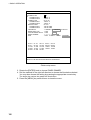
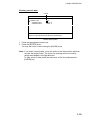
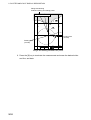
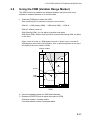
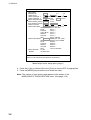
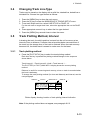
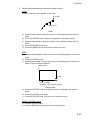
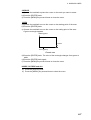
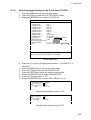
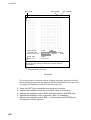
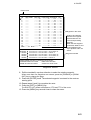
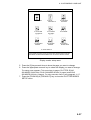
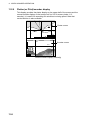
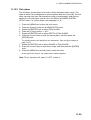
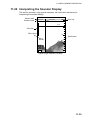
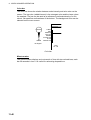
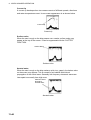
When cursor is turned on, VRM appears around it. When cursor is turned off,
VRM appears around own ship’s position. Also, a data box appears at the top of
the display to show the radius of VRM.
Radius of VRM
0.27nm
43
20
FISH
21
22
000001
Cursor
42
VRM
(Yellow)
41
0.3nm
GPS2D WGS84
VRM
2. Use the trackball to place the VRM where desired.
3. Rotate the [ENTER] knob to adjust the radius of VRM.
Clockwise rotation: Increase radius.
Counterclockwise rotation: Decrease radius.
2-11