1
DL6400/6600 Book Page 1 Friday, July 31, 1998 11:42 AM
24-wire dot matrix printers
USER’S MANUAL
DL6400/6600 Book Page 1 Friday, July 31, 1998 11:42 AM
Federal Communications Commission
Radio Frequency Interference Statement
for United States Users
Notice: This equipment has been tested and found to comply with the
limits for a Class B digital device, pursuant to Part 15 of FCC Rules.
These limits are designed to provide reasonable protection against
harmful interference in a residential installation. This equipment
generates, uses and can radiate radio frequency energy and, if not
installed and used in accordance with instructions, may cause harmful
interference to radio communications. However, there is no guarantee
that interference will not occur in a particular installation. If this
equipment does cause harmful interference to radio or television
reception, which can be determined by turning the equipment off and
on, the user is encouraged to try to correct the interference by one or
more of the following measures:
• Reorient or relocate the receiving antenna.
• Increase the separation between the equipment and receiver.
• Connect the equipment into an outlet on a circuit different from
that to which the receiver is connected.
• Consult the dealer or an experienced radio/TV technician for help.
FCC WARNING: Changes or modifications not expressly approved
by the party responsible for compliance could void the user’s authority
to operate the equipment.
(This equipment has been tested as M3390A/M3391A of the model
number.)
Notes:
1. The use of a nonshielded interface cable with the referenced device
is prohibited. The length of the parallel interface cable must be 3
meters (10 feet) or less. The length of the serial interface cable must
be 15 meters (50 feet) or less.
2. The length of the power cord must be 3 meters (10 feet) or less.
User’s Manual
DL6400/6600 Book Page 2 Friday, July 31, 1998 11:42 AM
Notice to Canadian Users
This Class B digital apparatus meets all requirements of the Canadian
Interference-Causing Equipment Regulations.
Cet appareil numérique de la Classe B respecte toutes les exigences du
Règlement sur le matériel brouilleur du Canada.
Notice to German Users
Bescheinigung des Herstellers/Importeurs
Hiermit wird bescheinigt, daß der/die/das
• M3390B/M3391B
in Übereinsstimmung mit den Bestimmungen der
• EN 45014 (CE)
funk-entstört ist.
Der Deutschen Bundespost wurde das Inverkehrbringen dieses Gerätes
angezeigt und die Berechtigung zur Überprüfung der Serie auf
Einhaltung der Bestimmungen eingeräumt.
Maschinenlärminformationsverordnung 3. GSGV, 18.01.1991:
Der höchste Schalldruckpegel beträgt 70 dB (A) oder weniger
gemäß EN 27779-1991.
User’s Manual
DL6400/6600 Book Page 3 Friday, July 31, 1998 11:42 AM
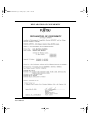
DECLARATION OF CONFORMITY
User’s Manual
DL6400/6600 Book Page 4 Friday, July 31, 1998 11:42 AM
User’s Manual
DL6400/6600 Book Page 5 Friday, July 31, 1998 11:42 AM
The contents of this manual may be revised without prior notice to
incorporate changes and improvements for units already shipped.
Every effort has been made to ensure that the information included
here is complete and accurate at the time of publication. However,
Fujitsu cannot be held responsible for errors or omissions.
Printer model specifications differ with the power supply input voltage
(100 to 120 or 220 to 240 VAC).
C147-E041-03EN July 1998
Copyright © 1998 FUJITSU LIMITED
Printed in Japan. All rights reserved. No part of this manual may be
reproduced or translated, stored in a database or retrieval system, or
transmitted in any form or by any means, electronic, mechanical,
photocopying, recording, or otherwise, without the prior written
permission of the copyright owner.
Trademark Acknowledgment
FUJITSU is a registered trademark and Fujitsu Creative Faces is a
trademark of Fujitsu Limited. Centronics is a trademark of Centronics
Data Computer Corporation. IBM PC and IBM Proprinter XL24E
are trademarks of International Business Machines Corporation. ESC/
P2 is a trademark of Seiko Epson Corporation. Microsoft is a registered
trademark, and MS-DOS, Windows, and Microsoft BASIC are
trademarks of Microsoft Corporation. Bitstream is a registered
trademark of Bitstream, Inc. Nimbus Sans is a registered trademark of
URW Unternehmensberaitung Karow Rubow Weber GmbH,
Hamburg.
Other product names mentioned in this manual may also be
trademarks and are used here for identification only.
Preface
You have made a wise choice by purchasing the DL6400 Pro/DL6600
Pro printer.
To ensure that you get the maximum performance from your printer,
read this manual before attempting to use the printer.
User’s Manual
DL6400/6600 Book Page 6 Friday, July 31, 1998 11:42 AM
The printer has an LED or LCD control panel. This manual describes
the operation of the printer with the LED control panel. For the
operation of the printer with the LCD control panel, see Appendix E.
As an ENERGY STAR® Partner, FUJITSU LIMITED has determined
that this product meets the ENERGY STAR® guidelines for energy
efficiency.
The International ENERGY STAR® Office Equipment Program is an
international program that promotes energy saving through the use of
computers and other office equipments. The program backs the
development and dissemination of products with functions that
effectively reduce energy consumption. It is an open system in which
business proprietors can participate voluntarily. The targeted products
are office equipment such as computers, displays, printers, facsimiles,
and copiers. Their standards and logos are uniform among
participating nations.
User’s Manual
DL6400/6600 Book Page i Friday, July 31, 1998 11:42 AM
Contents
Contents
Chapter 1
Introduction ................................................................................. 1-1
Overview ..................................................................................... 1-1
Package Contents ......................................................................... 1-2
Parts and Functions ..................................................................... 1-3
FRONT ......................................................................... 1-3
BACK ............................................................................. 1-3
INSIDE .......................................................................... 1-4
SIDES (left side shown) .................................................. 1-4
Chapter 2
Setting Up the Printer .................................................................. 2-1
Removing the Stopper and Cushion ............................................ 2-1
Installing the Paper Guide ........................................................... 2-2
Installing the Platen Knob ........................................................... 2-3
Connecting the Power Cord ........................................................ 2-4
Connecting the Interface Cable .................................................... 2-5
Chapter 3
Installing the Ribbon Cassette ..................................................... 3-1
Choosing a Cassette ..................................................................... 3-1
Preparing the Ribbon Cassette ..................................................... 3-2
Installing the Ribbon Cassette ...................................................... 3-3
Removing the Ribbon Cassette .................................................... 3-5
Replacing the Subcassette ............................................................. 3-6
Chapter 4
Loading Paper .............................................................................. 4-1
Loading Continuous Forms (Front) ............................................. 4-1
Loading Continuous Forms (Rear) .............................................. 4-6
Cutting Continuous Forms .......................................................... 4-6
Loading Cut Sheets ...................................................................... 4-7
Printing on Cut Sheets ............................................................... 4-10
Returning to Continuous Forms ................................................ 4-12
Chapter 5
Operating the Printer ................................................................... 5-1
LED type control panel ......................................................... 5-1
Using the Control Panel .............................................................. 5-1
LCD type control panel ........................................................ 5-6
Turning Printer Power On and Off ............................................. 5-8
User’s Manual
i
DL6400/6600 Book Page ii Friday, July 31, 1998 11:42 AM
Contents
Test Printing ................................................................................ 5-8
Demonstration Pattern Printing ................................................. 5-12
Sensor Detection ........................................................................ 5-14
Chapter 6
Clearing Paper Jams .................................................................... 6-1
Continuous Forms (Front) ........................................................... 6-1
Continuous Forms (Rear) ............................................................ 6-4
Cut Sheets .................................................................................... 6-4
Chapter 7
Paper Specifications ................................................................... 7-1
Continuous Forms ....................................................................... 7-1
Cut Sheets .................................................................................... 7-8
Labels ......................................................................................... 7-10
Precautions ................................................................................ 7-15
Chapter 8
Setup Mode .................................................................................. 8-1
Overview ...................................................................................... 8-1
Chapter Organization .................................................................. 8-2
Activating Setup Mode ................................................................. 8-2
Using Setup Mode ....................................................................... 8-4
Printing a List of Options ............................................................ 8-8
Setting Required Options ........................................................... 8-10
Changing MENU1 and MENU2 Options ................................ 8-11
Changing Hardware Options ..................................................... 8-24
Changing Print Adjustment Options ......................................... 8-28
Changing Configuration Options .............................................. 8-32
Changing Head Gap Adjustment Options ................................. 8-36
Exiting and Saving ..................................................................... 8-36
Resetting Default Values ............................................................ 8-37
Using Diagnostic Functions ....................................................... 8-38
Test printing (SELF-TST) ................................................... 8-39
Hex dump printing (HEX-DUMP) ..................................... 8-40
Checking vertical print alignment (V-ALMNT) .................. 8-42
Setup Mode Reference ............................................................... 8-45
Performing Online Setup ........................................................... 8-48
Chapter 9
Notes on Safety ............................................................................ 9-1
Chapter 10
Troubleshooting ......................................................................... 10-1
ii
User’s Manual
DL6400/6600 Book Page iii Friday, July 31, 1998 11:42 AM
Contents
Chapter 11
Daily Inspection and Maintenance ........................................... 11-1
Inspection .................................................................................. 11-1
Maintenance .............................................................................. 11-1
Chapter 12
Specifications ............................................................................ 12-1
Appendix A
Consumables and Options ........................................................... A-1
Appendix B
Command Sets ............................................................................. B-1
Fujitsu DPL24C PLUS ................................................................ B-2
Default settings at shipment ................................................ B-15
IBM Proprinter XL24E Emulation ............................................ B-18
EPSON ESC/P2 Emulation ...................................................... B-23
Appendix C
Interface Information ...................................................................C-1
Parallel Interface ..........................................................................C-1
Data Transmission Timing ..........................................................C-6
Serial Interface .............................................................................C-8
Serial Options ..............................................................................C-9
Cable Wiring .............................................................................C-10
Serial Protocols ..........................................................................C-12
Appendix D
Character Sets ............................................................................ D-1
Appendix E
Using the LCD Type Control Panel ............................................... E-1
Getting Acquainted with the Control Panel ................................. E-2
Control panel components .................................................... E-2
Indicator lights ............................................................... E-3
LCD screen .................................................................... E-3
Buttons ........................................................................... E-4
Overview of menus ................................................................ E-5
Points to remember about basic menus ........................... E-5
Using the basic menus ........................................................... E-5
Menus and functions ...................................................... E-5
Using the Setup Menus .............................................................. E-14
Using the control panel buttons in setup mode ................... E-14
Selecting options ........................................................... E-14
Starting functions ......................................................... E-15
Example of operations ......................................................... E-16
User’s Manual
iii
DL6400/6600 TOC Page iv Wednesday, August 26, 1998 3:23 PM
Contents
Selecting options in MENU1 and MENU2 .................E-17
Saving the changed options ...........................................E-17
Printing the self-test ......................................................E-20
Correcting vertical character displacement ....................E-21
Power-on Special Functions .......................................................E-22
Messages ....................................................................................E-23
Status messages ....................................................................E-23
Error messages .....................................................................E-27
Messages indicating user-correctable problems ..............E-27
Messages indicating fatal errors .....................................E-33
Index ..........................................................................................IN-1
Fujitsu Offices .........................................................Inside back cover
iv
User’s Manual
DL6400/6600 Book Page 1 Friday, July 31, 1998 11:42 AM
INTRODUCTION
CHAPTER
1
Overview
Introduction
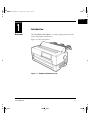
The DL6400 Pro/DL6600 Pro is a 24-dot impact printer used for
image and graphics reproduction.
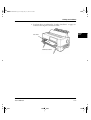
Figure 1-1 shows the printer.
Figure 1–1 DL6400 Pro/DL6600 Pro printer
User’s Manual
1-1
DL6400/6600 Book Page 2 Friday, July 31, 1998 11:42 AM
Package Contents
Package
Contents
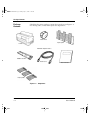
Check that the printer package contains the items shown in Figure 1-2.
For missing items, contact the Fujitsu sales department.
Platen knob
Paper guide
Printer
Maximum length 3 meters
Ribbon cassette
Power cord
User’s manual
Paper guides
Figure 1–2 Components
1-2
User’s Manual
DL6400/6600 Book Page 3 Friday, July 31, 1998 11:42 AM
Parts and Functions
Parts and
Functions
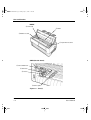
Figures 1-3 and 1-4 show the printer parts.
The numbers in the figures correspond to the parts listed in Table 1-1.
FRONT
w Back cut-sheet guides
q Top cover
e Paper guide
!1 Front cover
!0 Power switch
r Paper cutter
t Platen knob
o Front cut-sheet guide
i Front tray
y Control panel
u Cut-sheet tray
BACK
!6 Back cover
!2 Back auxiliary cover
!3 Power cord connector
!4 Interface cable connector
!5 Cut-sheet feeder connector
Figure 1–3 Parts (1)
User’s Manual
1-3
INTRODUCTION
DL6400/6600 Book Page 4 Friday, July 31, 1998 11:42 AM
Parts and Functions
INSIDE
!8 Print head
!9 Platen
!7 Ribbon cassette
@0 Paper thickness lever
SIDES (left side shown)
@1 Jam removal lever
@2 Lock lever
@3 Tractor
@4 Center guide
Figure 1–4 Parts (2)
1-4
User’s Manual
DL6400/6600 Book Page 5 Friday, July 31, 1998 11:42 AM
Parts and Functions
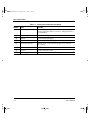
Table 1-1 lists the printer parts and functions.
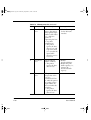
Table 1–1 Printer parts and functions
Number
Part
Function
q
Top cover
Protects the print head and other internal printer
components.
w
Back cut-sheet guides
Guides paper into the printer. Set based on the cut-sheet
or continuous forms width.
e
Paper guide
Set down for continuous forms and up for cut sheets.
r
Paper cutter
Cuts continuous forms.
t
Platen knob
Turned to feed paper manually.
y
Control panel
Contains the switches and status lamps used to operate
the printer.
u
Cut-sheet tray
Supports cut sheets during feeding.
i
Front tray
Holds cut sheets for insertion into the printer. Open for
cut sheets and closed for continuous forms.
o
Front cut-sheet guide
Set based on the cut-sheet width to guide paper into the
printer.
!0
Power switch
Set to "|" to turn power on and to "❍" to turn power
off. When power is on, the power lamp is on.
!1
Front cover
Protects components inside the printer. Opened to
replace continuous forms.
!2
Back auxiliary cover
Protects components inside the printer. Opened to
replace continuous forms.
!3
Power cord connector
Power cord connection.
!4
Interface cable
connector
Cable connection between the printer and processor.
!5
Cut-sheet feeder
connector
Cable connection between the printer and the optional
cut-sheet feeder.
!6
Back cover
Removed when the optional cut-sheet feeder is installed.
User’s Manual
1-5
INTRODUCTION
DL6400/6600 Book Page 6 Friday, July 31, 1998 11:42 AM
Parts and Functions
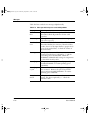
Table 1–1 Printer parts and functions (Continued)
Number
1-6
Part
Function
!7
Ribbon cassette
Contains the printing ribbon. If characters do not print
clearly, replace the ribbon or cassette. A Fujitsu ribbon is
recommended.
!8
Print head
Performs actual printing.
!9
Platen
Controls and feeds paper.
@0
Paper thickness lever
Used to manually adjust paper thickness.
@1
Jam removal lever
Turned down to allow jammed paper to be removed
more easily.
@2
Lock lever
Locks the tractor.
@3
Tractor
Feeds continuous forms.
@4
Center guide
Controls continuous forms feeding.
User’s Manual
DL6400/6600 Book Page 1 Friday, July 31, 1998 11:42 AM
CHAPTER
2
SETTING UP
THE PRINTER
Setting Up the Printer
Removing the
Stopper and
Cushion
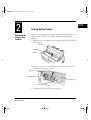
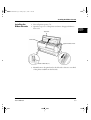
The printer is shipped with a stopper and cushion inside that prevent
vibration and other movement that could cause damage during
shipment.
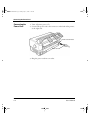
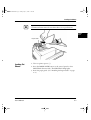
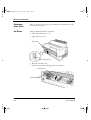
1. Open the top cover and lift out the stopper as shown by the arrow
in the figure.
Top cover
Print head
Stopper
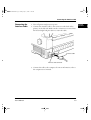
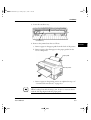
2. Open the front cover and cut-sheet tray and remove the cushion
from between the tractor shafts.
Front cover
Jam removal lever
Cut-sheet tray
Cushion
3. Check that the jam removal lever is locked.
User’s Manual
2-1
DL6400/6600 Book Page 2 Friday, July 31, 1998 11:42 AM
Installing the Paper Guide
Installing the
Paper Guide
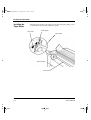
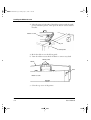
Insert the paper guide, at an angle, into the left and right guide grooves
on the back cover and slide it back into place.
Back cover
Guide groove
Paper guide
Back of printer
Paper exit
2-2
User’s Manual
DL6400/6600 Book Page 3 Friday, July 31, 1998 11:42 AM
Installing the Platen Knob
Installing the
Platen Knob
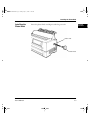
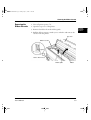
Insert the platen knob and align it with the gear teeth.
SETTING UP
THE PRINTER
Platen shaft
Platen knob
User’s Manual
2-3
DL6400/6600 Book Page 4 Friday, July 31, 1998 11:42 AM
Connecting the Power Cord
Connecting the
Power Cord
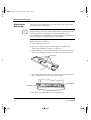
1. Turn off printer power (❍).
2. Connect the power cord to the connector on the back of the printer,
at the right side.
Power cord connector
Power cord
3. Plug the power cord into an outlet.
2-4
User’s Manual
DL6400/6600 Book Page 5 Friday, July 31, 1998 11:42 AM
Connecting the Interface Cable
Connecting the
Interface Cable
1. Turn off printer and processor power.
SETTING UP
THE PRINTER
2. Connect the interface cable to the connector at the back of the
printer, on the left side. Make sure the orientation is correct. Press
the left and right lock pins down to secure the cable.
Interface cable
Interface cable connector
3. Connect the cable to the computer. For more information, refer to
the computer user's manual.
User’s Manual
2-5
DL6400/6600 Book Page 6 Friday, July 31, 1998 11:42 AM
2-6
User’s Manual
DL6400/6600 Book Page 1 Friday, July 31, 1998 11:42 AM
CHAPTER
3
INSTALLING
THE RIBBON
CASSETTE
Installing the Ribbon Cassette
☞
The ribbon cassette contains a folded ribbon. Handle the ribbon
cassette carefully to ensure that the ribbon is not disordered or
damaged.
Choosing a
Cassette
User’s Manual
Notice:
A Fujitsu ribbon cassette is recommended. Other cassettes may cause
operating problems or damage the print head. Fujitsu takes no
responsibility for print head faults caused by such cassettes.
Use a cassette or subcassette (ribbon only) listed in Table 3-1.
Table 3–1 Ribbon cassette and subcassette
Product
Product number
Product description
Ribbon cassette
CA02460-D115
Ribbon in cassette
Subcassette
CA02460-D215
Ribbon only
3-1
DL6400/6600 Book Page 2 Friday, July 31, 1998 11:42 AM
Preparing the Ribbon Cassette
Preparing the
Ribbon Cassette
1. Remove the two protective tabs used in shipment.
2. Release the ribbon lock.
3. Turn the knob clockwise to check that the ribbon moves smoothly.
Remove the protective tabs
Knob
Lock tabs B
☞
Release the ribbon lock
3-2
Notice:
Adjust the paper thickness lever on the printer appropriately for the
forms used. Otherwise, the ribbon may come loose or paper may be
smeared by ink from the ribbon.
User’s Manual
DL6400/6600 Book Page 3 Friday, July 31, 1998 11:42 AM
Installing the Ribbon Cassette
Installing the
Ribbon Cassette
1. Turn off printer power (❍).
2. Open the top cover of the printer and move the paper thickness
lever to D.
INSTALLING
THE RIBBON
CASSETTE
Top cover
Print head
Paper thickness lever
Power switch off (❍)
3. Manually move the print head to the left side so that it is one third
of the printer width from the left side.
User’s Manual
3-3
DL6400/6600 Book Page 4 Friday, July 31, 1998 11:42 AM
Installing the Ribbon Cassette
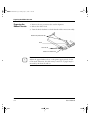
4. Align the pins on both ends of the ribbon cassette with the guide
grooves inside the printer. Then press the ribbon cassette down to
install it.
Ribbon cassette
Pin
Guide groove
5. Hook the ribbon over the ribbon guide.
6. Turn the ribbon cassette knob clockwise to remove any slack.
Ribbon guides
Ribbon
Knob
Ribbon cassette
7. Close the top cover of the printer.
3-4
User’s Manual
DL6400/6600 Book Page 5 Friday, July 31, 1998 11:42 AM
Removing the Ribbon Cassette
Removing the
Ribbon Cassette
1. Turn off printer power (❍).
2. Open the top cover of the printer.
3. Remove the ribbon from the ribbon guide.
4. Pull the ribbon cassette towards you to unlock it and remove the
cassette from the printer.
Top cover
Ribbon cassette
Power switch off (❍)
Ribbon guide
User’s Manual
Ribbon
3-5
INSTALLING
THE RIBBON
CASSETTE
DL6400/6600 Book Page 6 Friday, July 31, 1998 11:42 AM
Replacing the Subcassette
☞
Replacing the
Subcassette
The ribbon can be replaced up to five times before the entire ribbon
cassette itself must be replaced.
Notice:
A Fujitsu ribbon cassette is recommended. Other cassettes may cause
operating problems or damage the print head. Fujitsu takes no
responsibility for print head faults caused by such cassettes. Replace the
cassette carefully to avoid getting ink on your hands.
Replace the ribbon as follows:
1. Turn off printer power (❍).
2. Remove the ribbon cassette from the printer as explained in
“Removing the Ribbon Cassette” on page 3-5.
3. Sequentially press each of the four lock tabs A in the directions of
the arrows, starting from either end. Then open the cassette lid.
Lock tabs A
Lid
4. Press feed roller A in the direction of the arrow until it clicks into
place. This procedure loosens the ribbon holder.
Reverse guide
Feed roller A
5. Lift the reverse guide and remove the old ribbon.
3-6
User’s Manual
DL6400/6600 Book Page 7 Friday, July 31, 1998 11:42 AM
Replacing the Subcassette
6. When loading the new subcassette into the ribbon cassette, check
that the orientation of the new subcassette is correct. After loading
remove the paper tape.
7. Holding the subcassette casing, slide the bottom of the casing to the
right to remove it.
Casing
Paper tape
Ribbon path A
Feed roller A
Ribbon path B
8. Route the ribbon through paths A and B and insert the reverse
guide.
Ribbon path A
Reverse guide
Reverse guide insertion
Ribbon path B
9. Thread the ribbon through the cassette as shown by the dotted line
in the figure. Then raise the casing to remove it.
Casing
User’s Manual
3-7
INSTALLING
THE RIBBON
CASSETTE
DL6400/6600 Book Page 8 Friday, July 31, 1998 11:42 AM
Replacing the Subcassette
10. Press lock tabs B in the direction of the arrows to return feed roller
A to its original position. Then close the cassette lid. Turn the knob
clockwise to check that the ribbon moves smoothly.
Knob
Lock tabs B
11. Check off the subcassette replacement column on the cassette label.
12. Install the ribbon cassette (see “Installing the Ribbon Cassette” on
page 3-3).
3-8
User’s Manual
DL6400/6600 Book Page 1 Friday, July 31, 1998 11:42 AM
CHAPTER
4
Loading
Continuous
Forms (Front)
Loading Paper
LOADING
PAPER
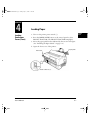
1. Turn on the printer power switch ( | ).
2. Press the PAPER PATH button on the control panel to select
FRONT TRACTOR. The FRONT TRACTOR lamp lights.
3. Move the paper guide back as indicated by the arrow in the figure.
(See “Installing the Paper Guide” on page 2-2.)
4. Open the front cover of the printer.
Front cover
Paper guide
Power switch on ( | )
User’s Manual
4-1
DL6400/6600 Book Page 2 Friday, July 31, 1998 11:42 AM
Loading Continuous Forms (Front)
5. Raise the cut-sheet tray.
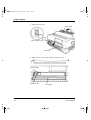
6. Turn the lock levers of the left and right tractors in the direction indicated by the arrow to unlock them.
Cut-sheet tray
Lock lever
Tractor
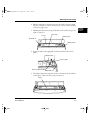
7. Move the left tractor to the reference point on the lower cover.
Then press the lock lever in the direction of the arrow in the figure
below to lock it.
8. Move the right tractor in alignment with the paper width.
9. Adjust the center guide to the paper width to remove slack in the
paper.
Lock lever
Reference point
Center guide
Tractors
4-2
User’s Manual
DL6400/6600 Book Page 3 Friday, July 31, 1998 11:42 AM
Loading Continuous Forms (Front)
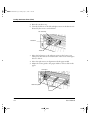
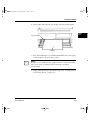
10. Open the paper holders of the left and right tractors. Align the
forms feed holes with the tractor pins and close the paper holders.
LOADING
PAPER
Tractor pins
Paper holders
Tractors
Continuous forms
11. Move the right tractor to add slight tension to the paper. Then press
the lock lever in the direction of the arrow to lock it.
Lock lever
Tractor
User’s Manual
4-3
DL6400/6600 Book Page 4 Friday, July 31, 1998 11:42 AM
Loading Continuous Forms (Front)
12. Lower the cut-sheet tray.
Cut-sheet tray
13. Close the front cover of the printer.
Front cover
4-4
User’s Manual
DL6400/6600 Book Page 5 Friday, July 31, 1998 11:42 AM
Loading Continuous Forms (Front)
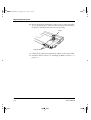
14. Press the ONLINE button on the control panel to place the printer
offline. The ONLINE lamp should not be lit.
15. Press the LOAD button (or LOAD/UNLOAD button) on the control panel to load a continuous form automatically.
16. Adjust the position of the print line
To adjust the print line to the position that you require, open the
top cover of the printer and align the red mark of the indicator with
the position you require the bottoms of characters to be.
• Fine forward feed: Holding the ONLINE button down, press
the LF/FF button to feed paper forward in small increments.
• For the operation of the printer with the LCD control panel, see
Appendix E.
• Fine reverse feed: Holding the ONLINE button down, press the
TEAR OFF button to feed paper in reverse in small increments.
Indicator
Red mark
17. Press the ONLINE button on the control panel to place the printer
online. The ONLINE lamp lights.
User’s Manual
4-5
LOADING
PAPER
DL6400/6600 Book Page 6 Friday, July 31, 1998 11:42 AM
Loading Continuous Forms (Rear)
Loading
Continuous
Forms (Rear)
Refer to the Rear-Feed Tractor User’s Manual for information on the
rear-feed tractor option.
Cutting
Continuous
Forms
Forms are cut at perforations 23.3 mm (11/12 inch) above the print
head center when the print head center is on the sixth line. A single line
feed is 4.2 mm (1/6 inch)..
Perforations
23.3 mm
(11/12 in)
Print head center
1. Press the TEAR OFF button on the control panel. The continuous
forms are then automatically loaded to where they are to be cut.
For the operation of the printer with the LCD control panel, see
Appendix E.
2. Open the noise-proof cover.
3. Check that the perforations are at the paper cutter.
4. Cut the continuous forms as shown in the figure below.
4-6
User’s Manual
DL6400/6600 Book Page 7 Friday, July 31, 1998 11:42 AM
Loading Cut Sheets
Important:
Continuous forms cannot be cut where there are no perforations.
LOADING
PAPER
Paper cutter
Loading Cut
Sheets
1. Turn on printer power ( | ).
2. Press the PAPER PATH button on the control panel to select
FRICTION (friction feed). The FRICTION lamp lights.
3. Raise the paper guide. (See “Installing the Paper Guide” on page
2-2.)
User’s Manual
4-7
DL6400/6600 Book Page 8 Friday, July 31, 1998 11:42 AM
Loading Cut Sheets
4. Open the front tray.
Paper guide
Power switch on ( | )
Front tray
5. Align the cut-sheet guide with the reference point.
Cut-sheet guide
Reference point
4-8
Front guide
User’s Manual
DL6400/6600 Book Page 9 Friday, July 31, 1998 11:42 AM
Loading Cut Sheets
6. Insert paper while aligning its left edge with the cut-sheet guide.
LOADING
PAPER
Cut-sheet guide
Cut sheet
☞
7. Press the LOAD button (or LOAD/UNLOAD button). The paper
is then loaded to the print start position.
Notice:
If paper is not loaded correctly, a paper feed error or skewed loading
may occur. Once a cut sheet has been inserted, it is loaded
automatically.
8. Adjust vertical printing as described in step 16 in “Loading Continuous Forms (Front)” on page 4-1.
User’s Manual
4-9
DL6400/6600 Book Page 10 Friday, July 31, 1998 11:42 AM
Printing on Cut Sheets
Printing on Cut
Sheets
You can print on cut sheets without removing continuous forms from
the tractor section.
1. Press the PAPER PATH button on the control panel to select
FRICTION (friction feed). The FRICTION lamp lights.
Important:
1. Retract continuous forms, if any, from the paper path to the tractor
section. The FRICTION lamp lights.
2. If the lamp does not light to indicate FRICTION, continuous
forms remain in the paper path. Cut the continuous forms and
select FRICTION again.
Continuous forms
4-10
User’s Manual
DL6400/6600 Book Page 11 Friday, July 31, 1998 11:42 AM
Printing on Cut Sheets
2. Load cut sheets as explained in “Loading Cut Sheets” on page 4-7
without removing the continuous forms.
LOADING
PAPER
Cut sheet
Continuous forms
User’s Manual
4-11
DL6400/6600 Book Page 12 Friday, July 31, 1998 11:42 AM
Returning to Continuous Forms
Returning to
Continuous
Forms
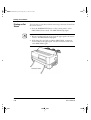
After printing on cut sheets with continuous forms loaded, you can
easily return to printing continuous forms.
1. Remove cut sheets, if any.
2. Tip back the paper guide.
Paper guide
Front tray
3. Close the front tray.
4. Press the PAPER PATH button on the control panel to select
FRONT TRACTOR or REAR TRACTOR, whichever you want
to use. The FRONT TRACTOR or REAR TRACTOR lamp
lights. Continuous forms are then loaded automatically.
The REAR TRACTOR lamp is for the optional rear-feed tractor.
5. Check the vertical printing position. See “Loading Continuous
Forms (Front)” on page 4-1.
4-12
User’s Manual
DL6400/6600 Book Page 1 Friday, July 31, 1998 11:42 AM
CHAPTER
5
Using the
Control Panel
Operating the Printer
LED type control panel
1. Layout
OPERATING
THE PRINTER
Figure 5-1 shows the LED type control panel layout.
Figure 5–1 Control panel layout (LED type)
2. Lamps
Control panel lamps indicate the printer status.
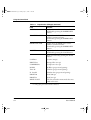
Table 5-1 lists the lamp functions.
Table 5–1 Lamp functions (LED type)
User’s Manual
Lamp*1
Function
ONLINE
Lights when the printer is online.
PAPER OUT (amber)
Changes to red when a paper outage is
detected.
1
Lights when MENU 1 is selected.
Switched by pressing the MENU button.
2
Lights when MENU 2 is selected.
Switched by pressing the MENU button.
5-1
DL6400/6600 Book Page 2 Friday, July 31, 1998 11:42 AM
Using the Control Panel
Table 5–1 Lamp functions (LED type) (Continued)
Lamp*1
Function
FRICTION
Lights when cut sheets can be used.
Switched by pressing the PAPER PATH
button.
FRONT TRACTOR
Lights when the FRONT tractor can be
used for continuous forms.
Switched by pressing the PAPER PATH
button.
REAR TRACTOR
Lights when the REAR tractor can be
used for continuous forms.
Switched by pressing the PAPER PATH
button.
LOCKED
Lights when lock mode is on.
Switched by pressing the LOCK button.
Fonts are selected by pressing the FONT
button.
COUR10
Courier (10 cpi)
PRESTG12
Prestige Elite (12 cpi)
COMPRESS17
Compression (17 cpi)
Bold PS
Boldface (proportional spacing)
Time PS
Timeless (proportional spacing)
N. Sans PS
Nimbus Sans (proportional spacing)
DRAFT10
Draft (10 cpi)
DRAFT12
Draft (12 cpi)
MENU FONT
The font selected in menu mode becomes
valid in this state.
*1 Lamps glow green unless otherwise indicated.
5-2
User’s Manual
DL6400/6600 Book Page 3 Friday, July 31, 1998 11:42 AM
Using the Control Panel
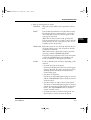
3. Buttons (when printer is online)
ONLINE:
Places the system offline after it prints the current
line.
LF/FF:
Line feed/forms feed button. Feeds forms forward.
Pressing this button continuously for 3 seconds or
more feeds lines forward to the feed point for the
next page (forms feed).
When the cut-sheet feeder is used, pressing this
button continuously for 3 seconds or more unloads
forms. If forms are not at the platen, forms are not
loaded, but a line feed occurs.
TEAR OFF: Places the system in tear off mode and feeds lines to
the forms cutting point. Tear off mode is valid for
continuous forms only.
When this button is pressed, the printer performs
centering, and the ONLINE lamp blinks.
If any button is pressed after forms are cut, the buzzer
sounds, the ONLINE lamp stops blinking, and
forms are fed back to their previous location.
LOAD:
User’s Manual
Loads or unloads forms as follows, depending on the
situation:
• Continuous forms at the platen
Forms are fed backward on the tractor until a paper
outage is detected. If a paper outage has not been
detected when forms have been fed 22 inches,
forms feeding stops.
• Cut sheets at the platen
Cut sheets are unloaded if printing has not started,
and the TOP MARGIN value is made the current
vertical location.
• Cut-sheet feeder set and cut sheets at the platen
Cut sheets are unloaded if printing has not started,
and the next cut sheet is loaded from the cut-sheet
feeder. The TOP MARGIN value is made the
current vertical location.
• Continuous forms or cut sheets being used, cutsheet feeder set, and no forms at the platen
5-3
OPERATING
THE PRINTER
DL6400/6600 Book Page 4 Friday, July 31, 1998 11:42 AM
Using the Control Panel
Forms are loaded, and the TOP MARGIN value is
made the current vertical location.
4. Buttons (when printer is offline)
LOCK:
Switches lock mode on or off. The lock mode takes
effect when the offline status changes to online. When
the LOCKED lamp is on, lock mode is on.
When lock mode is on, the font selected on the control
panel is in effect, even if a host command sends an
instruction to change it.
FONT:
Selects a font. The font lamps light sequentially each
time the FONT button is pressed. The font lamp that
is on indicates which font is selected.
The font setting takes effect when the offline status
changes to online.
If a command changes the font when lock mode is off,
the font lamp indication does not change.
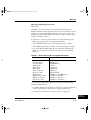
The font, pitch, and quality for each font selection are
shown here.
Sequence in which lamps light
Table 5–2 Font button values
5-4
Font
Quality
Characters per inch
COUR10
Courier
Letter
10
PRESTG12
Prestige
Letter
12
COMPRESS17
Compression
CQ
17
Bold PS
Boldface
Letter
Proportional spacing
Time PS
Timeless
Letter
Proportional spacing
N. Sans PS
Nimbus Sans
Letter
Proportional spacing
DRAFT10
Draft
Draft
10
DRAFT12
Draft
Draft
12
MENU FONT
The font, quality, and pitch for the font selected in
menu mode are used.
User’s Manual
DL6400/6600 Book Page 5 Friday, July 31, 1998 11:42 AM
Using the Control Panel
ONLINE:
Places the system online.
MENU:
Selects Menu 1 or 2. This button is a toggle.
LF/FF:
Feeds lines or forms (same as in online mode).
TEAR OFF:
Places the system in tearoff mode (same as in
online mode).
LOAD:
Loads or unloads forms (same as in online
mode).
PAPER PATH:
OPERATING
THE PRINTER
Selects FRICTION, FRONT TRACTOR, or
REAR TRACTOR.
ONLINE + LF/FF: Feeds lines forward by 1/180 inch.
ONLINE + TEAR OFF:
Feeds lines backward by 1/180 inch.
ONLINE + LOAD: Permanently stores the load position adjusted
by fine line feeding.
User’s Manual
LOCK + FONT:
Initializes the printer.
MENU + FONT:
Places the system in Setup mode.
See Chapter 8, “Setup Modes,” for more
information.
5-5
DL6400/6600 Book Page 6 Friday, July 31, 1998 11:42 AM
Using the Control Panel
LCD type control panel
1. Layout
Figure 5-2 shows the LCD type control panel layout.
Figure 5–2 Control panel layout (LCD type)
2. Lamps
Control panel lamps indicate the printer status.
Table 5-3 lists the lamp functions.
Table 5–3 Lamp functions (LCD type)
Lamps*1
Function
POWER
Lights when power is on.
ONLINE*2
Lights when the printer is online.
ALARM
(amber)
Changes to red to indicate an alarm.
FRICTION*2
Lights when cut sheets can be used.
Switched by pressing the PAPER PATH button.
FRONT
TRACTOR*2
Lights when the FRONT tractor can be used for
continuous forms.
Switched by pressing the PAPER PATH button.
REAR
TRACTOR*2
Lights when the REAR tractor can be used for
continuous forms.
Switched by pressing the PAPER PATH button.
*1 Lamps glow green unless otherwise indicated.
*2 Same as the LED control panel.
5-6
User’s Manual
DL6400/6600 Book Page 7 Friday, July 31, 1998 11:42 AM
Using the Control Panel
3. LCD
The LCD control panel displays printer status, messages, and
control items on the screen using alphanumeric characters. The
LCD control panel is 24 columns × 2 lines.
4. Buttons
ONLINE*1:
When the system is online, pressing ONLINE
puts the printer offline after the current lines
are printed. When the printer is offline,
pressing ONLINE puts the printer online.
F1, F2, and F3:
Programmable function buttons numbered 1
to 3. The functions depend on the LCD
screen contents.*2
↑ ↓:
Switches the direction of an arrow displayed
on the LCD screen.*2
NEXT DISPLAY:
Displays the next LCD screen.*2
LOAD/UNLOAD: Loads or unloads forms. The operation
depends on the situation.
This button performs the same function as the
LOAD button on the LED control panel. For
details, see 3 and 4 under “LED Type Control
Panel” on pages 5-3 and 5-4.
PAPER PATH*1:
Selects FRICTION, FRONT TRACTOR, or
REAR TRACTOR.
*1 Same as the LED control panel.
*2 For basic operation information, see Appendix E, “Using the LCD Type Control
Panel.”
User’s Manual
5-7
OPERATING
THE PRINTER
DL6400/6600 Book Page 8 Friday, July 31, 1998 11:42 AM
Turning Printer Power On and Off
☞
Turning Printer
Power On and
Off
Turn power on or off as follows:
1. On
Press the power switch at the left on the front of the printer to turn
the printer on ( | ). Depending on the switch settings, lamps will
light.
Notice:
Do not touch any other control panel button when turning power on
or off. Otherwise, you may activate a maintenance mode for other than
test printing.
2. Off
☞
Press the power switch to turn the printer off (❍). Lamps go out.
Test Printing
Notice:
Wait at least 3 seconds before turning on power again after turning it
off. Otherwise, a printer fault may occur.
The printer's built-in self-test program prints the firmware version
number, the names of resident emulations, and all available characters.
The test prints 80 characters per line.
For the operation of the printer with the LCD control panel, see
Appendix E.
Make sure paper is loaded. Check that the paper thickness lever is set
to the appropriate position (see “Installing the Ribbon Cassette” on
page 3-3. Then follow these steps to print a self-test page.
1. Turn off the printer.
2. Holding down the LF/FF button, turn the printer back on.
Hold LF/FF down until the printer beeps. Test printing will start
then.
3. To stop printing, press the FONT or MENU button. To remove
the test page, turn the platen knob clockwise.
5-8
User’s Manual
DL6400/6600 Book Page 9 Friday, July 31, 1998 11:42 AM
☞
Test Printing
Notice:
Do not attempt to use the LF/FF (line feed/forms feed) button to eject
paper in test mode.
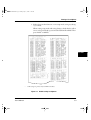
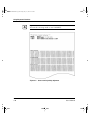
4. Check that the printed page resembles the sample in Figure 5-3.
Check that printing is uniform and free of light, dark, or smudged
areas. When printing quality is satisfactory, go to step 5. Otherwise,
correct problems as follows:
a. Check that the ribbon is installed correctly.
b. Check that the paper thickness lever is set to the appropriate position.
c. Put a new sheet in the cut-sheet tray. Then manually turn the
platen knob to advance the top edge of the paper past the top
roller.
d. Press FONT or MENU to restart printing. If printing quality
does not improve, turn off the printer and contact your dealer.
User’s Manual
5-9
OPERATING
THE PRINTER
DL6400/6600 Book Page 10 Friday, July 31, 1998 11:42 AM
Test Printing
Figure 5–3 Test printing sample
5. To exit test printing mode, press ONLINE. The printer goes online.
5-10
User’s Manual
DL6400/6600 Book Page 11 Friday, July 31, 1998 11:42 AM
Demonstration Pattern Printing
Demonstration
Pattern Printing
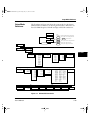
The printer prints a demonstration pattern showing some printing
features, as shown in Figure 5-4. To print a demonstration pattern,
follow the steps below.
For the operation of the printer with the LCD control panel, see
Appendix E.
1. Load a sheet of letter- or A4-size paper.
2. Turn off the printer.
OPERATING
THE PRINTER
3. Holding down the FONT button, turn the printer back on.
The printer will start printing the demonstration pattern.
4. For cut sheets, the demonstration stops after printing a page. If a
cut-sheet feeder or continuous forms are used, the demonstration
pattern is repeated. To stop or restart the demonstration during
printing, press ONLINE.
5. To exit demonstration mode, turn off the printer.
User’s Manual
5-11
DL6400/6600 Book Page 12 Friday, July 31, 1998 11:42 AM
Demonstration Pattern Printing
Figure 5–4 Demonstration pattern
5-12
User’s Manual
DL6400/6600 Book Page 13 Friday, July 31, 1998 11:42 AM
Sensor Detection
Sensor
Detection
User’s Manual
The printer has sensors to detect the following conditions:
• Top cover open
The printer goes offline if the top cover is open.
• Paper out
The printer stops printing when it detects a paper outage, cut-sheet
search, or cut-sheet loading.
• Paper jam
The printer stops printing when it detects a paper jam while paper is
being ejected.
• Print head overheating
The printer prints each line in three passes to protect the print head
when overheating is detected.
• Skewed feeding
When the printer detects skewed feed during loading from the front
table, the printer ejects a cut sheet by reverse line feeding.
• Internal lock switch (not available in some countries)
If the top cover is opened during printing, the printer will
automatically stop, and the remainder of the print data from the line
being printed will be lost. Therefore, do not open the top cover
during printing.
• Jam lever open
5-13
OPERATING
THE PRINTER
DL6400/6600 Book Page 14 Friday, July 31, 1998 11:42 AM
5-14
User’s Manual
DL6400/6600 Book Page 1 Friday, July 31, 1998 11:42 AM
CHAPTER
6
Continuous
Forms (Front)
Clearing Paper Jams
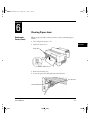
When using front-fed continuous forms, remove jammed paper as
follows:
1. Turn off printer power ( ❍ ).
CLEARING
PAPER JAMS
2. Open the front cover.
Front cover
Power switch off ( ❍ )
3. Raise the cut-sheet tray.
4. Lower the green left and right jam removal levers.
Cut-sheet tray
Jam removal lever
User’s Manual
6-1
DL6400/6600 Book Page 2 Friday, July 31, 1998 11:42 AM
Continuous Forms (Front)
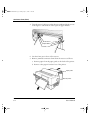
5. Turn the tractor lock levers in the direction indicated by the arrows
in the figure to unlock them. Then open the paper holders.
Lock levers
Paper holders
Tractors
6. Cut the forms just in front of the tractors.
7. Remove jammed continuous forms from the tractors as follows:
a. Remove paper from the paper guide, at the back of the printer.
b. Remove other paper from the front of the printer.
Paper guide
Back of printer
6-2
User’s Manual
DL6400/6600 Book Page 3 Friday, July 31, 1998 11:42 AM
Continuous Forms (Front)
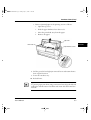
c. Remove jammed paper in the printing section as follows:
1.
Open the top cover.
2.
Slide the paper thickness lever down to D.
3.
Move the print head away from the paper.
4.
Remove the paper.
Top cover
CLEARING
PAPER JAMS
Print head
Paper thickness lever
8. Lift the green left and right jam removal levers and return them to
their original locations.
9. Lower the cut-sheet tray.
10. Reload forms.
Important:
To prevent paper jams when using continuous forms, align the left and
right holes with the tractor feed holes and ensure that the forms have
no slack.
User’s Manual
6-3
DL6400/6600 Book Page 4 Friday, July 31, 1998 11:42 AM
Continuous Forms (Rear)
Continuous
Forms (Rear)
Refer to the Rear-Feed Tractor User’s Manual for information on the
rear-feed tractor option.
Cut Sheets
Remove jammed cut sheets as follows:
1. Turn off printer power ( ❍ ).
2. Open the front cover.
Front cover
Power switch off ( ❍ )
3. Raise the cut-sheet tray.
4. Lower the green left and right jam removal levers.
Cut-sheet tray
Jam removal lever
6-4
User’s Manual
DL6400/6600 Book Page 5 Friday, July 31, 1998 11:42 AM
Cut Sheets
5. Lower the cut-sheet tray.
Cut-sheet tray
CLEARING
PAPER JAMS
6. Remove the jammed cut sheet as follows:
a. Remove paper in the paper guide from the back of the printer.
b. Remove paper other than paper in the paper guide from the
front of the printer.
Paper guide
Back of printer
c. Remove paper in the printing section as explained in step 7 of
“Continuous Forms (Front)” on page 6-3.
Important:
When loading forms after clearing a jam, be sure to insert cut sheets
with the left edge aligned with the paper guide.
User’s Manual
6-5
DL6400/6600 Book Page 6 Friday, July 31, 1998 11:42 AM
6-6
User’s Manual
DL6400/6600 Book Page 1 Friday, July 31, 1998 11:42 AM
CHAPTER
7
Paper Specifications
This chapter describes paper that the printer can use.
Any other paper should be tested carefully before use.
Continuous
Forms
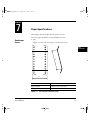
1. Size
Figure 7-1 shows the size range for continuous forms.
PAPER
SPECIFICATIONS
T
Y
Measurement
Dimensions in mm (in)
Paper width Y
101.6 to 419 (4 to 16.5)
Length between folds T
101.6 (4) or more
Figure 7–1 Size range for continuous forms
User’s Manual
7-1
DL6400/6600 Book Page 2 Friday, July 31, 1998 11:42 AM
Continuous Forms
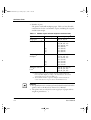
2. Number of parts
The printer can handle multipart paper. Table 7-1 lists allowable
combinations for the total number of parts, including the original,
and the ream weight.
Table 7–1 Number of parts and ream weight for continuous forms
Number of parts
Ream weight in g/m2
1
46, 52, 64, 81
2
3
4
5
[6]
[7]
[8]
39, 50, 64, (81)
39, 50, (64, 81)
39, (50, 64, 81)
39, (50, 64)
39, (50, 64)
39, (50, 64)
39, (50, 64)
Carbon-backed
multipart*1
2
3
4
5
[6]
[7]
[8]
39, 52, 64, (81)
39, 52, (64, 81)
39, (52, 64, 81)
39, (52, 64)
39, (52, 64)
39, (52, 64)
39, (52, 64)
Multipart with carbons*2
2
3
[4]
34, 46, 52, (64, 81)
34, 46, (52, 64)
34, 46, (52, 64)
Type
Single part
Pressure
sensitive*1
*1 Ream weights for pressure-sensitive and carbon-backed multipart
forms may differ slightly according to the manufacturer. Select forms
of the weight closest to those in Table. 7-1.
*2 The maximum number of parts for multipart forms with carbons
counts each carbon as one part; that is, the maximum is four.
Important:
1. For specifications for continuous forms loaded from the back of the
printer, refer to the Rear-Feed Tractor User’s Manual.
2. The printer can use only the bottom copy layer of paper with its
weight in parentheses ( ).
7-2
User’s Manual
DL6400/6600 Book Page 3 Friday, July 31, 1998 11:42 AM
Continuous Forms
3. Characteristics of paper with the number of parts in brackets [ ]
may differ slightly with the manufacturer and should be tested
carefully before use.
4. Paper used for continuous forms differs depending on whether it is
loaded from the front or from the back of the printer. The paper
specifications in Table 7-1 are for forms loaded from the front.
5. The total thickness of multipart paper must not exceed 0.65 mm
(0.025 in).
3. Binding
Select a binding type from Table 7-2.
Table 7–2 Binding for continuous forms with two to six parts
Remarks
Double-sided glued multipart
forms (zigzag spot gluing)
Recommended because:
• Forms remain flexible.
• Parts do not separate or
become misaligned easily.
25.4 mm (1 in) or less
Binding
76.2 mm (3 in) or less
Double-sided paper staples
User’s Manual
PAPER
SPECIFICATIONS
The more parts, the easier the
parts separate or become
misaligned.
7-3
DL6400/6600 Book Page 4 Friday, July 31, 1998 11:42 AM
Continuous Forms
Table 7–2 Binding for continuous forms with two to six parts (Continued)
Remarks
Single-sided zigzag spot gluing
and paper staples from back
Combination of the other two
types of binding
25.4 mm (1 in) or less
76.2 mm (3 in) or less
Binding
Important:
To avoid paper feed problems, do not bind as shown in the figure.
Line pasting
Stapling
Staple
Pasted
Check that the height of unfolded pasted forms at perforations is 2 mm
(0.08 in) or less.
2 mm (0.08 in)
or less
7-4
User’s Manual
#07_Chapter07 Page 5 Wednesday, September 2, 1998 10:01 AM
Continuous Forms
4. Binding holes in the scanning area of the sensor
The shaded area shown in the figure indicates the scanning area of
the sensor in which binding holes may lie. Their size is subject to
the following restrictions as described and illustrated.
☞
Any binding hole completely in the shaded area must be 7 mm
(0.28 in) or less in diameter.
Caution:
Always avoid printing on the binding holes. This could damage the
print head.
30 mm
(1.2 in)
PAPER
SPECIFICATIONS
10 mm (0.4 in)
First character
Binding holes
5. Perforations
The perforations in continuous forms must meet the following
conditions:
The ratio of cut to uncut areas for single-part continuous forms
must be 3:1.
User’s Manual
7-5
DL6400/6600 Book Page 6 Friday, July 31, 1998 11:42 AM
Continuous Forms
The uncut dimension at C on each end of horizontal perforations
shown below must be 1 mm or more.
3 mm (0.12 in)
cut
Vertical perforations (middle)
Horizontal perforations
1 mm (0.04 in)
uncut
Edge
Cut
C
Vertical
perforations
1 mm (0.04 in) or more
C
Uncut
When a cross-point cut occurs at the juncture of vertical and horizontal
perforations, printing is inhibited in the shaded area shown in the
figure below. Printing is not allowed in this area to prevent damage to
forms and also to prevent printer faults.
3 mm
(0.12 in)
3 mm
(0.12 in)
Inhibited area
Cross-point cut
28 mm
(1.1 in)
☞
Cross-point cut
7-6
28 mm
(1.1 in)
Cross-point uncut
Notice:
This restriction also applies when the print head moves without
printing.
User’s Manual
DL6400/6600 Book Page 7 Friday, July 31, 1998 11:42 AM
Continuous Forms
6. Print area
The figure below shows the print area on continuous forms.
Area
Size in mm
(in)
Remarks
A
4.2 (0.17)
Characters printed in this
area may not be neat. A line
spacing of 4.2 mm (1/6 in) or
more prevents characters on
adjacent lines from
overlapping.
5.08 to 30
(0.2 to 1.18)
Depending on the paper
width, this size varies as
follows:
101.6 to 119.4 mm (4 to 4.7
in) wide: 5.08 to 9 mm (0.2
to 0.35 in)
388.6 to 419 mm (15.3 to
16.5 in) wide: 15 to 30 mm
(0.6 to 1.18 in)
A
F
Print area
Perforations B
(fold)
F
A
A
F
C
5.08 (0.2)
or more
This size varies with the
paper width and number of
print columns, but must be at
least 5.08 mm (1/5 inch).
D
152 (6.0)
This area feeds off the
tractors and prevents reverse
line feed.
E
Appropriately
29 (1.1)
This value indicates the
paper-end detection point.
F
3.5 (0.14)
Do not move the printing
unit horizontally in this area
as paper may be smeared by
the ink ribbon or the printing
unit may be caught at bulges.
G
4.2 (0.17)
Print area
D
E
G
B
User’s Manual
101.6 to 419 mm
(4 to 16.5 in)
C
7-7
PAPER
SPECIFICATIONS
#07_Chapter07 Page 8 Friday, July 31, 1998 1:11 PM
Cut Sheets
Cut Sheets
For cut sheets, use high-quality paper with a light reflection factor of
60 percent or more. Ordinary high-quality white paper has a light
reflection factor of approximately 70 percent. The darker or thinner
the paper, the lower the reflection factor.
1. Size
Width: 90 to 420 mm (3.5 in to A3 horizontal)
Length: 90 to 420 mm (3.5 in to A3 horizontal)
2. Number of parts
The printer can handle multipart paper. Table 7-3 lists allowable
combinations for the total number of parts, including the original,
and the ream weight.
Table 7–3 Number of parts and ream weight for cut sheets
Type
Single
part
Number
of parts
Ream weight in g/cm2
1
<35>, 46, 52, 64, 81
Front
Rear*1
V
35, 46, 52, 64, 81, 104,
127
V
Pressure
sensitive*2
2
3
4
5
[6]
[7]
[8]
39, 50, 64, (81)
39, 50, (64, 81)
39, (50, 64, 81)
39, (50, 64)
39, (50, 64)
39, (50, 64)
39, (50, 64)
V
V
V
V
V
V
V
V
V
V
V
V
Carbonbacked
multipart*3
2
3
4
5
[6]
[7]
[8]
39, 52, 64, (81)
39, 52, (64, 81)
39, (52, 64, 81)
39, (52, 64)
39, (52, 64)
39, (52, 64)
39, (52, 64)
V
V
V
V
V
V
V
V
V
V
V
V
*1 For DL6600 only.
*2 Ream weights for pressure-sensitive and carbon-backed multipart
forms may differ slightly according to the manufacturer. Select forms
of the closest weight to those in the table.
*3 Do not use carbon paper with cut sheets.
7-8
User’s Manual
DL6400/6600 Book Page 9 Friday, July 31, 1998 11:42 AM
Cut Sheets
Important:
1. Paper with its weight in angle brackets < > must be at least 254
mm (10 in) wide.
2. For multipart forms the ream weight of the bottom sheet being
used must be one of the values in parentheses ( ).
3. Characteristics of paper with the number of parts in brackets [ ]
may differ slightly according to the manufacturer and should be
tested carefully before use.
4. The total thickness of multipart paper must not exceed 0.65 mm
(0.025 in).
3. Binding
PAPER
SPECIFICATIONS
Paste sheets at the top.
Important:
Pasted portions must be flexible and free of curl.
Paste here.
Front
User’s Manual
Side
7-9
DL6400/6600 Book Page 10 Friday, July 31, 1998 11:42 AM
Labels
4. Print area
The figure below shows the print area on cut sheets.
A
Area Size in mm (in)
Front
Rear
(DL6600 Pro only)
A
4.2 (0.17)
8.5 (0.33)
B
4.2 (0.17)
8.5 (0.33)
Print area
C*1 5.1 (0.2) to 38 (1.5) or
more
B
D
C
90 to 419 mm
5.1 (0.2) or more
D
(3.5 to 16.5 in)
*1 For wide paper, this specification is as follows:
406.4 mm (16 in) wide: 22.5 to 38.5 mm (0.9 to 1.5 in)
419 mm (16.5 in) wide: 36 to 38.5 mm (1.4 to 1.5 in)
Labels
Only labels on the front of continuous forms backing sheets can be
printed.
1. Size
Paper size specifications are the same as for general continuous
forms.
2. Paper thickness
The label and backing sheet together must be 0.2 mm (1/27 in) or
less.
7-10
User’s Manual
DL6400/6600 Book Page 11 Friday, July 31, 1998 11:42 AM
Labels
Important:
1. The thickness of the backing sheet must be 0.1 mm (1/254 in) or
less.
2. The thickness of the label must be 0.1 mm (1/254 in) or less.
3. Label adhesion
Labels must satisfy the conditions below and not peel off easily.
Label
Drum diameter:
27 mm (1.06 in)
Winding drum diameter
27 mm
(1.06 in)
Winding angle
180°
Winding time
24 hours
Ambient temperature
40°C
Ambient humidity
30% RH
PAPER
SPECIFICATIONS
4. Print area
The figure below shows the print areas on labels.
Fold
A
C
D
C
Print area
C
Print area
Area
Size in mm (in)
A
2.54 (0.1) or more
B
6.35 (0.25) or more
C
2.54 (0.1) or more
D
25.4 (1) *1
C
Label
B
B
*1 Lines may not be fed neatly in the print area of D. A line spacing of 1/6 inch or more prevents characters on adjacent lines from overlapping.
User’s Manual
7-11
#07_Chapter07 Page 12 Friday, July 31, 1998 1:12 PM
Labels
5. Formats
Use the formats shown below to prevent peeled labels from causing
feed failures, print head damage, and other serious problems.
Example 1:
Leave the four corners and sides uncut between cut portions and do
not remove nonlabel areas*1.
This procedure completely prevents label peeling.
Label
Label
Enlarged label:
Leave several cuts on
each of the four sides.
Label
Label
Label
Label
Label
Label
Backing
sheet
Leave uncut portions
on the four corners.
7-12
User’s Manual
DL6400/6600 Book Page 13 Friday, July 31, 1998 11:42 AM
Labels
Example 2:
If nonlabel areas*1 must be removed, round label corners.
Label
Label
Label
Label
Enlarged label:
Rounded (R2 to R3)*2 corners
Label
Mount
Label
Label
Label
PAPER
SPECIFICATIONS
*1 Areas in which no labels adhere to the backing sheet.
*2 R stands for radius. R2 and R3 should be between 2 mm and 3 mm.
Figure 7–2 Recommended label formats
User’s Manual
7-13
DL6400/6600 Book Page 14 Friday, July 31, 1998 11:42 AM
Labels
6. Restriction on APTC option
The printer performs automatic paper thickness detection on the
printing side. For forms with backing sheets removed, the thickness
differs between the label and backing sheet. Measure the thickness
at a label as shown in Figure 7-13.
Front end (or fold)
16.93 mm
(2/3 inch)
(1/2 inch)
38 mm (1.5 in) 44 mm (1.7 in)
12.7 mm
First printed character
ABC
Important:
Ensure that characters are printed in the shaded area.
Figure 7–3 Label arrangement
7-14
User’s Manual
DL6400/6600 Book Page 15 Friday, July 31, 1998 11:42 AM
Precautions
Precautions
1. Preprinting
When printing using a color with a reflection factor of 60 percent
or less, such as black, do not print in the shaded area shown in the
figure below.
30 mm
(1.18 in)
10 mm (0.4 in)
Preprinting-inhibited area
First character
PAPER
SPECIFICATIONS
Important:
The printer uses an autosensor to detect loaded paper in the shaded
area. If the area is preprinted in black, the sensor may fail to detect the
paper because of decreased light reflection.
Perform preprinting as follows:
a. Do not print horizontal lines thicker than 8 mm (0.3 in)
8 mm (0.3 in) or less
User’s Manual
7-15
DL6400/6600 Book Page 16 Friday, July 31, 1998 11:42 AM
Precautions
b. When consecutively printing lines that satisfy the specification
in (a), leave an interval of 8 mm (0.3 in) or greater between
lines.
Leave an interval of 8 mm (0.3 in) or greater.
Important:
If the line thickness is 0.5 mm (0.02 in) or less, the interval can be
4 mm (0.16 in) or more.
c. When printing near a paper edge, leave a margin of 8 mm
(0.3 in) or greater.
Top or bottom end of paper
Leave a margin of
8 mm (0.3 in)
or greater.
Important:
If the line thickness is 0.5 mm (0.02 in) or less, the interval can be
4 mm (0.16 in) or more.
d. When printing vertical lines in the shaded area in Figure 7-##,
make lines 0.5 mm (0.02 in) thick or less and do not print more
than one line.
Before printing characters in the shaded area in Figure 7-14, use a
sample to check that the characters can be printed.
7-16
User’s Manual
DL6400/6600 Book Page 17 Friday, July 31, 1998 11:42 AM
Precautions
2. Binding hole
The shaded area on page 7-15 also places restrictions on binding
holes punched in that area. If punching is necessary, make the holes
7 mm (0.28 in) or less in diameter.
3. Smearing caused by paper feed roller
If the percentage of printing in the shaded areas in the figure below
is high, the paper feed roller may smear paper at loading or ejection.
Design the format to make areas as far away from the printed area
as possible or print a color or pattern on the paper to make smearing
unnoticeable.
Smeared areas in the figure below assume that the left margin is
25.4 mm (1 in). If the left margin is changed, smear areas move
proportionally.
Unit: mm (in)
24.5
(0.96)
22 (0.87)
89.5
(3.52)
22 (0.87)
144.5
(5.69)
22 (0.87)
199.5
(7.85)
22 (0.87)
284.5
(11.2)
22 (0.87)
345.5
(13.6)
H
24.5
(0.96)
User’s Manual
22 (0.87)
First column
7-17
PAPER
SPECIFICATIONS
DL6400/6600 Book Page 18 Friday, July 31, 1998 11:42 AM
Precautions
4. Miscellaneous
When using special paper that does not conform to specifications,
prepare samples for full trials before using the paper.
Store and handle paper with care to prevent deformation or
damage. Do not store paper where humidity is high.
7-18
User’s Manual
#08_Chapter08 Page 1 Tuesday, August 18, 1998 1:30 PM
CHAPTER
8
Overview
Setup Mode
The printer provides two modes: normal mode, for everyday printer
operations, and setup mode, for selecting printer options and helping
diagnose printer problems.
Setup is performed offline using the printer control panel, an approach
called offline setup, or remotely using a processor or software, an
approach called setup program online setup. This chapter focuses on
offline setup. The section “Performing Online Setup” on page 8-48
applies to all emulations.
Optional printer settings include emulation, font, spacing, page length
and width, serial interface, and top-of-form. Saving settings in the
printer's permanent memory makes them the default settings. Default
settings are activated whenever the printer is turned on. If DPL24C
PLUS is saved as the default emulation, for example, DPL24C PLUS
is activated when the printer is next turned on.
Printer diagnostic functions include SELF-TST, HEX-DUMP, and
V-ALMNT, used in troubleshooting. HEX-DUMP is mainly used by
programmers.
For printers that use the LED control panel, perform offline setup as
follows. Firstly, print setup function, item, and option. Press the
FONT, MENU, or LOCK button to move the yellow arrow on the
print head beneath the desired selection.
For printers that use the LCD control panel, perform offline setup as
follows. Firstly, display the setup function, item, and option on the
LCD screen. Press F1, F2, or F3 to select the desired function. On the
LCD display, options can be easily set, and functions un be easily
executline setup function using the LCD control panel, see
Appendix E, “Using the LCD Type Control Panel.”
User’s Manual
8-1
SETUP MODE
DL6400/6600 Book Page 2 Friday, July 31, 1998 11:42 AM
Chapter Organization
Chapter
Organization
If you are using setup mode for the first time, read “Activating Setup
Mode” on page 8-2 and “Using Setup Mode” on page 8-4 to learn how
setup mode works. Once you understand the basics, read the following
sections to learn how to select printer options compatible with your
processor hardware and software.
To restore printer default values set at shipment, see “Resetting Default
Values” on page 8-36.
For information on using SELF-TST, HEX-DUMP, and V-ALMNT,
see “Using Diagnostic Functions” on page 8-37.
Experienced users can turn to the flowchart at the end of this chapter,
which lists the printer setup functions and options for quick reference.
Activating
Setup Mode
Before entering setup mode, load continuous forms paper. For
information, see “Loading Continuous Forms (Front)” on page 4-1.
You will need approximately eight sheets of paper to print all setup
selections.
Enter setup mode as follows:
1. Check that forms are loaded.
2. Press ONLINE to place the printer offline.
3. Press FONT and MENU together until the printer beeps.
If a beep does not sound, you are not in setup mode. Place the
printer offline and try again.
Upon entering offline setup mode, the printer prints the
information shown in Figure 8-1.
8-2
User’s Manual
DL6400/6600 Book Page 3 Friday, July 31, 1998 11:42 AM
Activating Setup Mode
SETUP MODE
(GAP-ADJ is printed only with APTC installed.)
Figure 8–1 Initial setup mode printout
The initial printout contains a header, help menu, and
<<FUNCTION>> menu. The header shows that the printer is offline
and in setup mode. The help menu summarizes setup mode
operations. The <<FUNCTION>> menu lists all functions available in
setup mode. Note that the yellow arrow on the print head is initially
below the SAVE&END function.
Another way to enter setup mode is to turn off the printer and then
turn it on again while pressing the FONT and MENU buttons.
Continue pressing the buttons until the printer beeps.
User’s Manual
8-3
DL6400/6600 Book Page 4 Friday, July 31, 1998 11:42 AM
Using Setup Mode
Using Setup
Mode
Entering setup mode prints the <<FUNCTION>> menu.
<<FUNCTION>>
SAVE&END
MENU1
MENU2
V-ALMNT
GAP-ADJ
HARDWRE
ADJUST
CONFIG
DEFAULT
LIST
SELF-TST
HEX-DUMP
(GAP-ADJ is printed only with APTC installed.)
Table 8-1 summarizes the setup mode functions.
Table 8–1 Setup mode functions
Function
Purpose
SAVE&END
Exits setup mode and saves changes made in
setup mode.
MENU1 and
MENU2
Assigns print features to MENU1 and
MENU2 on the control panel.
HARDWRE
Changes hardware options.
ADJUST
Changes print adjustment options.
CONFIG
Changes configuration options.
GAP-ADJ
Sets the head gap, and is displayed when the
printer is equipped with the APTC function.
DEFAULT
Resets MENU1 and MENU2 default values
set at shipment.
LIST
Prints all currently selected options.
SELF-TST
Run the self-test.
HEX-DUMP
Prints hexadecimal data dumps.
V-ALMNT
Checks and corrects vertical printing
alignment.
To select a function from the <<FUNCTION>> menu, do the
following:
1. Repeatedly press LOCK to position the yellow arrow on the print
head beneath the required function.
2. Press FONT or MENU to select a function. If the function has
items and options, the printer prints the first item and its options.
8-4
User’s Manual
DL6400/6600 Book Page 5 Friday, July 31, 1998 11:42 AM
Using Setup Mode
MENU1, MENU2, HARDWRE, ADJUST, CONFIG, and
GAP-ADJ contain items with selectable options.
The first three MENU1 items shown in angle brackets < > and
options, for example, are as follows:
<EMULATE>
<FONT>
COUR 10
COUR-I
<QUALITY>
DPL24C+
PRSTG12
N.SAN-N
LETTER
XL24E
ESC/P2
COMPRSD
N.SAN-B
REPORT
BOLDFCE
N.SAN-I
DRAFT
PICA10
TIMLS-N
CORRESP
TIMLS-B
OCR-B
TIMLS-I
OCR-A
DOWNLD0
COUR-N COUR-B
DOWNLD1
To select an option from an item menu, do the following:
1. Repeatedly press LOCK to position the yellow arrow on the print
head beneath the required option.
2. Press FONT to select the option. The printer prints the next function and its options.
3. After selecting options, press ONLINE to reprint the
<<FUNCTION>> menu.
Underlined options are current default settings—that is, the
settings saved in the printer’s permanent memory. In the preceding
example, the default options are Fujitsu DPL24C PLUS emulation,
Courier 10 font, and letter-quality printing.
Figure 8-2 summarizes option selection and button use for functions
that do not have options.
The following example illustrates the use of setup mode. The example
shows how to change the font and spacing in MENU2 to Prestige Elite
12 and 12 cpi.
1. Load continuous forms.
2. Enter setup mode.
Press FONT and MENU together until the printer beeps.
3. Select the MENU2 function.
Wait for the printer to stop printing and press LOCK twice to
position the yellow arrow on the print head beneath MENU2. Press
FONT or MENU to select MENU2 and print <EMULATE> and
its options.
User’s Manual
8-5
SETUP MODE
DL6400/6600 Book Page 6 Friday, July 31, 1998 11:42 AM
Using Setup Mode
Enter setup mode:
Press FONT and MENU
Reprint <<FUNCTION>> menu
Printer prints <<FUNCTION>> menu
Select function: Press LOCK to position
the cursor; then press FONT or MENU
The desired function is selected.
Press FONT
or MENU
Printer saves
changes and
exits setup
mode
SAVE&END
MENU1, MENU2,
HARDWRE, ADJUST,
CONFIG, and GAP-ADJ
Select options: Press LOCK
to position cursor; then press
FONT or MENU
Press ONLINE
LIST, DEFAULT
Press ONLINE
SELF-TST, HEX-DUMP
Press FONT or MENU to
pause or resume
Press LOCK
V-ALMNT
See “Using Diagnostic Functions”
on page 8-37 for details.
: Functions with items and options
Figure 8–2 Setup mode summary
8-6
User’s Manual
DL6400/6600 Book Page 7 Friday, July 31, 1998 11:42 AM
Using Setup Mode
4. Select the current emulation.
To leave the emulation unchanged, press FONT to select the
current emulation and print <FONT> and its options.
5. Change the font to Prestige Elite 12.
Press LOCK once to position the yellow arrow on the print head
beneath PRSTG12. Press FONT to select PRSTG12 and print
<QUALITY> and its options.
6. Select the current print quality.
To leave print quality unchanged, press FONT to select the current
print quality and print <PITCH>.
7. Change spacing to 12 cpi and exit MENU2.
Press LOCK once to position the yellow arrow beneath 12 CPI. To
leave MENU1 unchanged, press ONLINE to select 12 CPI and
exit MENU2. The <<FUNCTION>> menu is then reprinted.
8. Exit setup mode, saving the new font and spacing.
The cursor is beneath SAVE&END, so press FONT or MENU to
select SAVE&END. The printer save Prestige Elite 12 and 12 cpi
as the new default settings in MENU2. It then exits setup mode and
goes back online. These settings remain in effect until changed.
Important:
1. Load continuous forms before entering setup mode. LF/FF and
LOAD cannot be used to feed or load paper in setup mode.
2. When setup mode is entered, short help menus are printed at the
top of the page. Help menus are also printed when SELF-TST,
HEX-DUMP, or V-ALMNT is selected. Use help menus for quick
reference in setup mode.
3. Functions and options can be printed only one at a time. To move
forward (print the next function) in the item list, press FONT. To
move backward (print the previous function), press MENU.
4. While in the <<FUNCTION>> menu or selecting a function that
contains items and selectable options, press ONLINE to reprint the
<<FUNCTION>> menu.
User’s Manual
8-7
SETUP MODE
DL6400/6600 Book Page 8 Friday, July 31, 1998 11:42 AM
Printing a List of Options
5. Underlining beneath the first two letters of an option indicates the
current default setting. For example, 12 CPI indicates that 12
characters per inch is the default value. To change the default
settings, select and save a new setting.
6. While in setup mode, use LIST to print a list of currently selected
options. For details, see “Printing a List of Options” below.
7. To exit setup mode and permanently save changes, select either
SAVE & END or SELF-TST. For details, see “Exiting and Saving”
on page 8-35. To exit setup mode without saving changes, turn the
printer off. Previous default settings are activated when the printer
is turned on again.
Printing a List of
Options
LIST prints a list of all currently selected options. This list is useful for
checking settings when entering or exiting setup mode. To print
options, load continuous forms. Then do the following:
1. Enter setup mode
To center setup mode printer must be offline.
Press FONT and MENU simultaneously. Wait for the printer to
stop printing and check that the <<FUNCTION>> menu is
printed.
<<FUNCTION>>
SAVE&END MENU1 MENU2
V-ALMNT
GAP-ADJ
HARDWRE
ADJUST
CONFIG
DEFAULT
LIST
SELF-TST
HEX-DUMP
(GAP-ADJ is printed only with APTC installed.)
2. Select LIST.
Repeatedly press LOCK to position the yellow arrow on the print
head beneath LIST. Next, press FONT or MENU to select LIST.
The printer starts to print a list of current options. Figure 8-3 shows
the default values set at shipment.
Important:
To remove the printout, turn the platen knob until paper can be torn
off at the perforation. The TEAR OFF button cannot be used in setup
mode.
8-8
User’s Manual
DL6400/6600 Book Page 9 Friday, July 31, 1998 11:42 AM
Printing a List of Options
3. Either select another function or exit setup mode, saving any changes you made.
When exiting setup mode and saving changes, check that the yellow
arrow on the print head is positioned beneath SAVE &END. Then
press FONT or MENU.
SETUP MODE
*
*
GAP settings are printed only with APTC installed.
Figure 8–3 Default settings at shipment
User’s Manual
8-9
DL6400/6600 Book Page 10 Friday, July 31, 1998 11:42 AM
Setting Required Options
Setting
Required
Options
The sections “Changing MENU1 and MENU2 Options” on page
8-11 to “Changing Configuration Options“ on page 8-32 list the
default settings for options by function and tell how to change the
settings.
Menu 1 settings (MENU1)
Menu 2 settings (MENU2)
Hardware settings (HARDWRE)
Print adjustment settings (ADJUST)
Configuration settings (CONFIG)
Head gap adjustment (GAP-ADJ)
Most selectable options simply change print features such as the type
face and page format. Some options, however, must be selected
correctly for the printer to work properly with hardware and software.
Table 8-2 lists these options.
Table 8–2 Required options
8-10
Function
Item
Options
MENU1
EMULATE
The emulation selected for the printer
and software must match. The
emulation selected at printer setup (see
Chapter 2, “Setting Up the Printer”)
need not be changed unless you want
to switch to a different emulation. The
emulation assigned to MENU1 is the
default setting when the printer is
turned on.
See “Changing MENU1 and MENU2
Options” on page 8-11.
MENU2
None
If MENU2 is used, the selected
emulation must match that of the
software.
See “Changing MENU1 and MENU2
Options” on page 8-11.
User’s Manual
DL6400/6600 Book Page 11 Friday, July 31, 1998 11:42 AM
Changing MENU1 and MENU2 Options
Table 8–2 Required options (Continued)
Changing
MENU1 and
MENU2 Options
Function
Item
Options
HARDWRE
FORMAT
BAUD-RT
PROTOCL
DSR
DUPLEX
For a serial interface model, serial
interface options selected for the
printer must match those of the
software or operating system.
Otherwise, the printer will not print or
will print incorrectly.
See “Changing Hardware Options” on
page 8-24.
ADJUST
None
If your software does not specify the
top margin of the page, use the
printer's default top-of-form setting:
25.4 mm (1 in) from the top of the
paper. If the software does specify the
top margin, change the default setting
to 4.2 mm (1/6 in).
See “Changing Print Adjustment
Options” on page 8-28.
MENU1 and MENU2 set print options for MENU1 and MENU2 on
the control panel. In normal (nonsetup) mode, these menus are easily
switched.
Table 8-3 lists MENU1 and MENU2 items and options in the order
they are printed. For some emulations, some items are not defined and
some options differ.
MENU1 is active when the printer is first turned on.
The printer emulation must match that of the software. Otherwise, the
printer will not work correctly. If you regularly use two different
emulations, assign the most frequently used to MENU1 and the other
to MENU2. All settings available for MENU1 and MENU2 are
optional. Some items and options differ with the emulation.
To determine which features specific software supports, refer to the
software documentation.
User’s Manual
8-11
SETUP MODE
DL6400/6600 Book Page 12 Friday, July 31, 1998 11:42 AM
Changing MENU1 and MENU2 Options
The procedure for changing the MENU1 and MENU2 options
follows Table 8-3.
Table 8–3 MENU1 and MENU2 options
MENU 1 or MENU2
item
Options
<EMULATE>
Description
Select the same emulation as that of the software.
DPL24C+
XL24E
ESC/P2
Fujitsu DL-series printers
(DPL24C PLUS command set)
IBM Proprinter XL24E printers
Epson printers using the ESC/P2 command set
Note:
Changing the emulation resets all MENU1 or
MENU2 options to the default values set at shipment.
For each font below, the recommended pitch settings
are given in parentheses. When you change the font, be
sure to also change the pitch, if required.
<FONT>
COUR 10
PRSTG 12
COMPRSD
BOLDFCE
PICA 10
CORRESP
OCR-B
OCR-A
COUR-N
COUR-B
COUR-I
N.SAN-N
N.SAN-B
N.SAN-I
TIMLS-N
TIMLS-B
TIMLS-I
DOWNLD#
8-12
Font 0 or font 1 in the printer’s download RAM
User’s Manual
DL6400/6600 Book Page 13 Friday, July 31, 1998 11:42 AM
Changing MENU1 and MENU2 Options
Table 8–3 MENU1 and MENU2 options (Continued)
MENU 1 or MENU2
item
Options
Select the print quality that meets most needs.
<QUALITY>
<PITCH>
<LINE SP>
Description
LETTER
Letter quality. Highest resolution, slowest print speed,
invalid for compressed fonts.
REPORT
Report quality. Lower resolution than letter quality,
but prints at twice the speed. For double speed
regardless of font, use the correspondence font because
its quality is higher than report.
DRAFT
Regular draft quality. Lower resolution than report
quality, but prints at three times letter speed.
## CPI
2.5, 3, 5, 6, 10, 12, 15, 17, 18, or 20 characters per
horizontal inch (cpi)
PROP SP
Proportional spacing (1/12 inch for a space)
## LPI
1, 2, 3, 4, 5, 6, 7, or 8 lines per vertical inch (lpi)
6 lpi:
ABCD
ABCD
ABCD
ABCD
ABCD
ABCD
User’s Manual
SETUP MODE
3 lpi (double spacing):
ABCD
ABCD
ABCD
8-13
DL6400/6600 Book Page 14 Friday, July 31, 1998 11:42 AM
Changing MENU1 and MENU2 Options
Table 8–3 MENU1 and MENU2 options (Continued)
MENU 1 or MENU2
item
Options
<CHAR-W>
Description
If necessary, also change the spacing when 2 TIMES or
4 TIMES is selected.
NORMAL
Standard character width:
ABCD
2 TIMES
Double character width:
ABCD
4 TIMES*1
Quadruple character width:
ABCD
If necessary, also change the line spacing when 2
TIMES or 4 TIMES is selected.
<CHAR-H>
NORMAL
Standard character height:
ABCD abcd
2 TIMES
Double character height:
ABCD abcd
4 TIMES*1
Quadruple character height:
ABCD abcd
8-14
User’s Manual
DL6400/6600 Book Page 15 Friday, July 31, 1998 11:42 AM
Changing MENU1 and MENU2 Options
Table 8–3 MENU1 and MENU2 options (Continued)
MENU 1 or MENU2
item
Options
Description
Select an attribute to add emphasis. Only one attribute
can be selected at a time.
<ATTRIB>
NONE
Standard characters (no attributes)
ITALICS
Italic printing
CONDNSD
Condensed printing
SHADOW
Double printing with a slight offset
BOLD
Double printing at the same location
*1
<PAGE LG>
Specifies the page length in inches.
## IN
SETUP MODE
DPL24C PLUS and IBM XL24E emulations:
3.0, 3.5, 4.0, 5.0, 5.5, 6.0, 7.0, 8.0, 8.5, 11.0
(letter size), 11.6 (A4 size), 12.0, 14.0, or 18.0 inches
Epson ESC/P2 emulation:
4.0, 4.5, 5.0, ..., 11.0, 11.5, ..., 22.0 inches
<LFT-END>
Specifies the print start column for modifying the left
margin. Printing starts at this column plus the
software-specified left margin.
## COLM
Column 1, 2, 3, ..., 41
<LFT-END>
Softwarespecified
margin
User’s Manual
8-15
DL6400/6600 Book Page 16 Friday, July 31, 1998 11:42 AM
Changing MENU1 and MENU2 Options
Table 8–3 MENU1 and MENU2 options (Continued)
MENU 1 or MENU2
item
Options
<TOP-MRG>
Description
Specifies the number of space lines for the top margin.
The resultant blank space is the <TOP-MRG> setting
minus one line.
The total size of the top margin is the preceding value
plus these two settings: top-of-form (default = 1 inch)
plus software-specified top margin. If using software to
specify the top margin, use the default setting (one
line) for <TOP-MRG>.
## LINE1
1, 2, 3,4, 5, 6, 7, 8, 9, or 10 lines
Top-of-form
Top margin setting
8-16
User’s Manual
DL6400/6600 Book Page 17 Friday, July 31, 1998 11:42 AM
Changing MENU1 and MENU2 Options
Table 8–3 MENU1 and MENU2 options (Continued)
MENU 1 or MENU2
item
Options
<LANGUGE>
Description
Selects a language.
Two-pass means that diacritical marks are printed
separately from letters printed without reduction.
The first list of languages is common to all emulations.
Subsequent lists show options specific to other
emulations.
USA
UK
GERMAN
SWEDISH
PAGE437
PAGE850
PAGE860
PAGE863
PAGE865
ECMA94
ISO8859
PG852
PG852-T
PG855
PG866
HUNGARY
HUNG-T
SLOV
SLOV-T
POLISH
POLSH-T
MAZOWIA
MAZOW-T
LATIN2
LATIN2-T
KAMENIC
KAMEN-T
TURKY
TURKY-T
CYRILIC
IBM437
User’s Manual
American English (same as code page 437)
British English
German
Swedish
Code page 437
Code page 850
Code page 860
Code page 863
Code page 865
ECMA 94
ISO 8859-1
Code page 852
Code page 852 two-pass
Code page 855
Code page 866
Hungarian
Hungarian two-pass
Slovenian
Slovenian two-pass
Polish
Polish two-pass
Mazowian
Mazowian two-pass
Latin 2
Latin 2 two-pass
Kamenicky
Kamenicky two-pass
Turkish
Turkish two-pass
Cyrillic
IBM 437
SETUP MODE
8-17
DL6400/6600 Book Page 18 Friday, July 31, 1998 11:42 AM
Changing MENU1 and MENU2 Options
Table 8–3 MENU1 and MENU2 options (Continued)
MENU 1 or MENU2
item
Options
Description
<LANGUGE>
(continued)
IBM851
ELOT928
PG-DHN
LATIN-P
ISO-LTN
LITHUA1
LITHUA2
MIK
MACEDON
PG-MAC
ELOT927
ABG
ABY
DEC GR
GREEK 11
PG862
HBR-DEC
HBR-OLD
ISO-TUK
IBM 851
ELOT 928
Code page DHN
Latin Polish
ISO Latin
Lithuanian 1
Lithuanian 2
Macedonian
ISO Turkish
*2
FRENCH
ITALIAN
SPANISH
DANISH1
DANISH2
FINNISH
NORWEGN
French
Italian
Spanish
Danish I
Danish II
Finnish
Norwegian
*3
DANISH1
ITALIAN
SPANSH1
SPANSH2
JAPAN
NORWEGN
LATIN A
FRENCH
DANISH2
KOREA
LEGAL
8-18
Danish I
Italian I
Spanish I
Spanish II
Japanese
Norwegian
Latin American
French I
Danish II
User’s Manual
DL6400/6600 Book Page 19 Friday, July 31, 1998 11:42 AM
Changing MENU1 and MENU2 Options
Table 8–3 MENU1 and MENU2 options (Continued)
MENU 1 or MENU2
item
Options
Description
<CHR-SET>
SET 1
SET 2
IBM character set 1
IBM character set 2
If a downloaded (soft) font is used, the character set for
that font overrides the <CHR-SET> setting.
*3
<AGM>*4
ITALIC
GRAPHIC
Italic characters possible
Graphics characters (ruled lines) possible
OFF
Specifies that alternate graphics mode (AGM) is off.
The unit of line spacing is 1/72 or 1/216 of an inch.
Specifies that alternate graphics mode (AGM) is on.
The unit of line spacing is 1/60 or 1/180 of an inch.
ON
For continuous forms, specifies whether an inch is
skipped over the perforation. If not using software to
specify a bottom margin, select SKIP when using thick
multipart forms.
<PRF-SKP>
<WIDTH>
SKIP
NO-SKIP
One inch is skipped over the perforation.
The perforation is not skipped. Printing continues in
the bottom margin of the page.
13.6 IN
11.4 IN
11.0 IN
8.0 IN
13.6-inch page width
11.4-inch page width
11-inch page width
8-inch page width
Specifies whether the number zero is printed with a
slash. The slash is useful for distinguishing the capital
letter “O” from the number “0.”
This setting is invalid for some software fonts.
<ZEROFNT>*2
NO-SLSH
SLASH
User’s Manual
SETUP MODE
0
Ø
8-19
DL6400/6600 Book Page 20 Friday, July 31, 1998 11:42 AM
Changing MENU1 and MENU2 Options
Table 8–3 MENU1 and MENU2 options (Continued)
MENU 1 or MENU2
item
Options
<DC3-CDE>*5
DC1 and DC3 codes are sent from the host system.
ENABLE
DISABLE
<CR-CODE>
<LF-CODE>*2
8-20
Description
Enables DC1 and DC3 codes. Any data received
between DC3 and the next DC1 is ignored.
Disables DC1 and DC3 codes. These codes are then
ignored.
CR ONLY
No line feed is added to a carriage return
CR & LF
A line feed is added to each carriage return.
LF ONLY
No carriage return is added to a line feed. This is the
default when the XL24E emulation is selected.
LF & CR
A carriage return is added to each line feed.
User’s Manual
DL6400/6600 Book Page 21 Friday, July 31, 1998 11:42 AM
Changing MENU1 and MENU2 Options
Table 8–3 MENU1 and MENU2 options (Continued)
MENU 1 or MENU2
item
Options
Description
<RGHTEND>
WRAP
End-of-line wrap. Causes a carriage return plus a line
feed.
OVR-PRT
Characters are overprinted at the end of a line.
<==END==>
*1
*2
*3
*4
*5
*6
Indicates the end of MENU1 items. Press FONT to
print the first item,
<EMULATE>. Press MENU to print the previous
item, <RGHTEND>.
Press ONLINE to reprint the <<FUNCTION>>
menu.
SETUP MODE
Unavailable for the IBM XL24E emulation
Unavailable for the Epson ESC/P2 emulation
Available only for the Epson ESC/P2 emulation
Available only for the IBM XL24E emulation
Available only for the DPL24C+ Emulation
Underlined options are the factory default settings.
User’s Manual
8-21
DL6400/6600 Book Page 22 Friday, July 31, 1998 11:42 AM
Changing MENU1 and MENU2 Options
To change MENU1 or MENU2 options, check that continuous forms
are loaded. Then do the following:
1. Enter setup mode.
Place the printer offline and then press FONT and MENU
simultaneously. Wait for the printer to stop printing. The
<<FUNCTION>> menu is printed.
<<FUNCTION>>
SAVE&END MENU1 MENU2
V-ALMNT
GAP-ADJ
HARDWRE
ADJUST
CONFIG
DEFAULT
LIST
SELF-TST
HEX-DUMP
(GAP-ADJ is printed only with APTC installed.)
2. Select MENU1 or MENU2.
Repeatedly press LOCK to position the yellow arrow on the print
head beneath either MENU1 or MENU2. Press FONT or MENU
to select the function and print the <EMULATE> options.
<EMULATE>
DPL24C+
XL24E
ESC/P2
3. Select an emulation.
Repeatedly press LOCK to position the cursor beneath the
emulation required. Then do one of the following:
• Press FONT to select the emulation and print the next MENU1
or MENU2 item. In Table 8-3, this item is <FONT>.
• Press MENU to select the emulation and print <==END==>.
Press MENU again to print the last MENU1 or MENU2 item.
In Table 8-3, this item is <RGHTEND>. Using MENU is
convenient when options to be changed are near the end of the
list.
Important:
Whenever a new emulation is selected, all MENU1 or MENU2
options are reset to the default values for that emulation.
4. Change other MENU1 or MENU2 options as required.
Press LOCK to move the yellow arrow on the print head to the
option. Press FONT to select the option and print the next item
8-22
User’s Manual
DL6400/6600 Book Page 23 Friday, July 31, 1998 11:42 AM
Changing MENU1 and MENU2 Options
listed in Table 8-3. Press MENU to select the option and print the
previous item.
5. Exit MENU1 or MENU2.
Press ONLINE to exit the selected function and reprint the
<<FUNCTION>> menu.
6. Either select another function or exit setup mode, saving changes.
To exit setup mode and save changes, check that the yellow arrow
on the print head is positioned beneath SAVE&END. Then press
FONT or MENU.
Important:
To reset MENU1 and MENU2 to their default values, select
DEFAULT. See the section called “Resetting Default Values” on page
8-37 DEFAULT does not reset options handled by HARDWARE,
ADJUST, or CONFIG.
User’s Manual
8-23
SETUP MODE
DL6400/6600 Book Page 24 Friday, July 31, 1998 11:42 AM
Changing Hardware Options
HARDWRE defines printer hardware conditions. If you are using the
optional RS-232C serial interface, serial interface options must be set
correctly for the printer to function with system hardware.
Changing
Hardware
Options
Table 8-4 lists HARDWRE items and options in the order they are
printed. The procedure for changing hardware options follows
Table 8-4.
Table 8–4 HARDWRE options
HARDWRE item
Options
Description
Specifies how the printer responds to a paper outage.
<PPR-OUT>
CNTONLY
DETECT
IGNORE
The printer detects paper outage only for continuous
forms. Printing stops, and the PAPER OUT indicator (or
ALARM indicator) glows amber.
The printer detects paper outage for both continuous
forms and cut sheets. Printing stops, and the PAPER
OUT indicator (or ALARM indicator) glows amber.
The printer ignores paper outage for both continuous
forms and cutsheets. Printing continues until no more
data remains. No PAPER OUT (or ALARM) warning
occurs.
Note:
For cut-sheet feeders, printing stops, and the PAPER
OUT (or ALARM indicator) indicator glows amber,
regardless of the <PPR-OUT> setting.
<PRT-DIR>
BI-DIR
UNI-DIR
Enables or disables the printer status buzzer.
<BUZZER>
ON
OFF
8-24
The printer performs bidirectional printing in both
directions while seeking the next print direction, this
option is used for a shorter print time.
The printer performs unidirectional printing. This feature
is useful for printing vertical lines in tables even if vertical
alignment is not adjusted. Printing is slower than
bidirectional printing.
Buzzer is on. This setting is recommended. The printer
beeps to indicate paper outages and other conditions.
Buzzer is off.
User’s Manual
DL6400/6600 Book Page 25 Friday, July 31, 1998 11:42 AM
Changing Hardware Options
Table 8–4 HARDWRE options (Continued)
HARDWRE item
Options
<WORD-LG>
Description
To determine the required word length, refer to processor
documentation. Select 8-BIT when printing bit-image
graphics.
8 BIT
7 BIT
<BUFFER>
NONE
256BYTE2
2KBYTE2
8KBYTE
24KBYTE
32KBYTE
96KBYTE
128KBYT
<INTRFCE>
8-bit word length. Used by most processors
7-bit word length (MSB = 0).
Print buffer
Download buffer
0 bytes
28K bytes
56 bytes
127.75K bytes
2K bytes
126K bytes
8K bytes
120K bytes
24K bytes
104K bytes
32K bytes
96K bytes
96K bytes
32K bytes
128K bytes
0K bytes
Note:
With 128KB selected, the printer cannot accept any
downloaded font data.
SETUP MODE
Selects the type of the interface to the computer.
PARALEL
SERIAL
AUTO-2S
AUTO-4S
AUTO-6S
AUTO-10S
AUTO-15S
AUTO-20S
Centronics parallel interface
RS-232C serial interface
Auto interface selection mode
Both interfaces are ready for communication.
Specify the timing regarding the selected interface as
being inactive.
Serial interface items: The <FORMAT> to <DUPLEX> items are printed only when you select
the RS-232C option for the <INTRFCE> item. Be sure that options selected on the printer
match the operating system or software. Refer to related documentation.
User’s Manual
8-25
DL6400/6600 Book Page 26 Friday, July 31, 1998 11:42 AM
Changing Hardware Options
Table 8–4 HARDWRE options (Continued)
HARDWRE item
Options
<FORMAT>
8 NONE 1
8 NONE 2
8 EVEN 1
8 ODD 1
7 EVEN 1
7 ODD 1
7 MARK 1
7 SPACE1
7 EVEN 2
7 ODD 2
Description
Data bits
8
8
8
8
7
7
7
7
7
7
Parity bit
None
None
Even
Odd
Even
Odd
Mark
Space
Even
Odd
Stop bits
1
2
1
1
1
1
1
1
2
2
The data format also includes a start bit. The mark is
logical 1. The space is logical 0.
<BAUD-RT>
150
300
600
1200
2400
4800
9600
19200
<PROTOCL>
The baud rate is given in bits per second (bps). Select the
same baud rate as for the processor or modem.
Indicates the data transmission protocol.
XON/XOF
DTR
REV-CHL
DC1 and DC3 codes are used.
The Data Terminal Ready signal is used.
The Reverse Channel signal is used.
<DSR>
IGNORE
DETECT
The printer ignores DSR.
The printer detects DSR.
<DUPLEX>
FULL
Simultaneous data transmission occurs in opposite
directions.
Data transmission occurs in either direction, but not
simultaneously.
HALF
<CTS>
8-26
IGNORE
DETECT
The printer ignores CTS.
The printer detects CTS.
User’s Manual
DL6400/6600 Book Page 27 Friday, July 31, 1998 11:42 AM
Changing Hardware Options
Table 8–4 HARDWRE options (Continued)
HARDWRE item
Options
Description
<CD>
IGNORE
DETECT
The printer ignores CD.
The printer detects CD.
<==END==>
Indicates the end of the HARDWRE item list. Press
FONT to print the first item, <PPR-OUT>. Press
MENU to print the previous item, <CTS> for a serial
interface or <INTRFCE> for a parallel interface. Press
ONLINE to reprint the <<FUNCTION>> menu.
Note:
Underlined options are the factory default settings.
To change printer hardware options, check that continuous forms are
loaded. Then do the following:
1. Enter setup mode.
SETUP MODE
Place the printer offline and then press FONT and MENU
simultaneously. Wait for the printer to stop printing and check that
the <<FUNCTION>> menu is printed.
<<FUNCTION>>
SAVE&END MENU1 MENU2
V-ALMNT
GAP-ADJ
HARDWRE
ADJUST
CONFIG
DEFAULT
LIST
SELF-TST
HEX-DUMP
(GAP-ADJ is printed only with APTC installed.)
2. Select HARDWRE.
Repeatedly press LOCK to position the yellow arrow on the print
head beneath HARDWRE. Press FONT to select HARDWRE and
print the first item and its options.
<PPR-OUT>
CNTONLY
DETECT
IGNORE
3. Select an option.
Press LOCK to move the yellow arrow to the option. Press FONT
to select the option and print the next item.
Important:
To print the previous item, press MENU.
User’s Manual
8-27
DL6400/6600 Book Page 28 Friday, July 31, 1998 11:42 AM
Changing Print Adjustment Options
4. Repeat step (3) until all required options are changed.
5. Exit HARDWRE.
Press ONLINE to exit the HARDWRE function and reprint the
<<FUNCTION>> menu.
6. Either select another function or exit setup mode, saving changes.
To exit setup mode and save changes, check that the yellow arrow
on the print head is positioned beneath SAVE&END. Then press
FONT or MENU.
Changing Print
Adjustment
Options
When printing using ruled paper, use ADJUST to adjust the print
position so the printout fits the ruled lines. Use ADJUST to do the
following:
• Set the top-of-form.
• Fine-adjust the top-of-form.
• Fine-adjust the left print start column (left margin).
• Adjust for cumulative line-spacing errors on a page.
For the first three tasks ADJUST provides separate items for cut sheets
and continuous forms. The last task applies to cut sheets only.
The top edge of paper is the physical top of the page. The logical top
of the page, as understood by the printer when loading paper, is called
its top-of-form, where printing starts. Printing actually starts at the
position obtained by adding the following:
Top-of-form; default value = 1 inch (25.4 mm)
Top margin specified by software
Printer’s <TOP-MRG> (top margin) setting; default value = 1 line
Table 8-5 lists ADJUST items and options in the order they are
printed. The procedure for changing the top-of-form follows Table
8-5.
8-28
User’s Manual
DL6400/6600 Book Page 29 Friday, July 31, 1998 11:42 AM
Changing Print Adjustment Options
Table 8–5 ADJUST options
ADJUST item
Options
Sets the top-of-form for continuous forms in 1/6inch (4.2-mm) increments from the top of the
physical page.
<CNT-ORG>
1/6 IN
:
6/6 IN
:
66/6 IN
<CNTFINE>
The default setting is recommended if the top
margin is not software specified. 1/6 inch is
preferable when the top margin is software specified.
Fine-adjusts the top-of-form for continuous forms.
0/180, ..., 29/180
Increases the top-of-form in 1/180-inch (0.14-mm)
increments.
Sets the top-of-form for single sheets in 1/6-inch
(4.2-mm) increments from the top of the physical
page.
<CUT-ORG>
1/6 IN
:
6/6 IN
:
66/6 IN
<CUTFINE>
The default setting is recommended if the top
margin is not software specified; 1/6 inch is
preferable when the top margin is software specified.
Fine-adjusts the top-of-form for cut sheets.
0/180, ..., 29/180
<CNT-LFT>
Increases the top-of-form in 1/180-inch (0.14-mm)
increments.
Fine-adjusts the left print start position for
continuous forms.
-10/90, ..., 0,
..., 10/90
<CUT-LFT>
Moves the position left or right in 1/90-inch (0.28mm) increments.
Fine-adjusts the left print start position for cut
sheets.
-10/90, ..., 0,
..., 10/90
User’s Manual
Description
Moves the position left or right in 1/90-inch (0.28mm) increments.
8-29
SETUP MODE
DL6400/6600 Book Page 30 Friday, July 31, 1998 11:42 AM
Changing Print Adjustment Options
Table 8–5 ADJUST options (Continued)
ADJUST item
Options
Description
Compensates for cumulative line-spacing errors resulting
from front feeding continuous forms 22 inches.
<FCNTADJ>
-22/360, ..., 0,
..., +22/360
Decreases or increases in 1/360-inch increments.
Compensates for cumulative line-spacing errors resulting
from rear feeding continuous forms 22 inches.
<RCNTADJ>
-22/360, ..., 0,
..., +22/360
Decreases or increases in 1/360-inch increments.
Compensates for cumulative line-spacing errors
resulting from feeding cut sheets 10 inches.
<CUT-ADJ>
-22/360, ..., 0,
..., +22/360
<==END==>
Decreases or increases in 1/360-inch increments.
Indicates the end of the ADJUST item list. Press
FONT to print the first item, <CNT-ORG>. Press
MENU to print the last item, <CUT-ADJ>. Press
ONLINE to reprint the <<FUNCTION>> menu.
Note:
Underlined options are the factory default settings.
Before adjusting a print position, measure the amount of adjustment
required for paper preprinted with ruled lines, and thus requiring
precise print registration. To adjust a print position, check that
continuous forms are loaded. The following procedure adjusts the topof-form setting for cut sheets.
1. Enter setup mode.
Place the printer offline and then press FONT and MENU
simultaneously. Wait for the printer to stop printing and check that
the <<FUNCTION>> menu is printed:
<<FUNCTION>>
SAVE&END MENU1 MENU2
V-ALMNT
GAP-ADJ
8-30
HARDWRE
ADJUST
CONFIG
DEFAULT
LIST
SELF-TST
HEX-DUMP
(GAP-ADJ is printed only with APTC installed.)
User’s Manual
DL6400/6600 Book Page 31 Friday, July 31, 1998 11:42 AM
Changing Print Adjustment Options
2. Select ADJUST.
Repeatedly press LOCK to position the yellow arrow on the print
head beneath ADJUST. Press FONT or MENU to select ADJUST
and print the <CNT-ORG> options.
<CNT-ORG>
1/6IN
10/6IN
2/6IN
11/6IN
3/6IN
....
4/6IN
5/6IN
6/6IN
7/6IN
8/6IN
9/6IN
3. Select an option from 1/6 IN to 66/6 IN.
Press LOCK to move the yellow arrow on the print head to the
appropriate option. Press FONT to select the option. The
<CNTFINE> item is then printed. If the top-of-form must be fineadjusted, do so now. Otherwise, go to step 4.
4. Exit ADJUST.
Press ONLINE to exit ADJUST and reprint the
<<FUNCTION>> menu.
SETUP MODE
5. Exit setup mode, saving the top-of-form setting.
Make sure that the yellow arrow is positioned beneath
SAVE&END. Then press FONT or MENU.
6. Check the top-of-form setting.
Load paper and print a sample page using software to check
adjustment. If necessary, reenter setup mode and fine-adjust the
top-of-form by changing the <CNTFINE> option.
User’s Manual
8-31
DL6400/6600 Book Page 32 Friday, July 31, 1998 11:42 AM
Changing Configuration Options
Changing
Configuration
Options
CONFIG defines primary printer conditions for the following:
• Tearing off continuous forms
• Autoloading single sheets
• Directly decoding certain commands
Table 8-6 lists CONFIG items and options in the order they are
printed. The procedure for changing the printer configuration options
follows Table 8-6.
Table 8–6 CONFIG options
CONFIG item
Options
<TEAROFF>
MANUAL
AUTO
<TEARPOS>
VISIBLE
ALWAYS
Description
Specifies automatic or manual tearoff feed.
Automatic tearoff feed is valid for continuous forms only.
Tearoff feed can also be performed using the TEAR OFF
button.
Automatic tearoff feed is invalid, and tearoff feed must be
performed using the TEAR OFF button.
Specifies the tearoff position.
Select this option when the software positions forms at the
next top-of-form after printing the last data. The printer
performs tearoff feed without adding a form feed when
data transfer ends.
Select this option when the software stops after printing
the last data. The printer performs tearoff feed after adding
a forms feed when data transfer ends.
Note:
For both settings, tearoff positioning fails if the page length
setting does not match the actual perforation spacing.
The <TEAR-EN> item is printed when AUTO is specified for the <TEAROFF> item.
8-32
User’s Manual
DL6400/6600 Book Page 33 Friday, July 31, 1998 11:42 AM
Changing Configuration Options
Table 8–6 CONFIG options (Continued)
CONFIG item
Options
<TEAR-EN>
0 SEC
1 SEC
2 SEC
4 SEC
6 SEC
<CUTLOAD>
AUTO
BUTTON
Description
Specifies the offset time when tearoff is enabled.
The offset time is measured from when data transfer stops
to when the printer performs automatic tearoff feed. If the
printer receives data again within the offset time, the
printer does not perform automatic tearoff feed. In some
application programs, data transfer may stop temporarily
because of internal processing. This setting can prevent
undesired tearoff feed by causing the printer to wait for up
to 6 seconds each time data transfer stops.
Specifies how cut sheets are loaded using the front table.
Cut-sheet paper is automatically loaded within a certain
time after paper is loaded.
Cut-sheet paper is loaded by pressing the LOAD button
(or LOAD/UNLOAD button).
The <LOADTIM> item is printed when AUTO is specified for the <CUTLOAD> item.
<LOADTIM>
0.5, 1.0,
1.5, 2.0,
2.5, 3.0 SEC
<DECODE>
DIRECT
QUEUED
<ON-LOAD>
OFF LINE
ONLINE
User’s Manual
Autoload start time.
Autoloading starts when this time passes after cut-sheet
loading.
Specifies the timing of command decoding.
The printer decodes certain commands right after receiving
data.
Example:
ESC SUB I, ESC CR P (DPL24C+)
ESC Q # (IBM XL24E)
The printer decodes commands after storing all data
(including commands) in the input buffer. This speeds
data reception because the printer needs no decode time
during data reception.
Printer status after loading paper in offline mode.
Remains offline after paper loading.
Goes into online after paper loading.
8-33
SETUP MODE
DL6400/6600 Book Page 34 Friday, July 31, 1998 11:42 AM
Changing Configuration Options
Table 8–6 CONFIG options (Continued)
CONFIG item
Options
<LOCK>
NOTE
SETUP
ALL
<//S//>
DISABLE
ENABLE
Description
Lock function of setup mode.
Enables all buttons on the control panel.
Disables the setup-related buttons to keep the printer from
entering setup mode during the offline state.
Disables the setup-related buttons and the LOCK, FONT,
and MENU buttons.
Effectiveness of the Cut Sheet Feed Selection command
(//S//)
Makes the command ineffective.
Makes the command effective.
Note: The Cut Sheet Feed Selection command (//S//)
changes the paper source to the paper table and waits for
manual insertion of a cut sheet.
<CONT-PE>
TRACTOR
EDGE
<==END==>
Detects the end of continuous forms.
Paper end is detected by the sensor.
Paper-end unprinted area:
Front feeding continuous forms: About 31 mm
Rear feeding continuous forms: About 88 mm
Regardless of paper end, printing continues near the edge
of paper.
Paper-end uprinted area:
Front feeding continuous forms: About 4.2 mm
Rear feeding continuous forms: About 8.5 mm
Indicates the end of the CONFIG item list. Press FONT
to print the first item, <TEAROFF>. Press MENU to
print the previous item, <CONT-PE>. Press ONLINE to
reprint the <<FUNCTION>> menu.
Note:
Underlined options are the factory defaults settings.
8-34
User’s Manual
DL6400/6600 Book Page 35 Friday, July 31, 1998 11:42 AM
Changing Configuration Options
To change printer configuration options, check that continuous forms
are loaded. Then do the following:
1. Enter setup mode.
Place the printer offline and then press FONT and MENU
simultaneously. Wait for the printer to stop printing and check that
the <<FUNCTION>> menu is printed.
<<FUNCTION>>
SAVE&END MENU1 MENU2
V-ALMNT
GAP-ADJ
HARDWRE
ADJUST
CONFIG
DEFAULT
LIST
SELF-TST
HEX-DUMP
(GAP-ADJ is printed only with APTC installed.)
2. Select CONFIG.
Repeatedly press LOCK to position the yellow arrow on the print
head beneath CONFIG. Press FONT to select the CONFIG
function and print the <TEAROFF> options.
<TEAROFF>
MANUAL
AUTO
3. Select an option.
Press LOCK to move the yellow arrow to select an option. Press
FONT to select the option and print the next item.
Important:
To print the previous item, press MENU.
4. Exit CONFIG.
Press ONLINE and reprint the <<FUNCTION>> menu.
5. Either select another function or exit setup mode, saving changes.
To exit setup mode and save changes, check that the yellow arrow
on the print head is positioned beneath SAVE&END. Then press
FONT or MENU.
User’s Manual
8-35
SETUP MODE
DL6400/6600 Book Page 36 Friday, July 31, 1998 11:42 AM
Changing Head Gap Adjustment Options
Changing Head
Gap Adjustment
Options
The GAP-ADJ function adjusts the gap between the print head and the
paper. This function is displayed only when the automatic paper
thickness control (APTC) feature is built in.
Table 8–7 GAP-ADJ option
GAP-ADJ item
Options
Specifies the print head gap.
<AMOUNT>
<==END==>
Exiting and
Saving
Description
AUTO
The print head gap is set automatically.
1-PLY
2-PLY
3-PLY
4-PLY
5-PLY
6-PLY
7-PLY
8-PLY
POS.A
POS.B
POS.C
POS.D
Select one to eight-ply paper and auxiliary positions
A, B, C, or D.
MANUAL
Adjust the head gap using the paper thickness lever.
Indicates item termination.
Exit setup mode and save any changes either by exiting setup mode
immediately and selecting SAVE&END or by printing before exiting
setup mode, selecting SELF-TST, and pressing ONLINE.
Either way, changed settings are saved as the printer's new default
settings. These new default settings remain active until they are
changed.
8-36
User’s Manual
DL6400/6600 Book Page 37 Friday, July 31, 1998 11:42 AM
Resetting Default Values
Important:
The only way to exit setup mode without saving changes is to turn off
the printer. Turning the printer back on activates the previous default
settings.
To exit setup mode and save changes using SELF-TST, see “Test
Printing (SELF-TST)” on page 8-38. To exit setup mode and save
changes using SAVE&END, do the following:
1. Print the <<FUNCTION>> menu.
The <<FUNCTION>> menu should be the last printed line on the
page. If it is not printed, press ONLINE to print it. If using SELFTST or HEX-DUMP, press LOCK instead of ONLINE.
<<FUNCTION>>
SAVE&END MENU1 MENU2
V-ALMNT
GAP-ADJ
HARDWRE
ADJUST
CONFIG
DEFAULT
LIST
SELF-TST
HEX-DUMP
SETUP MODE
(GAP-ADJ is printed only with APTC installed.)
2. Select SAVE&END.
Check that the yellow arrow on the print head is positioned beneath
SAVE&END. Press FONT or MENU to select SAVE&END. The
printer exits setup mode and goes back online (the ONLINE
indicator glows green). Any changes made in setup mode are saved.
Resetting
Default Values
When resetting the printers default values, default values set at
shipment or default values for MENU1 and MENU2 set at shipment
make sure to reset as described in the following sections.
1. Default values
Default values activated when power is turned on are saved in the
printer's permanent memory. The easiest way to reset them is to
turn the printer off and then on. This procedure eliminates changes
not to be saved.
2. Default values set at shipment
For a list of the default values set at shipment, see “Printing a List
of Options” on page 8-8. To reset the default values for all
functions, do the following:
User’s Manual
8-37
DL6400/6600 Book Page 38 Friday, July 31, 1998 11:42 AM
Using Diagnostic Functions
• Turn off the printer.
• While pressing LOCK, FONT, and MENU, turn the printer on.
Continue pressing until the printer beeps.
3. Default values for MENU1 and MENU2 set at shipment
Table 8-3 lists the default values for MENU1 and MENU2 set at
shipment. Reset these values using the procedure described here.
This procedure does not reset the printer's hardware, printing
adjustment, and configuration options.
• Enter setup mode.
Place the printer offline and then press FONT and MENU
simultaneously. Wait for the printer to stop printing and check
that the <<FUNCTION>> menu is printed.
<<FUNCTION>>
SAVE&END MENU1 MENU2
V-ALMNT
GAP-ADJ
HARDWRE
ADJUST CONFIG DEFAULT LIST
SELF-TST
(GAP-ADJ is printed only with APTC installed.)
HEX-DUMP
• Select DEFAULT.
Repeatedly press LOCK to position the yellow arrow beneath
DEFAULT. Press FONT or MENU to select DEFAULT. The
printer reprints the <<FUNCTION>> menu. The default values
in MENU1 and MENU2 are now reset.
• Either select new options for MENU1 or MENU2 or exit setup
mode, saving the default values set at shipment.
To exit setup mode and save new default settings, check that the
yellow arrow is positioned beneath SAVE&END. Then press
FONT or MENU.
For more information, see “Changing MENU1 and MENU2
Options” on page 8-11.
Using
Diagnostic
Functions
8-38
This section explains how to use the SELF-TST, HEX-DUMP, and VALMNT diagnostic functions.
Use these functions to check printing quality and diagnose printer
problems. Note that HEX-DUMP is used mainly by programmers.
User’s Manual
DL6400/6600 Book Page 39 Friday, July 31, 1998 11:42 AM
Using Diagnostic Functions
Test printing (SELF-TST)
SELF-TST prints test pages to check printer operation independent of
the processor. It does not check the interface between the processor and
printer.
SELF-TST prints the printer’s firmware version number, resident
emulations, and all characters available in the currently selected
character set. If the DPL24C PLUS emulation is selected for MENU1,
printing uses settings currently assigned to MENU1. If Prestige Elite
12 is selected, for example, the test uses Prestige Elite 12.
The following procedure assumes the printer is in setup mode. Check
that continuous forms are loaded. Then do the following:
1. Print the <<FUNCTION>> menu.
The <<FUNCTION>> menu should be the last printed line on the
page. If it is not printed, press ONLINE. If using HEX-DUMP,
press LOCK instead of ONLINE to print the <<FUNCTION>>
menu.
<<FUNCTION>>
SAVE&END MENU1 MENU2
V-ALMNT
GAP-ADJ
HARDWRE
ADJUST
CONFIG
DEFAULT
LIST
SELF-TST
HEX-DUMP
(GAP-ADJ is printed only with APTC installed.)
2. Select SELF-TST.
Repeatedly press LOCK to position the yellow arrow on the print
head beneath SELF-TST. Then press FONT or MENU. The
printer selects SELF-TST and starts printing. A short help menu is
printed at the top of the page, followed by the test. Note that the
printer does not go online during printing.
3. Check the test page.
To temporarily halt test printing, press FONT or MENU. To
resume printing, press FONT or MENU again.
4. Exit SELF-TST.
To exit SELF-TST and remain in setup mode, press LOCK. The
<<FUNCTION>> menu is then reprinted.
User’s Manual
8-39
SETUP MODE
DL6400/6600 Book Page 40 Friday, July 31, 1998 11:42 AM
Using Diagnostic Functions
To exit SELF-TST and return online, press ONLINE. The printer
saves any changes you made while in setup mode and returns
online.
Another way to start the test is to turn off the printer and then press
LF/FF while turning the printer back on. As explained in “Test
Printing” on page 8-38, this procedure is convenient when first setting
up the printer.
Hex dump printing (HEX-DUMP)
HEX-DUMP prints data and commands in hexadecimal and
abbreviated control code. The character set is IBM character set 2.
HEX-DUMP is useful for checking whether the processor is sending
the correct commands to the printer and whether the printer is
executing commands correctly. It is also useful for debugging software
programs.
To print hex dumps, check that continuous forms are loaded. Then do
the following:
1. Enter setup mode.
Place the printer offline and then press FONT and MENU
simultaneously. Wait for the printer to stop printing and check that
the <<FUNCTION>> menu is printed.
<<FUNCTION>>
SAVE&END MENU1 MENU2
V-ALMNT
GAP-ADJ
HARDWRE
ADJUST
CONFIG
DEFAULT
LIST
SELF-TST
HEX-DUMP
(GAP-ADJ is printed only with APTC installed.)
2. Select HEX-DUMP.
Repeatedly press LOCK to position the yellow arrow on the print
head beneath HEX-DUMP. Then press FONT or MENU to select
HEX-DUMP. The printer goes online and prints a header and a
short help menu.
3. Print the hex dump.
To start hex dump printing, send the file or program to the printer.
The printer goes online and prints the hex dump. Figure 8-4 shows
a sample hex dump.
8-40
User’s Manual
DL6400/6600 Book Page 41 Friday, July 31, 1998 11:42 AM
Using Diagnostic Functions
Press FONT or MENU to temporarily halt hex dump printing. To
resume hex dump printing, press the button again.
Important:
When hex dump printing stops, the printer remains online in setup
mode (the ONLINE indicator glows green). To print another hex
dump, send another file to the printer.
SETUP MODE
Figure 8–4 Sample hex dump
4. Exit the HEX-DUMP function.
To remain in setup mode, press LOCK. The <<FUNCTION>>
menu is then reprinted.
To return to online normal mode, press ONLINE. If ONLINE is
pressed while the hex dump is printing, printing continues, but the
printer switches from hexadecimal format to standard characters.
User’s Manual
8-41
DL6400/6600 Book Page 42 Friday, July 31, 1998 11:42 AM
Using Diagnostic Functions
You can also enter hex dump mode by turning off the printer and then
turning it back on while pressing ONLINE and LF/FF. Continue
pressing the buttons until the printer beeps.
Checking vertical print alignment (V-ALMNT)
V-ALMNT corrects vertical character displacement that may occur in
bidirectional printing. Characters printed from left to right and right
to left become misaligned as follows:
This example shows how printing looks
when characters are vertically
misaligned. Note that the left
margin is not straight.
Check that continuous forms are loaded. If possible, use forms at least
356 mm (14 inches) wide to avoid printing on the platen. For letter or
A4 size, set WIDTH in MENU1 to 8 inches. See “Changing MENU1
and MENU2 Options” on page 8-11. Check and correct vertical
alignment as follows:
1. Enter setup mode.
Place the printer offline and then press FONT and MENU
simultaneously. Wait for the printer to stop printing and check that
the <<FUNCTION>> menu is printed.
<<FUNCTION>>
SAVE&END MENU1 MENU2
V-ALMNT
GAP-ADJ
HARDWRE
ADJUST CONFIG DEFAULT LIST
SELF-TST
(GAP-ADJ is printed only with APTC installed.)
HEX-DUMP
2. Select V-ALMNT.
Repeatedly press LOCK to position the yellow arrow on the print
head beneath V-ALMNT. Then press FONT or MENU to select
V-ALMNT. The printer starts printing rows of parallel bars at
letter-quality speed.
3. Adjust vertical alignment as follows:
Check the parallel bars. When they are aligned (not jagged), go to
step (4). If they are offset to the left, repeatedly press FONT until
8-42
User’s Manual
DL6400/6600 Book Page 43 Friday, July 31, 1998 11:42 AM
Using Diagnostic Functions
the bars are aligned. If the bars are offset to the right, repeatedly
press MENU until they are aligned.
The first line in the following example is assumed to be printed
from left to right:
Bars offset to the left
Bars offset to the right
4. Adjust vertical alignment at correspondence speed.
Press LOCK to switch from letter speed to correspondence speed.
SETUP MODE
Check the bars and adjust as in step (3).
5. Adjust vertical alignment at draft speed.
Press LOCK to switch from report speed to draft speed.
Check the bars and adjust as in step (3).
6. Exit V-ALMNT.
Press ONLINE to exit V-ALMNT and save the new vertical
alignment settings. The printer exits setup mode and goes back
online.
User’s Manual
8-43
DL6400/6600 Book Page 44 Friday, July 31, 1998 11:42 AM
Using Diagnostic Functions
Important:
You can also exit setup mode to exit V-ALMNT.
Figure 8–5 Correct vertical printing alignment
8-44
User’s Manual
DL6400/6600 Book Page 45 Friday, July 31, 1998 11:42 AM
Setup Mode Reference
The flowchart in Figure 8-6 shows the setup mode for the Fujitsu
DPL24C PLUS emulation. Following the flowchart, differences are
listed for IBM Proprinter XL24E and Epson ESC/P2 emulations.
Setup Mode
Reference
SETUP MODE
FUNCTIONS
Note:
Asterisks (*) indicate default settings at shipment.
LOCK
Move yellow arrow on the print head.
FONT or MENU Select function.
ITEMS & OPTIONS
ONLINE
SETUP MODE
SAVE&END
LOCK
Move yellow arrow on the print head.
FONT
Select option, print next item.
MENU
Select option, print previous item.
MENU1
MENU2
SETUP MODE
EMULATE: DPL24C+*
XL24E
ESC/P2
CHAR-H: NORMAL*
2 TIMES
4 TIMES
ATTRIB: NOTE*
ITALICS
CONDNSD
SHADOW
BOLD
PRF-SKP: NO-SKIP*
SKIP
WIDTH: 13.6 IN*
11.4 IN
11.0 IN
8.0 IN
FONT: COUR 10*
PRSTG12
COMPRSD
BOLDFCE
PICA10
CORRESP
OCR-B
OCR-A
COUR-N
COUR-B
COUR-I
N•SAN-N
N.SAN-B
N.SAN-I
TIMLS-N
TIMLS-B
TIMLS-I
DOWNLD#
PAGE LG: 3.0 IN
3.5 IN
4.0 IN
5.0 IN
5.5 IN
6.0 IN
7.0 IN
8.0 IN
8.5 IN
11.0 IN
11.6 IN
12.0 IN
14.0 IN
18.0 IN
LFT-END: 1 COLM*
2 COLM
3 COLM
4 COLM
•
•
•
40 COLM
41 COLM
ZEROFNT: NO-SLSH*
SLASH
QUALITY: LETTER*
REPORT
DRAFT
TOP-MRC: 1 LINE*
2 LINE
3 LINE
•
•
•
10 LINE
DC3-CDE: ENABLE*
DISABLE
PITCH: 2.5 CPI
3 CPI
5 CPI
6 CPI
10 CPI*
12 CPI
15 CPI
17 CPI
18 CPI
20 CPI
PROP SP
LANGUGE: USA
UK
GERMAN
FRENCH
ITALIAN
SPANISH
SWEDISH
DANISH1
PAGE437*
PAGE850
PAGE860
PAGE863
PAGE865
ECMA94
DANISH2
FINNISH
NORWEGN
ISO8859
PG852
PG852-T
CR-CODE: CR ONLY*
CR & LF
LINE SP: 1 LPI
2 LPI
3 LPI
4 LPI
5 LPI
6 LPI*
7 LPI
8 LPI
PG855
PG866
HUNGARY
HUNG-T
SLOV
SLOV-T
POLISH
POLSH-T
MAZOWIA
MAZOW-T
LATIN2
LATN2-T
KAMENIC
KAMEN-T
TURKY
TURKY-T
CYRILIC
IBM437
IBM851
ELOT928
LF-CODE: LF & CR*
LF ONLY
CHAR-W: NORMAL*
2 TIMES
4 TIMES
PG-DHN
LATIN-P
ISO-LTN
LITHUA1
LITHUA2
MIK
MACEDON
PG-MAC
ELOT927
ABG
ABY
DEC GR
GREEK II
PG862
HBR-DEC
HBR-OLD
ISO-TUK
RGHTEND: WRAP*
OVR-PRT
CHR-SET: SET 2*
SET 1
== END ==
Figure 8–6 DPL24C PLUS emulation
User’s Manual
8-45
DL6400/6600 Book Page 46 Friday, July 31, 1998 11:42 AM
Setup Mode Reference
HARDWRE
ADJUST
CONFIG
GAP-ADJ
AMOUNT: Auto*
1-PLY
2-PLY
3-PLY
4-PLY
5-PLY
6-PLY
TEAROFF: MANUAL*
AUTO
ON-LOAD: OFFLINE
ONLINE*
CNT-ORG: 1/6 IN CNTFINE: 0/180*
:
1/180
6/6 IN*
:
:
29/180
66/6 IN
PPR-OUT: CNTONLY*
DETECT
IGNORE
FORMAT: 8NONE
8NONE
8EVEN
8 ODD
7EVEN
1*
2
1
1
1
PRT-DIRBI-DIR*
UNI-DIR
7 ODD
7MARK
7SPACE
7EVEN
7 ODD
1
1
1
2
2
BAUD-RT: 150
300
600
1200
2400
4800
9600 *
19200
LIST
SELF-TST
HEX-DUMP
V-ALMNT
7-PLY
8-PLY
POS.A
POS.B
POS.C
POS.D
MANUAL
TEARPOS: VISIBLE*
ALWAYS
LOCK: NONE*
SETUP
ALL
CUT-ORG: 1/6 IN
:
6/6 IN*
:
66/6 IN
BUZZER: ON*
OFF
DEFAULT
TEAR-EN: 0 SEC CUTLOAD: AUTO
1 SEC*
BUTTON*
2 SEC
4 SEC
6 SEC
//S//: DISABLE*
ENABLE
CUTFINE: 0/180*
1/180
:
29/180
WORD-LG: 8 BIT*
7 BIT
PROTOCL: XON/XOF*
DTR
REV-CHL
CNT-LFT: –10/90
–9/90
:
0*
:
10/90
CONT-PE: TRACTOR
EDGE*
CUT-LFT: –10/90
–9/90
:
0*
:
10/90
BUFFER: NONE
256BYTE
2KBYTE
8KBYTE*
24KBYTE
32KBYTE
96KBYTE
128KBYT
DSR: IGNORE*
DETECT
LOADTIM: 0.5 SEC
1.0 SEC*
1.5 SEC
2.0 SEC
2.5 SEC
3.0 SEC
DECODE: DIRECT*
QUEUED
== END ==
FCNTADJ: -22/360 RCNTADJ:-22/360
-21/360
-21/360
:
:
0*
0*
:
:
+22/360
+22/360
INTRFCE: PARALEL
RS232C
AUTO-2S*
AUTO-4S
AUTO-6S
AUTO-10S
AUTO-15S
AUTO-20S
DUPLEX: FULL*
HALF
CUT-ADJ: –22/360
–21/360
:
0*
:
+22/360
== END ==
Serial interface only
CTS: IGNORE*
DETECT
CD: IGNORE*
DETECT
== END ==
Figure 8–6 DPL24C PLUS emulation (cont.)
8-46
User’s Manual
DL6400/6600 Book Page 47 Friday, July 31, 1998 11:42 AM
Setup Mode Reference
1. Differences in IBM Proprinter XL24E emulation
In the IBM Proprinter XL24E emulation, MENU1 and MENU2
differ from the DPL24C PLUS emulation as follows:
Options:
CHAR-W: NORMAL *
2 TIMES
CHAR-H: NORMAL *
2 TIMES
ATTRIB: NONE *
ITALIC
SHADOW
BOLD
AGM:
CHR-SET: SET 2 *
SET 1
AGM: OFF *
ON
PRF-SKIP: NO-SKIP *
SKIP
LF code:
SETUP MODE
LF-CODE: LF&CR
LF ONLY*
2. Differences in Epson ESC/P2 emulation
In the Epson ESC/P2 emulation, MENU1 and MENU2 differ
from the DPL24C PLUS emulation as follows:
ZEROFNT and LF-CODE are not defined.
Options:
PAGE LG:
User’s Manual
4.0 IN
4.5 IN
5.0 IN
5.5 IN
•
•
•
11.0 IN
11.5 IN *
•
•
•
22.0 IN
LANGUGE: USA
UK
GERMAN
SWEDISH
DANISH1
ITALIAN
SPANSH1
SPANSH2
JAPAN
NORWEGN
LATIN A
FRENCH
PAGE437*
PAGE850
PAGE860
PAGE863
PAGE865
ECMA94
DANISH2
KOREA
LEGAL
ISO8859
PG852
PG852-T
PG855
PG866
HUNGARY
HUNG-T
SLOV
SLOV-T
POLISH
POLSH-T
MAZOWIA
MAZOW-T
LATIN2
LATN2-T
KAMENIC
KAMEN-T
TURKY
TURKY-T
CYRILIC
IBM437
IBM851
ELOT928
PG-DHN
LATIN-P
ISO-LTN
LITHUA1
LITHUA2
MIK
MACEDON
PG-MAC
ELOT927
ABG
ABY
DEC GR
GREEK 11
PG862
HBR-DEC
HBR-OLD
ISO-TUK
CHR-SET: ITALIC *
GRAPHIC
8-47
#08_Chapter08 Page 48 Tuesday, August 18, 1998 1:34 PM
Performing Online Setup
Performing
Online Setup
The procedures explained in the preceding sections use offline setup
mode. Offline setup mode makes setting printer features one by one
from the control panel easier by printing the desired options for
checking.
In online setup mode, printer features are set via the processor instead
of the printer control panel.
1. Place the printer in online setup mode in one of two ways:
• Turn off the printer and then turn it back on while pressing
MENU. Hold down the button until the printer beeps. (Printers
with the LCD control panel can be placed in the online setup
mode only in the next way.)
• Issue printer command ESC e ONLINE. This command is valid
in any emulation.
2. Send setup data from the processor in one of three ways:
• Enter setup data directly from the processor keyboard before
starting work. For MS-DOS, hold down Ctrl and type P; data
entered from the keyboard is sent directly to the printer. When
data entry is complete, hold down Ctrl again and type P. This
procedure is useful when you are changing just a few settings.
• Use an editor to prepare a setup data file and send the file to the
printer using a command. For MS-DOS, use the COPY
command. This procedure is useful when you are using settings
repeatedly.
• Write a program that enables interactive entry of setup data on
the screen. This procedure is the most useful among the three.
Check with your dealer regarding the latest available programs.
3. Exit online setup mode by sending EXIT as the last setup data.
8-48
User’s Manual
DL6400/6600 Book Page 1 Friday, July 31, 1998 11:42 AM
CHAPTER
9
Notes on Safety
Note the following for safe use of the printer:
1. Dirt
Keep the printer clean and free of obstacles at all times.
Keep liquids, such as water and coffee, and metal objects, such as
paper clips and pins, away from the printer.
2. Vibration and impact shock
Protect the printer from excess vibration.
Do not drop or strike the printer in such a way as to cause impact
shock.
3. Long-term storage without use.
NOTES ON
SAFETY
Remove the power cable from the outlet.
4. Cleaning
Clean the outer cover gently with a soft cloth moistened with water
or a neutral detergent. Using a solvent such as benzene or thinner
or other corrosive substances may damage or discolor the cover.
5. Print head
Before printing, make sure that paper and a ribbon are loaded.
Printing without these damages the print head and platen.
Do not touch or force the print head when moving.
Do not turn off power when the print head is moving.
The print head becomes very hot during printing, and should not
be touched until it becomes cool.
User’s Manual
9-1
DL6400/6600 Book Page 2 Friday, July 31, 1998 11:42 AM
Notes on Safety
6. Ribbon cassette
A Fujitsu ribbon cassette is recommended. Other cassettes may
cause problems in operation or damage the print head. Fujitsu takes
no responsibility for print head faults caused by such cassettes.
Ensure that ribbons are not slack.
7. Paper
Store and handle paper carefully.
Avoid storing paper where humidity is high.
8. Installation conditions
Install the printer away from direct sunlight and heat-generating
equipment such as heaters.
Install the printer away from very humid places or areas where dust
contains oil or iron.
Install the printer on the flat and stable table.
Keep the area around the printer clean.
Keep the printer vent clear.
Check that the platen knob turns smoothly.
To ensure smooth paper feeding, align the edges of the printer and
table as shown in the figure below.
After loading, check that continuous forms are straight.
Printer (front)
Table edge
9-2
User’s Manual
DL6400/6600 Book Page 3 Friday, July 31, 1998 11:42 AM
Notes on Safety
Figure 9–1 Correct continuous forms loading
9. Internal lock switch (not available in some countries.)
If the top cover is opened during printing, the printer will
automatically stop, and the remainder of the print data from the
line being printed will be lost. Therefore, do not open the top cover
during printing.
User’s Manual
9-3
NOTES ON
SAFETY
DL6400/6600 Book Page 4 Friday, July 31, 1998 11:42 AM
9-4
User’s Manual
DL6400/6600 Book Page 1 Friday, July 31, 1998 11:42 AM
CHAPTER
10
Troubleshooting
To troubleshoot printer problems, follow the flowchart.
Power lamp does not light
and printer does not operate.
Is power cord
connected correctly?
No
Connect plugs securely
to the printer and outlet.
Yes
Contact maintenance personnel
TROUBLESHOOTING
User’s Manual
10-1
DL6400/6600 Book Page 2 Friday, July 31, 1998 11:42 AM
Troubleshooting
Power lamp lights, but printer
does not start printing.
Is interface cable
connected correctly?
No
Secure the cable with lock
pins (Page 2-5).
Yes
Is paper loaded?
No
Load paper (Page 4-1).
Yes
Is top cover
closed completely?
No
Close the top cover
completely.
No
Load the ribbon cassette
correctly (Page 3-3).
No
Press the ONLINE button
to place the printer online.
Yes
Replace the ribbon
(Page 3-6).
Yes
Is ribbon cassette
loaded correctly?
Yes
Is printer online?
Yes
Is ink ribbon used up?
No
Contact maintenance personnel
10-2
User’s Manual
DL6400/6600 Book Page 1 Friday, July 31, 1998 11:42 AM
CHAPTER
11
Inspection
Daily Inspection and Maintenance
To maintain stable print quality, check the following before and after
printer use:
1. Prework check
Is the area around the printer clean?
Keep the area free of paper clips and dirt that could adversely affect
printer operation.
2. Postwork check
Is printer power off? Unplug the power cable from the outlet to be
sure.
Maintenance
Note the following:
Wipe the cover with a damp, not dripping, cloth.
Use a neutral detergent if necessary.
Do not use thinner, alcohol, or other solvents to clean the printer.
User’s Manual
11-1
DAILY INSPECTION
AND
MAINTENANCE
DL6400/6600 Book Page 2 Friday, July 31, 1998 11:42 AM
11-2
User’s Manual
DL6400/6600 Book Page 1 Friday, July 31, 1998 11:42 AM
CHAPTER
12
Specifications
Tables 12-1 and 12-2 list the printer specifications, Table 12-3 lists the
installation conditions, and Figure 12-1 shows the outside dimensions
of the printer.
Table 12–1 Printer specifications
Item
Specification
Printing system
24-wire dot matrix
Printing speed
(DL6400 Pro)
Printing speed
(DL6600 Pro)
Letter quality
140 cps
Correspondence quality
280 cps
Report quality
280 cps
Draft quality
420 cps
Letter quality
180 cps
Correspondence quality
360 cps
Report quality
360 cps
Draft quality
540 cps
Dot spacing
1/360 inch
Remarks
Vertical and
horizontal
Print character and
number of columns
Pica pitch
136 characters/line
Character dot
configuration (body
face)
Letter Quality
24 × 36
Vertical ×
horizontal
Draft Quality
24 × 12
Vertical ×
horizontal
User’s Manual
12-1
SPECIFICATIONS
DL6400/6600 Book Page 2 Friday, July 31, 1998 11:42 AM
Printer Specifications
Table 12–1 Printer specifications (Continued)
Item
Image printing
Specification
Number of print dots
4896 dots/line
Vertical and horizontal
dot pitch
360 dpi
Vertical
Image printing by n/360
inch
Remarks
Table 12–2 Paper feed specifications
Item
Paper feed
Line spacing
12-2
Specification
Continuous forms
Push-in tractor feed
Cut sheets
Friction feed
Remarks
1, 2, 3, 4, 5, 6, 7, or 8 lines
per inch, programmable in
1/360 inch or various
increments
User’s Manual
DL6400/6600 Book Page 3 Friday, July 31, 1998 11:42 AM
Installation Conditions
Table 12–3 Installation conditions
Item
Dimensions
Specification
Width
600 mm
Depth
300 mm
Height
325 mm
Weight
Input power
Power
consumption
About 25 kg
Voltage
100 to 120 VAC ± 10%,
220 to 240 VAC +6, –10%
Phases
Single
Frequency
50/60 Hz +2, –4%
Plug specification
Parallel two pins
Voltage
DL6600 Pro
Heat
220-240 VAC
Ave. 330VA
Ave. 360VA
Max. 790VA
Max. 860VA
Ave. 390VA
Ave. 420VA
Max. 1000VA
Max. 1060VA
Ave. less than 160 Kcal/h
Installation status
Operating
Not operating
Temperature (°C)
5 to 35
0 to 50
Humidity (% RH)
30 to 80
10 to 80
Accessory cable length
User’s Manual
100-120 VAC
Printer
DL6400 Pro
Permissible
temperature
and humidity
ranges
Remarks
Temperature
gradient:
15°C/H or less
Power cable: 3 m
12-3
SPECIFICATIONS
DL6400/6600 Book Page 4 Friday, July 31, 1998 11:42 AM
Printer Dimension
600 mm
Front
325 mm
265 mm
300 mm
421 mm
Side
Figure 12–1 Dimensions
12-4
User’s Manual
DL6400/6600 Book Page 1 Friday, July 31, 1998 11:42 AM
APPENDIX
A
Consumables and Options
This appendix lists printer consumables and options. Contact your
dealer for information on ordering.
Table A–1 Consumables
Consumable
Order number
Ribbon cassette
CA02460-D115
Ribbon subcassette
CA02460-D215
Print head
D86B-1138-C363 for DL6400 Pro
(Manual)
D86B-1138-C369 for DL6400 Pro
(APTC)
D86B-1138-C353 for DL6600 Pro
(Manual)
D86B-1138-C359 for DL6600 Pro
(APTC)
Table A–2 Options
Option
Order number
Cut-sheet feeder
CA02464-0051
Rear-sheet feeder
CA02464-0001 *1
Rear-sheet feeder
secondary bin
CA02464-0031 *1
Stacker
CA02464-0081
Rear-feed tractor
CA02464-E602
CONSUMABLES
AND OPTIONS
*1 For DL6600 Pro only
User’s Manual
A-1
DL6400/6600 Book Page 2 Friday, July 31, 1998 11:42 AM
A-2
User’s Manual
DL6400/6600 Book Page 1 Friday, July 31, 1998 11:42 AM
APPENDIX
B
Command Sets
This appendix lists commands and parameters.
This printer has three resident command sets:
• Fujitsu DPL24C PLUS, native to Fujitsu DL series printers
• IBM Proprinter XL24E
• Epson ESC/P2
Select the same emulation on the printer as for the software. If the
software supports more than one emulation, including DPL24C
PLUS, select DPL24C PLUS for better performance.
COMMAND
SETS
User’s Manual
B-1
DL6400/6600 Book Page 2 Friday, July 31, 1998 11:42 AM
Fujitsu DPL24C PLUS
Fujitsu DPL24C
PLUS
This section lists printer commands for the DPL24C PLUS command
set native to the printer.
Table B–1 Printer commands in the DPL24C PLUS command set
Function
Print Mode Control
Double-strike (bold) printing on
Double-strike (bold) printing off
Emphasized (shadow) printing on
Emphasized (shadow) printing off
Italic printing on
Italic printing off
Select character style and screening
n1 = 0: Normal
1: Outline
2: Shaded
3: Outline and shaded
4: Thin outline
5: Thin shaded
6: Thin outline and shaded
n2 = 0: Transparent
1: Light dot matrix
2: Heavy dot matrix
3: Vertical bars
4: Horizontal bars
5: Slants
6: Back slants
7: Lattice
One-line double-width characters on
One-line double-width characters off
Double-width characters on or off
(on: n = 1, off: n = 0)
Double-height characters on or off
(on: n = 1, off: n = 0)
This command does not adjust the line spacing.
B-2
Command
ESC G
ESC H
ESC E
ESC F
ESC 4
ESC 5
ESC e S (n1) (n2)
SO or ESC SO
DC 4
ESC W (n)
ESC V (n)
User’s Manual
DL6400/6600 Book Page 3 Friday, July 31, 1998 11:42 AM
Fujitsu DPL24C PLUS
Table B–1 Printer commands in the DPL24C PLUS command set (Continued)
Function
Command
Multiwidth and height printing
n1 = 0: Not adjusted
1: Character spacing multiplied
2: Line spacing multiplied
3: Character spacing and line spacing multiplied
h1:Tens digit of horizontal multiple
h2:Units digit of horizontal multiple
v1:Tens digit of vertical multiple
v2:Units digit of vertical multiple
(0 ≤ h1 h2 or v1 v2 ≤ 11)
Condensed characters on
Condensed characters off
Subscript or superscript printing on
(subscript: n = 1, superscript: n = 0)
Subscript and superscript printing off
Select underline type
n = 0: Single line
1: Bold single line
2: Extremely bold single line
3: Double line
4: Bold double line
5: Extremely bold double line
Underline on or off
(on: n = 1, off: n = 0)
Overline on or off
(on: n = 1, off: n = 0)
Select printing style
This command combines printing styles. n is the sum
of values of styles to be combined.
n = 0: Pica
1: Elite
4: Condensed
8: Shadow
16: Bold
32: Double width
64: Proportional
ESC u (n) (h1) (h2)
(v1) (v2)
User’s Manual
SI or ESC SI
DC2
ESC S (n)
ESC T
ESC e U (n)
ESC – (n)
ESC e o (n)
ESC ! (n)
COMMAND
SETS
B-3
DL6400/6600 Book Page 4 Friday, July 31, 1998 11:42 AM
Fujitsu DPL24C PLUS
Table B–1 Printer commands in the DPL24C PLUS command set (Continued)
Function
Command
Select image overlay type
This command allows you to overlay a pattern on characters.
n = 1: Light dot matrix
2: Heavy dot matrix
3: Vertical bars
4: Horizontal bars
5: Slants
6: Back slants
7: Lattice
Image overlay printing on or off
(on: n = 1, off: n = 0)
ESC e I (n)
Horizontal Control
Space
Backspace
Carriage return
Elite (12 cpi)
Pica (10 cpi)
Proportionally spaced characters on or off
(on: n = 1, off: n = 0)
Set character spacing to (n – 1)/120 inch
(1 ≤ n ≤ 127)
Set character spacing to n/180 inch
(0 ≤ n ≤ 255)
Set character offset to n/120 inch
Canceled by CR or ESC x.
(0 ≤ n ≤ 63) (64 ≤ n ≤ 127)
Set character spacing to n/360 inch
(1 ≤ n1 n2 n3 ≤ 999)
n1, n2, and n3 are the hundreds, tens, and ones digits.
B-4
ESC e L (n)
SP
BS
CR
ESC M
ESC P
ESC p (n)
ESC US (n)
ESC h (n)
ESC DC1 (n)
ESC e H
(n1) (n2) (n3)
User’s Manual
DL6400/6600 Book Page 5 Friday, July 31, 1998 11:42 AM
Fujitsu DPL24C PLUS
Table B–1 Printer commands in the DPL24C PLUS command set (Continued)
Function
Vertical Control
Line feed
Reverse line feed
Form feed
Advance paper n/180 inch (0 ≤ n ≤ 255)
Reverse paper n/180 inch (0 ≤ n ≤ 255)
Advance paper n/360 inch
(1 ≤ n1 n2 n3 ≤ 999)
n1, n2 and n3 are the hundreds, tens, and ones digits.
Reverse paper n/360 inch
(1 ≤ n1 n2 n3 ≤ 999)
n1, n2, and n3 are the hundreds, tens, and ones digits.
Set line spacing to 1/8 inch (8 lpi)
Set line spacing to n/180 inch
(0 ≤ n ≤ 255)
Set line spacing to 7/60 inch
Set line spacing to n/60 inch
(0 ≤ n ≤ 127)
Set line spacing to 1/6 inch (6 lpi) or to the value set with the
ESC A command.
The preset line spacing command is ESC A (n).
Set line spacing to n/360 inch
(1 ≤ n1 n2 n3 ≤ 999)
n1, n2, and n3 are the hundreds, tens, and ones digits.
Set line spacing to n/360 inch
(1 ≤ n ≤ 255)
Command
LF
ESC LF
FF
ESC J (n)
ESC j (n)
ESC e J
(n1) (n2) (n3)
ESC e j
(n1) (n2) (n3)
ESC 0
ESC 3 (n)
ESC 1
ESC A (n)
ESC 2
ESC e V
(n1) (n2) (n3)
FS 3 (n)
COMMAND
SETS
User’s Manual
B-5
DL6400/6600 Book Page 6 Friday, July 31, 1998 11:42 AM
Fujitsu DPL24C PLUS
Table B–1 Printer commands in the DPL24C PLUS command set (Continued)
Function
Tabulation
Horizontal tab execution
Set horizontal tabs
n1 to nk are ASCII values of print columns
(at current character width) where tabs are to be set.
(1 ≤ n ≤ 255) (1 ≤ k ≤ 255)
Move to print column n (1 ≤ n ≤ 255)
Move dot column n/360 inch (n = n1 + n2 × 256)
The value below is for 136-column printers.
(0 ≤ n1 255) (0 ≤ n2 ≤ 19)
(0 ≤ n2 × 256 + n1 ≤ 4895)
Horizontal relative move by n/360 inch
(–999 ≤ n1 n2 n3 ≤ +999)
n1, n2, and n3 are the hundreds, tens, and ones digits of the
distance. s is a plus or minus (+ or –) sign.
Vertical tab execution
Set vertical tabs
n1 to nk ASCII are values of lines (at current line spacing)
where tabs are to be set.
(1 ≤ n ≤ 255) (1 ≤ k ≤ 64)
Move to line n (1 ≤ n ≤ 255)
Page Formatting
Set right margin (0 ≤ n ≤ 255)
Set left margin (0 ≤ n ≤ 255)
Set perforation skip by n lines
(1 ≤ n ≤ 127)
Perforation skip off
Set page length to n lines
(1 ≤ n ≤ 127)
Set page length to n inches
(1 ≤ n ≤ 22)
Set page length to n/360 inch (n = n1 × 256 + n2)
(0 ≤ n1 n2 ≤ 255)
(1 ≤ n1 × 256 + n2 ≤ 7920)
B-6
Command
HT
ESC D (n1) ... (nk) NUL
ESC HT (n)
ESC $ (n1) (n2)
ESC e R (s)
(n1) (n2) (n3)
VT
ESC B (n1) ... (nk) NUL
ESC VT (n)
ESC Q (n)
ESC l (n)
ESC N (n)
ESC O
ESC C (n) or
ESC e c (n) or
ESC FF (n)
ESC C NUL (n) or
ESC e c NUL (n) or
ESC FF NUL (n)
ESC e f (n1) (n2)
User’s Manual
DL6400/6600 Book Page 7 Friday, July 31, 1998 11:42 AM
Fujitsu DPL24C PLUS
Table B–1 Printer commands in the DPL24C PLUS command set (Continued)
Function
Character Set Control
Select character set 1
Appendix D lists character sets.
Select character set 2
Appendix D lists character sets.
Select international character set
n = 0: USA
1: France
2: Germany
3: United Kingdom
4: Denmark 1/Norway
5: Sweden/Finland
6: Italy
7: Spain
8: Denmark 2
Clear print buffer
Select printer
Deselect printer (ignore input)
Force most significant bit to 1
Force most significant bit to 0
Cancel control over most significant bit
Select code table
n = 0: Code page 437
1: Code page 850
2: Code page 860
3: Code page 863
4: Code page 865
5: ISO 8859-1/ECMA 94
Select extended character by character number
(0 ≤ n1 n2 n3 ≤ 664)
n1, n2, and n3 are the hundreds, tens, and ones digits.
Word Processing
Reset word processing features
User’s Manual
Command
ESC 7
ESC 6
ESC R (n)
CAN
DC1
DC3
ESC >
ESC =
ESC #
ESC e C (n)
ESC e E
(n1) (n2) (n3)
COMMAND
SETS
ESC x
B-7
DL6400/6600 Book Page 8 Friday, July 31, 1998 11:42 AM
Fujitsu DPL24C PLUS
Table B–1 Printer commands in the DPL24C PLUS command set (Continued)
Function
Command
Font Selection and Downloading
Select font m with source and style set by n
ESC % (m) (n)
•
m (bits 0 and 1: Font device selection)
Bit 1
0
0
1
•
Selection of font
0
1
0
Resident font
Download font
Resident font
m (bits 2 and 3: Specification of print quality)
Bit 3
0
0
1
1
•
Bit 0
Bit 2
0
1
0
1
Print quality
Original quality of font
Letter quality (360 dpi)
Correspondence quality (180 dpi)
Draft quality (120 dpi)
n (bit 0 to 2: Specification of font number)
(1) Resident fonts
n
0
1
2
3
4
5
6
7
B-8
m (bit 1, 0) = 0, 0
m (bit 1, 0) = 1, 0
Courier 10
Prestige elite 12
Draft
Compression
Boldface PS
Pica 10
Correspondence
High-speed draft
OCR-B
OCR-A
User’s Manual
DL6400/6600 Book Page 9 Friday, July 31, 1998 11:42 AM
Fujitsu DPL24C PLUS
Table B–1 Printer commands in the DPL24C PLUS command set (Continued)
Function
(2) Download fonts
n = 0: Download font 0
1: Download font 1
Select print quality (font attributes)
n = 0: Letter (360 × 180 dpi)
1: Correspondence (180 x 180 dpi)
2: Draft (120 × 180 dpi)
3: High-speed draft (90 x 180 dpi)
Select spacing mode (font attributes)
n = 0: Fixed-space font
1: Proportionally spaced font
Select character spacing(n/360 inch, font attributes)
(0 ≤ n1 ≤ 255) (0 ≤ n2 ≤ 255)
(n = n1 × 256 + n2)
Ex. n = 36: 10 spacing
30: 12 spacing
24: 15 spacing
21: 17 spacing
Condense or enlarge vertically (font attributes)
n = 1: Executed
0: Not executed
Select point size (n/1200 inch, font attributes)
(0 ≤ n1 ≤ 255) (0 ≤ n2 ≤ 255)
(n = n1 × 256 + n2)
Ex. n = 166: 10 point
Select character style (font attributes)
n = 0: Upright
1: Italic
Select stroke weight (font attributes)
n = 249: –7 (reserved)
251: –5 (reserved)
253: –3 (light)
0: 0 (medium)
3: 3 (bold)
5: 5 (black)
7: 7 (ultra black)
User’s Manual
Command
ESC e q (n)
ESC e s (n)
ESC e p (n1) (n2)
ESC e A (n)
ESC e v (n1) (n2)
ESC e i (n)
ESC e w (n)
COMMAND
SETS
B-9
DL6400/6600 Book Page 10 Friday, July 31, 1998 11:42 AM
Fujitsu DPL24C PLUS
Table B–1 Printer commands in the DPL24C PLUS command set (Continued)
Function
Command
Select typeface (font attributes)
n = 1: Pica
3: Courier (bitmap)
4: Nimbus Sans®
5: Timeless
6: Gothic
8: Prestige
23: Boldface
130: OCR-A
131: OCR-B
134: Courier (scalable)
Select font by ID (font attributes)
ESC e t (n)
n
Quality
1
2
3
4
9
10
32
34
128
129
130
132
133
134
140
141
142
LQ
LQ
LQ
LQ
LQ
LQ
CQ
DQ
LQ
LQ
LQ
LQ
LQ
LQ
LQ
LQ
LQ
Spacing
Fixed
Fixed
PS
Fixed
Fixed
Fixed
Fixed
Fixed
PS
PS
PS
PS
PS
PS
Fixed
Fixed
Fixed
ESC e F (n)
Pitch
10 cpi
12 cpi
—
10 cpi
10 cpi
10 cpi
10 cpi
12 cpi
—
—
—
—
—
—
10 cpi
10 cpi
10 cpi
Point
Typeface
12 pt
10 pt
12 pt
12 pt
12 pt
12 pt
12 pt
11 pt
10 pt
10 pt
10 pt
10 pt
10 pt
10 pt
10 pt
10 pt
10 pt
Courier (bitmap)
Prestige
Boldface
Pica
OCR-A
OCR-B
Courier (bitmap)
Gothic
Timeless
Timeless Italic
Timeless Bold
Nimbus Sans®
Nimbus Italic
Nimbus Bold
Courier (scalable)
Courier Bold (scalable)
Courier Italic (scalable)
LQ: Letter quality
CQ: Correspondence quality
PS: Proportional spacing
DQ: Draft quality
B-10
User’s Manual
DL6400/6600 Book Page 11 Friday, July 31, 1998 11:42 AM
Fujitsu DPL24C PLUS
Table B–1 Printer commands in the DPL24C PLUS command set (Continued)
Function
Command
Copy resident font to download area
m = 0: Courier 10
1: Prestige Elite 12
2: Draft
3: Compression
4: Boldface PS
5: Pica 10
6: Correspondence
7: High-speed draft
n = 0: Download font 0
1: Download font 1
Create download font
ESC : NUL (m) (n)
ESC & (m) (Cs)
(Ce) (data)
m (bits 4 and 5: Specifies the quality of characters to be registered)
Bit 5
Bit 4
0
1
1
1
0
1
Font quality
Letter (360 dpi)
Correspondence (180 dpi)
Draft (120 dpi)
m (bit 0: External font number to be registered)
Bit 0
Font number
selection
Font quality
0
Download
font 0
At power-on, resident font 0 is
automatically downloaded.
1
Download
font 1
At power-on, resident font 1 is
automatically downloaded.
User’s Manual
COMMAND
SETS
B-11
DL6400/6600 Book Page 12 Friday, July 31, 1998 11:42 AM
Fujitsu DPL24C PLUS
Table B–1 Printer commands in the DPL24C PLUS command set (Continued)
Function
Command
m (bits 1, 2, 3, 6, 7) not used
Cs (download start character of ASCII code)
Ce (download end character of ASCII code)
Decimal
0 ≤ Cs, Ce < 255
Hex
Precaution: Ce ≥ Cs
00 ≤ Cs, Ce ≤ FF
data (data of more than one byte containing bitmap data)
(Reserved)
Bit-Image Graphics
Graphics type m graphics
ESC e D (data)
Single-density graphics
Double-density graphics
High-speed double-density graphics
Quadruple-density graphics
360 dot-per-inch 24-pin graphics
ESC * (m)
(n1) (n2) (data)
ESC e b (m) (n1) (n2) (data) or
ESC e B (m) (n1) (n2) (data)
ESC K (n1) (n2) (data)
ESC L (n1) (n2) (data)
ESC Y (n1) (n2) (data)
ESC Z (n1) (n2) (data)
FS Z (n1) (n2) (data)
Cut-Sheet Feeder Control
Feed a sheet from bin 1
Feed a sheet from bin 2
Feed a sheet from bin 3
Eject a page from the printer
Select bin 1 for following pages
Select bin 2 for following pages
Select bin 3 for following pages
Eject sheet at end of current page
Change bins at next page
ESC EM 1
ESC EM 2
ESC EM E
ESC EM R
//1//
//2//
//E//
//R//
//C//
Initialize Printer
Reset printer
Reset printer
Initialize printer
ESC @
ESC CR P
ESC SUB I
Graphics type m graphics
B-12
User’s Manual
DL6400/6600 Book Page 13 Friday, July 31, 1998 11:42 AM
Fujitsu DPL24C PLUS
Table B–1 Printer commands in the DPL24C PLUS command set (Continued)
Function
Command
Bar Code Printing
Print bar code
b: Total number of parameters
R: (fixed)
c: Type of bar code
ESC DC4 (b) R
(c) (w) (h) (a)
(ch1) ... (chn)
ASC II
Decimal
Hex
1
2
3
4
5
6
7
A
B
a
49
50
51
52
53
54
55
65
66
97
31
32
33
34
35
36
37
41
42
61
Type of bar code
Codabar (nw-7)
EAN 13
EAN 8
Code 3 to 9
Industrial 2 of 5
Interleaved 2 of 5
Matrix 2 of 5
UPC type A
Code 128
UPC type A with checkdigit
printing
w: Width of narrow bar in 1/1440-inch units
h: Height of bar code
a: Defines check characters and OCR characters
ch1 ... chn: Bar code characters
Print Option Control
Friction feed selection
Rear tractor feed selection
Front tractor feed selection
Cut sheet feed selection
Host controlled paper path control
Automatic paper thickness control*1
User’s Manual
n= “F”: Friction
“T”: Rear Tractor
“M”: Front Tractor
//F//
//T//
//M//
//S//
ESC e T (n)
COMMAND
SETS
ESC e P (n1) (n2) (n3) (n4)
B-13
DL6400/6600 Book Page 14 Friday, July 31, 1998 11:42 AM
Fujitsu DPL24C PLUS
Table B–1 Printer commands in the DPL24C PLUS command set (Continued)
Function
Miscellaneous
Sound bell
Enable paper-out sensor
Ignore the paper-out sensor
Typewriter mode on or off
(on: n = 1, off: n = 0)
Move print head to home position
Unidirectional printing on or off
(on: n = 1, off: n = 0)
Select CR code definition
n = 0: CR = CR only
1: CR = CR + LF
Select LF code definition
n = 0: LF = LF only
1: LF = LF + CR
Enter online setup mode
Move print head (unit: 1/180 inch)
(0 ≤ n1 ≤ 255) (0 ≤ n2 ≤ 255)
Message display on LCD*2
Message display time control*2
Command
BEL
ESC 9
ESC 8
ESC i (n)
ESC <
ESC U (n)
ESC e r (n)
ESC e l (n)
ESC e ONLINE (data)
ESC e h (n1) (n2)
ESC e M (n1) (n2) D1...Dn
ESC e W (n1) (n2)
*1 The A.P.T.C control command is available only for a printer with the APTC feature.
*2 This command is available only for a printer with the LCD control panel.
B-14
User’s Manual
DL6400/6600 Book Page 15 Friday, July 31, 1998 11:42 AM
Fujitsu DPL24C PLUS
Default settings at shipment
The following table lists printer commands that control options
selectable in printer setup mode. Command parameters are omitted.
Table B–2 Default settings at shipment
Item
Options
Command
Emulation
DPL24C+, XL24E, ESC/P2
Controllable online
Font
COUR 10, PRSTG 12, COMPRSD,
BOLDFCE, PICA 10, CORRESP,
DOWNLD 0, DOWNLD 1
ESC e t
ESC e F
ESC %
Quality
LETTER, REPORT, DRAFT
ESC e q
Pitch
2.5, 3, 5, 6, 10, 12, 15, 17, 18, 20 CPI
or PROP SP
ESC e p
ESC e H
ESC h
ESC US
ESC M
ESC P
ESC p
ESC i
ESC e s
Line space
1, 2, 3, 4, 5, 6, 7, 8, LPI
ESC e V
ESC 0
ESC 1
ESC 2
ESC 3
ESC A
Character width
NORMAL, 2 TIMES, 4 TIMES
ESC W
SO or ESC SO
(DC4)
ESC u
ESC !
Character height
User’s Manual
NORMAL, 2 TIMES, 4 TIMES
COMMAND
SETS
ESC V
ESC u
B-15
DL6400/6600 Book Page 16 Friday, July 31, 1998 11:42 AM
Fujitsu DPL24C PLUS
Table B–2 Default settings at shipment (Continued)
Item
Options
Command
Attributes
NONE, ITALICS, CONDNSD,
SHADOW, BOLD
ESC 4 (ESC 5)
SI or ESC SI
(DC2)
ESC E (ESC F)
ESC G (ESC H)
ESC e i
ESC !
Page length
3.0, 3.5, 4.0, 5.0, 5.5, 6.0, 7.0, 8.0,
8.5, 11.0, 11.6, 12.0, 14.0, 18.0 IN
ESC C NUL
ESC FF NUL
ESC C
ESC FF
Left end
1, 2, 3, ... , 41 COLM
Controllable online
Top margin
1, 2, 3, ... , 10 LINE
Controllable online
Language
USA, UK, GERMAN, FRENCH,
ITALIAN, SPANISH, SWEDISH,
FINNISH, DANISH 1, DANISH 2,
NORWEGN, PAGE437, PAGE850,
PAGE860, PAGE863, PAGE865
ISO8859, ECMA94
ESC R
ESC e C
PG852, PG852-T, PG855, PG866,
HUNGARY, HUNG-T, SOLV,
SOLV-T, MAZOWIA, MAZOW-T,
POLISH, POLSH-T,
LATIN2, LATIN2-T,KAMENIC,
KAMEN-T, TURKY, TURKY-T, CYRLIC,
IBM437, IBM851, ELOT928, PG-DHN,
LATIN-P, ISO-LTN, LITHUA1, LITHUA2,
MIK, MACEDON, PG-MAC, ELOT927,
ABG. ABY. DEC GR. GREEK 11. HBR-DEC,
HBR-OLD, ISO-TUK
Not controllable by
commands
Character set
SET 1, SET 2
ESC 7
ESC 6
Perforation skip
SKIP, NO-SKIP
ESC N (ESC O)
Paper width
8.0 IN, 11.0 IN, 11.4 IN, 13.6 IN
Controllable online
B-16
User’s Manual
DL6400/6600 Book Page 17 Friday, July 31, 1998 11:42 AM
Fujitsu DPL24C PLUS
Table B–2 Default settings at shipment (Continued)
Item
Options
Command
Zero font
NO-SLSH, SLASH
Controllable online
DC1/DC3
ENABLE, DISABLE
Controllable online
CR code
CR-ONLY, CR & LF
ESC e r
LF code
LF-ONLY, LF & CR
ESC e l
Right-end wrap
WRAP, OVR-PRT
Controllable online
Paper outage
CNTONLY, DETECT
ESC 9 (ESC 8)
Print direction
BI-DIR, UNI-DIR
ESC U
Underlined option: Default setting at shipment
Command in parentheses ( ): Cancel command
COMMAND
SETS
User’s Manual
B-17
DL6400/6600 Book Page 18 Friday, July 31, 1998 11:42 AM
IBM Proprinter XL24E Emulation
IBM Proprinter
XL24E Emulation
This section lists printer commands for the IBM Proprinter XL24E
emulation. Asterisks in the “Function” column indicate extended
commands not supported by the original printer. .
Table B–3 Printer commands for the IBM Proprinter XL24E emulation
Function
Command
Print Mode Control
Double-strike (bold) printing on
Double-strike (bold) printing off
Emphasized (shadow) printing on
Emphasized (shadow) printing off
One-line double-width characters on
One-line double-width characters off
Double-width characters on or off
(on: n = 1, off: n = 0)
Double-height/double-width characters
n1 = 4, n2 = 0, m1 = 0, m2 = 0
m3 controls character height and line spacing:
m3
0
1
2
16
17
18
32
33
34
Height
Spacing
Unchanged
Normal
Double
Unchanged
Normal
Double
Unchanged
Normal
Double
Unchanged
Unchanged
Unchanged
Single
Single
Single
Double
Double
Double
ESC G
ESC H
ESC E
ESC F
SO or ESC SO
DC4
ESC W (n)
ESC [ @ (n1) (n2)
(m1) ... (m4)
m4 controls character width:
m3
Height
0
1
2
B-18
Unchanged
Normal
Double
User’s Manual
DL6400/6600 Book Page 19 Friday, July 31, 1998 11:42 AM
IBM Proprinter XL24E Emulation
Table B–3 Printer commands for the IBM Proprinter XL24E emulation (Continued)
Function
Command
Condensed characters on
Condensed and elite characters off
Subscript or superscript printing on
(subscript: n = 1, superscript: n = 0)
Subscript and superscript printing off
Underline on or off (on: n = 1, off: n = 0)
Overline on or off (on: n = 1, off: n = 0)
SI or ESC SI
DC2
ESC S (n)
Horizontal Control
Space
Backspace
Carriage return
Elite characters on
Proportionally spaced characters on or off
(on: n = 1, off: n = 0)
Vertical Control
Line feed
Form feed
Advance paper n/216 inch (1 ≤ n ≤ 255)
Advance paper n/180 inch (in AG mode) (1 ≤ n ≤ 255)
Set line spacing to 1/8 line
Set line spacing to 7/72 inch
Set line spacing to n/216 inch (0 ≤ n ≤ 255)
Set line spacing to n/180 inch (in AG mode) (0 ≤ n ≤ 255)
Preset line spacing to n/72 inch (1 ≤ n ≤ 255)
Preset line spacing to n/60 inch (in AG mode) (1 ≤ n ≤ 255)
Set line spacing to 1/6 inch or to the value
preset by line spacing command ESC A (n)
Change graphics line spacing base to
1/216 or 1/180 inch (for ESC J and ESC 3)
m1 = 4, m2 = 0
0 ≤ t1 ≤ 255, 0 ≤ t2 ≤ 255, t3 = 0, t4 = 180 or 216
User’s Manual
ESC T
ESC - (n)
ESC_(n)
SP
BS
CR
ESC :
ESC P (n)
LF
FF
ESC J (n)
ESC J (n)
ESC 0
ESC 1
ESC 3 (n)
ESC 3 (n)
ESC A (n)
ESC A (n)
ESC 2
ESC [ \ (m1) (m2)
(t1) ... (t4)
COMMAND
SETS
B-19
DL6400/6600 Book Page 20 Friday, July 31, 1998 11:42 AM
IBM Proprinter XL24E Emulation
Table B–3 Printer commands for the IBM Proprinter XL24E emulation (Continued)
Function
Tabulation
Horizontal tab execution
Set horizontal tabs
The values of n1to nk are ASCII values of the print columns (at the current character width) where tabs are to be
set.
(1 ≤ n ≤ 255) (1 ≤ k ≤ 28)
Clear all horizontal tabs
Move print position right by n/120 inch
(0 ≤ n1, n2 ≤ 255) (n = n1 + n2 × 256)
Vertical tab execution
Set vertical tabs
The values of n1 to nk in this command are the ASCII values of the lines (at the current line spacing) where tabs are
to be set.
(1 ≤ n ≤ 255) (1 ≤ k ≤ 64)
Clear all vertical tabs
Reset tabs to default values
Page Formatting
Set left margin at column n and right
margin at column m (0 ≤ n, m ≤ 255)
Set perforation skip to n lines (1 ≤ n ≤ 255)
Perforation skip off
Set page length to n lines (1 ≤ n ≤ 255)
Set page length to n inches (1 ≤ n ≤ 22)
Set top of form
B-20
Command
HT
ESC D (n1) ...(nk) NUL
ESC D NUL
ESC d (n1) (n2)
VT
ESC B (n1)...(nk) NUL
ESC B NUL
ESC R
ESC X (n) (m)
ESC N (n)
ESC O
ESC C (n)
ESC C NUL (n)
ESC 4
User’s Manual
DL6400/6600 Book Page 21 Friday, July 31, 1998 11:42 AM
IBM Proprinter XL24E Emulation
Table B–3 Printer commands for the IBM Proprinter XL24E emulation (Continued)
Function
Command
Character Set Control
Select character set 1
Select character set 2
Print n1 + n2 × 256 characters from all-character set
(chars.: Codes of characters to print, 0 ≤ chars. ≤ 255)
Print codes of character from all-character set
(char.: Character to print, 0 ≤ char. ≤ 255)
Select code page table n
(0 ≤ n1, n2 ≤ 255) (n = n1 + n2 × 256)
C1
0
1
3
3
3
3
C2
Code Page ID
0
181
82
92
95
97
Ignore command
Code page 437
Code page 850
Code page 860
Code page 863
Code page 865
Clear input buffer
Select printer
Deselect printer (ignore input)
Downloading
Select resident or download font
Ex. n = 0: Resident Draft
2: Resident Courier
4: Download Draft
6: Download Courier
Create download font
User’s Manual
ESC 7
ESC 6
ESC \ (n1) (n2)
(chars.)
ESC ^ (char.)
ESC [ T (n1) (n2)
0 0 (c1) (c2)
CAN
DC1
ESC Q #
ESC I (n)
ESC = (n1) (n2)
ID (m1) (m2) (data)
COMMAND
SETS
B-21
DL6400/6600 Book Page 22 Friday, July 31, 1998 11:42 AM
IBM Proprinter XL24E Emulation
Table B–3 Printer commands for the IBM Proprinter XL24E emulation (Continued)
Function
Bit-Image Graphics
Single-density graphics
Double-density graphics
High-speed double-density graphics
Quadruple-density graphics
High-resolution graphics
Command
Select graphics mode (in AG mode only)
ESC K (n1) (n2) (data)
ESC L (n1) (n2) (data)
ESC Y (n1) (n2) (data)
ESC Z (n1) (n2) (data)
ESC [ g (n1) (n2)
(m) (data)
ESC * (m) (c1) (c2) (data)
Cut-Sheet Feeder Control*
Feed a sheet from bin 1*
Feed a sheet from bin 2*
Feed a sheet from bin 3*
Eject a page from the printer*
Select bin 1 for following pages*
Select bin 2 for following pages*
Select bin 3 for following pages*
Eject sheet at end of current page*
Change bins at next page*
ESC EM 1
ESC EM 2
ESC EM E
ESC EM R
//1//
//2//
//E//
//R//
//C//
Print Option Control
Friction feed selection*
Rear tractor feed selection*
Front tractor feed selection*
Cut sheet feed selection*
//F//
//T//
//M//
//S//
Miscellaneous
Sound the bell
Unidirectional printing on or off
(on: n = 1, off: n = 0)
Add carriage return to all line feeds
(on: n = 1, off: n = 0)
Printer offline
Enter online setup mode*
Select default settings
B-22
BEL
ESC U (n)
ESC 5 (n)
ESC j
ESC e ONLINE (data)
ESC [ K (n1) (n2)
(i) (ID) (p1) (p2)
User’s Manual
DL6400/6600 Book Page 23 Friday, July 31, 1998 11:42 AM
EPSON ESC/P2 Emulation
EPSON ESC/P2
Emulation
The following table lists printer commands for the Epson ESC/P2
emulation. Asterisks in the “Function” column indicate extended
commands not supported by the original printer.
Table B–4 Printer commands for the Epson ESC/P2 emulation
Function
Print Mode Control
Double-strike (bold) printing on
Double-strike (bold) printing off
Emphasized (shadow) printing on
Emphasized (shadow) printing off
Italic printing on
Italic printing off
Select character style
n = 0: Normal
1: Outlined
2: Shaded
3: Outlined and shadowed
One-line double-width characters on
One-line double-width characters off
Double width characters on or off (on: n = 1, off: n = 0)
Double height characters on or off
(on: n = 1, off: n = 0)
Condensed characters on
Condensed characters off
Subscript or superscript printing on
(subscript: n = 1, superscript: n = 0)
Subscript and superscript printing off
Underline on or off
(on: n = 1, off: n = 0)
Command
ESC G
ESC H
ESC E
ESC F
ESC 4
ESC 5
ESC q (n)
SO or ESC SO
DC4
ESC W (n)
ESC w (n)
SI or ESC SI
DC2
ESC S (n)
ESC T
ESC - (n)
COMMAND
SETS
User’s Manual
B-23
DL6400/6600 Book Page 24 Friday, July 31, 1998 11:42 AM
EPSON ESC/P2 Emulation
Table B–4 Printer commands for the Epson ESC/P2 emulation (Continued)
Function
Command
Select line
n1 = 3, n2 = 0, d1 = 1
d2 = 0: Ignore command
1: Underline
2: Strike through
3: Overscore
d3 = 0 or 4: Cancel line selection
1: Single line
2 or 3: Double line
5: Single dotted line
6 or 7: Double dotted line
ESC ( - (n1) (n2)
(d1) (d2) (d3)
Select printing style
This command combines printing styles.
n is the sum of values of styles to be combined.
n = 0: Pica
1: Elite
2: Proportional spacing
4: Condensed
8: Shadow
16: Bold
32: Double width
64: Italics
128: Underline
ESC ! (n)
B-24
User’s Manual
DL6400/6600 Book Page 25 Friday, July 31, 1998 11:42 AM
EPSON ESC/P2 Emulation
Table B–4 Printer commands for the Epson ESC/P2 emulation (Continued)
Function
Horizontal Control
Space
Backspace
Carriage return
Set elite
Set pica
Set 15 cpi
Proportionally spaced characters on or off
(on: n = 1, off: n = 0)
Set intercharacter spacing to n/120 inch (for draft)
or n/180 inch (for letter and proportional)
(0 ≤ n ≤ 127)
Set character spacing to (n1 + n2 × 256)/360 inch
(0 ≤ n1 ≤ 255) (0 ≤ n2 ≤ 4)
Set character spacing to n/3600 inch
n1 = 1, n2 = 0
d = 10 to 19: 10/3600 inch = 1/360 inch
d = 20 to 29: 20/3600 inch = 1/180 inch
d = 30 to 39: 30/3600 inch = 1/120 inch
d = 40 to 49: 40/3600 inch = 1/90 inch
d = 50 to 59: 50/3600 inch = 1/72 inch
d = 60 to 69: 60/3600 inch = 1/60 inch
Vertical Control
Line feed
Form feed
Advance paper n/180 inch (1 ≤ n ≤ 255)
Set line spacing to 1/8 inch
Set line spacing to n/180 inch (0 ≤ n ≤ 255)
Set line spacing to n/60 inch (0 ≤ n ≤ 127)
Set line spacing to 1/6 inch
Set line spacing to n/360 inch (0 ≤ n ≤ 255)
User’s Manual
Command
SP
BS
CR
ESC M
ESC P
ESC g
ESC p (n)
ESC SP (n)
ESC c (n1) (n2)
ESC ( U (n1) (n2) (d)
LF
FF
ESC J (n)
ESC 0
ESC 3 (n)
ESC A (n)
ESC 2
ESC + (n)
COMMAND
SETS
B-25
DL6400/6600 Book Page 26 Friday, July 31, 1998 11:42 AM
EPSON ESC/P2 Emulation
Table B–4 Printer commands for the Epson ESC/P2 emulation (Continued)
Function
Tabulation
Horizontal tab execution
Set horizontal tabs
The values of n1to nk in this command are the ASCII
values of the print columns (at the current character
width) where tabs are to be set.
(1 ≤ n ≤ 255) (1 ≤ k ≤ 32)
Move print position n/120 inch (for draft)*1 or n/180 inch
(for letter)*1 right from left margin (n = n1 + n2 × 256)
Move print position n/120 inch (for draft)*1
or n/180 inch (for letter) left or right from the current
position
(n = n1 + n2 × 256)
Vertical tab execution
Set vertical tabs
The values of n1to nk are ASCII values of lines (at the
current line spacing) where tabs are to be set.
(1 ≤ n ≤ 255) (1 ≤ k ≤ 16)
Move to dot line (d1 + d2 × 256)/360 inch*1
n1 = 2, n2 = 0
(0 ≤ d1 ≤ 255) (0 ≤ d2 ≤ 127)
Vertical relative move by (d1 + d2 × 256)/360 inch*1
n1 = 2, n2 = 0
(0 ≤ d1 ≤ 255) (0 ≤ d2 ≤ 127)
-32768 ≤ d1 + d2 × 256 ≤ 32768
B-26
Command
HT
ESC D
(n1) ... (nk) NUL
ESC $ (n1) (n2)
ESC \ (n1) (n2)
VT
ESC B (n1) ...(nk) NUL
ESC ( V (n1) (n2)
(d1) (d2)
ESC ( v (n1) (n2)
(d1) (d2)
User’s Manual
DL6400/6600 Book Page 27 Friday, July 31, 1998 11:42 AM
EPSON ESC/P2 Emulation
Table B–4 Printer commands for the Epson ESC/P2 emulation (Continued)
Function
Page Formatting
Set right margin to column n
(1 ≤ n ≤ 255)
Set left margin to column n
(0 ≤ n ≤ 255)
Set top and bottom margins
n1 = 4, n2 = 0
Top margin = (t1 + t2 × 256)/360 inch*1
(0 ≤ t1 ≤ 255) (0 ≤ t2 ≤ 127)
Bottom margin = (b1 + b2 × 256)/360 inch*1
(0 ≤ b1 ≤ 255) (0 ≤ b2 ≤ 127)
Set perforation skip by n lines
(1 ≤ n ≤ 127)
Perforation skip off
Set page length to n lines (1 ≤ n ≤ 127)
Set page length to n inches (1 ≤ n ≤ 22)
Set page length to (d1 + d2 × 256)/360 inch*1
n1 = 2, n2 = 0
(0 ≤ d1 ≤ 255) (0 ≤ d2 ≤ 127)
Command
ESC Q (n)
ESC l (n)
ESC ( c (n1) (n2)
(t1) (t2) (b1) (b2)
ESC N (n)
ESC O
ESC C (n)
ESC C NUL (n)
ESC ( C (n1) (n2)
(d1) (d2)
COMMAND
SETS
User’s Manual
B-27
DL6400/6600 Book Page 28 Friday, July 31, 1998 11:42 AM
EPSON ESC/P2 Emulation
Table B–4 Printer commands for the Epson ESC/P2 emulation (Continued)
Function
Character Set Control
Select character set 1
Select character set 2
Select character set table
n = 0: Italics
1: Graphics
2: Download
3: Graphics
Select international character set
n = 0: USA
1: France
2: Germany
3: United Kingdom
4: Denmark 1
5: Sweden
6: Italy
7: Spanish 1
8: Japan
9: Norway
10: Denmark 2
11: Spanish 2
12: Latin America
13: Korea
64: Legal
Assign character set to active character set number 0 to 3
n1 = 3, n2 = 0
d1 = 0: Active character set 0
d1 = 1: Active character set 1
d1 = 2: Active character set 2
d1 = 3: Active character set 3
d2, d3 = 0, 0: Italic
d2, d3 = 1, 0: PC 437 (USA)
d2, d3 = 3, 0: PC 850 (Multilingual)
d2, d3 = 7, 0: PC 860 (Portugal)
d2, d3 = 8, 0: PC 863 (Canada-French)
d2, d3 = 9, 0: PC 865 (Norway)
Print n1 + n2 x 256 characters from all-character set
(0 ≤ n1 ≤ 255) (0 ≤ n2 ≤ 127)
(0 ≤ n1 + n2 × 256 ≤ 255)
B-28
Command
ESC 7
ESC 6
ESC t (n)
ESC R (n)
ESC ( t (n1) (n2)
(d1) (d2) (d3)
ESC ( ^ (n1) (n2)
(character codes)
User’s Manual
DL6400/6600 Book Page 29 Friday, July 31, 1998 11:42 AM
EPSON ESC/P2 Emulation
Table B–4 Printer commands for the Epson ESC/P2 emulation (Continued)
Function
Command
Clear input buffer
Delete character
Force most significant bit to 1
Force most significant bit to 0
Cancel control over most significant bit
CAN
DEL
ESC >
ESC =
ESC #
Font Selection and Downloading
Select font
n = 0: Resident character set
1: Download character set
Select letter or draft quality
n = 0: Draft
1: Letter
Select type style
Bitmap font
n = 0: Courier
1: Courier
2: Courier
3: Prestige
4: Courier
5: OCR-B
6: OCR-A
7: Courier
8: Courier
9: Courier
Scalable font:
n = 0: Timeless
1: NimbusSans®
2: Courier
3: Timeless
4: Timeless
5: Timeless
6: Timeless
7: Timeless
8: Timeless
9: Timeless
User’s Manual
ESC % (n)
ESC x (n)
ESC k (n)
COMMAND
SETS
B-29
DL6400/6600 Book Page 30 Friday, July 31, 1998 11:42 AM
EPSON ESC/P2 Emulation
Table B–4 Printer commands for the Epson ESC/P2 emulation (Continued)
Function
Command
Set scalable font mode
m sets character spacing.
m = 0: = Keep previous spacing
1: = Set proportional spacing mode
ESC X m (n1) (n2)
m ≥ 5: = Select character spacing (m/360 inch)
(Reset proportional spacing mode)
n1 and n2 set point size of font.
Point size = (n1 + n2 × 256) × 0.5 point
(0 ≤ n1 ≤ 255) (2 ≤ n2 ≤ 127)
Copy resident character set to download area
Create download font
Bit-Image Graphics
Graphics type m graphics
Bit image mode definition
Single-density graphics
Double-density graphics
High-speed double-density graphics
Quadruple-density graphics
Select raster image graphics
n1 = 1, n2 = 0
d = 1: Raster image graphics mode
Print raster image graphics
Cut-Sheet Feeder Control
Feed a sheet from bin 1
Feed a sheet from bin 2
Feed a sheet from bin 3*
Eject a page from the printer
Select bin 1 for following pages*
Select bin 2 for following pages*
Select bin 3 for following pages*
Eject sheet at end of current page*
Change bins at next page*
Cut sheet feed selection*
B-30
ESC : 0 (n) (s)
ESC & (s) (n) (m)
(a0) (a1) (a2) (data)
ESC * (m) (n1) (n2) (data)
ESC ? (s) (n)
ESC K (n1) (n2) (data)
ESC L (n1) (n2) (data)
ESC Y (n1) (n2) (data)
ESC Z (n1) (n2) (data)
ESC ( G (n1) (n2) (d)
ESC . (c) (v) (h) (m) (n1) (n2)
(data)
ESC EM 1
ESC EM 2
ESC EM E
ESC EM R
//1//
//2//
//E//
//R//
//C//
//S//
User’s Manual
DL6400/6600 Book Page 31 Friday, July 31, 1998 11:42 AM
EPSON ESC/P2 Emulation
Table B–4 Printer commands for the Epson ESC/P2 emulation (Continued)
Function
Command
Print Option Control
Friction feed selection*
Rear Tractor feed selection*
Front Tractor feed selection*
Cut sheet feed selection*
//F//
//T//
//M//
//S//
Miscellaneous
Sound bell
Move print head to home position
Unidirectional printing on or off
(on: n = 1, off: n = 0)
Initialize printer
Enter online setup mode*
BEL
ESC <
ESC U (n)
ESC @
ESC e ONLINE (data)
*1 The value depends on the pitch set by the ESC ( U command.
COMMAND
SETS
User’s Manual
B-31
DL6400/6600 Book Page 32 Friday, July 31, 1998 11:42 AM
B-32
User’s Manual
DL6400/6600 Book Page 1 Friday, July 31, 1998 11:42 AM
APPENDIX
C
Interface Information
The printer communicates with a processor through either a
Centronics parallel interface or a pre-installed add-on RS-232C serial
interface. The printer cannot use both interfaces at the same time.
This appendix provides information on wiring interface cables or
programming for processor-to-printer communications. To simply
connect the printer and processor, read the instructions in Chapter 2,
“Setting Up the Printer.”
Parallel
Interface
The Centronics parallel interface is the industry standard. It supports
the bi-directional data transfer in nibble mode of the IEEE 1284
standard. It is also compatible with the conventional Centronics
interface. The cable connector at the printer should be a shielded
Amphenol DDK 57FE-30360 or equivalent.
The following table lists the connector pin assignments. Note the
following:
• “Input” indicates a signal sent to the printer from the processor.
• “Output” indicates a signal sent from the printer.
• Return lines specified in the “Return pin number” column represent
twisted pairs, with one side connected to signal ground.
• The standard signal levels are 0.0 to +0.4 V for low and +2.4 to
+5.0 V for high.
INTERFACE
INFORMATION
User’s Manual
C-1
DL6400/6600 Book Page 2 Friday, July 31, 1998 11:42 AM
Parallel Interface
Table C–1 Parallel interface signals
Pin
number
1
Return
pin
number
19
Signal
Compatible mode
Nibble mode
Data Strobe
(DSTB)
Direction
Input
Host Clock
2
3
4
5
6
7
8
9
20
21
22
23
24
25
26
27
Data 1
Data 2
Data 3
Data 4
Data 5
Data 6
Data 7
Data 8
10
28
Acknowledge
(ACK)
Printer Clock
C-2
Description
• Strobe pulse for reading data (Data 1
to Data 8). The printer reads data
when this signals is low.
• The pulse width must be 1 µs or more
at the printer’s receiving terminal.
This signal is set high when the host
requests the reverse data transfer phase
(nibble mode).
Input
Input
Input
Input
Input
Input
Input
Input
• Data 1 to 8 signals correspond to
parallel data bits 1 to 8.
• Data 8 is the most significant bit, but
is not used in the 7-bit ASCII mode.
• All signals must go high at least 1 µs
before the falling edge of the Data
Strobe signal, and must stay high for at
least 1 µs after the rising edge.
Output
• Pulse signal indicating data receiption
completed (or data reception enabled)
status
• Issued when the printer switches from
offline to online
Reverse data transfer phase:
This signal goes high when data being
sent to the host is established.
Reverse idle phase:
This signal is set low then goes high to
interrupt the host, indicating that data is
available.
User’s Manual
DL6400/6600 Book Page 3 Friday, July 31, 1998 11:42 AM
Parallel Interface
Table C–1 Parallel interface signals (Continued)
Pin
number
Return
pin
number
11
29
Signal
Compatible mode
Nibble mode
Busy
Direction
Output
Printer Busy
12
30
Paper Empty
(P E)
—
Select
(SLCT)
Output
This signal goes high if paper runs out.
Reverse data transfer phase:
Data bit 2, then data bit 6
Reverse idle phase:
This signal is set high until the host
requests data and, after that, follows the
Data Available signal.
Output
X Flag
Data cannot be received when this signal
is high. e.g., if the buffer is full, or an
error occurs.
Reverse data transfer phase:
Data bit 3, data bit 7, then forward path
(host to printer) busy status
Ack Data Req
13
Description
This signal goes high when the printer is
selected (online), and goes low when the
printer is deselected (offline).
Reverse data transfer phase:
Data bit 1, then data bit 5
INTERFACE
INFORMATION
User’s Manual
C-3
DL6400/6600 Book Page 4 Friday, July 31, 1998 11:42 AM
Parallel Interface
Table C–1 Parallel interface signals (Continued)
Pin
number
14
Return
pin
number
—
Signal
Compatible mode
Nibble mode
Auto Feed XT
Direction
Input
Host Busy
Description
Not used
Reverse data transfer phase:
This signal is set low when the host can
receive data, and goes high when the
host has received data. Following a
reverse data transfer, the interface enters
the reverse idle phase when the Host
Busy signal goes low and the printer has
no data.
Reverse idle phase:
This signal goes high when the Printer
Clock signal goes low so that the
interface re-enters the reverse data
transfer phase. If it goes high with the
1284 Active signal low, the idle phase is
aborted and the interface returns to the
compatibility mode.
15
—
—
—
No connection
16
—
Signal Ground
(SG)
—
Logic ground level (0 V)
17
—
Frame Ground
(FG)
—
Printer chassis ground line. FG and SG
are connected.
18
—
+5V
19–30
—
Signal Ground
(SG)
31
—
Input Prime
(INPRM)
C-4
Output
—
Input
+5V source (up to 300 mA)
Twisted-pair return lines
If this signal is low for more than 50 µs,
the printer is reset to initial status and
placed online.
User’s Manual
DL6400/6600 Book Page 5 Friday, July 31, 1998 11:42 AM
Parallel Interface
Table C–1 Parallel interface signals (Continued)
Pin
number
Return
pin
number
32
—
Signal
Compatible mode
Nibble mode
Direction
Description
Fault
Output
This signal goes low under the following
printer conditions:
(1) Offline
(2) Paper out
(3) Cut-sheet feeder error
(4) Other printer error
Data Available
Reverse data transfer phase:
This signal is set low when the printer is
ready to send data to the host. During
the data transfer, it is used as data bit 0
(LSB), then data bit 4.
Reverse idle phase:
This signal is used to indicate that data is
available.
33
—
Signal Ground
(SG)
—
Logic ground level (0 V)
34
—
—
—
No connection
35
—
+5 VR
Output
Pulled up to +5 V through a 3.3 kΩ
resistor
36
—
SLCT-IN
Input
Not used
1284 Active
This signal goes high to cause the printer
to enter the reverse data transfer phase
(nibble mode).
Notes:
1. Left-aligned signal names are in compati mode and right-aligned
ones are in nibble mode.
2. The direction (input and output) refers to the printer.
INTERFACE
INFORMATION
3. Return line: Twisted-pair return line connected to the signal
ground level.
User’s Manual
C-5
DL6400/6600 Book Page 6 Friday, July 31, 1998 11:42 AM
Data Transmission Timing
Data
Transmission
Timing
The 6400 Pro/6600 Pro uses a bi-directional parallel interface
complying with IEEE 1284. This interface is also compatible with the
conventional Centronics interface. Data transfer from host to print is
performed according to Centronics standard, called compatible mode.
Data transfer from printer to host, it is performed according to the
IEEE 1284 standard, called nibble mode.
In compatible mode, the printer receives data from the computer in
handshaking mode based on the Busy and Acknowledge signals from
the printer and the Data Strobe signal from the computer. For the Data
Strobe and Acknowledge signals, the timing of the Busy signal must be
as shown in Figure C-1.
To send data from the printer to the host, the interface enters the
nibble mode where data is sent in units of four bits (nibble) using the
four output signal lines as data paths. The data transfer sequence in
nibble mode involves negotiation phase, reverse idle phase, reverse data
transfer phase, and termination phase. Figure C-2 shows the reverse
data transfer phase where data is sent.
Compatible mode (data transfer from host to printer):
Data 1 to Data 8
Data Strobe
BUSY
Acknowledge
T4
T1
T2
T3
T5 T6
T1, T2, T3 > 1 µs
T4 < 1 µs
0 µs< T5 < 3 µs
2 µs< T6 < 6 µs
Figure C–1 Data transmission timing
C-6
User’s Manual
DL6400/6600 Book Page 7 Friday, July 31, 1998 11:42 AM
Data Transmission Timing
Reverse data transfer phase in nibble mode (data transfer from printer
to host)
1284 Active
(from CPU)
Data Available (*)
Data bit 0
Data bit 4
X Flag
Data bit 1
Data bit 5
Ack Data Req
Data bit 2
Data bit 6
Printer Busy
Data bit 3
Data bit 7
Printer Clock
Host Busy
(from CPU)
* Data Available is assigned for the cable.
Figure C–2 Data transmission timing
INTERFACE
INFORMATION
User’s Manual
C-7
DL6400/6600 Book Page 8 Friday, July 31, 1998 11:42 AM
Serial Interface
Serial Interface
RS-232C is the standard serial interface for data terminal equipment
(DTE). The cable connector at the printer should be a D-subminiature
Cannon or Cinch DB-25P pronged connector or equivalent
conforming to EIA standards.
The following table shows pin assignments commonly used by most
processors.
Note the following:
• “Input” indicates a signal sent to the printer from the processor.
• “Output” indicates a signal sent from the printer.
• The signal level for mark (logical 1) is –3 V or lower; for space
(logical 0), it is +3 V or higher.
Table C–2 Serial interface
C-8
Pin
number
Signal
Direction
Description
1
FG
—
Frame Ground
2
TD
Output
Transmitted Data. This pin carries
information from the printer to the
processor.
3
RD
Input
Received Data. This pin carries
information from the processor to
the printer.
4
RTS
Output
Request To Send. Spaces are sent
when the printer is ready to transmit
data.
5
CTS
Input
Clear To Send. Spaces are sent when
the processor is ready to receive data.
6
DSR
Input
Data Set Ready. Spaces are sent when
the processor is turned on and ready.
7
SG
—
Signal Ground (common return)
8
CD
Input
Data Carrier Detect. Spaces are sent
when the processor lets the printer
receive data.
User’s Manual
DL6400/6600 Book Page 9 Friday, July 31, 1998 11:42 AM
Serial Options
Table C–2 Serial interface (Continued)
Serial Options
Pin
number
Signal
Direction
Description
11
RC
Output
Reverse Channel. This signal is used
in the RC protocol only. Spaces are
sent when the printer is ready to send
or receive data.
20
DTR
Output
Data Terminal Ready. Spaces are sent
when the printer is turned on and
ready.
The serial options listed here must be set up the same way on both the
processor and the printer. By using the printer control panel, the
processor operating system, or software, you can change selectable
options.
Transmission mode: Asynchronous, full duplex, or half duplex
(selectable)
Speeds:
150, 300, 600, 1200, 2400, 4800, 9600, or
19200 baud (selectable)
Data bits:
7 or 8 bits (selectable)
Parity bit:
Odd, even, mark, space, or none (selectable)
Start bit:
1 bit
Stop bit:
1 or 2 bits (selectable)
Protocol:
XON/XOFF (DC1/DC3), DTR (Data
Terminal Ready), RC (Reverse Channel), or
ETX/ACK (selectable)
Buffer size:
256, 2K, 8K, 24K, 32K, 96K, or 128K bytes
(selectable)
INTERFACE
INFORMATION
User’s Manual
C-9
DL6400/6600 Book Page 10 Friday, July 31, 1998 11:42 AM
Cable Wiring
Cable Wiring
The printer allows two types of serial communication control: DSR
enabled and DSR disabled. The type used is determined by processor
requirements and affects the way the interface cable is wired. To select
between DSR-enabled and DSR-disabled control, use the printer
HARDWRE function (see “Changing Hardware Options” on page
8-24 and in subsequent sections).
DSR-disabled control offers simpler cabling and communication than
DSR-enabled control. It can be used for interfacing with an IBM or
most other PCs. With DSR-disabled control, input control signals
DSR, CTS, and CD are always considered high, regardless of their
actual status. Therefore, a wire connection for these pins is not
required. The following figure below shows the wiring required for
connection to an IBM PC.
Processor
TD
RD
DSR
DTR
RTS
CTS
CD
SG
(pin 2)
(pin 3)
(pin 6)
(pin 20)
(pin 4)
(pin 5)
(pin 8)
(pin 7)
Printer
q
w
#
#
#
#
#
TD
RD
DSR
DTR (RC)
RTS
CTS
CD
SG
# Open wire
Wire q is unnecessary for the DTR (or RC) protocol.
Some computers may not require wire w.
Figure C–1 Cable wiring (DSR disabled control)
DSR-enabled control enables communication with an RS-232C
interface. The CTS and DSR input control signals are enabled; CD is
ignored. DSR must be high when the printer receives data. If the
printer has data to be transmitted, it transmits data immediately when
both DSR and CTS are high.
C-10
User’s Manual
DL6400/6600 Book Page 11 Friday, July 31, 1998 11:42 AM
Cable Wiring
For connection to a data communications equipment DCE device
using DSR-enabled control, use a straight-through cable. For
connection to a data terminal equipment DTE device, use a nullmodem cable as shown here.
Processor (DTE)
TD
RD
DSR
DTR
RTS
CTS
CD
SG
(pin 2)
(pin 3)
(pin 6)
(pin 20)
(pin 4)
(pin 5)
(pin 8)
(pin 7)
Printer (DTE)
TD
RD
DSR
DTR
RTS
CTS
CD
SG
Figure C–1 Cable wiring (DSR-enabled control)
INTERFACE
INFORMATION
User’s Manual
C-11
DL6400/6600 Book Page 12 Friday, July 31, 1998 11:42 AM
Serial Protocols
Serial Protocols
A protocol is a set of instructions that control the way data is
transmitted between devices such as a processor and printer. The
protocol ensures that the processor does not send information to the
printer faster than the data can be processed. By telling the processor
when it can receive data, the protocol prevents the printer buffer from
overflowing.
This printer offers a choice of four protocols: XON/XOFF, DTR, RC,
and ETX/ACK. The following table gives details. If no particular
protocol is recommended, try DTR.
Table C–1 Serial protocols
C-12
Protocol
Description
ON/XOFF
(DC1/DC3)
When the printer is ready to receive data, it sends
the XON (DC1) code (hex 11). When fewer than
255 bytes of space remain in the buffer, or when the
printer is switched offline, the printer sends the
XOFF (DC3) code (hex 13). The processor must
stop transmitting data within 255 (63) characters of
receiving XOFF, or information may be lost.
DTR
(hardware)
The DTR signal on interface cable pin 20 controls
the flow of data rather than sending a character
code.
RC
Same as DTR except that it uses the Reverse
Channel signal (pin 11) instead of the Data
Terminal Ready signal (pin 20).
ETX/ACK
This protocol is a little more complicated, but allows
faster throughput under some conditions. The
processor adds the End of Text ETX character
(hex 03) at the end of each block of print data. The
block, including the ETX character, is usually half
the printer input buffer, but it can be as large as the
input buffer.
The processor must stop transmitting the next block
of data until it receives the ACK character, or
information may be lost. Data transmission
continues until the printer finishes printing two
blocks, providing high-throughput data
communication.
User’s Manual
DL6400/6600 Book Page 1 Friday, July 31, 1998 11:42 AM
APPENDIX
D
Character Sets
1. Basic character sets for DPL24C PLUS and IBM XL24E emulation
The two basic character sets for the DPL24C PLUS command set
and the IBM Proprinter XL24E emulation are shown below. These
are USA character sets. Character set 2 is the same as code page 437
in IBM PS/2 character sets. Characters in boxes differ for sets 1 and
2. Those of set 2 also vary with the national character set.
IBM PC character set 1
IBM PC character set 2
CHARACTER
SETS
User’s Manual
D-1
DL6400/6600 Book Page 2 Friday, July 31, 1998 11:42 AM
2. Basic character sets for ESC/P2 emulation
The three basic character sets available for ESC/P2 emulation are
shown below. The characters for decimal codes 128 to 255 (hex 80
to FF) differ for each set.
D-2
User’s Manual
DL6400/6600 Book Page 3 Friday, July 31, 1998 11:42 AM
CHARACTER
SETS
User’s Manual
D-3
DL6400/6600 Book Page 4 Friday, July 31, 1998 11:42 AM
3. National character sets available for all emulations
The 50 national character sets available for all emulations are shown
below. They support different characters and symbols specific to
different languages. Note that these tables are for a resident Courier
10 font. Some national character sets do not have some characters
and symbols and may not be usable depending on resident fonts.
See item (6) for details.
D-4
User’s Manual
DL6400/6600 Book Page 5 Friday, July 31, 1998 11:42 AM
CHARACTER
SETS
User’s Manual
D-5
DL6400/6600 Book Page 6 Friday, July 31, 1998 11:42 AM
D-6
User’s Manual
DL6400/6600 Book Page 7 Friday, July 31, 1998 11:42 AM
CHARACTER
SETS
User’s Manual
D-7
DL6400/6600 Book Page 8 Friday, July 31, 1998 11:42 AM
LITHUA1 (Lithuanian 1)
D-8
LITHUA2 (Lithuanian 2)
User’s Manual
DL6400/6600 Book Page 9 Friday, July 31, 1998 11:42 AM
MIK
MACEDON (Macedonian)
CHARACTER
SETS
User’s Manual
D-9
DL6400/6600 Book Page 10 Friday, July 31, 1998 11:42 AM
D-10
User’s Manual
DL6400/6600 Book Page 11 Friday, July 31, 1998 11:42 AM
4. National character sets available for DPL24C PLUS and IBM
XL24E emulation
The character sets that are different from Code Page 437 (USA) but
that are available in the DPL24C PLUS command set and the IBM
Proprinter XL24E emulation are shown below.
CHARACTER
SETS
User’s Manual
D-11
DL6400/6600 Book Page 12 Friday, July 31, 1998 11:42 AM
D-12
User’s Manual
DL6400/6600 Book Page 13 Friday, July 31, 1998 11:42 AM
5. National character sets available for ESC/P2 emulation
The character sets that are different from graphics character set 2
available for Epson ESC/P2 emulation are shown below.
CHARACTER
SETS
User’s Manual
D-13
DL6400/6600 Book Page 14 Friday, July 31, 1998 11:42 AM
D-14
User’s Manual
DL6400/6600 Book Page 15 Friday, July 31, 1998 11:42 AM
CHARACTER
SETS
User’s Manual
D-15
DL6400/6600 Book Page 16 Friday, July 31, 1998 11:42 AM
6. Restrictions on national character sets supported in all emulations
D-16
✔ ✔
✔ ✔
✔ ✔
✔
✔
✔
✔
✔
✔
✔
✔
✔
✔
✔
✔
✔
✔
✔
✔
✔
✔
✔
✔
✔
✔
✔
✔
✔
✔
✔
✔
✔
✔
✔
✔
✔
✔
✔
✔
✔
✔
✔
✔
✔
✔
✔
✔
✔
✔
✔
✔
✔
✔
✔
✔
✔
✔
✔
✔
✔
✔
✔
✔
✔
✔
✔
✔
✔
✔
✔
✔
✔
✔
✔
✔
✔
✔
✔
✔
✔
✔
✔
✔
✔
✔
✔
✔
✔
✔
✔
✔
✔
OCR-A
✔
✔
✔
✔
✔
✔
✔
✔
✔
✔
OCR-B
✔
✔
✔
✔
✔
✔
✔
✔
✔
✔
Correspondence
✔
✔
✔
✔
✔
✔
✔
✔
✔
✔
✔
✔
✔
✔
✔
✔
✔
✔
✔
✔
✔
✔
✔
Nimbus Sans *1
✔
✔
✔
✔
✔
✔
✔
✔
✔
✔
✔
✔
✔
✔
✔
✔
✔
✔
✔
✔
✔
✔
✔
Timeless *1
✔
✔
✔
✔
✔
✔
✔
✔
✔
✔
✔
✔
✔
✔
✔
✔
✔
✔
✔
✔
✔
✔
✔
Pica 10
✔
✔
✔
✔
✔
✔
✔
✔
✔
✔
✔
✔
✔
✔
✔
✔
✔
✔
✔
✔
✔
✔
✔
Bold PS
USA
UK
GERMAN
SWEDISH
ISO8859
ECMA94
PAGE437
PAGE850
PG852
PG852-T
PG855
PAGE860
PAGE863
PAGE865
PG866
HUNGARY
HUNG-T
SLOV
SLOV-T
POLISH
POLSH-T
MAZOWIA
MAZOW-T
Draft
USA*2
United Kingdom
German
Swedish
ISO 8859-1
ECMA 94
Code Page 437*2
Code Page 850
Code Page 852
" two-pass
Code Page 855
Code Page 860
Code Page 863
Code Page 865
Code Page 866
Hungarian
" two-pass
Slovenian
" two-pass
Polish
" two-pass
Mazowian
" two-pass
Compress
Name in setup menu
Elite 12
National character set
Courier 10
Resident font
Courier scalable*1
In all emulations, this printer supports 50 national character sets for
characters and symbols specific to different languages. Some
national character sets, however, do not have specific characters and
symbols and may not be usable, depending on resident fonts. The
following table shows which resident fonts are supported for each
national character set:
✔ ✔
✔
✔
✔
✔
✔
✔ ✔
✔
✔ ✔
✔ ✔
✔ ✔
✔
✔
✔ ✔
✔
✔
✔
✔
✔
User’s Manual
✔
✔
✔
✔
✔
✔
✔
✔
✔
✔
✔
✔
✔
✔
✔
✔
✔
✔
✔
✔
✔
✔
✔
✔
✔
✔
✔
✔
✔
✔
✔
✔
✔
✔
✔
✔
✔ ✔
✔ ✔
✔ ✔
✔
✔
✔
✔
✔
✔
✔
✔
✔
✔
✔
✔
OCR-A
✔
✔
✔
✔
✔
✔
OCR-B
✔
✔
✔
✔
✔
✔
Correspondence
✔
✔
✔
✔
✔
✔
✔
✔
✔
✔
✔
✔
✔
✔
✔
✔
✔
✔
✔
✔
✔
✔
✔
✔
✔
✔
✔
Nimbus Sans *1
✔
✔
✔
✔
✔
✔
✔
✔
✔
✔
✔
✔
✔
✔
✔
✔
✔
✔
✔
✔
✔
✔
✔
✔
✔
✔
✔
Timeless *1
✔
✔
✔
✔
✔
✔
✔
✔
✔
✔
✔
✔
✔
✔
✔
✔
✔
✔
✔
✔
✔
✔
✔
✔
✔
✔
✔
Pica 10
✔
✔
✔
✔
✔
✔
✔
✔
✔
✔
✔
✔
✔
✔
✔
✔
✔
✔
✔
✔
✔
✔
✔
✔
✔
✔
✔
Bold PS
LATIN2
LATN2-T
KAMENIC
KAMEN-T
TURKY
TURKY-T
CYRILIC
IBM437
IBM851
ELOT928
PG-DHN
LATIN-P
ISO-LTN
LITHUA1
LITHUA2
MIK
MACEDON
ABG
ABY
PG-MAC
ELOT927
DEC GR
GREEK 11
PG862
HBR-OLD
HBR-DEC
ISO-TUK
Draft
Latin 2
" two-pass
Kamenicky
" two-pass
Turkish
" two-pass
Cyrillic
IBM 437
IBM 851
ELOT 928
Code Page DHN
Latin Polish
ISO Latin
Lithuanian 1
Lithuanian 2
MIK
Macedonian
ABG
ABY
Code Page MAC
ELOT927
DEC Greek
Greek 11
Code Page 862
Hebrew Old
Hebrew DEC
ISO-Turkish
Compress
Name in setup menu
Elite 12
National character set
Courier 10
Resident font
Courier scalable*1
#D_AppendixD Page 17 Tuesday, August 18, 1998 1:35 PM
✔
✔
✔
✔
✔
✔
✔
✔
✔
✔
✔
✔
✔
✔
✔
✔
✔
✔
✔
✔
*1 These are scalable and provided with upright, italic, and bold as resident fonts.
*2 USA is the same as Code Page 437.
✔ Supported
CHARACTER
SETS
User’s Manual
D-17
DL6400/6600 Book Page 18 Friday, July 31, 1998 11:42 AM
D-18
User’s Manual
#E_AppendixE Page 1 Wednesday, September 2, 1998 10:05 AM
APPENDIX
E
Using the LCD/LED Type Control Panel
Two types of printer control panel are available: the light-emitting
diode (LED) lamp type and the liquid-crystal display (LCD) type.
With the LED lamp type control panel,
• Status or error information is represented by on/off states of the LED
lamps or, in some cases, by combinations of the LED lamps.
• Setup information is printed on paper.
• Button functions are determined for each button and for
combinations of two or more buttons.
With the LCD type control panel,
• Status or error information is represented by a combination of up to
48 characters, consisting of numerals, letters, and symbols, displayed
on the LCD screen.
• Setup information is displayed on the LCD screen.
• Button functions are displayed on the LCD, and the functions of
some buttons can be programmed by firmware.
The body of this manual describes operations and functions using the
LED type control panel. This appendix describes operations of the
LCD type control panel, focusing on
• Basic printer operations
• Setup menu operations
You use the printer control panel to control most printer operations. If
your printer is equipped with the LCD type control panel, read the
entire first section to familiarize yourself with this type of control
panel.
This appendix does not generally repeat the descriptions and
procedures that are the same as or similar to those for printers with the
LED type control panel. This appendix also does not describe
individual operations, but gives basic information necessary for
everyday printer operations using the LCD type control panel.
USING THE
LCD/LED TYPE
CONTROL PANEL
User’s Manual
E-1
#E_AppendixE Page 2 Wednesday, September 2, 1998 10:05 AM
Getting Acquainted with the Control Panel
Getting
Acquainted with
the Control Panel
This section consists of three parts:
• Control panel components
• Overview of menus
• Using the basic menus
Control panel components
The LCD type control panel has the following components:
• Six indicator lights
• A 24-character × 2-line display
• Eight buttons
Figure E-1 shows the layout of the LCD type control panel. A
description of each component follows.
: LED indicator light
: Button
Figure E–1 LCD type control panel
E-2
User’s Manual
#E_AppendixE Page 3 Wednesday, September 2, 1998 10:05 AM
Getting Acquainted with the Control Panel
Indicator lights
Indicator
Meaning
POWER
Indicates printer power is on.
ONLINE
Indicates the printer is online and printing
or ready to print.
ALARM
Indicates an error has occurred. The LCD
also displays an error message. The alarm
may also sound.
FRICTION
Indicates cut sheets can be used.
FRONT TRACTOR
Indicates continuous forms can be used
with the front tractor.
REAR TRACTOR
Indicates continuous forms can be used
with the optional rear tractor.
Switch among the FRICTION, FRONT TRACTOR, and REAR
TRACTOR indicators by pressing the PAPER PATH button while
the printer is offline.
LCD screen
The printer menus and status or error messages appear on a two-line
display. Buttons F1, F2, and F3, located beneath the display, are used
to select menu options. Basic menu options are described later in this
section.
Form ↑
feed
Tear off
paper
Line ↑
feed
On the top line of the display, short messages appear to guide you in
using the printer. A status or error message is always displayed after you
take some action, such as turning on the printer or pressing F1, F2, or
F3. Status messages displayed during normal printer operation and
error messages are listed in the section “Messages” on page E-23.
USING THE
LCD/LED TYPE
CONTROL PANEL
User’s Manual
E-3
#E_AppendixE Page 4 Wednesday, September 2, 1998 10:05 AM
Getting Acquainted with the Control Panel
Buttons
E-4
Button
Function
ONLINE
Switches the printer online or offline.
F1, F2, and F3
Scroll through the printer menu items to allow
selection of setup functions, items, and options.
Other specific functions are assigned by the
setup functions selected.
↓ ↑
Reverses the direction of the up or down arrows
shown in the display. For example, pressing this
button changes forward line feed (↑) to reverse
line feed (↓).
NEXT DISPLAY
Displays the printer’s four basic menus.
LOAD/
UNLOAD
Loads paper to the top-of-form position for
printing. Unloads (retracts) continuous forms to
the tractor or ejects cut-sheet paper.
PAPER PATH
Selects the friction, front tractor, or optional
rear tractor for feeding paper.
User’s Manual
#E_AppendixE Page 5 Wednesday, September 2, 1998 10:05 AM
Getting Acquainted with the Control Panel
Overview of menus
The printer has two types of menus:
• Basic menus
• Setup menus
The basic menus allow you to select frequently used printer options.
These menus allow you to feed paper, select fonts, print quality, and
character pitch, and reset the printer. In addition, one of the basic
menus allows you to enter setup mode.
The setup menus – available in setup mode – allow you to specify the
printer's default operating parameters (also called the power-on default
settings). The setup menus allow you to set the printer's hardware
conditions, top-of-form position, and various print characteristics. You
can also perform some other special functions, such as printing a list of
current parameter settings. To use the setup menus, see the section
“Using the Setup Menus” on page E-14.
Points to remember about basic menus
• You can use basic menus while the printer is either online or offline.
• The changes you make using basic menus are temporary. The
changes are not saved in the printer's permanent memory. (To
permanently change the printer's default settings, use the SAVE
function. See “Example of operations” on page E-16.)
Using the basic menus
The printer's four basic menus are each displayed in three panels on the
LCD screen. This section shows the basic menus and summaries their
functions and the effects of buttons on the menus. This section then
describes common operations using the basic menus.
Menus and functions
Form ↑
feed
Tear off
paper
Line ↑
feed
• Executes form feed.
User’s Manual
USING THE
LCD/LED TYPE
CONTROL PANEL
E-5
#E_AppendixE Page 6 Wednesday, September 2, 1998 10:05 AM
Getting Acquainted with the Control Panel
• Advances continuous forms paper to the tear-off edge and then
retracts paper to the original position (for rear feeding only).
• Executes line feed.
Reset
printer
Micro ↑
feed
Line ↑
feed
• Resets the printer.
• Executes micro line feed.
• Executes line feed.
<Font> ↑
COUR 10
<Qual> ↑
LETTER
<Pitch> ↑
10 CPI
• Displays the currently selected font, print quality, and pitch.
• Changes the font, print quality, and pitch.
Enter
setup
<Menu>
MENU1
<Lock>
OFF
• Activates setup mode.
• Selects setup menu 1 or 2.
• Enables or disables lock mode. With lock mode on, the printer
ignores font commands from your application software and
continues to use the font, print quality, and pitch selected in the
previous basic menu.
Buttons perform the following operations in the basic menus:
• To display each of the four basic menus, repeatedly press the NEXT
DISPLAY button.
• To select options from the basic menus, press the F1, F2, or F3
button or the ↓↑ (invert arrow) button. Items enclosed by less-than
and greater-than signs (< >) have options.
• To execute functions, press the F1, F2, or F3 button. Items not
enclosed by < > are functions.
E-6
User’s Manual
#E_AppendixE Page 7 Wednesday, September 2, 1998 10:05 AM
Getting Acquainted with the Control Panel
Executing a form feed or line feed
To execute a form feed or line feed:
Form ↑
feed
Line ↑
feed
Tear off
paper
1. Press NEXT DISPLAY repeatedly until the menu
shown at the left appears.
2. Check the direction of the arrow displayed in the
menu. If the arrow points up ↑, paper feeds forward. If the arrow points down ↓, paper feeds
backward. To invert the arrow, press the ↓↑ button.
Page length = 11.0 inch
feed
paper
feed
feed
Line count = 002
paper
feed
3. Press F1 to feed paper forward (or backward) by
the page. As the paper moves forward (or backward) on the platen, the control panel briefly displays the page length, as shown at the left.
Press F3 to feed paper forward (or backward) by
the line. As the paper moves forward (or backward) on the platen, the control panel briefly displays the new line count, with 001 indicating the
first print line (the top-of-form).
The example here indicates that the paper is positioned to start printing at the second print line.
Executing a micro line feed
To execute a micro line feed (1/180 inch per step):
Reset
printer
Micro ↑
feed
Line ↑
feed
1. Press NEXT DISPLAY repeatedly until the menu
shown at the right appears.
2. Check the direction of the arrow displayed in the
menu. If the arrow points up ↑, paper feeds forward. If the arrow points down ↓, paper feeds
backward. To invert the arrow, press the ↓↑ button.
Offset(n/180”) = +008
feed
paper
feed
3. Press F2 to feed paper forward (or backward) by
small increments (or decrements) of 0.14 mm (1/
180 inch). As the paper moves forward (or backward) on the platen, the control panel briefly disUSING THE
LCD/LED TYPE
CONTROL PANEL
User’s Manual
E-7
#E_AppendixE Page 8 Wednesday, September 2, 1998 10:05 AM
Getting Acquainted with the Control Panel
plays the offset from a particular line in the range
(–128 to +127).
The example here indicates an offset of +8/180
inch from the currently selected print line.
Tearing off continuous forms
To tear off continuous forms:
Form ↑
feed
Line ↑
feed
Tear off
paper
1. Make sure the printer has stopped printing. Press
NEXT DISPLAY repeatedly until the menu
shown at the left appears.
2. Press F2 to advance the forms to the tear-off edge.
The control panel displays the prompt message
shown at the left.
Tear off paper
and press any button
3. Tear off the continuous forms.
Form ↑
feed
Line ↑
feed
Tear off
paper
4. Press any button on the control panel to retract
the continuous forms back to the original position. The original basic menu reappears.
Resetting the printer
To reset the printer:
Reset
printer
Micro ↑
feed
Line ↑
feed
RESET: Are you sure?
No
Yes
E-8
Tear off
paper
2. Press F1. The confirmation message shown at the
left appears.
3. Respond to the confirmation message. Press F3 to
reset the printer. If you do not want to reset the
printer, press F1.
Now resetting
Form ↑
feed
1. Press NEXT DISPLAY repeatedly until the menu
shown at the left appears.
Line ↑
feed
After the printer is reset, the original basic menu
reappears.
User’s Manual
#E_AppendixE Page 9 Wednesday, September 2, 1998 10:05 AM
Getting Acquainted with the Control Panel
Important:
Resetting the printer resets the following:
• Line buffer data
• Input buffer data
• Mechanical positions
• Top-of-form position
The following remain in effect:
• Menu 1 or 2 settings; print font, quality, and pitch; and lock on or
off as set by the control panel
• LOAD ADJ function settings specified in setup mode
• Downloaded data
Changing print font, quality, and pitch temporarily
You can temporarily change the print font, quality, and pitch from the
power-on defaults settings. Any changes you make are active until the
power is turned off. (Use setup mode to change the settings
permanently.)
To change print font, quality, and pitch temporarily:
<Font>↓
COUR 10
<Qual>↓
LETTER
<Pitch>↓
10 CPI
1. Press NEXT DISPLAY repeatedly until the menu
shown at the right appears.
The bottom line displays abbreviations of the current font, quality, and pitch settings. In the menu
shown here, the current settings are
• Courier 10 font
• Letter-quality print
• 10 characters per inch cpi
2. Look at the arrows displayed in the top line of the
display. If an arrow point up, press ↓↑ to reverse
it. In the following steps, it is assumed that the arrows point down.
USING THE
LCD/LED TYPE
CONTROL PANEL
User’s Manual
E-9
#E_AppendixE Page 10 Wednesday, September 2, 1998 10:05 AM
Getting Acquainted with the Control Panel
<Font>↓
PICA 10
<Qual>↓
LETTER
<Pitch>↓
10 CPI
3. Press F1 repeatedly to scroll through the various
font options, selecting each in turn. The last selection wraps around to the first selection.
• Courier 10
• Prestige 12
• Compressed printing
• Boldface PS
• Pica 10
• Correspondence
• OCR-B 10
• OCR-A 10
• Courier normal 10 (outline)
• Courier bold 10 (outline)
• Courier italic 10 (outline)
• Nimbus Sans normal PS (outline)
• Nimbus Sans bold PS (outline)
• Nimbus Sans italic PS (outline)
• Timeless normal PS (outline)
• Timeless bold PS (outline)
• Timeless italic PS (outline)
• Downloaded font #1
• Downloaded font #2
If you want to scroll upward, press ↓↑ to reverse
the arrow.
<Font>↓
PICA 10
<Qual>↓
REPORT
<Pitch>↓
10 CPI
4. Press F2 repeatedly to scroll through the various
print quality options, selecting each in turn.
• Letter
• Report
• Draft
E-10
User’s Manual
#E_AppendixE Page 11 Wednesday, September 2, 1998 10:05 AM
Getting Acquainted with the Control Panel
<Font>↓
PICA 10
<Qual>↓
REPORT
<Pitch>↓
12 CPI
5. Press F3 repeatedly to scroll through the various
character spacing options, selecting each in turn.
• 10 CPI, 12 CPI, 15 CPI, 17 CPI, 18 CPI, 20
CPI, PROP SP (proportional spacing), 2.5 CPI,
3 CPI, 5 CPI, and 6 CPI
After the changes in this example, the printer prints characters using
the pica 10 font, report quality, and 12 cpi so long as the computer
commands do not change these options or you do not switch the menu
(1 or 2) in the basic menus.
Important:
The actual printed font, print quality, and pitch may differ from the
settings displayed in this menu because the options displayed are
independent of those specified by commands from the computer.
Selecting MENU1 or MENU2
You can easily select either of the two setup menus, which you can use
to change settings while in setup mode.
To select MENU1 or MENU2:
Enter
setup
<Menu>
MENU1
<Lock>
OFF
Enter
setup
<Menu>
MENU2
<Lock>
OFF
Form ↑
feed
Tear off
paper
Line ↑
feed
1. Make sure the printer has printed all data. Press
NEXT DISPLAY repeatedly until the menu
shown at the left appears.
2. To switch to MENU2, press F2.
3. The printer is initialized 2 seconds later. The original basic menu reappears.
Important:
Print data buffer is cleared even if the last selected menu is the same as
the original.
USING THE
LCD/LED TYPE
CONTROL PANEL
User’s Manual
E-11
#E_AppendixE Page 12 Wednesday, September 2, 1998 10:05 AM
Getting Acquainted with the Control Panel
Enabling or disabling lock mode
Lock mode protects the font selected on the control panel from being
changed by commands from your application software.
To enable lock mode:
Enter
setup
<Menu>
MENU1
<Lock>
OFF
Enter
setup
<Menu>
MENU1
<Lock>
ON
1. Press NEXT DISPLAY repeatedly until the menu
shown at the right appears.
2. Press F3 to switch the option from OFF to ON.
Lock mode remains in effect until the power is
turned off. It is not disabled by initializing or resetting the printer or by changing the emulation.
Entering setup mode
You can specify different settings in advance by entering setup mode.
There are many menus in setup mode.
To enter setup mode:
Enter
setup
<Menu>
MENU1
<Lock>
OFF
1. Make sure the printer has printed all data. Press
NEXT DISPLAY repeatedly until the menu
shown at the left appears.
2. Press F1 to enter setup mode. The setup mode
opening message shown at the left appears for
2 seconds.
Offline setup mode
If unprinted data remains in the buffer, the confirmation message shown at the left appears before
the opening message.
Data will be lost. OK?
No
Func. ↓
MENU1
E-12
Yes
Item ↓
EMULATE
Option ↓
DPL24C*
Pressing F1 redisplays the original menu (step 1).
Pressing F3 clears the data and switches the printer
to setup mode (next step).
3. The setup mode initial menu appears.
User’s Manual
#E_AppendixE Page 13 Wednesday, September 2, 1998 10:05 AM
Getting Acquainted with the Control Panel
Exiting setup mode
You can exit setup mode in the following two ways:
• Use the EXIT FROM SETUP function in setup mode to return to
the setup mode initial menu.
• Press the ONLINE or NEXT DISPLAY button to return to the first
basic menu.
In either case, if any options were changed, a confirmation message
asks you whether you want to save new options in nonvolatile memory.
USING THE
LCD/LED TYPE
CONTROL PANEL
User’s Manual
E-13
#E_AppendixE Page 14 Wednesday, September 2, 1998 10:05 AM
Using the Setup Menus
Using the Setup
Menus
Using the control panel buttons in setup mode
With the LED type control panel, setup functions, items, and options
to be selected are printed on paper. To specify or execute a selection,
position the yellow arrow on the print head at the selection using the
ONLINE, FONT, MENU, and LOCK buttons.
With the LCD type control panel, setup functions, items, and options
are displayed on a 24-character × 2-line LCD. The LCD screen is
divided into three parts in which functions, items, and options are
displayed respectively. These three parts also correspond to the F1, F2,
and F3 buttons beneath the LCD. You can select or execute desired
functions, items, and options using these three buttons according to
messages that appear above the buttons.
The organization of setup functions, items, and options is the same for
both types of control panels. Abbreviated names of functions, items,
and options printed or displayed are also the same. See Chapter 8 for
information on items that are the same.
This section describes the basic operations used in setup mode. It also
describes some typical operations in detail. However, this section does
not describe all setup mode operations because the LCD screen
messages are self-explanatory.
Selecting options
The MENU1, MENU2, HARDWRE, ADJUST, CONFIG, and
GAP-ADJ functions have options you can select or change. For these
functions, the F1, F2, and F3 buttons work as described below.
Relationship of the three screen sections and the F1, F2, F3 buttons
As described in “Setup Mode Reference” on page 8-44, setup mode
provides many functions, items, and options. To make the display suit
the hierarchical structure of setup mode and to make the operation of
buttons easy, the screen is divided into three parts, from left to right
displaying functions, items, and options. You can easily make a desired
selection by selecting a function using F1, an item using F2, and an
option using F3, in this sequence.
E-14
User’s Manual
#E_AppendixE Page 15 Wednesday, September 2, 1998 10:05 AM
Using the Setup Menus
The selections are not in effect until they are saved.
Function is
displayed
Item is
displayed
Option is
displayed
F1
F2
F3
Changes
function
Changes
item
Changes
option
ONLINE, ↓↑, and NEXT DISPLAY buttons
During selection, the functions of the ONLINE, ↓↑, and NEXT
DISPLAY buttons are as follows:
• Press the ONLINE or NEXT DISPLAY button to exit setup mode
and return to the original basic menu.
• Press the ↓↑ button to reverse the direction of the arrow displayed in
the screen section.
Starting functions
The SAVE, LIST, LOAD DEFAULTS, SELF-TEST, HEX DUMP,
V-ALIGNMENT, and EXIT FROM SETUP functions save changed
options, list current options, help diagnose printer problems, and so
on. These functions do not have any items or options to be selected.
For these functions, the F1, F2, and F3 buttons work as described
below.
F1, F2, F3 buttons
For functions that have no items and options to be selected, select the
function using F1. The function name appears on the lower line of the
screen, and “GO” appears above the F3 button. The upper line of the
screen continues to display the setup mode initial menu.
USING THE
LCD/LED TYPE
CONTROL PANEL
User’s Manual
E-15
#E_AppendixE Page 16 Wednesday, September 2, 1998 10:05 AM
Using the Setup Menus
Press F3 to start the function. The function is executed or its specific
prompt message for the next operation is displayed.
Func.
Item
Function name
Option
GO
F1
F2
F3
Selects
function
Not used
Executes
function
ONLINE, ↓↑, and NEXT DISPLAY buttons
After the function is started, the functions of the ONLINE, ↓↑, and
NEXT DISPLAY buttons are as follows:
• Press the ONLINE or NEXT DISPLAY button to exit setup mode
and return to the original basic menu. When the HEX DUMP
function is executed, this button switches the printer between online
and offline modes.
• The ↓↑ button is not used.
Example of operations
This section describes typical setup mode functions to help you
understand the operations of all other setup mode functions. The
following functions are described:
• MENU1 and MENU2
• SAVE
• EXIT FROM SETUP
• SELF-TEST
• V-ALIGNMENT
E-16
User’s Manual
#E_AppendixE Page 17 Wednesday, September 2, 1998 10:05 AM
Using the Setup Menus
Selecting options in MENU1 and MENU2
“Setup Mode Reference” on page 8-44 describes the assignment of
functions, items, and options in setup menus. The following example
shows how to select (not change) the print quality from letter to draft
to speed printing using MENU1. It also shows how to scroll forward
and backward through the setup menus.
Func. ↓
MENU1
Item ↓
EMULATE
Option ↓
DPL24C+*
1. Enter setup mode. If MENU1 is not displayed under Func., press F1 until it appears.
Func. ↓
MENU1
Item ↓
QUALITY
Option ↓
LETTER*
2. Press F2 until QUALITY appears under Item.
Func. ↓
MENU1
Item ↓
QUALITY
Option ↓
DRAFT
3. Press F3 until DRAFT appears under Option.
An asterisk (*) appears next to each default option.
Draft print quality is now selected. To use this option in printing, save
it. If you are working through the example setup operations described
here, go to the SAVE function on page E-18.
Scrolling the menu
• To scroll forward quickly through the setup functions, items, or
options, press and hold down F1, F2, or F3. The last selection wraps
around to the first selection.
• To scroll backward when you pass the desired function, item, or
option, press the ↓↑ button to make the arrows on the display point
up (↑). To scroll quickly, press and hold down F1, F2, or F3. The
first selection wraps around to the last selection.
Saving changed options
You can save changed options in three ways:
• Use the SAVE function.
• Use the EXIT FROM SETUP function.
• Press the ONLINE or NEXT DISPLAY button.
USING THE
LCD/LED TYPE
CONTROL PANEL
User’s Manual
E-17
#E_AppendixE Page 18 Wednesday, September 2, 1998 10:05 AM
Using the Setup Menus
With the first method, the printer remains in setup mode after saving
the changes, allowing you to use different functions in setup mode.
With the other methods, the printer saves the changes and then exits
from setup mode and redisplays the original basic menu.
If you made changes while in setup mode, the printer prompts you to
save the changes. You can save changes permanently or temporarily.
Permanent changes become the printer's new default settings.
Temporary changes are lost when the printer is turned off.
Using the SAVE function
The SAVE function permanently saves changed options. Use SAVE
when you want to select another function after saving. To use the
SAVE function, follow these steps:
Func. ↓
MENU1
Item ↓
QUALITY
Option ↓
DRAFT
1. Make sure the printer is in setup mode. If you just
completed the previous exercise, the printer is in
setup mode with the menu shown at the left.
Func. ↓
SAVE
Item ↓
Option ↓
GO
2. Press F1 until SAVE appears under Func.
NOTE: Values have been
permanently saved.
Func. ↓
SAVE
Item ↓
Option ↓
GO
3. Press F3 to execute the SAVE function. If the options have been changed, the save execution message briefly appears, indicating the changed
options are now permanently saved. Then the
original SAVE menu reappears. If the options
were not changed, the original SAVE menu simply reappears.
4. If you want, select another function.
If you are working through the exercises, after completing the exercise
on the SAVE function go to the SELF-TEST function on page E-20.
E-18
User’s Manual
#E_AppendixE Page 19 Wednesday, September 2, 1998 10:05 AM
Using the Setup Menus
Using the EXIT FROM SETUP function or the ONLINE or NEXT
DISPLAY button
When you use the EXIT FROM SETUP function or press the
ONLINE or NEXT DISPLY button, the printer prompts you to
permanently or temporarily save changed options. Use these methods
when you want to place the printer offline after saving. Follow these
steps:
Item ↓
XXXXX
Option ↓
XXXXX
1. Be sure the printer is in setup mode with the menu
shown at the left displayed.
Func. ↓
Item ↓
EXIT FROM SETUP
Option ↓
GO
2. Press F1 until EXIT FROM SETUP appears under Func. Then press F3 to execute the EXIT
FROM SETUP function. Alternatively, press
ONLINE or NEXT DISPLAY.
EXIT: Use temporarily?
USE
SAVE
Not-exit
Func. ↓
XXXXX
NOTE: Values are lost
if power is turned off.
The prompt message shown at the right appears.
3. • To use the changed options temporarily press
F1. The save execution message shown at the
right briefly appears.
The changed options are now temporarily
saved.
NOTE: Values have been
permanently saved.
• To use the changed options permanently press
F2. The save execution message shown at the
right briefly appears.
The changed options are now permanently
saved.
Enter
setup
<Menu>
MENU1
<Lock>
OFF
4. The original basic menu reappears, and you can
place the printer online.
USING THE
LCD/LED TYPE
CONTROL PANEL
User’s Manual
E-19
#E_AppendixE Page 20 Wednesday, September 2, 1998 10:05 AM
Using the Setup Menus
Printing the self-test
The printing self-test is a convenient way to check print quality after
making adjustments using the GAP-ADJ or V-ALIGNMENT
function. You can start the printing self-test from setup mode.
To start the self-test, load paper in the printer. Then follow these steps:
Func. ↓
SAVE
Item ↓
Option ↓
GO
1. Enter setup mode. If you just completed the previous exercise on the SAVE function, the printer is
in setup mode with the menu shown at the left.
Func. ↓
SELF-TEST
Item ↓
Option ↓
GO
2. Press F1 until SELF-TEST appears under Func.
EXIT
Self-test printing
STOP
GO
3. Press F3 to select GO. The self-test starts with the
self-test execution message shown at the left.
4. Press F2 to stop self-test printing. Press F3 to resume self-test printing.
Func. ↓
SELF-TEST
Item ↓
Option ↓
GO
5. Press F1 to exit self-test mode and return to the
SELF-TEST menu.
Form ↑
feed
Tear off
paper
Line ↑
feed
6. Press ONLINE to exit setup mode. The basic
menu reappears.
E-20
User’s Manual
#E_AppendixE Page 21 Wednesday, September 2, 1998 10:05 AM
Using the Setup Menus
Correcting vertical character displacement
You use the V-ALIGNMENT function to correct the vertical character
displacement that sometimes occurs with bidirectional printing.
Printing from left to right becomes misaligned with printing from right
to left, resulting in erratic-looking print lines.
To start the vertical alignment function, load paper wider than
381 mm (15 inches). Then follow these steps:
Func. ↓
MENU1
Item ↓
EMULATE
Func. ↓
Item ↓
V-ALIGNMENT
Option ↓
DPL24C+*
1. Enter setup mode.
Option ↓
GO
2. Press F1 until V-ALIGNMENT appears under
Func.
Vertical alignment: xx
SPEED
INCR
DECR
3. Press F3 to select GO. The vertical alignment execution message shown at the left appears, and the
printer prints alternate rows of vertical bars.
Bars are printed from left to right and then from
right to left, initially at letter-quality speed.
4. Check the offset of the left-to-right bars against
the right-to-left bars. If the offset is to the left,
press F2 to increase the offset. If the offset is to the
right, press F3 to decrease the offset. Recheck the
offset several seconds later. Continue this step until the bars are correctly aligned.
5. Press F1 to change SPEED to Correspondence.
Then repeat step 4.
6. Press F1 to change SPEED to Draft. Then repeat
step 4.
Func. ↓
Item ↓
V-ALIGNMENT
Option ↓
GO
7. Press ONLINE or NEXT DISPLAY to stop printing and return to the V-ALIGNMENT menu.
(You can then select another function.)
USING THE
LCD/LED TYPE
CONTROL PANEL
User’s Manual
E-21
#E_AppendixE Page 22 Wednesday, September 2, 1998 10:05 AM
Power-on Special Functions
EXIT: Use temporarily?
USE
SAVE
Form ↑
feed
Not-exit
Line ↑
feed
Tear off
paper
8. Press ONLINE to save the settings. The prompt
message shown at the left appears.
9. To save the settings temporarily, press F1. To save
the settings permanently, press F2.
A save execution message appears and then the
original basic menu is redisplayed.
Table E-1 lists functions you can execute by pressing the ONLINE or
F1 to F3 control panel buttons while turning on the power. Keep the
buttons pressed until the buzzer sounds. Use only the combinations of
buttons listed here. If you make a mistake (the printer displays a
message not listed in the table), turn the power off without responding
affirmatively to the message.
Power-on
Special
Functions
Table E–1 Power-on special functions
Buttons pressed during power on
Function
Initial message
Vertical alignment
Vertical alignment print
Printing self-test
Self-test print
F2
Printing demonstration
DEMO pattern printing
F1
F2
Printing hexadecimal dump
Hex dump mode
F1
F2
Option listing
Setup values listing
ONLINE
F1
E-22
F3
User’s Manual
#E_AppendixE Page 23 Wednesday, September 2, 1998 10:05 AM
Messages
Messages
Status messages
Table E-2 lists messages the printer displays during normal operation.
The messages are listed alphabetically.
Table E–2 Printer status messages
Message
Meaning
Data will be lost. OK?
No
Yes
Data remains in the print buffer. If
you do not need the data, select Yes
(press F3).
DEMO pattern printing
STOP
GO
The printer is printing or ready to
print a demonstration pattern page.
Press F2 to pause printing. Press F3
to start or restart printing.
ERROR! Use this button to
invert arrows on LCD.
You have used the ↓↑ button
incorrectly. Use ↓↑ to reverse the
direction of the arrows shown in the
display. You cannot use this button
to change the direction of the
NEXT DISPLAY button.
EXIT: Use temporarily?
USE SAVE Not-exit
The SAVE or EXIT function was
selected in setup mode. Press F1 to
use the changed options
temporarily (until the power is
turned off ). Press F2 to use the
changed options permanently. Press
F3 to return to the initial setup
menu.
Factory values are set!
The LOAD DEFAULTS function
was selected in setup mode, and the
printer's factory default settings
have been reset in MENU1 and
MENU2.
HEX dump mode
EXIT
The printer is in setup mode and is
printing in hexadecimal format.
Press F1 to exit.
USING THE
LCD/LED TYPE
CONTROL PANEL
User’s Manual
E-23
#E_AppendixE Page 24 Wednesday, September 2, 1998 10:05 AM
Messages
Table E–2 Printer status messages (Continued)
E-24
Message
Meaning
Internal test
The printer is performing its
internal hardware test. This message
appears for 2 seconds immediately
after the printer is turned on.
Line count = xxx
This message appears briefly when a
line feed is executed. It indicates the
new line position for printing,
where line 001 is the top-of-form
position.
Loading/Unloading paper
The printer is loading paper to the
print position or unloading paper
to the tractor.
NOTE: Values are lost if
power is turned off.
This message appears when you exit
setup mode by selecting USE,
which temporarily save the changes
you made. When you turn the
printer off, the changes are lost.
NOTE: Values have been
permanently saved.
This message appears when you exit
setup mode by selecting SAVE,
which permanently saves the
changes you made, making them
the printer's new power-on default
settings.
Now resetting
The printer is clearing its print
buffer and resetting itself for
printing.
Offline setup mode
This message appears briefly when
you enter setup mode using the
control panel. It is the opening
message of offline setup mode.
Offset (n/180”) = xxxx
This message briefly appears when a
micro line feed is executed. It
indicates the offset from the current
print line in units of 1/180 inch,
where xxxx is –128 to +127.
User’s Manual
#E_AppendixE Page 25 Wednesday, September 2, 1998 10:05 AM
Messages
Table E–2 Printer status messages (Continued)
Message
Meaning
Online setup mode
This message appears when a
computer command places the
printer in setup mode. It is the
opening message of online setup
mode. Printer status information
appears in the lower line of the
display.
Page length = xx.x inch
This message appears briefly when a
form feed is executed. It indicates
the length of paper moved per form
feed.
Paper still remains
When unloading continuous forms,
paper was not retracted all the way
to the tractor. Tear off the
continuous forms.
Printing
The printer is online and printing.
RESET: Are you sure?
No
Yes
The printer is ready to reset itself.
Press F3 to reset the printer. The
buffer is cleared.
Save top adjust now!
This message briefly appears when
the adjusted top-of-form position is
permanently saved in the printer.
Line 001 is set at the current
position on the page.
Self-test printing
EXIT STOP GO
The printer is printing or ready to
print its self-test pattern, used to
check print quality. Press F1 to exit
the self-test. Press F2 to pause
printing. Press F3 to start or restart
printing.
Setup values listing
The printer is printing a page
listing its currently set default
values.
USING THE
LCD/LED TYPE
CONTROL PANEL
User’s Manual
E-25
#E_AppendixE Page 26 Wednesday, September 2, 1998 10:05 AM
Messages
Table E–2 Printer status messages (Continued)
E-26
Message
Meaning
Tear off paper and press any
button
This message appears when Tear off
paper is selected from the control
panel. After tearing off the
continuous forms, press any button
on the control panel to retract the
paper to the top-of-form.
TOP ADJ: xx/6 IN + xx/180
MICRO↑ EXIT SAVE
This message appears for 7 seconds
when the printer loads paper while
offline. It indicates the top-of-form
(line 001) position from the top
edge of the paper by the sum of a
multiple of 1/6 inch and a multiple
of 1/180 inch. You can adjust the
top-of-form by using ↓↑ and F1
while this message is displayed.
Press F2 to save the setting
temporary. Press F3 to save the
setting permanently.
Vertical alignment: xx
SPEED INCR DECR
The printer is printing the vertical
bar pattern used to check alignment
between forward and backward
printing. Press F1 to change print
quality (speed). Press F2
(increment) and F3 (decrement) to
adjust the alignment of forward
printing. To stop printing, press the
ONLINE or NEXT DISPLAY
button.
User’s Manual
#E_AppendixE Page 27 Wednesday, September 2, 1998 10:05 AM
Messages
Error messages
Many printer messages are informational. They are intended to guide
you in using the printer. Because these messages are self-explanatory
and require no corrective action, they are not discussed here.
This section lists and gives possible solutions for two types of error
messages:
• Messages indicating user-correctable problems
• Messages indicating fatal errors
When you see an error message, first check table E-3, E-4 and E-5 for
the LED model and table E-6 for the LCD model to determine
whether it indicates a problem you can correct. If the message is not
listed in table E-3 to E-6, check the list of fatal error messages in
table E-7 for the LED model or the list on page E-34 for the LCD
model.
Messages indicating user-correctable problems
For both printer models, LED model and LCD model, the messages
indicating user-correctable problems fall into two categories:
• Operational error messages
• Warning error messages
Operational error messages
LED model
An operational error message indicates a problem you can correct
immediately.
1. If one of the two following errors occur, the “PAPER OUT” LED
lights and the alarm buzzer sounds.
Operate push buttons in the same way as in the offline state.
Table E–3 Operational error list
No.
Error name
Error description
Recovery method
1
Paper end
(PE) error
Paper end is
detected.(*1)
• Insert forms and
load them.
USING THE
LCD/LED TYPE
CONTROL PANEL
User’s Manual
E-27
#E_AppendixE Page 28 Wednesday, September 2, 1998 10:05 AM
Messages
Table E–3 Operational error list (Continued)
No.
Error name
Error description
Recovery method
2
Cut sheet
feeder error
Cut sheet feeder
paper end or paper
jam is detected.(*2)
• Remove jammed
paper.
• Insert cut sheets
and load them.
Notes: *1. DL6400 has a paper end detection sensor to detect paper
end (Paper end is not detected, unless the setup item
PPR-OUT: IGNORE is set.)
*2. Cut sheet feeder error is detected during paper loading.
2. If the following error occurs, the alarm buzzer sounds.
All switches on the control panel are disabled.
Table E–4 Operational error list
No.
Error name
Error description
1
Cover open
error
Cover is open.
Recovery method
• Shut the cover.
LCD model
An operational error message indicates a problem you can correct
immediately. Printing stops after the current line, and the following
occurs:
• The ALARM indicator turns red.
• The printer goes offline.
• The alarm sounds (unless it was deactivated in setup mode).
The printer remains offline until the error is corrected. The operational
error message appears in the upper line of the display, the lower line
retains the previous contents. For example, the display appears as
follow when a paper outage is detected during a form feed or line feed.
feed
E-28
Out of paper
paper
feed
User’s Manual
#E_AppendixE Page 29 Wednesday, September 2, 1998 10:05 AM
Messages
Warning error messages
LED model
A warning error message indicates an interface or data format error
while the printer is online. When this error occurs, the alarm buzzer
sounds but printing continues.
Table E–5 Warning errors list
No.
Error name
Error description
Recovery method
1
Parity error
An incorrect parity
condition is
detected in received
data at the
RS-232C interface.
• Besides parity,
this error may
also occur due to
incorrect setting.
• The printer
prints question
marks (?).
• Check the baud
rate and data
format.
• Check the interface
cable.
2
Framing
error
An incorrect stop
bit condition is
detected in received
data at the
RS-232C interface.
• The printer
prints a question
mark (?) for the
first error byte
then ignores the
succeeding data.
• Check all settings
for the RS-232C
interface.
USING THE
LCD/LED TYPE
CONTROL PANEL
User’s Manual
E-29
#E_AppendixE Page 30 Wednesday, September 2, 1998 10:05 AM
Table E–5 Warning errors list (Continued)
E-30
No.
Error name
Error description
Recovery method
3
Overflow
error
The host transmits
data to the printer
although the input
buffer is full of data
(i.e., while the
printer is
requesting the host
to stop data
transmission).
• The printer
ignores the data
(data is lost) and
a question mark
(?) is stored in the
input buffer
when the error is
recovered.
• Check all settings
for the RS-232C
interface.
4
Download
error
The download
buffer overflows.
• The printer
ignores the data
(data is lost).
• Reduce
downloaded data.
• Reduce the print
buffer capacity, i.e.,
increase the
download buffer
capacity.
5
Overrun
error
The printer cannot
accept data at the
rate it is
transmitted. That
is, while the printer
is reading out the
input buffer, the
host transmits the
next data.
• The printer
ignores the data
(data is lost).
User’s Manual
#E_AppendixE Page 31 Wednesday, September 2, 1998 10:05 AM
Messages
Table E–5 Warning errors list (Continued)
No.
Error name
Error description
6
Transmission
timeout error
While the printer
attempts to
transmit data to the
host, ten seconds
elapse with the
output buffer full
of data.
• The printer
ignores the data
(data is lost).
Note:
Recovery method
Incorrect settings on the RS-232C do not always cause parity
or framing errors. If the baud rates of the host computer and
the printer are multiples of 4800, such as 19200, framing
errors are not detectable, and meaningless data indicates a
setting error. These errors do not affect the line from the host
computer. An error remains if the printer is online and no
other warning is displayed until push button operation or an
operational error or fatal error is detected. The buzzer sounds
each time a download error occurs.
LCD model
A warning error message indicates an interface or data format error
while the printer is online. The printer remains online and printing
does not stop, but the following happens:
• The ALARM indicator turns red.
• An alarm sounds (unless it was deactivated in setup mode).
For example, the display appears as follows when a buffer control error
occurs on the serial interface.
Buffer overflow
The message remains displayed until the printer is placed offline and
the error condition is corrected.
User’s Manual
E-31
USING THE
LCD/LED TYPE
CONTROL PANEL
#E_AppendixE Page 32 Wednesday, September 2, 1998 10:05 AM
Messages
Table E-6 lists nonfatal error messages alphabetically.
Table E–6 Messages indicating user-correctable problems
E-32
Message
Meaning and solution
Buffer overflow
The print buffer fails to accept data. The data is
discarded. Check all parameters for the serial
interface.
Cover is open
The top cover is open or removed. Printing stops.
Close the top cover.
Download
error
The download buffer has overflown. The data is
discarded. Reduce the amount of download data,
reduce the size of the input buffer to prepare more
space for download data, or check the format of
download data.
Framing error
The printer has received data in an incorrect
format. The first byte is replaced by “?” and the
succeeding data is all discarded. Check the
FORMAT and BAUD RT settings in setup menus
or check the interface cable.
Out of paper
The printer is out of paper. Install paper and press
LOAD/UNLOAD. To resume printing, press
ONLINE.
Out of paper
or jam
The cut-sheet feeder is out of paper, or a paper jam
has occurred. Remove the jam, if any. Install
paper and press LOAD/UNLOAD. To resume
printing, press ONLINE.
Parity doesn't
match
The printer has received data with a incorrect
parity. The data is replaced by “?” Check the
interface cable.
User’s Manual
#E_AppendixE Page 33 Wednesday, September 2, 1998 10:05 AM
Messages
Messages indicating fatal errors
LED model
Generally, a user cannot clear errors caused by defective printer
hardware because usually, the printer does not restart. Therefore, when
a fatal error occurs, immediately call your repair service center. For
preliminary identification help of the fatal error types possible, please
read the information below.
If a fatal error occurs, the printer enters one of the following states:
• If printing is in progress, it is stopped immediately.
• The ONLINE indicator goes off, and the printer goes offline.
• The PAPER OUT indicator blinks, and the alarm buzzer sounds.
• One of the FONT LEDs light up, thus indirectly indicating the
alarm type (see table E-7 for the errors and their corresponding
LEDs.)
Table E–7 Alarm names and the corresponding LED display
Alarm name
LEDs lit
Power alarm
Left end alarm
Overload alarm
RAM alarm
FAN alarm
Head alarm
SP motor alarm
LF motor alarm
GAP alarm*1
Ribbon motor alarm
JAM lever alarm*2
CSF motor alarm
COUR 10
PRESTG 12
COMPRESS 17
Bold PS
N. Sans PS
DRAFT 10
DRAFT 12
MENU FONT
COUR 10, COMPRESS 17
COUR 10, Bold PS
COUR 10, Time PS
COUR 10, N.Sans PS
*1, *2 You can evade each of these errors using the corresponding
method indicated below:
*1 Confirm whether the specification of the form used lies within the
printer’s specification (for details see “Paper specification”).
*2 Set the Jam removal lever (for how to do it, see page 6-4).
USING THE
LCD/LED TYPE
CONTROL PANEL
User’s Manual
E-33
#E_AppendixE Page 34 Wednesday, September 2, 1998 10:05 AM
Messages
LCD model
Fatal errors other then “Jam lever open” cannot be corrected. Fatal
errors include serious mechanical or electrical problems that prevent
the printer from operating. Printing stops immediately, and the
following occurs:
• The ALARM indicator blinks red.
• The ONLINE indicator turns off (the printer goes offline).
• An alarm sounds.
A fatal error message cannot be cleared. Usually, the printer does not
restart. When a fatal error occurs, call your repair service. The upper
line of the display shows FATAL! For example, the display appears as
follows if the voltage is too low for printer operation.
FATAL!
Low voltage
The fatal error messages are listed here alphabetically.
• CSF motor driver
• Fan doesn't work
• Jam lever open (To correct, turn off power, close the jam lever, and
turn power back on.)
• Left end sensor
• LF motor driver
• Low voltage
• Overload
• Paper too thick
• Print head driver
• RAM read/write
• Resident ROM sum (The ALARM indicator does not light and an
alarm does not sound.)
• Ribbon motor driver
• SP motor driver
E-34
User’s Manual
DL6400/6600 Book Page 1 Friday, July 31, 1998 11:42 AM
Index
A
Configuration options 8-32
Connecting the interface cable 2-5
Connecting the power cord 2-4
Consumables A-1
Continuous forms 4-1, 4-6, 4-12
cutting 4-6
front 4-1
rear 4-6
returning 4-12
Control panel 1-5, 5-1
buttons E-14, E-22
components E-2
LCD type E-1
LED type 5-1
COUR10 lamp 5-2, 5-4
Cut sheet 4-10, 7-8
loading 4-7
printing 4-10
search 5-13
tray 1-5
Cut-sheet feeder connector 1-5
Cut-sheet feeder control B-13, B-22,
Cutting continuous forms 4-6
Activating setup mode 8-2
attribute (ATTRIB) 8-15
B
Back auxiliary cover 1-5
Back cover 1-5
Back cut-sheet guides 1-5
Bar code printing B-12
Basic menus E-5
Enter setup E-12
Line feed E-6
Lock mode E-12
Micro line feed E-7
Reset printer E-8
Select font, quality, pitch E-9
Select menu 1 or 2 E-11
Tear off E-8
Binding 7-3, 7-9
Binding holes 7-5, 7-17
Bit-image graphics B-13, B-22,
Bold PS lamp 5-4
Buttons 5-3, 5-4, 5-7
B-30
C
Carbon-backed multipart paper 7-2, 7-8
Cassette 3-1
Center guide 1-6
Chapter organization 8-2
Character set control B-7, B-21, B-28
Character sets D-1
Cleaning the printer 9-1
Command sets B-1
COMPRESS17 lamp 5-2, 5-4
User’s Manual
B-30
D
Default settings at shipment 8-9, B-15
Diagnostics 8-38
Dimensions 12-4
Dirt 9-1
Double-sided glued multipart forms 7-3
Double-sided paper staples 7-3
Downloading B-21
DPL24C PLUS emulation 8-45
DRAFT10 lamp 5-2, 5-4
DRAFT12 lamp 5-2, 5-4
IN-1
INDEX
DL6400/6600 Book Page 2 Friday, July 31, 1998 11:42 AM
Index
E
EPSON ESC/P2 emulation B-23
Epson ESC/P2 emulation 8-47
Error messages E-26
Installing the ribbon cassette 3-3
Interface cable connector 1-5
Interface cable, connecting 2-5
Interface information C-1
Invert arrow button E-15
F
J
F1 to F3 buttons E-15
Fatal errors E-29
Fine forward feed 4-5
Fine reverse feed 4-5
FONT button 5-4, 5-5, 5-8, 8-2
Font selection and downloading B-8, B-29
Formats 7-12
FRICTION lamp 4-10, 5-2, 5-6
Front cover 1-5
Front cut-sheet guide 1-5
FRONT TRACTOR lamp 4-1, 4-12, 5-2,
5-6
Front tray 1-5
Fujitsu DPL24C PLUS B-2
Jam removal lever 1-6, 6-1
Jammed continuous forms 6-1
Jammed cut sheet 6-4
H
Head gap adjustment options 8-36
Hex decimal code 8-40
Hex dump printing 8-40
Horizontal control B-4, B-19, B-25
L
Label adhesion 7-11
Labels 7-10
Lamps 5-1, 5-6
LCD type control panel 5-6, E-1
LED type control panel 5-1
LF/FF button 4-5, 5-3, 5-5
LOAD button 5-3, 5-5
LOAD/UNLOAD button 5-7
Loading cut sheets 4-7
Loading paper 4-1
LOCK button 5-4, 5-5
Lock lever 1-6
LOCKED lamp 5-2
Long-term nonuse 9-1
M
I
IBM Proprinter XL24E emulation 8-47,
B-18
Initializing printer B-13
Inspection, daily 11-1
Installation conditions 9-2, 12-3
Installing the paper guide 2-2
Installing the platen knob 2-3
IN-2
Maintenance 11-1
MENU 1 lamp 5-1
MENU 2 lamp 5-1
MENU button 5-5, 5-8, 8-2
MENU FONT lamp 5-2, 5-4
MENU1 and MENU2 options 8-11
Menus E-5
Basic E-5
User’s Manual
DL6400/6600 Book Page 3 Friday, July 31, 1998 11:42 AM
Index
Setup E-12, E-13
Messages
Error E-26
Status E-23
Multipart forms with carbons 7-2
N
N. Sans PS lamp 5-2, 5-4
NEXT DISPLAY button E-15,
Number of parts 7-2, 7-8
E-16,
E-19
O
ONLINE button 5-3, 5-5,
E-19
ONLINE lamp 5-1
Online setup 8-48
Operational errors E-26
Options A-1
E-15,
E-16,
Perforations 7-5
Platen 1-6
Platen knob 1-5
installing 2-3
Power 5-8
Power cord connector 1-5
Power cord, connecting 2-4
Power switch 1-5
Power-on special functions E-22
Preprinting 7-15
Pressure-sensitive paper 7-2, 7-8
PRESTG12 lamp 5-2, 5-4
Print adjustment 8-28
Print adjustment options 8-28
Print area 7-7, 7-10, 7-11
Print density too high 5-13
Print head 1-6, 9-1
Print head overheating 5-13
Print mode control B-2, B-18, B-23
Printing cut sheets 4-10
Printing options 8-8
Printing specifications 12-1
P
R
Page formatting B-6, B-20, B-27
Paper cutter 1-5
Paper feed specifications 12-2
Paper guide 1-5
installing 2-2
Paper jam 5-13, 6-1
PAPER OUT lamp 5-1
Paper outage 5-13
PAPER PATH button 4-1, 4-12, 5-5,
5-7
Paper specifications 7-1
Paper thickness 7-10
Paper thickness lever 1-6
Paper, loading 4-1
Paper, precautions 7-15
Parallel interface C-1
Ream weighting 7-8
REAR TRACTOR lamp 4-12
Removing the ribbon cassette 3-5
Removing the stopper and cushion 2-1
Replacing the subcassette 3-6
Resetting default values 8-37
Restriction on APTC option 7-14
Returning to continuous forms 4-12
Ribbon casset, installing 3-3
Ribbon cassette 1-6, 3-2, 9-2
preparing 3-2
removing 3-5
User’s Manual
IN-3
INDEX
DL6400/6600 Book Page 4 Friday, July 31, 1998 11:42 AM
Index
S
Safety 9-1
Sensor detection 5-13
Serial interface C-8
Setting up the printer 2-1
Setup
character width (CHAR-W) 8-14
FUNCTION 8-4
mode 8-1
mode reference 8-45
mode summary 8-6
online 8-48
Setup menus E-12
EXIT E-19
MENU1 or MENU2 E-17
SAVE E-18
Scrolling E-17
SELF-TEST E-20
V-ALIGNMENT E-21
Setup parameters
alternate graphics-mode (AGM) 8-19
autoload start time (LOADTIM) 8-34
baud rate (BAUD-RT) 8-26
buzzer ON/OFF (BUZZER) 8-24
cariage return code (CR-CODE) 8-20
character height (CHAR-H) 8-14
character set (CHR-SET) 8-19
command decode timing (DECODE) 8-34
continuous forms fine adjustment (CNTFINE) 8-29
continuous forms left print position (CNTLFT) 8-29
continuous forms top-of-form (CNT-ORG)
8-29
cut-sheet adjustment (CUT-ADJ) 8-30
cut-sheet autoloading (CUTLOAD) 8-34
cut-sheet fine adjustment (CUTFINE)
8-29
cut-sheet left print position (CUT-LFT)
8-30
cut-sheet top-of-form (CUT-ORG) 8-29
IN-4
data set ready (DSR) 8-26
data transmission protocol (PROTOCL)
8-26
DC3 code (DC3-CDE) 8-20
duplex transmission (DUPLEX) 8-26
emulation (EMULATE) 8-12
font (FONT) 8-12
format (FORMAT) 8-26
input buffer (BUFFER) 8-25
interface type (INTRFCE) 8-25
language (LANGUGE) 8-17
left end-of-page (LFT-END) 8-15
line feed code (LF-CODE) 8-20
line spacing (LINE SP) 8-13
page length (PAGE LG) 8-15
page width (WIDTH) 8-19
perforation skip (PRF-SKP) 8-19
pitch (PITCH) 8-13
print direction (PRT-DIR) 8-24
quality (QUALITY) 8-13
right end-of-page (RGHTEND) 8-21
run out of paper (PPR-OUT) 8-24
tearoff feed (TEAROFF) 8-32
tearoff position (TEARPOS) 8-32
tearoff-enabled time (TEAR-EN) 8-34
top margin (TOP-MRG) 8-16
word length (WORD-LG) 8-25
zero with a slash (ZEROFNT) 8-19
Single part 7-2
Single-sided zigzag spot gluing 7-4
Size 7-1, 7-8, 7-10
Skewed feeding 5-13
Smearing caused by paper feed roller 7-17
Specifications
paper feed 12-2
printing 12-1
Status messages E-23
Stopper, removing 2-1
Subcassette, replacing 3-6
User’s Manual
DL6400/6600 Book Page 5 Friday, July 31, 1998 11:42 AM
Index
T
Tabulation B-6, B-20, B-26
TEAR OFF button 4-5, 4-6, 5-3,
Test printing 5-8, 8-39
Time PS lamp 5-2, 5-4
Top cover 1-5
Tractor 1-6
Troubleshooting 10-1
5-5
V
Vertical control B-5, B-19,
Vertical print alignment 8-42
Vibration 9-1
B-25
W
Warning errors E-27
Word processing B-7
Z
Zigzag spot gluing 7-4
User’s Manual
IN-5
INDEX
DL6400/6600 Book Page 6 Friday, July 31, 1998 11:42 AM
IN-6
User’s Manual
#V_OfficeAddress Page 1 Friday, July 31, 1998 1:14 PM
Fujitsu Offices
Please send your comments on this manual or on Fujitsu products to
the following addresses:
FUJITSU AUSTRALIA LIMITED
475 Victoria Avenue, Chatswood
N.S.W., 2067, AUSTRALIA
TEL: (61-2) 410-4555
FAX: (61-2) 411-8603
FUJITSU ITALIA S.p.A.
Via Nazario Sauro, 38
20099 Sesto S, Giovanni (MI), ITALY
TEL: (39-2) 26294-1
FAX: (39-2) 26294-201
FUJITSU CANADA INC.
2800 Matheson Boulevard East
Mississauga, Ontario L4W 4X5, CANADA
TEL: (1-905) 602-5454
FAX: (1-905) 602-5457
FUJITSU KOREA LIMITED
5~11th Floor, Koryo Keumyoong Center Bldg.
Yoidodong 23-6, Yongdungpogu
Seoul, KOREA
TEL: (82-2) 3787-6000
FAX: (82-2) 3787-6074
FUJITSU COMPUTER PRODUCTS OF
AMERICA, INC.
2904 Orchard Parkway, San Jose
CA 95134-2022, U.S.A.
TEL: (1-408) 432-6333
FAX: (1-408) 894-1709
FUJITSU NORDIC AB
Kung Hans Väg 12
S-192 68 Sollentuna, SWEDEN
TEL: (46-8) 626-6000
FAX: (46-8) 626-6711
FUJITSU DEUTSCHLAND GmbH.
Frankfurter Ring 211
80807 München, GERMANY
TEL: (49-89) 32378-0
FAX: (49-89) 32378-100
FUJITSU (SINGAPORE) PTE. LTD.
75 Science Park Drive
#02-06 CINTECH II, SINGAPORE 0511
TEL: (65) 777-6577
FAX: (65) 777-8794
FUJITSU ESPAÑA, S.A.
Almagro 40, 28009 Madrid, SPAIN
TEL: (34-1) 581-8400
FAX: (34-1) 581-8125
FUJITSU SYSTEMS BUSINESS
(MALAYSIA) SDN. BHD.
Fujitsu Plaza, 1A, Jalan Tandang 204
P.O. Box 636 Pejabat Pos Jalan Sultan
46770 Petaling Jaya
Selangor Darul Ehsan, MALAYSIA
TEL: (60-3) 793-3888
FAX: (60-3) 793-0888
FUJITSU EUROPE LTD.
2 Longwalk Road, Stockly Park, Uxbridge
Middlesex UB11 1AB, ENGLAND
TEL: (44-81) 573-4444
FAX: (44-81) 573-2643
User’s Manual
FUJITSU FRANCE S.A.
1, place des Etats-Unis Silic 310
94588 RUNGIS Cedex, FRANCE
TEL: (33-1) 41-80-38-80
FAX: (33-1) 41-80-38-66
FUJITSU SYSTEMS BUSINESS
(THAILAND) LTD.
12th Floor, Olympia Thai Tower
444 Rachadapisek Road, Samsennok
Huaykwang, Bangkok 10310, THAILAND
TEL: (662) 512-6066
FAX: (662) 512-6068
FUJITSU HONG KONG LIMITED
Room 2521, Sun Hung Kai Centre
30 Harbour Road, HONG KONG
TEL: (852) 827-5780
FAX: (852) 827-4724
FUJITSU TAIWAN LTD.
8th FL., NO. 170, Hung Tai Center
Tun Hwa N. RD., Taipei, TAIWAN
TEL: (886-2) 545-7700
FAX: (886-2) 717-4644
FUJITSU ICIM LTD.
Nagar Road, Pune 411 014, INDIA
TEL: (91-212) 681-528
FAX: (91-212) 680-238
FUJITSU LIMITED
Computer Products Business Group
Kamikodanaka 4-1-1, Nakahara-ku
Kawasaki-shi 211, JAPAN
TEL: (81-44) 754-8633
FAX: (81-44) 754-8510
DL6400/6600 Book Page 1 Friday, July 31, 1998 11:54 AM
C147-E041-03EN