1
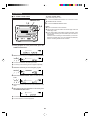
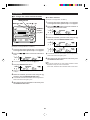
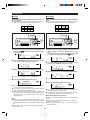
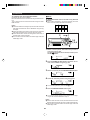
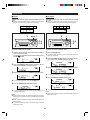
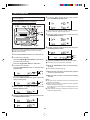
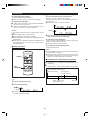
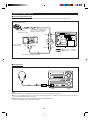
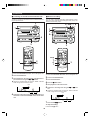
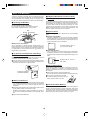
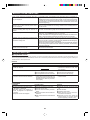
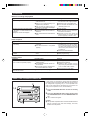
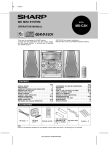
MD COMPACT COMPONENT SYSTEM
MODEL
MD-MX10H
OPERATION MANUAL
Thank you for purchasing this SHARP product.
To obtain the best performance from this product, please read
this manual carefully. It will guide you in operating your SHARP
product.
MD-MX10H MD Compact Component System consisting of
MD-MX10H (main unit) and CP-MX10H (speaker system).
CONTENTS
Page
SPECIAL NOTES ................................................................ 1
ACCESSORIES ................................................................... 2
PRECAUTIONS ................................................................... 2
NAMES OF CONTROLS AND INDICATORS ...................... 3-5
PREPARATION FOR USE ................................................ 6-8
SETTING THE CLOCK ........................................................ 9
SOUND CONTROL ........................................................... 10
COMPACT DISC OPERATION .......................................... 11
MINIDISC OPERATION ..................................................... 12
CONVENIENT CD AND MINIDISC OPERATIONS ............. 13-16
RADIO OPERATION .................................................... 17-18
RECORDING ................................................................ 19-23
Page
EDITING ....................................................................... 24-29
TIMER OPERATION ..................................................... 30-31
USING EXTERNAL UNITS .......................................... 32-33
WHAT IS A MINIDISC? ..................................................... 34
MINIDISC SYSTEM LIMITATIONS .................................... 35
TROUBLESHOOTING .................................................. 35-36
RESETTING THE MICROCOMPUTER ............................. 36
ERROR MESSAGES ......................................................... 37
MAINTENANCE ................................................................ 38
SPECIFICATIONS ............................................................. 38
TERMS OF GUARANTEE .................................. Back cover
SPECIAL NOTES
NOTE FOR USERS IN THE U.K.
The mains lead of this product is fitted with a non-rewireable
(moulded) plug incorporating a 3A fuse. Should the fuse need
to be replaced, a BSI or ASTA approved BS 1362 fuse marked
or
and of the same rating as above, which is also
indicated on the pin face of the plug must be used.
Always refit the fuse cover after replacing the fuse. Never
use the plug without the fuse cover fitted.
In the unlikely event of the socket outlet in your home not
being compatible with the plug supplied, cut-off the mains
plug and fit an appropriate type.
Ensure that neither the brown nor the blue wire is connected
to the earth terminal in your three pin plug.
DANGER:
The fuse from the cut-off plug should be removed and the
cut-off plug destroyed immediately and disposed of in a safe
manner.
Under no circumstances should the cut-off plug be inserted
elsewhere into a 13A socket outlet as a serious electric shock
may occur.
To fit an appropriate plug to the mains lead, follow the instructions below:
SERVICE INFORMATION
In the unlikely event of your equipment requiring repair,
please contact the dealer or supplier from whom it was purchased. Where this is not possible, please contact the telephone number listed below.
You will then be given details of how to obtain service.
- 0345-125387 Please note; all calls will be charged at local rate.
Before replacing the plug cover, make sure that:
● If the new fitted plug contains a fuse, its value is the same
as that removed from the cut-off plug.
● The cord grip is clamped over the sheath of the mains
lead and not simply over the lead wires.
IF YOU HAVE ANY DOUBT, CONSULT A QUALIFIED ELECTRICIAN.
Certain replacement parts and accessories may be obtained
from our main parts distributor.
IMPORTANT:
The wires in the mains lead are coloured in accordance with
the following code:
Blue
: Neutral
Brown
: Live
As the colours of the wires in the mains lead of this product
may not correspond with the coloured markings identifying
the terminals in your plug, proceed as follows:
● The wire which is coloured blue must be connected to the
plug terminal which is marked N or coloured black.
● The wire which is coloured brown must be connected to
the plug terminal which is marked L or coloured red.
WILLOW VALE ELECTRONICS LTD.
MANCHESTER 0161-682-1415
READING
01189-876444
In the unlikely event of this equipment requiring repair during the guarantee period, you will need to provide proof of
the date of purchase to the repairing company.
Please keep your invoice or receipt, which is supplied at the
time of purchase.
● Recording and playback of any material may require consent, which SHARP is unable to give. Please refer particularly to the provisions of the Copyright Act 1956, the Dramatic and Musical Performers Protection Act 1958, the
Performers Protection Acts 1963 and 1972 and to any subsequent statutory enactments and orders.
● This equipment complies with the requirements of Directives 89/336/EEC and 73/23/EEC as amended by 93/68/
EEC.
● US and foreign patents licensed from Dolby Laboratories
Licensing Corporation.
● When the ON/STAND-BY button is set at STAND-BY position, mains voltage is still present inside the unit.
When the ON/STAND-BY button is set at STAND-BY position, the unit may be brought into operation by the timer
mode or remote control.
CAUTION
Use the MD compact component system only in accordance
with the instructions given in this manual and do not attempt
to interfere with the interlock switch or make any other adjustment as this may result in exposure to hazardous radiation.
Warning:
● This unit contains no user serviceable parts. Never remove
covers unless qualified to do so. This unit contains dangerous voltages, always remove mains plug from the socket
before any service operation and when not in use for a
long period.
Warning:
● To prevent fire or shock hazard, do not expose this appliance to dripping or splashing. No objects filled with liquids,
such as vases, shall be placed on the apparatus.
1
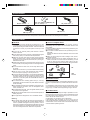
ACCESSORIES
Remote control × 1
"AA" size battery (UM/SUM-3, R6,
HP-7 or similar) × 2
AC power lead × 1
FM aerial × 1
AM loop aerial × 1
Note:
Parts and accessories mentioned in this operation manual other than those in the drawing are not included.
PRECAUTIONS
■ General
■ Care of compact discs
● Please ensure that the equipment is positioned in a well
ventilated area and ensure that there is at least 10cm (4")
of free space along the sides and back. There must also be
a minimum of 10cm (4") of free space on the top of the
unit.
● Do not use oil, solvents, petrol, paint thinners or insecticides on the unit.
● Do not expose the unit to moisture, to temperatures higher
than 60°C (140°F) or to extreme low temperatures.
● Keep the unit away from direct sunlight, strong magnetic
fields, excessive dust, humidity and electronic/electrical
equipment (home computers, facsimiles, etc.) which generate electrical noise.
● Hold the AC power plug by the head when removing it from
the AC socket, since pulling the lead can damage internal
wires.
● Do not remove the outer cover, as this may result in electric shock.
Refer internal service to your local SHARP service facility.
● Use the unit on a firm, level surface free from vibration,
and do not place anything on the top of the unit.
● If the unit malfunctions whilst in use, press the ON/STANDBY button to enter the stand-by mode, then disconnect the
AC power lead from the AC socket. Plug the AC power
lead back in, and then press the ON/STAND-BY button to
turn the power on.
● If an electrical storm is taking place near you, it is suggested that you disconnect the AC power lead from the AC
socket for safety.
● The ventilation should not be impeded by covering the ventilation openings with items, such as newspapers, tablecloths, curtains, etc.
● No naked flame sources, such as lighted candles, should
be placed on the apparatus.
● Attention should be drawn to the environmental aspects of
battery disposal.
● The apparatus is designed for use in moderate climate.
Compact discs are fairly resistant to damage, however
mistracking can occur due to an accumulation of dirt on the
disc surface.
Follow the guidelines below for maximum enjoyment from your
CD collection and player.
● Do not write on either side of the disc, particularly the nonlabel side.
Signals are read from the non-label side. Do not mark this
surface.
● Keep your discs away from direct sunlight, heat, and excessive moisture.
● Always hold the CDs by the edges. Fingerprints, dirt, or
water on the CDs can cause noise or mistracking. If a CD
is dirty or does not play properly, clean it with a soft, dry
cloth, wiping straight out from the centre, along the radius.
NO
YES
Correct
■ Volume control
The sound level at a given volume setting depends on a combination of speaker efficiency, location and various other factors.
It is advisable to avoid exposure to high volume levels, which
occur whilst turning the unit on with the volume control setting up high, or whilst continually listening at high volumes.
■ Condensation
Sudden temperature changes, storage or operation in an extremely humid environment may cause condensation inside
the cabinet (CD pickup, MiniDisc pickup, etc.) or on the transmitter LED on the remote control.
Condensation can cause the unit to malfunction.
If this happens, leave the power on with no disc in the unit
until normal playback is possible (about 1 hour). Wipe off any
condensation on the remote control transmitter LED with a
soft cloth before operating the unit.
Warning:
● The voltage used must be the same as that specified on
this unit. Using this product with a higher voltage other than
which is specified is dangerous and may result in a fire or
other type of accident causing damage. SHARP will not be
held responsible for any damage resulting from use of this
unit with a voltage other than that which is specified.
2
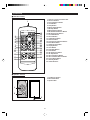
NAMES OF CONTROLS AND INDICATORS
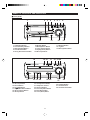
■ Front panel
1
2
9
1.
2.
3.
4.
5.
On/Stand-by Button
Timer Stand-by Indicator
Name/TOC Edit Button
Timer/Delete Button
Tuning Down/Review Button
14.
15.
16.
17.
18.
19.
CD Compartment
Record Button
Track Edit Button
CD 0 MD Edit Start Button
CD Open/Close Button
CD Stop Button
4
10
6.
7.
8.
9.
10.
11
MD Stop Button
MD Play/Pause Button
Tuning Up/Cue Button
Display (Demo) Button
MD Compartment
14
21
3
15 16
22 23 24
20.
21.
22.
23.
24.
25.
12
8
13
11. MD Eject Button
12. Jog Dial
13. Memory/Enter Button
17 18 19 20
25 26
CD Play/Pause Button
Headphone Socket
Surround Button
Preset Equalizer Button
Extra Bass Button
Tuner (Band) Button
3
5 6 7
27
28
26. Auxiliary Button
27. Volume Control
28. Volume Select Button
(Continued)
■ Display window
2 3 4 56
1
7
8
9
10
11
12
13
14
15
16
17
18
1.
2.
3.
4.
5.
6.
7.
8.
9.
10.
FM Stereo Indicator
FM Stereo Mode Indicator
Track Edit Indicator
Play/Pause Indicator
Repeat Indicator
TOC Indicator
Level Meters
Digital Recording Indicator
CD Indicator
MD Indicator
19
11.
12.
13.
14.
15.
16.
17.
18.
19.
20.
20 21 22
Record Indicator
Sleep Indicator
Disc Indicator
Track Indicator
Memory Indicator
Random Play Indicator
Total Time Indicator
Remaining Time Indicator
Character Information Display
AM/PM Indicator
23
21. Timer Record/Timer Play Indicator
22. Surround Indicator
23. Extra Bass Indicator
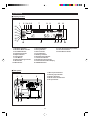
■ Rear panel
1
2
1.
2.
3.
4.
5.
3
4 5
4
AM Loop Aerial Socket
Auxiliary Input Sockets
Speaker Terminals
FM 75 Ohms Aerial Socket
AC Input Socket
(Continued)
■ Remote control
1.
2.
3.
4.
5.
6.
7.
8.
9.
10.
11.
12.
13.
14.
15.
16.
17.
18.
19.
20.
21.
22.
23.
24.
25.
26.
27.
28.
1
2
3
4
5
6
7
8
9
10
11
12
13
14
15
16
17
18
19
20
21
22
23
24
25
26
27
28
Remote Control Transmitter LED
Surround Button
Preset Equalizer Button
Clock Button
Sleep Button
Memory/Enter Button
MD Stop Button
MD Play/Pause Button
MD Track Down/Review Button
MD Track Up/Cue Button
Track Edit Button
Record Button
On/Stand-by Button
Dimmer Button
Tuner Preset Up/Down Buttons
Extra Bass Button
Volume Select Button
Display Button
Clear Button
Play Mode Button
Time Button
CD Play/Pause Button
CD Stop Button
CD Track Up/Cue Button
CD Track Down/Review Button
Tuner (Band) Button
Auxiliary Button
Volume Buttons
■ Speaker section
1. Full-Range Speaker
2. Bass Reflex Duct
3. Speaker Wire
1
2
3
5
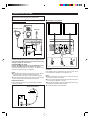
PREPARATION FOR USE
Unplug the AC power lead from the AC socket before
connecting or disconnecting any component.
■ Aerial connection
■ Speaker connection
1
AM loop aerial
FM aerial
2
Left
Right
Black
Red
1
Supplied FM aerial
2
Red
3
Connect the FM aerial wire to the FM 75 OHMS socket
and position the FM aerial wire in the direction where the
strongest signal can be received.
Supplied AM loop aerial
Connect the AM loop aerial wire to the AM LOOP socket.
Position the AM loop aerial for optimum reception.
Place the AM loop aerial on a shelf, etc., or attach it to a
stand or a wall with screws (not supplied).
Connect each speaker wire to the SPEAKER terminals
as shown.
Use speakers with an impedance of 6 ohms or more, since
lower impedance speakers can damage the unit.
Notes:
● Do not place the aerial on the main unit as it may result in
noise pickup from the internal digital electronics.
Place the aerial away from the unit for better reception.
● If the AM loop aerial and the FM aerial wire are placed
near the AC power lead, interference may result.
Notes:
● Connect the black wire to the minus (–) terminal, and the
red wire to the plus (+) terminal.
● Do not mix the right channel and left channel wiring when
connecting the speakers to the unit.
● Do not let bare speaker wires touch each other as this may
damage the amplifier and/or speakers.
● The speaker grille is not detachable.
External FM aerial
Use an external FM aerial if you require better reception.
Consult your dealer.
External FM aerial
6
(Continued)
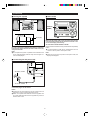
■ Placing the system
10 cm (4")
■ Demo mode
10 cm (4")
DISPLAY
(DEMO)
10 cm (4")
10 cm (4")
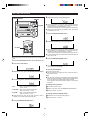
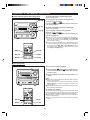
When the AC power lead is first connected, the unit will
enter the demonstration mode and the words will scroll
across the display continuously.
To cancel the demonstration mode:
Be sure to keep space between the units for ventilation.
Keep the top and the back of this unit at least 10 cm (4")
away from the wall.
When in the demonstration mode, press the DISPLAY (DEMO)
button.
● The demonstration mode will be cancelled and the unit
will be in the low power consumption mode.
Note:
● Do not place the system or speakers near a television set
as the magnetic fields produced may cause irregular colours to be displayed.
Note:
● When the unit is in the low power consumption mode, the
display will disappear.
■ Connecting the AC power lead
AC 230 V, 50 Hz
To AC INPUT
To an AC socket
Connect the AC power lead to the AC INPUT socket, then
connect its plug to an AC socket.
Notes:
● Unplug the AC power lead from the AC socket if the unit
will not be in use for a prolonged period of time.
● Never use a power lead other than the one supplied. Use
of a power lead other than the one supplied may cause an
electric shock or fire.
7
(Continued)
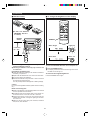
■ Remote control
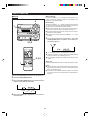
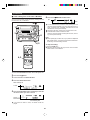
■ To change the brightness of the display
● 2 "AA" size batteries
(UM/SUM-3, R6, HP-7
or similar)
Remote
sensor
DIMMER
When bright
Lights up
When dark
Goes out
0.2 m - 6 m
(8" - 20')
15
15
● When inserting or removing the batteries, push them
toward the battery terminal.
● Installing the batteries incorrectly may cause the unit
to malfunction.
Ï
1 Press the ON/STAND-BY button to turn the power on.
2 Press the DIMMER button.
● The display will become dimmer and the light around the
VOLUME control will go out.
Precautions for battery use:
● Insert the batteries according to the direction indicated in
the battery compartment.
● Replace all old batteries with new ones at the same time.
● Do not mix old and new batteries.
● Remove the batteries if they are weak or if the unit will not
be used for long periods of time.
This will prevent potential damage due to battery leakage.
To return to the original brightness:
Press the DIMMER button again.
Caution:
Do not use rechargeable batteries (nickel-cadmium battery,
etc.).
Notes concerning use:
● Replace the batteries if the operating distance is reduced
or if the operation becomes erratic.
● Periodically clean the transmitter LED on the remote control and the sensor on the main unit with a soft cloth.
● Exposing the sensor on the main unit to strong light may
interfere with operation. Change the lighting or the direction of the unit.
● Keep the remote control away from moisture, excessive
heat, shock, and vibrations.
8
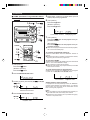
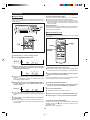
SETTING THE CLOCK
ON/STAND-BY
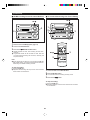
6 Adjust the hour by turning the jog dial.
MEMORY/
ENTER
● When the jog dial is turned one click clockwise, the time
will increase by 1 hour. When it is turned one click anticlockwise, the time will decrease by 1 hour.
Keep turning the jog dial to change the time continuously.
● When the 12-hour display is selected, “AM” will change
automatically to “PM”.
Jog dial
7 Press the MEMORY/ENTER button.
8 Adjust the minutes by turning the jog dial.
CLOCK
● When the jog dial is turned one click clockwise, the time
will increase by 1 minute. When it is turned one click anticlockwise, the time will decrease by 1 minute.
Keep turning the jog dial to change the time continuously.
● The hour setting will not advance even if minutes advance
from "59" to "00".
● In this example, the clock is set for the 24-hour (0:00) system.
9 Press the MEMORY/ENTER button.
1 Press the ON/STAND-BY button to turn the power on.
2 Press the CLOCK button.
● The clock starts operating from "0" second.
(Seconds are not displayed.)
To see the time display:
3 Within 5 seconds, press the MEMORY/ENTER button.
Press the CLOCK button.
● The time display will appear for about 5 seconds even in
the stand-by mode.
Note:
● The "CLOCK" will appear at the push of the CLOCK button
when the AC power supply is restored after a power failure
occurs or after the AC power lead is disconnected.
If this happens, follow the procedure below to change the
clock time.
4 Turn the jog dial to select the time display mode.
1
2
3
1
2
To change the clock time:
→The 24-hour display will appear.
→(0:00 - 23:59)
"12:00 AM" →The 12-hour display will appear.
→(AM or PM 12:00 - 11:59)
"0:00 AM" →The 12-hour display will appear.
→(AM or PM 0:00 - 11:59)
● Note that this can only be set when the unit is first installed or it has been reset (see page 36).
"0:00"
Press the CLOCK button.
Within 5 seconds, press the MEMORY/ENTER button.
Perform steps 6 - 9 above.
To change the time display mode:
5 Press the MEMORY/ENTER button.
9
Reset the microcomputer (see page 36).
Perform steps 2 - 9 above.
SOUND CONTROL
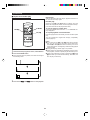
■ Volume
■ Extra bass (X-BASS)
(Main unit)
(Remote control)
(Main unit)
X-BASS
(Remote control)
X-BASS
X-BASS
0
15
MAX
(Main unit operation)
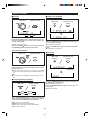
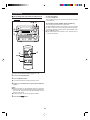
When the VOLUME control is turned clockwise, the volume will increase. When it is turned anti-clockwise, the
volume will decrease.
Press the X-BASS button to emphasise the bass region
of the frequency spectrum.
● "X-BASS ON" will appear.
(Remote control operation)
Press the VOLUME button to increase the volume and
the VOLUME button to decrease the volume.
Press the X-BASS button again to cancel the extra bass
mode.
● "X-BASS OFF" will appear.
Servo Powered Volume:
■ Surround
(Main unit)
(Remote control)
VOLUME
SELECT
The VOLUME control automatically comes out when the
power is turned on, and goes back when the unit is set to
the stand-by mode.
● When the power is turned on, you can put the VOLUME
control in and out by pressing the VOLUME SELECT button.
(Main unit)
(Remote control)
SURROUND
SURROUND
SURROUND
Note:
● Do not push in the VOLUME control forcibly with your finger.
■ Pre-programmed equalizer
(Main unit)
Press the SURROUND button to allow you to enjoy music that seems to surround you.
● "SURROUND" will appear.
(Remote control)
Press the SURROUND button again to cancel the surround mode.
● "PASS" will appear.
EQUALIZER
FLAT
SOFT
HEAVY
VOCAL
When the EQUALIZER button is pressed, the current
mode setting will be displayed. To change to a different
mode, press the EQUALIZER button repeatedly.
FLAT: The sound is not modified.
HEAVY: Bass and treble are emphasised.
VOCAL: Vocals (midrange tones) are emphasised.
SOFT: Treble is reduced.
10
COMPACT DISC OPERATION
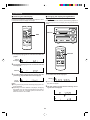
■ CD playback
1
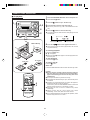
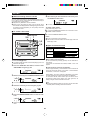
1 Press the ON/STAND-BY button to turn the power on.
2 Press the CD ■ button.
3 Press the 7 button to open the disc tray.
4 Place the CD on the disc tray, label side up.
3,5
● Be sure to place 8 cm (3") CD in the middle of the disc
tray.
6
5 Press the 7 button to close the disc tray.
● The total number of tracks and the total playing time will
be displayed.
2
Total number of tracks
Label side up
Total playing time
6 Press the CD 06 button to start playback from track 1.
● When the last track has been played back, the unit will
stop automatically.
To interrupt playback:
Press the CD 06 button.
● “ 6 ” will appear.
● Press the CD 06 button again to resume playback from
the same point.
4
To stop playback:
8 cm (3")
Press the CD ■ button.
12 cm (5")
To remove the CD.
Press the 7 button.
After use:
Press the ON/STAND-BY button to enter the stand-by mode.
Caution:
● Do not carry the unit with a CD left in the disc tray. The
disc may come loose inside the unit and it may be damaged or cause damage to the unit. This may also cause
malfunctions.
● Do not push the disc tray whilst it is moving.
● If the power fails whilst the tray is open, wait until the power
is restored.
● If the disc tray is stopped forcibly, "E-CD20" will appear in
the display and the unit will not function.
If this occurs, press the ON/STAND-BY button to enter the
stand-by mode and then turn the power on again.
● Subjecting the unit to shock or vibration may cause
mistracking.
● Playing certain CDs at a high volume may cause
mistracking. In this case, listen at a lower volume.
● If TV or radio interference occurs during CD operation, move
the unit away from the TV or radio.
6
2
1
11
MINIDISC OPERATION
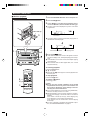
1 Press the ON/STAND-BY button to turn the power on.
■ MiniDisc playback
2 Press the MD ■ button.
3 Load a MiniDisc in the direction indicated by the arrow on the MiniDisc, with the labelled side facing up.
● The disc name will be displayed only when it has been
programmed.
Label side up
3
Disc name
● The total number of tracks and the total playing time on
the MiniDisc will be displayed.
2
Total number of tracks
1
4
Total playing time
4 Press the MD 06 button.
● If the MiniDisc has a track name, it will appear and scroll
across the display. Then, the elapsed playing time will appear.
● If the MiniDisc has no track names, the elapsed playing
time will appear.
● When the last track has been played back, the unit will
stop automatically.
7
To interrupt playback:
Press the MD 06 button.
● " 6 " will appear.
● Press the MD 06 button again to resume playback from
the same point.
To stop playback:
Press the MD ■ button.
2
4
To remove a MiniDisc:
Press the 7 button.
Caution:
● Do not carry the unit with a MiniDisc left in the MD
compartment. The disc may come loose inside the unit
and it may be damaged or cause damage to the unit.
This may also cause malfunctions.
● If TV or radio interference occurs when using the MiniDisc,
move the unit away from the TV or radio.
● Although MiniDiscs will not normally skip due to vibration,
you may hear skipping in the sound if there is continuous
vibration.
If the volume is turned up too high, sound skipping may
occur depending on the contents of the MiniDisc.
If this happens, turn the volume down and the skipping
should stop.
● If an error message is displayed during MiniDisc operation, see "ERROR MESSAGES" on page 37.
1
12
CONVENIENT CD AND MINIDISC OPERATIONS
To listen again to the track being played:
(Main unit operation)
■ APSS (Auto Program Search System)
Turn the jog dial anti-clockwise during playback.
MD 06
(Remote control operation)
Press the CD 5 or MD 5 button for less than 0.5 seconds during playback.
jog dial
To move to the beginning of the next track:
(Main unit operation)
Turn the jog dial clockwise during playback.
CD 06
(Remote control operation)
Press the CD 4 or MD 4 button for less than 0.5 seconds during playback.
● To skip a number of tracks at one time, turn the jog dial on
the main unit or press the CD 5 / 4 or MD 5 / 4
button on the remote control repeatedly until the desired
track number is shown.
● To start continuous playback from a desired track, select
the track number by turning the jog dial on the main unit, or
by pressing the CD 5 / 4 or MD 5 / 4 button on
the remote control, whilst in the stop mode. Then, press
the CD 06 or MD 06 button.
MD 06
CD 06
MD 5
CD 4
MD 4
CD 5
■ Cue and review
MD/CD 3
1 Load a disc and begin playback.
2 Hold the MD/CD 2 button down for audible fast for-
MD/CD 2
ward, and hold the MD/CD 3 button down for audible fast reverse.
3 Normal playback will resume when the button is released.
Notes:
● When the end of the last track is reached, "END" will light,
and the unit will pause.
If you want to listen to a portion of a track again, press the
MD/CD 3 button to return to the point in the track you
want to listen to.
● If the beginning of the disc is reached whilst reviewing, playback will start automatically.
To search very quickly:
MD 3
CD 2
MD 2
CD 3
When fast forward or fast reverse is used whilst in the pause
mode, the playback point will move more quickly than when
using audible fast forward or audible fast reverse playback.
● In this mode, no sound is heard. Therefore, you should refer to the time display.
● When you lift your finger, the unit will re-enter the pause
mode.
13
(Continued)
5 Repeat steps 3 and 4 for any other tracks. Up to 20
■ APMS (Automatic Programmable Music
Selector)
tracks (P-20) can be programmed.
6 (CD operation)
Press the CD ■ button.
1,6 MD H 7 MD 06
(MiniDisc operation)
2,4
Press the MD ■ button.
3
7
Total number of tracks
CD 06
Total playing time
7 (CD operation)
1,6
Press the CD 06 button to start playback of the programmed selections.
CD H
(MD operation)
Press the MD 06 button to start playback of the programmed selections.
● After all of the programmed tracks have finished playback,
the unit will automatically stop.
CLEAR
2,4
1,6
1,6
To clear the programmed selections:
CD H
MD H
Press the CLEAR button whilst the “MEMORY” indicator is
flashing.
● Each time the button is pressed, one track will be cleared,
beginning with the last track programmed.
7
7
CD 06
MD 06
To cancel the APMS:
3
Press the CD H button.
Whilst the unit is stopped in the APMS mode, press the CLEAR
button to turn off the “MEMORY” display.
● The programme contents will be erased.
● When you open the disc tray or eject a MiniDisc, the APMS
mode will be cancelled.
(MiniDisc operation)
To check which tracks are programmed:
Press the MD H button.
Whilst the unit is stopped in the APMS mode, turn the jog dial
or press the CD 5 / 4 or MD 5 / 4 button.
1 (CD operation)
2 Press the MEMORY/ENTER button.
Track number
3 Turn the jog dial or press the CD 5 / 4 or
MD 5
Playback order
Adding tracks to the programme:
/ 4 button.
If a programme has been previously stored, the “MEMORY”
indicator will be displayed. Then follow steps 2 - 6 to add additional tracks. The new tracks will be stored after the last
track of the original programme.
MEMORY
Selected track number
Notes:
● It is not possible to insert an additional track between programmed tracks that have already been entered.
● Programming and cancelling are not possible during playback or in the pause mode.
4 Press the MEMORY/ENTER button.
MEMORY
Playback order
14
(Continued)
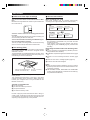
■ Repeat and random play
Repeat play
After the last track has been played, playback will return to
the first track and begin again.
Random play
When the CD 06 or MD 06 button is pressed, all of the
tracks will be played at random, and then playback will stop.
(The same track will not be played back twice.)
To cancel repeat or random play:
P-MODE
Press the P-MODE button until the " R " or "RANDOM" display disappears.
MD 06
CD 06
To repeat playback of selected tracks:
Enter the programme for the tracks you want and start repeat
play.
You can programme a single track and play it repeatedly
(refer to page 14).
Notes:
● If you press the CD 4 or MD 4 button during random
play, you can move to the next track. On the other hand,
the CD 5 or MD 5 button does not allow you to move
to the previous track. The beginning of the track being played
will be located.
● During APMS play, random play is not possible.
● When random or repeat play is selected during CD or MiniDisc playback, random or repeat play will start at that point.
● When using repeat play, be sure to press the CD ■ or MD
■ button after you have finished listening. Otherwise, the
disc will play continuously.
1 Select the desired programme source, CD or MiniDisc.
2 Press the P-MODE button.
● Each time this button is pressed, the mode will change in
the following order:
Repeat indicator
Random indicator
Disappears
3 Press the CD 06 or MD 06 button to start playback.
15
(Continued)
■ Switching the time display
■ Changing the display during MiniDisc
playback
Each time the TIME button is pressed during playback or when
in the pause mode, the display will change.
Each time the DISPLAY button is pressed during playback or
when in the pause mode, the display will change as described
below.
DISPLAY
TIME
DISPLAY
1 The elapsed playing time for current track will be displayed.
TRACK
No display
2 The remaining playing time for the current track will
be displayed.
REMAIN
3 The total remaining playing time for the disc from the
1 The track name will be displayed.
point being played at that time will be displayed.
TRACK
TOTAL
REMAIN
● When the MiniDisc does not have a track name, this display does not appear.
Notes:
● During random play, the total remaining playing time cannot be displayed.
● Depending on a CD or MiniDisc to be played, the playing
time display may not match the total playing time which is
indicated on the CD or MiniDisc jacket, as the time between the tracks is not included.
2 The total number of tracks and the remaining recording time will be displayed.
16
RADIO OPERATION
Manual tuning:
■ Tuning
Press the TUNING (X or W) button as many times as required to adjust the frequency shown on the display to the
frequency of the desired station.
4
Auto tuning:
When the TUNING (X or W) button is pressed for more than
0.5 seconds, scanning will start automatically and the tuner
will stop at the first receivable broadcast station.
● When radio interference occurs during auto scan tuning,
auto scan tuning may stop automatically at that point.
● If a weak station signal is found during auto scan tuning,
the station will be skipped.
● To stop the auto tuning, press the TUNING (X or W) button again.
1
5 To receive an FM stereo transmission, press the
TUNER (BAND) button so that the "ST" indicator on
the display lights up.
2,3,5
ST
● "j" will appear when an FM broadcast is in stereo.
● If the FM reception is weak, press the TUNER (BAND)
button so that the "ST" indicator goes out.
● The reception changes to monaural, the sound becomes
clearer.
2,3,5
After use:
1
Press the ON/STAND-BY button to enter the stand-by mode.
Notes:
● The last station tuned in will be recalled, even after changing the tuning band or the function, or after switching the
unit to the stand-by mode.
● If the unit's tuner interferes with the reception of a nearby
TV or radio, move the unit as far away from these items as
possible.
1 Press the ON/STAND-BY button to turn the power on.
2 Press the TUNER (BAND) button.
3 Press the TUNER (BAND) button to select the desired
frequency band. (FM ST, FM or AM)
FM ST
FM
AM
X or W) button to tune into the
4 Press the TUNING (X
desired station.
17
(Continued)
To recall a memorised station:
■ Preset tuning
Turn the jog dial or press the PRESET (X or W) button for
less than 0.5 seconds to select the desired station.
● The stations (preset channel number, frequency and frequency band) which have been stored in memory will appear in the display in numerical order, irrespective of the
frequency bands.
You can store up to 40 stations in memory (40 stations consisting of any combination of AM and FM stations you like)
and recall them.
Backup function:
The backup function protects all station presets for a few hours
should there be a power failure or the AC power lead is removed from the AC socket.
2,4
3
■ Preset memory scan
The stations saved in the preset memory can be scanned
automatically.
3
2,4
CLEAR
PRESET
(X W)
MEMORY/
ENTER
To enter stations into memory:
1 Perform steps 1 - 5 in the "Tuning" section.
2 Press the MEMORY/ENTER button.
MEMORY
X or
1 To scan the preset stations, press the PRESET (X
3 Within 5 seconds, turn the jog dial or press the PRE-
W) button for more than 0.5 seconds.
● The station preset number will flash and the programmed
stations will be tuned in sequentially, for 5 seconds each.
X or W ) button to make the preset channel
SET (X
number flash in the display.
X or W) button again to stop the
2 Press the PRESET (X
memory scan at the desired station.
Note:
When the preset memory does not have any stations stored
in it, the preset memory scan will not function.
● Store the stations in memory, in order, starting with preset
channel 1.
When
is displayed, a station has already been stored
in this preset number memory.
4 Within 5 seconds, press the MEMORY/ENTER button
To erase the memorised station:
to store that station in the selected station preset
number memory.
1 Recall the memorised station to erase by turning the
X or W) button.
jog dial or pressing the PRESET (X
2 Press the CLEAR button.
MEMORY
● "MEMORY" and preset number will flash.
● If the "MEMORY" and preset number indicators go out
before the station is memorised, repeat the operation from
step 2.
3 Within 5 seconds, press the MEMORY/ENTER button.
4 Repeat steps 1-3 to erase other memorised stations.
5 Repeat steps 1 - 4 to set other stations, or to change a
preset station.
● When a new station is stored in the selected station preset number memory, the contents previously memorised
will be erased.
To erase all memorised stations:
When the unit is in the stand-by mode, hold down the TUNER
(BAND) and the MD ■ buttons, and then press the ON/
STAND-BY button.
● "PRESET CLR" will appear.
18
RECORDING
■ Differences from tape recordings
■ About track numbers
You cannot record music on the reverse side of a MiniDisc.
MiniDiscs are single sided and should only be inserted with
the correct side up.
When recording from a CD
New track numbers will be created automatically
according to the original tracks (Synchro mark function).
CD
First trac
Track A
MiniDisc
First track
You don't need to search for the starting point at which
to record.
The unit automatically finds the point at which recording can
start. Recording will start from that point.
Track A
Third track
Track B
Track C
Second
track
Track B
Third track
Track C
● When you record from a CD to a MiniDisc, the track numbers recorded on the MiniDisc may not match the track
numbers on the CD.
If this happens, correct the track numbers using the DIVIDE (page 27) and COMBINE (page 27) functions after
recording.
You can check the total or remaining recordable time (possible recording) before recording.
This lets you plan a recording session so that the last song
will not come to an abrupt end before it has finished.
■ Disc writing (TOC)
Recordings cannot be made in the following situations.
The TOC (Table of Contents) is information on track numbers
and recording areas to allow the unit to recognize musical
selections or sounds.
The entire MiniDisc is controlled depending on this TOC, which
enables the unit to find the beginning of a track quickly or to
automatically record in a vacant area.
Area for TOC (recording track
numbers, track names, etc.)
Second trac
● If you try recording on a playback-only MiniDisc (commercially available music MiniDisc).
● If a MiniDisc is protected against accidental erasure (page
34).
● If there is no more recording time left on the disc (page
35).
● When the "TOC FULL" message appears (page 37).
● If a disc's TOC has been damaged.
Notes:
● When recording important selections, be sure to make a
preliminary test to ensure that the desired material is being properly recorded.
● The VOLUME, X-BASS, EQUALIZER and SURROUND
controls can be adjusted with no effect to the recorded signal (Variable Sound Monitor).
Area for recording
the sound
When you start recording or editing, "TOC" will appear in the
display window.
This indicates that information in the TOC is now being
changed according to the recording or editing being performed. (The changed TOC is not yet recorded on the
MiniDisc at this time.)
The TOC is recorded when
● you stop recording.
● you switch to another input source.
● you eject the MiniDisc.
● you enter the stand-by mode.
Do NOT unplug the power lead whilst the TOC is being recorded ("TOC" is flashing) and do NOT impart shock to the
unit. Otherwise, TOC will not be correctly recorded, and consequently proper playback may not be possible.
19
(Continued)
■ Recording from a CD onto a MiniDisc
(One-Touch Editing)
To cancel the operation:
A CD can be recorded to a MiniDisc, starting from the first
track, with one-touch operation.
To stop recording:
Before pressing the CD 0 MD EDIT START button, press
the CD ■ button.
Press the MD ■ button.
● Playback and recording will stop and the track numbers
will be written on the MiniDisc.
MD H
Notes:
● When the CD playing time is longer than the available
MiniDisc recording time, the recording process will not start
even when the CD 0 MD EDIT START button is pressed.
1
4
3
2
Total number of
recordable tracks
(from the first track)
● To record as many tracks as are available, press the CD 0
MD EDIT START button again.
Then, when the CD 0 MD EDIT START button is pressed
again, recording will start. However, when the MiniDisc runs
out of space, "DISC FULL" will be displayed and the CD
and MiniDisc will stop.
However, if the available recording time on the MiniDisc is
less than the length of the first track on the CD, recording
will not be performed.
1 Press the ON/STAND-BY button to turn the power on.
2 Press the CD ■ button.
3 Load a CD and a recordable MiniDisc.
● The total number of tracks and the total playing time on
the CD will be displayed.
4 Press the CD 0 MD EDIT START button.
0
REC
● Recording will begin, starting from the first track of CD.
● After recording (all of the tracks that can be recorded), the
unit will stop automatically.
To check the remaining time available for recording:
1
2
3
Available recording time
Press the MD ■ button.
Load a MiniDisc.
Press the DISPLAY button to find the time followed by
hyphen.
● The total number of tracks previously recorded and the
available remaining time will be displayed, the unit will return to the original display 4 seconds later.
20
(Continued)
■ Track editing from a CD onto a MiniDisc
6 Press the CD 0 MD EDIT START button.
You can record several consecutive tracks, starting from the
first track of a CD, to a MiniDisc.
0
REC
MD H
● The CD loaded will be recorded in order, starting from the
first track. When a MiniDisc runs out of recording space or
when a CD has been completely recorded, the CD and
the MiniDisc will stop automatically.
● Recording will begin, starting from the first track of CD.
● Selected tracks will be recorded in order.
After the unit has finished recording the last track, recording will stop automatically.
1
6
3
2
Note:
● When repeat play has been set, if you press the CD 0 MD
EDIT START button, the repeat mode will be cancelled automatically, and track editing will start.
4,5
To stop recording:
Press the MD ■ button.
● Playback and recording will stop and the track numbers
will be written on the MiniDisc.
4,5
1 Press the ON/STAND-BY button to turn the power on.
2 Press the CD ■ button.
3 Load a CD and a recordable MiniDisc.
4 Press the TRACK EDIT button.
When selecting CD
T-EDIT
5 Press the TRACK EDIT button repeatedly to select the
last track number you want to record.
The last
track number
Total recording time
● If you select 21 tracks or more, "E. OVER" will be displayed.
21
(Continued)
■ APMS recording from a CD onto a MiniDisc
■ To record without using One-Touch Editing
MD H
MD H
1
2
1
3
2
3
1 Select tracks for APMS playback (page 14).
2 Load a recordable MiniDisc.
3 Press the CD 0 MD EDIT START button.
● APMS playback will start, and recording will start automatically.
● Programmed tracks will be recorded in order. After the
unit has finished recording the last track, recording will
stop automatically.
MD H
3
2
Note:
● When repeat play has been set, if you press the CD 0 MD
EDIT START button, the repeat mode will be cancelled automatically, and APMS recording will start.
To stop recording:
Press the MD ■ button.
● Playback and recording will stop and the track numbers
will be written on the MiniDisc.
1 Load a CD and a recordable MiniDisc.
2 Press the ● REC button.
● The unit will enter the recording stand-by mode.
3 Press the CD 06 button.
To stop recording:
Press the MD ■ button.
● Recording will stop and the track numbers will be written
on the MiniDisc.
22
(Continued)
To stop recording:
■ Recording from the built-in radio onto a
MiniDisc
MD ■
Press the MD ■ button.
The recording will stop and the track number will be written
on the MiniDisc.
5
To record the track number whilst recording:
The recording is performed as a single track.
To identify different sections of a recording, you can increase
the track number at any point during the recording process.
To create a new track number whilst in the recording mode,
press the ● REC button.
● The track number will increase by one, and then the recording will continue.
2
4
3
5
4
MD ■
3
1 Tune in to the desired station (pages 17 - 18).
2 Load a recordable MiniDisc.
3 Press the ● REC button.
● The unit will enter the recording stand-by mode.
4 Check the recordable time by pressing the DISPLAY
button.
Notes:
● Before recording an AM broadcast, enter the recording
stand-by mode, and then separate the AM loop aerial from
the main unit. Adjust it so that the AM broadcast can be
tuned in most clearly.
● During recording, you cannot change the station.
5 Press the MD 06 button.
23
EDITING
6 After entering all of the characters in the name, press
■ What the editing function can do
the NAME/TOC EDIT button.
You can create original discs using the MiniDisc editing function, on which you can change the order of the tracks and you
can create disc or track names.
● Playback-only MiniDiscs cannot be edited.
● Tracks (up to 255 tracks per disc) can be named. Since
track names are displayed when the beginning of each track
is located or during playback, you can quickly check the
name of each track.
● The disc name will be recorded.
To erase a disc name:
1
2
After performing steps 1 to 3.
Press the TIMER/DELETE button for 2 seconds or more.
● "NAME CLEAR" will flash.
■ To create a disc name
TIMER/DELETE
2,6
Press the MEMORY/ENTER button.
Notes:
● Up to 40 characters can be entered.
● This function cannot be used in the random play mode and
APMS play mode.
1
3,5
2,4
■ Type of characters used
Type of
characters
Characters (Symbols)
A B C D E F G H
I
Capital letters
R S T U V W X Y Z
Symbols
1
(
2
)
3
J
K L
0
!
"
M N O P Q
4
5
6
7
8
9
+
,
-
.
/
? @ < = > _
$
% &
'
Number of characters you can enter
● Disc names and track names
Up to 40 characters (including spaces) can be entered for
each name.
If more than 40 characters are entered, "NAME FULL" will
appear.
1 Press the MD ■ button.
● The total number of tracks and the total playing time on a
MiniDisc will appear.
2 Press the NAME/TOC EDIT button, and then select
● Total number of characters per MiniDisc
A total of approximately 1,700 characters can be used for all
of the disc and track names. If more than 1,700 characters
are entered, " TOC FULL" will appear.
"DISC NAME" using the jog dial.
Whilst editing, the "TOC" indicator is displayed. This means
the edit results have not been recorded on the MiniDisc.
To record the results, select another input or set the unit to
the stand-by mode. During writing, the "TOC" goes out, all
editing changes will be recorded on the disc.
3 Within 10 seconds, press the MEMORY/ENTER button.
DISC
Note:
● Storing the edited contents on the disc can be done after
several pieces of editing have been finished.
● The unit will enter the character input mode.
4 Select the character you want using the jog dial.
DISC
5 Press the MEMORY/ENTER button to enter the character.
DISC
● Repeat steps 4 to 5 above to enter the characters in the
name.
24
(Continued)
To erase a track name:
■ To create a track name
1
2
After performing steps 1 to 2.
Press the TIMER/DELETE button for 2 seconds or more.
● "NAME CLEAR" will flash.
TIMER/DELETE
1,5
2,4
3
Press the MEMORY/ENTER button.
Notes:
● Up to 40 characters can be entered.
● This function cannot be used in the random play mode and
APMS play mode.
● If you create a track name whilst recording the track, make
sure you finish entering the name before you finish recording the track.
If the end of the recording is reached before you have entered the complete name, only the characters entered before the recording ended will be recorded.
1 During playback or in the pause mode, press the
NAME/TOC EDIT button.
2 Within 10 seconds, press the MEMORY/ENTER button.
TRACK
● The unit will enter the character input mode.
● The track you are listening to will be played repeatedly.
3 Select the character you want using the jog dial.
TRACK
4 Press the MEMORY/ENTER button to enter the character.
TRACK
● Repeat steps 3 to 4 above to enter the characters in the
name.
5 After entering all of the characters in the name, press
the NAME/TOC EDIT button.
● The track name will be recorded.
● The unit will return to normal playback.
25
(Continued)
■ To change disc names and track names
● To add a character:
(Example: To change "BET" to "BEST")
TIMER/DELETE
NAME/TOC EDIT
3 MD ■
1 To change disc names, perform steps 1 - 3 on page 24.
To change track names, perform steps 1 - 2 on page 25.
2
2 Press the 3 or 2 button to flash the character at
the place you want to add a letter.
MEMORY/
ENTER
DISC
Jog dial
● To cancel the operation, press the MD ■ button.
3 Select the character you want to add, using the jog
dial. Then, press the MEMORY/ENTER button.
DISC
● To delete a character:
(Example: To change "BESUT" to "BEST")
1 To change disc names, perform steps 1 - 3 on page 24.
DISC
To change track names, perform steps 1 - 2 on page 25.
2 Press the 3 or 2 button to flash the character to
● The selected character will be added, and the original characters will move to the right by one.
erase.
DISC
4 After entering all of the characters in the name, press
the NAME/TOC EDIT button.
● To cancel the operation, press the MD ■ button.
Note:
● You cannot modify disc or track names created on other
equipment if they are over 40 characters.
In this case, erase the name and then enter a new name.
3 Press the TIMER/DELETE button.
DISC
● After this step, if you are not going to enter a character, go
to step 5.
4 Select the character you want to add, using the jog
dial. Then, press the MEMORY/ENTER button.
● The selected character will be added, and the original characters will move to the right by one.
5 After entering all of the characters in the name, press
the NAME/TOC EDIT button.
26
(Continued)
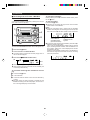
■ Divide
■ Combine
A single track can be divided into two at any desired position.
Two consecutive tracks can be combined into one
track.
● The numbers of the tracks which come after the newly divided track will be automatically increased by one.
● The numbers assigned to the tracks following the combined tracks will be decreased by one automatically.
1
2
A
1
2
A
1
3
B
C
3
B
1
4
C
D
2
MD ■
2
A
D
3
B
2
A
D
C
D
3
B
2
1
4
C
MD ■
1
3,4
2
3,4
1,2
1 Play the track which you want to divide into two, and
1 Whilst in the stop mode, select the second of the two
press the MD 06 button at the point where you want
to divide the track.
adjacent tracks you want to combine using the jog
dial.
Or start playing the second of the two tracks you want
to combine, and then press the MD 06 button.
2 Press the NAME/TOC EDIT button, and within 10 seconds, select "DIVIDE" using the jog dial.
2 Press the NAME/TOC EDIT button, and within 10 seconds, select "COMBINE" using the jog dial.
3 Within 10 seconds, press the MEMORY/ENTER button.
3 Within 10 seconds, press the MEMORY/ENTER button.
● To cancel the operation, press the MD ■ button.
4 Press the MEMORY/ENTER button again.
● To cancel the operation, press the MD ■ button.
4 Press the MEMORY/ENTER button again.
● The track is divided, and the unit is stopped at the beginning of the second of the two tracks.
● The numbers of the tracks which come after the divided
track are automatically increased by one.
● When a track which has been given a name is divided, the
two new tracks will have the same name. If the "TOC FULL"
message is seen, the second track may not be given a
name (page 35).
● The two tracks are combined, and the unit is stopped at
the beginning of the combined track.
● The numbers assigned to the tracks following the combined track are automatically decreased by one.
When both tracks have a name:
● When only the first track has a name → That name will be
used.
● When only the second of the two tracks has a name →
That name will be used.
● When both tracks have a name → The name of the first
track will be used.
Notes:
● This unit can hold up to 255 tracks. However, even if the
number of tracks assigned has not reached 255, it might
not be possible to make any further divisions of tracks (page
35).
● This function cannot be used in the random play mode and
APMS play mode.
27
(Continued)
To combine two non-contiguous tracks:
■ Move
(Example: the first and third tracks)
Move the third track to the second track using the MOVE function.
Then, combine the first and second tracks using the COMBINE function.
A designated track can be moved to any desired
position.
● The numbers assigned to the tracks following the track
which is moved will be adjusted automatically.
1
Notes:
● Tracks recorded from analogue inputs cannot be combined
with tracks recorded from CDs or MiniDiscs using the digital inputs.
● Tracks recorded in the stereo mode cannot be combined
with tracks recorded in the monaural long-play mode.
● Tracks where either track's recording time is less than 15
seconds may not be combined.
● This function cannot be used in the random play mode and
APMS play mode.
2
A
1
3
B
2
C
4
C
3
A
2
D
4
B
D
MD ■
1
3,5
1,2,4
1 Whilst in the stop mode, select the track you want to
move using the jog dial.
Or start playing the track to be moved, and then press
the MD 06 button.
2 Press the NAME/TOC EDIT button, and within 10 seconds, select "MOVE" using the jog dial.
3 Within 10 seconds, press the MEMORY/ENTER button.
4 Select the new track position using the jog dial.
● To cancel the operation, press the MD ■ button.
5 Press the MEMORY/ENTER button again.
● The track is moved, and the unit is stopped at the beginning of the new track selected in step 4.
Notes:
● When a track has been moved, the other tracks which are
affected will be assigned new track numbers automatically.
● This function cannot be used in the random play mode and
APMS play mode.
28
(Continued)
■ Erase
■ All Erase
Tracks you want to erase can be erased one at a
time.
All of the tracks you want to erase can be erased
at once.
● Once all of tracks have been erased, they cannot be recovered. Double-check the tracks before erasing them.
● Once a track has been erased, it cannot be recovered.
Double-check the track number before erasing it.
1
2
A
1
3
B
2
A
C
3
B
D
4
1
5
D
2
A
E
3
B
4
C
D
5
E
4
E
2
MD ■
BLANK
2
1
1
3,4
2
3,4
1,2
To erase tracks one at a time:
To erase all of the tracks at once:
1 Whilst in the stop mode, select the track you want to
1 Press the MD ■ button.
erase using the jog dial.
Or start playing the track to be erased, and then press
the MD 06 button.
● The total number of tracks and the total playing time on a
MiniDisc will appear.
2 Press the NAME/TOC EDIT button, and within 10 seconds, select "ALL ERASE" using the jog dial.
2 Press the NAME/TOC EDIT button, and within 10 seconds, select "ERASE" using the jog dial.
3 Within 10 seconds, press the MEMORY/ENTER button.
3 Within 10 seconds, press the MEMORY/ENTER button.
● To cancel the operation, press the MD ■ button.
4 Press the MEMORY/ENTER button again.
● To cancel the operation, press the MD ■ button.
4 Press the MEMORY/ENTER button again.
● All of the track numbers and track names will be erased.
● The track is erased, and the unit is stopped at the beginning of the next track.
Note:
● This function cannot be used in the random play mode and
APMS play mode.
Notes:
● When a track is erased, the numbers assigned to the tracks
following the erased track will be automatically decreased
by one.
● When a track is erased, the track name will be erased at
the same time.
● This function cannot be used in the random play mode and
APMS play mode.
29
TIMER OPERATION
6 Turn the jog dial to set the minute to start, and then
I Before setting the timer, make sure that the clock setting
is correct (page 9).
press the MEMORY/ENTER button.
■ Timer playback/Timer recording
1,10
TIMER
3 2 MD H
MEMORY/
ENTER
I If the ending time is not set manually, it will automatically
be set for one hour after the starting time.
Jog dial
7 Turn the jog dial to set the hour to stop, then press
2 CD H
the MEMORY/ENTER button.
9
2 TUNER (BAND) 2 AUX
8 Turn the jog dial to set the minute to stop, then press
the MEMORY/ENTER button.
Before timer operation, the following preparations are required.
● Load a CD, a recordable MiniDisc for timer recording.
● Preset the radio station.
1 Press the ON/STAND-BY button to turn the power on.
2 (To select timer playback)
PLAY
or
REC
Press the CD ■, MD ■, TUNER (BAND) or AUX button.
9 Adjust the VOLUME control for the desired volume.
(To select timer recording)
● Be careful not to turn the volume up too high.
Press the CD ■, TUNER (BAND) or AUX button.
10 Press the ON/STAND-BY button to enter the stand-
3 (To select timer playback)
by mode.
● The TIMER indicator will light up.
Press the TIMER/DELETE button to select the timer
playback mode.
11 When the timer start time is reached, timer playback
PLAY
or timer recording will start.
12 When the timer end time is reached, timer recording
(To select timer recording)
will stop.
Press the TIMER/DELETE button again to select the
timer recording mode.
Notes:
I The timer cannot control the component connected to the
Auxiliary input sockets.
I When the CD or MiniDisc is played to the end, playback
will stop before the stop time.
If you wish to play to the stop time, set repeat play for the
CD or MiniDisc.
● Timer playback and timer recording cannot be set at the
same time using the timer.
REC
4 Whilst "ff PLAY" or "ff REC" is flashing, press the
MEMORY/ENTER button.
5 Turn the jog dial to set the hour to start, and then press
the MEMORY/ENTER button.
30
(Continued)
To confirm the timer setting:
3 Press the SLEEP button to select the time.
Press the TIMER/DELETE button once.
● The turn-on time, the turn-off time will be displayed.
1
2
(Maximum: 2 hours - Minimum: 30 minutes)
The amount of sleep time can also be changed during the
sleep operation.
● 2 hours-30 minutes → 30-minute intervals
To cancel timer operation:
Whilst in the timer stand-by mode, press the ON/STANDBY button to turn the power on.
Press the TIMER/DELETE button repeatedly to turn off
the timer, "f PLAY" or "f REC" will go out.
Caution:
In the following cases, the timer recording function will not
work.
● When a MiniDisc has not been inserted.
● When a playback-only MiniDisc is inserted.
● When the MiniDisc you inserted is protected against accidental erasure.
● When there is no recording space left on the MiniDisc you
have inserted (when the "TOC FULL" or "DISC FULL"
message appears).
SLEEP
4 The unit will enter the stand-by mode automatically
after the preset sleep time has elapsed.
To cancel the sleep operation:
Press the SLEEP button repeatedly. "0:00" will appear and
"SLEEP" will go out at the same time.
● The sleep operation will be cancelled.
To confirm the remaining sleep time:
■ Sleep operation
Press the SLEEP button.
Notes:
● Once the sleep time is set, it will remain the same duration
until the setting is changed.
● The sleep functions of this unit cannot be used to control
equipment connected to this unit. You must use the sleep
functions of the other equipment, if it has them.
SLEEP
■ Simultaneous sleep and timer operation
1
2
ON/
STAND-BY
Perform steps 1 - 9 on page 30, "Timer playback/Timer
recording".
Perform steps 1 - 3 of the "Sleep operation" on this page.
1 Timer playback (record) setting
2 Sleep timer setting
Timer playback
(record) start time
30 minutes - 2 hours
The radio, CD and MiniDisc can all be turned off automatically.
Sleep operation will
automatically stop.
1 Play the desired sound source.
2 Press the SLEEP button.
SLEEP
● If you do not need to change the time, the unit will enter
the sleep mode automatically.
31
Desired time
End time
USING EXTERNAL UNITS
■ Connecting external units
Before connecting external units, set this unit to the stand-by mode and turn off the power to the external units.
The other MD/CD player
To the output/
headphone socket
To the analogue
output sockets
LEFT
Commercially available lead
with 3.5 mm (1/8") stereo
mini-plug and RCA plugs
RIGHT
LEFT
RIGHT
LEFT
RIGHT
● Red plug → To RIGHT
● White plug → To LEFT
Commercially available RCA lead
■ Headphones
Notes:
● Before plugging in or unplugging the headphones, make sure the volume level is reduced.
● Be sure your headphones have a 3.5mm (1/8") diameter plug and are between 16 ohms and 50 ohms impedance.
The recommended impedance is 32 ohms.
● When headphones are connected, the speakers are disabled automatically.
Adjust the VOLUME control for the desired volume.
32
(Continued)
■ Listening to sound from an external unit
■ Manual recording
To listen to sound from an external unit connected to the analogue input terminals:
You can start a recording manually whilst listening to playback from other external equipment (tape deck, tuner) connected to the auxiliary input.
3
6
1
MD H
7 6
1
2
4
4
2
3
MD H
7
4
1
2
4
1
1 Press the ON/STAND-BY button to turn the power on.
2 Press the AUX button.
3 Start playback on the external unit, and adjust the input sound level using the 3 or 2 button.
● Adjust the recording level so that the "OVER" indicator
does not light at the maximum level.
OVER
-2
0
3
1 Press the ON/STAND-BY button to turn the power on.
2 Load a recordable MiniDisc.
3 Press the AUX button.
4 Press the I REC button.
5 Start playback on the external unit.
6 Adjust the recording level using the 3 or 2 button.
● Adjust the recording level so that the "OVER" indicator
does not light at the maximum level.
+4
OVER
4 Adjust the sound level using the VOLUME buttons on
the remote control or the VOLUME control on this main
unit.
-2
7 Press the MD 06 button.
To stop recording:
Press the MD ■ button.
33
0
+4
WHAT IS A MINIDISC?
The disc is stored in a cartridge. You can handle it easily without worrying about dust, fingerprints, etc. However, dust entering the opening of the cartridge, dirt on the cartridge, warping, etc. may cause malfunctions. Please note the following.
■ Handling the MiniDisc
Do not touch the disc directly!
Do not open the shutter or touch the disc directly.
If the shutter is opened forcibly, it may break.
Disc
Cartridge
■ Adaptive TRansform Acoustic Coding
[ATRAC]
The ATRAC (Adaptive TRansform Acoustic Coding) is a new
technology that is designed to eliminate the information in
sounds which you can not hear and to compress the remaining sound data so that the recording uses about 1/5 of the
original sound information. Sound data is analysed and
filtered to take advantage of psycho acousticmasking. The
acoustic quality of the sound is not impaired.
■ Types of discs
Shutter
There are two types of discs: playback-only and recordable
types.
● Playback-only MiniDisc:
This type of MiniDisc is used for commercially available
prerecorded music. This is the same kind of optical disc as
CDs. Playback is performed using an optical pickup. (Recording and editing are not possible.)
Where not to store discs:
Do not store discs in places with high temperatures or humidity. Specifically, do not leave discs in places exposed to
direct sunlight or in cars with doors and windows closed. Do
not leave discs in places where sand can get into the cartridge easily (e.g. beaches).
■ To prevent recorded discs from being
erased accidentally
Slide the accidental erase prevention tab, located on the side
of the disc, in the direction indicated by the arrow.
● The disc will then be protected against accidental erasure.
● To add a recording to such a disc, slide the accidental erase
prevention tab back to its original position.
A Shutter will be used on
only one side (back).
● Recordable MiniDisc:
This is a "raw disc" on which recording can be performed.
A magneto optical disc is used. Recordings are made using a laser and magnetic field. Repeated recording is possible.
Shutters will be used on
both sides.
■ How to apply labels
Tab
When sticking a label on a MiniDisc cartridge, be sure to observe the following. If a label is not affixed properly, a
MiniDisc may become jammed in the unit such that it can not
be removed.
● Stick a label correctly to the specified area.
(Do not stick labels to areas other than the specified one.)
● Do not stick one label upon another.
● If a label is peeling off or starts to come
loose, replace it with a new one.
Protected against
accidental erasure
■ What is a MiniDisc?
● A MiniDisc is a 64 mm (2-1/2") diameter disc which is stored
in a cartridge. MiniDiscs are easy to handle, compared to
CDs, because they are protected against dust and
scratches.
● Recording and playback use a digital system with a sound
quality that is similar to that found on CDs.
MiniDiscs cannot twist or stretch like tapes. The quality of
sound will not deteriorate. MiniDiscs are extremely durable.
● Never disassemble MiniDiscs.
34
■ Shock Resistant Memory
During playback, approximately 10 seconds of information is
stored in the semiconductor memory. Therefore, even when
the pickup cannot read information for a second or two due to
an external shock, the sound continues without interruption
because the information stored in memory is output.
MINIDISC SYSTEM LIMITATIONS
Even if the maximum recording time of a
MiniDisc has not been reached, "TOC FULL"
may be displayed.
Even if the maximum recording time of a
MiniDisc has not been reached, "DISC FULL"
may be displayed.
Even if several short tracks are erased, the remaining recording time may not show an increase.
Two tracks may not be combined in editing.
The total of the recorded time and time remaining on a disc may not add up to the maximum
possible recording time.
If recorded tracks are fast reversed or fast forwarded, the sound may skip.
In the MD system, the delimiter of the recording area on a MiniDisc is
programmed in a TOC. If partial erasing, recording and editing are repeated several times, TOC information will fill up, even though the number
of tracks has not reached the limit (255 tracks), and further recording will
be impossible. (If you use the all erase function, this MiniDisc can be used
from the beginning.)
If there is any flaw on the MiniDisc, that part is automatically excluded
from the space available for recording. Therefore, the recording time becomes shorter.
When the remaining recording time of a disc is displayed, short tracks
less than 12 seconds long may not be included in the total.
For MiniDiscs on which repeated recording and editing operations were
performed, the COMBINE function may not work.
A track recorded from a CD (digital recording) and a track recorded from a
radio or other equipment (analogue recording) cannot be combined.
A cluster (about 2 seconds) is normally the minimum unit of recording. So,
even if a track is less than 2 seconds long, it will use about 2 seconds of
space on the disc. Therefore, the time actually available for recording may
be less than the remaining time displayed.
If there are scratches on discs, those sections will be automatically avoided
(no recording will be placed in those sections). Therefore, the recording
time will be reduced.
A MiniDisc which has been recorded or edited repeatedly may skip during
fast reverse or fast forward.
TROUBLESHOOTING
■ If a problem occurs
If this unit functions abnormally during operation, first check the following items. If the unit continues to function abnormally, or if an
abnormality appears other than listed below, set this unit to the stand-by mode and disconnect the AC power plug, then consult your
SHARP dealer or service personnel.
General
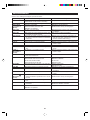
Symptom
Possible cause
Remedy
● The clock is wrong.
● When a button is pressed, the unit
does not respond.
● Did a power failure occur?
● No sound is heard.
● Is the volume level is set to "0"?
● Are the headphones connected?
● Are the speaker wires disconnected?
● When a radio or TV which uses an
indoor aerial is placed near the unit,
the picture on the TV screen may be
distorted or the radio may not function properly.
● Try setting it again.
● Set this unit to the stand-by mode
and then turn it back on. Then, retry
the operation.
● Increase the volume level.
● Disconnect the headphones.
● Connect the wires securely.
● It is recommended that you use an
external aerial.
● Radios make unusual noise or the
picture on the TV screen is distorted.
CD Playback
Symptom
Possible cause
Remedy
● Even though a disc has been loaded,
"NO DISC" is displayed.
● Playback stops in the middle of a
track, or playback is not performed
properly.
● Playback sounds are skipped.
● The disc is loaded up-side down.
● The disc is very dirty.
● The disc does not satisfy the standards.
● Is the unit located near excessive vibrations?
● Has condensation formed inside the
unit?
● Load the disc with the correct side
up.
● Clean the disc.
● Load the correct disc.
● Place the unit on a firm, level surface free from vibration.
● Remove the disc and leave the
power turned on. The unit should
function properly in about 1 hour.
35
(Continued)
MiniDisc recording and playback
Symptom
Possible cause
Remedy
● A recording cannot be made.
● Is the MiniDisc protected against accidental erasure?
● Did you try to make recording on a
playback-only MiniDisc?
● Can you see the "DISC FULL" or
"TOC FULL" message in the display?
● The disc is very dirty.
● Is the unit located near excessive vibrations?
● Has condensation formed inside the
unit?
● Slide the accidental erase prevention tab back to its original position.
● Replace it with a recordable disc.
● Put in another recordable disc with
recording space on it.
Symptom
Possible cause
Remedy
● Radios make unusual noise consecutively.
● The unit is placed near the TV or
computer.
● The aerial direction is not placed
properly.
● The preset channel cannot be recalled.
● Did you erase the programmed station?
● When the unit receives a radio
broadcast near a TV set, a computer or a word-processor, it may pick
up noise. If this happens, move the
unit from the place where the noise
is picked up.
● Correct the aerial direction.
● Preset the channel again.
● Redo programming.
Symptom
Possible cause
Remedy
● The remote control does not function or does not operate properly.
● The batteries (polarity) are not inserted properly.
● The batteries inside the remote control are dead.
● The remote control is operated from
an incorrect distance or angle.
● Is the AC power lead plugged in?
● Insert properly.
● Replace the batteries.
● Operate it within a range of 0.2 m
(8") to 6 m (20') and within an angle
of 15 ° to either side of centre.
● Even though a disc has been loaded,
"NO DISC" or "CAN'T READ" is displayed.
● Playback sounds are skipped.
● Clean the disc.
● Place the unit on a firm, level surface free from vibration.
● Remove the disc and leave the
power turned on. The unit should
function properly in about 1 hour.
Radio reception
Remote control
● The power cannot be turned on from
the remote control.
● Connect the AC power lead.
RESETTING THE MICROCOMPUTER
If this product is subjected to strong external interference
(mechanical shock, excessive static electricity, abnormal supply voltage due to lightning, etc.) or if it is operated incorrectly, it may malfunction or the display may not function correctly. If such a problem occurs, do the following:
2
1,2
1 Press the ON/STAND-BY button to enter the stand-by
mode.
2 Press the ON/STAND-BY button whilst holding down
the SURROUND button and the TIMER/DELETE button.
● "ALL CLEAR" will appear.
Caution:
● The operation explained above will erase all data stored in
memory including clock and timer settings, and tuner,
MiniDisc and CD presets.
2
36
ERROR MESSAGES
When an error message is displayed, proceed as follows:
Error messages
BLANK MD
CAN'T COPY
CAN'T READ
( :Number or
symbol)
CAN'T EDIT
CAN'T REC
CAN'T WRITE
DISC FULL
E-CD 20
E. OVER
EDIT OVER
Er-MD
( :Number or
symbol)
NAME FULL
Meaning
● Nothing is recorded.
(Neither music nor disc name is recorded.)
● You tried to record from a copy prohibited CD.
● The disc is damaged.
● TOC information cannot be read.
● MiniDisc not specified.
● A track cannot be edited.
● Recording cannot be performed correctly due
to vibration or shock in the unit.
● The TOC information could not be created properly due to a mechanical shock or to scratches
on the disc.
● The disc is out of recording space.
● The CD tray is not working properly.
● You chose 21 or more tracks for track editing.
● There is no space to make CD editing on the
disc.
● A MiniDisc is not working properly.
NOT AUDIO
● The number of characters for the disc name or
track name exceeds 40.
● A MiniDisc has not been loaded.
● The MiniDisc data cannot be read.
● A CD has not been loaded.
● The CD data cannot be read.
● The data recorded on this disc is not audio data.
PLAY MD
PROTECTED
● You tried to record on a playback-only disc.
● The disc is write protected.
TEMP OVER
● The temperature is too high.
TOC FORM
( :Number or
symbol)
TOC FULL
● TOC information recorded on the MD does not
match the MiniDisc specifications or it cannot
be read.
● There is no space left for recording track numbers.
● There is no space left for recording character
information.
NO DISC
TOC FULL 1
? DISC
● The data contains an error.
● MiniDisc not specified.
37
Remedy
● Replace it with another disc.
● Replace the CD.
● Replace it with another disc.
● Erase the disc and try recording again.
● Change the stop position of the track and then
try editing it.
● Re-record or replace the MiniDisc.
● Set this unit to the stand-by mode and try to
write the TOC again. (Remove any source of
shock or vibration whilst writing.)
● Replace the disc with another recordable disc.
● Set this unit to the stand-by mode and turn the
power on again.
● Decrease the number of tracks.
● Replace it with a disc that has enough time to
record.
● Set this unit to the stand-by mode and turn the
power on again.
● Shorten the disc or track name.
● Load a MiniDisc.
● Reload the MiniDisc.
● Load a CD.
● Reload the CD.
● Select another track.
● Replace the disc.
● Replace it with another recordable disc.
● Move the write protection tab back to its original position.
● Set this unit to the stand-by mode and wait for
a while.
● Replace it with another disc.
● Erase the disc and try recording again.
● Replace it with another recordable disc.
● Replace it with another recordable disc.
● Erase the needless characters.
● Replace it with another disc.
MAINTENANCE
■ External care
● Periodically wipe the cabinet with a soft cloth and a diluted soap solution, then wipe with a dry cloth.
● Do not use chemically treated cleaning cloths or other chemicals.
SPECIFICATIONS
As part of our policy of continuous improvement, SHARP reserves the right to make design and specification changes for
product improvement without prior notice. The performance specification figures indicated are nominal values of production units. There may be some deviations from these values in individual units.
● General
● Compact disc player section
Power source:
AC 230 V, 50 Hz
Type:
Drawer type compact disc player
Power
consumption:
50 W
Signal readout:
Non-contact, 3-beam semiconductor
laser pickup
Rotation speed:
200 - 500 rpm CLV, Approx.
Error correction:
CIRC (Cross Interleave Reed-Solomon
Code)
Quantization:
16-bit linear
● Amplifier section
Frequency
response:
20 - 20,000 Hz
Output power:
D/A converter:
1-bit D/A converter
Dimensions:
Weight:
Width; 215 mm (8-1/2")
Height; 162 mm (6-7/16")
Depth; 344 mm (13-9/16")
4.4 kg (9.7 Ibs.)
RMS; 30 W (15 W+15 W)
(10% T.H.D.)
Signal/noise ratio: 95 dB (1 kHz)
Output terminals: Speaker; 6 ohms
Headphones; 16 - 50 ohms
(recommended 32 ohms)
Input terminals:
Dynamic range:
90 dB (1 kHz)
Wow and flutter:
Unmeasurable
(less than 0.001% W. peak)
Auxiliary; 500 mV/47 k ohms
● Tuner section
● MiniDisc recorder section
Type:
MiniDisc recorder
Frequency range: FM; 87.5 - 108.0 MHz
AM; 522 - 1,620 kHz
Signal readout:
Non-contact, 3-beam semiconductor
laser pickup
Sensitivity:
Rotation speed:
400 - 900 rpm CLV, Approx.
Error correction:
ACIRC (Advanced Cross Interleave
Reed-Solomon Code)
Quantization:
20-bit linear (A/D converter)
Coding:
ATRAC (Adaptive Transform Acoustic
Coding)
Maximum input
power:
30 W
44.1 kHz
Rated input
power:
15 W
Impedance:
6 ohms
Dimensions:
Width; 160 mm (6-5/16")
Height; 280 mm (11-1/16")
Depth; 183.5mm (7-1/4")
Weight:
2.1 kg (4.6 Ibs.)/each
Sampling
frequency:
Recording
method:
● Speaker section
Type:
Magnetic modulation
overwrite method
Frequency
response:
20 - 20,000 Hz
D/A converter:
1-bit D/A converter
Wow and flutter:
Unmeasurable
(less than 0.001% W. peak)
Signal/noise ratio: 95 dB (1 kHz)
Dynamic range:
90 dB (1 kHz)
Audio channel:
Stereo; 2 channels
Monaural; 1 channel (playback only)
(long-time recording mode)
FM; 2.5 µV (75 ohms unbalanced)
AM; 650 µV/m
38
Full range speaker system
[10 cm (4") full-range speaker]
TERMS OF GUARANTEE
Sharp Electronics (UK) Ltd. ("Sharp") guarantees to provide for the repair, or at its option the replacement, of this product
subject to the conditions listed below:-
1.
This guarantee shall only apply to faults which are due to inferior workmanship or materials. It does not cover faults or
damage caused by accident, misuse, fair wear and tear, neglect, tampering with the product, or repair other than by a
Service Facility appointed by Sharp.
2.
As this product is intended for private domestic use only, the guarantee will not apply if the product is used in the course of
a business, trade or profession.
3.
To benefit from this guarantee, any fault which occurs must be notified to Sharp, or its appointed Service Facility within one
year from the date this product was purchased. Proof of purchase must be provided.
4.
The guarantee does not cover carriage costs, jewelled styli, audio tapes, compact discs or batteries.
5.
In the unlikely event of this product requiring repair, please contact the supplier from whom it was purchased. Where this is
not possible, please contact the Sharp Customer Information Centre on the telephone number given below.
6.
No person has any authority to vary the terms or conditions of this guarantee.
7.
This guarantee is offered as an additional benefit to your statutory rights, and does not affect these rights in any way.
If you have any difficulty operating this product, or would like information on other Sharp products, please telephone the Sharp
Customer Information Centre on the number given below.
Sharp Customer Information Centre - Telephone 0345 125387
SHARP ELECTRONICS (U.K.) LTD.
Sharp House, Thorp Road, Newton Heath, Manchester, M40 5BE
SHARP CORPORATION
TINSE0287AWZZ
A0002.YT