1
Warning
Setting Up
Stacking and
installing the
commander and the
receiver
Use the stacking
mounts to create a
stacked configuration
(one projector on top of
the other).
When assembling a
stacked configuration,
make sure you follow
these steps. If the
steps are not followed
correctly, the product
could fall, or your fingers
could get caught, which
could cause an injury.
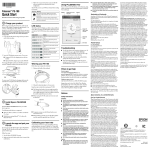
Attach the polarizing filters to the commander and the receiver.
There are numbers
on the bases of
the projectors, stacking
mounts, and polarizing
filters. Make sure the
numbers match when
assembling.
Commander
Turn over the commander and the receiver, and then attach the polarizing
filters.
Press until they click into place.
Receiver
2
Secure the polarizing filters for
the commander and the receiver
with the supplied screws. Do not
overtighten the screws.
1
Attach the feet (when
setting up on a desk).
Attach the front foot and the rear
feet to the base of the receiver.
Turn the feet to extend and
retract to adjust the horizontal
tilt.
3
Stack the commander on top of the receiver.
Carefully remove the protective
tape from the stack angle
adjustment screws, and then
remove the screws (on both the
left and right sides).
Loosen the screws for the commander's stacking mount connector (on
both the left and right sides).