1
■ Troubleshooting
■ Switching Images
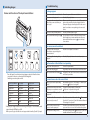
Names and Functions of the Input Source Buttons
No images appear
Did you turn on the connected device?
Turn on the power of the connected device.
Did you turn on the projector?
Press the [Projector] button.
Did you press the correct Input Source
button for the connected device you
want to play?
When no specific input source is selected, [Computer1]
button is automatically selected and images from the
[Computer1] input port are displayed. Press the correct
Input Source button corresponding to the connected
device.
Did you press the [A/V Mute] button?
Press the [A/V Mute] button again.
Is the operation indicator light on
?
If no operations are made on the Connection & Control
Box for eight hours, it enters standby status. Press any
button and the indicator turns to Blue , press the Input
Source button.
Orange
The source can not be switched
Did you press the correct Input
Source button corresponding to the
connected device?
Press the correct Input Source button.
Is the Message Broadcasting dialog
displayed?
Press the [Projector] button and restart the projector.
The Connection & Control Box is not operating
Press the Input Source buttons to input images and audio from the device
connected to the port as shown in the following table.
Switching sources may take a while.
Input Source Button
Computer1
HDMI1/MHL
USB
Computer2
S-Video
Video
HDMI2
LAN
Image Input
Computer1
HDMI1/MHL
USB Display ⇔ USB-A
Computer2
S-Video
Video
HDMI2
LAN
Audio Input
Audio1
HDMI1/MHL
USB Display/Audio2*
Audio2
Audio-L/R
Audio-L/R
HDMI2
LAN/Audio2*
* If the projector supports audio transfer using USB display or over a network, audio
is input through USB Display or LAN.
When you use a projector that does not support audio transfer, [Audio 2] is input.
Is the power of this product on?
Turn on the power switch.
Is the power cable plugged?
Plug in the power cable of the Connection & Control Box.
Is the operation indicator flashing
?
Blue
Unplug the power cable of the Connection & Control Box,
and contact your dealer.
No sound comes out or the sound is faint
Is the projector's audio input setting
correct?
Check that the projector's "A/V Settings" or "Audio Input"
are correct.
Projector's user's guide
Did you turn down the audio volume
of the projector or speakers too much?
Turn up the volume with the [Volume] dial. Projector's or Speakers' user's guide.
Is the projector's "MIC Input Level"
appropriate?
Adjust the input level of the microphone.
Is the audio cable of the connected
device correctly connected?
Check the connection of the audio cable.
This manual
"Input Ports", Connection & Control Box Installation Manual
"Connecting to the Speaker"
Is there a cable connected to the
projector's audio output port?
If a cable is connected to the projector's audio output
port, sound does not come out from the built-in speaker.
Is the Dip switch setting correct?
Check the Dip switch setting.
Connection & Control Box
Installation Manual "Connecting to the Speaker"
3