1
PowerLite® 83V+
Quick Setup
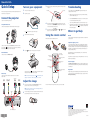
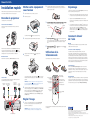
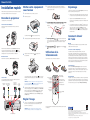
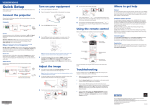
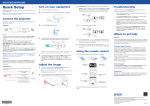
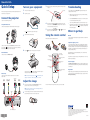
Turn on your equipment
Before using the projector, make sure you read the safety instructions in the
User’s Guide on your projector CD.
1
Turn on your computer or video source.
2
Plug in the projector.
3
Turn the focus ring to sharpen the image, and the zoom ring to enlarge
or reduce it.
Zoom ring
Focus ring
Troubleshooting
If you see a blank screen or the No signal message after turning on your
computer, check the following:
•Make sure the power light on the projector is green and not flashing,
and the A/V Mute slide is open.
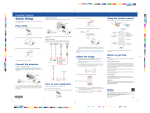
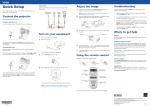
Connect the projector
•Press the Source Search button on the projector or the remote control
to select the computer as the image source.
Choose from the following connections:
Computer Monitor Port
4
If your image looks like
or
, you’ve placed the projector off to
one side of the screen at an angle. Place it directly in front of the center
of the screen, facing the screen squarely.
5
If your image looks like
projector to correct it.
Connect a computer using the VGA cable that came with the projector.
The
3
Open the A/V Mute slide all the way.
or
, press the
or
buttons on the
power light on the projector turns orange.
•If you’re using a Windows® notebook, press the function key on your
keyboard that lets you display on an external monitor. It may be labelled
CRT/LCD or have an icon such as
. You may have to hold down the
Fn key while pressing it.
Where to get help
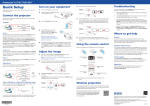
Using the remote control
Manual
Make sure the batteries are installed as shown.
For more information about using the projector, install the User’s Guide from
your projector CD.
Telephone Support Services
Connect one end to the projector’s Computer1 port, and the other end to
your computer’s
monitor port. If you are using a notebook, switch it to
external display. You can also connect an audio cable.
4
Press the
To use the Epson PrivateLine® Support service, call (800) 637-7661 and enter
the PIN on the Epson PrivateLine Support card included with your projector.
This service is available 6 am to 6 pm, Pacific Time, Monday through Friday, for
the duration of your warranty period. You may also speak with a projector
support specialist by dialing:
power button on the projector or remote control.
External Monitor
Connect a monitor to the Monitor Out port.
Turn projector
on and off
Access projector
menus
Choose which
source to display
Video Player
Connect up to 4 video devices and use the remote control to switch
between them.
S-Video cable
(optional)
Component video to VGA cable
(optional)
RCA video cable (composite video)
(optional)
Computer cable (included)
The projector beeps, the
power light flashes green, and then stays on.
The projector lamp comes on in about 5 seconds.
pm
to 6
pm,
Pacific Time,
Get solutions to common
problems
Days and hours of support are subject to change without notice. Toll or long
distance charges may apply.
Navigate projector
menus
Internet Support
Visit www.epson.com/support for solutions to common problems. You can
download utilities and documentation, get FAQs and troubleshooting advice,
or e-mail Epson.
Control projector
volume
(562) 276-4394 (US), or (905) 709-3839 (Canada), 6
Monday through Friday.
Turn off projector display
and sound
Registration
Register today to get product updates, special promotions and customer-only
offers. You can use the CD included with your projector, or register online at
www.epson.com/webreg. NOTE: To shut down the projector, press the
power button twice, then
unplug it. You don’t have to wait for the projector to cool down.
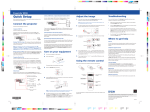
Adjust the image
1
If you don’t see an image, press the Source Search button on the
projector or remote control to select the image source.
For more information on using the remote control, see your User’s Guide.
NOTE: If you still see a blank screen or have other display problems, see
the troubleshooting tips on the right.
L-Audio-R ports
Audio2 and Audio1 ports
2
To raise the image, press the foot release button and lift the front of the
projector. Release the button to lock the foot in position.
Epson is a registered trademark and Epson Exceed Your Vision is a registered logomark of Seiko Epson
Corporation. PowerLite and PrivateLine are registered trademarks of Epson America, Inc.
General Notice: Other product names used herein are for identification purposes only and may be trademarks of
their respective owners. Epson disclaims any and all rights in those marks.
*411830100*
*411830100*
This information is subject to change without notice.
© 2009 Epson America, Inc. 11/09
Printed in XXXXXX
CPD-27732