1
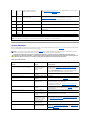
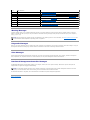
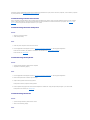
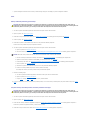
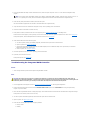
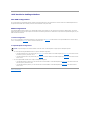
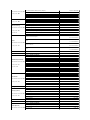
Drive not ready
Diskette missing or
improperly inserted in
diskette drive.
Reinsert or replace the diskette.
Embedded RAID error
An error has been
generated by the firmware
used by the optional
integrated RAID controller.
Update the RAID firmware using the Dell Support website at
support.dell.com.
Embedded RAID firmware is not present
The firmware used by the
optional integrated RAID
controller is not responding
to system requests.
Restore the RAID firmware using the Dell Support website at
support.dell.com.
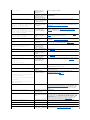
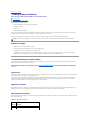
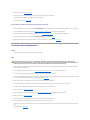
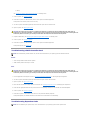
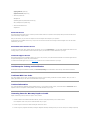
Error: Incorrect memory configuration. Ensure
memory in slots DIMM_1A and DIMM_1B, DIMM_2A
and DIMM_2B on each memory card match
identically in size, speed, and rank.
One or more unmatched
pairs of memory modules
are detected
Ensure that the memory modules are installed in matched pairs. See
"General Memory Module Installation Guidelines" in "Installing System
Components."
Error: Incorrect memory configuration. When
mixing Dual and Single Rank memory on the same
memory card, Dual Rank DIMMs must be in slots
DIMM_1A and DIMM_1B, and Single Rank DIMMs must
be in slots DIMM2_A and DIMM2_B.
Dual-rank memory modules
are installed in slots
DIMM2_A and DIMM2_B.
Ensure that only single-rank memory modules are installed in slots
DIMM2_A and DIMM2_B. See "General Memory Module Installation
Guidelines" in "Installing System Components."
Error: Incorrect memory configuration. Memory
cards with DIMMs must be populated in order:
MEM A, MEM B, MEM C, then MEM D.
Memory riser cards must be Move memory riser cards so they are installed in order. See "System
installed in consecutive
Memory" in "Installing System Components."
order.
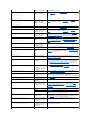
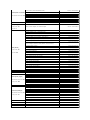
Error: More than one RAC detected, system
halted.
Two RACs are installed, or
faulty or improperly
installed RAC.
Ensure that only one RAC is installed. Ensure that the RAC is properly
installed. See "Troubleshooting Expansion Cards" in "Troubleshooting
Your System."
Error: Remote Access Card initialization
failure.
Faulty or improperly
installed RAC.
Ensure that the RAC is properly installed. See "Troubleshooting
Expansion Cards" in "Troubleshooting Your System."
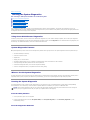
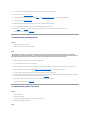
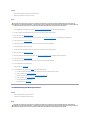
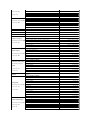
Error 8602: Auxiliary device failure. Verify
that the keyboard and mouse are securely
attached to correct connectors.
Loose or improperly
connected mouse or
keyboard cable; faulty
mouse or keyboard.
Replace the mouse. If the problem persists, replace the keyboard.
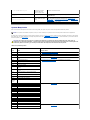
Gate A20 failure
Faulty keyboard controller
(faulty system board).
See "Getting Help."
General failure
Operating system
corrupted or improperly
installed.
Reinstall the operating system.
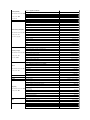
Keyboard controller failure
Faulty keyboard controller
(faulty system board).
See "Getting Help"
Keyboard data line failure
Loose or improperly
connected keyboard cable;
faulty keyboard; faulty
keyboard controller.
Ensure that the keyboard is properly connected. If the problem persists,
replace the keyboard. If the problem persists, see "Getting Help."
Keyboard fuse has failed.
Keyboard fuse has failed.
Replace the keyboard.
Manufacturing mode detected
System is incorrectly
configured.
After the message appears during system boot, press <Alt><F> to turn
off manufacturing mode.
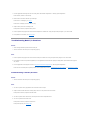
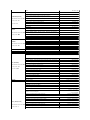
Memory address line failure at address, read
value expecting value
Faulty or improperly
installed memory modules,
or faulty system board.
Ensure that all memory modules are properly installed. See
"Troubleshooting System Memory" in "Troubleshooting Your System." If
the problem persists, see "Getting Help."
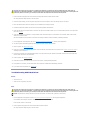
Memory mirroring enabled
Memory mirroring enabled
You can enable memory mirroring using the System Setup program if the
memory is configured to support mirroring. For more information, see
"General Memory Module Installation Guidelines" in "Installing System
Components," and "Using the System Setup Program" in your User's
Guide.
Memory tests terminated by keystroke
The spacebar was pressed
during POST to terminate
the memory test.
Information only.
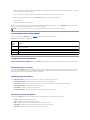
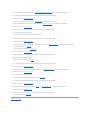
No boot device available
Faulty or missing diskette
drive, optical drive, or hard
drive.
Check the Integrated Devices configuration settings in the System
Setup program. See "Using the System Setup Program" in your User's
Guide. Ensure that either SCSI Controller, Diskette Controller, or IDE
CD-ROM Controller is enabled. If the system is booting from a SCSI
controller, ensure that the controller is properly connected. If the
problem persists, replace the drive. See "Installing Drives."
Keyboard failure
Keyboard stuck key failure
Faulty system board. See "Getting Help."
Memory double word logic failure at address,
read value expecting value
Memory odd/even logic failure at start address
to end address
Memory write/read failure at address, read
value expecting value
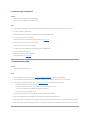
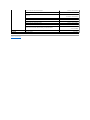
No boot sector on hard-disk drive
An operating system is not
on the hard drive.
Check the hard-drive configuration settings in the System Setup
program. See "Using the System Setup Program" in your User's Guide.
No timer tick interrupt
Faulty system board.
See "Getting Help."
Not a boot diskette
Not a bootable diskette.
Use a bootable diskette.
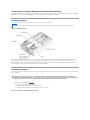
PCI BIOS failed to install
Loose cables to expansion Ensure that all appropriate cables are securely connected to the
card(s); faulty or improperly expansion cards. See "Troubleshooting Expansion Cards," in