1
Flow Generator management
3
Parameter usage exceptions
• If the srcdev and ingrport parameters are both defined, they must both be local to the switch
and refer to the same source.
• If the dstdev and egrport parameters are both defined for the flow, they must both be local to
the switch and represent the same destination.
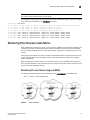
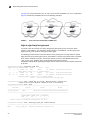
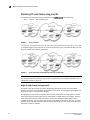
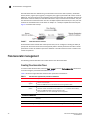
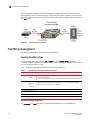
The following example (illustrated in Figure 8) creates a Flow Generator flow named “Flow1” generates
traffic using the ingress SIM-Port 1/1 from device 040100 (Domain 4) to device 050200 (Domain 5).
FIGURE 8
A Flow Generator flow between two switches
switch:admin> flow --create Flow1 -feature generator -ingrport 1/1 -srcdev 040100
-dstdev 050200
When you create a flow, it is automatically activated unless you use the -noactivate keyword for the
flow --create command. Refer to “Creating an inactive flow in Flow Generator” on page 33 for an
example.
ATTENTION
Flow creation is not allowed if Advanced Performance Monitor or Port Mirroring is enabled. Similarly,
APM and Port Mirroring-related operations will not be allowed if any flow (active or defined) is
present on the switch.
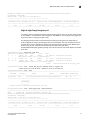
Creating an inactive flow in Flow Generator
To create an inactive Flow Generator flow, enter the flow --create command with the -noactivate
keyword.
flow --create flowname -feature generator flow_parameters -noactivate
Refer to “Activating Flow Generator flows” on page 33 for information on activating a
Flow Generator flow. The following example creates an inactive Flow Generator flow named
“sflow8” from device 020a00 to device 01c000 ingressing through SIM-Port 10.
switch:admin> flow --create sflow8 -noactivate -feature generator -ingrport 10
-srcdev 0x020a00 -dstdev 0x01c000
Activating Flow Generator flows
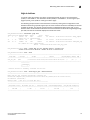
To activate an inactive Flow Generator flow, enter flow --activate flowname -feature generator.
Activating a flow does not automatically clear the flow statistics for that flow; the existing statistic
counters resume counting using the resumed flow data. If you are activating a learned flow, the
sub-flows will be refreshed based on the first four Source ID-Destination ID pairs in the zone
database that are registered in the Name Server.
Flow Vision Administrator’s Guide
53-1002999-01
33