1
ADJUSTMENT
Se**ing
the
STEP
2
Force
Without a properlyinstalled safety reversalsystem, p_rsons
(particularlysmall children) could be SERIOUSLYiNJUREDor
KILLEDby a closing garagedoor.
. Too much force on garagedoor will interfere with proper
operationof safetyreversalsystem
=NEVERuseadfustmentsto compensatefor a binding or
sticking garagedoor_.
=After ANYadjustmentsare made, the safety reversalsystem
MUSTbe tested. Door MUSTreverseon contact with 1-1/2"
(3.8 cm) high object (or 2x4 laid flat) on floor,
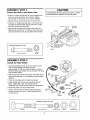
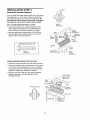
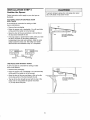
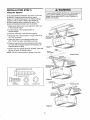
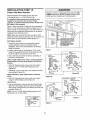
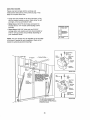
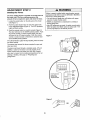
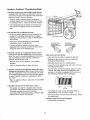
The force setting button is located on the left panel of
the motor uniL The force setting measures the
amount of force required to open and close the door.
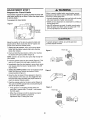
t.. Locate the purple button on the left panel of the motor
unit (Figure !),.
2. Push the purple button twice to enter the opener into
Force Adjustment Mode (Figure 1) The LED (Indicator
Light) will flash quickly..
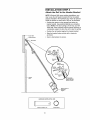
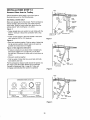
3. Push the remote control or control console (Figure 2).
The door will travel to the DOWN (close) position. Push
the remote control or control console again, the door
will travel to the UP (open) position,. Push the remote
control or control console a third time to send the door
to the DOWN (close) position,
Figure I
The LED (Indicator Light) wil stop flashing when the force
has been learned.
The opener has learned the forces required to open and
close your door
The door must travel through a complete cycle, UP and
DOWN, in order for the force to be set properly. If the
opener cannot open and close your door fully, inspect
your door to insure that it is balanced properly and is not
sticking or binding. See page 3, "Preparing your
garage door."
0000
Indicator
Ught
Push Purple button
twice 1o enter
unit into Force
Adjustment Mode
Black
Button
Figure 2
OR
29