1
Operation Guide 3357
Initial Screens
When you enter the Timekeeping, World Time, or Alarm Mode, the data you were
viewing when you last exited the mode appears first.
Timekeeping
• Resetting the seconds to 00 while the current count is in the range of 30 to 59
causes the minutes to be increased by 1. In the range of 00 to 29, the seconds are
reset to 00 without changing the minutes.
• The year can be set in the range of 2000 to 2099. The day of the week is calculated
automatically in accordance with the date.
• The watch's built-in full automatic calendar makes allowances for different month
lengths and leap years. Once you set the date, there should be no reason to change
it except after you have the watch's battery replaced or when battery power drops to
Level 4.
• The current time for all city codes in the Timekeeping Mode and World Time Mode is
calculated in accordance with the Greenwich Mean Time (GMT) differential for each
city, based on your Home City time setting.
• GMT differential is calculated by this watch based on Universal Time Coordinated
(UTC*) data.
UTC is the world-wide scientific standard of timekeeping. It is based upon carefully
* maintained
atomic (cesium) clocks that keep time accurately to within microseconds.
Leap seconds are added or subtracted as necessary to keep UTC in sync with the
Earth's rotation. The reference point for UTC is Greenwich, England.
12-hour/24-hour Timekeeping Formats
The 12-hour/24-hour timekeeping format you select in the Timekeeping Mode is
also applied in all other modes.
• With the 12-hour format, the P (PM) indicator appears on the display for times in the
range of noon to 11:59 p.m. and no indicator appears for times in the range of
midnight to 11:59 a.m.
• With the 24-hour format, times are displayed in the range of 0:00 to 23:59, without
any indicator.
Illumination Precautions
• The illumination provided by the light may be hard to see when viewed under direct
sunlight.
• Illumination automatically turns off whenever an alarm sounds.
• Frequent use of illumination shortens the battery operating time.
Auto light switch precautions
• Wearing the watch on the inside of your wrist, movement of your arm, or vibration of
your arm can cause frequent activation of the auto light switch and illumination of the
face of the watch. To avoid running down the battery, turn off the auto light switch
whenever engaging in activities that might cause frequent illumination of the face.
• Note that wearing the watch under your sleeve while the auto light switch is turned
on can cause frequent illumination of the face and can run down the battery.
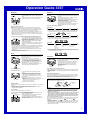
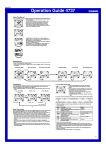
More than 15 degrees
too high
• Illumination may not turn on if the face of the watch is
more than 15 degrees above or below parallel. Make
sure that the back of your hand is parallel to the ground.
• Illumination turns off after the preset illumination
duration (see “To specify the illumination duration”),
even if you keep the watch pointed towards your face.
• Static electricity or magnetic force can interfere with proper operation of the auto
light switch. If illumination does not turn on, try moving the watch back to the starting
position (parallel with the ground) and then tilt it back towards your face again. If this
does not work, drop your arm all the way down so it hangs at your side, and then
bring it back up again.
• Under certain conditions, illumination may not turn on until about one second after
you turn the face of the watch towards you. This does not necessarily indicate
malfunction of the auto light switch.
• You may notice a very faint clicking sound coming from the watch when it is shaken
back and forth. This sound is caused by mechanical operation of the auto light
switch, and does not indicate a problem with the watch.
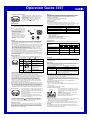
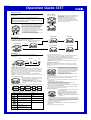
City Code Table
City
Code
City
GMT
Differential
–11
HNL
ANC
Honolulu
Anchorage
–11.0
–10.0
–09.0
LAX
Los Angeles
–08.0
DEN
Denver
–07.0
CHI
Chicago
–06.0
NYC
New York
–05.0
CCS
RIO
–02
–01
GMT
LON
PAR
BER
ATH
CAI
JRS
JED
THR
DXB
KBL
KHI
DEL
DAC
RGN
BKK
Caracas
Rio De Janeiro
–04.0
–03.0
–02.0
–01.0
London
Paris
Berlin
Athens
Cairo
Jerusalem
Jeddah
Tehran
Dubai
Kabul
Karachi
Delhi
Dhaka
Yangon
Bangkok
+00.0
HKG
Hong Kong
SEL
TYO
ADL
SYD
NOU
WLG
Seoul
Tokyo
Adelaide
Sydney
Noumea
Wellington
+01.0
+02.0
+03.0
+03.5
+04.0
+04.5
+05.0
+05.5
+06.0
+06.5
+07.0
+08.0
+09.0
+09.5
+10.0
+11.0
+12.0
Other major cities in same time zone
Pago Pago
Papeete
Nome
San Francisco, Las Vegas, Vancouver,
Seattle/Tacoma, Dawson City, Tijuana
El Paso, Edmonton, Culiacan
Houston, Dallas/Fort Worth,
New Orleans, Mexico City, Winnipeg
Montreal, Detroit, Miami, Boston,
Panama City, Havana, Lima, Bogota
La Paz, Santiago, Port of Spain
Sao Paulo, Buenos Aires, Brasilia, Montevideo
Praia
Dublin, Lisbon, Casablanca, Dakar, Abidjan
Milan, Rome, Madrid, Amsterdam, Algiers, Hamburg,
Frankfurt, Vienna, Stockholm
Helsinki, Istanbul, Beirut, Damascus,
Cape Town
Kuwait, Riyadh, Aden, Addis Ababa, Nairobi, Moscow
Shiraz
Abu Dhabi, Muscat
Male
Mumbai, Kolkata
Colombo
Jakarta, Phnom Penh, Hanoi, Vientiane
Singapore, Kuala Lumpur, Beijing, Taipei, Manila, Perth,
Ulaanbaatar
Pyongyang
Darwin
Melbourne, Guam, Rabaul
Port Vila
Christchurch, Nadi, Nauru Island
• Based on data as of December 2003.
4