Transcript
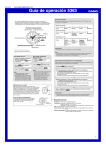
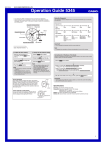
MA1201-EA Operation Guide 5276 Your watch may differ somewhat from the one shown in the illustration. Some models may use a combination of hands and rotating disks to indicate information. The word “hand” in this section is used to mean both analog hands and rotating disks. Elapsed time Stopwatch 1/20-second Hand Hour Hand Minute Hand A A A A B Start Stop Re-start Stop Reset A B B A B Start Split Split release Stop Reset A B A B B Start Split First runner finishes. Display time of first runner. Stop Second runner finishes. Split release Display time of second runner. Reset Split time A Second Hand Using the Stopwatch The stopwatch measures elapsed time in 1/20-second increments up to 11 hours, 59 minutes, 59.95 seconds. Click 1 Click 2 Two finishes B Crown Stopwatch Second Hand Stopwatch Minute Hand Day Indicator Important! Stopwatch Hour Hand Do not operate the stopwatch with the crown pulled out. Note Stopwatch functions To adjust the time setting When the second hand is at 12 o’clock, pull the Crown out to Click 2. The stopwatch 1/20-second hand will move for 10 minutes after you start an elapsed time operation. After that, it will stop at 0. When you stop the elapsed time operation, the 1/20-second hand will move to the 1/20-second reading for the current elapsed time. To change the day indicator setting Pull the Crown out to Click 1. Correcting the 0 Positions of the Hands Rotate the Crown away from you to set the day. Rotate the Crown to change the time setting. Operational Flow Push the Crown back in. Push the Crown back in. Note Take care that you set the correct AM or PM time. When changing the time, move the minute hand four or five minutes past your final setting, and then back it up to the setting you want. Perform the following procedure if the stopwatch hands do not return to their 0 (zero) positions when you reset the stopwatch. Note The day indicator setting uses a 31day month. Make adjustments for months of shorter lengths. Avoid changing the day indicator setting between the hours of 9 p.m. and 1 a.m. Otherwise, the day indicator may not change correctly at midnight. Crown Operations Some water-resistant models (100 meters, 200 meters) have a screw-in crown. When you need to perform a crown operation, rotate it towards you to unscrew it. Then pull the crown out. Avoid applying undue force when pulling. The watch loses its water resistance while the crown is unscrewed. After performing a crown operation, fully screw the crown back in. Crown Use the A button to select the hand whose zero position you want to correct. Each time you hold down A for about two seconds in the following procedure, it cycles to the next hand to be corrected. Use the B button in the following procedure to correct the 0 position of the currently selected hand. Holding down B moves the current hand at high speed. Pull the Crown out to Click 2. Hold down A for about two seconds, the Stopwatch 1/20-second Hand will rotate to indicate the 1/20-second hand setting mode. If the hand does not align with 00, use the B button to adjust it. Hold down A for about two seconds, the Stopwatch Second Hand will rotate to indicate the second hand setting mode. If the hand does not align with 12 o’clock, use the B button to adjust it. Loosen If your watch has a rotary bezel... You can rotate the bezel to align its ▼ mark with the minute hand. Then you will be able to tell how much time has elapsed since aligning the ▼ mark. Start Elapsed time Hold down A for about two seconds, the Stopwatch Hour Hand and Stopwatch Minute Hand will rotate to indicate the hour hand and minute hand setting mode. If the hands do not align with 0 hours and 0 minutes, use the B button to adjust them. Current Specifications Accuracy: ±20 seconds average per month Stopwatch: Measuring Capacity: 11:59'59.95" (12 hours) Measuring Unit: 1/20 second Measurements: Elapsed time; split time; two finishes Battery: One silver oxide battery (Type: SR927SW) Battery Life: Approximately 3 years (2 hours stopwatch operation per day) After all of the hands are the way you want, push the Crown back in. Important! Timekeeping stops while the crown is pulled out. Correct the current time setting after performing the above operation. 1