1
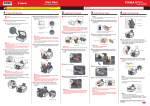
Remove the Protective Material
Retirada del material protector
2
1
2
A
Remove all the protective materials and orange tape from the outside of the machine.
• The tape and protective materials may differ in shape and position from what they actually are.
Retire la cinta naranja y todos los materiales protectores del exterior del equipo.
• La forma y la posición de la cinta y los materiales protectores pueden variar respecto
a las reales.
Open the Paper Output Tray (A).
Abra la bandeja de salida del papel (A).