1
Easy
Operation
Guide
CONTENTS
Preface
Manuals for the Machine.............................................. 01
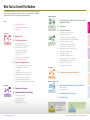
What You Can Do with This Machine.......................... 03
Control Panel................................................................... 05
Copying Function
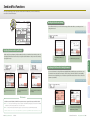
Making a Copy................................................................ 07
Basic Copying Functions............................................... 09
Advanced Copying Functions...................................... 13
Printing Function
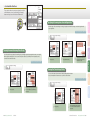
Printing from a Computer............................................. 17
Specifying the Printer Driver Settings........................ 19
Sending/Facsimile Functions
Sending a Document (E-mail, I-fax, File Server,
and USB Memory Media Device)................................. 21
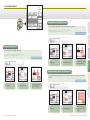
Sending a Fax.................................................................. 23
Send and Fax Functions................................................ 25
Scanning Function
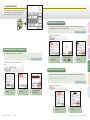
Scanning from a Computer (Remote Scan)............... 35
Other Functions & Troubleshooting
Keep this guide near the machine for future reference.
Operating the Machine from a Computer
(Remote UI)...................................................................... 37
Customizing the Machine Settings............................. 39
Troubleshooting............................................................. 41
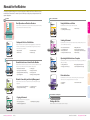
Manuals for the Machine
The manuals included with the machine and optional equipment are listed below. Please read them as necessary
to make full use of the machine. The manuals you receive will vary according to the products purchased and the
system configurations.
PDF on User Manual CD-ROM
Using the Machine as a Printer
Basic Operations and Function Overview
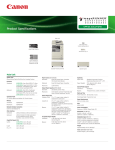
Read this manual to quickly learn the basic operations and functionality of the machine. Always
keep this manual near the machine for future reference.
Easy
Operation
Guide
Read this manual to learn how to use the machine as a printer.
Printer Guide
▶ Managing Print Jobs
▶ Customizing the Printer Settings
CONTENTS
Preface
Manuals for the Machine ............................................. 01
What You Can Do with This Machine ......................... 03
Control Panel.................................................................. 05
▶ Troubleshooting
Preface
Paper Manual
Printer Guide
Copying Function
Making a Copy ............................................................... 07
Basic Copying Functions .............................................. 09
Advanced Copying Functions ..................................... 13
Easy Operation Guide
Printing Function
Printing from a Computer............................................ 17
Specifying the Printer Driver Settings....................... 19
Sending/Facsimile Functions
Sending a Document (E-mail, I-fax, File Server,
and USB Memory Media Device) ................................ 21
Sending a Fax ................................................................. 23
Send and Fax Functions ............................................... 25
Scanning Function
Please read this guide before operating this product.
After you finish reading this guide, store it in a safe place for future reference.
Scanning from a Computer (Remote Scan) .............. 35
ENG
Other Functions & Troubleshooting
Sending a Document
Send and Fax Functions ............................................... 25
Sending a Fax ................................................................. 23
and USB Memory Media Device) ................................ 21
Sending a Document (E-mail, I-fax, File Server,
Sending/Facsimile Functions
Specifying the Printer Driver Settings....................... 19
Printing from a Computer............................................ 17
Printing Function
Advanced Copying Functions ..................................... 13
Basic Copying Functions .............................................. 09
Making a Copy ............................................................... 07
Copying Function
Control Panel.................................................................. 05
What You Can Do with This Machine ......................... 03
Manuals for the Machine ............................................. 01
Preface
CONTENTS
Startup and Safe Use of the Machine
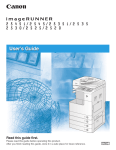
Read this manual first to learn important information regarding safe use of the machine. This
manual also contains information you should know before using the machine, as well as an
overview of how to use the machine.
User’s Guide
Guide
Operation
Easy
User’s Guide
▶ Safety Instructions
▶ Basic Functions
▶ Routine Maintenance
▶ Troubleshooting
Read this manual to learn how to send scanned documents by e-mail, I-fax, and fax, or to a file
server and USB memory media device.
Sending and Facsimile Guide
Sending and Facsimile Guide
Please read this guide before operating this product.
After you finish reading this guide, store it in a safe place for future reference.
ENG
▶
▶
▶
▶
Basic Send and Fax Functions
Specifying Destinations
Receiving Documents
Checking the Send/Receive Status
▶
▶
▶
▶
Editing Address Book
Printing Communication Reports
Customizing the Send and Fax Settings
Troubleshooting
Read this guide first.
Please read this guide before operating this product.
After you finish reading this guide, store it in a safe place for future reference.
ENG
Operating the Machine from a Computer
PDF on User Manual CD-ROM
General Instructions on How to Use the Machine
Read this manual to learn the basic operations common to the functions of the machine. Also
read to learn routine maintenance and how to troubleshoot the problems.
Reference Guide
Reference Guide
Please read this guide before operating this product.
After you finish reading this guide, store it in a safe place for future reference.
ENG
▶
▶
▶
▶
Introduction to the Machine
Operating the Touch Panel Display
Specifying the Machine’s Basic Settings
Optional Equipment
▶
▶
▶
▶
Loading Paper
Replacing Consumables
Clearing Paper Jams
Identifying and Isolating Problems
Network Connectivity and Security Management
Read this manual to learn how to connect the machine to a network and perform security
management.
System Settings Guide
Please read this guide before operating this product.
After you finish reading this guide, store it in a safe place for future reference.
▶ Instructions for the System Administrator
▶ Specifying the Network Settings
▶ Security Management
▶ Troubleshooting
Read this manual to learn how to access the machine from a computer by using the Remote UI
(Remote User Interface).
Remote UI Guide
Remote UI Guide
Please read this guide before operating this product.
After you finish reading this guide, store it in a safe place for future reference.
▶ Starting the Remote UI
▶ Managing Jobs and Job Logs
▶ Managing Department/User IDs
▶ Customizing the Machine Settings
ENG
Driver Instructions
Read this manual to learn how to use the drivers for printing from a computer, using the
machine as a scanner, and using the Fax function on a computer.
Driver Software Guide
Driver Software Guide
Please read this guide before operating this product.
After you finish reading this guide, store it in a safe place for future reference.
▶ Printer Drivers
▶ Fax Driver
▶ Color Network ScanGear
ENG
Other
System Settings Guide
ENG
Included with the Barcode Printing Kit-B1
Copying a Document
Bar Code Printing Guide
Read this manual to learn how to copy originals.
Copying Guide
▶ Basic Copying Functions
▶ Advanced Copying Functions
▶ Customizing the Copy Settings
Printing a Bar Code
Read this manual to learn how to print bar codes from a computer.
Copying Guide
Please read this guide before operating this product.
After you finish reading this guide, store it in a safe place for future reference.
ENG
01 Easy Operation Guide Preface
Copy
Scanning from a Computer (Remote Scan) .............. 35
Scanning Function
Print
Troubleshooting ............................................................ 41
Customizing the Machine Settings ............................ 39
(Remote UI)..................................................................... 37
Operating the Machine from a Computer
Other Functions & Troubleshooting
Send/Fax
Keep this guide near the machine for future reference.
Operating the Machine from a Computer
(Remote UI)..................................................................... 37
Customizing the Machine Settings ............................ 39
Troubleshooting ............................................................ 41
Scan
Keep this guide near the machine for future reference.
Manuals for the Machine Easy Operation Guide 02
What You Can Do with This Machine
Sending/Facsimile Functions
† Optional for the imageRUNNER
2545/2535/2530/2525/2520
Copying Function
09 Basic Copying Functions
10
11
12
Making Enlarged/Reduced Copies
Adjusting the Density of Copied Images
Optimizing the Copy Output Quality
Using Paper Not Loaded in the Drawers
Copying on Both Sides of the Paper
Stapling Collated Copies
Making Copies in Sets Arranged in Page Order
Making Copies Grouped by Page
FAX
† Optional
14
15
16
29
30
33
34
Specifying Destinations Easily and Quickly
Recalling the Most Recent Settings
Specifying the File Format for Sending Documents
Printing the Sender Information When Sending I-Faxes/Faxes
Setting the Send Screen to Suit Your Needs
Automatically Forwarding Received Documents
Scanning Documents Containing Photos Clearly
Specifying the Scanning Area to Cover the Original Size
Scanning Fine Text and Images Clearly
Scanning Two-Sided Originals
Scanning Different Size Originals Together
Adjusting the Background Color of Sent Documents
Adding the Reply Destination to Sent Documents
Specifying the Time to Start Sending
Affixing Stamps on Scanned Originals
Scanning Function
35 Scanning from a Computer (Remote Scan)
Remote SCAN
Other Functions & Troubleshooting
37 Operating the Machine from a Computer (Remote UI)
17 Printing from a Computer
19 Specifying the Printer Driver Settings
20
Remote UI
Configuring the Page Settings
Selecting the Finishing Style
Selecting the Paper Source
Selecting the Print Output Quality
What is the Remote UI?
Accessing the Remote UI
39 Customizing the Machine Settings
41 Troubleshooting
SECURITY
03 Easy Operation Guide Preface
38
Other
Printing Function
PRINT
27
28
31
32
13 Advanced Copying Functions
Copying Facing Pages of Bound Originals Separately
Copying Different Size Originals Together
Copying ID Cards
Copying Multiple Originals on One Sheet of Paper
Erasing Dark Borders When Copying Bound Originals
Adjusting the Sharpness of Copied Images
Storing and Recalling Frequently Used Settings
Making Copies in the Page Arrangement to Form a Booklet
25 Send and Fax Functions
26
07 Making a Copy
COPY
23 Sending a Fax
Copy
SEND
Print
Manuals for the Machine
What You Can Do with This Machine
Control Panel
Send/Fax
01
03
05
Preface
21 Sending a Document (E-mail, I-fax, File Server, and USB
Memory Media Device)
Preface
Scan
The imageRUNNER 2545i/2545/2535i/2535/2530/2525/2520 incorporates a rich array of input and output features that can greatly
enhance your efficiency. Equipped with features that meet the needs of document work in a digitized office, the imageRUNNER
2545i/2545/2535i/2535/2530/2525/2520 represents the ultimate in digital multitasking machines.
▷ Department ID Management
▷ User ID Management
See the System Settings Guide on the
User Manual CD-ROM.
Send, Remote Scan, and Remote UI
are the network-based functions.
NETWORK
What You Can Do with This Machine Easy Operation Guide 04
Control Panel
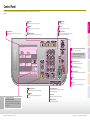
The control panel consists of the touch panel display, physical keys for various operations, numeric keys, and
indicators.
– COPY key
Touch Panel Display
Clear key
SEND key
Use to switch to the top screen of the Send and Fax
functions.
Press to clear entered numbers or characters.
Press to log in to/out of the machine when it is managed
with Department ID/User ID Management.
ID (Log in/Out) key
SCAN/OPTIONS key
Use to switch to the top screen of the Remote Scan function.
Copy
Displays the menu screen for each function and the System
Monitor screen.
Numeric keys
Use to enter numbers.
Use to switch to the top screen of the Copy function.
Preface
If no messages or menu are displayed on the touch
panel display with the Main Power Indicator lighting
up, the machine is in the Sleep mode.
Additional Functions key
Press to access the Additional Functions menu.
Counter Check key
Press to display the Counter Check screen.
Print
Control Panel Power switch (Sub Power Supply)
Press to clear or enter the Sleep Mode.
Send/Fax
Volume Control key
Start key
Press to start an operation such as copying and scanning.
Scan
Press to display the screen for the machine’s audible tone
settings.
Stop key
Press to stop a job in progress such as copying and
scanning.
Display Contrast dial
Use to adjust the brightness of the touch panel display.
● Viewing and Canceling Jobs
Reset key
Press to cancel the specified settings and return to the
top screen.
Processing/Data Indicator
Flashes when the machine is in operation. Lights up when
the machine has waiting jobs.
Error Indicator
Flashes or lights up when an error has occurred.
● Checking the Machine Status
Main Power Indicator
Press [System Monitor] to view the job status or cancel jobs.
You can also check the machine status such as the amount of
remaining paper.
Lights up when main power is ON.
05 Easy Operation Guide Preface
Other
Control Panel Easy Operation Guide 06
Making a Copy
Copying Guide
PDF on User Manual CD-ROM
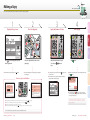
This section describes the basic operation procedure for copying originals.
Copying Guide
After you finish reading this guide, store it in a safe place for future reference.
Please read this guide before operating this product.
1
2
Display the Copy Screen
4
Specify the Number of Copies
ENG
Copying Guide
Start Copying
Print
Copy
Place Your Originals
3
ENG
Preface
Please read this guide before operating this product.
After you finish reading this guide, store it in a safe place for future reference.
(Power).
▶ Close the feeder/platen cover after placing your originals on
the platen glass.
How to Log in to the Machine
▶ To change the value you have entered, press
the correct value.
(Clear) → enter
Press
(Start).
Send/Fax
Enter the desired number of copies
(1 to 999) using – (numeric
keys).
▶ When the screen below appears, select the original size → press
[OK] →
(Start).
▶ The number of copies you specify is displayed on the upper
right side of the touch panel display.
Scan
▶ If the machine is in the Sleep mode, press
Place your originals in the feeder or on the
platen glass.
▶ To cancel copying, press
(Stop). You can also cancel the
current copy job by pressing [Cancel] on the screen indicating
the copy processing status.*
▶ Enter your Department ID and password if the screen prompts you to do so → press (Log In/Out).
▶ Enter your User ID and password if the screen prompts you to do so → press (Log In/Out).
▶ Insert the control card if the screen prompts you to do so.
▶ When you have finished the operations, press (Log In/Out) or remove the control card to log out.
* The canceling procedure differs depending on the job status. For
more information, see Chapter 1, “Introduction to Copy Function,”
in the Copying Guide.
For more information, see Chapter 2, “Basic Operations,” in the Reference Guide.
07 Easy Operation Guide Copy
Making a Copy Easy Operation Guide 08
Other
Press
(COPY) to display the top screen
of the Copy function.
Basic Copying Functions
This section describes the operation procedures for the Copy functions you can access from the top screen of the
Copy function.
4
2
3
Chapter 2❖Copying Guide
TEXT
TEXT/
PHOTO
PHOTO
Press the original type drop-down list box →
select the original type from [Text], [Text/Photo],
or [Photo].
3
Copy
1
You can set the machine to optimize the copy output quality by
selecting the type of your original. If your original contains both text
and photo images, select [Text/Photo].
Preface
Optimizing the Copy Output Quality
You can use the stack bypass as a temporary paper source for the size of
the paper that is not loaded in any paper drawers.
Making Enlarged/Reduced Copies
Print
Using Paper Not Loaded in the Drawers
Press [Copy Ratio] → select or set the desired ratio → press [Done] as
indicated on the touch panel display.
Press [Paper Select].
4
Select the button for the stack bypass as shown left →
press [Done].**
You can automatically set the copy ratio by pressing [Auto] on the Copy Ratio screen.
* When you load paper in the stack bypass, the Stack Bypass screen appears.
** The specified paper size and type are displayed on the button.
Adjusting the Density of Copied Images
You can optimize the copy density level for the original, automatically or manually.
Chapter 2❖Copying Guide
2
Press [Light] to make the density lighter or press [Dark] to darken to
the desired level. Press [A] (auto) to automatically set the density
level.
Stack Bypass—A Multi-purpose Paper Tray
● The stack bypass is a versatile paper source that enables you to print on special sizes and types of paper.
▶ You can use it as a temporary paper source, as described above.
▶ You can use special sizes and types of paper that are not available in the paper drawers:
– Non-standard size paper
– Special types of paper such as thicker paper or labels
● You can specify the default paper size/type for the stack bypass.
Specifying the paper size and type is required when you use the stack bypass. To skip this procedure, you can set and store the default
paper size and type by specifying [Stack Bypass Standard Settings] from the Additional Functions menu.
For more information, see Chapter 3, “Configuring the Machine’s Basic Settings,” in the Reference Guide.
09 Easy Operation Guide Copy
Basic Copying Functions Easy Operation Guide 10
Other
1
To manually select the stack bypass as the paper source after the paper is
loaded and its size and type are specified:
Scan
Chapter 2❖Copying Guide
To specify the paper size and type:
Load the paper in the stack bypass as illustrated → select the paper size → press
[Next] → select the paper type → press [OK] → [Done] as indicated on the touch
panel display.*
The stack bypass is now chosen as the paper source.
Send/Fax
Chapter 2❖Copying Guide
You can make an enlarged or reduced copy from the original of a standard
paper size, such as LTR original to 11" × 17" or LGL to LTR. The optimal copy
ratio is automatically set by selecting the desired paper size from the paper
size buttons.
You can also set the copy ratio from 25% to 400% in 1% increments on the
Copy Ratio screen.
>> Basic Copying Functions
1
Making Copies in Sets Arranged in Page Order
You can set the machine to output the copies in sets arranged in
page order.
Copying on Both Sides of the Paper
2
Press [Finishing] → [Collate] → [OK] as indicated on
the touch panel display.
† The 2 > 2-Sided and 2 >1-Sided mode are available on the imageRUNNER
2530/2525/2520 only when the optional Feeder (DADF-AB1) is attached.
Copy
Chapter 2❖Copying Guide
You can copy two-sided originals or multiple one-sided originals on
both sides of the paper.
1 > 2-Sided
Preface
2
Making Copies Grouped by Page
2 > 1-Sided
2 > 2-Sided
You can set the machine to output the copies in groups of individual
pages.
Print
Chapter 2❖Copying Guide
Book > 2-Sided (Front/Back 2-Sided)
2
2
1
1
2
3
2
4
3
3
4
4
Output Orientations
1
Press [2-Sided] → select the 2-Sided mode you want to
use → press [OK] as indicated on the touch panel
display.
† For The Book > 2-Sided mode, you will be asked to select the type of original.
Stapling Collated Copies
You can set the machine to staple the collated copies on the specified position.
When performing Collate or Group copying, you can select either “Rotate” or “Offset” as the output orientation. It is
possible to combine the output orientation and the Collate or Group mode, such as Collate + Rotate, Group + Offset, etc.
● Rotate
● Offset
Each printout group is output in alternating orientations.
(Not available when the optional Inner Finisher-B1 is attached to
the machine.)
Each printout group is output with the same orientation, but
staggered back and forth in alternating layers. (Available when
the optional Inner Finisher-B1 is attached to the machine.)
† The Staple mode is available only when the optional Inner Finisher-B1 is attached to the machine.
Chapter 2❖Copying Guide
Stapled
2
11 Easy Operation Guide Copy
Press [Finishing] → [Staple] → [Next] → select the staple type and position → press
[OK] as indicated on the touch panel display.
Scan
1
Press [Finishing] → [Group] → [OK] as indicated on the
touch panel display.
Press [Rotate] → [Next] →
select the paper source →
press [OK] to use the Rotate
mode.
Press [Offset] → [OK] to use the
Offset mode.
Basic Copying Functions Easy Operation Guide 12
Other
Book > 2-Sided (Left/Right 2-Sided)
Send/Fax
Chapter 2❖Copying Guide
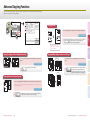
Advanced Copying Functions
1
2
3
4
Copying ID Cards
You can copy both sides of an ID card on one side of paper at actual size.
Preface
This section describes the operation procedures for the Copy functions you can access from the [Special Features]
button on the top screen of the Copy function.
Press [ID Card Copy] → select the layout type → press [Next]
→ select the paper source → press [OK] → [Done] as
indicated on the touch panel display.
3
Copy
Chapter 3❖Copying Guide
Copying Multiple Originals on One Sheet of Paper
You can copy the facing pages of bound originals on separate sheets
of paper.
1
2 on 1
You can reduce two or four original images to fit on one sheet of
paper.
Chapter 3❖Copying Guide
1
Chapter 3❖Copying Guide
Press [2-Page Separation] → [Done].
4
4 on 1
Press [Image Combination] → select the original size
→ press [Next] → select the combination mode →
press [Next] → select the paper source → press [OK]
→ [Done] as indicated on the touch panel display.
1
2
3
4
Scan
Copying Different Size Originals Together
You can copy multiple originals of different sizes at the same time when using the feeder.
1
† The Different Size Originals mode is available on the imageRUNNER 2530/2525/2520 only when the optional
Feeder (DADF-AB1) is attached.
2
3
4
13 Easy Operation Guide Copy
Other
Chapter 3❖Copying Guide
2
Send/Fax
Copying Facing Pages of Bound Originals Separately
Print
† For the position of the copied
images, you can select either top/
bottom or left/right.
Press [Different Size Originals] → select [Same Width] or [Different Width] →
press [OK] → [Done] as indicated on the touch panel display.
Advanced Copying Functions Easy Operation Guide 14
>> Advanced Copying Functions
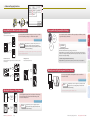
You can erase shadows and lines that may appear on the copy. Select the
erase mode depending on the type or condition of the original.
70%
Text/Photo
Group
Chapter 3❖Copying Guide
1
ON
Press [Frame Erase] → select the mode you want to use →
press [Next] → select the original size → press [Next] →
specify the erase width → press [OK] → [Done] as indicated
on the touch panel display.
Chapter 3❖Copying Guide
3
2 on 1
Photo
To store the setting combination:
First make a combination of the copy settings you want to store.
Press [Mode Memory] → [Store/Erase] → select [Store] → select the memory button in which you
want to store the setting in → press [Next]. Confirm the setting and press [Yes] → [OK] → [Done] as
indicated on the touch panel display.
† For the Binding Erase mode, select the side of the original on which to erase the shadow,
instead of selecting the original size.
Book Frame Erase mode:
Binding Erase mode:
Erases shadows on the edges and in the center of the copy of the
bound original.
Erases shadows of punch holes.
To recall the setting combination from the memory:
Press [Mode Memory] → select the memory button you want to recall → press [OK] → [Done].
OFF
Making Copies in the Page Arrangement to Form a Booklet
OFF
You can copy the originals in such a way that the copies are made into a
booklet when folded.
ON
Aptly nicknamed
“Tropical Forests under the sea”,
these spots of breathtaking
beauty serve as home to
countless varieties of life,
and to us of the land,
this alluring,
dream-like world
forms a tropical
paradise filled
with romance.
Sharpness
Higher
The world's coral reefs, where
brilliantly colored fish and a
myriad of other tropical creatures
come together.
Aptly nicknamed
“Tropical Forests under the sea”,
these spots of breathtaking
beauty serve as home to
countless varieties of life,
and to us of the land,
this alluring,
dream-like world
forms a tropical
paradise filled
with romance.
Sharpness
Lower
15 Easy Operation Guide Copy
7
8
1
6
3
4
Adjusting the Sharpness of Copied Images
Chapter 3❖Copying Guide
2
1
2
3
4
5
6
7
8
5
ON
The world's coral reefs, where
brilliantly colored fish and a
myriad of other tropical creatures
come together.
Send/Fax
OFF
You can store the possible combinations of the copy settings to recall when you make
a copy with the setting combination.
4
Press [Booklet] → select the original size → press [Next] → select
the paper source → press [OK] → [Done] as indicated on the
touch panel display.
† You can also copy the first page of the originals as a cover.
You can adjust the sharpness level. To make the text or lines sharper,
increase the sharpness level. To make the halftone images softer,
decrease the sharpness level.
Chapter 3❖Copying Guide
2
Scan
Erases shadows on the edges of the copy.
Press [Sharpness] → [Low] or [High] to adjust the
sharpness level → [OK] → [Done] as indicated on the
touch panel display.
Advanced Copying Functions Easy Operation Guide 16
Other
Original Frame Erase mode:
Storing and Recalling Frequently Used Settings
Copy
Erasing Dark Borders When Copying Bound Originals
Print
2
4
Preface
1
3
Printing from a Computer
Driver Software Guide
PDF on User Manual CD-ROM
This section describes the basic operation procedure for printing a document from a computer.
Driver Software Guide
After you finish reading this guide, store it in a safe place for future reference.
Please read this guide before operating this product.
1
2
Select the Printer
Specify the Print Settings
4
ENG
Driver Software Guide
Start Printing
▶ On this screen, you can specify the number of prints, and
pages to print. If you need no detailed settings, click [OK]** to
start printing.
* The name of the button to display the printer setting sheet shown
on step 3 may vary depending on the application you are using.
** The name of the button to start printing may vary depending on
the application you are using.
† The dialog boxes for print settings shown in steps 2 and 4 may
vary depending on the application you are using.
In each sheet of the printer setting dialog
box, specify the print settings that suit your
preferences → click [OK].
For more information on the print settings, see p. 19 and p. 20.
Specify the number of prints and pages to
print as necessary → click [OK].*
▶ To cancel printing on your computer, click [Cancel] in the
dialog box that appears when the print data is being
processed.
▶ To cancel printing on the machine’s control panel, use the
System Monitor screen displayed by pressing
(Stop) or
[System Monitor].**
* The name of the button to start printing may vary depending on
the application you are using.
** The canceling procedure differs depending on the job status. For
more information, see Chapter 2, “Managing Print Jobs,” in the
Printer Guide.
Printer Driver
The printer driver installed on your computer enables the machine to print
the documents from the applications on your computer. The printer driver
also enables you to specify the various print settings such as paper size and
finishing style.
▶ For more information on the printer driver settings, see p. 19 and p. 20.
17 Easy Operation Guide Print
Printing from a Computer Easy Operation Guide 18
Scan
In the [Print] dialog box, select your printer
→ click [Properties]*.
Other
In the application you open the
document to print from, click the
[File] menu → select [Print].
Send/Fax
Print
Copy
Open the [Print] Dialog Box
3
ENG
Preface
Please read this guide before operating this product.
After you finish reading this guide, store it in a safe place for future reference.
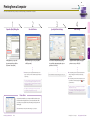
Specifying the Printer Driver Settings
This section describes the instructions on how to specify printer driver settings, such as the finishing style and
print quality.
†The printer driver screens shown below may differ from the ones displayed on your computer, depending on the machine and
optional equipment, printer driver, or operating system you are using.
1 Select by
Enables you to select the paper supply method from Paper Source or Paper Type.
2 Paper Selection
Enables you to select either you use the same paper source or type for all pages or
use a different paper source or type for the specified pages. This setting is useful,
for example, when you want to print the covers of your document on a different
kind of paper.
1
2
3
3 Paper Source/Paper Type*
Enables you to select a desired paper source or type when making prints.
Configuring the Page Settings
Driver Software Guide
3 Output Size
Enables you to select the size of the paper to print on.
4 Page Layout
Enables you to print multiple pages onto one sheet of paper, or in other multiple
layouts.
Driver Software Guide
Selecting the Print Output Quality
On the [Quality] sheet, you can specify the print output quality to match the purpose of the printing.
1 Objective
Enables you to print a document with the print settings that best suit the content
of the document. When you select an item, a comment is displayed below the list.
1
2 Manual Grayscale Settings
Enables you to manually specify the settings such as brightness or contrast for your
grayscale prints.
Driver Software Guide
Selecting the Finishing Style
Send/Fax
4
2 Page Size
Enables you to select the size of the document you have created in an application.
Scan
2
3
1 Profile
Enables you to set the printer driver simply by selecting it from the list. Printer
driver settings for different purposes are registered.
Print
* When you select [Paper Type] on <Select by>, [Paper Type] is displayed instead of [Paper
Source], allowing you to select the paper type to print your document on.
On the [Page Setup] sheet, you can specify the page settings.
1
Copy
On the [Paper Source] sheet, you can specify the paper source and type.
Preface
Selecting the Paper Source
2
1 Print Style
Enables you to select the print style such as 1-sided or 2-sided Printing.
1
2 Binding Location
Enables you to select the binding location such as Long Edge (Left) of Short Edge
(Top).
2
3
3 Finishing
Enables you to select the finishing style such as Collate or Group.
On each sheet, click [OK]
to return to the [Print]
window after you have
specified the settings.
Other
On the [Finishing] sheet, you can specify the finishing style.
[Help] Button
Driver Software Guide
Click [Help] on each sheet to display the further information
about the print settings.
19 Easy Operation Guide Print
Specifying the Printer Driver Settings Easy Operation Guide 20
Sending a Document
Sending and Facsimile Guide
(E-mail, I-fax, File Server, and USB Memory Media Device)
PDF on User Manual CD-ROM
†The Send function is available only when the Color Send Kit-Y1
Sending and
Facsimile Guide
(optional for the imageRUNNER 2545/2535/2530/2525/2520) is activated.
Please read this guide before operating this product.
After you finish reading this guide, store it in a safe place for future reference.
After you finish reading this guide, store it in a safe place for future reference.
Please read this guide before operating this product.
1
Place Your Originals
3
4
Specify the Destination
ENG
Sending and Facsimile Guide
Start Sending
Print
Copy
Display the Send Screen
2
ENG
Preface
This section describes the basic operation procedure for sending a document.
▶ If the machine is in the Sleep mode, press
(Power).
▶ Enter your ID and password or insert the control card if the
screen prompts you to do so. For more information on logging
in to the machine, see “How to Log in to the Machine,” on p. 07.
▶ Close the feeder/platen cover after placing your originals on
the platen glass.
Press [New Address] → select the sending
method → specify the destination.
▶ You can also specify the destination by using [Address Book],
[Favorites Buttons], or [One-touch Buttons]. These functions
save you the effort of entering a destination each time you
send documents.
Press
(Start).
Send/Fax
Place your originals in the feeder or on the
platen glass.
▶ When the screen below appears, select the original size → press
[OK] →
(Start).
Scan
Press
(SEND) to display the top screen
of the Send and Fax functions.
† Some USB memory media devices are not compatible with the
machine. For more information, see Chapter 2, “Sending
Documents,” in the Sending and Facsimile Guide.
▶ To cancel scanning originals, press
(Stop). You can also
cancel scanning originals by pressing [Cancel] on the screen
indicating the send processing status.
For instructions on how to cancel sending a document during
transmission, see Chapter 2, “Sending Documents,” in the Sending
and Facsimile Guide.
21 Easy Operation Guide Send/Fax
Sending a Document (E-mail, I-fax, File Server, and USB Memory Media Device) Easy Operation Guide 22
Other
For information on specifying destinations, see p. 25.
Sending a Fax
Sending and Facsimile Guide
PDF on User Manual CD-ROM
†The Fax function is available only when the optional Super G3 Fax Board-AG1 is attached to the
machine.
Sending and
Facsimile Guide
Please read this guide before operating this product.
After you finish reading this guide, store it in a safe place for future reference.
After you finish reading this guide, store it in a safe place for future reference.
Please read this guide before operating this product.
1
Place Your Originals
3
4
Enter the Fax Number
ENG
Sending and Facsimile Guide
Start Sending
Print
Copy
Display the Send Screen
2
ENG
Preface
This section describes the basic operation procedure for sending a fax.
▶ If the machine is in the Sleep mode, press
(Power).
▶ Enter your ID and password or insert the control card if the
screen prompts you to do so. For more information on logging
in to the machine, see “How to Log in to the Machine,” on p. 07.
▶ Close the feeder/platen cover after placing your originals on
the platen glass.
Enter the fax number using
(numeric keys).
–
▶ You can also specify the destination by using [Address Book],
[Favorites Buttons], or [One-touch Buttons]. These functions
save you the effort of entering a fax number each time you
send documents.
Press
(Start).
Send/Fax
Place your originals in the feeder or on the
platen glass.
▶ When the screen below appears, select the original size → press
[OK] →
(Start).
Scan
Press
(SEND) to display the top screen
of the Send and Fax functions.
▶ To cancel scanning originals, press
(Stop). You can also
cancel scanning originals by pressing [Cancel] on the screen
indicating the fax processing status.
For instructions on how to cancel sending a document during
transmission, see Chapter 2, “Sending Documents,” in the Sending
and Facsimile Guide.
23 Easy Operation Guide Send/Fax
Sending a Fax Easy Operation Guide 24
Other
For information on specifying destinations, see p. 25.
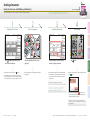
Send and Fax Functions
This section describes the operation procedures for the Send and Fax functions you can access from the top
screen of the Send and Fax functions.
The Recall function enables you to send a document using any of the last three addresses, scan settings, and send
settings that were used.
4
Chapter 4❖Sending and Facsimile Guide
5
Press [Recall].
Copy
2
4
3
Print
Specifying Destinations Easily and Quickly
[Address Book], [One-touch Buttons], and [Favorites Buttons] enable you to streamline and customize the procedures for
specifying destinations. These functions enable you to register recipient destinations so that you can send documents by
pressing only a few keys.
1
Select [1 Before], [2 Before], or [3
Before].
2
Confirm the settings → press [OK].
1
Press [Address Book].
2
Press [Favorites Buttons].
3
Send/Fax
Chapter 4❖Sending and Facsimile Guide
Specifying the File Format for Sending Documents
Press [One-touch Buttons].
You can send documents in a variety of file formats, including TIFF, PDF, and JPEG. This gives you the freedom to send
documents in a manner that is suited to the purpose of the document, as well as the recipient’s document handling
environment. Scanned original images are converted to the specified file format and sent via e-mail or to a file server or
USB memory media device.
Chapter 3❖Sending and Facsimile Guide
Press [File Format].
Select the desired favorites button →
press [Done].
Other
5
Select the desired destination → press
[OK].
Select the desired one-touch button →
press [Done].
File Formats
In addition to standard TIFF, PDF, and JPEG file formats, the machine also supports PDF (Compact) and PDF (OCR) files.
▶ PDF (Compact) files are archived with a higher compression ratio than normal PDF. The resulting file data size is smaller than normal PDF,
and therefore recommended for jobs that are to be sent over the network.
▶ PDF (OCR) files perform OCR (Optical Character Recognition) on scanned documents to create a PDF with searchable text.
† PDF (OCR) is available only when the Color Send Searchable PDF Kit-C1 (optional for the imageRUNNER 2545/2535/2530/2525/2520) is activated.
25 Easy Operation Guide Send/Fax
Scan
1
Preface
Recalling the Most Recent Settings
1
Select the desired file format.
† You cannot select the file format when
sending I-faxes or faxes.
2
If you want to separate multiple images
and send them as separate files, press
[Divide into Pages] → [Done].
Send and Fax Functions Easy Operation Guide 26
>> Send and Fax Functions
This section describes the operation procedures for specifying the
useful Additional Functions settings related to the Send and Fax
functions.
You can specify the screen to display first when you press
(SEND). You can select Favorites Buttons screen, Onetouch screen, or the top screen of the Send and Fax functions as the screen to display first.
Preface
Setting the Send Screen to Suit Your Needs
Chapter 7❖Sending and Facsimile Guide
(Additional Functions).
Copy
Press
Printing the Sender Information When Sending I-Faxes/Faxes
The sender information is printed at the top of the documents that you send via I-fax/fax. Information such as your I-fax
address, name and fax number is printed, enabling the recipient to know who sent the document.
1
Press [Communication Settings]
→ [TX Settings] under <Common
Settings>.
2
Press [▼] or [▲] until [Default
Screen for Send] appears → press
[Default Screen for Send].
3
Select the desired setting item →
press [OK].
To return to the top screen, press
(Reset).
Automatically Forwarding Received Documents
1
Press [Communication Settings]
→ [TX Settings] under <Common
Settings>.
2
Press [▼] or [▲] until [TX
Terminal ID] appears → press [TX
Terminal ID].
3
Press [Option].
You can set the machine to automatically forward the received I-fax/fax documents to any desired destination. If a
received document matches the forwarding conditions you set, it is forwarded to the destination. You can also specify a
forwarding destination for received documents that do not match the forwarding conditions.
Chapter 4❖System Settings Guide
(Additional Functions).
Other
Press
Send/Fax
(Additional Functions).
Scan
Press
Print
Chapter 7❖Sending and Facsimile Guide
4
Select the print position of the
sender information → select the
type of marking* → press [OK].
To return to the top screen, press
(Reset).
* The [Telephone # Mark] setting is available only when the optional Super G3 Fax Board-AG1 is
attached.
† For details of the optional settings with illustrations, see Chapter 7, “Customizing the Machine’s
Settings,” in the Sending and Facsimile Guide.
1
27 Easy Operation Guide Send/Fax
Press [System Settings]* →
[Forwarding Settings].
* To make changes to the System
Settings, log in to the machine as
the System Manager.
2
Press [Register] → register the
forwarding conditions and
destinations as indicated on the
touch panel display.
3
Select the desired forwarding
setting → press [Validate/
Invalidate] → [Done].
To return to the top screen, press
(Reset).
Send and Fax Functions Easy Operation Guide 28
>> Send and Fax Functions
This section describes the operation procedures for the Send
and Fax functions you can access from the [Scan Settings]
button on the top screen of the Send and Fax functions.
1
When the edges of the scanned image are missing, change the Document Size setting to a size that is larger than the
actual original size.
Preface
Specifying the Scanning Area to Cover the Original Size
Chapter 3❖Sending and Facsimile Guide
Press [Scan Settings].
Copy
1
1
1
2
3
Press [Document Size].
Select the document size that is
larger than the original size →
press [Done] → [OK].
Press [Scan Settings].
Scanning Fine Text and Images Clearly
You can scan fine text in documents more clearly by setting a higher resolution.
Note, however, that the file size increases as you increase the resolution.
Chapter 3❖Sending and Facsimile Guide
1
2
Press [Scan Settings].
Press the original type drop-down list
box → select [Photo] or [Text/Photo] →
press [OK].
Other
1
Press [Option].
1
29 Easy Operation Guide Send/Fax
Send/Fax
Chapter 3❖Sending and Facsimile Guide
Press [Option].
Scan
You can improve the image quality of scanned images by selecting the original type setting that best suits your originals.
When originals containing photos are not scanned clearly, select [Photo] or [Text/Photo] from the original type dropdown list box to obtain better results.
Print
Scanning Documents Containing Photos Clearly
Press [Option].
2
Press the [Resolution] drop-down list
box → select the desired resolution →
press [OK].
Send and Fax Functions Easy Operation Guide 30
>> Send and Fax Functions
1
Preface
Scanning Different Size Originals Together
You can scan multiple originals of different sizes at the same time when using the feeder.
1
Chapter 3❖Sending and Facsimile Guide
Copy
† The Different Size Originals mode is available on the imageRUNNER 2530/2525/2520
only when the optional Feeder (DADF-AB1) is attached.
Press [Scan Settings].
Scanning Two-Sided Originals
Print
You can scan both sides of the originals set in the feeder.
† The 2-Sided Original mode is available on the imageRUNNER 2530/2525/2520
only when the optional Feeder (DADF-AB1) is attached.
1
Press [Scan Settings].
2
Press [Option].
Press [Different Size Origin].
3
Select [Same Width] or [Different
Width] → press [OK] → [OK].
Adjusting the Background Color of Sent Documents
You can adjust the density of the background color when scanning color originals. You can adjust red, green, and blue
separately.
Chapter 3❖Sending and Facsimile Guide
Press [Option].
2
Press [2-Sided Original].
3
Select [Book Type] or [Calendar
Type] → press [OK] → [OK].
1
Press [Scan Settings].
Other
1
Scan
1
Send/Fax
Chapter 3❖Sending and Facsimile Guide
1
31 Easy Operation Guide Send/Fax
Press [Option].
2
Press [Adjust Background].
3
Press [-] or [+] to adjust the
amount of each color → press
[OK] → [OK].
Send and Fax Functions Easy Operation Guide 32
>> Send and Fax Functions
This section describes the operation procedures for the Send
and Fax functions you can access from the [Send Settings]
button on the top screen of the Send and Fax functions.
Specifying the Time to Start Sending
You can specify the time for sending the document. This function is useful, for example, when you want to send a
document at a future time when you may not be near the machine.
Preface
1
Chapter 2❖Sending and Facsimile Guide
Press [Send Settings].
Copy
1
Print
Adding the Reply Destination to Sent Documents
You can specify the reply-to address for your e-mails/I-faxes.
1
Press [Delayed Send].
2
Enter the time to send the
document using – (numeric keys) → press [OK].
3
Press [Done].
Send/Fax
Chapter 2❖Sending and Facsimile Guide
First, register the e-mail address you want to use as the reply-to
address.
Press [Send Settings].
1
Affixing Stamps on Scanned Originals
Scan
You can set the machine to affix a stamp on the front side of scanned originals to indicate they have been scanned.
† The Stamp mode is available only when the optional Stamp Unit-B1 is attached
to the feeder (optional for the imageRUNNER 2530/2525/2520).
Chapter 3❖Sending and Facsimile Guide
1
Press [▼].
2
Press [Reply-to].
3
Other
1
Press [Send Settings].
Select the reply-to address →
press [OK] → [Done].
1
33 Easy Operation Guide Send/Fax
Press [Stamp].
2
Press [Done].
Send and Fax Functions Easy Operation Guide 34
Scanning from a Computer
Driver Software Guide
(Remote Scan)
PDF on User Manual CD-ROM
†The screen shots shown below may differ from the ones displayed on your computer, depending on the
application or operating system you are using.
Driver Software Guide
Please read this guide before operating this product.
After you finish reading this guide, store it in a safe place for future reference.
After you finish reading this guide, store it in a safe place for future reference.
Please read this guide before operating this product.
1
Place Your Originals
3
Open the Color Network ScanGear
4
ENG
Driver Software Guide
Start Scanning
▶ If the machine is in the Sleep mode, press
(Power).
▶ Enter your ID and password or insert the control card if the
screen prompts you to do so. For more information on logging
in to the machine, see “How to Log in to the Machine,” on p. 07.
Place your originals in the feeder or on the
platen glass.
▶ Close the feeder/platen cover after placing your originals on
the platen glass.
From the menu of the application, select the
command* to start the scanning operation.
▶ Make sure that the Color Network ScanGear is selected as the
scanner to be used.
For more information, see the documentation that comes with
your TWAIN-compliant application.
▶ On the Color Network ScanGear dialog box, specify the
settings such as the color mode and resolution.
▶ To cancel scanning, click [Cancel] in the dialog box that
appears when the scan data is being processed.
▶ When scanning is complete, press [Offline] on the Remote
Scan screen in step 1.
For instructions on how to specify the settings on the Color
Network ScanGear dialog box, see the Driver Software Guide.
Other
* Command names include [Scan New], [Acquire], and others,
depending on the application you are using.
Specify the scan settings that suit your
preferences → click [Scan].
Scan
Press
(SCAN/OPTIONS) to display the
Remote Scan screen → press [Online].
Send/Fax
Print
Copy
Display the Remote Scan Screen
2
ENG
Preface
This section describes the basic operation procedure for scanning originals to load the scanned images to a
computer.
35 Easy Operation Guide Scan
Scanning from a Computer (Remote Scan) Easy Operation Guide 36
Operating the Machine from a Computer
Remote UI Guide
(Remote UI)
PDF on User Manual CD-ROM
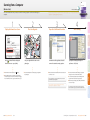
This section describes the basic operation procedure for accessing the machine from a computer by using the
Remote UI.
Remote UI Guide
After you finish reading this guide, store it in a safe place for future reference.
Please read this guide before operating this product.
■ What is the Remote UI?
ENG
ENG
■ Accessing the Remote UI
The Remote UI (Remote User Interface) is software built into the machine that enables users to access machine functions and settings from
a web browser on a computer. Some examples of what you can do on the Remote UI include:
▶ Checking the machine status such as paper or toner amount
▶ Checking the job status
▶ Registering or editing the addresses.*
* The Address Book can be protected by a password.
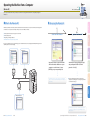
1
Log in to the Remote UI
Copy
Start Your Web Browser
2
Remote UI Guide
Preface
Please read this guide before operating this product.
After you finish reading this guide, store it in a safe place for future reference.
If you log in to the Remote UI as the System Manager, you can use further functions such as setting Department ID/User Management and
customizing the various machine settings.
* The IP address in the screen shots in this section is for illustrative
purposes only. Ask your network administrator for the IP address of
your machine.
▶ After successfully logging in, the Device Status page is
displayed. Go to other pages as necessary by using the menu
on the left side of the page.
Other
Network
On the Remote UI top page displayed in step 1,
enter your Department ID or User ID and
password* → click [OK].
Scan
Start your web browser → enter the IP address*
of the machine into the Web browser on your
computer to access the Remote UI → press
[ENTER] key on your computer keyboard.
Send/Fax
Print
Viewing the Jobs
Checking the consumables
Editing the Address Book
* The ID and password you have to enter when logging in depend
on the Remote UI setting. Ask your system administrator for your
ID and password.
37 Easy Operation Guide Other
Operating the Machine from a Computer (Remote UI) Easy Operation Guide 38
Customizing the Machine Settings
From the Additional Functions screen, you can customize the machine settings to suit your needs.
2 [Copy Settings]
Enables you to specify the settings for the Copy function.
▶Chapter 4 in the Copying guide
3 [Timer Settings]
Enables you to specify the timer-related settings for the
machine, such as the time for the machine to enter the Sleep
mode.
▶Chapter 3 in the Reference Guide
Enables you to specify the settings for the Send and Fax
functions.
▶Chapter 7 in the Sending and Facsimile Guide
7 [Report Settings]
Enables you to print various reports such as the User’s Data List.
▶Chapter 2 in the Reference Guide
▶Chapter 8 in the Sending and Facsimile Guide
8 [Address Book Settings]
Enables you to register, edit, or delete destinations.
▶Chapter 4 in the Sending and Facsimile Guide
9 [System Settings]*
Enables you to specify the machine’s system settings such as
the network- or security-related settings. Mainly used by the
administrator.
* To make changes to the System Settings, log in to the machine as
the System Manager.
▶System Settings Guide
5 [Adjustment/Cleaning]
Displaying the screen for the
function you frequently use
If you frequently use the Copy function,
for example, you can set the Copy screen
to be displayed first.
(Chapters to refer to depend on the setting items.)
Saving electricity or toner
There are two settings for saving electricity and toner.
Various settings for the Copy function
can be stored and recalled as a
setting combination.
Setting the time for the
machine to enter the Sleep
mode
You can adjust the time for the
machine to enter the Sleep mode.
To save toner:
Preventing misdialing when
sending a fax
When you dial a fax number, the
machine prompts you to enter the
fax number again, which will prevent
dialing mistakes.
Other
To save electricity:
Storing and recalling the
copy settings you prefer
Send/Fax
Enables you to adjust and optimize the machine settings for
better results when printing on special paper or under other
conditions. Also enables you to perform automatic machine
cleaning.
▶Chapter 5 and 6 in the Reference Guide
Examples of Useful Settings
Preface
Enables you to specify the settings for the Print function.
▶Chapter 3 in the Printer Guide
Scan
The Additional Functions screen is displayed by pressing
(Additional Functions) on the machine’s control
panel. From this screen, you can change and customize the machine’s various settings. When these settings are
changed or specified, they are saved as default settings and remain in effect until they are changed again.
4 [Communications Settings]
6 [Printer Settings]
Copy
Enables you to specify the settings that are fundamental to the
machine operations.
▶Chapter 3 in the Reference Guide
Print
1 [Common Settings]
Press [Initial Function] and make
the desired settings.
Chapter 3 in the
Reference guide
39 Easy Operation Guide Other
Press [Energy Consumption in
Sleep Mode] and make the
desired settings.
Chapter 3 in the
Reference guide
Press [Toner Save Mode] and
make the desired settings.
Chapter 3 in the
Reference guide
First make the copy settings as you
prefer. Press [Standard Settings]
and make the desired settings.
Press [Auto Sleep Time] and make
the desired settings.
Press [Restrict the Send Function]
→ [Confirm Entered Fax Numbers]
and make the desired settings.
Chapter 4 in the
Copying Guide
Chapter 3 in the
Reference guide
Chapter 4 in the
System Settings Guide
Customizing the Machine Settings Easy Operation Guide 40
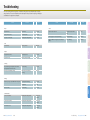
Troubleshooting
This section describes which other guides to check when seeking solutions to problems that may occur when
using the machine. The list also includes where to find descriptions of the procedures for replacing or refilling the
consumables such as paper, toner, and staples.
Chapter
Guide
Problem
Section Title
Chapter
Guide
Preface
Section Title
Other
Paper
Paper has run out.
Paper Drawers
5
Reference
A paper jam has occurred.
Clearing Paper Jams
6
Reference
Paper jams occur frequently.
Identifying and Isolating Problems
6
Reference
The power does not turn ON.
Main Power and Control Panel
Power
2
User’s
A message appears on the touch panel display.
Self-diagnostic Display
6
Reference
An error code like “E******” appears on the touch panel
display.
Service Call Message
6
Reference
Copy
Problem
Toner has run out.
Replacing the Toner
5
Reference
A staple jam has occurred.
Clearing Staple Jams
6
Reference
Staples have run out.
Replacing the Staple Cartridge
5
Reference
The scanned images of the originals scanned with the
platen glass/feeder have marks or stains.
Routine Cleaning
5
Reference
Memory becomes full during scanning.
If Memory Becomes Full during
Scanning...
6
Reference
Specifying Common Settings
3
Reference
Settings Menu
3
Printer
Routine Cleaning
5
Reference
Cannot send documents.
Identifying and Isolating Problems
9
Sending and
Facsimile
Cannot receive documents.
Identifying and Isolating Problems
9
Sending and
Facsimile
Transmissions are slow.
Identifying and Isolating Problems
9
Sending and
Facsimile
Print
Toner
Send/Fax
Staples
Scan
Scanning
The density of a copy or print is different from the original.
Printouts are dirty.
Other
Printing
Communications
41 Easy Operation Guide Other
Troubleshooting Easy Operation Guide 42
CANON INC.
30-2, Shimomaruko 3-chome, Ohta-ku, Tokyo 146-8501, Japan
CANON U.S.A., INC.
One Canon Plaza, Lake Success, NY 11042, U.S.A.
CANON CANADA INC.
6390 Dixie Road Mississauga, Ontario L5T 1P7, Canada
CANON EUROPA N.V.
Bovenkerkerweg 59-61 1185 XB Amstelveen, The Netherlands
(See http://www.canon-europe.com/ for details on your regional dealer)
CANON LATIN AMERICA, INC.
703 Waterford Way Suite 400 Miami, Florida 33126 U.S.A.
CANON AUSTRALIA PTY. LTD
1 Thomas Holt Drive, North Ryde, Sydney, N.S.W. 2113, Australia
CANON CHINA CO., LTD
15F Jinbao Building No.89 Jinbao Street, Dongcheng District, Beijing 100005, China
CANON SINGAPORE PTE. LTD.
1 HarbourFront Avenue #04-01 Keppel Bay Tower, Singapore 098632
CANON HONGKONG CO., LTD
19/F., The Metropolis Tower, 10 Metropolis Drive, Hunghom, Kowloon, Hong Kong
FT5-2703 (000)
xxxxxxxxxx © CANON INC. 2009 PRINTED IN CHINA