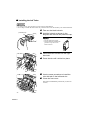
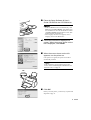
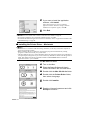
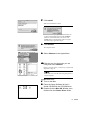
1
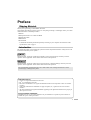
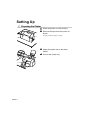
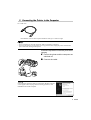
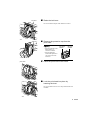
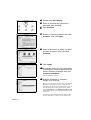
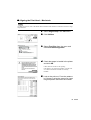
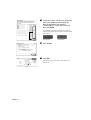
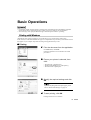
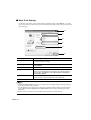
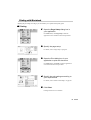
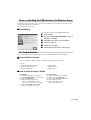
BUBBLE JET PRINTER Quick Start Guide Table of Contents Preface 1 Shipping Materials 1 Introduction 1 Setting Up 2 Connecting the Printer to the Computer 3 Installing the Print Head 4 Loading Paper 7 Installing the Printer Driver 8 Aligning the Print Head Basic Operations 17 19 Printing Photographs Directly from a Digital Camera ©CANON INC.2003 PRINTED IN VIETNAM 17 Printing with Macintosh Appendix XX2003XX 13 Printing with Windows Print Head Maintenance QA7-2592-V01 2 Preparing the Printer 21 22 22 Notes on Handling the USB Interface (for Windows Users) 23 For Further Details... 23 BE QA7-2592-V01 Exif Print This printer supports Exif 2.2 (also called “Exif Print”). Exif Print is a standard for enhancing the communication between digital cameras and printers. By connecting to an Exif Print-compliant digital camera, the camera’s image data at the time of shooting is used and optimized, yielding extremely high quality prints. Canadian Radio Interference Regulations This digital apparatus does not exceed the Class B limits for radio noise emissions from a digital apparatus as set out in the interference-causing equipment standard entitled “Digital Apparatus,” ICES-003 of the Industry Canada. Cet appareil numérique respecte les limites de bruits radioélectriques applicables aux appareils numériques de Classe B prescrites dans la norme sur le matériel brouilleur NMB-003 d'Industrie Canada intitulée « Appareils numériques ». International ENERGY STAR® Program As an ENERGY STAR® Partner, Canon Inc. has determined that this product meets the ENERGY STAR guidelines for efficiency. The International ENERGY STAR® Office Equipment Program is a global program that promotes energy saving through the use of computer and other office equipment. The program backs the development and dissemination of products with functions that effectively reduce energy consumption. It is an open system in which business can participate voluntarily. The targeted products are office equipment such as computers, monitors, printers, faxes and copiers. Their standards and logos are uniform among participating nations. Power Requirements Never use a power supply voltage other than that supplied in the country of purchase. Using the incorrect voltage could cause a fire or electric shock. The correct power supply voltages and frequencies are as follows: AC 100-127V, 50/60Hz AC 220-240V, 50/60Hz Printer Model: K10224 (i450) Preface Shipping Materials Thank you for purchasing a Canon Bubble Jet Printer. Check that all the following items are in the box. If anything is missing or is damaged, contact your Canon Authorized Dealer or Sales Representative. Printer Setup Software & User’s Guide CD-ROM Quick Start Guide Print Head 2 Ink Tanks * A USB cable should be purchased separately according to your computer. For details on cable specifications, refer to page 3. Introduction This Quick Start Guide uses the following symbols to indicate important information. Always observe the instructions indicated by these symbols. Instructions that, if ignored, could result in death or serious personal injury caused by incorrect operation of the equipment. These must be observed for safe operation. Instructions that, if ignored, could result in personal injury or material damage caused by incorrect operation of the equipment. These must be observed for safe operation. Also read the Safety Precautions in the User’s Guide. Observe the warnings and cautions to avoid personal injury or damage to the printer. Trademark Notices • Canon® is a registered trademark of Canon Inc. • BJ™ is a trademark of Canon Inc. • Microsoft® and Windows® are registered trademarks of Microsoft Corporation in the U.S. and other countries. • Apple, Mac, Macintosh are trademarks of Apple Computer, Inc., registered in the U.S. and other countries. • All other trademarks and registered trademarks appearing in this Quick Start Guide are the property of their respective owners. Copyright ©2003 CANON INC. All rights reserved. No part of this publication may be transmitted or copied in any form whatsoever without the express written permission. 1 Setting Up 1 Preparing the Printer 1 Place the printer on a flat surface. 2 Remove the tape from the printer as shown. The tape position is subject to change. 3 Attach the paper rest to the sheet feeder. 4 Pull out the output tray. 2 2 Connecting the Printer to the Computer Use a USB cable. Recommended: Canon or other computer manufacturer cable, up to 5 meters in length. • If your computer has an earth connection, make sure that this is attached. • If you do not intend to use the printer for a long period of time, unplug the power cord from the power outlet after turning off the printer. Follow the steps below to install the printer driver correctly. 1 Ensure the printer and the computer are switched off. 2 Connect the cable. If the Add New Hardware Wizard or Found New Hardware Wizard screen appears when carrying out the following operations, click Cancel and turn off the computer. 3 3 Installing the Print Head • Never attempt to plug the power cord into the power outlet or unplug the power cord when your hands are wet. • Never damage, modify, stretch, or excessively bend or twist the power cord. Do not place heavy objects on the power cord. • Never use any power supply other than the standard power supply available in the country of purchase. Using the incorrect voltage and frequency could cause a fire or electric shock. • Always push the plug all the way into the power outlet. Installing the Print Head 1 Plug the printer in. 2 Turn on the printer. Do NOT turn on the computer yet. The POWER lamp flashes and the printer begins to operate. Wait until the POWER lamp remains fully lit. ON 3 Open the output tray. output tray 4 Open the front cover. The print head holder moves to the center. print head holder 4 lock lever 5 Raise the lock lever. Do not touch internal parts other than the lock lever. 6 Remove the protective cap from the print head. • Do not touch the print head nozzles or electrical contacts. • Do not attempt to reattach the protective cap once it has been removed. print head print head nozzles electrical contacts 7 Place the print head in the holder. 8 Lock the print head into place by lowering the lever. Do not touch the lock lever once the print head has been installed. 5 Installing the Ink Tanks • For safety reasons, store ink tanks out of the reach of small children. • Do not drop or shake ink tanks as this may cause the ink to leak out and stain your clothes and hands. 1 Take out the black ink tank. protective cap 2 Hold the ink tank as shown in the diagram and remove the protective cap. ink port • Do not touch the ink port. • Do not attempt to reattach the protective cap once it has been removed. 3 Insert the black ink tank into the righthand slot. 4 Press the tab until it clicks into place. 5 Use the same procedure to install the color ink tank in the left hand slot. 6 Close the front cover. Wait until the POWER lamp remains fully lit (about 60 seconds). 6 4 Loading Paper Loading A4 (Letter) Size Plain Paper paper thickness lever 1 Open the front cover. 2 Move the paper thickness lever at the top of the print head holder to the left position. Close the front cover. Set the paper thickness lever to the left when using plain paper, to the right when using thick paper. Refer to the User’s Guide for information on loading envelopes and other media. 3 Pull out the paper rest and the output tray as shown. print side 4 To avoid paper jams, fan the stack to remove static cling, then align the edges of the stack by tapping it on a flat surface. 5 Load the paper, aligning it with the right side of the sheet feeder. You can load up to 100 sheets of plain paper. Do not exceed this limit. 6 Press the paper guide and slide it against the left side of the stack of paper. You now need to install the printer driver: Windows: Go to page 8 Mac OS 8.6-9.x: Go to page 10 Mac OS X: Go to page 11 7 5 Installing the Printer Driver Installing the Printer Driver – Windows • Do not disconnect the cable or remove the CD-ROM during the installation. The driver cannot be correctly installed. • The screens below refer to Windows XP installation. Screen may differ depending on the operating system you are using. • When installing the printer driver in Windows XP or Windows 2000, log on to the system as a member of the Administrators group. • The Setup Software & User’s Guide CD-ROM contains the application software. If you want to install the application software, click Install on step 7. Internet Explorer 4.0 or later must be installed for Easy-PhotoPrint. If the following screen appears automatically, click Cancel and follow steps 1 to 8 to install the printer driver. Special Notes for Windows 98 or Windows Me USB Users Click Cancel to quit the screen and turn off the printer. Next, remove and replace the USB cable connected to your computer. OFF 1 Ensure the printer and computer are switched off. 2 Turn on the computer and start Windows. If any applications automatically run, quit them. Disable any virus detection programs. Do NOT turn the printer on at this stage. 8 3 Place the Setup Software & User’s Guide CD-ROM in the CD-ROM drive. • If the CD-ROM does not run automatically, click Start and select My Computer, then double-click the CD-ROM icon. For non-XP Windows, doubleclick My Computer in the Windows screen, then double-click the CD-ROM icon. • If the language selection screen appears, select a language, then click the Next button. 4 Follow the instructions displayed on screen. When the screen shown on the left is displayed, click Install. 5 When the screen shown on the left appears, turn the printer on. If the printer is recognized, the printer driver will be automatically installed. If the connection is not recognized, refer to the section “Notes on Handling the USB Interface (for Windows Users)” on page 23. ON 6 Click OK. Before you use the printer, you must carry out print head alignment on page 13. 9 7 If you want to install the application software, click Install. Follow the instructions on screen to install the application software. When the message “Software installation is completed.” appears, click OK. 8 Click Exit. • To view the User’s Guide, refer to “How to View the User’s Guide” on page 23. • If a message prompting you to restart the computer appears, click Yes. • For further information of applications and how to start them, refer to “Applications Included in the CD-ROM Package” on page 24. Installing the Printer Driver – Macintosh • Do not remove or insert the USB cable during installation, as this may result in the computer or printer not operating normally. • Before installing the driver, disable all virus detection programs and automatically loading programs or remove them from your system folder. • The Setup Software & User’s Guide CD-ROM contains the application software, Easy-PhotoPrint, to import and print image data. If you want to install Easy-PhotoPrint, double-click the application folder, then double-click the Easy-PhotoPrint folder and then Installer. Refer to the Photo Application Guide in your CD-ROM. For Mac OS 8.6-9.x Users 1 Turn on the Mac. 2 Place the Setup Software & User’s Guide CD-ROM in the CD-ROM drive. 3 Double-click the Mac OS 8.6-9.x folder. 4 Double-click the Printer Driver folder, then select a language. 5 Double-click Installer. 6 Read the License Agreement and click Accept to continue. 10 7 Click Install. Wait for the installation to finish. If the above message appears, check that there are no unsaved documents, then click the Continue button. If a document needs to be saved, click Cancel then save the document. After saving the document, begin again from step 4. 8 Click Restart. The computer restarts. 9 Select Chooser in the Apple Menu. 10 Click the icon for the printer you are using and close Chooser. Before you use the printer, you must carry out print head alignment on page 15. Refer to the User’s Guide when using this printer as a network printer. For Mac OS X Users 1 Turn on the Mac. 2 Place the Setup Software & User’s Guide CD-ROM in the CD-ROM drive. 3 Double-click the Mac OS X folder, then double-click the Printer Driver folder. 11 4 Double-click i450 180.pkg. 5 Enter an administrator name and a password, then click OK. 6 Click Continue. 7 Read the License Agreement and click Continue, then click Agree. 8 Select a destination to where you want to install the printer driver, and click Continue. 9 Click Install. 10 A message asking for your confirmation to restart your computer appears on the screen. Read the message, then click Continue Installation. Software installation will start. 11 Software installation is complete. Restart your computer. Before you use the printer, you must carry out print head alignment. For instructions on how to align the print head, refer to the Printer Driver Guide for Mac OS X. To view the Printer Driver Guide for Mac OS X, doubleclick the Manual folder and Additional Guide for OSX User’s folder and select the language folder that you use as necessary. You can also refer to the Printer Driver Guide for Mac OS X for instructions on how to use the printer driver. 12 6 Aligning the Print Head This operation must be carried out when using the printer for the first time. Aligning the print head positions allows you to print without shifts in the color registration. Aligning the Print Head – Windows 1 Click Start and select Control Panel, Printers and Other Hardware, and then Printers and Faxes. For non-XP Windows, click Start, then select Settings, Printers. 2 Click the icon for your printer. 3 Open the File menu and select: • Windows XP/Windows 2000 → [Printing Preferences...] • Windows Me/Windows 98 → [Properties] to open the setting screen. 4 Click OK. 5 Click the Maintenance tab, and click Print Head Alignment. 13 6 Check that paper is loaded in the printer and click OK. If a message warning you not to perform other operations appears, click OK. It takes about 60 seconds to start printing. 7 After the pattern is printed, click Yes. If the pattern is not printed successfully, open the front cover and ensure that the ink tanks are correctly installed. 8 Look at the print-out. From the patterns in Column A, select the most even, least irregular pattern and enter the number. 9 In the same way, one by one, select the most even patterns printed with the least irregularities from each of Columns B to K, enter their numbers, and click OK. If it is difficult to pick the best pattern on Column H, pick the setting that produces the least noticeable vertical white stripes. Less noticeable white stripes More noticeable white stripes 10 Click OK. This completes the printer setup. The printer is now ready to use. 14 Aligning the Print Head – Macintosh For Mac OS X users, refer to the Printer Driver Guide for Mac OS X for instructions on how to align the print head. 1 Select Page Setup in the File Menu. 2 Click Utilities. 3 Select Test Print from the menu and click Print Head Alignment. 4 Check that paper is loaded in the printer and click OK. It takes about 60 seconds to start printing. If the pattern is not printed successfully, open the front cover and ensure that the ink tanks are correctly installed. 5 Look at the print-out. From the patterns in Column A, select the most even, least irregular pattern and enter the number. 15 6 In the same way, one by one, select the most even patterns printed with the least irregularities from each of Columns B to K, enter their numbers and click Send. If it is difficult to pick the best pattern on Column H, pick the setting that produces the least noticeable vertical white stripes. Less noticeable white stripes More noticeable white stripes 7 Click Close. 8 Click OK. This completes the printer setup. The printer is now ready to use. 16 Basic Operations • If you detect smoke, unusual smells or strange noises around the printer, immediately switch the printer off and always unplug the printer. Contact your local Canon service representative. • To avoid injury, never put your hand or fingers inside the printer while it is printing. Printing with Windows Adjusting the print settings according to your needs allows you to produce better quality prints. In this section, we will use WordPad for the purpose of explanation. The procedures you use and the screens that appear on your computer may differ according to the application that you use. Printing 1 Print the document from the application. On the File menu, click Print. Check the application’s users manual for the actual procedures. 2 Ensure your printer is selected, then click: • Windows XP →[Preferences] • Windows Me/Windows 98 → [Properties] • Windows 2000 →[Main] tab 3 Specify the required settings and click OK. If you use anything other than plain paper, please refer to “Basic Print Settings” on page 18. 4 To start printing, click OK. Printing will start in a few moments. 17 Basic Print Settings For the best print quality, specify the minimum requirement settings in the Main tab. To get the best results, ensure you select the type of media loaded in the printer when printing on paper other than plain paper. (6) (1) (2) (3) (4) (5) (1) Media Type Select the type of media loaded in the printer. (2) Print Quality Select one option from High, Standard and Draft. Select Custom to set the print quality manually. (3) Color Adjustment If you wish to control the color adjustment settings in more detail, select Manual. (4) Preview before printing Select this to check the layout before printing. (5) Help Click this for a more detailed explanation of the functions in the tab. (This may not appear when using Windows XP or Windows 2000. If this happens, click Start then select All Programs (or Programs) Canon i450 - Guide). (6) ? Click this to change the cursor shape to ?. By clicking on the item’s name with this ? cursor, an explanation will be displayed. • Clicking the Print Advisor allows you to change to the most appropriate print settings simply by answering questions when prompted. • Use the application to set the paper size and paper orientation. Before printing, open the settings screen and check that the Page Size in the Page Setup tab is the same as that specified within application. • Refer to the User’s Guide for more information about printer driver functionality. 18 Printing with Macintosh Adjusting the print settings according to your needs allows you to produce better quality prints. Printing 1 Open the Page Setup dialog box in your application. On the File menu, click Page Setup. Check the application’s users manual for the actual procedures. 2 Specify the page setup. For details, refer to “Page Setup” on page 20. 3 Open the Print dialog box in your application to print the document. On the File menu, click Print. Check the application’s users manual for the actual procedures. 4 Specify the print settings according to your requirements. For details, refer to “Basic Print Settings” on page 20. 5 Click Print. Printing will start in a few moments. 19 Page Setup Use the Page Setup dialog box to specify the paper size settings. Select paper size you wish to use. Basic Print Settings For the best print quality, specify the minimum requirement settings in the Print dialog box. To get the best results, ensure you select the type of media loaded in the printer when printing on paper other than plain paper. (3) (1) (2) (1) Media Type Select the type of media loaded in the printer. (2) Print Mode Select the type of document you want to print. To specify more detailed settings for the print quality or color, select Manual and click Details. (3) Print Click this to start printing. • See Balloon Help for more information about other printer driver functions. Select Show Balloons in the Help menu for an explanation of each of the items in the setting screen. To see the explanation, point to the item with the mouse. • Refer to the User’s Guide for more information about printer driver functionality. 20 Print Head Maintenance If Blurring Occurs or If a Specific Color Does Not Print Perform print head cleaning to improve the print quality. Ensure that the printer is turned on and follow the instructions below. • Windows Open the printer driver settings screen and click the Maintenance tab. Click Cleaning. See page 13 for details on how to open the setting screen. • Macintosh Open the Page Setup dialog box and click Utilities. Click Cleaning. When the Printer Runs out of Ink Replace the empty ink tank with a new one. Specify the following ink tanks when purchasing. Ink Tank BCI-24 Color Ink Tank BCI-24 Black 1 Open the front cover and remove the empty ink tank. Do not touch the lock lever. color black lock lever 2 Install the new ink tank. Close the front cover when finished. When you enable the low ink warning, reset the ink counter of the ink tank installed. Refer to the User’s Guide for more detailed procedures and information about maintenance. 21 Appendix Printing Photographs Directly from a Digital Camera Connecting a Canon digital camera with the Bubble Jet Direct function to the printer allows you to print recorded images directly without using a computer. Connect the USB cable that came with your digital camera. Media Types for Digital Camera When you connect a digital camera, you can use the following media: Digital Camera Setting Media Type Card #1 Photo Paper Pro 4” x 6” / 101.6 ×152.4 mm Card #2 Photo Paper Plus Glossy 4” × 6” / 101.6 × 152.4 mm Card #3 Photo Paper Plus Glossy 5” × 7” / 127.0 × 177.8 mm LTR Photo Paper Pro or Photo Paper Plus Glossy Letter A4 Photo Paper Pro or Photo Paper Plus Glossy A4 Printing from a Digital Camera 1 Ensure the printer is turned on. 2 Load the paper on the paper rest. 3 Ensure the digital camera is turned off. 4 Connect the digital camera and printer with the USB cable that came with the digital camera. The power of the digital camera automatically turns on. If not, manually turn on the power. 5 Start printing using the print function of the digital camera. 22 Notes on Handling the USB Interface (for Windows Users) If installation of the printer driver does not proceed as instructed in this Quick Start Guide, there may be a problem with the USB driver installation. Try reinstalling the printer driver. Reinstalling If you cannot proceed beyond the Printer Port screen: 1 Click Cancel. 2 When the Terminate Installation screen is displayed, click OK. 3 4 5 6 Click Exit, then remove the CD-ROM. Turn the printer off. Restart the computer. Reinstall the printer driver (see page 8). For Further Details... For more information, place the Setup Software & User’s Guide CD-ROM in the CD-ROM drive. User’s Guide Contents The “User’s Guide” is HTML manual you can browse through on your computer. Contents • Printer parts and their functions • Further printing techniques • Routine maintenance • Printing media • Troubleshooting • Specifications How to View the User’s Guide For Windows (1) Load the CD-ROM in your computer. (2) Click Documentation at left of the screen. (3) Click View Documents. (4) When a message appears, click • Yes – to install the User’s Guide • No – only to browse the User’s Guide (5) Select User’s Guide and click OK. Follow the instructions on screen. For Mac OS 8.6-9.x (1) Load the CD-ROM in your computer. (2) Double-click the Manual folder. (3) Double-click the User's Guide folder. (4) Select a language folder. (5) Double-click the icon for the i450_UG_ENG.htm file. 23 Applications Included in the CD-ROM Package For detailed description of the various features of photo applications and instructions on their use, refer to the Photo Application Guide include on the Setup Software & User’s Guide CD-ROM. Easy-PhotoPrint (Windows/Macintosh) You can make a Borderless Printing easily and quickly, just by selecting a photograph taken with a digital camera and the paper type on which to print. You can also use simple editing features such as trimming and image rotation. It is Exif Print (Exif 2.2) compatible. Easy-WebPrint (Windows) You can easily print homepages displayed on Internet Explorer or pages from User’s Guide (HTML manual of this printer) in full size. Easy-WebPrint automatically adjusts the layout when printing a screen. This feature enables you to print a screen without its right end being cut. This application is a plug-in for Internet Explorer, and its toolbar is automatically added to Internet Explorer after installation. BJ Printer Driver Systems Requirements For Windows • Use a computer equipped on which Windows XP, Windows 2000, Windows Me, or Windows 98 can operate. • USB* interface • CD-ROM drive • Available hard-disk space for printer driver installation Windows XP/Windows 2000: 50MB Windows Me/Windows 98: 15MB * USB operation can only be guaranteed on a PC with pre-installed Windows XP, Windows 2000, Windows Me, or Windows 98. (This includes Windows XP, Windows 2000, or Windows Me upgraded from pre-installed Windows 98 or later) For Macintosh • Use a Macintosh series computer equipped with USB interface on which Mac OS 8.6-9.x or Mac OS X v.10.2.1 or later can operate. • Available hard-disk space for printer driver installation Mac OS 8.6-9.x: 30 MB Mac OS X v.10.2.1 or later: 100 MB • The following functions are not supported when using Mac OS X v.10.2.1 or later: - Duplex Printing - Photo Optimizer Pro Additional Systems Requirements for User’s Guide • Pentium® 75 MHz equivalent or higher processor (Pentium® 133MHz equivalent or higher processor recommended) • 2x or higher CD-ROM drive (4x or higher recommended) • 10 MB of available hard-disk space (when installing the User’s Guide) • Microsoft Internet Explorer 5.0 or later 24 Exif Print This printer supports Exif 2.2 (also called “Exif Print”). Exif Print is a standard for enhancing the communication between digital cameras and printers. By connecting to an Exif Print-compliant digital camera, the camera’s image data at the time of shooting is used and optimized, yielding extremely high quality prints. Canadian Radio Interference Regulations This digital apparatus does not exceed the Class B limits for radio noise emissions from a digital apparatus as set out in the interference-causing equipment standard entitled “Digital Apparatus,” ICES-003 of the Industry Canada. Cet appareil numérique respecte les limites de bruits radioélectriques applicables aux appareils numériques de Classe B prescrites dans la norme sur le matériel brouilleur NMB-003 d'Industrie Canada intitulée « Appareils numériques ». International ENERGY STAR® Program As an ENERGY STAR® Partner, Canon Inc. has determined that this product meets the ENERGY STAR guidelines for efficiency. The International ENERGY STAR® Office Equipment Program is a global program that promotes energy saving through the use of computer and other office equipment. The program backs the development and dissemination of products with functions that effectively reduce energy consumption. It is an open system in which business can participate voluntarily. The targeted products are office equipment such as computers, monitors, printers, faxes and copiers. Their standards and logos are uniform among participating nations. Power Requirements Never use a power supply voltage other than that supplied in the country of purchase. Using the incorrect voltage could cause a fire or electric shock. The correct power supply voltages and frequencies are as follows: AC 100-127V, 50/60Hz AC 220-240V, 50/60Hz Printer Model: K10224 (i450) BUBBLE JET PRINTER Quick Start Guide Table of Contents Preface 1 Shipping Materials 1 Introduction 1 Setting Up 2 Connecting the Printer to the Computer 3 Installing the Print Head 4 Loading Paper 7 Installing the Printer Driver 8 Aligning the Print Head Basic Operations 17 19 Printing Photographs Directly from a Digital Camera ©CANON INC.2003 PRINTED IN VIETNAM 17 Printing with Macintosh Appendix XX2003XX 13 Printing with Windows Print Head Maintenance QA7-2592-V01 2 Preparing the Printer 21 22 22 Notes on Handling the USB Interface (for Windows Users) 23 For Further Details... 23 BE QA7-2592-V01