1
1
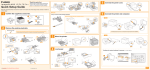
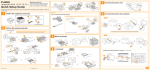
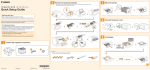
Confirm the supplied accessories.
A
B
C
For Wi-Fi settings
SPA Verifique los accesorios suministrados.
4
Load paper.
SPA Cargue papel.
SPA Para la configuración
de Wi-Fi
1
Remove all the tape.
2
Remove all the orange tape attached to the printer when performing the following procedure.
SPA Retire la totalidad de la cinta.
The packing materials may be changed in form or placement, or may be added or removed without notice.
SPA
Retire la totalidad de la cinta naranja acoplada a la impresora cuando lleve a cabo el siguiente procedimiento.
Los materiales de embalaje pueden diferir en su forma o posición y pueden añadirse o eliminarse sin previo aviso.
4
2
3
Longer than A4
5
6
Remove the packing materials.
SPA Retire los materiales de embalaje.
1
2
3
Up to here
4
5
Specify the connection settings and install the driver.
* If you are using Macintosh, see the "Printer Driver Guide for Macintosh"
(HTML manual).
SPA Especifique la configuración de la conexión e instale el controlador.
1
5
1
6
2
3
Follow the instructions on the screen.
7
SPA Siga las instrucciones de la pantalla.
C
2
1
* English sample
2
8
Pull out the sealing tapes of all the
toner cartridges.
SPA Tire de las cintas de sellado de todos
los cartuchos de tóner.
9
Check!
Did you remove all the packing
materials?
SPA
SPA
Reinicie el ordenador.
SPA Si tiene un problema durante la
configuración de la conexión,
consulte los Consejos útiles.
6
Make sure that all the orange tape is completely removed.
Restart your computer.
If you have a problem during
the connection settings, see
the Useful Tips.
Specify the paper settings and check the operation.
* If you are using Macintosh, see the "Printer Driver Guide for Macintosh"
(HTML manual).
SPA Especifique la configuración del papel y compruebe el funcionamiento.
Asegúrese de retirar completamente la totalidad de la cinta naranja.
SPA ¿Ha retirado todos los materiales de
embalaje?
1
2
3
1
2
1
2
4
5
Close the covers and insert the paper drawer after you finish checking.
SPA
Setup finished.
Cierre las tapas e inserte la bandeja de papel una vez finalizada la comprobación.
SPA Ha finalizado la configuración.
* You can check the operation ( 4 and 5 ) only when using Windows.
3
Connect the power cord.
SPA Conecte el cable de alimentación.
1
2
A
7
Next, see the e-Manual.
SPA A continuación, consulte el e-Manual.
* If you are using Macintosh, double-click
[index.html] in the [Manuals] - [Source] folder
in the supplied CD-ROM.
Setup finished.
SPA Ha finalizado la configuración.