1
Chapter 2
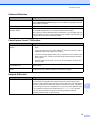
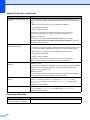
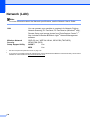
Printable area
2
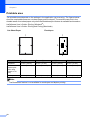
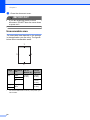
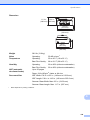
The printable area depends on the settings in the application you are using. The figures below
show the unprintable areas on cut-sheet paper and envelopes. The machine can print in the
shaded areas of cut-sheet paper only when the Borderless print feature is available and turned on.
uuSoftware User’s Guide: Printing (Windows®)
uuSoftware User’s Guide: Printing and Faxing (Macintosh)
Cut-Sheet Paper
Envelopes
1
3
1
4
3
2
4
2
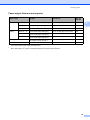
Top (1)
Bottom (2)
Left (3)
Right (4)
Cut-Sheet
0.12 in. (3 mm)
0.12 in. (3 mm)
0.12 in. (3 mm)
0.12 in. (3 mm)
Cut-Sheet
(Duplex print
when using
Ledger or A3
size)
0.87 in. (22 mm)
0.87 in. (22 mm)
0.12 in. (3 mm)
0.12 in. (3 mm)
Envelopes
0.87 in. (22 mm)
0.87 in. (22 mm)
0.12 in. (3 mm)
0.12 in. (3 mm)
Note
The Borderless feature is not available for envelopes and duplex printing.
18