1
16
XD80USB
17
Quick Start Guide
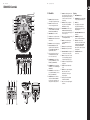
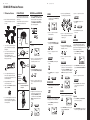
XD80USB Controls
(1)
(2)
(3)
(4)
(5)
(6)
(7)
(8)
(10)
(11)
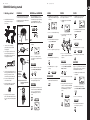
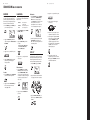
(EN) Controls
(12)
(1)
VOLUME knob adjusts the master volume
of the headphone output and main outputs.
(2)
DISPLAY shows the current status and
selection. See Display below for details.
(3)
START/STOP button starts or stops playback
of a SONG (in NORMAL mode) or a PATTERN,
RHYTHM, or BEAT (in LEARNING mode).
(4)
SAVE/ENTER button saves a new kit.
(5)
CLICK button starts or stops the metronome.
(17)
(6)
DRUM OFF button mutes/unmutes the drum
track of a SONG.
(13)
(14)
(15)
(16)
(9)
(7)
RECORD button is used to record your playing.
(8)
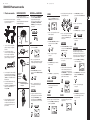
Minus (–) and Plus (+) buttons allow
adjustment and selection of KITS, SONGS,
VOICES, PATTERNS, RHYTHMS, BEATS, and
adjusts the TEMPO, volume, etc.
(9)
(10)
(17)
(28)
(29)
(30)
(18)
(19) (20)
(21)
(31)
(23) (24)
(25)
(32)
(33)
(34)
(35)
(26)
(27)
UTILITY button allows adjustment of each
pad’s sensitivity, threshold, crosstalk, curve,
and the splash sensitivity. It also allows you
to turn local sounds on or off, or return to
default settings.
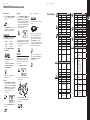
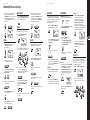
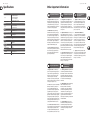
Display
TEMPO button allows you to adjust the
tempo of the current SONG, PATTERN,
RHYTHM, BEAT, or recording.
(28)
TEMPO/MEASURE indicator.
(29)
HIT INDICATOR, indicates a GOOD hit during
learning or playing with the metronome.
(30)
BEAT indicator.
(31)
Moving display shows the metronome
moving back and forth with the beat.
SLOW/GOOD/FAST gives feedback of your
timing during practice.
(32)
UTILITY/REC/LEARN/CLICK indicates the
current mode.
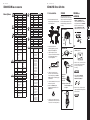
USB connection to a computer for receiving
or transmitting MIDI information.
(33)
PARAMETER displays the current
parameter, such as NUM, VOL, PAN, PIT, etc.
(18)
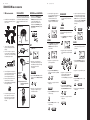
MIDI I/O connections allow input and
output of MIDI information to other
MIDI devices.
(34)
(19)
TOM 4 Input for an optional 4th Tom Pad.
(20)
CRASH 2 Input for an optional 2nd Crash.
VALUE indicates values such as the
number of the current SONG, VOICE, or KIT
(in NORMAL mode), PATTERN, RHYTHM,
or BEAT number (in LEARNING mode),
numeric EQ levels, volume levels, and some
ON/OFF parameters.
(35)
SONG/KIT/VOICE indicates the
current selection.
(15)
(16)
PLAY/PRACTICE button starts or stops a
PATTERN, RHYTHM, or BEAT without being
timed or scored. Press-and-hold to playback
the last scoring session.
(21)
Pad Select buttons allow the selection of
the individual drum heads and cymbals.
Press each one to hear its sound.
OUTPUT R / L /MONO line-level outputs for
connection to a mixer or active speaker.
(22)
SONG/PATTERN button selects a SONG to
play along to in NORMAL mode, or selects a
PATTERN to play in LEARNING mode.
AUX IN 1⁄8" stereo input connects an audio
source such as an MP3 player, CD player, or
computer audio output, to play along to.
(23)
DC IN connects to the supplied AC/DC power
supply adapter.
(24)
ON/OFF switch turns the drum module
on/off.
(25)
PHONES 1⁄8" stereo output for headphones.
Make sure the volume control is
turned down before connecting and
wearing headphones.
(26)
Mounting tube for attaching the drum
module to the drum kit frame.
(27)
DB25 connector for attaching the supplied
cable harness.
(11)
KIT/RHYTHM button selects a KIT to play in
NORMAL mode, or selects a RHYTHM to play in
LEARNING mode.
(12)
VOICE/BEAT button selects a VOICE for each
pad or cymbal in NORMAL mode, or selects a
BEAT to play in LEARNING mode.
(13)
PAGE/SELECT button. Press-and-hold to
switch between NORMAL and LEARNING
modes (pages). Press momentarily to cycle
through and select available parameters.
(22)
(14)