1
Avaya 2033 IP Conference
Phone User Guide
Avaya Communication Server 1000
Document Status: Standard
Document Version: 04.01
Part Code: NN43111-100
Date: November 2010
© 2010 Avaya Inc. All Rights Reserved.
Notices
While reasonable efforts have been made to ensure that the information in this document is complete and accurate at the time
of printing, Avaya assumes no liability for any errors. Avaya reserves the right to make changes and corrections to the
information in this document without the obligation to notify any person or organization of such changes.
Documentation disclaimer
Avaya shall not be responsible for any modifications, additions, or deletions to the original published version of this
documentation unless such modifications, additions, or deletions were performed by Avaya. End User agree to indemnify
and hold harmless Avaya, Avaya’s agents, servants and employees against all claims, lawsuits, demands and judgments
arising out of, or in connection with, subsequent modifications, additions or deletions to this documentation, to the extent
made by End User.
Link disclaimer
Avaya is not responsible for the contents or reliability of any linked Web sites referenced within this site or documentation(s)
provided by Avaya. Avaya is not responsible for the accuracy of any information, statement or content provided on these
sites and does not necessarily endorse the products, services, or information described or offered within them. Avaya does
not guarantee that these links will work all the time and has no control over the availability of the linked pages.
Warranty
Avaya provides a limited warranty on this product. Refer to your sales agreement to establish the terms of the limited
warranty. In addition, Avaya’s standard warranty language, as well as information regarding support for this product, while
under warranty, is available to Avaya customers and other parties through the Avaya Support Web site: http://
www.avaya.com/support
Please note that if you acquired the product from an authorized reseller, the warranty is provided to you by said reseller and
not by Avaya.
Licenses
THE SOFTWARE LICENSE TERMS AVAILABLE ON THE AVAYA WEBSITE, HTTP://SUPPORT.AVAYA.COM/
LICENSEINFO/ ARE APPLICABLE TO ANYONE WHO DOWNLOADS, USES AND/OR INSTALLS AVAYA
SOFTWARE, PURCHASED FROM AVAYA INC., ANY AVAYA AFFILIATE, OR AN AUTHORIZED AVAYA
RESELLER (AS APPLICABLE) UNDER A COMMERCIAL AGREEMENT WITH AVAYA OR AN AUTHORIZED
AVAYA RESELLER. UNLESS OTHERWISE AGREED TO BY AVAYA IN WRITING, AVAYA DOES NOT EXTEND
THIS LICENSE IF THE SOFTWARE WAS OBTAINED FROM ANYONE OTHER THAN AVAYA, AN AVAYA
AFFILIATE OR AN AVAYA AUTHORIZED RESELLER, AND AVAYA RESERVES THE RIGHT TO TAKE LEGAL
ACTION AGAINST YOU AND ANYONE ELSE USING OR SELLING THE SOFTWARE WITHOUT A LICENSE. BY
INSTALLING, DOWNLOADING OR USING THE SOFTWARE, OR AUTHORIZING OTHERS TO DO SO, YOU, ON
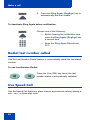
BEHALF OF YOURSELF AND THE ENTITY FOR WHOM YOU ARE INSTALLING, DOWNLOADING OR USING
THE SOFTWARE (HEREINAFTER REFERRED TO INTERCHANGEABLY AS "YOU" AND "END USER"), AGREE
TO THESE TERMS AND CONDITIONS AND CREATE A BINDING CONTRACT BETWEEN YOU AND AVAYA
INC. OR THE APPLICABLE AVAYA AFFILIATE ("AVAYA").
Copyright
Except where expressly stated otherwise, no use should be made of the Documentation(s) and Product(s) provided by
Avaya. All content in this documentation(s) and the product(s) provided by Avaya including the selection, arrangement and
design of the content is owned either by Avaya or its licensors and is protected by copyright and other intellectual property
laws including the sui generis rights relating to the protection of databases. You may not modify, copy, reproduce, republish,
upload, post, transmit or distribute in any way any content, in whole or in part, including any code and software.
Unauthorized reproduction, transmission, dissemination, storage, and or use without the express written consent of Avaya
can be a criminal, as well as a civil offense under the applicable law.
Third Party Components
Certain software programs or portions thereof included in the Product may contain software distributed under third party
agreements ("Third Party Components"), which may contain terms that expand or limit rights to use certain portions of the
Product ("Third Party Terms"). Information regarding distributed Linux OS source code (for those Products that have
distributed the Linux OS source code), and identifying the copyright holders of the Third Party Components and the Third
Party Terms that apply to them is available on the Avaya Support Web site: http://support.avaya.com/Copyright.
Trademarks
The trademarks, logos and service marks ("Marks") displayed in this site, the documentation(s) and product(s) provided by
Avaya are the registered or unregistered Marks of Avaya, its affiliates, or other third parties. Users are not permitted to use
such Marks without prior written consent from Avaya or such third party which may own the Mark. Nothing contained in
this site, the documentation(s) and product(s) should be construed as granting, by implication, estoppel, or otherwise, any
license or right in and to the Marks without the express written permission of Avaya or the applicable third party. Avaya is a
registered trademark of Avaya Inc. All non-Avaya trademarks are the property of their respective owners.
Downloading documents
For the most current versions of documentation, see the Avaya Support. Web site: http://www.avaya.com/support
Contact Avaya Support
Avaya provides a telephone number for you to use to report problems or to ask questions about your product. The support
telephone number is 1-800-242-2121 in the United States. For additional support telephone numbers, see the Avaya Web
site: http://www.avaya.com/support
Revision history
Revision history
November 2010
Standard 04.01. This document is up-issued to support Avaya
rebranding changes.
June 2010
Standard 03.01. This document is up-issued to support Avaya
Communication Server 1000 Release 7.0.
May 2009
Standard 02.01. This document is up-issued to support
Communication Server 1000 Release 6.0.
May 2007
Standard 01.01. This document is issued to support
Communications Server 1000 Release 5.0. This document
contains information previously contained in the following legacy
document, now retired: Nortel IP Audio Conference Phone 2033
User Guide (NN-10300-014).
April 2006
Standard 2.00. This document is up-issued to support Nortel
Communication Server 1000 Release 4.5 IP Audio Conference
Phone 2033 R2.
Note: Changes to “Before You begin” section to reflect the Power
over Ethernet option. Changes to the “Telephone Options Menu”,
section to bring up to date. Changes to the “View Set Information”
section to bring up to date. Changes to the “Adjust Volume” section to
bring up to date. Added the feature “Call Timer”.
April 2005
Standard 1.00. This document is a new document for
Communication Server 1000 IP Audio Conference Phone 2033.
3
Revision history
4
Contents
Contents
Regulatory and safety information . . . . . . . . . . . . . . . . . . . . 9
About the Avaya 2033 IP Conference Phone . . . . . . . . . . . 13
Basic features . . . . . . . . . . . . . . . . . . . . . . . . . . . . . . . . . . . . . 13
Extension microphones . . . . . . . . . . . . . . . . . . . . . . . . . . . . . 15
Telephone controls . . . . . . . . . . . . . . . . . . . . . . . . . . . . . . . . . 16
Telephone display . . . . . . . . . . . . . . . . . . . . . . . . . . . . . . . . . 19
Cleaning the display screen . . . . . . . . . . . . . . . . . . . . . . . 19
Soft keys . . . . . . . . . . . . . . . . . . . . . . . . . . . . . . . . . . . . . 20
Telephone status indicators . . . . . . . . . . . . . . . . . . . . . . . . . . 20
Call features and Flexible Feature Codes . . . . . . . . . . . . . . . 21
Security features . . . . . . . . . . . . . . . . . . . . . . . . . . . . . . . . . . . 21
Connect the Avaya 2033 IP Conference Phone components .
24
Before you begin . . . . . . . . . . . . . . . . . . . . . . . . . . . . . . . . . . 24
Steps . . . . . . . . . . . . . . . . . . . . . . . . . . . . . . . . . . . . . . . . . . . 25
Configure options on the Avaya 2033 IP Conference Phone .
27
Use the Telephone Options menu . . . . . . . . . . . . . . . . . . . . . 28
Adjust volume . . . . . . . . . . . . . . . . . . . . . . . . . . . . . . . . . . . . . 29
Adjust display screen contrast . . . . . . . . . . . . . . . . . . . . . . . . 32
Select a language . . . . . . . . . . . . . . . . . . . . . . . . . . . . . . . . . . 33
Select Date/Time format . . . . . . . . . . . . . . . . . . . . . . . . . . . . . 33
Select Local DialPad Tone . . . . . . . . . . . . . . . . . . . . . . . . . . . 34
View Set Information . . . . . . . . . . . . . . . . . . . . . . . . . . . . . . . 35
Select Ring type . . . . . . . . . . . . . . . . . . . . . . . . . . . . . . . . . . . 36
Select Call Timer . . . . . . . . . . . . . . . . . . . . . . . . . . . . . . . . . . 37
5
Contents
Select Live Dial Pad . . . . . . . . . . . . . . . . . . . . . . . . . . . . . . . . 37
Make a call . . . . . . . . . . . . . . . . . . . . . . . . . . . . . . . . . . . . . . . 39
Steps . . . . . . . . . . . . . . . . . . . . . . . . . . . . . . . . . . . . . . . . . . . 39
Use Live Dialpad . . . . . . . . . . . . . . . . . . . . . . . . . . . . . . . . . . 39
Use Predial . . . . . . . . . . . . . . . . . . . . . . . . . . . . . . . . . . . . . . . 40
Activate Ring Again . . . . . . . . . . . . . . . . . . . . . . . . . . . . . . . . 41
Redial last number called . . . . . . . . . . . . . . . . . . . . . . . . . . . . 42
Use Speed Call . . . . . . . . . . . . . . . . . . . . . . . . . . . . . . . . . . . . 42
Make a System Speed Call . . . . . . . . . . . . . . . . . . . . . . . . . . 44
Answer a call . . . . . . . . . . . . . . . . . . . . . . . . . . . . . . . . . . . . . 45
While on an active call . . . . . . . . . . . . . . . . . . . . . . . . . . . . . 46
Place a call on hold . . . . . . . . . . . . . . . . . . . . . . . . . . . . . . . . 46
Transfer a call . . . . . . . . . . . . . . . . . . . . . . . . . . . . . . . . . . . . . 46
Use Timed Reminder Recall . . . . . . . . . . . . . . . . . . . . . . . . . . 47
Use Call Park . . . . . . . . . . . . . . . . . . . . . . . . . . . . . . . . . . . . . 48
Record a Calling Party Number . . . . . . . . . . . . . . . . . . . . . . . 50
Trace a malicious call . . . . . . . . . . . . . . . . . . . . . . . . . . . . . . . 50
While away from your desk . . . . . . . . . . . . . . . . . . . . . . . . . 52
Use Call Forward . . . . . . . . . . . . . . . . . . . . . . . . . . . . . . . . . . 52
Use Internal Call Forward . . . . . . . . . . . . . . . . . . . . . . . . . . . . 53
Use Remote Call Forward . . . . . . . . . . . . . . . . . . . . . . . . . . . 53
Secure your telephone . . . . . . . . . . . . . . . . . . . . . . . . . . . . . . 55
Talk with more than one person . . . . . . . . . . . . . . . . . . . . . 58
Set up a conference call . . . . . . . . . . . . . . . . . . . . . . . . . . . . . 58
Use Group Call . . . . . . . . . . . . . . . . . . . . . . . . . . . . . . . . . . . . 59
6
Contents
Work without interruption . . . . . . . . . . . . . . . . . . . . . . . . . . 61
Use Make Set Busy . . . . . . . . . . . . . . . . . . . . . . . . . . . . . . . . 61
Additional call features . . . . . . . . . . . . . . . . . . . . . . . . . . . . 62
Use Call Page Connect to make an announcement . . . . . . . . 62
Charge a call or charge a forced call . . . . . . . . . . . . . . . . . . . 62
Use Forced Camp-on . . . . . . . . . . . . . . . . . . . . . . . . . . . . . . . 65
Use Enhanced Override . . . . . . . . . . . . . . . . . . . . . . . . . . . . . 66
Override a busy signal . . . . . . . . . . . . . . . . . . . . . . . . . . . . . . 67
Use Privacy Release . . . . . . . . . . . . . . . . . . . . . . . . . . . . . . . 68
Use Radio Paging . . . . . . . . . . . . . . . . . . . . . . . . . . . . . . . . . . 68
Additional features . . . . . . . . . . . . . . . . . . . . . . . . . . . . . . . . 71
Virtual Office . . . . . . . . . . . . . . . . . . . . . . . . . . . . . . . . . . . . . . 71
Virtual Office Login . . . . . . . . . . . . . . . . . . . . . . . . . . . . . . 71
Virtual Office on your remote telephone . . . . . . . . . . . . . . 72
Virtual Office on your office telephone . . . . . . . . . . . . . . . 74
Virtual Office logout . . . . . . . . . . . . . . . . . . . . . . . . . . . . . 74
Automatic log out from Virtual Office . . . . . . . . . . . . . . . . 75
Emergency calls on your Remote IP Phone . . . . . . . . . . 75
Avaya CS 1000 Media Gateway 1000B . . . . . . . . . . . . . . . . . 79
Test Local Mode . . . . . . . . . . . . . . . . . . . . . . . . . . . . . . . . 79
Resume Normal Mode . . . . . . . . . . . . . . . . . . . . . . . . . . . 80
Hospitality features . . . . . . . . . . . . . . . . . . . . . . . . . . . . . . . 82
Set Automatic Wake-Up . . . . . . . . . . . . . . . . . . . . . . . . . . . . . 82
Flexible Feature Codes . . . . . . . . . . . . . . . . . . . . . . . . . . . . 84
Terms you should know . . . . . . . . . . . . . . . . . . . . . . . . . . . 85
Index . . . . . . . . . . . . . . . . . . . . . . . . . . . . . . . . . . . . . . . . . . . 89
7
Contents
8
Regulatory and safety information
Regulatory and safety
information
Table 1: EMC
Jurisdiction
Standard
Description
United States
FCC CFR 47
Part 15
Class B Emissions: FCC Rules for
Radio Frequency Devices (see
Notes 1a and 1b on page 10)
Canada
ICES-003
Class B Emissions: InterferenceCausing Equipment Standard:
Digital Apparatus
Australia /
New Zealand
AS/NZS 3548
CISPR 22
Class B Emissions: Information
Technology Equipment – Radio
Disturbance
Japan
VCCI
Class B Emissions: Information
Technology Equipment (see
Note 2 on page 10)
European
Community
EN 55022 /
CISPR 22
Class B Emissions: Information
Technology Equipment – Radio
Disturbance
EN 55024
Information Technology Equipment
– Immunity Characteristics
Limits and methods of
measurement
EN 61000-3-2
Limits for harmonic current
emissions (equipment input
current <= 16 A per phase)
EN 61000-3-3
Limitation of voltage fluctuations
and flicker in low-voltage supply
systems for equipment with rated
current <= 16 A
9
Regulatory and safety information
Note 1a: This equipment has been tested and found to comply with
the limits for a Class B digital device, pursuant to part 15 of the
FCC Rules. These limits are designed to provide reasonable
protection against harmful interference in a residential installation.
This equipment generates, uses, and can radiate radio frequency
energy and, if not installed and used in accordance with the
instructions, may cause harmful interference to radio
communications. However, there is no guarantee that interference
will not occur in a particular installation. If this equipment does cause
harmful interference to radio or television reception, which can be
determined by turning the equipment off and on, the user is
encouraged to try to correct the interference by one or more of the
following measures:
• Reorient or relocate the receiving antenna.
• Increase the separation between the equipment and receiver.
• Connect the equipment into an outlet on a circuit different from that
to which the receiver is connected.
• Consult the dealer or an experienced radio/television technician for
help.
Note 1b: The user should not make changes or modifications not
expressly approved by Avaya. Any such changes could void the
user’s authority to operate the equipment.
Note 2:
VCCI:
Class B ITE
Translation:
This is a Class B product based on the standard of the Voluntary
Control Council for Interference from Information Technology
Equipment (VCCI). If this is used near a radio or television
receiver in a domestic environment, it may cause radio
10
Regulatory and safety information
interference. Install and use the equipment according to the
instruction manual.
Table 2: Safety
Jurisdiction
Standard
Description
United States
UL 60950
Safety for Information Technology
Equipment
Canada
CSA 60950
Safety for Information Technology
Equipment
European
Community
EN 60950
Safety for Information Technology
Equipment
Other Safety Approvals:
• IEC 60950: Safety for Information Technology Equipment
Note 3: All Components of the Avaya 2033 IP Conference Phone
Release 2.0 shipped to Europe comply with European Union
Environmental Directives (EU ED).
11
Regulatory and safety information
DenAn regulatory notice for Japan
12
About the Avaya 2033 IP Conference Phone
About the Avaya 2033 IP
Conference Phone
The Avaya 2033 IP Conference Phone brings voice to the audio
conference environment by connecting directly to a Local Area Network
(LAN) through an Ethernet connection.
Note 1: Not all features are available on all telephones. Consult your
system administrator to verify which features are available for your
use.
Note 2: On the Avaya 2033 IP Conference Phone, the soft key labels
display directly above the soft key.
Basic features
The Avaya 2033 IP Conference Phone supports the following features:
•
three soft keys that, when required, map to 4 soft keys to provide
access to a maximum of 10 functions
•
multi-field LCD screen
•
up to two extension microphones to provide microphone coverage in
larger rooms
•
volume control bar for adjusting ringer and speaker volume
•
two specialized fixed keys:
— Services
— Message (Inbox)
•
three call-processing fixed keys:
— Line
— Hold
— Goodbye
•
automatic network configuration
13
About the Avaya 2033 IP Conference Phone
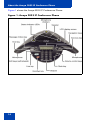
Figure 1 shows the Avaya 2033 IP Conference Phone.
Figure 1: Avaya 2033 IP Conference Phone
14
About the Avaya 2033 IP Conference Phone
Extension microphones
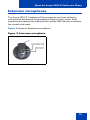
The Avaya 2033 IP Conference Phone supports up to two extension
microphones that extend the microphone range in large rooms. Each
extension microphone has a Mute button and an LED indicator to indicate
the current mute state.
Figure 2 shows an extension microphone.
Figure 2: Extension microphone
15
About the Avaya 2033 IP Conference Phone
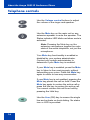
Telephone controls
Use the Volume control buttons to adjust
the volume of the ringer and speaker.
Use the Mute key on the main unit or any
extension speaker to mute the speaker. The
Status indicator LED blinks red when mute is
activated.
Note: Pressing the Mute key on the
extension microphone toggles the mute
state of the entire telephone, not just the
microphone.
Your Mute key functionality is enabled or
disabled by your system administrator.
Contact your system administrator to
determine if your Mute key is enabled.
If your Mute key is enabled, press the Mute
key to listen to the receiving party without
transmitting your voice. Press the Mute key
again to return to two-way conversation.
If your Mute key is not enabled, pressing the
Mute key places the call on hold. Press the
Mute key again to restore the active call or
press the line key to restore the active call.
You cannot retrieve this call from hold by
pressing the Hold key.
Use the Line (DN) key to access the single
line and activate on-hook dialing. No status
icon or LED is provided.
16
About the Avaya 2033 IP Conference Phone
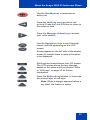
Use the Goodbye key to terminate an
active call.
Press the Hold key to put an active call
on hold. Press the Line (DN) key to return to
the caller on hold.
Press the Message (Inbox) key to access
your voice mailbox.
Use the Navigation keys to scroll through
menus and lists appearing on the LCD
screen.
Arrows appear on the left side of the display
screen to indicate there is more information
to be displayed.
Soft keys are located below the LCD screen.
The LCD screen above the key changes,
based on the active soft key function. Refer
to “Soft keys” on page 20 for further
information.
Press the Shift soft key labeled >> to access
the second layer of soft keys.
Note: When a triangle appears before a
key label, the feature is active.
17
About the Avaya 2033 IP Conference Phone
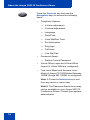
Press the Services key and use the
Navigation keys to access the following
items:
•
Telephone Options:
— Volume adjustment
— Contrast adjustment
— Language
— Date/Time
— Local DialPad Tone
— Set Information
— Ring type
— Call timer
— Live Dial Pad
•
Password Admin:
— Station Control Password
•
Virtual Office Login and Virtual Office
Logout (if Virtual Office is configured)
•
Test Local Mode and Resume Local
Mode (if Avaya CS 1000 Media Gateway
1000B (Avaya MG 1000B) is configured)
Note 1: Press the Services key to exit
from any menu or menu item.
Note 2: The Password Admin menu may
not be available on your Avaya 2033 IP
Conference Phone. Consult your system
administrator.
18
About the Avaya 2033 IP Conference Phone
Telephone display
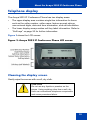
The Avaya 2033 IP Conference Phone has two display areas:
•
The upper display area contains single-line information for items
such as the caller number, caller name, feature prompt strings,
user-entered digits, date and time information, and set information.
•
The lower display area provides soft key label information. Refer to
“Soft keys” on page 20 for further information.
Figure 3 shows the LCD screen.
Figure 3: Avaya 2033 IP Conference Phone LCD screen
Cleaning the display screen
Gently wipe the screen with a soft, dry cloth.
CAUTION
Do not use any liquids or powders on the
phone. Using anything other than a soft, dry
cloth can contaminate telephone components
and cause premature failure.
19
About the Avaya 2033 IP Conference Phone
Soft keys
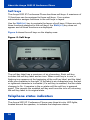
The Avaya 2033 IP Conference Phone has three soft keys. A maximum of
10 functions can be assigned to these soft keys. Your system
administrator assigns functions to the soft keys in layers.
Use the Shift (>>) key to navigate the layers of soft keys. If there are only
three functions assigned to the soft keys, the Shift (>>) key does not
appear and all three functions are displayed.
Figure 4 shows the soft keys on the display area.
Figure 4: Soft keys
The soft key label has a maximum of six characters. Each soft key
includes the soft key label and an icon. When a soft key is in use, a
flashing icon appears at the beginning of the soft key label, and the label
shifts one character to the right. (If the label is six characters long, the last
or rightmost character is truncated.) If a soft key is enabled, the icon state
changes to On. It remains in the on state until the soft key is pressed
again. This cancels the enabled soft key and turns the icon off, returning
the soft key label to its original state.
Telephone status indicators
The Avaya 2033 IP Conference Phone uses three bi-color LED lights,
located around the speaker, to indicate the telephone status.
20
About the Avaya 2033 IP Conference Phone
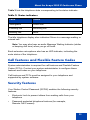
Table 3 lists the telephone state corresponding to the status indicator.
Table 3: Status indicators
LEDs
Status
Solid green
Active call
Flashing red
Incoming call
Blinking red
Mute
The idle telephone display also indicates if there is a message waiting or
missed call.
Note: You may also hear an audio Message Waiting Indicator (stutter
or beeping dial tone) when you go off-hook.
Each extension microphone also has an LED indicator, indicating the
mute status of the telephone.
Call features and Flexible Feature Codes
System administration is required for call features and Flexible Feature
Codes (FFCs). Contact your system administrator to configure these
features and codes on your telephone.
Call features and FFCs must be assigned to your telephone and
supported by system software.
Security features
Your Station Control Password (SCPW) enables the following security
features:
•
Electronic Lock to prevent others from making calls from your
telephone
•
Password-protected telephone features (for example,
Remote Call Forward)
21
About the Avaya 2033 IP Conference Phone
Your system administrator defines your initial SCPW. Contact your
system administrator for detailed information.
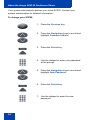
To change your SCPW:
1. Press the Services key.
2. Press the Navigation keys to scroll and
highlight Password Admin.
3. Press the Select key.
4. Use the dialpad to enter your password
at the prompt.
5. Press the Navigation keys to scroll and
highlight New Password.
6. Press the Select key.
7. Use the dialpad to enter the new
password.
22
About the Avaya 2033 IP Conference Phone
8. Press the Select key to accept the new
password.
Note: If you are locked out of your Avaya
2033 IP Conference Phone, or forget
your SCPW, contact your system
administrator.
23
Connect the Avaya 2033 IP Conference Phone components
Connect the Avaya 2033 IP
Conference Phone components
Before you begin
CAUTION
Damage to equipment
Do not plug the Avaya 2033 IP
Conference Phone into a regular
telephone jack. Doing so results in severe
damage to the IP phone. Consult your
system administrator to ensure that you
plug your set into a 10/100BaseT network
interface.
Note: Your Avaya 2033 IP Conference Phone supports both AC
power and Power over Ethernet (PoE) options. To use Power over
Ethernet, where power is delivered over CAT5 cable, the LAN must
support Power over Ethernet, and an AC adapter is not required. If
necessary an AC power supply can be used, when the Power over
Ethernet option is not available.
24
Connect the Avaya 2033 IP Conference Phone components
Steps
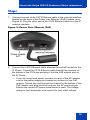
1. Connect one end of the CAT5 Ethernet cable to the network interface
located on the back of the Power over Ethernet (PoE) module. (see
Figure 5). Plug the other end of the CAT5 Ethernet cable in to the IP
network interface.
Figure 5: Power Over Ethernet (PoE)
2. Connect the CAT5 Ethernet cable attached to the PoE module to the
IP Phone. Thread the CAT5 Ethernet cable through the channel on
the bottom of the IP Phone and plug it into the PoE module port on
the IP Phone.
— If you are using local power, connect one end of the AC adapter
cord to the power supply port located on the back of the PoE
module. Thread the cord through the channel to the bottom of the
PoE module and plug the other end into the AC power source.
Ensure the correct AC power transformer is used. The voltage
rating on the transformer must match the wall outlet voltage.
25
Connect the Avaya 2033 IP Conference Phone components
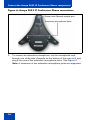
Figure 6: Avaya 2033 IP Conference Phone connections
3. To connect an extension microphone, run the microphone cord
through one of the side channels on the bottom of the main unit, and
plug it into one of the extension microphone jacks. See Figure 6.
Note: A maximum of two extension microphone jacks are supported.
26
Configure options on the Avaya 2033 IP Conference Phone
Configure options on the Avaya
2033 IP Conference Phone
The Avaya 2033 IP Conference Phone Services menu lists the following
submenus:
•
The Telephone Options menu enables you or your system
administrator to configure telephone preferences.
•
The Password Admin menu enables you or your system
administrator to change the Station Control Password.
•
The Virtual Office Login and Test Local Mode (for Branch Office)
menus are listed when an Avaya 2033 IP Conference Phone Class of
Service is set for Virtual Office and Branch Office. For more
information, see page 71.
Note: The Password Admin, Virtual Office Login, and Test Local
Mode menus may not be available on your Avaya 2033 IP
Conference Phone. Consult your system administrator.
The Telephone Options menu offers the following options:
— Volume adjustment
— Contrast adjustment
— Language
— Date/Time
— Local Dialpad Tone
— Set Info
— Ring type
— Call Timer
— Live Dialpad
Note: When an option has a sublist, an ellipsis (...) appears after the
option.
27
Configure options on the Avaya 2033 IP Conference Phone
Use the Telephone Options menu
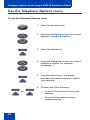
To use the Telephone Options menu:
1. Press the Services key.
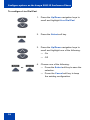
2. Press the Navigation keys to scroll and
highlight Telephone Options.
3. Press the Select key.
4. Press the Navigation keys to scroll and
highlight an option (for example,
Language...).
5. Press the Select key. The display
provides information required to adjust
your selection.
6. Choose one of the following:
or
— Press the Select key to save your
changes.
— Press the Cancel key to keep
existing settings.
28
Configure options on the Avaya 2033 IP Conference Phone
Adjust volume
To adjust the volume, press the Services key, select Telephone Options
and select Volume adjustment from the menu. Choose one of the
following:
•
Ringer
•
Handset Listen
•
Buzzer
Note 1: The option On Hook Dialing Listen is not applicable to the
Avaya 2033 IP Conference Phone.
Note 2: Volume can also be adjusted using the Volume control
buttons. See “Telephone controls” on page 16.
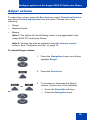
To adjust Ringer volume:
1. Press the Navigation keys to scroll and
highlight Ringer.
2. Press the Select key.
or
3. To increase or decrease the Ringer
volume, choose one of the following:
— Press the Down/Up soft keys.
or
— Press the Navigation keys.
29
Configure options on the Avaya 2033 IP Conference Phone
4. Choose one of the following:
— Press the Select key to save the
volume level and return to the
Telephone Options menu.
or
— Press the Cancel key to keep
existing settings.
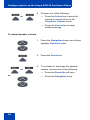
To adjust Speaker volume:
1. Press the Navigation keys to scroll and
highlight Handset Listen.
2. Press the Select key.
or
3. To increase or decrease the speaker
volume, choose one of the following:
— Press the Down/Up soft keys.
or
30
— Press the Navigation keys.
Configure options on the Avaya 2033 IP Conference Phone
4. Choose one of the following:
— Press the Select key to save the
volume level and return to the
Telephone Options menu.
or
— Press the Cancel key to keep the
existing settings.
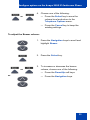
To adjust the Buzzer volume:
1. Press the Navigation keys to scroll and
highlight Buzzer.
2. Press the Select key.
or
3. To increase or decrease the buzzer
volume, choose one of the following:
— Press the Down/Up soft keys.
or
— Press the Navigation keys.
31
Configure options on the Avaya 2033 IP Conference Phone
4. Choose one of the following:
or
— Press the Select key to save the
volume level and return to the
Telephone Options menu.
— Press the Cancel key to keep
existing settings.
Adjust display screen contrast
To adjust the LCD screen contrast, press the Services key, select the
Telephone Options, and select Contrast adjustment from the menu.
To adjust display screen contrast:
or
1. To increase or decrease the display
contrast level, choose one of the
following:
— Press the Down/Up soft keys.
or
— Press the Navigation keys.
2. Choose one of the following:
or
— Press the Select key to save the
contrast level and return to the
Telephone Options menu.
— Press the Cancel key to keep
existing settings.
32
Configure options on the Avaya 2033 IP Conference Phone
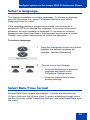
Select a language
The display is available in multiple languages. To choose a language,
press the Services key, select Telephone Options, and select
Language from the menu.
If the Language setting is password-protected, you must enter a
password (SCPW) to change the language. If you enter an incorrect
password, an error message is displayed. If you enter an incorrect
password more than three times, the password functionality is locked.
Contact your system administrator to unlock the password.
To select a language:
1. Press the Navigation keys to scroll and
highlight the desired language (for
example, German [Deutsche]).
Deutsche
2.
or
Choose one of the following:
— Press the Select key to save the
language and return to the
Telephone Options menu.
— Press the Cancel key to keep
existing settings.
Select Date/Time format
Several Date/Time formats are available. Formats are based on the
12-hour clock and the 24-hour clock.To select a date/time format, press
the Services key, select Telephone Options, and select Date/Time from
the menu.
33
Configure options on the Avaya 2033 IP Conference Phone
To select a date/time format:
1. Press the Navigation keys to scroll and
highlight the desired format. Sample
formats appear in the upper-right side of
the display area.
2. Choose one of the following:
— Press the Select key to save the
format and return to the
Telephone Options menu.
or
— Press the Cancel key to keep
existing settings.
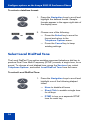
Select Local DialPad Tone
The Local DialPad Tone option enables a pressed telephone dial key to
produce Dual Tone Multi-Frequency (DTMF) sounds, a single tone, or no
sound. To choose a local dialpad tone, press the Services key, select
Telephone Options, and select Local DialPad Tone from the menu.
To select Local DialPad Tone:
1. Press the Navigation keys to scroll and
highlight one of the following dialpad
tones:
— None to disable all tones
— Short Click to enable a single tone
for all keys
— DTMF to turn on a separate DTMF
tone for each key
34
Configure options on the Avaya 2033 IP Conference Phone
2. Choose one of the following:
or
— Press the Select key to save the
tone selection and return to the
Telephone Options menu.
— Press the Cancel key to keep
existing settings.
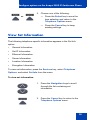
View Set Information
The following telephone-specific information appears in the Set Info
option:
•
General Information
•
Set IP Information
•
Ethernet Information
•
Server Information
•
Location Information
•
Encryption Information
To view set information, press the Services key, select Telephone
Options, and select Set Info from the menu.
To view set information:
1. Press the Navigation keys to scroll
through the list containing set
information.
2. Press the Cancel key to return to the
Telephone Options menu.
35
Configure options on the Avaya 2033 IP Conference Phone
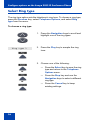
Select Ring type
The ring type option sets the telephone’s ring tone. To choose a ring type,
press the Services key, select Telephone Options, and select Ring
type from the menu.
To choose a ring type:
1. Press the Navigation keys to scroll and
highlight one of the ring types.
Ring type 3
2. Press the Play key to sample the ring
tone.
3. Choose one of the following:
or
— Press the Select key to save the ring
type and return to the Telephone
Options menu.
or
— Press the Stop key and use the
Navigation keys to select a different
ring type.
— Press the Cancel key to keep
existing settings.
36
Configure options on the Avaya 2033 IP Conference Phone
Select Call Timer
The call timer measures how long you are on each call.
To enable or disable the call timer, press the Services key, select
Telephone Options, and select Call Timer from the menu.
To Enable/Disable Call Timer:
1. Press the Navigation keys to select
between:
—
Call Timer: On
—
Call Timer: Off
2. Choose one of the following:
or
— Press the Select key to save the
configuration and return to the
Telephone Options menu.
— Press the Cancel key to keep
existing settings.
Select Live Dial Pad
Use live dialpad to dial a number using the telephone dialpad without
having to pick up the handset or press the handsfree key.
To configure live dialpad, press the Services key, select Telephone
Options, and select Live Dial Pad from the menu.
37
Configure options on the Avaya 2033 IP Conference Phone
To configure Live Dial Pad:
1. Press the Up/Down navigation keys to
scroll and highlight Live Dial Pad.
2. Press the Select soft key.
3. Press the Up/Down navigation keys to
scroll and highlight one of the following:
— On
— Off
4. Choose one of the following:
or
— Press the Select soft key to save the
selection.
— Press the Cancel soft key to keep
the existing configuration.
38
Make a call
Make a call
This section describes features associated with making a call. You have
several ways to make a call from an Avaya 2033 IP Conference Phone.
Steps
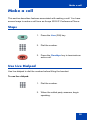
1. Press the Line (DN) key.
2. Dial the number.
3. Press the Goodbye key to terminate an
active call.
Use Live Dialpad
Use live dialpad to dial the number before lifting the handset.
To use live dialpad:
1. Dial the number.
2. When the called party answers, begin
speaking.
39
Make a call
3. Press the Goodbye key to terminate an
active call.
Use Predial
Use the Predial feature to enter, preview, and edit numbers before
dialing.
To use Predial:
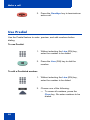
1. Without selecting the Line (DN) key,
enter the number to be dialed.
2. Press the Line (DN) key to dial the
number.
To edit a Predialed number:
1. Without selecting the Line (DN) key,
enter the number to be dialed.
2. Choose one of the following:
— To erase all numbers, press the
Clear key. Re-enter numbers to be
dialed.
40
Make a call
— To change numbers one-at-a-time,
press the Delete key to backspace.
Re-enter a new number.
3. Press the Line (DN) key to dial the
number.
Activate Ring Again
Use the Ring Again feature if you receive a busy tone or if there is no
answer. Your IP Phone rings when the person you called becomes
available. Ring Again automatically redials the number.
To activate Ring Again:
1. Dial a number and receive a busy tone
or no answer.
2. Choose one of the following:
or
— Press the Ring Again (RngAgn)
key.
— Enter the Ring Again Activate FFC.
To call a Ring Again party when you receive notification:
1. After receiving the notification tone,
press the Line (DN) key.
41
Make a call
2. Press the Ring Again (RngAgn) key to
automatically dial the number.
To deactivate Ring Again before notification:
Choose one of the following:
— Before hearing the notification tone,
press the Ring Again (RngAgn) key
a second time.
or
— Enter the Ring Again Deactivate
FFC.
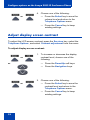
Redial last number called
Use the Last Number Redial feature to automatically redial the last dialed
number.
To use Last Number Redial:
Press the Line (DN) key twice (the last
number dialed is automatically redialed).
Use Speed Call
Use the Speed Call feature to place internal and external calls by dialing a
one-, two-, or three-digit code.
42
Make a call
To create a Speed Call number:
1. Press the Speed Call Controller
(SpcCtl) key. The triangular icon
flashes, indicating programming mode.
2. At the prompt:
— Enter a one-, two-, or three-digit
code (0-999).
— If required, enter the access code
(for example, “9”).
— Enter the telephone number
(internal, external, or long-distance
number).
3. Press the Speed Call Controller
(SpcCtl) key again to save the code and
number. The icon quits flashing.
To make a Speed Call:
1. Press the Line (DN) key.
2. Press the Speed Call Controller
(SpcCtl) key.
3. Dial the Speed Call code to
automatically dial the number.
43
Make a call
Make a System Speed Call
Use the System Speed Call feature to dial Speed Call codes that override
dialing restrictions placed on your telephone.
To make a System Speed Call:
1. Press the Line (DN) key.
2. Choose one of the following:
or
— Press the System Speed Call
(SScUsr) key.
— Press the System Speed Call
Controller (SScCtl) key.
3. Dial the Speed Call code to
automatically dial the number.
44
Answer a call
Answer a call
Each incoming call causes the telephone to ring and the Message
Indicator lamps to flash.
To answer a call:
Press the Line (DN) key.
45
While on an active call
While on an active call
This section describes features available during an active call.
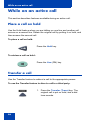
Place a call on hold
Use the Hold feature when you are talking on one line and another call
arrives on a second line. Retain the original call by putting it on hold, and
then answer the second call.
To place a call on hold:
Press the Hold key.
To retrieve a call on hold:
Press the Line (DN) key.
Transfer a call
Use the Transfer feature to redirect a call to the appropriate person.
To use the Transfer feature to direct a call to a third party:
1. Press the Transfer (Trans) key. The
original call is put on hold, and a dial
tone sounds.
46
While on an active call
2. Dial the DN to which the call is
transferred.
To see the DN being dialed, use the
Navigation keys to scroll down to the next
line.
3. When that number rings or a person
answers, press the Transfer (Trans)
key to connect the calling party.
To return to the original call, if the transfer is incomplete:
If the person called is not available, press the
Line (DN) key to reconnect to the original
call.
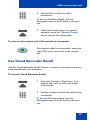
Use Timed Reminder Recall
Use the Timed Reminder Recall feature to receive a reminder tone when
a transferred call is not answered.
To activate Timed Reminder Recall:
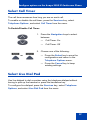
1. Press the Transfer (Trans) key. The
original call is put on hold, and a dial
tone sounds.
2. Dial the number to which the call is being
transferred.
To see the DN being dialed, use the
Navigation keys to scroll down to the next
line.
47
While on an active call
3. Press the Transfer (Trans) key again to
start the recall timer.
Note: If the transfer is complete, the
recall timer stops.
If the transferred call is not answered, your telephone rings.
1. Press the Line (DN) key to reconnect to
the original caller.
2. Choose one of the following:
or
— Press the Transfer (Trans) key and
repeat the transfer (to a different
DN).
— If the transfer is picked up while you
are on the line, press the Goodbye
key to complete the transfer.
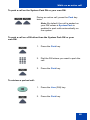
Use Call Park
Use the Call Park feature to hold temporarily (park) and retrieve a call
from any telephone. Using Call Park does not tie up a line and, when
configured network-wide, can be used across networks. A System Park
Extension can be set to automatically park most calls.
48
While on an active call
To park a call on the System Park DN or your own DN:
During an active call, press the Park key
twice.
Note: By default, the call is parked on
your DN unless a System Park is
enabled to park calls automatically on
the system.
To park a call on a DN other than the System Park DN or your
own DN:
1. Press the Park key.
2. Dial the DN where you want to park the
call.
3. Press the Park key.
To retrieve a parked call:
1. Press the Line (DN) key.
2. Press the Park key.
49
While on an active call
3. Dial the DN where you parked the call.
Note: If a parked call is not retrieved
within a specified time period, it rings
back to your telephone or the attendant.
Record a Calling Party Number
Use the Calling Party Number feature to record a caller’s number, or to
charge a call to an account number, during an established call.
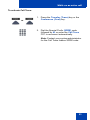
To record a caller’s number for accounting purposes:
1. Press the Call Party (CParty) key. The
caller is placed on hold.
2. Dial a charge account number or the
caller’s number.
Note: For information on using the
Charge key, see “Charge a call or
charge a forced call” on page 62.
3. Press the Call Party (CParty) key to
return to the call.
Trace a malicious call
Use the Malicious Call Trace feature to trace nuisance calls within your
system.
Note: Malicious Call Trace is not a default feature. Contact your
system administrator to configure this feature on your telephone.
50
While on an active call
To activate Call Trace:
or
1. Press the Transfer (Trans) key or the
Conference (Conf) key.
2. Dial the Special Prefix (SPRE) code
followed by 83 or enter the Call Trace
FFC to reconnect automatically.
Note: Contact your system administrator
for the Call Trace feature SPRE code.
51
While away from your desk
While away from your desk
This section describes features that are used when you are away from
your desk.
Use Call Forward
Use the Call Forward feature to direct incoming calls to ring on another
line (DN). If the telephone is in the process of ringing, that call cannot be
forwarded.
To forward your calls or change the forward number:
1. Press the Forward (Fwd) key.
A flashing triangle icon appears next to the
label Fwd.
2. Dial the DN where you want to forward
your calls.
3. Press the Forward (Fwd) key.
The triangle icon stops flashing to indicate
Call Forward (CFwd) is active.
To deactivate Call Forward:
Press the Forward (Fwd) key.
The triangle icon is removed to indicate Call
Forward (CFwd) is deactivated.
52
While away from your desk
To reinstate Call Forward to the same number:
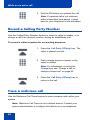
Press the Forward (Fwd) key twice.
Use Internal Call Forward
Use Internal Call Forward to allow only calls originating at internal DNs to
ring at another DN. Calls originating outside your telephone system still
ring at your telephone. Current incoming calls cannot be forwarded.
To activate Internal Call Forward:
1. Press the Line (DN) key and enter the
Internal Call Forward Activate FFC.
2. Dial the DN to which your internal calls
will be forwarded.
3. Press the Goodbye key.
To deactivate Internal Call Forward:
Press the Line (DN) key and enter the
Internal Call Forward Deactivate FFC.
Use Remote Call Forward
Use the Remote Call Forward feature to forward calls (from any
telephone other than your own) to any telephone.
53
While away from your desk
To activate Remote Call Forward:
1. Press the Line (DN) key.
2. If calling from a telephone outside the
system, dial your direct system access
number and wait for dial tone.
3. Dial the Remote Call Forward Activate
FFC to activate the feature.
4. Dial your Station Control Password. A
dial tone sounds.
5. Choose one of the following:
— Dial your DN.
— To forward calls to the previous
call forward number, press the #
key. (Do not perform steps 6 and 7.)
6. Dial the number to which calls are being
forwarded. If calls are forwarded to an
invalid number, a fast busy signal
sounds.
7. Press the # key.
54
While away from your desk
To deactivate Remote Call Forward:
1. Press the Line (DN) key.
2. If calling from a telephone outside the
system, dial the direct system access
number and wait for the dial tone.
3. Dial the Remote Call Forward
Deactivate FFC.
4. Dial your Station Control Password.
5. After hearing the dial tone, dial your DN.
6. Press the # key.
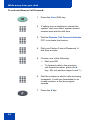
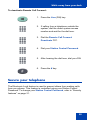
Secure your telephone
The Electronic Lock feature is used to prevent others from making calls
from your phone. This feature is controlled using your Station Control
Password. To change your Station Control Password, refer to “Security
features” on page 21.
55
While away from your desk
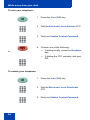
To lock your telephone:
1. Press the Line (DN) key.
2. Dial the Electronic Lock Activate FFC.
3. Dial your Station Control Password.
4. Choose one of the following:
or
— If dialing locally, press the Goodbye
key.
— If dialing the FFC remotely, dial your
DN.
To unlock your telephone:
1. Press the Line (DN) key.
2. Dial the Electronic Lock Deactivate
FFC.
3. Dial your Station Control Password.
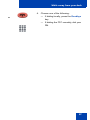
56
While away from your desk
4. Choose one of the following:
or
— If dialing locally, press the Goodbye
key.
— If dialing the FFC remotely, dial your
DN.
57
Talk with more than one person
Talk with more than one person
This section describes features that enable conversations between more
than two people.
Note: Contact your system administrator for information on accessing
audio conference bridge applications.
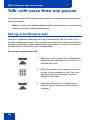
Set up a conference call
Use the Conference feature to set up a conference call for three or six
people, including yourself. The number of people the Conference feature
supports depends on your telephone configuration. Contact your system
administrator to determine your configuration.
To set up a conference call:
1. While on a call, press the Conference
(Conf) key to place the call on hold. You
receive dial tone.
2. Dial the number of the person you want
to add to the conference call. You can
talk privately to the person you are
adding at this time.
3. Press the Conference (Conf) key a
second time to conference all parties
together.
58
Talk with more than one person
If the person you attempt to add to the conference is unavailable:
1. Press the Goodbye key.
2. Press the Line (DN) key to return to your
original call.
Use Group Call
Use the Group Call feature to automatically call members of a predefined
group, one at a time, until they all answer.
To call group members:
1. Press the Line (DN) key.
2. Enter the Group Call FFC.
— The feature automatically calls all
group members.
— The telephone numbers of the group
members display as they answer.
— If a person who is in your group is on
a conference call or another group
call, then that person is not
connected to your group call.
— After everyone in the group has
answered, only the person who
made the group call can put the call
on hold.
59
Talk with more than one person
To answer a Group Call:
Press the Line (DN) key.
Note: When you answer a Group Call, three 10-second tones notify
you that there is a group call on your extension.
To end a Group Call:
Press the Goodbye key.
Note: When the person who made the
Group Call disconnects, the call
terminates for all members of the group.
However, the members of the Group Call
can disconnect from the call and not
affect other members on the call.
60
Work without interruption
Work without interruption
This section describes features that provide uninterrupted work time.
Use Make Set Busy
Use the Make Set Busy feature to make your telephone appear busy to all
callers.
To activate Make Set Busy:
1. Press the Line (DN) key.
2. Enter the Make Set Busy Activate FFC.
To deactivate Make Set Busy:
1. Press the Line (DN) key.
2. Enter the Make Set Busy Deactivate
FFC.
61
Additional call features
Additional call features
Contact your system administrator to determine if the following call
features are available on your telephone.
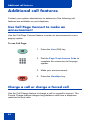
Use Call Page Connect to make an
announcement
Use the Call Page Connect feature to make an announcement over a
paging system.
To use Call Page:
1. Press the Line (DN) key.
2. Dial the Page Trunk Access Code to
complete the connection to the page
system.
3. Make your announcement.
4. Press the Goodbye key.
Charge a call or charge a forced call
Use the Call Charge feature to charge a call to a specific account. The
Forced Charge feature charges long-distance calls from a telephone
restricted to local calls.
62
Additional call features
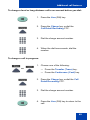
To charge a local or long-distance call to an account before you dial:
1. Press the Line (DN) key.
2. Press the Charge key or dial the
Call Detail Recording FFC.
3. Dial the charge account number.
4. When the dial tone sounds, dial the
number.
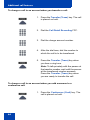
To charge a call in progress:
1. Choose one of the following:
or
— Press the Transfer (Trans) key.
— Press the Conference (Conf) key.
2. Press the Charge key or dial the Call
Detail Recording FFC.
3. Dial the charge account number.
4. Press the Line (DN) key to return to the
call.
63
Additional call features
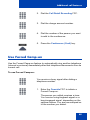
To charge a call to an account when you transfer a call:
1. Press the Transfer (Trans) key. The call
is placed on hold.
2. Dial the Call Detail Recording FFC.
3. Dial the charge account number.
4. After the dial tone, dial the number to
which the call is to be transferred.
5. Press the Transfer (Trans) key when
you hear a ring tone.
Note: To talk privately with the person at
the transfer number, wait until the person
at the transferred number answers.
Press the Transfer (Trans) key when
you are ready to transfer the call.
To charge a call to an account when you add someone to a
conference call:
1. Press the Conference (Conf) key. The
call is placed on hold.
64
Additional call features
2. Dial the Call Detail Recording FFC.
3. Dial the charge account number.
4. Dial the number of the person you want
to add to the conference.
5. Press the Conference (Conf) key.
Use Forced Camp-on
Use the Forced Camp-on feature to automatically ring another telephone
(internal or external) immediately after that telephone disconnects from its
current call.
To use Forced Camp-on:
You receive a busy signal after dialing a
telephone number.
1. Enter the Override FFC to initiate a
Forced Camp-on.
The person you called receives a tone.
You receive a ring/ringback signal or a
busy/engaged signal, depending on the
options chosen. You are now camped on
to the number you dialed.
65
Additional call features
2. Press the Goodbye key.
When the person you called finishes the
call, your telephone automatically dials
the number. Both telephones ring.
To answer a call camped on to your extension:
When the telephone rings, press the Line
(DN) key.
Use Enhanced Override
Use the Enhanced Override feature to override an active call after you
attempt a Forced Camp-on. Use Enhanced Override to make a simple
call or a consultation call, such as placing a call on hold and calling
another party.
To use Enhanced Override:
You receive a busy signal after dialing a
telephone number:
1. Enter the Override FFC to initiate a
Forced Camp-on.
— If either person on the call
disconnects at this time, you
receive an overflow (fast busy/
engaged) signal.
66
Additional call features
2. Enter the Override FFC again.
— The other two persons on the call
receive an override tone and a
conference call is established
between the three of you. If anyone
disconnects, the other two persons
remain connected.
To disconnect Enhanced Override:
Press the Goodbye key.
Override a busy signal
Use the Override feature to override a busy signal and interrupt another
call.
To override a busy/engaged signal:
You dial a telephone number and receive a
busy signal.
Enter the Override FFC.
The people in the targeted call receive a tone
for approximately one second. After the
Override feature joins you to their call, a
short tone repeats every 16 seconds.
67
Additional call features
To end the connection:
Press the Goodbye key.
Use Privacy Release
Use the Privacy Release feature to enable one or more people who share
your DN to join a call.
To use Privacy Release on an established call:
Press the Privacy Release (PrvRls) key
during a call.
A person joins the call by pressing the
shared number (DN) key on the person’s
telephone (Multiple Appearance DN feature).
Use Radio Paging
Use the Radio Paging feature to page a person and stay on the line until
the person answers. The paged person answers the call after entering a
special Page Meet-me code from any telephone.
To use Automatic Preselection (Meet-me page):
1. Press the Line (DN) key.
2. Dial the Radio Paging Access FFC.
The paging tone sounds (two beeps
followed by a dial tone).
68
Additional call features
3. Dial the number of the party you want to
page. After dialing, the ringback tone
sounds.
Note: The paged person can use any
telephone to enter a Radio Paging
Answer FFC, plus the person’s own DN.
4. If your call goes unanswered for a preset
time period and a 15-second highpitched tone sounds followed by silence,
press the Goodbye key.
To use Automatic Post selection:
The called party is either busy on the telephone or away from the desk.
To page the called party, you do not need to redial the number of the
called party.
1. Press the Radio paging (RadPag) key.
A special dial tone sounds.
2. Dial the Radio Paging Access FFC.
The ringback tone sounds.
Note: The paged person can use any
telephone to enter a Radio Paging
Answer FFC, plus the person’s own DN.
3. If your call goes unanswered for a preset
time period and a 15-second highpitched tone sounds followed by silence,
press the Goodbye key.
69
Additional call features
To answer a Radio Page:
If you carry a Radio Pager, a page indicates that someone dialed your
line (DN). If the Radio Page system is set up to function in Meet-me
mode, you can answer the page call from any telephone.
1. Press the Line (DN) key.
2. Dial the Radio Page Answer FFC. The
paging tone sounds.
3. Dial your own DN to connect to the
paging caller. If the caller has hung up,
a steady, high-pitched (Number
Unavailable) tone sounds.
70
Additional features
Additional features
Virtual Office
When you are away from your office telephone, use the Virtual Office
feature to transfer calls and all of your telephone's features to a remote
telephone.
Note 1: Consult your system administrator to verify if the Virtual
Office feature is available for your use.
Note 2: When used as the remote telephone, the Avaya 2033 IP
Conference Phone can activate only an Avaya 1110 IP Deskphone,
Avaya 1210 IP Deskphone, Avaya 2033 IP Conference Phone and
an IP Phone 2001 for Virtual Office.
If the IP Phone is configured for Virtual Office, a Virtual soft key is
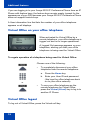
displayed.
Virtual Office Login
To activate Virtual Office from this IP Phone on your Office IP Phone:
1. Press the Virtual soft key.
2. Enter your User ID (for example, your
DN including the access code) at the
prompt.
Note: This number must be an ESN
number.
3. Press the Select key.
71
Additional features
4. At the prompt, enter the home Station
Control Password (SCPW).
Note 1: If the User ID is not found
locally, the message “Locating Remote
Server” appears.
Note 2: After three failed login attempts,
wait one hour before attempting to log in
again.
A successful login transfers all the
features, time, date, and tones to your
remote telephone from your office
telephone.
Virtual Office on your remote telephone
Figure 7 on page 72 through Figure 10 on page 73 show IP Phones
logged on to an Avaya 2033 IP Conference Phone using Virtual Office.
Figure 7: Logged on to an Avaya 2033 IP Conference Phone
using an Avaya 2033 IP Conference Phone
72
Additional features
Figure 8: Logged on to an Avaya 2033 IP Conference Phone
using an IP Phone 2001
Figure 9: Logged on to an Avaya 2033 IP Conference Phone
using an IP Phone 2002
Figure 10: Logged on to an Avaya 2033 IP Conference Phone
using an IP Phone 2004
73
Additional features
If you are logging in to your Avaya 2033 IP Conference Phone from an IP
Phone with feature keys, the feature keys remain empty (except for the
appearance of your DN) because your Avaya 2033 IP Conference Phone
does not support feature keys.
A User information line that lists the number of your office telephone
appears on all displays.
Virtual Office on your office telephone
When activated for Virtual Office by a
remote telephone, your office telephone is
logged out and is no longer operational.
A Logged Out message appears on your
telephone, alerting you that your office
telephone is being used for Virtual Office.
To regain operation of a telephone being used for Virtual Office:
Choose one of the following:
•
To completely disconnect your office
telephone from the remote telephone:
a. Press the Home key.
b. Enter your User ID and password
(this logs the office telephone back
on to your office network).
or
•
To use your office telephone as the
remote telephone for Virtual Office,
press the Virtual (Vrtual) key to log in to
another IP Phone.
Virtual Office logout
To log out of Virtual Office, press the Virtual soft key.
74
Additional features
Automatic log out from Virtual Office
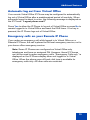
Your remote Virtual Office IP Phone may be configured to automatically
log out of Virtual Office after a predetermined period of inactivity. When
automatic logout is about to occur, the following message is displayed on
the IP Phone: "Logout phone now?"
Press Yes to allow the IP Phone to log out of Virtual Office or press No to
remain logged in to Virtual Office and reset the IDLE timer. If no key is
pressed, the IP Phone logs out of Virtual Office.
Emergency calls on your Remote IP Phone
If you make an emergency call while logged in to Virtual Office on a
Remote IP Phone, the call is placed to the local emergency service, not to
your home office emergency service.
Note: Some IP Phones are configured as Virtual Office-only
telephones and have no assigned DN. However, these IP Phones
can still be used to make emergency calls. “Emergency Calls only “ is
displayed on the IP Phone display when not logged in to Virtual
Office. When the phone goes off-hook, dial tone is available for
emergency calls only. All other calls are restricted.
75
Additional features
Troubleshoot Virtual Office
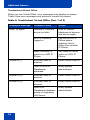
When you use Virtual Office, error messages may display on-screen.
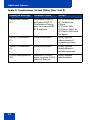
Table 4 lists error messages and actions to correct the causes.
Table 4: Troubleshoot Virtual Office (Part 1 of 3)
Displayed Message
Probable Cause
Action
Busy, try again
Remote IP Phone is
active (not idle).
Wait for remote
telephone to become
idle and try again.
ACD IP Phone is
logged in.
Log out of ACD IP
Phone before
initiating Virtual
Office from another
IP Phone.
Make-Set-Busy is
inactive on ACD IP
Phone.
Set Make-Set-Busy
active on ACD IP
Phone.
Incorrect User ID
entered.
Enter correct User ID.
User ID is not in
Gatekeeper
database.
Notify system
administrator.
Invalid ID (2)
Incorrect User ID
entered.
Enter correct User ID.
Invalid ID (3)
Incorrect User ID
entered.
Enter correct User ID.
User ID in
Gatekeeper database
points to originating
Call Server.
Notify system
administrator.
Invalid ID (1)
76
Additional features
Table 4: Troubleshoot Virtual Office (Part 2 of 3)
Displayed Message
Probable Cause
Action
Locked from Login
Three failed attempts
to enter the correct
Station Control
Password.
Wait one hour for the
lock to clear
automatically, or
notify system
administrator to clear
lock.
Logged out
Home TN in use by
Virtual Office.
Log in to another TN
using Virtual Office.
Permission Denied
(1)
Remote telephone
has no Station
Control Password.
Notify system
administrator.
Permission Denied
(3)
Incorrect User ID
entered.
Enter correct User ID.
Remote telephone
has no Station
Control Password.
Notify system
administrator.
Incorrect User ID
entered.
Enter correct User ID.
Attempt to log in to a
remote IP Phone
2002 or IP Phone
2004 (some
restrictions apply).
Go to an Avaya 2033
IP Conference
Phone, IP Phone
2002, or IP Phone
2004 and try to log in
again, or consult your
system administrator.
Incorrect User ID
entered.
Enter correct User ID.
Incorrect Station
Control Password
entered.
Select Retry, and try
again with the correct
Station Control
Password.
Permission Denied
(4)
Permission Denied
(6)
77
Additional features
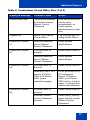
Table 4: Troubleshoot Virtual Office (Part 3 of 3)
Displayed Message
Probable Cause
Action
Permission Denied
(7)
Attempted Login to
an Avaya 2033 IP
Conference Phone
from an Avaya 2050
IP Softphone.
Go to an Avaya 2033
IP Conference
Phone,
IP Phone 2001,
IP Phone 2002, or
IP Phone 2004 and
try again.
Server Unreachable
(1)
Network problem.
Notify system
administrator if
problem persists.
Server Unreachable
(2)
Network problem.
Notify system
administrator if
problem persists.
VOUD configured on
TN
Remote IP Phone
does not have VOUA
Class of Service.
Notify system
administrator.
78
Additional features
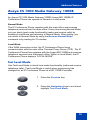
Avaya CS 1000 Media Gateway 1000B
An Avaya CS 1000 Media Gateway 1000B (Avaya MG 1000B) IP
Conference Phone can operate in Normal or Local mode.
Normal Mode
The IP Conference Phone registers with the main office and receives
telephone services from the main office. At any time during Normal Mode,
you can check local mode functionality (make and receive calls) by
enabling Local Mode and returning to Normal Mode. After testing, you
can return to Normal Mode by using the Resume Normal Mode
command or by waiting for 10 minutes.
Local Mode
If the WAN connection is lost, the IP Conference Phone loses
communication with the main office Terminal Proxy Server (TPS). The IP
Conference Phone then registers with the Avaya MG 1000B and receives
telephone services from the branch office. When in Local Mode, the IP
Conference Phone displays "LOCAL MODE".
Test Local Mode
Use Test Local Mode to check local mode functionality (make and receive
telephone calls). Test Local Mode is useful when provisioning has
changed for an IP Conference Phone at a MG 1000B Controller.
1. Press the Services key.
2. Press the Navigation keys to scroll and
highlight Test Local Mode.
79
Additional features
3. Press the Select key (the telephone
resets and registers to the branch office).
Resume Normal Mode
Use the Resume Normal Mode command to return to Normal Mode after
testing survival functionality.
Note: If the Resume Normal Mode command is not performed after
testing, the telephone automatically returns to Normal Mode in 10
minutes.
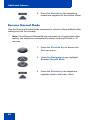
1. Press the Services key to access the
Services menu.
2. Using the Navigation keys, highlight
Resume Normal Mode.
3. Press the Select key (the telephone
registers back to the main office).
80
Additional features
Troubleshoot MG 1000B
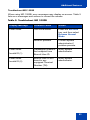
When using MG 1000B, error messages may display on-screen. Table 5
lists error messages and actions to correct the causes.
Table 5: Troubleshoot MG 1000B
Display Message
Probable Cause
Action
Local Mode
Test Local Mode.
Press the Services
key, and then select
Resume Normal
Mode.
Network problem.
Contact system
administrator if
problem persists.
Gatekeeper unable to
find endpoint from
Branch User ID.
Notify system
administrator.
Branch User ID not
found in any
equipped Terminal
Number (TN).
Notify system
administrator.
Local Mode
Invalid ID (1)
Local Mode
Invalid ID (2)
81
Hospitality features
Hospitality features
Hospitality features are intended for hotel operations.
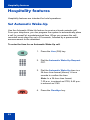
Set Automatic Wake-Up
Use the Automatic Wake-Up feature to receive a timed reminder call.
From your telephone, you can program the system to automatically place
a call to yourself at a predetermined time. When you answer the call,
recorded music plays for up to 30 seconds, followed by a prerecorded
announcement or the attendant.
To enter the time for an Automatic Wake-Up call:
1. Press the Line (DN) key.
2. Dial the Automatic Wake-Up Request
FFC.
3. Dial the Automatic Wake-Up time in a
24-hour time format (hhmm). A tone
sounds to confirm the time.
Note: In a 24-hour time format,
7:30 a.m. is entered as 0730; 9:45 p.m.
is entered as 2145.
4. Press the Goodbye key.
82
Hospitality features
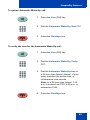
To quit an Automatic Wake-Up call:
1. Press the Line (DN) key.
2. Dial the Automatic Wake-Up Quit FFC.
3. Press the Goodbye key.
To verify the time for the Automatic Wake-Up call:
1. Press the Line (DN) key.
2. Dial the Automatic Wake-Up Verify
FFC.
3. Dial the Automatic Wake-Up time in
a 24-hour time format (hhmm). If your
query matches the preset time, a
confirmation tone sounds.
Note: In a 24-hour time format, 7:30
a.m. is entered as 0730; 9:45 p.m. is
entered as 2145.
4. Press the Goodbye key.
83
Flexible Feature Codes
Flexible Feature Codes
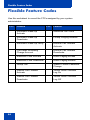
Use this worksheet to record the FFCs assigned by your system
administrator.
FFC
84
Feature
FFC
Feature
Automatic Wake-Up
Activate
Malicious Call Trace
Automatic Wake-Up
Deactivate
Pickup Ringing Number
Automatic Wake-Up Verify
Remote Call Forward
Activate
Call Detail Recording
Charge Account
Remote Call Forward
Deactivate
Electronic Lock Activate
Radio Paging Access
Electronic Lock Deactivate
Radio Paging Answer
Group Call
Station Control Password
Change
Internal Call Forward
Activate
Virtual Office Terminal
Log On
Internal Call Forward
Deactivate
Virtual Office Terminal
Log Off
Terms you should know
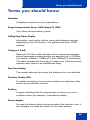
Terms you should know
Attendant
A telephone operator in your organization.
Avaya Communication Server 1000 (Avaya CS 1000)
Your office communication system.
Calling Party Name Display
Information, such as the caller’s name and telephone number,
appearing on the LCD screen. The system must have CPND
enabled.
Category 5 (Cat5)
Balanced 100 Ohm cable and associated connecting hardware
whose transmission characteristics are specified up to 100 MHz.
It is used by 10BaseT, 100BaseT4, and 100BaseTX installations.
The cable normally has four pairs of copper wire. Cat5 is the most
popular cable used in new installations today.
Date/time display
The current date and time when the telephone is in an idle state.
Directory Number (DN)
A number consisting of one to seven digits for a telephone. Also
known as an extension number.
Fastbusy
A signal indicating that all outgoing lines are busy or an error
condition exists (for example, a misdialed number).
Feature display
An area that shows status information about the feature in use. It
also displays the name and status of the active session.
85
Terms you should know
Fixed key
The hard-labeled keys on your telephone.
Flexible Feature Codes
Specialized codes entered using the dialpad that enable features
(for example, Ring Again).
Goodbye key
A fixed key used to end an active call.
Information display
Any display of call activity, lists, prompts, and status of calls. On
the Avaya 2033 IP Conference Phone, this information area is a
one-line by 24-characters area. If the text message exceeds this
area, a scroll arrow icon indicates that you must use the scroll
keys to view the remaining text.
Information line
A one-line by 24-character area that displays date and time or
application information.
Interrupted dial tone
A broken or pulsed dial tone, heard when you access some
features on your telephone.
Message (Inbox)
A fixed key on the Avaya 2033 IP Conference Phone that
connects to your voice messaging system when the key is
pressed.
Message waiting indicator/Incoming call indicator
An LCD or an LED that indicates the status of a feature by the
flash, wink, steady on, or off.
86
Terms you should know
Navigation keys
Keys used to scroll through menus and lists appearing on the
LCD screen.
Off-hook
Any line selected to make a call or receive an incoming call.
The term off-hook is applied whether (a) the user presses a line
key, (b) the call is automatically answered at the set, or (c) a line
is automatically selected for an outgoing call.
Paging tone
A special tone heard when using the Radio Paging feature. You
hear two beeps followed by dial tone.
Ringback/ring tone
A sound indicating that a call you have made is ringing at its
destination.
Services key
A fixed key used to access options such as Telephone Options,
Password Admin, Virtual Office Login, Virtual Office Logout, Test
Local Mode, and Resume Normal Mode.
Shared Directory Number
A DN (extension) that is shared by two or more persons.
Soft keys
A set of keys programmed by your system administrator. These
three keys, located directly below the display area, have four
programmable layers. These keys are also used to configure
parameters in the Telephone Options menu.
Special dial tone
The three consecutive tones followed by dial tone that you hear
when accessing telephone features.
87
Terms you should know
Special Prefix code (SPRE)
Special codes entered using the dialpad, followed by a two-digit
access code, that enable features (for example, Call Forward All
Calls requires entry of SPRE code + 74).
Station Control Password (SCPW)
Enables security features on your phone to prevent others from
making calls from your telephone and to prevent access to
protected features (for example, Remote Call Forward).
Status Messages
A message displayed to inform the user of important information.
A right arrow appears if more than one Status Message is
present. Examples of Status Messages include: Message
Waiting, All Lines Forwarded to: 6453, Do Not Disturb On, Ring
Again active, and Ringer is OFF.
System or Switch
Your office communication system.
User Interface
Screen displays that interact with the end-user as a result of an
action or event.
88
Index
Index
A
E
About the Avaya 2033 IP
Conference Phone 13
Electronic Lock 55
Answer a call 45
Enhanced Override 66
Attendant 85
Extension microphones 15
EMC information 9
Automatic Wake-Up 82
F
B
Fastbusy 85
Basic features 13
Feature display 85
Branch office 79
Fixed key 86
C
Flexible Feature Codes (FFC) 84,
86
Call features and Flexible Feature
Codes 21
Forced Camp-on 65
Call Forward 52
Forward key 52
Call Page 62
G
Call Page Connect 62
Goodbye key 17, 39, 40, 86
Call Park 48
Group Call 59
Call party information 85
Call Timer 37
H
Calling Party Number 50
Hold 46
Charge a call or charge a forced
call 62
Hold key 17
Conference call 58
Contrast adjustment 32
D
Date/time display 85
Date/Time format 33
Direct system access 55
Directory Number 85
Hospitality features 82
I
Indicator status 86
Information display 86
Information line 86
Internal Call Forward 53
Interrupted dial tone 86
DN 85
89
Index
L
Ring type 36
Language selection 33
Ringback/ring tone 65, 87
Line key 16, 39
Local DialPad Tone 34
S
M
Secure your telephone 55
Make Set Busy 61
Services key 18, 87
Malicious call trace 50
Services menu 27
Meet-me page 68
Set information 37
Message key 17, 86
Shared Directory Numbers 87
Message waiting indicator 86
Soft keys (self-labeled) 17, 87
Mute button 16
Special dial tone 87
Safety information 9, 11
Special Prefix code (SPRE) 88
N
Speed Call 42
Navigation keys 17, 87
Speed Call, System 44
Station Control Password 55
O
Off-hook 87
Station Control Password (SCPW)
88
Off-hook dialing 39
Status indicators 20
Override a busy signal 67
Status Messages 88
System or Switch 88
P
System Speed Call 44
Page Meet-me code 68
Paging tone 87
T
Predial feature 40
Telephone controls 16
Privacy Release 68
Telephone display 19
Test Local Mode 79
R
Timed Reminder Recall 47
Radio Page 68
Transfer a call 46
Record a Calling Party Number 50
Regulatory information 9
U
Remote Call Forward 53
User Interface 88
Resume Normal Mode 80
Ring Again 41
90
Index
V
View Set Information 35
Virtual Office 71
Virtual Office login 71
Virtual Office logout 74
Virtual Office on your office
telephone 74
Virtual Office on your remote
telephone 72
Volume adjustment 29
Volume control buttons 16
91
Index
92