Transcript
TELL ME MORE Starting Guide - Campus v10
2
1
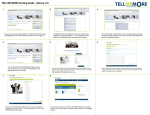
To access your language program, go to
www.tellmemorecampus.com and enter your username
and password.
3
You may need to enable Flash Paramters to run on your computer. This will
not download anything on your system. Simply follow the onscreen instructions to set the permissions.
TIP: You need to select the radio button to the left of the green checkmark.
5
4
6
9
8
Next you will need to select your objectives.
You will then need to determine your proficiency. You can either take
the Auralog ‘Assessment Test’, or select a level for yourself. If the
assessment test is chosen, it will open up in a new window.
Next, please select the language content you would like to work
in: Professional Situations or Everyday Situations.
Next, please select the language you wish to learn.
7
You have the option to watch a short guided tour of TELL ME MORE. The
video will show you how to navigate the solution and will get you prepared
to start your language training. To skip this step, click ‘Continue’.
Once the objectives have been selected you can access your learning path by clicking ‘Confirm’. You will be directed to your TELL ME
MORE home page.
Your personalized TELL ME MORE home page provides access to
your learning, progress, and support tools.