1
CD650_IFU_EN_UK.book
Page 1
Monday, June 23, 2008
3:42 PM
Register your product and get support at
www.philips.com/welcome
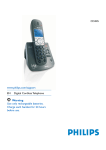
CD650
EN Telephone
! Warning
Use only rechargeable batteries.
Charge the handset for 24 hours before use.
CD650_IFU_EN_UK.book
Page 2
Monday, June 23, 2008
3:42 PM
CD650_IFU_EN_UK.book
Page 1
Monday, June 23, 2008
3:42 PM
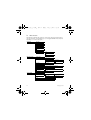
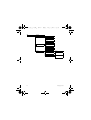
Table of contents
1
Important
3
5
Use more of your phone
19
1.1
Power requirements
3
5.1
Switch the handset on/off
19
1.2
Safety Information
3
5.2
Keypad lock/unlock
19
1.3
Conformity
4
5.3
Text or number entry
19
1.4
Using GAP standard
compliance
5.4
Call in progress
19
4
5.5
Call waiting
20
1.5
Recycling and disposal
4
5.6
Caller Line Indentification
21
1.6
Electric, Magnetic and
Electromagnetic Fields (“EMF”) 5
5.7
Using your Phonebook
21
5.8
Using the Redial list
23
2
Your phone
6
5.9
Using the Call log
24
2.1
What’s in the box
6
5.10
Using the Intercom
25
2.2
Overview of your phone
7
5.11
Paging
26
2.3
Display icons
9
2.4
Menu icons
9
6
Personal settings
27
6.1
Change the Handset Name
27
2.5
Overview of the base station 10
3
Getting started
11
3.1
Connect the base station
11
3.2
Wall mounting the base
11
3.3
Install your phone
12
3.4
Welcome mode
13
3.5
Menu structure
14
4
Using your phone
17
6.2
Handset Tones
27
6.3
Change the Display Language
28
6.4
Set Wallpaper
28
6.5
Set Colour Theme
28
6.6
Set Contrast Level
28
6.7
Set Backlight time
28
6.8
Activate /Deactivate Auto
Hang-up
29
4.1
Make a call
17
7
Clock and Alarm settings 30
4.2
Answer a call
17
7.1
Set date and time
30
4.3
End a call
18
7.2
Set date/time format
30
Table of contents
1
CD650_IFU_EN_UK.book
Page 2
Monday, June 23, 2008
3:42 PM
7.3
Set alarm
31
10
SMS
41
7.4
Set alarm tone
31
10.1
Write and send new SMS
41
10.2
View Inbox messages
42
10.3
Save a message in the Draft
box
44
10.4
SMS settings
45
8
Advanced settings
32
8.1
Easy Call
32
8.2
Activate/Deactivate
Conference mode
32
8.3
Call Barring
32
11
Technical data
47
8.4
Activate/Deactivate XHD
Sound mode
33
12
Frequently asked
questions
48
8.5
Change master PIN
33
8.6
Registration
34
Index
51
8.7
Unregister a handset
35
8.8
Country Selection
35
8.9
Reset Unit
35
8.10
Default settings
36
8.11
Set Auto Prefix
36
8.12
Change Recall time
36
8.13
Change the Dial Mode
(country-dependent)
37
8.14
Set first ring
37
9
Network Services
38
9.1
Call Forward
38
9.2
Voice Mail
39
9.3
Call Return
39
9.4
Cancel Call Back
39
9.5
Withhold ID
40
2
13
Table of contents
CD650_IFU_EN_UK.book
1
Page 3
Monday, June 23, 2008
Important
Take time to read this user manual before
you use your phone. It contains important
information and notes regarding your
phone.
1.1
Power requirements
• This product requires an electrical
supply of 220-240 volts AC. In case of
power failure, the communication can
be lost.
• The Electrical network is classified as
hazardous. The only way to power
down the charger is to unplug the
power supply from the electrical
outlet. Ensure that the electrical outlet
is always easily accessible.
• The voltage on the network is
classified as TNV-3
(Telecommunication Network
Voltages), as defined in the standard
EN 60-950.
! Warning
To avoid damage or malfunction:
• Do not allow the charging contacts or
the battery to come into contact with
metal objects.
• Do not open it as you could be
exposed to high voltages.
• Never use any other battery than the
one delivered with the product or
recommended by Philips: risk of
explosion.
• Always use the cables provided with
the product.
Important
3:42 PM
1.2
Safety Information
• Handsfree activation could suddenly
increase the volume in the earpiece to
a very high level: make sure the
handset is not too close to your ear.
• This equipment is not designed to
make emergency calls when the power
fails. An alternative has to be made
available to allow emergency calls.
• Do not expose the phone to excessive
heat caused by heating equipment or
direct sunlight.
• Do not drop your phone or allow
objects to fall on your phone.
• Do not use any cleaning agents
containing alcohol, ammonia, benzene,
or abrasives as these may harm the
set.
• Do not use the product in places
where there are explosive hazards.
• Do not let small metal objects come
into contact with the product. This can
deteriorate audio quality and damage
the product.
• Do not allow the charger to come into
contact with liquids.
• Active mobile phones in the vicinity
may cause interference.
About operating and storage
temperatures:
• Operate in a place where temperature
is always between 0 and 35º C (32 to
95º F).
• Store in a place where temperature is
always between -20 and 45º C (-4 to
113º F).
• Battery life may be shortened in low
temperature conditions.
3
CD650_IFU_EN_UK.book
Page 4
Monday, June 23, 2008
1.3
Conformity
We, Philips declare that the product is in
compliance with the essential requirements
and other relevant provisions of Directive
1999/5/EC. This product can only be
connected to the analogue telephone
networks of the countries mentioned on
the packaging.
You can find the Declaration of
Conformity on www.p4c.philips.com.
1.4
Using GAP standard
compliance
The GAP standard guarantees that all
DECTTM GAP handsets and base stations
comply with a minimum operating
standard irrespective of their make. Your
handset and base station are GAP
compliant, which means the minimum
guaranteed functions are: register a
handset, take the line, receive a call and
dial.The advanced features may not be
available if you use another handset than
a CD650/655 with your base station.
To register and use your CD650/655
handset with a GAP standard base station
of a different make, first follow the
procedure described in the
manufacturer’s instructions, then
follow the procedure described on
page 34.
To register a handset of another make to
the CD650/655 base station, place the
base station into registration mode
(page 34), then follow the procedure in
the manufacturer’s instructions.
4
3:42 PM
1.5
Recycling and disposal
Disposal instructions for old products:
The WEEE directive (Waste Electrical
and Electronic Equipment Directive ;
2002/96/EC) has been put in place to
ensure that products are recycled using
best available treatment, recovery and
recycling techniques to ensure human
health and high environmental protection.
Your product is designed and
manufactured with high quality materials
and components, which can be recycled
and reused.
Do not dispose of your old product in
your general household waste bin.
Inform yourself about the local separate
collection system for electrical and
electronic products marked by this
symbol.
Use one of the following disposal options:
• Dispose of the complete product
(including its cables, plugs and
accessories) in the designated WEEE
collection facilities.
• If you purchase a replacement
product, hand your complete old
product back to the retailer. He
should accept it as required by the
WEEE directive.
Important
CD650_IFU_EN_UK.book
Page 5
Monday, June 23, 2008
Disposal instructions for batteries:
Batteries should not be
disposed of with general
household waste.
5.
3:42 PM
Philips plays an active role in the
development of international EMF
and safety standards, enabling Philips
to anticipate further developments
in standardisation for early
integration in its products.
Packaging information:
Philips has marked the packaging with
standard symbols designed to promote
the recycling and appropriate disposal of
your eventual waste.
A financial contribution has been
paid to the associated national
recovery & recycling system.
The labelled packaging material is
recyclable.
1.6
1.
2.
3.
4.
Electric, Magnetic and
Electromagnetic Fields
(“EMF”)
Philips Royal Electronics
manufactures and sells many
consumer oriented products which
usually, as with any electronic
apparatus, have the ability to emit
and receive electro magnetic signals.
One of Philips' leading Business
Principles is to take all necessary
health and safety precautions for our
products, to comply with all
applicable legal requirements and to
stay well within the EMF standards
applicable at the time of producing
the products.
Philips is committed to develop,
produce and market products that
cause no adverse health effects.
Philips confirms that if its products
are handled properly for their
intended use, they are safe to use
according to scientific evidence
available today.
Important
5
CD650_IFU_EN_UK.book
2
Page 6
Monday, June 23, 2008
3:42 PM
Your phone
Congratulations on your purchase and welcome to Philips!
To fully benefit from the support that Philips offers, register your product at
www.philips.com/welcome.
2.1
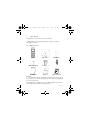
What’s in the box
Handset
Base station
Battery door
2 AAA rechargeable
batteries
Power supply
Line cord*
User manual
Guarantee
Quick Start Guide
Note
*You may find in the box the line adaptor delivered separately from the line cable. In
this case, you have to connect the line adaptor to the line cord first before plugging the
line cord to the line socket.
In multihandset packs, you will find one or more additional handsets, chargers with
power supply units and additional rechargeable batteries.
6
Your phone
CD650_IFU_EN_UK.book
2.2
Page 7
Monday, June 23, 2008
Overview of your phone
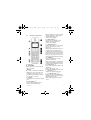
A Earpiece
B Event LED
Blinks when there is a new missed call,
SMS or Voicemail.
Note
If you have not subscribed to Caller Line
Identification service, there will not be
any alerts for new events. Hence, the
event LED will not blink when there is a
new call, SMS, or voicemail.
C Display
See page 9 for an overview of the display
icons.
D Left Softkey m
Select the function displayed on the
handset screen directly above it.
Your phone
3:42 PM
During a call: Initiate a second call, consult
phonebook, transfer a call or activate/
deactivae XHD sound mode.
Switch on the backlight.
E Right Softkey >
Select the function displayed on the
handset screen directly above it.
Switch on the backlight.
F Navigation keys :
In idle mode: Scroll up to access the Call
log and scroll down to access the
Phonebook.
During a call: Scroll up/down to increase or
decrease earpiece and speaker volume.
In editing mode: Scroll up/down to go to
the previous character or next character.
In other modes: Scroll up/down a menu
list or go to the previous or next record
in the Phonebook, Redial list or Call log.
G Talk key r
In idle mode: Answer an incoming
external or internal call.
During a call: Activate the recall function.
In other modes: Dial the selected number
in the Phonebook, Redial list or Call log.
H Hang-up key e
In idle mode: Long press to switch on/off
the handset.
During a call: Hang up a call.
In other modes: Return to the idle mode.
I
Menu key M
In idle mode: Go to the main menu.
J
Loudspeaker key v
In idle mode: Turn on the loudspeaker
and dial the number. Answer an incoming
call using handsfree mode.
During a call: Toggle the loudspeaker
on/off.
7
CD650_IFU_EN_UK.book
Page 8
Monday, June 23, 2008
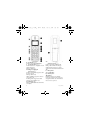
K Redial key a
In idle mode: Access the Redial list.
L Keypad lock key *
In idle mode: Insert *. Long press to lock/
unlock the keypad.
During a call: Insert *.
M Ringer on/off key &
Pause key #
In idle mode: Insert #. Long press to turn
the ringer on/off.
During a call: Insert #.
When predialling: Long press to insert a
pause marked “P”.
In editing mode: Long press to switch
between upper and lower case.
N Mute key b
During a call: Mute/Unmute the handset
microphone.
8
3:42 PM
O
Call transfer key & Intercom /
Conference key c
In idle mode: Initiate an internal call.
During a call: Hold the line and page
another handset. Long press to start a
conference between internal and external
calls.
P Microphone
Q Loudspeaker
R Battery door
Danger
Handsfree activation can suddenly
increase the volume in the earpiece to a
very high level. Make sure the handset is
not too close to your ear.
Your phone
CD650_IFU_EN_UK.book
2.3
Page 9
Monday, June 23, 2008
3:42 PM
Display icons
Indicates that the battery is
fully charged. Icon blinks
during charge and when the
battery is low.
Indicates that the battery is
fully discharged.
Indicates that an external call
is connected or held. Icon
blinks when receiving an
incoming call.
Indicates that there are
existing SMS messages in the
inbox. Icon blinks when
there are new voicemail or
unread SMS messages.
Displays when there are
existing call log records or
when call log is accessed.
Icon blinks when there are
new missed calls.
Displays when the alarm
clock is activated.
Displays when the
loudspeaker is activated.
Displays when ringer off is
activated.
Your phone
Indicates that the handset is
registered and within range
of the base station.
Icon blinks when the handset
is out of range or is
searching for a base.
2.4
Menu icons
Phonebook
Personal set
Clock & Alarm
Advanced set
Network Service
SMS
9
CD650_IFU_EN_UK.book
2.5
Page 10
Monday, June 23, 2008
3:42 PM
Overview of the base station
A Paging key C
Page handset.
Long press to start registration procedure.
10
Your phone
CD650_IFU_EN_UK.book
Page 11
3
Getting started
3.1
Connect the base station
Monday, June 23, 2008
1 Place the base station in a central
2
location near the telephone line
socket and electricity socket.
Connect the line cord and the power
cable to their corresponding
connectors at the bottom of the base
station as shown.
3:42 PM
! Warning
Avoid placing the base station too close
to large metal objects such as filing
cabinets, radiators or electrical
appliances. This can impair the range and
sound quality. Buildings with thick internal
and external walls may impair
transmission of signals to and from the
base.
! Warning
The base station does not have an ON/
OFF switch. Power is applied when the
power adaptor is plugged into the unit
and connected to the electricity socket.
The only way to power down the unit is
to unplug the power adaptor from the
electricity socket. Therefore, ensure that
the electricity socket is easily accessible.
The power adaptor and telephone line
cord have to be connected correctly, as
incorrect connection could damage the
unit.
Always use the telephone line cord
supplied with the unit. Otherwise, you
may not get a dial tone.
3 Connect the other end of the line
cord to the telephone line socket
and the other end of the power
cable to the electricity socket.
Note
The line adaptor may not be attached to
the line cord. In this case, you have to
connect the line adaptor to the line cord
first before plugging the line cord to the
line socket.
Getting started
3.2
Wall mounting the base
The base is designed to support wall
mounting. To wall mount the base, follow
the instructions below.
!
Warning
Other wall mounting methods are not
recommended and may damage the
product.
1 Remove the bracket from the back
of the base station.
11
CD650_IFU_EN_UK.book
Page 12
Monday, June 23, 2008
3:42 PM
5 Slide the base down into place.
2 Turn the bracket upside down and
then re-insert the bracket to the
back of the base station.
3.3
Install your phone
Before using the handset, the batteries
have to be installed and fully charged.
3.3.1 Install battery
! Warning
3 Insert screws (not included) into the
wall.
Always use AAA rechargeable batteries
supplied with your unit. There could be
risk of battery leakage if you use alkaline
batteries or other battery types.
1 Slide out the battery cover.
2 Place the batteries in the correct
polarity as indicated and replace the
cover.
4 Align the mounting holes on the
back of the base with the screws on
the wall.
12
Getting started
CD650_IFU_EN_UK.book
Page 13
Monday, June 23, 2008
3.3.2 Charge battery
! Warning
The handset must be charged for at least
24 hours before using it for the first time.
When the battery level becomes low, the
low battery sensor alerts you by sounding an
audible tone and blinking the battery icon.
If the battery level becomes exceedingly
low, the phone automatically switches off
and any function in progress will not be
saved.
1 Place the handset on the charging cradle
of the base station. A melody is emitted
if the handset is placed correctly.
on the display
2 The battery icon
blinks during charge.
becomes
3 The battery icon
steady when the handset is fully
charged.
Note
Optimal battery life is reached after 3
cycles of complete charging (over 15
hours) and discharging, allowing
approximately 12 hours of talk-time and
150 hours of stand-by time.
3.4
Welcome mode
Note
Depending on your country, the
WELCOME screen may not appear. In
this case, you are not required to select
your country/operator/language settings.
In the case when WELCOME appears on
the screen before you first use your
handset, you need to configure it
according to the country of use.
Getting started
3:42 PM
After charging it for a few minutes, the
word WELCOME appears in various
languages. Follow these steps to configure
your phone:
1 Scroll : to the word WELCOME in
your preferred language and press
mSELECT to confirm your
selection.
2 Scroll : to your country.
3 Press mSELECT to confirm your
selection.
4 Press : to your operator (if
necessary).
5 Press mSELECT again to confirm
your selection.
• The default line settings and menu
language for the selected country
will be automatically configured.
• To set date/time, see “Set date and
time” on page 30.
Your phone is now ready for use.
Note
You can still make outgoing calls or
receive incoming calls without first
defining your country selection. The
welcome mode will display again after the
call.
Tip
You may change your country settings
anytime after the first configuration. (see
“Country selection” in chapter 8.8)
If there are no key presses for 15
seconds, the handset will automatically
return to idle mode. It will also return to
idle mode automatically when you place
the handset back on the base station.
13
CD650_IFU_EN_UK.book
Page 14
Monday, June 23, 2008
3:42 PM
3.5
Menu structure
The table below describes the menu tree of your phone. Press M in idle mode to
enter the main menu. Use navigation keys : to navigate within the menus and press
left softkey m to enter each option.
PHONEBOOK
NEW ENTRY
LIST
EDIT ENTRY
SELECT MELODY
DELETE ENTRY
DELETE ALL
DIRECT MEMORY
KEY 1
...
KEY 9
PERSONAL SETTING
HANDSET NAME
HANDSET TONES
LANGUAGE
RING VOLUME
RING TONE
List of melodies
KEY BEEP
ON/OFF
List of languages
WALLPAPER
CLOCK & ALARM
COLOUR THEME
COLOUR 1/COLOUR 2/COLOUR3/COLOUR 4
CONTRAST
LEVEL 1/2/3/4/5
BACKLIGHT TIME
20 SECONDS/40 SECONDS/60 SECONDS
AUTO HANG-UP
ON/OFF
SET DATE/TIME
SET FORMAT
14
TIME FORMAT
12 HOURS/24 HOURS
DATE FORMAT
DD:MM / MM:DD
ALARM
OFF/ON ONCE/ON DAILY
ALARM TONE
MELODY 1/MELODY 2/MELODY 3
Getting started
CD650_IFU_EN_UK.book
ADVANC. SETTINGS
Page 15
Monday, June 23, 2008
EASY CALL
MODE
3:42 PM
ON/OFF
NUMBER
CONFERENCE
ON/OFF
CALL BARRING
MODE
ON/OFF
NUMBER
NUMBER 1/NUMBER 2/
NUMBER 3/NUMBER 4
XHD SOUND
ON/OFF
CHANGE PIN
REGISTRATION
UNREGISTER
COUNTRY
RESET
AUTO PREFIX
DETECT DIGIT
PREFIX
NETWORK SERVICES
Getting started
RECALL TIME
SHORT/MEDIUM/LONG
DIAL MODE
TONE/PULSE
FIRST RING
ON/OFF
CALL FORWARD
ACTIVATE/DEACTIVATE/
CHANGE CODE
CALL FWD BUSY
ACTIVATE/DEACTIVATE/
CHANGE CODE
CALL FWD UNANSW.
ACTIVATE/DEACTIVATE/
CHANGE CODE
VOICEMAIL/VOICEMAIL 2
CALL/SETTINGS
INFO 1/INFO 2
CALL/SETTINGS
CALL RETURN
CALL/SETTINGS
CANCEL CALL BACK
CALL/SETTINGS
WITHHOLD ID
ACTIVATE/SETTINGS
15
CD650_IFU_EN_UK.book
SMS
Page 16
Monday, June 23, 2008
3:42 PM
WRITE SMS
INBOX
REPLY
FORWARD
SAVE NUMBER
DELETE
DELETE ALL
DRAFTS
EDIT
SEND
DELETE
DELETE ALL
SETTINGS
16
SMS RECEPTION
ON/OFF
SMS CENTRE
SMS CENTRE 1/SMS CENTRE 2/
SMS CENTRE 3
DEFAULT CENTRE
SMS CENTRE 1/SMS CENTRE 2/
SMS CENTRE 3
Getting started
CD650_IFU_EN_UK.book
Page 17
4
Using your phone
4.1
Make a call
Monday, June 23, 2008
4.1.1 Predialling
1 Dial the number (maximum 24
digits).
2 Press r or v key.
• The call is initiated.
Tip
You may insert a prefix number to the
beginning of your predial number, see
“Set Auto Prefix” on page 36 for more
information.
4.1.2
Direct dialling
1 Press r or v key to take the
2
line.
Dial the number.
• The call is initiated.
4.1.3
Call from redial list
1 Press a key in idle mode.
2 Scroll : to an entry in the redial
list.
3 Press r or v key.
4.1.4
3:42 PM
Call from the call log
1 Press u in idle mode.
2 Scroll : to CALL LIST or SMS and
3
4
press mSELECT to enter the
respective sub-menus.
Scroll : to an entry.
Press r or v key.
• The call is initiated.
Note
You need to subscribe to Caller Line
Identification service to be able to see the
caller’s number or name in the call log
(see “Access Call log” on page 24).
4.1.5
Call from the phonebook
1 Press d in idle mode.
2 Scroll : to a phonebook entry.
3 Press r or v key.
• The call is initiated.
Tip
Instead of scrolling : to browse the
phonebook entries, you can press the
numeric key corresponding to the first
letter of the entry you wish to locate. For
example, pressing 2 will show the
entries starting with A. Pressing 2
again will show the entries starting with B,
etc...
• The call is initiated.
Tip
The handset stores the last 20 numbers
dialled. The last number dialled will
appear first in the redial list. If the redial
number matches a phonebook entry, the
name will be displayed instead.
Using your phone
4.2
Answer a call
When the phone rings, press r key.
• The call is established.
Note
Incoming call has priority over other
events. Whenever there is an incoming
call, other status in progress such as
17
CD650_IFU_EN_UK.book
Page 18
Monday, June 23, 2008
3:42 PM
phone setting, menu navigation, etc will
be aborted.
Danger
When the handset rings during an
incoming call, please do not hold the
handset too close to your ear, as the
volume of the ringing tone may damage
your hearing.
4.2.1 Handsfree answering
When the phone rings, press v key.
• The handset loudspeaker is
activated.
Danger
Handsfree activation can suddenly
increase the volume in the earpiece to a
very high level. Make sure the handset is
not too close to your ear.
4.3
End a call
To end a conversation, press e key.
Tip
If AUTO HANG-UP mode is activated
(see “Activate /Deactivate Auto Hangup” on page 29) , you can simply place the
handset back to its base station to end the
call. This feature is activated by default.
Note
The call duration will be displayed on the
handset screen for about 5 seconds.
18
Using your phone
CD650_IFU_EN_UK.book
5
Page 19
Monday, June 23, 2008
Use more of your
phone
5.1
Switch the handset on/off
Press and hold e key for 3 seconds to
switch on/off the handset in idle mode.
5.2
Keypad lock/unlock
Press and hold * key for 2 seconds to
lock/unlock the keypad in idle mode.
5.3
Text or number entry
When you select a field in which you can
enter text, you can enter the letters that
are printed on the keys by pressing the
relevant key once or several times. For
example, to enter the name “PAUL”:
1 Press 7 once: P
2 Press 2 once: PA
3 Press 8 twice: PAU
4 Press 5 three times: PAUL
The table below gives you the character
assignment during text or number entry:
Keys
Assigned characters
1
space 1 @ _ # = < > ( )
&€£$¥[]{}¤§
2
abc2àäçåæ
3
def3èé∆Φ
4
ghi4ìΓ
Use more of your phone
3:42 PM
5
jkl5Λ
6
mno6ñòö
7
pqrs7βΠΘΣ
8
tuv8ùü
9
wxyz9øΩΞΨ
0
.0,/:;"’!¡?¿*+-%\^~|
#
Long press to switch
between upper and lower
case.
*
*
Tip
Press >BACK to delete the last digit or
character entered.
5.4
Call in progress
Some options are available to you during
a call. The available options are:
5.4.1 Adjust earpiece volume
During a call, press : to select from
VOLUME 1 to VOLUME 3.
5.4.2 Mute/Unmute microphone
When the microphone is muted, your
correspondent cannot hear you.
1 During a call, press b or to turn
off the microphone.
19
CD650_IFU_EN_UK.book
Page 20
Monday, June 23, 2008
3:42 PM
2 Press b to turn on the
microphone.
5.4.3
Activate/Deactivate
loudspeaker mode
Danger
Handsfree activation can suddenly
increase the volume in the earpiece to a
very high level. Make sure the handset is
not too close to your ear.
1 During a call, press v key to
activate the loudspeaker mode.
2 Press v key again to return to
normal mode.
5.4.4 Adjust loudspeaker volume
During a call in handsfree mode, press :
to select from VOLUME 1 to VOLUME 5.
5.4.7
Activate/deactivate XHD
Sound mode
XHD sound mode is an exclusive feature
making your phone conversations
sounding just like real-life conversations.
When activated, the XHD Sound mode
transmits with high fidelity all the
emotions of the call, as if your
correspondent was talking next to you.
1 During a call, press >OPTION,
scroll : to XHD ON and press
mSELECT to activate.
2 To deactivate, press >OPTION,
scroll : XHD OFF and press
mSELECT.
5.4.8
1
5.4.5
Initiate a second call
(subscription dependent)
During a call, press >OPTION and
select START 2ND CALL to put the
current call on hold and initiate a second
external call.
5.4.6 Consult phonebook
During a call, press >OPTION and
select PHONEBOOK to access and
review phonebook entries.
20
2
Transfer call (subscription
and country dependent)
During a call, press >OPTION,
scroll : to SWITCH CALL and
press mSELECT.
• The screen shows R4.
Enter the phone number that you
want to transfer your incoming calls
to.
• The call is transferred.
5.5
Call waiting
If you have subscribed to Call Waiting
service, the earpiece will emit a beep tone
to inform you that there is a second
incoming call. The number or name of the
second caller will also be displayed on your
phone if you have subscribed to Caller
Line Identification service (CLI). Please
contact your network provider for more
Use more of your phone
CD650_IFU_EN_UK.book
Page 21
Monday, June 23, 2008
information on this service.
When you receive a second incoming call
while on the phone, press r+2 key
to put the current call on hold and
answer the second call.
OR
- Press r+1 key to end the current
call and answer the second call.
- Press r+2 subsequently to toggle
between these 2 calls.
The above operations may be different
according to your network.
5.6
Caller Line Indentification
Caller Line Identification (CLI) is a special
service that you may subscribe from your
network operator. If you have subscribed
to CLI service, the identity of the caller
(caller’s number or name) will be
displayed on your handset during an
incoming call. If you have not subscribed
to this service, or if the caller has chosen
to withhold the number, the identity of
the caller will not be displayed. Please
contact your network provider for more
information on this service.
5.7
Using your Phonebook
Your phone can store up to 200
phonebook memories, including 10 direct
access memories (1 to 9).
Depending on your country, Key 1 and Key
2 may be preset to the voice mail number
and information service number of your
network operator respectively. Each
phonebook entry can have a maximum of
24 digits for the phone number and 14
characters for name.
Use more of your phone
5.7.1
3:42 PM
Access phonebook
1 Press d in idle mode and scroll :
2
3
to browse the phonebook.
• The phonebook entries are listed in
alphabetical order.
To view the details of a phonebook
entry, scroll : to the phonebook
entry and press mSELECT.
To dial a number from the
phonebook, scroll : to the
phonebook entry and press r.
Tip
Instead of scrolling : to browse the
phonebook entries, you can press the
numeric key corresponding to the first
letter of the entry you wish to locate. For
example, pressing 2 will show the
entries starting with A. Pressing 2 again
will show the entries starting with B, etc...
5.7.2
1
2
3
Store a contact in the
phonebook
Press M in idle mode, press
mSELECT to enter PHONEBOOK,
press mSELECT to enter NEW
ENTRY.
Enter the name of the contact
(maximum 14 characters) and press
mOK.
Enter the phone number (maximum
24 digits) and press mOK.
• A validation tone is emitted.
Tip
You cannot store a new phonebook entry
when the memory is full. In this case, you
have to delete existing entries to make
space for new entries.
21
CD650_IFU_EN_UK.book
5.7.3
Page 22
Monday, June 23, 2008
Edit a phonebook entry
1 Press M in idle mode, press
mSELECT to enter PHONEBOOK,
scroll : to EDIT ENTRY and press
mSELECT.
2 Scroll : to select an entry you
wish to edit and press mSELECT.
3 Press >CLEAR to erase the letters
4
one by one, enter the name and
press mOK.
Press >CLEAR to erase the digits
one by one, enter the phone number
and press mOK.
• A validation tone is emitted.
5.7.4 Set melody
With this function you can personalize
the melody played when someone in the
phonebook calls you.
Note
You need to subscribe to Caller Line
Identification service to be able to benefit
from this feature.
1 Press M in idle mode, press
mSELECT to enter PHONEBOOK,
scroll : to SELECT MELODY and
press mSELECT.
2 Scroll : to select an entry you
wish to set the melody for and press
mSELECT.
3 Press mEDIT to set or change the
melody for the contact.
4 Scroll : to the melody list and
press mSELECT to confirm.
• A validation tone is emitted.
22
5.7.5
3:42 PM
Delete a phonebook entry
1 Press M in idle mode, press
mSELECT to enter PHONEBOOK,
scroll : to DELETE ENTRY and
press mSELECT.
2 Scroll : to select an entry you
3
wish to delete and press
mSELECT.
DELETE? is displayed on the screen.
Press mOK to confirm deletion.
• A validation tone is emitted.
5.7.6
Delete the phonebook list
1 Press M in idle mode, press
mSELECT to enter PHONEBOOK,
scroll : to DELETE ALL and press
mSELECT.
2 DELETE ALL? is displayed on the
screen.
Press mOK to confirm deletion.
• A validation tone is emitted.
5.7.7 Direct Access Memory
You can store up to 9 direct access
memories (Keys 1 to 9). A long
press on the keys in idle mode will
automatically dial the stored phone
number. Depending on your country, Key
1 and Key 2 may be preset to the voice mail
number and information service number of
your network operator respectively.
Use more of your phone
CD650_IFU_EN_UK.book
Page 23
Monday, June 23, 2008
5.7.7.1
1
2
3
4
5
6
Store Direct Access
Memory
Press M in idle mode, press
mSELECT to enter PHONEBOOK,
scroll : to DIRECT MEMORY and
press mSELECT.
Scroll : to select a key (Keys 1 to
9) and press mSELECT.
• The stored number is displayed (if
any).
Press mOK to display the menu
options.
Press mSELECT to select EDIT
Scroll : to the entry you wish to
store as direct access memory and
press mSELECT to view the details.
Press mSELECT to confirm.
• A validation tone is emitted.
5.7.7.2
1
2
3
4
Delete Direct Access
Memory
Press M in idle mode, press
mSELECT to enter PHONEBOOK,
scroll : to DIRECT MEMORY and
press mSELECT.
Scroll : to select a key (Keys 1 to
9) and press mSELECT.
• The stored number is displayed (if
any).
Press mSELECT to display the
menu options.
Scroll : to DELETE and press
mSELECT.
• A validation tone is emitted.
Use more of your phone
3:42 PM
5.8
Using the Redial list
The redial list stores the last 20 numbers
dialled. A maximum of 24 digits can be
displayed for each entry.
5.8.1
Access Redial list
1 Press a in idle mode and scroll
: to browse the redial list.
• The last number dialled will appear
first in the redial list. If the redial
number matches a phonebook
entry, the name will be displayed
instead.
Note
To return to idle mode, press e key.
5.8.2
1
2
3
4
Save a redial number into
the phonebook
Press a in idle mode and scroll
: to select an entry. Press
mSELECT to view the details.
Press a and press mSELECT
to select SAVE NUMBER.
Enter the name of the contact
(maximum 14 characters) and press
mOK.
Edit the number if necessary and
press mOK.
• A validation tone is emitted.
Note
Press >CLEAR to delete the last digit
or character entered.
23
CD650_IFU_EN_UK.book
Page 24
Monday, June 23, 2008
5.8.3 Delete a redial number
1 Press a in idle mode and scroll
: to select an entry.
2 Press a, scroll : to DELETE
and press mOK.
3 DELETE? is displayed on the screen.
Press mOK again to confirm
deletion.
• A validation tone is emitted.
3:42 PM
Note
* If the identity of the caller is withheld or
the network does not provide the date
and time information, then only the date
and time of the call will be displayed.
If you have not subscribed to Caller Line
Identification service, there will not be
any information displayed in the call log.
5.9.1
Access Call log
1 Press u in idle mode, scroll : to
5.8.4
CALL LIST and SMS and press
mSELECT to enter the respective
Delete the redial list
1 Press a in idle mode.
2 Press a, scroll : to DELETE
3
ALL and press mOK.
DELETE ALL? is displayed on the
screen.
Press mOK again to confirm
deletion.
• A validation tone is emitted.
sub-menus.
5.9.2
1
2
5.9
Using the Call log
The call log offers quick access to the
CALL LIST and SMS events. If you have
subscribed to Caller Line Identification
service, the identity of the caller (caller’s
number or name) will be displayed
together with the date and time of the
call*. The CALL LIST records the last 50
entries of the incoming calls. The calls
(missed and received) are displayed in
chronological order with the most recent
call at the top of the list. When the call list
is empty, the screen displays LIST
EMPTY.
24
3
4
Save a call list entry into the
phonebook
Press u in idle mode and scroll :
to select an entry. Press mSELECT
to view the details.
Press a and press mSELECT
to select SAVE NUMBER.
Enter the name of the contact
(maximum 14 characters) and press
mOK.
Edit the number (if necessary) and
press mOK.
• A validation tone is emitted.
5.9.3
Delete a call list entry
1 Press u in idle mode, press
2
mSELECT to enter CALL LIST,
scroll : to an entry in the call list
and press mOPTION.
Scroll : to DELETE ENTRY and
press mSELECT.
Use more of your phone
CD650_IFU_EN_UK.book
Page 25
Monday, June 23, 2008
3 Press mOK to confirm deletion.
• A validation tone is emitted.
5.9.4
Delete the call list
1 Press u in idle mode, press
mSELECT to enter CALL LIST,
scroll : to an entry in the call list
and press mOPTION.
Scroll : to DELETE ALL and press
mSELECT.
DELETE ALL? is displayed on the
screen.
Press mOK to confirm deletion.
• A validation tone is emitted.
3:42 PM
2 If there are more than 2 registered
handsets, the handset numbers
which are available for intercom will
be displayed. Scroll : to the
specific handset you want to call and
press mSELECT.
5.10.1 Intercom another handset
5.10.2 Transfer an external call to
another handset
1 During the call, press and hold c
key to put the external call on hold
(the caller can no longer hear you).
• Intercom is established immediately
if there are only 2 registered
handsets.
2 If there are more than 2 registered
handsets, the handset numbers
which are available for intercom will
be displayed. Scroll : to the
specific handset you want to call and
press mSELECT.
• The called handset rings.
3 Press r key on the called handset
to answer the internal call, where
both internal callers can talk.
• Intercom is established.
4 Press e key on the first handset to
transfer the external call to the
called handset.
• The external call is transferred.
Note
If the handset does not belong to CD650/
655 range, this function may not be
available.
Note
If there is no answer from the called
handset, press c key to resume the
external call.
2
3
5.10 Using the Intercom
! Warning
Intercom and call transfer is only possible
with handsets registered to the same base
station.
This feature is only available when there
are at least 2 registered handsets. It
allows you to make free internal calls,
transfer external calls from one handset
to another and use the conference
option.
1 Press c key in idle mode.
• Intercom is established immediately
if there are only 2 registered
handsets.
Use more of your phone
25
CD650_IFU_EN_UK.book
Page 26
Monday, June 23, 2008
5.10.3 Answer an external call
during intercom
1 When there is an incoming external
call during an intercom, a new call
tone is emitted.
2 To end the intercom and answer the
external call, press e. The handset
will ring. Press r to answer the
external call.
• Connection with the external call is
established.
Tip
To put the internal call on hold and
answer the incoming external call, press
r key.
5.10.4 Switch between an internal
and external call
To switch between an internal or
external call, press c key.
5.10.5 Establish a three-party
conference call
The conference call feature allows one
external call to be shared with two
handsets (in intercom). The three parties
can share the conversation and no
network subscription is required.
1 During the call, press c key to
put the external call on hold (the
caller can no longer hear you).
• Intercom is established immediately
if there are only 2 registered
handsets.
2 If there are more than 2 registered
handsets, the handset numbers
which are available for intercom will
26
3
4
3:42 PM
be displayed. Scroll : to the
specific handset you want to call and
press mSELECT.
• The called handset rings.
Press r key on the called handset
to answer the internal call, where
both internal callers can talk.
• Intercom is established.
Press and hold c key for 2
seconds on the first handset to start
the three-party conference.
• CONFERENCE will be displayed on
the screen once the conference call
is established.
Tip
If CONFERENCE mode is activated (see
“Activate/Deactivate Conference mode”
on page 32), a three-party conference call
is automatically established if the second
handset takes the line when there is
already an external call in progress.
5.11 Paging
The paging feature enables you to locate
a missing handset if the handset is in range
and contains charged batteries.
1 Press p key on the base station.
• All the registered handsets start to
ring.
2 Once retrieved, press any key on
the handset to end the paging.
Note
If there are no key presses within 30
seconds, the handset and base station will
automatically return to idle mode.
Tip
To stop paging, press p key on the base
station again.
Use more of your phone
CD650_IFU_EN_UK.book
Page 27
Monday, June 23, 2008
3:42 PM
2 Scroll : to your desired volume
6
Personal settings
6.1
Change the Handset Name
You can name the handset and display the
handset name in idle mode. The default
handset name of your handset is PHILIPS.
1 Press M in idle mode, scroll :
to PERSONAL SETTING and press
mSELECT, press mSELECT to
enter HANDSET NAME.
2 Edit the handset name (maximum 14
characters) and press mOK to
confirm.
• A validation tone is emitted and the
screen returns to previous menu.
6.2
6.2.1
Handset Tones
Set the Ring Volume
Danger
When setting the ring volume of your
phone or when the handset rings during
an incoming call, please do not hold the
handset too close to your ear as the
volume of the ringing tone may damage
your hearing.
There are 5 levels of ring volume,
including progressive volume.
1 Press M in idle mode, scroll :
to PERSONAL SETTING and press
mSELECT, scroll : to
HANDSET TONES and press
mSELECT. Press mSELECT again
to enter RING VOLUME
Personal settings
level and press mOK to confirm.
• A validation tone is emitted and the
screen returns to previous menu.
Note
When the volume is set to off, the icon
will be displayed on the screen.
6.2.2 Set the Ring Melody
There are 15 polyphonic ring melodies
available on your handset.
1 Press M in idle mode, scroll :
to PERSONAL SETTING and press
mSELECT, scroll : to
HANDSET TONES and press
mSELECT. Scroll : to RING
TONE and press mSELECT.
2 Scroll : to your desired melody to
play the melody.
3 Press mOK to set the ring melody.
• A validation tone is emitted and the
screen returns to previous menu.
6.2.3
Activate/Deactivate Key
Beep
A single beep is emitted when a key is
pressed. You can enable or disable the
key beep. By default, the key beep is ON.
1 Press M in idle mode, scroll :
to PERSONAL SETTING and press
mSELECT, scroll : to
HANDSET TONES and press
mSELECT. Scroll : to KEY BEEP
and press mSELECT.
2 Scroll : to ON or OFF and press
mOK to confirm.
• A validation tone is emitted and the
screen returns to previous menu.
27
CD650_IFU_EN_UK.book
Page 28
Monday, June 23, 2008
6.3
Change the Display Language
Your handset can support different
display languages, depending on your
country selection during the WELCOME
mode.
1 Press M in idle mode, scroll :
to PERSONAL SETTING and press
mSELECT, scroll : to
LANGUAGE and press mSELECT.
2 Scroll : to your desired language
and press mSELECT to confirm.
• A validation tone is emitted and the
screen returns to previous menu.
Tip
Once the display language is set, the
option menus on the handset will switch
to display in the selected language
immediately.
6.4
Set Wallpaper
This feature allows you to select the
wallpaper to be displayed in idle mode.
There are 3 wallpapers pre-installed on
your handset. The 4th wallpaper is a blank
wallpaper.
1 Press M in idle mode, scroll :
to PERSONAL SETTING and press
mSELECT, scroll : to
WALLPAPER and press
mSELECT.
2 Scroll : to your desired wallpaper
and press mSELECT to confirm.
• A validation tone is emitted and the
screen returns to previous menu.
28
6.5
3:42 PM
Set Colour Theme
1 Press M in idle mode, scroll :
2
to PERSONAL SETTING and press
mSELECT, scroll : to COLOUR
THEME and press mSELECT.
Scroll : to COLOUR 1, COLOUR
2, COLOUR 3 or COLOUR 4 and
press mSELECT to confirm.
• A validation tone is emitted.
6.6
Set Contrast Level
There are 5 contrast level options
(LEVEL 1, LEVEL 2, LEVEL 3, LEVEL 4 or
LEVEL 5). The default contrast level is
LEVEL 2.
1 Press M in idle mode, scroll :
to PERSONAL SETTING and press
mSELECT, scroll : to
CONTRAST and press mSELECT.
2 Scroll : to your desired contrast
level (LEVEL 1, LEVEL 2, LEVEL 3,
LEVEL 4 or LEVEL 5) and press
mSELECT to confirm.
• A validation tone is emitted and the
screen returns to previous menu.
6.7
Set Backlight time
1 Press M in idle mode, scroll :
2
to PERSONAL SETTING and press
mSELECT, scroll : to
BACKLIGHT TIME and press
mSELECT.
Scroll : to 20 SECONDS, 40
SECONDS or 60 SECONDS and
press mSELECT to confirm.
• A validation tone is emitted.
Personal settings
CD650_IFU_EN_UK.book
Page 29
Monday, June 23, 2008
3:42 PM
Note
By default, the backlight remains on for 20
seconds after each activation such as an
incoming call, key presses, lifting the
handset off the base station, etc.
6.8
Activate /Deactivate Auto
Hang-up
This function enables you to end a call
automatically by simply replacing the
handset on the base station. By default,
the Auto Hang-up feature is ON.
1 Press M in idle mode, scroll :
to PERSONAL SETTING and press
mSELECT, scroll : to AUTO
HANG-UP and press mSELECT.
2 Scroll : to ON or OFF and press
mSELECT to confirm.
• A validation tone is emitted and the
screen returns to previous menu.
Personal settings
29
CD650_IFU_EN_UK.book
7
Page 30
Monday, June 23, 2008
Clock and Alarm
settings
This feature allows you to set the date,
time and alarm settings for your phone.
The default date and time is 01-01 and
00:00 respectively.
your ISDN system or contact your
network provider.
7.2
Set date/time format
You can set your preferred date/time
format for your phone. The default
format is DD-MM and 24 HOURS.
7.2.1
7.1
1
2
3
Set date and time
Press M in idle mode, scroll :
to CLOCK & ALARM and press
mOK, press mSELECT to enter
SET DATE/TIME.
The last stored date is displayed.
Enter the current date (dd-mm) and
press mOK.
The last stored time is displayed.
Enter the current time (hh-mm).
Press 2 to select A (am) or 7
to select P (pm) if the time is in 12
hours format. Press mOK to
confirm.
• A validation tone is emitted.
Note
An error tone will be emitted if an invalid
digit is entered in the date/time fields.
Hour: 00 to 12; Minute: 00 to 59
Date: 01 to 31; Month: 01 to 12
! Warning
If your phone is connected to an ISDN
line through an adaptor, the date & time
may be updated after each call. The
availability of date & time update is
dependent on your network provider.
Please check the date & time settings in
30
3:42 PM
Set time format
1 Press M in idle mode, scroll :
2
3
to CLOCK & ALARM and press
mOK, scroll : to SET FORMAT
and press mSELECT.
Press mOK to enter TIME
FORMAT.
• The current setting is displayed.
Scroll : to select time format
display (12 HOURS or 24 HOURS)
and press mOK to confirm.
• A validation tone is emitted and the
screen returns to previous menu.
7.2.2
Set date format
1 Press M in idle mode, scroll :
2
3
to CLOCK & ALARM and press
mOK, scroll : to SET FORMAT
and press mSELECT.
Scroll : to enter DATE FORMAT
and press mOK.
• The current setting is displayed.
Scroll : to select date format
display (DD:MM or MM:DD) and
press mOK to confirm.
• A validation tone is emitted and the
screen returns to previous menu.
Clock and Alarm settings
CD650_IFU_EN_UK.book
7.3
Page 31
Monday, June 23, 2008
3:42 PM
Set alarm
1 Press M in idle mode, scroll :
2
3
to CLOCK & ALARM and press
mOK, scroll : to ALARM and
press mSELECT.
Scroll : to OFF, ON ONCE or ON
DAILY and press mSELECT.
If you select ON ONCE or ON
DAILY, enter the time (hh-mm) for
the alarm and press 2 to select
A (am) or 7 to select P (pm) if
the time is in 12 hours format. Press
mOK to confirm.
• A validation tone is emitted and the
screen returns to previous menu.
Note
The alarm tone and alarm icon
will
only sound/blink for 1 minute when the
alarm time is reached. To mute the alarm
tone, simply press any key on the handset.
7.4
Set alarm tone
1 Press M in idle mode, scroll :
2
to CLOCK & ALARM and press
mOK, scroll : to ALARM TONE
and press mSELECT.
Scroll : to MELODY 1, MELODY 2
or MELODY 3 and press mSELECT
to confirm.
• A validation tone is emitted and the
screen returns to previous menu.
Clock and Alarm settings
31
CD650_IFU_EN_UK.book
8
Page 32
Monday, June 23, 2008
Advanced settings
8.1
Easy Call
When activated, the Easy Call feature
enables you to dial a number by pressing
any key on your handset. This feature is
very useful for direct access to
emergency services.
You can enter up to 24 digits for easy call
number.
2
3
3:42 PM
mSELECT, press mSELECT to
enter EASY CALL.
Scroll : to NUMBER and press
mSELECT.
• The last stored Easy Call number is
displayed (if any).
Enter the easy call number
(maximum 24 digits) and press
mOK to confirm.
• A validation tone is emitted and the
screen returns to previous menu.
8.2
8.1.1
To activate Easy Call mode
1 Press M in idle mode, scroll :
2
3
4
to ADVANC. SETTINGS and press
mSELECT, press mSELECT to
enter EASY CALL.
Press mSELECT to enter MODE.
Scroll : to ON and press
mSELECT to confirm.
Enter the Easy Call number and
press mOK to confirm.
• A validation tone is emitted.
8.1.2
1
2
To deactivate Easy Call
mode
Long press M (when Easy Call
mode has been activated before).
Scroll : to OFF and press
mSELECT to confirm.
8.1.3
To change Easy Call number
1 Press M in idle mode, scroll :
to ADVANC. SETTINGS and press
32
Activate/Deactivate
Conference mode
When conference mode is activated, you
can initiate a three-party conference call
with a second handset registered to your
base station automatically if the second
handset takes the line when there is
already an external call in progress.
The default setting for this mode is ON.
1 Press M in idle mode, scroll :
to ADVANC. SETTINGS and press
mSELECT, scroll : to
CONFERENCE and press
mSELECT.
2 Scroll : to ON or OFF and press
mSELECT to confirm.
• A validation tone is emitted and the
screen returns to previous menu.
8.3
Call Barring
Call barring enables you to restrict selected
handsets from dialling a phone number
beginning with certain digits. You can set up
to 4 different barring numbers, with each
number containing up to 4 digits.
Advanced settings
CD650_IFU_EN_UK.book
Page 33
Monday, June 23, 2008
• A validation tone is emitted and the
screen returns to previous menu.
8.3.1
1
2
To activate/deactivate Call
Barring
Press M in idle mode, scroll :
to ADVANC. SETTINGS and press
mSELECT, scroll : to CALL
BARRING and press mSELECT.
Enter the master PIN when
prompted and press mOK to
confirm.
Note
By default, the master PIN is 0000.
3 Press mSELECT to enter MODE.
4 Scroll : to ON or OFF and press
mSELECT to confirm.
• A validation tone is emitted and the
screen returns to previous menu.
8.3.2
To modify Call Barring
number
1 Press M in idle mode, scroll :
2
to ADVANC. SETTINGS and press
mSELECT, scroll : to CALL
BARRING and press mSELECT.
Enter the master PIN when
prompted and press mOK to
confirm.
Note
By default, the master PIN is 0000.
3 Scroll : to NUMBER and press
mSELECT.
4 Scroll : to NUMBER 1, NUMBER
2, NUMBER 3 or NUMBER 4 and
press mSELECT.
5 Enter the barring number (maximum
4 digits) and press mOK to
confirm.
Advanced settings
3:42 PM
Note
If a restricted number is dialled, the call
will not be connected. When this
happens, the phone emits an error tone
and returns to idle mode.
8.4
Activate/Deactivate XHD
Sound mode
The XHD SOUND mode is an exclusive
feature making your phone conversations
sounding just like real-life conversations.
When activated, the XHD SOUND mode
transmits with high fidelity all the
emotions of the call as if your
correspondent was talking next to you.
1 Press M in idle mode, scroll :
to ADVANC. SETTINGS and press
mSELECT, scroll : to XHD
SOUND and press mSELECT.
2 Scroll : to ON or OFF and press
mSELECT to confirm.
Tip
During a call, you can also press
>OPTION and select XHD ON/XHD
OFF to activate/deactivate XHD SOUND
mode.
8.5
Change master PIN
The master PIN is used for setting call
barring and registration/unregistration of
handsets. The default master PIN number
is 0000. The maximum length of the
master PIN is 4 digits. This PIN is also
used to protect the settings of your
handset. Your handset will prompt you
whenever the PIN is required.
33
CD650_IFU_EN_UK.book
Page 34
Monday, June 23, 2008
Note
The default PIN code is preset to 0000. If
you change this PIN code, keep the PIN
details in a safe place where you have easy
access to them. Do not lose the PIN code.
1 Press M in idle mode, scroll :
to ADVANC. SETTINGS and press
mSELECT, scroll : to CHANGE
PIN and press mSELECT.
2 Enter the current master PIN when
prompted and press mOK to
confirm.
• The PIN entered will be shown as
asterisks (*) on the screen.
3 Enter the new PIN and press mOK.
4 Enter the new PIN again and press
mOK to confirm PIN change.
• A validation tone is emitted and the
screen returns to previous menu.
Note
If you forget your PIN, you will need to
reset your phone to its default settings.
See next section “Reset Unit” for more
details.
8.6
Registration
If you wish to register an additional
handset or if you have inadvertently
unregistered your phone handset and
want to re-register it, follow the
procedure described below. This is the
procedure for registering CD650/655
handsets.The procedures may vary
according to the handset you want to
register. In this case, please refer to the
manufacturer of the additional handset.
Additional handsets must be registered to
the base unit before you can use them. Up
34
3:42 PM
to 5 handsets can be registered to one
base station.
The master PIN is required before you
can register or unregister handsets.
Note
By default, the master PIN is 0000.
To register your handset manually:
The Master PIN is required before you
can register or unregister handsets.
Note
By default, the Master PIN is 0000.
1 On the base station, press and hold
p for approximately 5 seconds.
The base station emits a beep when
it is ready to accept registration.
2 On the handset, press M key,
scroll : to ADVANC. SETTINGS
and press mSELECT, scroll : to
REGISTRATION and press
mSELECT.
Note
If no action is taken on the handset within
10 seconds, the registration procedure
will be aborted. If this happens, repeat
Step 1.
3 Enter the Master PIN when prompted
and press mOK to confirm.
Note
By default, the Master PIN is 0000.
4 WAITING_ _ is displayed on the
screen.
Note
If no base is found within a certain period,
the handset returns to idle mode.
Advanced settings
CD650_IFU_EN_UK.book
Page 35
Monday, June 23, 2008
3:42 PM
2 Scroll : to the country of your
8.7
1
2
Unregister a handset
Press M in idle mode, scroll :
to ADVANC. SETTINGS and press
mSELECT, scroll : to
UNREGISTER and press
mSELECT.
Enter the master PIN when
prompted and press mOK to
confirm.
Note
By default, the master PIN is 0000.
3 Scroll : to select the handset
number to unregister and press
mSELECT.
• A validation tone is emitted to
indicate successful unregistration and
the screen shows UNREGISTERED.
Note
If no action is taken on the handset within
15 seconds, the unregistration procedure
will be aborted and the handset returns
to idle mode.
To unregister a handset that does not
belong to the CD650/655 range, you can
only use the CD650/655 handset to
unregister it.
8.8
Country Selection
The availability of this menu is dependent
on your country.
You can select another country different
from the one chosen during WELCOME
mode.
1 Press M in idle mode, scroll :
to ADVANC. SETTINGS and press
mSELECT, scroll : to
COUNTRY and press mSELECT.
Advanced settings
choice and press mOK to confirm.
• A validation tone is emitted and the
screen returns to previous menu.
Note
Once the country is selected, the default
line settings for the selected country will
be applied to the phone automatically
(e.g. Recall time, Dial mode, Language,
etc).
8.9
Reset Unit
You can reset your phone to its default
settings with this feature.
! Warning
Upon reset, all your personal settings, call
log and redial list entries will be deleted
and the phone will return to its default
settings. However, your phonebook will
remain unchanged after reset.
Note
You may have to configure your phone
once again. In this case the WELCOME
mode will appear again after the reset. (go
to chapter 3.4)
1 Press M in idle mode, scroll :
2
to ADVANC. SETTINGS and press
mSELECT, scroll : to RESET
and press mSELECT.
RESET? is displayed on the screen.
Press mOK to confirm.
• A validation tone is emitted.
• The unit is reset to its default
settings (see “Default settings” on
page 36).
35
CD650_IFU_EN_UK.book
8.10
Page 36
Monday, June 23, 2008
Default settings
Ringer Volume
Ringer Melody
Earpiece
Volume
Speaker
Volume
Wallpaper
MEDIUM
RING 1
VOLUME 3
Key Beep
Contrast
Backlight time
Auto Hang-up
Alarm clock
Barring mode
Easy call
SMS reception
Handset Name
Date/Time
Master PIN
XHD sound
mode
Conference
ON
LEVEL 2
20s
ON
OFF
OFF
OFF
ON
PHILIPS
01-01; 00:00
0000
ON
Note
The use of your CD655 cannot be
guaranteed with all types of PABX.
1 Press M in idle mode, scroll :
2
8.11 Set Auto Prefix
This feature allows you to define a prefix
number to be added to the beginning of a
number during predialling (see “Predialling”
on page 17). You can also use this feature to
add a detect string to match and replace the
first few digits of the number during
predialling.
You can enter up to a maximum of 5 digits
36
for the detect string and 10 digits for the auto
prefix number.
VOLUME 3
ON
3:42 PM
3
4
5
to ADVANC. SETTINGS and press
mSELECT, scroll : to AUTO
PREFIX and press mSELECT.
DETECT DIGIT is displayed on the
screen.
• The last stored detect string is
displayed (if any).
Enter a detect string number
(maximum 5 digits) and press mOK
to confirm.
PREFIX is displayed on the screen.
• The last stored prefix number is
displayed (if any).
Enter the prefix number (maximum
14 digits) and press mOK to
confirm.
• A validation tone is emitted and the
screen returns to previous menu.
Note
If no detect string (blank) is entered, the
prefix number will be automatically added
to the predial number after r key is
pressed.
For numbers starting with *, # or a pause
(P), the prefix number will not be added
to the predial number after r key is
pressed.
8.12 Change Recall time
Recall time (or dial delay) is the time
delay by which the line will be
Advanced settings
CD650_IFU_EN_UK.book
Page 37
Monday, June 23, 2008
disconnected after you press r key. It
can be set to short, medium or long.
The default value of recall time that is
preset in your handset should be the best
suited for your country network and
therefore you should not need to change it.
Note
This setting is useful when using network
services. The use of some services
accessed with [r + 1] , [r +
2] (call waiting, call forward...) will
depend on your recall time setting. Please
contact your network provider for more
details on this feature.
1 Press M in idle mode, scroll :
to ADVANC. SETTINGS and press
mSELECT, scroll : to RECALL
TIME and press mSELECT.
2 Scroll : to SHORT, MEDIUM or
LONG and press mSELECT to
confirm.
• A validation tone is emitted and the
screen returns to previous menu.
3:42 PM
8.14 Set first ring
When this function is set to Off, the first
ring from a voice call will not sound. This
is particularly useful in countries where
calling line identity is sent after the first
ring. Consequently, the phones in the
house will not ring when a message arrives.
1 Press M in idle mode, scroll :
to ADVANC. SETTINGS and press
mSELECT, scroll : to FIRST
RING and press mSELECT.
2 Scroll : to ON or OFF and press
mOK to confirm.
• A validation tone is emitted and the
screen returns to previous menu.
8.13
Change the Dial Mode
(country-dependent)
The default value for dial mode that is
preset in your handset should be the best
suited for your country network and
therefore you should not need to change it.
1 Press M in idle mode, scroll :
to ADVANC. SETTINGS and press
mSELECT, scroll : to DIAL
MODE and press mSELECT.
2 Scroll : to TONE or PULSE and
press mSELECT to confirm.
• A validation tone is emitted and the
screen returns to previous menu.
Advanced settings
37
CD650_IFU_EN_UK.book
9
Page 38
Monday, June 23, 2008
Network Services
This menu provides a convenient means
for you to access, activate or deactivate
some network services that are country/
subscription dependent. Contact your
network provider for more information
about these services.
The default numbers and values that are
preset in your phone should be the best
suited for your country network and
therefore you should not need to change
them.
4
9.1.1
Activate Call Forward
Note
When this feature is activated, depending
on the call forwarding option you have
set, your incoming calls will be forwarded
to the number of your choice.
1 Press M in idle mode, scroll :
to NETWORK SERVICES and press
mSELECT.
2 Scroll : to the type of call
forwarding option you wish to set
(CALL FORWARD / CALL FWD
BUSY / CALL FWD UNANSW.) and
press mSELECT.
3 Enter the number that you wish the
call to be forwarded to and press
mOK.
38
• The number for that selected service
will be dialled.
When the number has been dialled,
press e to return to idle mode.
9.1.2
Deactivate Call Forward
1 Press M in idle mode, scroll :
2
3
9.1
Call Forward
There are 3 call forwarding options
available: Unconditional Call Forwarding,
When Busy and When Unanswered.
3:42 PM
4
to NETWORK SERVICES and press
mSELECT.
Scroll : to the type of call
forwarding option you wish to set
(CALL FORWARD / CALL FWD
BUSY / CALL FWD UNANSW.) and
press mSELECT.
Scroll : to DEACTIVATE and
press mSELECT to confirm.
• The number for that selected service
will be dialled.
When the number has been dialled,
press e to return to idle mode.
9.1.3
Change codes
1 Press M in idle mode, scroll :
2
3
4
to NETWORK SERVICES and press
mSELECT.
Scroll : to the type of call
forwarding option you wish to set
(CALL FORWARD / CALL FWD
BUSY / CALL FWD UNANSW.) and
press mSELECT.
Scroll : to CHANGES CODES
and press mSELECT to enter the
number for forwarding.
Press mOK to confirm.
Network Services
CD650_IFU_EN_UK.book
Page 39
Monday, June 23, 2008
9.2
Voice Mail
This feature allows the caller to leave a
voice message when you are unable, or
do not wish to take a call yourself. The
availability of this feature is dependent on
your country and your subscription with
your network provider. Charges often
apply for you to retrieve messages, as
these are stored by the network rather
than on the handset itself. Contact your
network provider for more information
about this feature.
9.2.1
Set up Voice Mail number
1 Press M in idle mode, scroll :
2
3
to NETWORK SERVICES and press
mSELECT, scroll : to
VOICEMAIL or VOICEMAIL 2 and
press mSELECT.
Scroll : to SETTINGS and press
mSELECT.
Modify the voice mail number and
press mOK.
9.2.2
Activate Voice Mail
9.3
3:42 PM
Call Return
9.3.1
Set up Call Return
1 Press M in idle mode, scroll :
2
3
to NETWORK SERVICES and press
mSELECT, scroll : to CALL
RETURN and press mSELECT.
Scroll : to SETTINGS and press
mSELECT.
Enter the required number for call
back and press mOK.
9.3.2
Activate Call Return
1 Press M in idle mode, scroll :
2
3
to NETWORK SERVICES and press
mSELECT, scroll : to CALL
RETURN and press mSELECT.
Press mSELECT to CALL.
• The number for that selected service
will be dialled.
When the number has been dialled,
press e to return to idle mode.
9.4
Cancel Call Back
1 Press M in idle mode, scroll :
2
3
to NETWORK SERVICES and press
mSELECT, scroll : to
VOICEMAIL or VOICEMAIL 2 and
press mSELECT.
Press mSELECT to CALL.
• The number for that selected service
will be dialled.
When the number has been dialled,
press e to return to idle mode.
Network Services
9.4.1
Set up Cancel Call Back
1 Press M in idle mode, scroll :
2
3
to NETWORK SERVICES and press
mSELECT, scroll : to CANCEL
CALL BACK and press mSELECT.
Scroll : to SETTINGS and press
mSELECT.
Enter the required number for
cancelling of call back and press
mOK.
39
CD650_IFU_EN_UK.book
9.4.2
Page 40
Monday, June 23, 2008
3:42 PM
Activate Cancel Call Back
1 Press M in idle mode, scroll :
2
3
to NETWORK SERVICES and press
mSELECT, scroll : to CANCEL
CALL BACK and press mSELECT.
Press mSELECT to CALL.
• The number for that selected service
will be dialled.
When the number has been dialled,
press e to return to idle mode.
9.5
Withhold ID
9.5.1
Set up Withhold ID
1 Press M in idle mode, scroll :
2
3
to NETWORK SERVICES and press
mSELECT, scroll : to
WITHHOLD ID and press
mSELECT.
Scroll : to SETTINGS and press
mSELECT.
Enter the required number for
withholding ID and press mOK.
9.5.2
Activate Withhold ID
1 PPress M in idle mode, scroll :
2
3
40
to NETWORK SERVICES and press
mSELECT, scroll : to
WITHHOLD ID and press
mSELECT.
Press mSELECT to ACTIVATE.
• The number for that selected service
will be dialled.
When the number has been dialled,
press e to return to idle mode.
Network Services
CD650_IFU_EN_UK.book
Page 41
Monday, June 23, 2008
3:42 PM
2 Enter the text and press mOK.
10 SMS
SMS stands for Short Message Service. To
benefit from this service, you must
subscribe to Caller Line Identification
Service (CLI) together with SMS service
from your network provider. SMS
messages can be exchanged with a phone
(mobile or compatible fixed lines),
provided the receiver has also subscribed
to CLI and SMS services.
The factory settings on your handset
correspond to the main national
operator. If you wish to send or receive
SMS messages through another service
provider, you must set the corresponding
numbers (see “To set outgoing number”
on page 46).
Your handset can store up to 50 SMS
messages (40 SMS in the Inbox and 10
SMS in the Draft box) and the maximum
length of each message is 160 characters.
10.1
Write and send new SMS
Note
When composing your SMS, if there are
no key presses for 30 seconds, the
handset will return to idle mode. The
edited message will be automatically
saved in the SMS editor buffer.
1
SMS
Press M in idle mode, scroll :
to SMS and press mSELECT, press
mSELECT again to enter WRITE
SMS.
u
Press to move cursor left
by 1 position.
Press and hold to jump to
the 1st character/digit.
d
Press to move cursor right
by 1 position.
Press and hold to jump to
the last character/digit.
>
Press to erase the previous
character/digit.
Press to return to the
previous menu if there are
no characters/digits on the
input screen.
Long press to delete all
characters/digits.
CLEAR
1
space
2
abc2àäçåæ
3
def3èé∆Φ
4
ghi4ìΓ
5
jkl5Λ
6
mno6ñòö
7
pqrs7βΠΘΣ
8
tuv8ùü
9
wxyz9øΩΞΨ
0
.0,/:;"’!¡?¿*+%\^~|
1@_#=<>()
&€£$¥[ ] { } ¤ §
41
CD650_IFU_EN_UK.book
#
Page 42
Monday, June 23, 2008
Long press to switch
between upper and lower
case.
*
*
Note
You can enter up to 160 characters for an
SMS.
If you receive a call while writing an SMS,
the operation will be interrupted. When
you go back to SMS editing, the message
will be retrieved automatically.
3 Enter the destination phone number
and press mOK.
Tip
You can also press mPHBK, scroll :
to select a phone number, press mOK
twice.
4 Press mOK to send the message.
The message will be sent
immediately.
• SMS SENT! is displayed if the
message is sent successfully.
Note
If the SMS messages cannot be sent
successfully, the messages will be saved
into the Draft box
10.2 View Inbox messages
The messages in the Inbox are listed
according to the time of receipt, with the
newest message appearing first. The
Inbox can store up to 40 messages.
Each time an SMS is received, you will be
alerted by a beep tone and the screen
displays the number of new messages
received. The event LED will blink until
the SMS has been reviewed.
42
3:42 PM
! Warning
When the message box is full, you will not
be able to receive new messages. In this
case, you need to delete some old
messages in order to receive new ones.
1 Press M in idle mode, scroll :
to SMS and press mSELECT, scroll
: to INBOX and press
mSELECT.
Tip
If there are unread new messages, the
icon will appear in front of the SMS
message.
2 Browse the list of SMS messages and
select the message you wish to read.
• The message list is displayed with
the sender’s phone number or
corresponding name (if the number
matches the phonebook record).
3 Press mVIEW to view the message
content.
Tip
To scroll to the next or previous row
while reading an SMS, press :. The
sender’s phone number and the date and
time of reception are displayed at the end
of the message,
4 When viewing the message content,
you can press mOPTION to access
the following options:
REPLY
FORWARD
SAVE
NUMBER
Send a reply to the
sender of the message
Forward the message
to another recipient
Save the sender’s
number in your
phonebook
SMS
CD650_IFU_EN_UK.book
DELETE
DELETE
ALL
Page 43
Monday, June 23, 2008
Delete the selected
message
Delete all messages in
the Inbox
10.2.1 Reply to an Inbox message
1 Go to the message content (refer to
2
3
4
steps 1 to 3 in “View Inbox
messages” on page 42) and press
mOPTION to display the Inbox
menu options.
Press mSELECT to select REPLY
and start editing.
After editing, press mOK to
confirm the message.
To send the message, refer to steps
3 to 4 in “Write and send new SMS”
on page 41.
Tip
To save the message in the Draft box,
refer to steps 1 to 3 in “Save a message in
the Draft box” on page 44.
10.2.3 Save sender’s phone
number in phonebook
1 Go to the message content (refer to
steps 1 to 3 in “View Inbox
messages” on page 42) and press
mOPTION to display the Inbox
menu options.
2 Scroll : to SAVE NUMBER and
press mSELECT to enter a name
for this new contact.
3 Enter a name for this new contact
and press mOK.
4 Modify the phone number (if
necessary) and press mOK.
• A validation tone is emitted and the
screen returns to display the
message content.
10.2.4 Delete an Inbox message
1 Go to the message content (refer to
10.2.2 Forward an Inbox message
1 Go to the message content (refer to
2
3
4
SMS
steps 1 to 3 in “View Inbox
messages” on page 42) and press
mOPTION to display the Inbox
menu options.
Scroll : to FORWARD and press
mSELECT to start editing it if you
wish.
After editing, press mOK to
confirm the message.
To send the message, refer to steps
3 to 4 in “Write and send new SMS”
on page 41.
3:42 PM
2
steps 1 to 3 in “View Inbox
messages” on page 42) and press
mOPTION to display the Inbox
menu options.
Scroll : to DELETE and press
mSELECT to confirm deletion.
10.2.5 Delete all Inbox messages
1 Go to the message content (refer to
2
steps 1 to 3 in “View Inbox
messages” on page 42) and press
mOPTION to display the Inbox
menu options.
Scroll : to DELETE ALL and press
mSELECT.
43
CD650_IFU_EN_UK.book
Page 44
Monday, June 23, 2008
3:42 PM
3 DELETE ALL? is displayed on the
screen. Press mSELECT again to
confirm deletion.
10.3
1
2
3
Save a message in the Draft
box
After writing the message (refer to
steps 1 to 3 in “Write and send new
SMS” on page 41), press mOK.
Scroll : to SAVE AS DRAFT.
Press mOK to confirm.
10.3.2 Edit a Draft message
1 Go to the draft message (refer to
2
3
4
10.3.1 Review Draft messages
1 Press M in idle mode, scroll :
2
3
4
to SMS and press mSELECT, scroll
: to DRAFTS and press
mSELECT.
Browse the list of SMS messages and
select the message you wish to
review.
Scroll : to the message you wish
to review and press mVIEW.
When viewing the message content,
you can press mOPTION to access
the following options:
EDIT
SEND
DELETE
DELETE
ALL
Edit the message and
send or save as draft
Send the message
immediately
Delete the message
Delete all messages in
the Draft box
Tip
To save the message in the Draft box,
refer to steps 1 to 3 in “Save a message in
the Draft box” on page 44.
10.3.3 Send a message from Draft
box
1 Go to the draft message (refer to
steps 1 to 3 in “Review Draft
messages” on page 44).
2 Press mOK to send the message.
The message will be sent
immediately.
• SMS SENT! is displayed if the
message is sent successfully.
10.3.4 Delete a Draft message
1 Go to the draft message (refer to
2
44
steps 1 to 3 in “Review Draft
messages” on page 44) and press
mOPTION to display the DRAFTS
menu options.
Press mSELECT to EDIT the
message.
After editing, press mOK to
confirm message.
To send the message, refer to steps
3 and 4 in “Write and send new
SMS” on page 41.
steps 1 to 3 in “Review Draft
messages” on page 44) and press
mOPTION to display the DRAFTS
menu options.
Scroll : to DELETE and press
mSELECT to confirm deletion.
SMS
CD650_IFU_EN_UK.book
Page 45
Monday, June 23, 2008
10.3.5 Delete all Draft messages
1 Go to the draft message (refer to
steps 1 to 3 in “Review Draft
messages” on page 44) and press
mOPTION to display the DRAFTS
menu options.
2 Scroll : to DELETE ALL and press
mSELECT.
3 DELETE ALL? is displayed on the
screen. Press mSELECT again to
confirm deletion.
10.4 SMS settings
This menu allows you to set up the server
for sending and receiving SMS messages.
Your phone can receive messages from 3
service centers.
Each service center consists of 2
numbers:
- Incoming number
- Outgoing number
The maximum length of an incoming/
outgoing number is 24 digits.
Note
The incoming and outgoing numbers of
your phone are already set to work on your
country network. We advise you not to
modify these settings. For more
information or in case of any problems,
please contact your local network provider.
10.4.1 Activate or deactivate the
reception of SMS
Your phone can receive SMS messages
from another phone if you have
subscribed to the Caller Line
SMS
3:42 PM
Identification (CLI) and SMS services from
your network provider. By default, SMS
reception is set to ON so that you can
receive SMS messages.
1 Press M in idle mode, scroll :
to SMS and press mSELECT, scroll
: to SETTINGS and press
mSELECT, press mSELECT to
enter SMS RECEPTION.
2 Scroll : to ON or OFF and press
mOK to confirm.
Tip
Even if SMS reception is OFF, you can still
send SMS messages.
10.4.2 To set incoming number
The incoming and outgoing numbers of
your phone are already set to work on
your country network. We advise you
not to modify these settings. For more
details or in case of any problems, please
contact your local network provider.
1 Press M in idle mode, scroll :
to SMS and press mSELECT, scroll
: to SETTINGS and press
mSELECT, scroll : to SMS
CENTRE and press mSELECT.
2 Scroll : to SMS CENTRE 1, SMS
CENTRE 2 or SMS CENTRE 3 and
press mOK.
3 Press mSELECT to enter
INCOMING NUMBER.
4 Enter the incoming number and
press mOK to confirm.
• A validation tone is emitted.
Note
The maximum length of an incoming
number is 24 digits.
45
CD650_IFU_EN_UK.book
Page 46
Monday, June 23, 2008
3:42 PM
10.4.3 To set outgoing number
1 Press M in idle mode, scroll :
2
3
4
to SMS and press mSELECT, scroll
: to SETTINGS and press
mSELECT, scroll : to SMS
CENTRE and press mSELECT.
Scroll : to SMS CENTRE 1, SMS
CENTRE 2 or SMS CENTRE 3 and
press mOK.
Press mSELECT to enter
OUTGOING NUMBER.
Enter the outgoing number and
press mOK to confirm.
• A validation tone is emitted.
Note
The maximum length of an outgoing
number is 24 digits.
10.4.4 To set default SMS center
1 Press M in idle mode, scroll :
2
to SMS and press mSELECT, scroll
: to SETTINGS and press
mSELECT, scroll : to DEFAULT
CENTRE. and press mSELECT.
Scroll : to SMS Center that you
wish to set as default center (SMS
CENTRE 1, SMS CENTRE 2 or SMS
CENTRE 3) and press mSELECT.
• A validation tone is emitted.
Note
The default SMS center number is 1.
46
SMS
CD650_IFU_EN_UK.book
Page 47
Monday, June 23, 2008
3:42 PM
11 Technical data
Display
• Progressive LCD backlight
General telephone features
• Dual mode caller name & number
identification
• 15 polyphonic ringer melodies
Phonebook list, Redial list and Call
log
• Phonebook list with 200 entries
• Redial list with 20 entries
• Call log with 50 entries
Battery
• 2 x HR AAA NiMh 600 mAh batteries
Radio specifications
• Frequency band: 1880 - 1900 MHz
• Maximum output power: 250 mW
Power consumption
• Power consumption at idle mode:
around 800 mW
Temperature range
• Operation: Between 0 and 35º C (32
to 95º F).
• Storage: Between -20 and 45º C (-4 to
113º F).
Relative humidity
• Operation: Up to 95% at 40°C
• Storage: Up to 95% at 40°C
Technical data
47
CD650_IFU_EN_UK.book
Page 48
Monday, June 23, 2008
3:42 PM
12 Frequently asked
questions
www.philips.com/support
In this chapter, you will find the most
frequently asked questions and answers
about your phone.
Connection
The handset does not switch on!
• Charge the batteries: Put the handset on
the base station to charge. After a few
moments, the phone will switch on.
The handset does not charge!
• Check charger connections.
icon is not blinking during
charge!
• Battery is full: There is no need to
charge the battery.
• Bad battery contact: Adjust the
handset slightly.
• Dirty contact: Clean the batteries
contact with a dry cloth.
• Wrong batteries installed: Use only
AAA rechargeable batteries supplied
with your unit There could be risk of
battery leakage if you use alkaline
batteries or other battery types.
Communication is lost during a call!
• Charge the battery
• Move closer to the base station.
The phone is "Out of range"!
• Move closer to the base station.
48
Warning batt. is displayed on
handset!
• Use only AAA rechargeable batteries
supplied with your unit. There could
be risk of battery leakage if you use
alkaline batteries or other battery
types.
Set-up
Searching... is displayed on handset
and
icon is blinking!
• Move closer to the base station.
• Make sure that your base station is on.
• Reset your unit and restart handset
registration (see “Registration” on
page 34).
Sound
Handset does not ring!
Check that the RING VOLUME is not set
to off, and make sure
icon is not
displayed on the screen (see “Set the Ring
Volume” in chapter 6.2.1).
Caller cannot hear me at all!
Microphone may be muted: During a call,
press b.
Frequently asked questions
CD650_IFU_EN_UK.book
Page 49
Monday, June 23, 2008
There’s no dialling tone!
• No power: Check the connections.
• Batteries are empty: Charge the
batteries.
• Move closer to the base station.
• Wrong line cable used: Use the line
cable provided.
• Line adaptor is required: Connect the
line adaptor to the line cord.
Caller cannot hear me clearly!
• Move closer to the base station.
• Move the base station at least one
metre away from any electronic
appliances.
Frequent noise interference on my
radio or television!
• Move the base station as far away as
possible from the electrical appliances.
Product behaviour
Keypad does not work!
• Unlock your keypad: Long press *
in idle mode.
The handset warms up when
making a long call!
• This is a normal behavior. The handset
consumes energy while calling.
The handset cannot be registered to
the base station!
• Maximum number of handsets (5) has
been reached. To register a new
handset, unregister an existing
handset.
• Remove and replace the handset
batteries.
Frequently asked questions
3:42 PM
• Try again by disconnecting and
connecting the base station power
supply and follow the procedure to
register a handset.
• Make sure that you have entered the
correct PIN code. If you have not
changed it, by default it is 0000.
Caller’s number is not displayed!
• Service is not activated: Check your
subscription with your network
operator.
I cannot receive new SMS!
• SMS storage space is full: Delete old
SMS to receive new ones.
• Wrong SMS settings: Check your SMS
settings (see “SMS settings” in chapter
10.4).
I cannot send or receive new SMS!
• Service is not activated: Check your
subscription with your network
operator.
• Wrong SMS settings: Check your SMS
settings (see “SMS settings” in chapter
10.4).
• Another SMS-enabled phone is also on
your line. Deactivate the SMS
reception on one of the device.
• There is a compatibility problem
between the operators. Contact your
service provider for more information.
• Identity is withheld. Show identity (see
“Activate Withhold ID” in chapter
9.5.2).
I cannot change the settings of my
voice mail
Operator voice mail is managed by your
operator and not the phone itself. Please
49
CD650_IFU_EN_UK.book
Page 50
Monday, June 23, 2008
3:42 PM
contact your operator should you want to
change the settings.
Poor audio quality and the antenna
icon
is blinking!
• The indoor and outdoor range of the
phone is up to 50 metres and 300
metres respectively. When the
handset moves beyond the operation
range, the antenna icon
will blink.
My handset keeps going into idle
mode!
• If there are no key presses for 30
seconds, the handset will automatically
return to idle mode. It will also return
to idle mode automatically when you
place the handset back on the base
station.
Phonebook entry cannot be stored
and Memory full is displayed!
• Delete an entry to free memory
before saving your contact again.
The Master PIN code is wrong!
• The default master PIN is 0000.
• If it has been changed before, and you
cannot remember the new one, reset
the handset to revert to the default
master PIN code (see “Reset Unit” in
chapter 8.9).
50
Frequently asked questions
CD650_IFU_EN_UK.book
Page 51
Monday, June 23, 2008
3:42 PM
13 Index
A
E
Accessories 6
Alarm 31
Alarm tone 31
Answer a call 17
Answer an external call 26
Auto Answer 29
Edit a phonebook entry 22
Edit Draft message 44
End a call 18
B
F
First ring 37
Forward SMS message 43
Backlight time 28
H
C
Handset Name 27
Handset Tones 27
Handsfree answering 18
Call Barring 32
Call Forward 38
Call in progress 19
Call log 17, 24
Call Return 39
Call waiting 20
Cancel Call Back 39
Charge battery 13
Clock and Alarm 30
Colour Theme 28
Conference call 26
Connect base station 11
Contrast 28
Country Selection 35
D
Date and time 30
Default settings 37
Delete a call list entry 24
Delete a phonebook entry 22
Delete a redial number 24
Delete call list 25
Delete redial list 24
Dial Mode 37
Direct dialling 17
Display icons 9
Draft box 44
Index
I
Incoming number 45
Install battery 12
Install phone 11, 12
Intercom 25
K
Key Tone 27
Keypad lock/unlock 19
L
Language 28
Loudspeaker mode 20
Loudspeaker volume 20
M
Make a call 17
Master PIN 33
Menu icons 9
Menu structure 14
Mute 19
O
Outgoing number 46
Overview of the base station 10
Overview of your phone 7
51
CD650_IFU_EN_UK.book
Page 52
Monday, June 23, 2008
3:42 PM
P
Paging 26
Phonebook 17, 21
Predialling 17
R
Recall time 36
Recycling and disposal 4
Redial list 17, 23
Registration 34
Reply SMS message 43
Reset Unit 35
Ring Melody 27
Ring Volume 27
S
Save a redial number 23
Save number to phonebook 43
SMS settings 45
Store a contact 21
Switch calls 26
Switch handset on/off 19
T
Text or number entry 19
U
Unmute 19
Unregister 35
V
Voice Mail 39
Voice mail 21, 22
Volume 19, 41
W
Wallpaper 28
Withhold ID 40
Write a SMS 41
X
XHD Sound mode 20
52
Index
Page 45
Monday, June 23, 2008
3:42 PM
ENGLISH
CD650_IFU_EN_UK.book
CD650_IFU_EN_UK.book
Page 46
Monday, June 23, 2008
3:42 PM
© 2008 Koninklijke Philips Electronics N.V.
All rights reserved
Reproduction in whole or in part is prohibited without the
written consent of the copyright owner
Document number: 3111 285 44131
Printed in China