Transcript
CM097-2-USB | Lighter Socket Mount with USB Power Connector
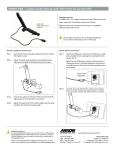
Package Contents:
(1) CM097-2-USB - Lighter socket mount with mini USB power
Specs: Input (12V - 24V) outlets, Output (5V, 500mA)
CM097-2-USB
Lighter Socket Mount
with Mini USB Power
Make sure the power mentioned in the specs is compatible
with your device prior to use.
!
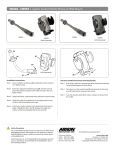
Mount Installation Instructions
Do not place mount in or near an air bag deployment
zone or where it will obstruct view of the road.
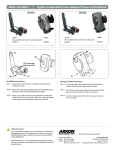
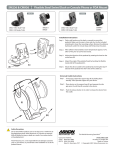
Dual T Device Attachment
Step 1.
Insert the DC Power plug (A) completely into the vehicle’s
12V - 24V / lighter socket.
Step 2.
Adjust the angle of the pedestal arm by tightening the
adjustment knob (B) to the desired placement angle.
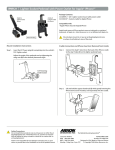
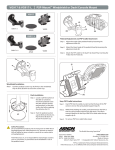
Step 1.
Attach the mini USB power connector (E) to the device’s
power socket (F).
Note: The mini USB power connector will only power /
charge your device. Inserting the power connector in a
mini USB sync port will not provide power to the device.
(Device sold
separately)
A
H
B
G
F
C
D
Mini USB
power
connector
Step 3.
If necessary, adjust the rotation of the mounting head by
tightening the screw (C) with a screwdriver.
Step 4.
Adjust the angle of the dual T-tab head by tightening the
wing nut (D) to the desired mounting angle.
!
Safety Precautions
Do not install Arkon products over an air bag cover or within the air
bag deployment zone. Arkon Resources, Inc. assumes no responsibility of liability for injury or death as a result of car crashes and / or
air bag deployment.
Arkon is not responsible for any damages caused to your car, your
device, or yourself due to the installation or use of this pedestal mount.
E
Step 2.
Attach the device to the pedestal by inserting the dual
T-tabs of the pedestal (G) into the dual T-slots of the
device (H).
The Mobile Mounting Specialists™
Consumer Hotline:
USA (800) 841-0884
INT’L (626) 254-9005
Monday - Friday 9 am - 5 pm, PST
www.arkon.com
Arcadia, CA 91006 USA
Designed in USA | Made in Taiwan
© Copyright 2009 Arkon Resources, Inc.