1
CHAPTER 26: BIOS
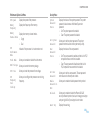
Performance Options Sub-Menu
CPU Speed
Displays the speed of the processor.
Memory
Frequency
Memory
Channel Mode
Displays the frequency of the memory.
CPU
Performance
Mode
Turbo Mode
Indicates if the processor is in turbo mode or not.
DDR3 Voltage
CPU Vcore
CPU
Frequency
OverClocking
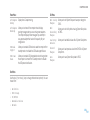
Security Menu
System
Password
Status
Displays the memory channel modes.
•
•
Single
Dual
Allows you to enable or disable the turbo mode.
Set System
Password
User
Password
Status
Allows you to configure the processor over-clocking
frequency.
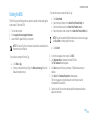
Allows you to set the system password. The system
password controls access to the system setup utility.
Displays the status of the user password.
•
•
Allows you to enter the memory voltage.
Allows you to set the processor Vcore voltage.
Displays the status of the system password. The system
password is also known as the Master/Supervisor
password.
• Set: The system password is enabled.
• Clear: The system password is disabled.
Set User
Password
Set: The user password is enabled and the built-in PS/2
compatible mouse controller is enabled.
Clear: The user password is disabled and the built-in
PS/2 compatible mouse controller is disabled.
Allows you to set the user password. The user password
controls access to the computer at boot.
Enable
Password on
Boot
Failsafe
Allows you to enable or disable password entry on boot.
Asset Tag
Displays the asset tag.
Allows you to enable or disable the Phoenix FailSafe™
security software to protect, track, and manage your laptop
and your digital files if your laptop is lost or stolen.
0116 /
0116