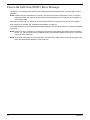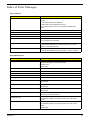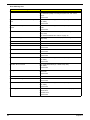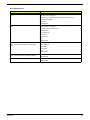
1
Security
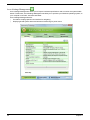
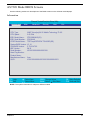
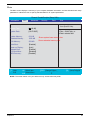
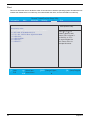
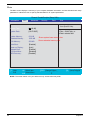
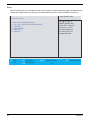
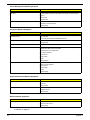
The Security screen contains parameters that help safeguard and protect your computer from unauthorized
use.
Information
Main
Phoenix TrustedCore(tm) Setup Utility
Advanced
Security
Boot
Exit
Item Specific Help
48
Supervisor Password is :
User Password is :
SATA HDD Password is:
Clear
Clear
Clear
Set Supervisor Password:
Set User Password:
Set SATA HDD Password
[Enter]
[Enter]
[Enter]
Password on Boot :
[Disabled]
Supervisor Password
controls access of the
whole setup utility.
It can be used to boot
up when Password on
boot is enabled.
F1 Help
Select Item
F5/F6 Change Values
F9 Setup Defaults
Esc Exit
Select Menu
Enter Select
F10 Save and Exit
Sub-Menu
Chapter 2