Transcript
HS801 Headset
Bluetooth®
Wireless Headset
Quick Start Guide
6809492A44-A
2
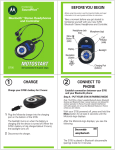
Turn On Your Headset
Volume
3
Turn On Your Phone’s
Bluetooth Feature.
Bluetooth power option is OFF by
default.
Bluetooth power option must be ON
to search for devices.
4
Pair Your Headset and
Phone.
You must electronically pair your
headset and your Bluetooth enabled
(S) phone before you can make a call.
Volume
2. Turn on your headset.
3. Turn on your phone's
Bluetooth feature.
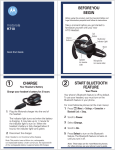
Please read this first!
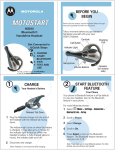
Charge Your Headset
For 2 Hours.
Before you can use
your Bluetooth®
headset you must:
1. Charge your headset for
2 hours.
STOP
1
4. Pair your headset and
phone.
Release tab down
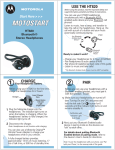
1. Plug the Motorola phone charger
into the back of the headset, with
the charger's release tab facing
down and the headset facing up.
The indicator LED turns on.
2. When your headset fully charges
(about 2 hours) the indicator LED
turns off.
Indicator LED
Find this feature on your Motorola
phone:
M> Settings > Connection > Bluetooth Link >
Handsfree > Look for Devices
3. Select Motorola HS801 from the list
of Bluetooth devices.
Find this feature on your Motorola
phone:
4. Select YES to bond with the Motorola
HS801.
M > Settings > Connection > Bluetooth Link >
Setup >
Scroll to Power:
Select Change.
Scroll to On.
Press Select.
5. Enter the passkey 0000 on the phone.
Select OK.
MFB
Hold both the MFB and one of the
volume buttons until the LED turns
on. When the headset is ON the LED
flashes every 3 seconds.
4 Continued. . .
For other phones, please refer to your
phone’s user’s guide.
Indicator LED
MFB
1. Press one of the volume buttons
until the indicator LED lights
steadily.
2. Perform a device discovery from
your Motorola phone:
6. The LED indicator flashes rapidly
when pairing is completed.
If you need more help with this headset,
Contact us at 1-877-MOTOBLU
(1-877-668-6258) or go to
www.hellomoto.com/bluetooth
and click on "Support"