1
Product Specifications
Slots for mini expansion cards
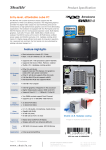
The DS81L features two slots for Mini expansion cards. One is a half-size
Mini-PCIe-slot dedicated for Wireless LAN adapter cards (e.g. the
accessory WLN-C). The second is of full-size format and it supports
mSATA (Mini Serial ATA) cards. This means even the new generation of
Solid State Drives (SSD) in a compact Mini PCIe card form factor can
be used. The mSATA interface supports a transfer rate of up to 6 Gb/s
for super high-speed storage.
Photos: half-size WLAN card (left) and full-size mSATA SSD card (right).
Optional WLAN kit “WLN-S”
The Shuttle Slim-PC Accessory WLN-S is a wireless LAN kit consisting of a
Mini-PCIe card, two antennas and appropriate cables. With WLN-S you
can equip the DS81L with the wireless LAN standard according to IEEE
802.11b/g/n. Data transfer speeds of up to 300 MBit/s can be reached
and WPA2 with AES encryption is supported, too.
The supplied 75/100mm VESA mount allows for installation on to walls or
monitors which is particularly interesting for the industry segment,
company buildings and public institutions. Other than this, the chassis
bears numerous threaded holes (M3) enabling it to be fitted almost
anywhere.
Kensington Lock
This is a small, metal-reinforced hole as part of an anti-theft system. The
DS81L provides an appropriate hole on both side of its chassis. The lock
and cable are not included.
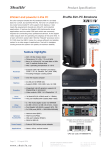
External power button by separate remote line
If because of space constraints (e.g. in case of fixed installation), the
machine cannot be switched on by pressing the front power button, it
can be powered on by a separate remote line. You will find an
appropriate four-pin-connector at the back panel of the DS81L (pitch
2.54 mm). Furthermore, this connector provides a Clear CMOS function
and +5V DC voltage supply for external devices.
+5V voltage (2)
Clear CMOS (1)
Front Panel
Page 6 2 December 2014
www.shuttle.eu
(4) Power Button
(3) Ground
Power on after Power fail
The BIOS setup provides a "Power-On after Power Fail" function that can
be found under "Power Management Configuration". As the name
indicates, this function determines the PC's behaviour after power
failure: (1) unconditional power on, (2) restore former status or (3) keep
system turned off. As a matter of the nature of this function, it may fail
after short power failures. This is why the DS81L also comes with a
hardware-based solution. By removing Jumper 4 (see image) the
system will start unconditionally once power is applied.
Shu t tl e Computer Han dels GmbH
Fritz- Strassmann-S t r. 5
25337 Elmshorn | Germany
Tel. +49 (0) 4121-47 68 60
Fax +49 (0) 4121-47 69 00
[email protected]
© 2014 by Shuttle Computer Handels GmbH (Germany). All information subject to change without notice. Pictures for illustration purposes only.
VESA mount