1
O&O AutoBackup
4
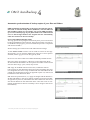
3. Now select the destination drive which is simultaneously also the
start event. O&O AutoBackup supports all disks labeled as”hotplug
capable”, meaning those disks that can be exchanged while the computer’s running. If the storage medium was already connected before
O&O AutoBackup was started, you’ll be able to select it from the list of
available destination disks. Otherwise, connect it now, click Refresh and
select it from the list.
4. Save your settings.
5. If you want to run the copy on your stick or disk immediately, click
Run’. Otherwise, the action selected will be executed whenever you
connect your destination disk to your computer.
Action settings
Under Advanced settings, you can define batch commands that can
be run instead of default actions on the destination disk after it’s
connected. It’s also possible to modify the structure of the directory for
saving data/folders on the destination drive. The option “Use subfolder“
will let you specify a separate folder name. With the option “Attach the
computer name in the path“, the name of the computer will be added to
the path on the destination drive where the files/folders will be saved.
The Event Viewer lists the most important events such as program start,
program end, saving of settings, disk connection as well as processing
with processing status.
Made in Germany. Made in Berlin.
All O&O products are developed and serviced in Berlin. We take the
concerns of our customers very seriously because we know just how
important their data is for them. What’s more, we’ve been doing so for
over ten years!
Schedule settings
Supports Windows® 8.1, 8, 7, and Vista ®
Help
O&O Software GmbH
Am Borsigturm 48
13507 Berlin
Germany
Tel
+49 (0)30 991 9162-00
Fax
+49 (0)30 991 9162-99
[email protected]
Webwww.oo-software.com
© 2011-2014 O&O Software. All rights reserved. O&O and the O&O logo are trademarks or registered trademarks of O&O Software. All named
Trademarks are the property of their respective owners.