1
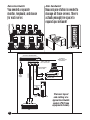
just plug and unplug single cables
rather than three. And these
cables can span as much as
100 feet (30.5 m) on either side of
the switch, so you have plenty of
flexibility in your installation.
Each ServSwitch supports
VGA and SVGA video; with
special cabling, it can also handle
XGA and XGA-2. See Technically
Speaking below and
Specifications on page 4 for
information about video
compatibility, screen resolutions,
and cabling distances.
For information about lowsmoke cables, contact Technical
Support.
A switch for every application
ServSwitch comes with 2, 4, 8,
12, or 16 CPU ports. Depending on
the model, ServSwitch is available
in a Mini, Slim, or Full Chassis.
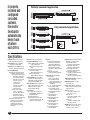
You can use ServSwitch to
ServSwitch Expansion Cable
to cascade subsidiary (“submaster”) switches to a master
ServSwitch in order to control
as many as 256 CPUs.
Support for audio, serial, and USB
With the use of specialized
cables, the ServSwitch can be
adapted to support USB
keyboards and mice, serial touch
screens, or audio speakers.
Order the USB to PS/2 User
Cable (EHNUSB or EHN485) to
support USB keyboard and mouse
connections.
Order Server and User
ServSwitch Cables with Serial
Support (EHN382S, EHN383S) to
connect serial devices such as
touch screen monitors.
Order Server and User
ServSwitch Cables with Audio
Support (EHN151A, EHN154A) to
use one set of speakers for
multiple CPUs.
Flash upgradable
Most ServSwitch models
feature flash ROM. As firmware
upgrades become available, you
can easily download them to the
switch through the RS-232 port.
If you need a ServSwitch
without flash memory for secure
applications, choose the -R2
ServSwitch versions which
feature non-upgradable ROM.
4-Port Expansion Boards are
available if you would like to add
CPU ports to a Full-Chassis 8- or
12-Port ServSwitch. Since it’s a
tricky procedure, we’ll install the
upgrade for you at no extra
charge.
Specially quoted cables are
available if you would like to use
an IBM 9515, 9517, or 9518
monitor. Call Tech Support at
724-746-5500 to find out about the
custom cables for these products.
If you would like to mount a
2-Port Mini-Chassis ServSwitch in
a 19", 23", or 24" rack, our product
codes for the required Rackmount
Kit are RMK19M, RMK23M, or
RMK24M. The corresponding
product codes for the 4- or 8-Port
Slim-Chassis switches are
RMK19B, RMK23B, or RMK24B.
The corresponding codes for the
8-, 12-, and 16-Port Full Chassis
units are RMK19C, RMK23C, or
RMK24C.
The ServSwitch is not
designed to work with dongles or
docking stations. Call Technical
Support for information on other
products that support these
devices.
Technically Speaking
ervSwitch commands consist
of a press and release of the
left Control (CTRL) key followed
by just a few other keystrokes.
The ServSwitch is not
designed to handle bus-mouse
I/O, so it cannot be attached to
bus-mouse CPUs, and it cannot
be an adequate master unit for
submaster ServSwitch busmouse units.
The ServSwitch is not
designed to be cascaded with
the ServSwitch Multi, the
ServSelect, or the ServSwitch
Duo. However, ServSwitch can
be cascaded with itself, the
S
2
ServSwitch Ultra™, the Matrix
ServSwitch, and the ServSwitch
Affinity™.
The maximum distance that
original ServSwitch cable can be
run is 20 ft. (6.1 m) end to end
from the shared peripherals to
any CPU. Because some CPUs
can drive keyboard and mouse
signals farther than that, we offer
coaxial cables in lengths up to
100 ft. (30.5 m). (Consult with your
CPU manufacturers about this,
and note that screen-image
quality will decrease with
distance.)