1
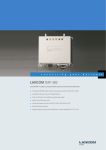
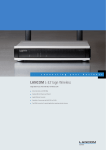
LANCOM L-1302acn dual Wireless
Features as of: LCOS 9.00
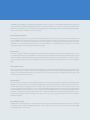
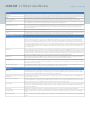
IEEE 802.11ac/IEEE 802.11n Features
Short Guard Interval
The guard interval is the time between OFDM symbols in the air. IEEE 802.11n gives the option for a shorter 400 nsec guard interval compared to
the legacy 800 nsec guard interval. Under ideal RF conditions this increases the throughput by upto 10%
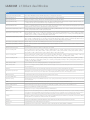
WLAN operating modes
WLAN access point
Infrastructure mode (autonomous operation or managed by LANCOM WLAN controller)
WLAN bridge*
Point-to-multipoint connection of up to 16 Ethernet LANs (mixed operation optional), broken link detection, blind mode, supports VLAN When
configuring Pt-to-Pt links, pre-configured names can be used as an alternative to MAC Adresses for creating a link. Rapid spanning-tree protocol
to support redundant routes in Ethernet networks
WLAN router
Use of the LAN connector for simultaneous DSL over LAN, IP router, NAT/Reverse NAT (IP masquerading) DHCP server, DHCP client, DHCP relay
server, DNS server, PPPoE client (incl.Multi-PPPoE), PPTP client and server, NetBIOS proxy, DynDNS client, NTP, port mapping, policy-based routing
based on routing tags, tagging based on firewall rules, dynamic routing with RIPv2, VRRP
WLAN client*
Transparent WLAN client mode for wireless Ethernet extensions, e.g. connecting PCs or printers by Ethernet; up to 64 MAC addresses. Automatic
selection of a WLAN profile (max. 8) with individual access parameters depending on signal strength or priority
*) Note
Operating mode only available for IEEE 802.11n WLAN module. Operating mode for IEEE 802.11ac WLAN module in preparation.
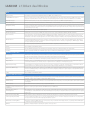
Firewall
Stateful inspection firewall
Incoming/Outgoing Traffic inspection based on connection information. Trigger for firewall rules depending on backup status, e.g. simplified rule
sets for low-bandwidth backup lines. Limitation of the number of sessions per remote site (ID)
Packet filter
Check based on the header information of an IP packet (IP or MAC source/destination addresses; source/destination ports, DiffServ attribute);
remote-site dependant, direction dependant, bandwidth dependant
Extended port forwarding
Network Address Translation (NAT) based on protocol and WAN address, i.e. to make internal webservers accessible from WAN
N:N IP address mapping
N:N IP address mapping for translation of IP addresses or entire networks
Tagging
The firewall marks packets with routing tags, e.g. for policy-based routing; Source routing tags for the creation of independent firewall rules for
different ARF contexts
Actions
Forward, drop, reject, block sender address, close destination port, disconnect
Notification
Via e-mail, SYSLOG or SNMP trap
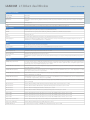
Quality of Service
Traffic shaping
Dynamic bandwidth management with IP traffic shaping
Bandwidth reservation
Dynamic reservation of minimum and maximum bandwidths, totally or connection based, separate settings for send and receive directions. Setting
relative bandwidth limits for QoS in percent
DiffServ/TOS
Priority queuing of packets based on DiffServ/TOS fields
Packet-size control
Automatic packet-size control by fragmentation or Path Maximum Transmission Unit (PMTU) adjustment
Layer 2/Layer 3 tagging
Automatic or fixed translation of layer-2 priority information (IEEE 802.11p-marked Ethernet frames) to layer-3 DiffServ attributes in routing mode.
Translation from layer 3 to layer 2 with automatic recognition of IEEE 802.11p-support in the destination device
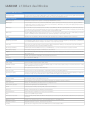
Security
Intrusion Prevention
Monitoring and blocking of login attempts and port scans
IP spoofing
Source IP address check on all interfaces: only IP addresses belonging to the defined IP networks are allowed
Access control lists
Filtering of IP or MAC addresses and preset protocols for configuration access
Denial of Service protection
Protection from fragmentation errors and SYN flooding
General
Detailed settings for handling reassembly, PING, stealth mode and AUTH port
URL blocker
Filtering of unwanted URLs based on DNS hitlists and wildcard filters
Password protection
Password-protected configuration access can be set for each interface
Alerts
Alerts via e-mail, SNMP-Traps and SYSLOG
Authentication mechanisms
EAP-TLS, EAP-TTLS, PEAP, MS-CHAP, MS-CHAPv2 as EAP authentication mechanisms, PAP, CHAP, MS-CHAP and MS-CHAPv2 as PPP authentication
mechanisms
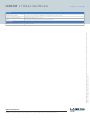
WLAN protocol filters
Limitation of the allowed transfer protocols, source and target addresses on the WLAN interface
Adjustable reset button
Adjustable reset button for 'ignore', 'boot-only' and 'reset-or-boot'
IP redirect
Fixed redirection of any packet received over the WLAN interface to a dedicated target address