1
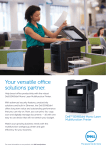
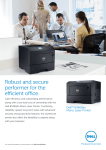
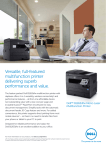
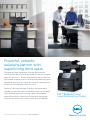
Dell B5465dnf
Mono Laser Multifunction Printer
Performance and versatility at outstanding value
•Print, scan, copy and fax from a single device and get optimal
networking performance with built-in 1000Mbps Gigabit Ethernet.
•Generate professional business print-outs at blazing speeds of up to
70 pages per minute (ppm) (letter) / 66 ppm (A4)1. First page out time
is only 4 second with the powerful 800 MHz Dual-Core processor
and 1GB2 on-board memory.
•Scan two-sided documents at outstanding speeds of up to 72 sides per
minute (spm) (letter) / 70 spm (A4) with the built-in Duplex Automatic
Document Feeder (DADF) designed with a dual scan sensor.
•Boasting a high maximum duty cycle of up to 300,000 pages per
month3, the Dell B5465dnf is able to handle heavy workloads reliably.
•Save on printing costs with the optional Extra High Yield toner
cartridge. With a 45,000 page yield4, it offers a low cost per page
(CPP) of US 1 cent per page5.
•Gain peace of mind with standard 3 Years Limited Hardware
Warranty6, which includes fuser replacement to help save you from
high replacement costs.
Robust scalability to meet evolving
productivity needs
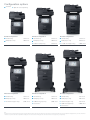
•Expand the input paper capacity to meet higher printing demands
with the optional 550-sheet and 2,100-sheet trays (sold separately).
Add an optional 550-sheet tray and one 2,100-sheet high capacity
input tray7 to get a maximum input capacity of 3,300-sheets.
•Print on a variety of paper types such as labels, envelopes and
transparencies. You can even print on specialty or smaller sized media.
•Besides the standard USB connection or Gigabit Ethernet
connection, the optional Wireless Print Server (sold separately) can
enable 802.b/g/n wireless data transfer for wireless printing8.
•Dell’s optional Hard Disk is a secure hard disk with encryption to
protect user data. It is used to buffer jobs, collate large jobs, store
forms, fonts or macros and enables job building.
Advanced security features designed to
protect data
•Help prevent confidential documents sent to the printer from being
viewed by others with the PIN authentication feature. This feature
allows you to set a PIN that must be entered on the printer to retrieve
print jobs. A maximum number of PIN entry attempts may also be
specified so when the number of PIN entry attempts exceeds the
specified amount, all of the related print jobs are deleted.
•Protect your data with SNMPv3 support for added network security,
while the optional Wireless Print Server supports WPA2.0 and 802.1X
wireless security.
•Dell B5465dnf automatically inspects downloaded firmware updates
for the appropriate digital signatures. Firmware that is not correctly
packaged and signed is rejected.
•With Access Controls, you can choose from a drop-down list of
available security templates to control local and remote access to
specific menus, functions and workflows. It also provides the ability
to disable functions entirely.
•Physically lock the printer with a Kensington Lock. Use the optional
lockable paper tray to protect costly or sensitive media, such as
company letterheads or checks (Kensington Lock and optional
Lockable Tray sold separately).
Boost workforce efficiency
•Easily navigate and adjust menu settings with the 10.2 inch LCD and
intuitive control panel.
•With the Remote Operator Panel application on this printer, you
can remotely access the printer control panel display using the
Embedded Web Server (EWS).
•Print directly from mobile devices with Dell Mobile Print app9 for
Android™.
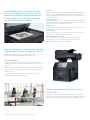
Fast data transmission with Gigabit Ethernet
10/100/1000.
Easily connect to a wireless network with the
optional Wireless Print Server (sold separately).
Ease of operation with intuitive 10.2 inch LCD
touch screen and control panel.
Scan two-sided documents at outstanding
speeds of up to 72 sides per minute (spm)
(letter) / 70 spm (A4) with the built-in dual
scan sensor DADF
Increase efficiency with fast print speeds
of up to 70ppm (letter) / 66ppm (A4)1 and
automatic two-sided printing.
Print directly from Android™ mobile devices
using Dell Mobile Print9.
1.Measured in accordance with ISO IEC 27434 methodology. Actual print speeds will vary with use.
2.1 MB means 1 million bytes, 1 GB means 1,000 megabytes or 1,000,000,000 bytes; total accessible capacity varies depending on operating environment.
3.Duty cycle is defined as the maximum number of imaged outputs a device could deliver in a month. This metric provides a comparison of robustness in relation to other Dell printers and multifunction printers.
4.Toner yield based on testing in accordance with ISO/IEC 19752. Yields vary with usage and environmental conditions.
5.Cost Per Page (CPP) model assumes exclusive use of Extra High Yield Use and Return consumables after ship-with consumables run out. CPP calculation is based on list prices of Dell Extra High Yield Use and
Return Toner (45,000 page yield).
6.For a copy of Limited Hardware Warranty, write Dell USA LP, Attn: Warranties, One Dell Way, Round Rock, TX 78682 or visit dell.com/warranty. For warranty information on other countries, see website:
dell.com/servicecontracts and then select the country.
7.Purchase of the optional Castor Base is required when using the optional 2,100-sheet input tray.
8.PC must have a wireless card or be connected to a wireless network and have the printer software installed for proper function.
9.The printer and the mobile device must be connected to the same wireless network.