1
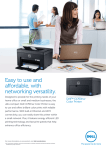
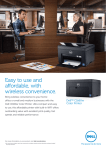
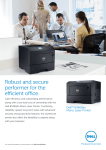
Dell B2360d and B2360dn
Mono Laser Printers
Boost office productivity
Do more with Dell B2360dn
•Fast printing speed of up to 40 pages per minute (ppm) (letter) / 38
ppm1 (A4) with up to 1200 x 1200 dpi resolution.
•Connect your printer to a wireless network4 with the optional
External Wireless Adaptor (sold separately).
•Powerful 800Mhz dual-core processor and large onboard memory
(128MB2 for Dell B2360d; 256MB2 for Dell B2360dn) enables fast data
processing.
•Monitor, manage and create reports for the printer fleet on your network
with Dell OpenManageTM Printer Manager V2 (OMPM) utility. Use the
OMPM to easily update the entire managed printing environment.
•Get fast network data transmission with Gigabit Ethernet
10/100/1000 (applicable for Dell B2360dn only).
•Eliminate the clutter on PCs by replacing multiple print drivers
with one versatile solution, the Dell Open Printer Driver (OPD). It is
designed to help reduce the huge workload of driver deployment and
setting changes.
•Stay well stocked with the standard 250-sheet paper tray. Or, expand
the printing capacity with the optional 550-sheet input paper tray
(sold separately).
•Print directly from Android™ mobile devices using Dell Mobile Print app5.
Reliable performance at an affordable price
Get secured with Dell B2360dn
•With a maximum duty cycle of up to 80,000 pages per month ,
the Dell B2360d and B2360dn printers are able to meet high office
printing demands reliably.
•Gain peace of mind with security features anchored to protect your
data. Dell B2360dn supports SNMPv3 to ensure network security,
while the optional External Wireless Adaptor supports WPA2.0 and
802.1X wireless security.
3
•Minimize downtime and maintenance cost with the high page yield
imaging drum of up to 60,000 pages.
•Works seamlessly with your new Microsoft Windows 8 operating system.
®
®
•Securely access the Embedded Web Server (EWS) via password for
secure authentication. Valid credentials must be provided before
gaining access to the protected function.
Environmentally-conscious design with
security features
•Reduce paper usage by up to 50% with automatic two-sided printing
and reduce energy consumption by enabling the Eco Mode function.
•Physically lock your printer with a Kensington Lock. Use the optional
lockable paper tray to protect costly or sensitive media, such as
company letterheads or checks (Kensington Lock and optional
Lockable Tray sold separately).
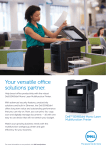
Increase efficiency with fast print speeds
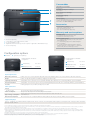
of up to 40ppm (letter) / 38ppm (A4)1 and
automatic two-sided printing.
Intuitive user interface with 2 Line LCD, 7
Buttons, 1 LED indicator.
Increase the printing capacity to 850-sheets
by adding an optional 550-sheet tray (sold
separately).
Maximize network performance with built-in
Gigabit Ethernet 10/100/1000 (Networking
capability is applicable to Dell B2360dn only).
Easily connect to a wireless network with the
optional External Wireless Adaptor (applicable
to Dell B2360dn only).
Print directly from Android™ mobile devices
using the Dell Mobile Print app5 (applicable to
Dell B2360dn only).
1.Measured in accordance with ISO IEC 27434/35 methodology. Actual print speeds will vary with use.
2.1 MB means 1 million bytes, 1 GB means 1,000 megabytes or 1,000,000,000 bytes; total accessible capacity varies depending on operating environment.
3.Duty cycle is defined as the maximum number of imaged outputs a device could deliver in a month. This metric provides a comparison of robustness in relation to other Dell printers and
multifunction printers.
4.P C must have a wireless card or be connected to a wireless network and have the printer software installed for proper function.
5.The printer and the mobile device must be connected to the same wireless network.