1
Multimedia Contact Center
Increase Reachability and
Customer Service
Intelligent Call Distribution
The integrated OpenScape Business
Multimedia Contact Center allows you
to improve customer service and
therefore the satisfaction of your customers.
Thanks to intelligent distribution of
calls, your customers are quickly and
competently served, and always connected to the suitable employee.
In addition to call distribution, you can
also offer customers e-mail or fax as
methods for making contact. Just like
voice calls, inquiries over these media
are always automatically forwarded to
the right employee. If all employees
are busy, callers can also leave voice
messages so that your employees can
call back. This means no order is lost.
Flexible Queue Options
For the case when all of your employees (agents) are talking on the phone,
individual queue options can offer various options to customers, e. g. individual announcement or forwarding to
other service groups.
Customers can also shorten their waiting times by leaving a message. Your
employees then call back when there
are less incoming new calls.
Agent in Multiple Groups
The competence of your employees can
be utilized optimally by also enabling
them in multiple Contact Center
groups. An employee (agent) will then
always firstly receive the calls from the
group you have assigned him as the
highest competence level: e. g. 100% in
"Sales", but only 80% in the "Service"
group. The employee therefore receives calls for "Sales" as a preference.
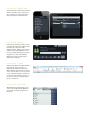
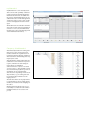
Wallboard
To keep your employees always up-todate on Contact Center utilization, for
instance on how many callers are currently in the queuing mechanism, details can be displayed in real time on a
large screen monitor or by a projector.
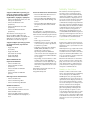
Caller List
Authorization Level
Detailed information on all calls, faxes,
and e-mails made until now can be
found in the caller list of the Contact
Center. Search and sorting functions
support fast retrieval of specific details.
Various authorizations can be assigned
for the role of an agent (employee), supervisor (team leader) or administrator depending on the structure of your
Contact Center.
Preferred Agent
To improve personal support, the Contact Center can be configured so that a
particular customer is always automatically transferred to his contact person.
VIP Support
VIP customers can be transferred directly to free agents without having to wait a
long time in a queuing mechanism. This
ensures that your VIP customers are always served quickly and no important
order is lost.
Call Number-Dependent Voice
Guidance
OpenScape Business can play individual announcements in response to the
phone number of the caller. If you have
international customers, for instance,
the caller can always be addressed in
his national language making him feel
he has the best possible support.
Wrap-Up
OpenScape Business gives your employees time to take care of wrapping
up their customer calls. The wrap-up
time is individually configurable. Extended options can be recorded and
subsequently evaluated, for instance
what the caller wanted: Order, information, complaint, etc..
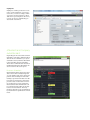
Administration of the Contact
Center
Depending on the assigned role (authorization level), the user has the capability of customizing various options
individually and easily:
• Queuing mechanisms
• Schedules
• Breaks
• Wrap-up codes
• Announcements
• External directory
Contact Center Clients
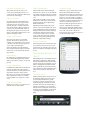
myAgent
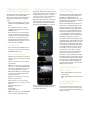
The myAgent client is the interface
with which employees (agents) accept
customer calls according to qualifications. Thanks to the integrated presence display, agents can quickly consult further experts because the agent
can immediately see which expert is
free at the moment and can therefore
give him support.
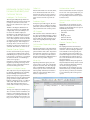
myAgent ensures that your agents always identify how many callers are still
in the queuing mechanism, and they
can then react appropriately.
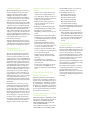
Depending on the assigned roles (authorization level), over 20 predefined
reports can be produced, for instance
to see how many calls each agent accepted.