1
Simple Setup Suite from Epson
Epson projectors offer a host of innovative features that
ensure flexible placement and fast, easy setup.
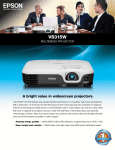
Easy image adjustments — Position your projector almost anywhere and still get a correctly proportioned image with auto vertical correction and easy-slide horizontal image correction.
USB Plug ‘n Play instant setup — Use the included
USB cable to instantly project content. View your projected presentation on the screen and your computer simultaneously.
HDMI connectivity — Get both audio and brilliant HD
video content with just one cable. Compatible with the
latest laptops, Blu-ray® and media players.
Additional Features/Benefits
• PC-free slideshows — via a USB thumb drive
• The ultimate in portability — compact, lightweight
design; take it to the next conference room or even
to the client’s location
• Filters to protect your investment — with easy
side access for hassle-free maintenance
Quick, smart controls
• Instant Off® — quickly power down the projector, pack up and go
• Sleep Mode (A/V Mute) — pause your presentation without turning the projector off
• Direct Power Off/On — control your projector with
the flip of a switch
The more pixels, the better the detail
Resolution defines the level of detail and depth you’ll see
in a projected image. It’s measured as the number of
pixels wide by the number of pixels high.
1.5 x more
2
x more
resolution than SVGA
resolution than SVGA
SVGA (800 x 600)
XGA (1024 x 768)
WXGA (1280 x 800)
Meets basic projection needs
Ensures sharper detail
Offers high definition and is ideal for
widescreen (16:10) displays
For more information on Epson’s environmental
programs, go to eco.epson.com
Eco Features
• RoHS compliant
• Recyclable product 6
•Epson America, Inc. is a SmartWay SM
Transport Partner 7