1
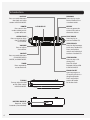
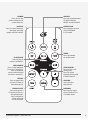
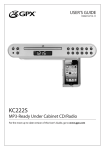
POWER
Press to turn the
under cabinet music
system off or on.
DISPLAY
Press to switch between
the clock and radio
station in RADIO MODE.
PLAY/PAUSE
Press to play or
pause a loaded CD.
SKIP/SEARCH
Press to skip between
tracks on a loaded CD.
Press and hold to
search and individual
track on a loaded CD.
REPEAT
Press to repeat the
current CD track or
the entire album.
PROG/CLKSET
Press to program a
CD to play tracks in a
designated order.
Press and hold in
power off mode
to set the clock.
Customer Support: 1-888-999-4215
SOURCE
Press to switch between
CD MODE, RADIO
MODE, and AUX MODE.
OPEN/CLOSE
Press to open or close
the CD DRAWER
in CD mode.
TIMER
Press repeatedly
to set the timer.
STOP/AM/FM
Press to stop a CD
during play.
Press to switch
between AM and FM
in RADIO MODE.
VOLUME
Press to adjust
the volume.
RANDOM
Press to play tracks
from a loaded CD in
a random order.
5