1
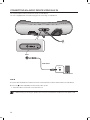
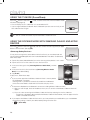
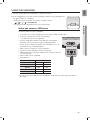
EnG USING THE USB MODE 1.Connect the USB device to the USB port on the back of the unit. button on the front panel of the Wireless Audio with Dock repeatedly until 2.Touch the the icon appears in the display. FUNC. •Each time you press the button, the selection changes as follows : ; ; ; ; AUX (LED Off) •The selected mode is displayed in red in the Function Display. ● playing Before you connect a USB device Read the list below to check compatibility. • This product may not be compatible with certain types of USB storage media. • The FAT16 and FAT32 file systems are supported. -- The NTFS file system is not supported. • Connect a USB device directly to the USB port of the product. Otherwise, you may encounter a USB compatibility problem. • Do not connect multiple storage devices to the product via a multicard reader. It may not operate properly. • Digital camera PTP protocols are not supported. • Do not remove the USB device while it is being read. • DRM-protected music files (MP3, WMA) from a commercial web site can not be played. • External HDDs are not supported. • Compatibility list Format File name File extension Bit rate Version Sampling Frequency DC 14V 4A USB AUX IN ONLY FOR SERVICE 5V 500mA DC 14V 4A USB AUX IN ONLY FOR SERVICE 5V 500mA Music MP3 WMA .MP3 .WMA 80~320 56~128 kbps kbps V8 44.1KHz 44.1KHz Do not connect your mobile device to the USB port and the Docking station at the same time for recharging. 21 VOL