1
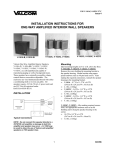
Mounting
PBX Access
The VIP-810 was designed for wall or table mounting.
Secure unit to wall studs or a suitable brace away
from heat sources or strong magnetic fields (motors,
fans, power supplies, etc.) with the control and
terminal strip accessible. One wood screw is included
for mounting.
When using the VIP-810 with an electronic key
system or PBX, a VIP-810 must be connected to a
loop start trunk (FXO) port.
When using the VIP-810 with a PBX station port, a
VIP-820 must be used to interface the telephone
system with the network.
Power Connections
NOTE: This equipment must be installed near an
AC power outlet due to the power cord being used
as a disconnect device.
•
The VIP-810 is provided with a VP-324 for North
American use.
After all required connections have been made,
plug the VP-324 into appropriate AC wall outlet.
Operation
Press line key (electronic key system) or dial trunk
access code (PBX) to connect to the VIP-810. The
VIP-810 automatically disconnects from page when
you hang up.
Pots Telephone Access
The VIP-810 may be connected to a POTS telephone
set. This gives you direct access to the network.
APPLICATION EXAMPLES
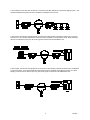
Use the VIP-810 with a PBX Loop Start Trunk Port and a VIP-800 to interface the telephone system to Valcom
powered speakers over a network. When the PBX Loop Start Trunk Port is accessed, the VIP-810 will activate the
VIP-800.
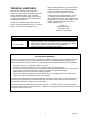
In this example, the VIP-810 is connected to the data network jack already installed and now the network connected
telephone can reach into the existing Valcom Page Control to access one way all call priority paging. This
configuration could be used at a guard shack where network access is available, but telephone access is not.
2
947052