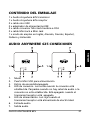
1
I can’t connect my Audio Anywhere 625.
Check the following:
1. Ensure that the power adapter is connected and the
power LED (5) is on (red).
2. Ensure that the distance between the transmitter and
receiver is not greater than 10 metres and that there are
no large obstacles in the way.
3. Check that the connection LED (4) is on (not blinking). If it
is not on, press the ON/OFF switch (3).
No sound comes out of the audio installation.
x
Ensure that the audio cable is correctly connected (AUX
IN), that the correct input has been selected on your
audio installation and that your audio system’s volume is
set to the desired level.
x
Check that neither the transmitter nor receiver is muted.
I have connected the sound from the TV wirelessly with
my audio installation but the sound is not synchronised
with the picture.
Your TV needs more time to construct the picture than it does
to play the sound.
The sound from your TV is therefore played slightly later so
that both picture and sound are synchronised.
For the best result, connect the Audio Anywhere transmitter
to the audio output on your TV and not to the audio output
on your set-top box or satellite receiver.
If you connect the transmitter to the headphone output, the
TV’s speakers will be disconnected and you can continue to use
the TV remote control to regulate volume via the Audio
Anywhere 625.
Can I connect my speakers directly to the receiver?
AUDIO ANYWHERE 625
9
ENGLISH
FREQUENTLY ASKED QUESTIONS