1
INSTRUCTIONS
Locking
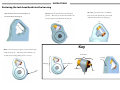
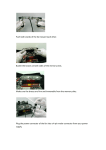
(1) Press the retract button (a) and pull the
(2) Once you have enough cable, loop the cable around an
(3) Locate the security slot on your laptop or computer (d). Insert the pin
lock head out of the housing (b) allowing
immovable object such as a table leg (c) or anchor. Then slide
of the lock head into the security slot (d), and push the key barrel on the back
enough cable to loop around an immovable
the lock head back through the opening in the housing.
of the lock (e) until you hear a click. Your computer is now secured.
object
(b)
(d)
(c)
(a)
(e)
Unlocking
(4) To secure your CODi® laptop carrying case,
(5) Insert the pin of the lock head into the security slot
(6) Insert the key into the key barrel and turn the key clockwise (h). The
loop the cable around an immovable object such as
located on the side of the housing (g). Your CODi® laptop
barrel will extrude out of the lock head to the unlock position (i). You
a table leg or anchor. Then loop the cable through
carrying case is now secure.
can now remove your lock from the security slot.
your carrying case handle (f ).
(h)
(i)
(f)
(g)