1
QuickSpecs
HP EliteBook 8760w Mobile Workstation
Standard Features (availability may vary by country)
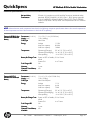
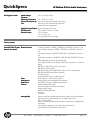
Wired Equivalent Privacy (WEP) support up to 128-bit keys
Wi-Fi Protected Access (WPA) and WPA2 support
802.1x authentication support, including EAP-TLS, EAP-TTLS, PEAP-GTC,
PEAP-MSCHAPv2, and LEAP
Advanced Encryption Standard (AES) support
Dual antennas integrated in the display enclosure
Intel Centrino Ultimate-N Integrated support for 802.11a, b, g, and n*
6300 (3x3)
3 transmit, 3 receive antennas
Up to 450 mbps data rate
Atheros HB112AGN
Integrated support for 802.11a, b, g, and n*
802.11a/b/g/n (3x3)
3 transmit, 3 receive antennas
WiFi Adapter
Bluetooth Specification v2.1+EDR compliant
HP Integrated Module
with Bluetooth 2.1+EDR Works with a wide range of Bluetooth devices
Wireless Technology
* In countries where 802.11n is not allowed, this capability is not enabled (802.11a/b/g only).
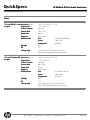
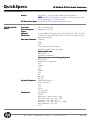
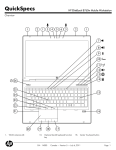
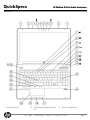
Keyboard
The HP spill-resistant keyboard is designed using a thin layer of Mylar film under the keyboard and a
drain system that funnels fluid through a hole in the bottom of the notebook. This minimizes the risk of
damage to sensitive components underneath. The 101/102-key compatible keyboard features a fullpitch key layout with desktop keyboard features, such as editing keys, both left and right control and alt
keys, function keys, and 19.05 x 19.05 mm key pitch (center-to-center spacing). U.S. and International
key layouts are available. Other features include hot keys for instant access to power conservation and
brightness and a separate numeric keypad.
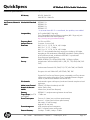
HP DuraKeys is a clear coating applied over the notebook keyboard that
HP DuraKeys
helps protect the finish and the printed characters on the keys.
The optional backlit keyboard for low light environments is toggled on and
Optional Backlit
Keyboard
off with the Fn+F12 function key.
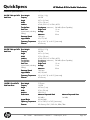
Launch Buttons and
Function Keys
Separate launch buttons provide easy access to the following features: wireless on/off, volume mute, HP
QuickWeb, and calculator launch button. Function keys provide control of the following features:
standby mode, external display, volume down, volume up, HP Power Assistant, and display brightness.
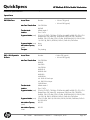
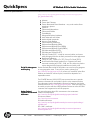
Pointing device
Touchpad with on/off button (double-tap to activate/de-activate), two-way scroll, gestures, three pick
buttons
Pointstick with three additional pointstick buttons
DA - 14000
North America — Version 11 — February 29, 2012
Page 9