1
10
Part I: Windows 7 Stuff Everybody Thinks You Already Know
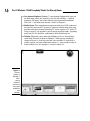
Figure 1-1:
Windows 7,
the newest
version of
Microsoft
Windows,
comes preinstalled on
most new
PCs today.
Windows gets its name from all the cute little windows it places on your
monitor. Each window shows information, such as a picture, a program that
you’re running, or a baffling technical reprimand. You can put several windows on-screen at the same time and jump from window to window, visiting
different programs. You can also enlarge a window to fill the entire screen.
Like the mother with the whistle in the lunch court, Windows controls every
window and each part of your computer. When you turn on your computer,
Windows jumps onto the screen and supervises any running programs.
Throughout all this action, Windows keeps things running smoothly, even if
the programs start throwing food at each other.
In addition to controlling your computer and bossing around your programs,
Windows 7 comes with a bunch of free programs. Although your computer
can run without these programs, they’re nice to have. These programs let
you do different things, like write and print letters, browse the Internet, play
music, and even create a slide show from your vacation photos and burn it to
a DVD — automatically.
And why are you using Windows 7? If you’re like most people, you didn’t have
much choice. Nearly every computer sold since October 22, 2009 comes with
Windows 7 preinstalled. A few people escaped Windows by buying Apple
computers (those nicer-looking computers that cost a lot more). But chances