1
Love to lead?
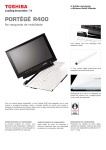
The new Portégé R400
World’s first notebook with Microsoft Active
Notifications for automatic e-mail synchronization.
Leading connectivity
Gain real-time e-mail and calendar notification, even when the
notebook is closed or in sleep mode
• World’s first Microsoft Active Notifications using poll
mode for synchronization.
• Toshiba Edge Display, featuring OLED technology with
256 x 16 dot resolution as well as easy navigation buttons
Gain more reliable wireless connectivity
• Diversity Antenna WLAN
• Wireless LAN 802.11a/b/g and Bluetooth ® 2.0 + EDR
• Support for the latest wireless security protocols, including WPA2
Leading productivity
Experience instant productivity
• Turns on quickly from sleep mode
• Wireless log-on via Bluetooth ® mobile phone
Experience instant, easy and secure access to data
• Biometric logon with Fingerprint Reader
• Bypass system and software passwords
Experience hassle-free communications
• Toshiba ConfigFree™ software including
Wireless Radar, Connectivity Doctor and
Profile Settings
• Integrated VoIP microphone
Leading mobility
Feel free on the move
• Ultra-portable 12.1” convertible notebook at 1.72 kg
• TruBrite ® WXGA display with LED backlight technology
• Anti-reflective protection panel with digitizer function
• Extended mobility with long battery life
Feel protected with Toshiba EasyGuard
• HDD Protection, 3D Accelerometer, Magnesium Casework,
Anti-scratch LCD cover
• Fingerprint Reader, TPM1.2 (Trusted Platform Module)
and BitLocker™
• Anti-theft Protection Timer
Feel creative
• Digital ink thanks to Microsoft ® Vista™ Business and
Windows Vista™ Ulimate
• Rotating display with strong and reliable hinge
• New digital pen delivers a smooth input experience
• Windows Vista makes using a Tablet PC easier and
more efficient
Leading design
Thrilling luxury and style
• High-lustre black-and-white design
• Developed by Toshiba and Microsoft for the best Windows
Vista experience
• Clear UV coating for a luminous and scratch-resistant LCD cover
Thrilling pure geometry
• World’s first latch-free Tablet PC
• Strong horizon line unencumbered by hinges
• New streamlined key design
• Windows Aero offers an elegant, visually more compelling
desktop experience
Portégé R400
Defining the mobile avant-garde.
Portégé R400
Toshiba EasyGuard
Get advanced data protection
Windows® BitLocker™ provides full-volume encryption and boot
integrity checking to help ensure your data stays confidential,
even if your notebook is lost or stolen.
• Secure: Multiple-Level Password Utilities, FingerPrint
Reader (includes software for Password) and
identity management, Infineon TPM Software
Professional Package 2.0, Trusted Platform Module
(TPMv1.2), Anti-theft Protection Timer, Secure Digital
Token Utility, Advanced Instant Security, Device Access
Control Utility, Reinforced Security Cable Lock
Slot,Execute Disable, Windows® BitLocker™,
Handwriting Signature Login
• Protect & Fix: Shock Absorbing Design, HDD Shock
Absorber, Hard Disk Drive Protection, 3D
Accelerometer, HDD Shock Absorber, Spill-Resistant
Keyboard, Magnesium Alloy Casework, PC Diagnostic
Tool, Key Component Access
• Connect: Diversity Antenna, Toshiba ConfigFree,
WiFi Easy Locator, Bluetooth Stack,
1 second Instant Resume
• Optimize: Toshiba Assist, Power Saver Utility,
Presentation Button, Toshiba Zooming Utility, Toshiba
One-touch Resolution Change, Toshiba LCD Rotation
Utility, Fn-esse Shortcut Utility, Toshiba Edge Display
Processor/ Technology
• Intel® Centrino® Duo Mobile Technology
featuring Intel® Core™ Duo Processor
Ultra Low Voltage U2500 (2 MB Cache,
1.20 GHz, 533 MHz FSB), Intel® 945GM
Express chipset and Intel® PRO/
Wireless 3945ABG network connection
Operating system
• Genuine Microsoft® Windows® Vista™ Business
Display
• 12.1" WXGA Toshiba TruBrite® TFT
Wide Viewing Angle display with LED
backlight technology, anti-reflective
protection panel and digitizer function,
resolution 1,280 x 800
• Toshiba Edge Display with OLED (Organic
Light Emission Diode) technology, simple
3-button navigation for ease of use: alert
mode, e-mail button, calendar button,
256 x 16 dot resolution
Hard disk
• 80 GB (4,200 rpm), Parallel ATA
System memory
• 2 GB (1 GB + 1 GB), maximum expandability: 4 GB, technology: DDR2 RAM
(533 MHz)
Graphics adapter
• Mobile Intel® 945GM Express chipset, up
to 256 MB DDR2 RAM, 16x PCI Express
Pointing device
• Touch Pad
• Tablet Pen
Wired communication
• Gigabit Ethernet LAN
Wireless communication
• Microsoft Active Notifications via Toshiba Edge
Display supports Poll Mode over WLAN
• Wireless LAN (802.11a/b/g)
• Bluetooth® 2.0 with EDR (Enhanced
Data Rate)
Special features
•
•
•
•
•
•
•
•
•
•
•
Anti-scratch LCD cover (UV clear painting)
Toshiba Flash Cards
Programmable button (default: e-mail)
Windows® Security button
Rotating button
Cross Functional button
Integrated microphone for VoIP
Toshiba Enhanced SpeedStep
Toshiba Zooming utility
Toshiba Power Saver utility
HD Audio supporting
Physical dimensions
• W x L x H: 304 x 239.5 x 29.5 (front) /
31.9 (back) mm
• Weight: starting at 1.72 kg
Sound system
Warranty
Interfaces
Options & accessories
• DDR2-667 2GB Memory
(PA3513U-1M2G)
• Universal AC Adapter
(PA3377C-2ACA)
• Battery Pack
(PA3522U-1BRS)
• 2nd Battery Pack
(PA3523U-1BRS)
• USB FDD Kit
(ACC021)
• External DVD SuperMulti Drive
(PA3454U-1DV2)
• DynaDock USB Port Rep – VGA
(PA3541U-2PRP)
• DynaDock USB Port Rep – DVI
(PA3542U-2PRP)
• Tablet PC Pen
(PA3545U-1RTC)
•
•
•
•
•
•
•
•
Toshiba Bass Enhanced Sound System
Built-in speaker
Built-in microphone
Volume dial (digital)
2x USB 2.0
RGB
External microphone
RJ-45
Expansions
• PC Card slot for 1x Type II card
• 2 memory slots (both filled)
Bundled software
• Toshiba ConfigFree™ incl. Bluetooth®/
Wireless LAN Radar, Connectivity Doctor
and Profile Settings
• Toshiba Bluetooth® Stack
• Toshiba Bluetooth® Monitor
• Toshiba Utilities and Driver
• Toshiba User’s Manual
• Toshiba Management Console
• Toshiba Disc Creator
• InterVideo® WinDVD™
• Norton Internet Security™ 2006 (includes
free Internet updates for 90 days)
• 3-year international warranty. Upgrade
your standard warranty with Toshiba SelectServ
warranty programs. Contact your nearest Toshiba
Authorized Reseller for details.
Battery
• Lithium-ion technology
Bundled hardware
• AC adapter
• Tablet Pen
CPU performance may vary from specifications under certain conditions such as the use of battery instead of AC power, certain external peripherals, certain multimedia applications or network connections, complex modeling software and in areas
with low air pressure at high altitude (1,000 metres above sea level) and/or certain temperatures. CPU performance may also vary from specifications due to design configuration. Under some conditions, your computer may automatically shut
down as a normal protective measure. To avoid risk of lost data, please make periodic back-up copies. For optimum performance, use your computer only under recommended conditions. Please read detailed restrictions in the product
resource guide, visit the Toshiba web site: toshiba.ca and/or contact Toshiba Technical Support. • Graphics processor unit (GPU) performance may vary depending on product model, design configuration, applications, power management settings and features utilized. • Part of the main system memory may be used by the graphics system and therefore reduce the amount of main system memory available. • For PCs configured with 4 GB of system memory, the full system memory
space for computing activities will be considerably less and will vary by model and system configuration. • For information about upgrading your system memory please refer to the user manual or contact your local Toshiba
service provider. • One GB means one billion bytes, accessible capacity may be less. • Wired and wireless communication capabilities to be applied in countries where approved. • Battery life may vary depending on applications, power
management settings and features utilized. Recharge time varies depending on usage. Battery may not charge while computer is consuming full power. After a period of time, the battery will lose its ability to perform at maximum capacity and will
need to be replaced. This is normal for all batteries. To purchase a new battery pack, see your accessories information shipped with your computer or visit the Toshiba web site at toshiba.ca. • Small bright dots may appear on your TFT display
when you turn on your PC. Your display contains an extremely large number of thin-film transistors (TFT) and is manufactured using high-precision technology. Any small bright dots that may appear on your display are an
intrinsic characteristic of the TFT manufacturing technology. • Weight may vary depending on product configuration, vendor components, manufacturing variability and options selected. • Contact your local Toshiba reseller for more information
about the service provision you require.
toshiba.ca
Microsoft, Windows and Windows Vista are either registered trademarks or trademarks of Microsoft Corporation in the United States and/or other countries. All trademarks are acknowledged. Product specifications, configurations, prices and system, component/options
availability are all subject to change without notice. Product design specifications and colours are subject to change without notice and may vary from those shown. © 2007 copyright Toshiba of Canada Limited. All rights reserved. Errors and omissions excepted.