1
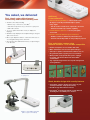
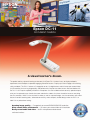
You asked, we delivered
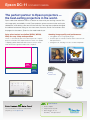
Fast, simple setup with advanced
connectivity and flexible teaching tools
• Versatileconnectivityincluding:
–USBforeasyconnectiontoaPC/Mac®
Additional
Features/Benefits
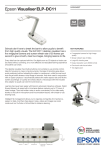
• Great positioning flexibility — camera head rotates
90 degrees vertically and horizontally to capture
many angles
–VGAandCompositeforeasyconnectiontoaprojector
– Can be used as a webcam to capture the classroom
•
•
•
•
– Portrait and Landscape rotation capability
–Built-inSDcardslot
12"x17"captureareamakesiteasytodisplaytwo fullpages
Simultaneouslydisplayliveandcapturedimagesusingthe
split-screenfunction
Microscopeadapterincluded—allowstheentireclassto
seeamagnifiedimageatthesametime
Storeimageswith1GBinternalmemoryorexportimages
toanSDcard
• Intuitive buttons and icons — for easy navigation
and control
• Remote control included for your convenience
– Enables teachers to walk freely around the room
– Controls both the Epson DC-11 and your Epson projector
Easy audio/video capture using
included software — PC and Mac compatible
• Built-inmicrophonetorecordaudiowithvideo
• Makeannotationsoverliveandcapturedimages
• Time-lapsecapturetodemonstrateactivitiessuchas
the growth of plants, organic processes and more
• WithyourPC,easilyuploadwhatyou’vecaptured
topopulareducationwebsiteslikeSchoolTube®
andYouTube®1
• Tagcapturedimages/videosforeasyfilemanagement and organization
Built-inSDcardslot
VGAandCompositeconnection
toaprojector
Time-lapsecapturefunction
Sleek, durable design with security features
• Convenient,compactdesignsavesspaceonyour
desktop and makes setup quick and easy
• Durabledesignwithrobustmetalarm
• Kensington® lock support, built-in security bar and
mounting holes for added peace of mind
Microscopeadapterincluded
(Microscopenotincluded)
Security bar