1
Convert hard copies to digital files, manage your document workflow,
and help the environment. The MC561 Color MFP lets you do it all.
Full functionality at your fingertips – The userfriendly operator panel of the MC561 Color MFP
features a clear, organized array of navigation
buttons, a backlit LCD display, alphanumeric
keypad, 1-touch fax dialing keys, and a full
QWERTY keyboard. The MC561 also comes with
this productivity-enhancing software:
Document management made simple – The
MC561 Color MFP includes ActKey software that
lets you move between scan-to tasks—including
Scan-to-Folder, Scan-to-Application and Scan-toPC Fax—with a single click.
PaperPort® software from Nuance® easily turns
piles of paper and photos into PDF and JPEG files—
using the MFP’s scanner—and saves them to your
computer for future use.
OmniPage® from Nuance—optical character
recognition (OCR) software—quickly turns hardcopy office documents and forms into electronic
files for easy editing, searching and sharing.
Desktop Capture Solution—works through
PaperPort’s Active Directory Authentication to
move scanned documents into your SharePoint®
or DocuWare® workflow, quickly and easily.5
Deep Sleep Mode The MC561 Color MFP takes
power-saving even more seriously when left on for
an extended period: it slips into a “deep sleep”
that expends just over a single watt to maintain.
Mono Resource-Print Mode Even when the color
toner runs out, you can still print needed documents
in crisp, clear black & white. Simply cancel the
original job and select this energy-efficient mode in
the printer driver.
Environmentally friendly features – The MC561
Color MFP also helps you control your effect on
the planet’s health by providing:
One-piece image drum This long-lasting, userreplaceable consumable remains friendly to your
budget while lowering the number of items to
dispose of and store.
Automatic ECO Mode When you’re only printing a
few pages, the MC561 Color MFP’s response is to
enter this energy-saving, performance-enhancing
setting. Same terrific output, lower power
consumption. Everybody wins.
Energy Star® compliance With its lower power
consumption—especially in Deep Sleep Mode—
and standard duplexing, the MC561 Color MFP
meets the government’s standards for energy
efficiency.
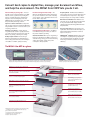
The MC561 Color MFP at a glance
Easy-to-read and -use operator panel: ergonomically designed to meet the needs of your workflow environment—
keeping tasks simple and end users more productive. Backlit LCD display tilts up to enhance user productivity.
Full QWERTY keyboard (behind lift-open 1-Touch key panel):
enables easy entry of email addresses and messages.
Dual access: scan faxes into memory while the unit
is busy sending or receiving faxes
Flatbed scanner: handles up to 8.5" x 11" documents
on the glass and up to 8.5" x 14" via the Reversing Auto
Document Feeder (RADF)
Backlit LCD display: 3.5-inch screen tilts up as
much as 90˚ to further simplify navigation
Multi-tasking: performs two tasks at the same time
High Definition Color: printing technology
that ensures breathtaking output, even on
plain paper
100-sheet multi-purpose tray: also handles
3" x 5" cards, envelopes and banner sheets
up to 8.5" x 52"
250-sheet paper tray: fewer user interventions
means greater productivity
Optional 530-sheet 2nd paper tray: increases
max paper capacity to 880 sheets
1
ublished performance results based on laboratory testing
P
on simplex sheet (1 side). Individual results may vary.
2 Based on ITU-T Test Chart #1.
3 Larger files may require additional memory.
4 Available in the U.S. and Canada only.
5 Requires optional connectors.
50-sheet RADF: scans both sides of a
sheet; increases user productivity
Alphanumeric keypad: easily enter fax
numbers, codes and quantities
1-Touch dialing: pre-program up to
16 fax locations (panel lifts to reveal
QWERTY keyboard)
Scan to/Print from USB memory stick:
convenient front port makes these
operations quick and easy
Single Pass Color™ technology:
straight-through paper path allows for
superior flexibility in paper handling
Compact, space-saving design: the
small footprint of the MC561 MFP
allows it to fit into most work spaces