1
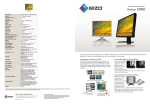
58 cm (23”) Multitouch Monitor
Dimension Diagram (Unit: mm)
S P E C I F I C I AT I O N S
Panel Size
(31.4)
557
514
23" / 58 cm (584 mm diagonal)
Active Display Size (H × V)
171
Panel Type
VA (with overdrive circuit)
Viewing Angles (H, V)
291
376
Brightness
3000:1
(53.6)
Response Time (Typical)
134
122
68
39.5
Native Resolution
Pixel Pitch
43
Response Time (Typical)
367
204.5
375.5
125
83
54.5
Look-Up Table
15°
Dot Clock
357
65
136
326
151
340
Digital Scanning
Frequency (H, V)
10 bits per color
Gray-Black Two-Tone, Black
31 – 81 kHz, 55 – 76 Hz
Audio Input Terminals
3.5 mm stereo jack
3.5 mm headphone jack
0.35 W speaker
USB Ports / Standard
Plug & Play
1 upstream / USB 2.0
VESA DDC 2B
Power Requirements
AC 100 – 120 V / 200 – 240 V, 50 / 60 Hz
Power Consumption
26 W (typical)
42 W (maximum)
Power Save Mode
Less than 1.3 W
Tilt
15°, 25°, 35°, 45°, 55°,65°
Dimensions (W × H × D)
With Stand: 557 × 204.5 – 375.5 × 194 – 367 mm
Without Stand: 557 × 367 × 68 mm
EIZO ScreenSlicer
Net Weight
With Stand: 7.6 kg
Without Stand: 6.8 kg
This is a free software utility that lets you more effectively use
your screen through partitioning. Simply drop your windows
into configurable partitioned areas and they will be aligned
instantly. Available for download from www.eizo.com. Preset Modes
Game, Cinema, Paper, sRGB, User1, User2, Auto Fine Contrast2
EcoView Settings
E-mail
Browser
Word Processor
Clock, Phase, Position, Range (Auto), Screen Size (full screen,
enlarge, normal), Smoothing (5 stages), Border Intensity
Color Adjustment
Brightness, Black Level, Contrast, Gamma, Temperature,
Saturation, Hue, Gain, Power Resolution, Overdrive, Reset
Power Management
Power Save (VESA DPM and DVI DMPM), Off Timer
Sound
Volume, Power Save, Source (HDMI)
Other Settings
Signal Switching, Product Information (name, serial number,
resolution, operating time, etc.), OSD Menu Settings, HDMI Color
Space, Adjustment Lock, DDC/CI Lock, Languages (English,
French, German, Italian, Japanese, Simplified and Traditional
Chinese, Spanish, Swedish), Power Indicator, Reset
Certifications
and Standards
TCO Displays 5.1, EPEAT Gold (US), c-Tick, CE, CB, cTUVus, FCC-B,
Canadian ICES-003-B, TUV/S, VCCI-B, EPA Energy Star, RoHS,
WEEE
Supplied Accessories
AC power cord, signal cables (DVI-D – DVI-D, D-Sub – D-Sub), USB
cable, audio cable, touch pen, cleaning cloth, EIZO LCD Utility
Disk (PDF user's manual, touch panel driver), setup guide, 4
screws for mount option, warranty card
Warranty
Three Years
Touch Panel
Optical Clarity
Phone +81-76-277-6792
www.eizo.com
Fax: +81-76-277-6793
Auto EcoView, EcoView Index
Screen Adjustment
Touch Panel Type
153 Shimokashiwano, Hakusan, Ishikawa 924-8566 Japan
Multitouch
Versatility
HDMI: 15 – 68 kHz, 49 – 61 Hz (VGA Text: 69 – 71 Hz)
DVI: 31 – 68 kHz, 59 – 61 Hz
D-Sub mini 15 pin, HDMI (PC connection supported), DVI-D 24 pin
(with HDCP)
Speakers
A three-year warranty offers a long service life, and compliance with leading industry standards such as TCO Displays
5.1, TÜV Ergonomics, and EPA Energy Star ensures a better
working environment.
16.77 million from a palette of 1.06 billion
Video Input Terminals
Audio Output Terminals
Customer Assurance
1920 × 1080 (16: 9 aspect ratio)
Analog: 148.5 MHz, Digital: 148.5 MHz
Analog Scanning
Frequency (H, V)
°
Gray-to-gray: 7 ms, black-white-black: 25 ms
0.2655 × 0.2655 mm
Display Colors
194
178°, 178° (at contrast ratio of 10:1
265 cd/m2
Contrast
45
136
200
509.8 × 286.7 mm
Infrared Optical Imaging
88%
Compatible OS
Multi-touch: Windows 7 32-bit and 64-bit
Single-touch: Windows Vista 32-bit and 64-bit
Communication Protocol
USB
© 2010 Eizo Nanao Corporation
All product names are trademarks or registered trademarks of their respective
companies. FlexScan and EIZO are registered trademarks of Eizo Nanao
Corporation. Specifications are subject to change without notice.
Full HD
3 Inputs
LaidBack Stand
Paper Mode
Game Mode
EIZO Multitouch Monitor
Digital Contents
The FlexScan T2351W offers a multitouch interface via
Windows 7 that provides an intuitive way to use your PC with
simple hand gestures. With its superb image quality, durability,
and ergonomic design, the FlexScan T2351W is ideal for schools,
libraries, offices, and homes.
Digital Contents
Schools, Offices
and Public Spaces
The multitouch interface makes learning more
fun and interactive. The non-scratch touch
surface ensures the T2351W can withstand the
rigors of use in schools and public spaces.
Gaming and Cinema
An HDMI input is included for full-HD connectivity with audio-visual devices such as gaming
consoles and Blu-ray disc players. Multitouch
offers a new way of enjoying PC games.
Digital Photo
Retouching
2
Display your documents and ebooks on the
screen and use the multitouch interface to
navigate from one page to the next.
The 23-inch screen with a full HD resolution
offers ample space for enjoying digital photos.
The optional EIZO EasyPIX tool simplifies
color matching with your prints.
Multitouch Interface
LaidBack Stand
Both intuitive
Pinch-out/in
Spin
and enjoyable to
work with,
multitouch lets
you tap, scroll,
drag, pinch,
spin, etc. with your fingers instead of a mouse and
keyboard. The multitouch interface is supported by
Windows 7 and works with the growing number of
multitouch applications compatible with this OS.
Rather than outfit a current desktop
monitor with multitouch capabilities,
EIZO designed the FlexScan T2351W
as a multitouch monitor from the
start. This monitor debuts a new
cabinet design featuring a
LaidBack stand. With this stand,
the bottom of the bezel rests on
the desktop like a notebook PC and tilts back in six stages
from 15° to 65°. When seated, this allows you to look
almost directly down at the screen and comfortably touch it
with your elbows resting on the desktop.
Paper Mode That Simulates Printed Paper
With people
spending more
time viewing
documents and
ebooks on their
monitors rather
than in printed form, EIZO has introduced a “Paper”
mode to make reading as comfortable as possible and
reduce eye strain. Paper mode adjusts the monitor’s
brightness, contrast ratio, and color temperature to
simulate the appearance of printed paper.
HDCP Support
Both the DVI-D and HDMI connectors support
high-bandwidth digital content protection (HDCP) for
viewing of content from HDCP-equipped devices.
Preset Modes for Optimum Viewing
In addition to Paper mode, several other preset modes are
also available: Cinema, sRGB, Game, and two User modes
for user-adjustable settings. Toggling between modes is
done manually in the OSD menu or automatically by
assigning a mode to a particular application with the
bundled ScreenManager Pro for LCD software (Windows 7
and Vista compatible).
Cinema
Paper
sRGB
Game
User 2
User 1
3
EIZO Multitouch Monitor
Digital Contents
The FlexScan T2351W offers a multitouch interface via
Windows 7 that provides an intuitive way to use your PC with
simple hand gestures. With its superb image quality, durability,
and ergonomic design, the FlexScan T2351W is ideal for schools,
libraries, offices, and homes.
Digital Contents
Schools, Offices
and Public Spaces
The multitouch interface makes learning more
fun and interactive. The non-scratch touch
surface ensures the T2351W can withstand the
rigors of use in schools and public spaces.
Gaming and Cinema
An HDMI input is included for full-HD connectivity with audio-visual devices such as gaming
consoles and Blu-ray disc players. Multitouch
offers a new way of enjoying PC games.
Digital Photo
Retouching
2
Display your documents and ebooks on the
screen and use the multitouch interface to
navigate from one page to the next.
The 23-inch screen with a full HD resolution
offers ample space for enjoying digital photos.
The optional EIZO EasyPIX tool simplifies
color matching with your prints.
Multitouch Interface
LaidBack Stand
Both intuitive
Pinch-out/in
Spin
and enjoyable to
work with,
multitouch lets
you tap, scroll,
drag, pinch,
spin, etc. with your fingers instead of a mouse and
keyboard. The multitouch interface is supported by
Windows 7 and works with the growing number of
multitouch applications compatible with this OS.
Rather than outfit a current desktop
monitor with multitouch capabilities,
EIZO designed the FlexScan T2351W
as a multitouch monitor from the
start. This monitor debuts a new
cabinet design featuring a
LaidBack stand. With this stand,
the bottom of the bezel rests on
the desktop like a notebook PC and tilts back in six stages
from 15° to 65°. When seated, this allows you to look
almost directly down at the screen and comfortably touch it
with your elbows resting on the desktop.
Paper Mode That Simulates Printed Paper
With people
spending more
time viewing
documents and
ebooks on their
monitors rather
than in printed form, EIZO has introduced a “Paper”
mode to make reading as comfortable as possible and
reduce eye strain. Paper mode adjusts the monitor’s
brightness, contrast ratio, and color temperature to
simulate the appearance of printed paper.
HDCP Support
Both the DVI-D and HDMI connectors support
high-bandwidth digital content protection (HDCP) for
viewing of content from HDCP-equipped devices.
Preset Modes for Optimum Viewing
In addition to Paper mode, several other preset modes are
also available: Cinema, sRGB, Game, and two User modes
for user-adjustable settings. Toggling between modes is
done manually in the OSD menu or automatically by
assigning a mode to a particular application with the
bundled ScreenManager Pro for LCD software (Windows 7
and Vista compatible).
Cinema
Paper
sRGB
Game
User 2
User 1
3
Gaming and Cinema
Schools, Offices, and Public Spaces
Touch Screen with Reinforced Glass
Energy Efficiency Gauge
Clearer and Sharper Images for Gaming
Full HD (1920 × 1080) Resolution
To ensure it is durable enough to withstand use in
schools and public access areas, the touch screen has a
non-scratch surface made of reinforced glass with a
hardness of 6 Mohs – the same hardness as titanium.
A user-activated EcoView Index displays the level of
power savings and equivalent amount of CO2 reduction compared to using the monitor without Auto
EcoView activated and with the screen set at a
brightness of 100%.
Selecting Game mode activates two new EIZO features
called “Power Resolution and “Power Gamma.”
The 1920 × 1080
native resolution
displays pixel-bypixel all the
content of full
19” monitor
T2351W
(1280 × 1024)
(1920 × 1080)
high-definition
video sources such as Blu-ray discs and many of today's
games without any black bars across the top and bottom
of the screen.
Finger, Glove, or Pen Touch
The FlexScan T2351W employs optical imaging touch
panel technology which accepts input from a bare or
gloved hand as well as a touch pen.
Optimized Brightness
An ambient brightness sensor called “Auto EcoView”
that detects changes in the ambient brightness and
signals the backlight to adjust the screen brightness
accordingly so it is never too dark or too bright.
Low
Brightness
High
Brightness
Max.
Power Consumption
Min.
[Power Resolution]
This feature makes the details in both low and high
resolution games look clearer and sharper.
[Power Gamma]
This feature applies a gamma curve to games and other
animated images that amplifies the feeling of contrast to
make them look more three dimensional.
Power
Resolution
Power
Gamma
Input Lag of Less Than One Frame
The input lag or the difference between the time a signal
is input into the monitor and then shown on the screen is
less than one frame. This is approximately 1/60th of a
second, so gamers see the action as it happens and react
immediately.
Overdrive Circuit
An overdrive circuit is included to reduce gray-to-gray
response time to 7 ms and ensure that movies and other
moving images look clean and sharp with an absolute
minimum of blurring and ghosting.
3000:1 Contrast Ratio
This high contrast ratio produces a
more realistic black to give images
a feeling of depth and vividness.
Auto EcoView Sensor
© 2007 IREM SOFTWARE ENGINEERING INC. All rights reserved.
4
Standard
Panel
High Contrast
Panel
5
Gaming and Cinema
Schools, Offices, and Public Spaces
Touch Screen with Reinforced Glass
Energy Efficiency Gauge
Clearer and Sharper Images for Gaming
Full HD (1920 × 1080) Resolution
To ensure it is durable enough to withstand use in
schools and public access areas, the touch screen has a
non-scratch surface made of reinforced glass with a
hardness of 6 Mohs – the same hardness as titanium.
A user-activated EcoView Index displays the level of
power savings and equivalent amount of CO2 reduction compared to using the monitor without Auto
EcoView activated and with the screen set at a
brightness of 100%.
Selecting Game mode activates two new EIZO features
called “Power Resolution and “Power Gamma.”
The 1920 × 1080
native resolution
displays pixel-bypixel all the
content of full
19” monitor
T2351W
(1280 × 1024)
(1920 × 1080)
high-definition
video sources such as Blu-ray discs and many of today's
games without any black bars across the top and bottom
of the screen.
Finger, Glove, or Pen Touch
The FlexScan T2351W employs optical imaging touch
panel technology which accepts input from a bare or
gloved hand as well as a touch pen.
Optimized Brightness
An ambient brightness sensor called “Auto EcoView”
that detects changes in the ambient brightness and
signals the backlight to adjust the screen brightness
accordingly so it is never too dark or too bright.
Low
Brightness
High
Brightness
Max.
Power Consumption
Min.
[Power Resolution]
This feature makes the details in both low and high
resolution games look clearer and sharper.
[Power Gamma]
This feature applies a gamma curve to games and other
animated images that amplifies the feeling of contrast to
make them look more three dimensional.
Power
Resolution
Power
Gamma
Input Lag of Less Than One Frame
The input lag or the difference between the time a signal
is input into the monitor and then shown on the screen is
less than one frame. This is approximately 1/60th of a
second, so gamers see the action as it happens and react
immediately.
Overdrive Circuit
An overdrive circuit is included to reduce gray-to-gray
response time to 7 ms and ensure that movies and other
moving images look clean and sharp with an absolute
minimum of blurring and ghosting.
3000:1 Contrast Ratio
This high contrast ratio produces a
more realistic black to give images
a feeling of depth and vividness.
Auto EcoView Sensor
© 2007 IREM SOFTWARE ENGINEERING INC. All rights reserved.
4
Standard
Panel
High Contrast
Panel
5
HDMI, DVI-D, and D-Sub Inputs
An HDMI input is included for full HD connectivity
with audio-visual devices such as gaming consoles and
Blu-ray disc players. DVI-D and D-Sub inputs allow
connection to PCs with digital and analog graphics
boards respectively.
®
Two Color Variations
Two color options are available – an all-black cabinet
and a two-tone cabinet where the front is gray and the
sides and rear are black.
Digital Photo Retouching
The optional
EIZO EasyPIX
color matching
tool is ideal for
digital photo
enthusiasts
looking to match
colors between
their monitors and
photo prints. With the EIZO EasyPIX software you can
match the monitor’s color and brightness with that of the
photo paper and then create a monitor profile with the
bundled EX1 color sensor. No expertise in color management is required and the profile can be shared with image
retouching software to ensure accurate results when
printing. (Macintosh OS not supported.)
The FlexScan T2351W uses a VA (vertical alignment)
178 viewing
panel with wide 178°
viewingangles.
angles.Contrast
Contrastand
andhue
hue
changes are minimal even when viewing the screen at an
angle.
10-Bit Gamma Correction
Ideal Gamma Curve
Uncorrected
Gamma Curve
256 Tones
6
Brightness
Brightness
This technology ensures smooth, accurate color tones by
converting the 8-bit PC data to 10-bit, assigning the ideal
gamma values then returning the data to 8-bit format for
display.
23” High Resolution Screen
23" High Resolution Screen
Panel with Wide Viewing Angles
Wide Viewing Angles
Panel with Narrow Viewing Angles
Compatible with EIZO EasyPIX
Integrated Speaker and Headphone Jack
A 0.35-watt speaker is built into the front bezel for
audio capability. A headphone jack is located on the
side of the monitor.
Scale Non-Native Resolutions to Full Screen
When working at less than native resolution or aspect
ratios other than 16:9 you can use the scaling function
to enlarge your work proportionally or expand it to fill
the screen. You can then smooth or sharpen the image
in five increments.
This 2-megapixel, 23-inch screen offers ample space for
This 2-megapixel, 23-inch screen offers ample space for
displaying your thumbnails and then expanding it for
displaying your thumbnails and then expanding them for
photo editing.
viewing or retouching.
Normal
Enlarge
Full Screen
Dedicated Touch Pen
An easy-to-use touch pen is included.
Ideal Gamma Curve
256 Tones
7
HDMI, DVI-D, and D-Sub Inputs
An HDMI input is included for full HD connectivity
with audio-visual devices such as gaming consoles and
Blu-ray disc players. DVI-D and D-Sub inputs allow
connection to PCs with digital and analog graphics
boards respectively.
®
Two Color Variations
Two color options are available – an all-black cabinet
and a two-tone cabinet where the front is gray and the
sides and rear are black.
Digital Photo Retouching
The optional
EIZO EasyPIX
color matching
tool is ideal for
digital photo
enthusiasts
looking to match
colors between
their monitors and
photo prints. With the EIZO EasyPIX software you can
match the monitor’s color and brightness with that of the
photo paper and then create a monitor profile with the
bundled EX1 color sensor. No expertise in color management is required and the profile can be shared with image
retouching software to ensure accurate results when
printing. (Macintosh OS not supported.)
The FlexScan T2351W uses a VA (vertical alignment)
178 viewing
panel with wide 178°
viewingangles.
angles.Contrast
Contrastand
andhue
hue
changes are minimal even when viewing the screen at an
angle.
10-Bit Gamma Correction
Ideal Gamma Curve
Uncorrected
Gamma Curve
256 Tones
6
Brightness
Brightness
This technology ensures smooth, accurate color tones by
converting the 8-bit PC data to 10-bit, assigning the ideal
gamma values then returning the data to 8-bit format for
display.
23” High Resolution Screen
23" High Resolution Screen
Panel with Wide Viewing Angles
Wide Viewing Angles
Panel with Narrow Viewing Angles
Compatible with EIZO EasyPIX
Integrated Speaker and Headphone Jack
A 0.35-watt speaker is built into the front bezel for
audio capability. A headphone jack is located on the
side of the monitor.
Scale Non-Native Resolutions to Full Screen
When working at less than native resolution or aspect
ratios other than 16:9 you can use the scaling function
to enlarge your work proportionally or expand it to fill
the screen. You can then smooth or sharpen the image
in five increments.
This 2-megapixel, 23-inch screen offers ample space for
This 2-megapixel, 23-inch screen offers ample space for
displaying your thumbnails and then expanding it for
displaying your thumbnails and then expanding them for
photo editing.
viewing or retouching.
Normal
Enlarge
Full Screen
Dedicated Touch Pen
An easy-to-use touch pen is included.
Ideal Gamma Curve
256 Tones
7
58 cm (23”) Multitouch Monitor
Dimension Diagram (Unit: mm)
S P E C I F I C I AT I O N S
Panel Size
(31.4)
557
514
23" / 58 cm (584 mm diagonal)
Active Display Size (H × V)
171
Panel Type
VA (with overdrive circuit)
Viewing Angles (H, V)
291
376
Brightness
3000:1
(53.6)
Response Time (Typical)
134
122
68
39.5
Native Resolution
Pixel Pitch
43
Response Time (Typical)
367
204.5
375.5
125
83
54.5
Look-Up Table
15°
Dot Clock
357
65
136
326
151
340
Digital Scanning
Frequency (H, V)
10 bits per color
Gray-Black Two-Tone, Black
31 – 81 kHz, 55 – 76 Hz
Audio Input Terminals
3.5 mm stereo jack
3.5 mm headphone jack
0.35 W speaker
USB Ports / Standard
Plug & Play
1 upstream / USB 2.0
VESA DDC 2B
Power Requirements
AC 100 – 120 V / 200 – 240 V, 50 / 60 Hz
Power Consumption
26 W (typical)
42 W (maximum)
Power Save Mode
Less than 1.3 W
Tilt
15°, 25°, 35°, 45°, 55°,65°
Dimensions (W × H × D)
With Stand: 557 × 204.5 – 375.5 × 194 – 367 mm
Without Stand: 557 × 367 × 68 mm
EIZO ScreenSlicer
Net Weight
With Stand: 7.6 kg
Without Stand: 6.8 kg
This is a free software utility that lets you more effectively use
your screen through partitioning. Simply drop your windows
into configurable partitioned areas and they will be aligned
instantly. Available for download from www.eizo.com. Preset Modes
Game, Cinema, Paper, sRGB, User1, User2, Auto Fine Contrast2
EcoView Settings
E-mail
Browser
Word Processor
Clock, Phase, Position, Range (Auto), Screen Size (full screen,
enlarge, normal), Smoothing (5 stages), Border Intensity
Color Adjustment
Brightness, Black Level, Contrast, Gamma, Temperature,
Saturation, Hue, Gain, Power Resolution, Overdrive, Reset
Power Management
Power Save (VESA DPM and DVI DMPM), Off Timer
Sound
Volume, Power Save, Source (HDMI)
Other Settings
Signal Switching, Product Information (name, serial number,
resolution, operating time, etc.), OSD Menu Settings, HDMI
Color Space, Adjustment Lock, DDC/CI Lock, Languages
(English, French, German, Italian, Japanese, Simplified and
Traditional Chinese, Spanish, Swedish), Power Indicator, Reset
Certifications
and Standards
TCO Displays 5.1, EPEAT Gold (US), c-Tick, CE, CB, cTUVus,
FCC-B, Canadian ICES-003-B, TUV/S, VCCI-B, EPA Energy Star,
RoHS, WEEE, CCC, GOST-R
Supplied Accessories
AC power cord, signal cables (DVI-D – DVI-D, D-Sub – D-Sub),
USB cable, audio cable, touch pen, cleaning cloth, EIZO LCD
Utility Disk (PDF user's manual, touch panel driver), setup
guide, 4 screws for mount option, warranty card
Warranty
Three Years
Touch Panel
Optical Clarity
Phone +81-76-277-6792
www.eizo.com
Fax: +81-76-277-6793
Auto EcoView, EcoView Index
Screen Adjustment
Touch Panel Type
153 Shimokashiwano, Hakusan, Ishikawa 924-8566 Japan
Multitouch
Versatility
HDMI: 15 – 68 kHz, 49 – 61 Hz (VGA Text: 69 – 71 Hz)
DVI: 31 – 68 kHz, 59 – 61 Hz
D-Sub mini 15 pin, HDMI (PC connection supported), DVI-D 24 pin
(with HDCP)
Speakers
A three-year warranty offers a long service life, and compliance with leading industry standards such as TCO Displays
5.1, TÜV Ergonomics, and EPA Energy Star ensures a better
working environment.
16.77 million from a palette of 1.06 billion
Video Input Terminals
Audio Output Terminals
Customer Assurance
1920 × 1080 (16: 9 aspect ratio)
Analog: 148.5 MHz, Digital: 148.5 MHz
Analog Scanning
Frequency (H, V)
°
Gray-to-gray: 7 ms, black-white-black: 25 ms
0.2655 × 0.2655 mm
Display Colors
194
178°, 178° (at contrast ratio of 10:1
265 cd/m2
Contrast
45
136
200
509.8 × 286.7 mm
Infrared Optical Imaging
88%
Compatible OS
Multi-touch: Windows 7 32-bit and 64-bit
Single-touch: Windows Vista 32-bit and 64-bit
Communication Protocol
USB
© 2010 Eizo Nanao Corporation
All product names are trademarks or registered trademarks of their respective
companies. FlexScan and EIZO are registered trademarks of Eizo Nanao
Corporation. Specifications are subject to change without notice.
Full HD
3 Inputs
LaidBack Stand
Paper Mode
Game Mode