1
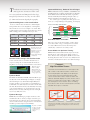
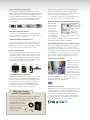
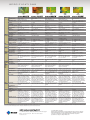
Next Generation Connectivity and lock the control buttons to prevent tampering with screen settings. You can also switch a PC’s primary power and a monitor’s secondary power on and off regardless of the manufacturer. For details see www.eizo.com/global/products/ accessories/flexscan/ecoview_net/index.html Organize Applications with EIZO ScreenSlicer This bundled software utility lets you more effectively use your screen through partition>VYK7YVJLZZVY )YV^ZLY ing. Simply drop Software windows aligned in partiyour windows tioned areas. into configurable partitioned areas and they will be aligned instantly (Windows 7, Vista, and XP compatible). ,THPS The FlexScan S2402W and S2202W come with DVI-D (digital) and D-Sub (analog) inputs while the other three models also include a DisplayPort (digital) input. With DisplayPort, audio and video signals are transmitted via a single, high-bandw idth cable at distances up to 15 meters without any signal degradation. DisplayPort Connector DisplayPort DVI-D D-Sub DVI Input Level Adjustment Compensates for degradation of image quality that may occur when connecting a monitor with a signal switch box or via a long cable. Individual Adjustment of Gamma To provide better image consistency in multi-monitor environments, EIZO performs advanced gamma adjustment at the factory, which minimizes discrepancies among monitor gamma characteristics. Placement Flexibility All models except the FlexScan S2202W come with the highly versatile FlexStand (shown below) which offers title, swivel, portrait rotation, and up to 174 mm of height adjustment. The FlexStand S2202W comes with a stand that features 100 mm of height adjustment, tilt, swivel, and portrait mode. Height Adjustment 174 mm Portrait Right 90° Tilt Swivel 30° 344° Power Management Software EIZO EcoView NET software allows your organization to reduce its electric bills while minimizing its burden on the environment by centralizing control over the power settings of monitors on a network. For FlexScan S series and other EIZO monitors that support DDC/CI, you can adjust the brightness, turn the Auto EcoView function on and off, Wide Color Gamut / EasyPIX Compatibility The wide color gamut of the FlexScan S2243W and S2233W reproduces 95% of Adobe RGB, while that of the S2433W reproduces 96% of Adobe RGB. Compatibility with the optional EIZO EasyPIX accessory allows for simple color matching between monitor and photo prints. ScreenManager Pro for LCD and ScreenTuner Developed for Windows and Mac OSes respectively and available from www.eizo.com, these two free applications let you adjust your monitor’s color with your mouse rather than the OSD menu buttons. With ScreenManager Pro for LCD you can also assign a preset mode to a specific application so that mode becomes active whenever the application is in use. Commitment to Quality While outsourcing production is now common practice in the monitor industry, EIZO continues to manufacture its products the same way it has throughout its 40 year history — with its own staff at its own factories. This allows EIZO to keep close control over production quality and offer the industry’s only 5-year manufacturer’s limited warranty. Customer Assurance EIZO strives to create a better work environment by complying with strict environmental performance requirements for low energy consumption, product and package recyclability, and manufacturing processes, as well as specific ergonomic and functional conditions. This has earned all monitors in this brochure the TCO Displays 5.0 certification. S2433W S2243W S2233W S2433W S2243W S2233W