1
For more information on the KODAK ESP 5250
All-in-One Printer, visit www.kodak.com/go/aio
Print Specifications
Print speed
General Specifications
Borderless KODAK Lab-Quality 4" x 6" Photos1 in as
little as 29 seconds2; documents up to 30 pages per
minute in black and 29 pages per minute in color3;
9600 DPI high-resolution color photo print option4
Print size
Standard-size borderless photos up to 8.5" x 11"
(U.S. letter size), 210 mm x 297 mm (A4 size), and
standard-size documents up to 8.5" x 14" (legal size)
Wi-Fi
Built-in Wi-Fi connectivity, 802.11 b/g
Mobile printing
Print directly from an iPhone, iPad, iPod touch, or
BLACKBERRY5 device with KODAK Pic Flick App
Memory cardPrint without a computer using memory card
compatibility slot (SECURE DIGITAL, SECURE DIGITAL High
Capacity, MINI SD, MULTIMEDIA, MEMORY STICK
and MEMORY STICK PRO)
Standard
paper tray Holds a maximum of 100 sheets (20 lbs. paper) or
20 sheets photo paper (minimum paper size 4" x 6"
(102 x 381 mm) to maximum paper size 8.5" x 14"
(216 x 356 mm)
Display
2.4" (61 mm) LCD (color)
Ink cartridge
compatibility Scanning
KODAK Black Ink Cartridge, 10 Series
KODAK Color Ink Cartridge, 10 Series
CIS optical scanner, 1200 DPI at 24 bit
Scan multiple pictures simultaneously and software will create separate image
files automatically
Scan documents and photos up to 8.5" x 11.7" (216 mm x 297 mm)
Scan and edit your documents with optical character recognition (not
compatible with MACINTOSH OS)
Copying
Copy speed (draft) 25/25 cpm (black/color)
25-400% scaling or fit to page, and make up to 99 copies at a time
Dimensions and Weight
(W x D x H) = 16.6" x 11.8" x 6.9" /
422 mm x 300 mm x 175 mm
Weight
14 lbs. (6.4 kg)
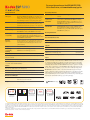
4x6 29
IN.
SEC
29 seconds
to print a 4x6 in.
borderless photo2
30
PPM
29
PPM
Document speed3
Built in Wi-Fi, 802.11 b/g USB external port —
(1) back
Minimum system
requirements
WINDOWS
MICROSOFT WINDOWS 7, VISTA, or XP-Home
(SP2 or above); INTERNET EXPLORER 6 or higher;
INTEL CELERON 1.2 GHz or compatible processor;
512 MB memory; 500 MB available hard disk space;
CD-ROM drive; USB port
MACINTOSH
MACINTOSH OS 10.4.8 or higher; POWER PC G4,
G5, or INTEL-based MAC; 1.2 GHz clock speed;
512 MB memory6; 200 MB available hard disk space;
CD-ROM drive; USB port
Ordering Information
KODAK ESP 5250 All-in-One Printer
CAT 104 8230
Recommended Accessories
KODAK USB 2.0 Inkjet Printer Cable
CAT 845 9828
KODAK Wireless 2.0 USB BLUETOOTH Adapter
CAT 839 1567
Supplies
KODAK Black Ink Cartridge 10B
CAT 116 3641
KODAK Black Ink Cartridge 10XL
CAT 823 7216
KODAK Color Ink Cartridge 10C
CAT 894 6501
KODAK Combo Ink Cartridge 10B/10C
CAT 836 7849
Papers
Photo: Kodak offers three types of universally compatible, quality photo
papers in a variety of sizes and finishes. KODAK ULTRA Premium Photo Paper
is our highest quality paper featuring proprietary technology for astounding
color and image quality. KODAK Premium Photo Paper delivers consistently
beautiful prints. And the affordable KODAK Photo Paper is great for everyday
prints. All are optimized to work with KODAK All-in-One Inkjet Printers, but
are also universally compatible, so you can use them with any inkjet printer.
Documents: Kodak offers a line of document and multi-use paper to fit your
needs — Ultimate, Premium, and Everyday. All enhance color inkjet documents
with bright colors and rich blacks. For optimal results, use KODAK Document
Papers. If KODAK Papers are not available, we recommend using a document paper
displaying the COLORLOK Technology logo on the packaging.
One-button color copies, photos, or documents, without a PC
Size
Connectivity
KodacolorTechnology
2.4"
6.1 CM
Preview and print
pictures without a PC
9600
OPTIMIZED DPI
High resolution color
photo printing option4
SCAN
CIS optical scanner
1200 dpi @ 24 bit
1.) Using KODAK Ultra Premium and KODAK Premium Photo Papers. 2.) Based on fastest document print mode and borderless 4x6 photos using KODAK Photo Paper, Studio Gloss, and using WINDOWS OS-based
PCs that meet recommended system requirements. Actual results may vary. 3.) Based on fastest document print mode using WINDOWS OS-based PCs that meet recommended system requirements. Actual results
may vary. 4.) Color ink droplets to be placed with a horizontal pitch of 1/9600 inch at minimum. Resolution may vary based on printer driver setting. 5). Compatible with iPhone (iOS 3.0 or later), iPad, iPod touch
(2nd generation or later), and Wi-Fi enabled BLACKBERRY Devices with OS 4.5 or later. Printer and device must be connected to the same local area network. 6). An INTEL Processor-based MAC with 1024 MB of
RAM is recommended.
© Kodak, 2011. Kodak, Kodacolor, and ESP are trademarks of Eastman Kodak Company. Kodak is an authorized licensee of the SECURE DIGITAL trademark. USB-IF logos are trademarks of Universal Serial Bus
Implementers Forum, Inc. IC-1604 CAT No 121 4907 (US Version)