1
4
Simple to use, easy to manage
1
Running complex jobs doesn’t have to be
complicated. The Phaser 7500 offers superior
printer management capabilities and innovative features that make it especially easy to use.
• Effortless printer management with
CentreWare Internet Services embedded
web server. Save time with configuration
cloning and automatic installation. View
job status and troubleshoot right from
your web browser.
2
3
• The easy-open access is right up front;
no need to rotate or move the printer to
perform routine maintenance like changing
toner and adding paper.
• Bi-directional communication provides
updates on your print jobs, along with toner
supply levels, from the front panel, your
desktop or even over the web. Pop-up alerts
immediately notify you of any print problems
– and how to fix them.
• Store frequently printed files on the builtin hard drive (standard on 7500DX) for fast,
easy, walk-up reprinting. The Print With
feature lets you include a stored file with
your new print job.
• Peace of mind. A full one-year on-site
warranty and Xerox Total Satisfaction
Guarantee ensure that your printer will
be on-line, all the time.
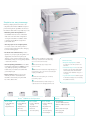
1
100-sheet Tray 1 (multipurpose tray) feeds a
wide range of custom-size media all the way
up to 12.6 x 47 in. banner sheets
Advanced security
• Worry-free deployment. Powerful
tools let you control who prints in color,
and when.
2
500-sheet main tray supports paper sizes
up to 11.7 x 17 in.
3
1,500-sheet Feeder includes three trays that support
paper sizes up to 13 x 18 in. and boosts total paper
capacity to 2,100 sheets
4
• Private data stays secure. Secure Print
holds the job in the queue until a PIN is
entered at the printer, and Hard Drive
Overwrite “shred” data after every job or
on request.
• A good network citizen. Built-in support
for the latest security protocols including
IPv6, 802.1x and IPSec.
Automatic two-sided printing for convenient,
paper saving output
5
Optional wheeled stand provides storage for a
complete set of toner cartridges (shown below)
5
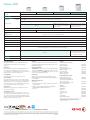
Phaser® 7500 Printer Configurations
Options
Phaser 7500N
Phaser 7500DN
Phaser 7500DT
Phaser 7500DX
•2
-Tray, 600-sheet
capacity
• 2-Tray, 600-sheet
capacity
• 3-Tray, 1,100-sheet
capacity
• 5-Tray, 2,100-sheet
capacity
• Gigabit Ethernet
• Gigabit Ethernet
• Gigabit Ethernet
• Gigabit Ethernet
• Stand
• Automatic
two-sided printing
• Automatic
two-sided printing
• Automatic
two-sided printing
• Wireless Network Adapter
• Productivity Kit
• Productivity Kit
• Productivity Kit
(includes 40 GB Hard Drive)
• 500 and 1,500-sheet feeders
• Memory upgrade